Explore how to effectively conduct DB performance testing using Harness FME, comparing popular databases like MariaDB and PostgreSQL through feature flags. Gain insights on optimizing database integrity and performance to enhance your web applications.

DB Performance Testing with Harness FME

Databases have been crucial to web applications since their beginning, serving as the core storage for all functional aspects. They manage user identities, profiles, activities, and application-specific data, acting as the authoritative source of truth. Without databases, the interconnected information driving functionality and personalized experiences would not exist. Their integrity, performance, and scalability are vital for application success, and their strategic importance grows with increasing data complexity. In this article we are going to show you how you can leverage feature flags to compare different databases.
Let’s say you want to test and compare two different databases against one another. A common use case could be to compare the performance of two of the most popular open source databases. MariaDB and PostgreSQL.

MariaDB and PostgreSQL logos
Let’s think about how we want to do this. We want to compare the experience of our users with these different database. In this example we will be doing a 50/50 experiment. In a production environment doing real testing in all likelihood you already use one database and would use a very small percentage based rollout to the other one, such as a 90/10 (or even 95/5) to reduce the blast radius of potential issues.
To do this experiment, first, let’s make a Harness FME feature flag that distributes users 50/50 between MariaDB and PostgreSQL
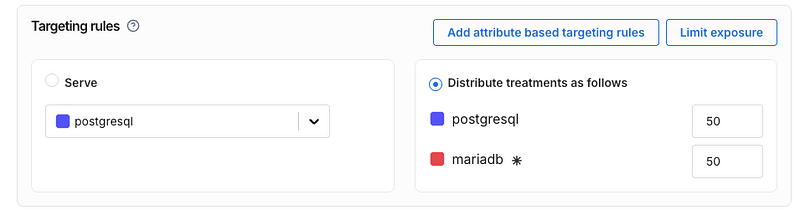
Now for this experiment we need to have a reasonable amount of sample data in the db. In this sample experiment we will actually just load the same data into both databases. In production you’d want to build something like a read replica using a CDC (change data capture) tool so that your experimental database matches with your production data
Our code will generate 100,000 rows of this data table and load it into both before the experiment. This is not too big to cause issues with db query speed but big enough to see if some kind of change between database technologies. This table also has three different data types — text (varchar), numbers, and timestamps.
Now let’s make a basic app that simulates making our queries. Using Python we will make an app that executes queries from a list and displays the result.
Below you can see the basic architecture of our design. We will run MariaDB and Postgres on Docker and the application code will connect to both, using the Harness FME feature flag to determine which one to use for the request.

The sample queries we used can be seen below. We are using 5 queries with a variety of SQL keywords. We include joins, limits, ordering, functions, and grouping.
We use the Harness FME SDK to do the decisioning here for our user id values. It will determine if the incoming user experiences the Postgres or MariaDB treatment using the get_treatment method of the SDK based upon the rules we defined in the Harness FME console above.
Afterwards within the application we will run the query and then track the query_executionevent using the SDK’s track method.
See below for some key parts of our Python based app.
This code will initialize our Split (Harness FME) client for the SDK.
We will generate a sample user ID, just with an integer from 1–10,000
Now we need to get whether our user will be using Postgres or MariaDB. We also do some defensive programming here to ensure that we have a default if it’s not either postgres or mariadb
Now let’s run the query and track the query_executionevent. From the app you can select the query you want to run, or if you don’t it’ll just run one of the five sample queries at random.
The db_manager class handles maintaining the connections to the databases as well as tracking the execution time for the query. Here we can see it using Python’s time to track how long the query took. The object that the db_manager returns includes this value
Tracking the event allows us to see the impact of which database was faster for our users. The signature for the Harness FME SDK’s track method includes both a value and properties. In this case we supply the query execution time as the value and the actual query that ran as a property of the event that can be used later on for filtering and , as we will see later, dimensional analysis.
You can see a screenshot of what the app looks like below. There’s a simple bootstrap themed frontend that does the display here.
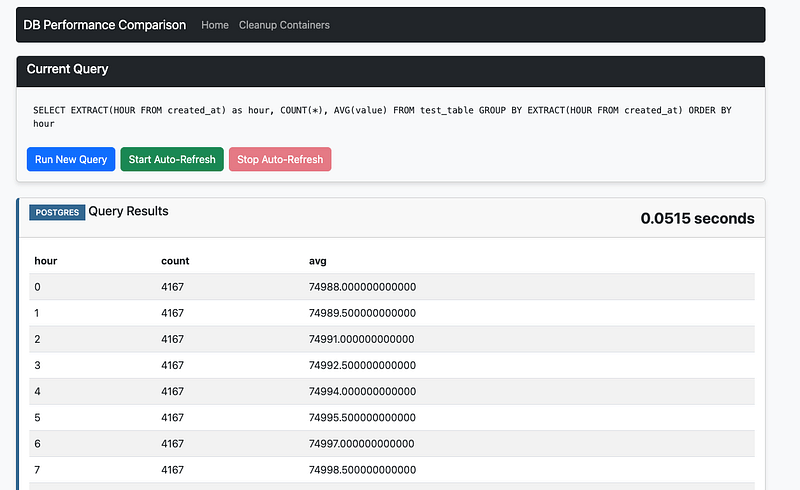
app screenshot
The last step here is that we need to build a metric to do the comparison.
Here we built a metric called db_performance_comparison . In this metric we set up our desired impact — we want the query time to decrease. Our traffic type is of user.

Metric configuration
One of the most important questions is what we will select for the Measure as option. Here we have a few options, as can be seen below

Measure as options
We want to compare across users, and are interested in faster average query execution times, so we select Average of event values per user. Count, sum, ratio, and percent don’t make sense here.
Lastly, we are measuring the query_execution event.
We added this metric as a key metric for our db_performance_comparison feature flag.

Selection of our metric as a key metric
One additional thing we will want to do is set up dimensional analysis, like we mentioned above. Dimensional analysis will let us drill down into the individual queries to see which one(s) were more or less performant on each database. We can have up to 20 values in here. If we’ve already been sending events they can simply be selected as we keep track of them internally — otherwise, we will input our queries here.

selection of values for dimensional analysis
Now that we have our dimensions, our metric, and our application set to use our feature flag, we can now send traffic to the application.
For this example, I’ve created a load testing script that uses Selenium to load up my application. This will send enough traffic so that I’ll be able to get significance on my db_performance_comparison metric.
I got some pretty interesting results, if we look at the metrics impact screen we can see that Postgres resulted in a 84% drop in query time.

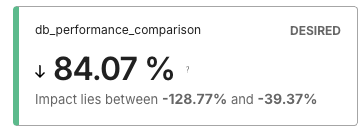
Even more, if we drill down to the dimensional analysis for the metric, we can see which queries were faster and which were actually slower using Postgres.
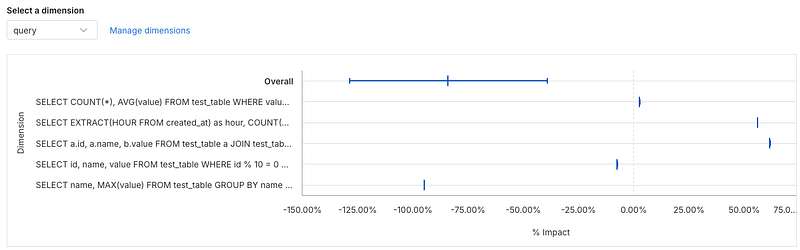
So some queries were faster and some were slower, but the faster queries were MUCH faster. This allows you to pinpoint the performance you would get by changing database engines.
You can also see the statistics in a table below — seems like the query with the most significant speedup was one that used grouping and limits.
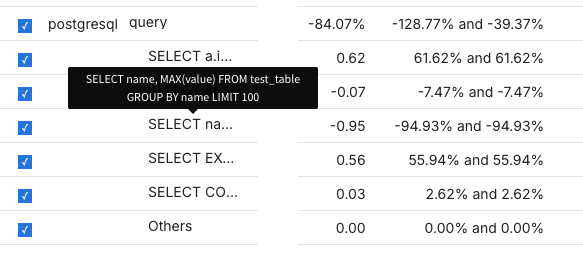
However, the query that used a join was much slower in Postgres — you can see it’s the query that starts with SELECT a.i... , since we are doing a self-join the table alias is a. Also the query that uses EXTRACT (an SQL date function) is nearly 56% slower as well.
Conclusion
In summary, running experiments on backend infrastructure like databases using Harness FME can yield significant insights and performance improvements. As demonstrated, testing MariaDB against PostgreSQL revealed an 84% drop in query time with Postgres. Furthermore, dimensional analysis allowed us to identify specific queries that benefited the most, specifically those involving grouping and limits, and which queries were slower. This level of detailed performance data enables you to make informed decisions about your database engine and infrastructure, leading to optimization, efficiency, and ultimately, better user experience. Harness FME provides a robust platform for conducting such experiments and extracting actionable insights. For example — if we had an application that used a lot of join based queries or used SQL date functions like EXTRACT it may end up showing that MariaDB would be faster than Postgres and it wouldn’t make sense to consider a migration to it.
The full code for our experiment lives here: https://github.com/Split-Community/DB-Speed-Test