Automate security scans and enforce policies across your pipelines with Harness STO and Checkmarx One - seamless, scalable, and built for DevSecOps.

TL;DR
- Harness STO integrates with Checkmarx One to run SAST, SCA, container image, and DAST scans automatically on every code commit or build, eliminating manual security testing steps.
- All scan results are normalized and de-duplicated into a unified vulnerability dashboard, so you see one consolidated view instead of separate reports across multiple tools.
- AI-powered remediation provides actionable fix suggestions and can automatically generate pull requests to resolve vulnerabilities, accelerating resolution time for developers.
- Policy-driven governance lets you set severity thresholds that automatically fail builds or require approvals before deployment, enforcing security standards without manual gates.
- The integration delivers enterprise-grade application security coverage across the entire SDLC without disrupting developer workflows or slowing delivery velocity.
Harness Security Testing Orchestration (STO) module automates the execution of security scans by integrating with 40+ scanners and consolidating their findings.
Harness STO provides a centralized view of vulnerabilities with de-duplication and governance controls. By integrating Checkmarx One’s comprehensive application security solution into Harness STO, DevOps and AppSec teams can embed powerful security scans directly into their CI pipelines.
This integration allows every code commit or build to be automatically evaluated for security issues using Checkmarx One’s comprehensive platform, with Harness STO handling result ingestion, normalization, and policy enforcement. The goal is to catch security flaws early and provide developers with actionable insights without disrupting the continuous delivery workflow. In the sections below, we explain how the integration works and the key benefits it offers for both Harness STO and Checkmarx One users.
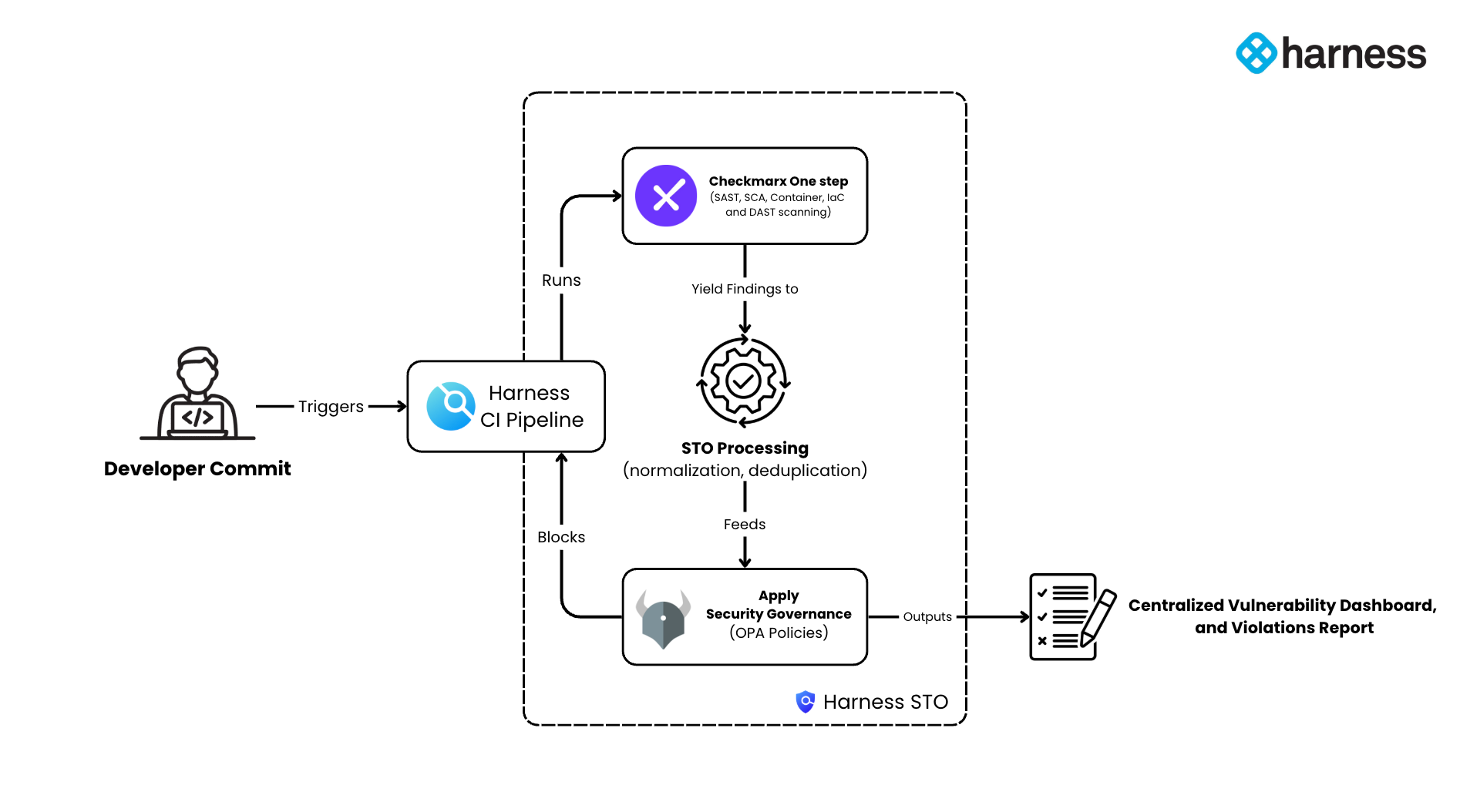
CI Workflow with STO and Checkmarx One
Adding Checkmarx One to a Harness pipeline is straightforward:
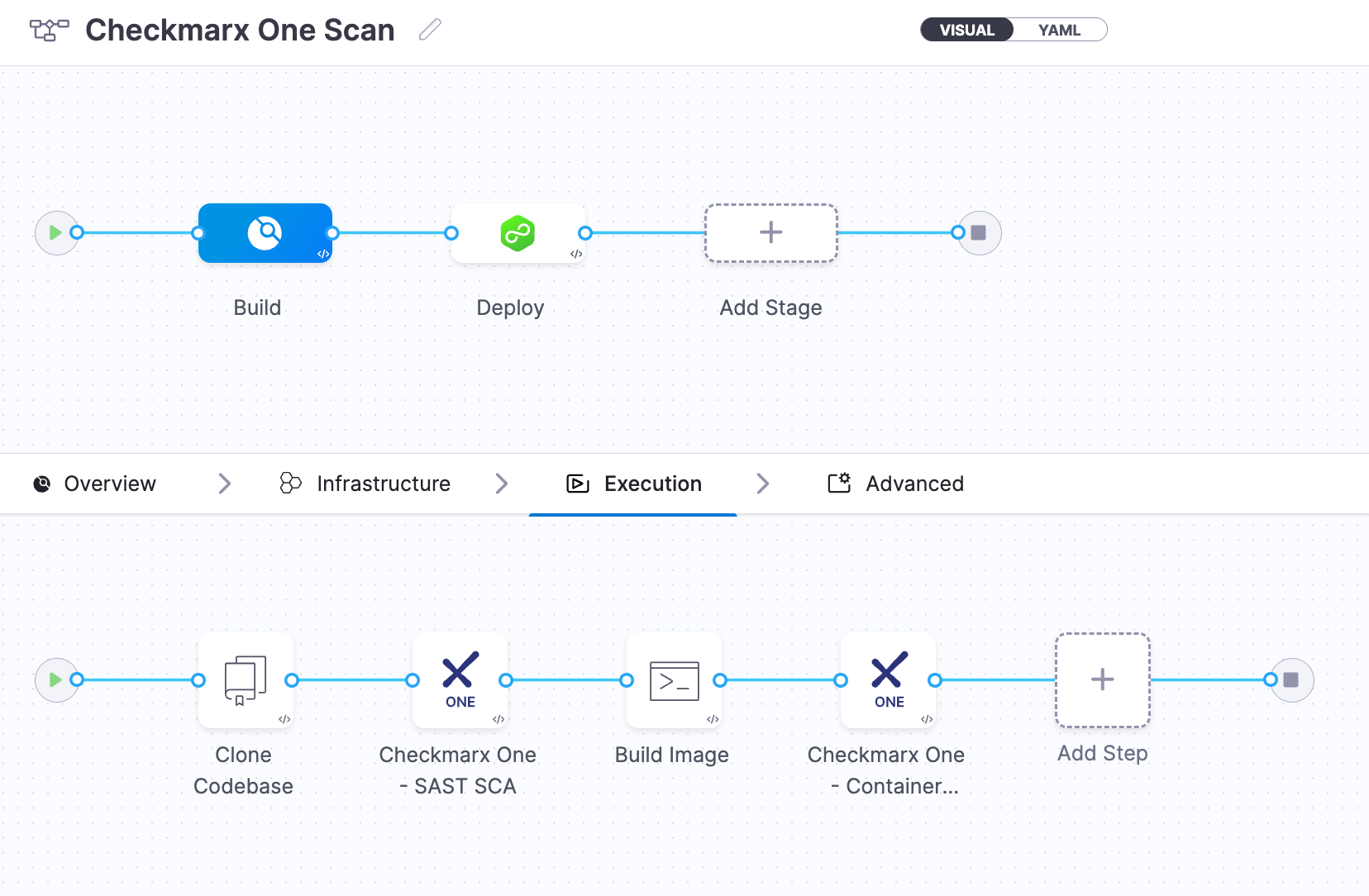
- Harness STO offers a native Checkmarx One scanning step that can be added to both CI and Security stages within your Harness pipeline.
- This step establishes a connection between Harness and the Checkmarx One platform using authorization credentials, and triggers the configured scans across key stages of your application lifecycle: Source Code (SAST), Container Images (Container Scanning), and Running Application Instances (DAST).
- All major Checkmarx One scan types can be orchestrated in a single step. When the pipeline runs, Harness automatically sends the codebase to Checkmarx One for analysis.
- The scan results are then pulled back into Harness STO in a standardized format.
Harness’s STO engine will ingest these results, deduplicate the findings, and map them to a common severity/schema for consistency. This means whether an issue came from SAST or SCA, it’s presented in a unified way.
After processing the scan outcomes, STO can enforce governance policies before the pipeline proceeds. For example, you might configure a rule to mark the build pipeline as failed if any Critical or High severity vulnerabilities are found. STO supports setting severity thresholds (e.g., “fail on severity ≥ High”) or other custom policies to decide if the build pipeline should be blocked.
Key Benefits
Integrating Checkmarx One into Harness STO brings multiple benefits for engineering and security teams:
- Automated, Early Security Testing: The integration enables automatic scans on every code commit or build as part of the CI process. Developers don’t need to run Checkmarx One scans manually or in separate jobs – Harness orchestrates it as a pipeline step. This “shift-left” automation catches vulnerabilities early in the SDLC, preventing risky code from progressing down the pipeline.
- De-duplicated & Normalized Results: When Checkmarx One scans run via STO, the findings are normalized and de-duplicated. Harness STO’s processing engine standardizes the vulnerability data (mapping issues to common identifiers like CWE or CVE) and merges duplicate reports.
- Remediate Vulnerabilities: Harness STO presents remediation suggestions provided by Checkmarx One and enhances this with automated remediation steps powered by Harness AI. The integration of Harness AI also supports the creation of pull requests (PRs) to address identified vulnerabilities, helping to resolve issues faster and apply fixes directly to your CI/CD pipeline.
- Policy-Driven Governance and Gates: Harness STO allows teams to codify security policies and integrate them as quality gates in the CI/CD pipeline. Using the Checkmarx One integration, you can enforce organizational risk thresholds – for instance, automatically fail the build pipeline if a critical severity issue is found, or require a security approval before deployment if medium-severity issues exceed a certain count.
- Comprehensive AppSec Coverage: The unified and comprehensive nature of the Checkmarx One platform, combined with Harness STO, provides extensive coverage across various types of vulnerabilities and runtime languages. This integration delivers robust and scalable Application Security testing tailored for enterprise needs.
Conclusion
Harness STO’s integration with Checkmarx One simplifies incorporating robust security scanning into your CI/CD workflows. STO users can leverage Checkmarx's extensive security capabilities, while Checkmarx users benefit from STO’s centralized vulnerability management and automated policy enforcement.
This approach streamlines security integration without interrupting development processes. It ensures vulnerabilities are promptly detected and addressed while reducing overhead for both development and security teams. The combined use of Harness STO and Checkmarx One enables efficient and reliable security governance as an integral part of continuous software delivery.
To get started, refer to our documentation for guidance on integrating Checkmarx into your Harness pipelines.
Checkout comparisons: Gitlab Ultimate with Harness STO
Learn more: Build a secure CI pipeline with best practices and strategies
.webp)
