Automatically mitigate risky feature releases using Harness FME metric alerts, Event Relay triggers, and feature flag kill switches.

TL;DR
Connect Harness FME metric alerts to Event Relay triggers so pipelines can automatically mitigate risky feature releases using feature flag actions such as kill switches, reducing manual response time and improving release resilience.
Self-healing releases with Harness FME: metric-alert webhooks, Event Relay triggers, and a kill switch that can move before anyone is staring at a dashboard.
A rollout usually feels calm right up until the first metric turns against you. Maybe conversion drops. Maybe latency jumps. Maybe a guardrail starts flashing red while the team is in another tab, another meeting, or another timezone.
Feature flags already give teams a safer way to release: code can sit in production while exposure moves up or down independently. The gap is what happens after the signal arrives. If the response path is still "somebody sees an alert, finds the flag, and flips it by hand," you have only moved the risk from deploy time to detection time.
This post walks through a small, opinionated pattern for closing that gap. Harness FME emits a metric alert, a Harness Generic webhook receives it, Event Relay starts a pipeline, and the pipeline runs an FME action such as Kill Feature Flag. The result is not magic. It is a controlled remediation path that you can template, review, and govern.
At a glance
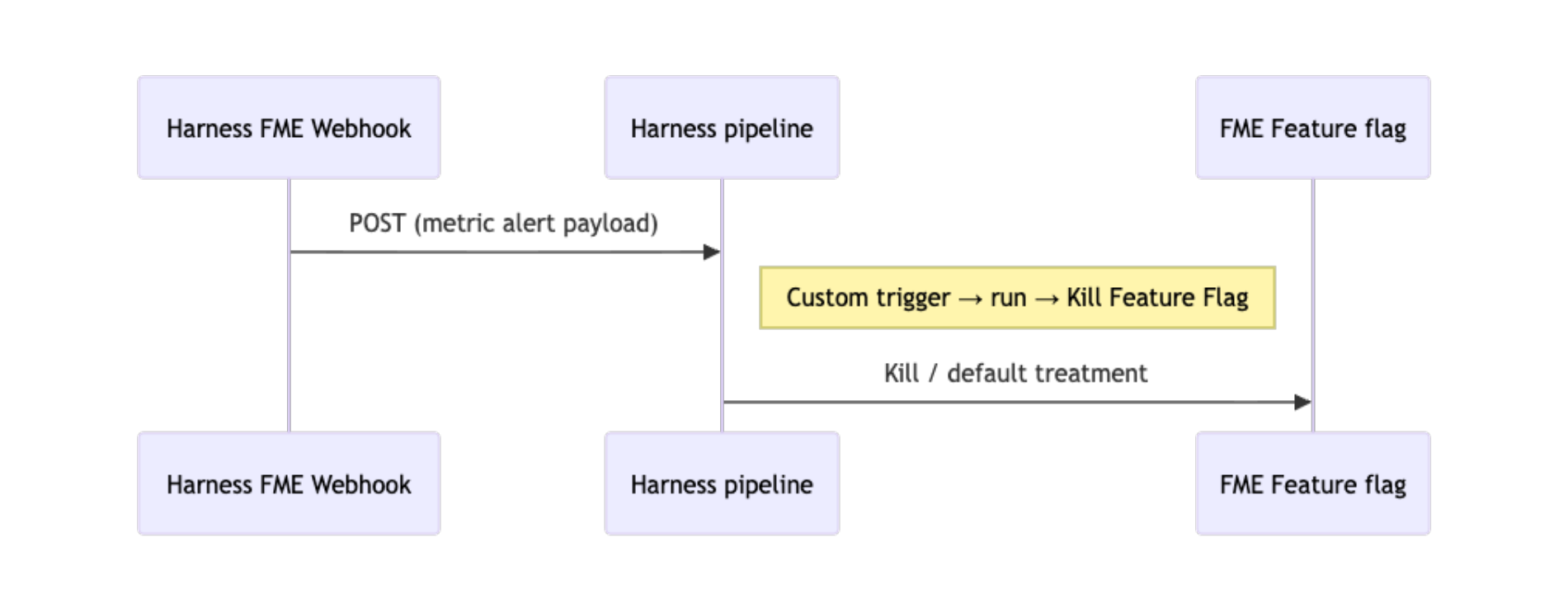
How the pieces fit together
You can think of the system as three responsibilities: emit, accept, and act. Keeping those responsibilities separate makes the automation easier to reason about later, especially when you start adding guardrails.
FME emits the signal
FME Release Monitoring watches metrics tied to flags and experiments. When an alert policy or significance check crosses the line you define, FME can send a structured JSON POST to a URL you control. Create that integration under FME Settings -> Integrations -> Webhooks as an Outgoing Webhook for metric alerts. The payload shape is documented in the metric-alert webhook reference.
Harness accepts and routes it
The URL FME calls is the Generic webhook URL from Harness Webhook resources. An Event Relay trigger on the mitigation pipeline listens on that webhook, checks header and payload conditions, and maps the body into pipeline variables using <+trigger.payload.path.to.field>.
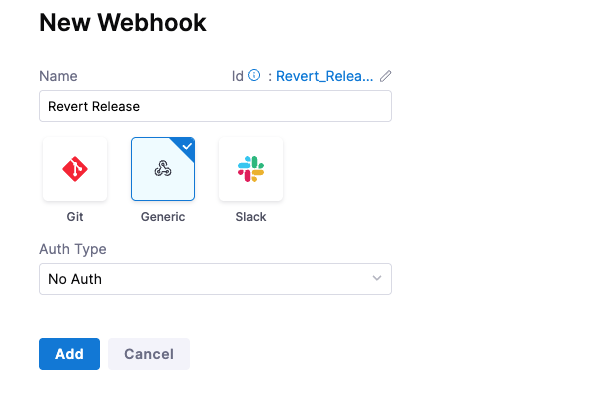
To get the URL, create a Generic webhook in Account, Org, or Project settings -> Webhook, choose No Auth, and copy the generated URL. Then create an Event Relay trigger on the pipeline and point the FME metric-alert integration at that same URL.
The pipeline acts on FME
The mitigation path is a Custom stage with steps from the Feature Management & Experimentation section of the step library. For instant containment, Kill Feature Flag serves the default treatment; see kill switch in the FME docs. FME can also perform any flag operation within this pipeline from the broad and rich array of flag steps, as you can see below. It’s more than just a simple kill; FME can perform actions such as reverting the feature to be released only to internal testing, or to a lower percentage of users seeing the feature. Beyond this you have the full functionality of the Harness platform as well for notification or any further actions you wish to take upon a metric alert.
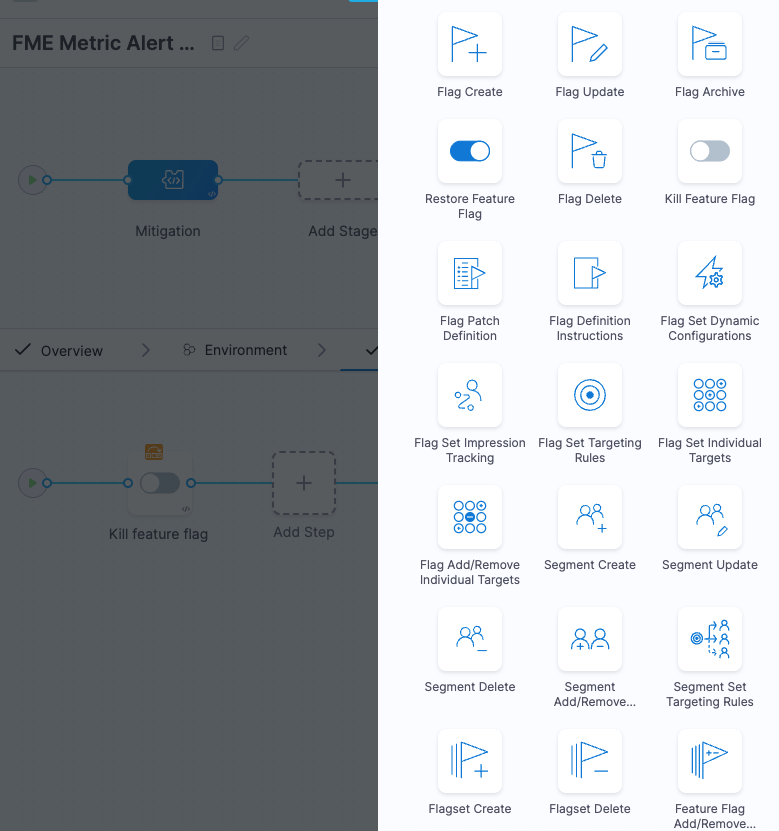
Reference: pipeline for fme_metric_alert_mitigation
Before wiring the trigger, here is the finished pipeline shape. The example pipeline fme_metric_alert_mitigation keeps the remediation logic in one Custom stage and leaves the alert details as runtime inputs.
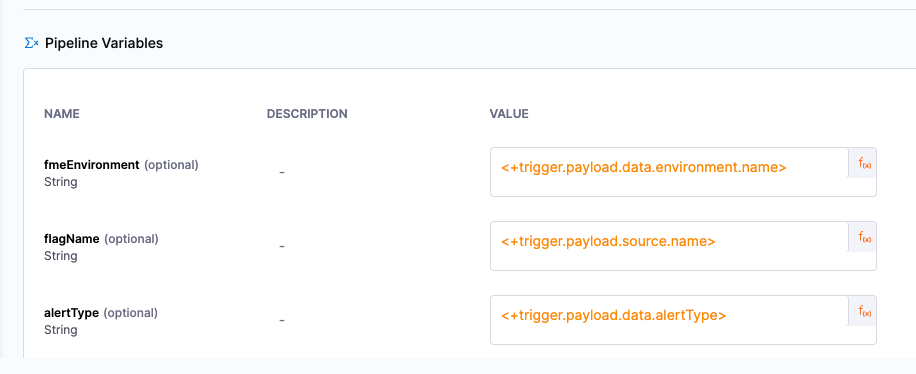
The pipeline variables are the handoff between the incoming alert and the FME step. They tell the kill step which flag to touch and which FME environment to use.
For the METRIC_ALERT body, use these exact Pipeline Input expressions on the Event Relay trigger:
The alertType variable uses <+input>.default(ALERT_POLICY) on the pipeline for manual runs. For webhook runs, map alertType from the payload so SIGNIFICANCE and ALERT_POLICY stay distinct. The kill step is gated with when, so it runs only when <+pipeline.variables.alertType> == "ALERT_POLICY". Tighten or relax that JEXL if you also want significance-driven kills.
Click Save after wiring the Event Relay trigger to the Generic webhook resource.

Implementation walkthrough
Prerequisites are straightforward but worth checking before you test. FME webhook setup requires the permissions listed in Prerequisites, including account-level connector access for the integration. On the Harness side, you need access to create Webhook resources, edit pipelines and triggers, and change FME flags in the environments the step touches. The FME steps and RBAC docs cover the permission details. Event Relay Generic webhooks may also require the CDS_EVENT_BRIDGE_WEBHOOK and CD_TRIGGERS_REFACTOR feature flags in your account.
The steps below are ordered so you have the Generic webhook URL before you paste anything into FME.
Step 1: Pipeline and custom trigger (Harness)
- Open Pipeline Studio and paste in the YAML above. Set the appropriate org and project identifiers.
- In Account, Org or Project settings -> Webhook, create a Generic webhook, choose No Auth, and copy the Generic webhook URL. You will paste it into FME in Step 2.
- Back in the pipeline, go to Triggers -> New Trigger -> Event Relay. Select the Generic webhook, configure Pipeline Input using the reference table above, and save the trigger.
- Optional: add Event Relay header or payload conditions, for example on
<+trigger.payload.type>, so onlyMETRIC_ALERTbodies start the pipeline.
For fme_metric_alert_mitigation, the mitigation stage is already defined: Custom stage mitigation, step Kill Feature Flag with flagName and environment from pipeline variables, and when set to alertType == "ALERT_POLICY".
Step 2: Metric alert webhook (FME)
- In FME Settings → Integrations → Webhooks, add Outgoing Webhook (Metric Alerts) and choose environments and alert types to forward.
- Set URL to the Harness Generic webhook URL from Step 1
- Use Send Test Message if available, then confirm a Harness execution appears and variables resolve (payload schema).
Step 3: Validate and tune
- Run a controlled test with a test webhook or a non-production flag. Inspect the mitigation stage, step logs, and FME flag state before and after.
- Adjust Event Relay conditions, the kill step when, or add steps such as approvals, notifications, and failure strategies to match your risk model.
- If you need kills on significance events as well as alert-policy events, change the JEXL or add a second kill path with a complementary condition.

Why this pattern helps
The obvious win is lower MTTR. The path from "alert fired" to "exposure reduced" becomes a pipeline execution instead of a human checklist.
It is also a cleaner operating model. The decision starts with FME alerting, the routing lives in Event Relay, and the action lives in a pipeline where RBAC, approvals, failure strategies, and audit history already exist.
The pattern is repeatable too. Generic webhook plus Event Relay trigger plus pipeline plus FME step can be copied across projects or wrapped in a template once your team agrees on the right defaults.
That last part matters. Automated mitigation is powerful, but it should still reflect human judgment. Some alerts should kill a flag immediately. Some should notify first. Some should require approval before touching production. Closing the loop with metric alert webhooks, Event Relay triggers, and FME pipeline steps gives you one place to express the rule: if monitoring says this, delivery does that.