


.svg)
Security Testing Orchestration
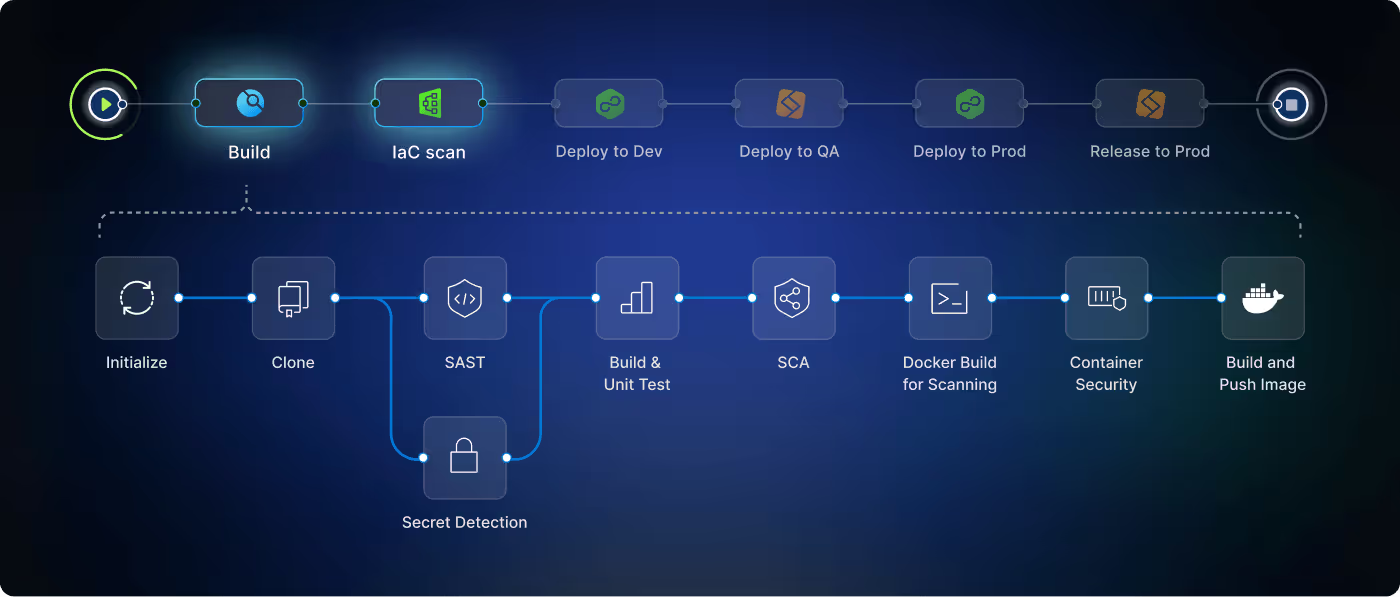
Seamlessly integrate both Harness and 50+ partner security scanners into your build pipelines, orchestrating tests and managing AppSec posture with intelligent deduplication and prioritization, a unified dashboard, and pipeline-level visibility
Sift Through a Sea of Vulnerabilities
Harness AI can analyze all of your aggregated security findings - from vulnerabilities to misconfigurations - across all the security tests in your pipeline, to surface the issues you're looking for.
Know What to Fix First
The Harness AppSec agent can do the heavy lifting for you, analyzing every issue, telling you what's most critical to fix first, and making sure you're remediating the most risk.
Take Action on Your Top Issues
With Harness AI, you can just tell the agent what you want it to do, such as creating a pull request for your top vulnerabilities and including AI remediation guidance to help developers fix them.
See Every Risk Across Your Pipeline
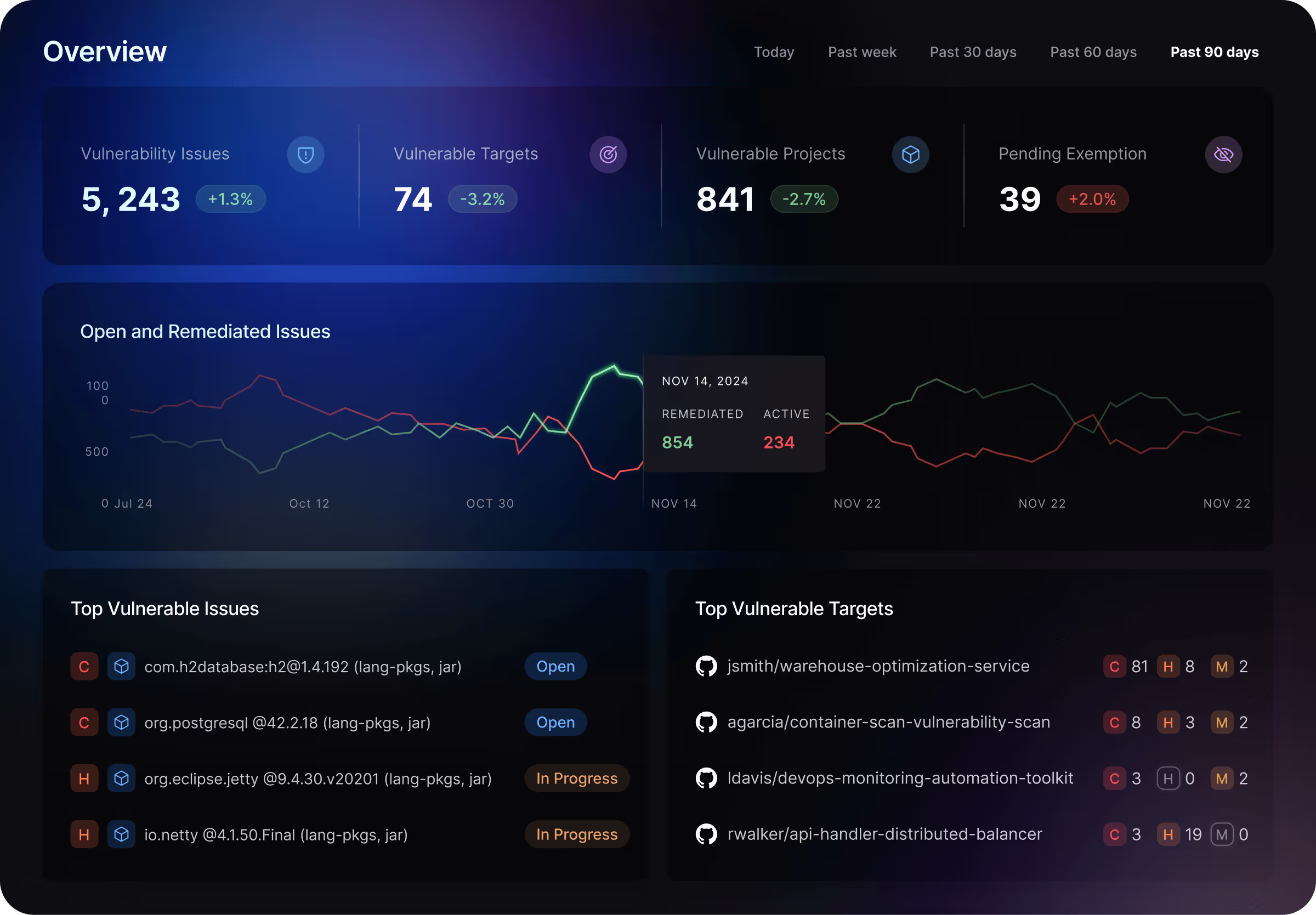
Harness helps you understand your application security posture at the pipeline level, with a single pane of glass showing vulnerabilities identified across every stage of the SDLC, regardless of how many different scanning tools or security vendors you have
Orchestration for Every Pipeline
50+ Pre-built integrations
Pre-built integrations remove the overhead from configuring security scans and allow you to deploy in just few clicks
Harness Pipeline Builder
Visual and intuitive pipeline builder makes it easy to add security scans to existing pipeline stages - or create new ones
Bring Your Own Scanners
Use the right combination of scanners and tools for each pipeline, including both Harness and third-party scanners
Custom Integrations
Integrate with non-standard scanners by extracting scan results through APIs or ingesting security findings via SARIF
Simplified Vulnerability Management
Visibility across every pipeline
See vulnerabilities in one place for every security tool in a pipeline - or across every pipeline - even from multiple vendors.
Vulnerability Deduplication
Reduce the noise in your pipelines with automatic deduplication and normalization of issues.
Pipeline-Wide Prioritization
Prioritize remediation by severity, across every vulnerability found in the pipeline.
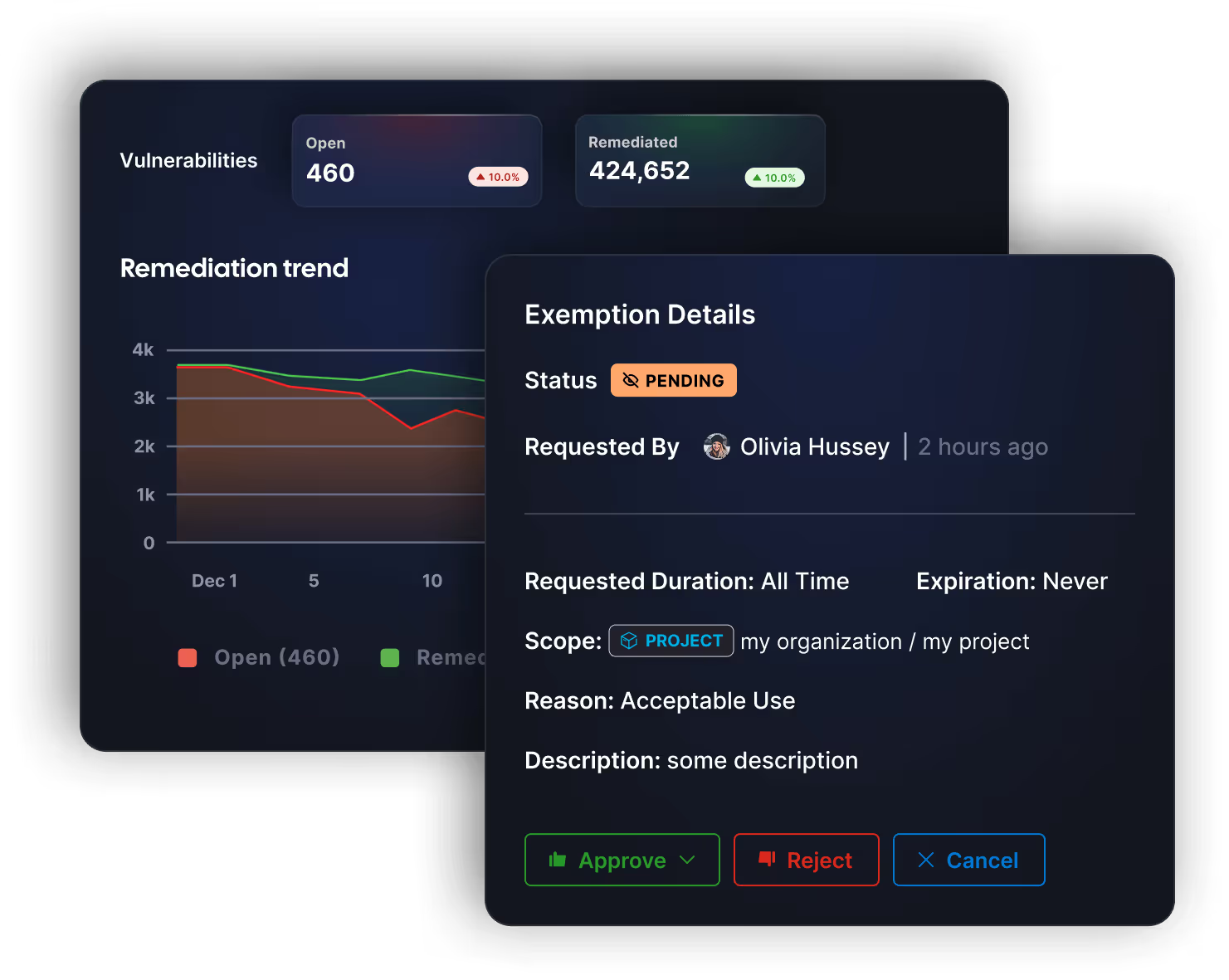
Issue Exemption
Create approval steps or work with devs to review and exempt specific issues from your security policies.
Streamline Developer Remediation
Reduce Noise for Your Developers
Give developers a single vulnerability to focus on, regardless of how many times or in how many branches it was found
Create JIRA Tickets in the Pipeline
Reduce the ticket spam and create JIRA tickets after deduplication and prioritization between all the scanners in the pipeline
AI-Powered Remediation
Easily identify affected pipelines, create JIRA tickets, and track remediation to respond to zero-day vulnerabilities.
Pipeline-Level Governance
Ensure Testing Compliance
Policies don't just take action on test results, but also ensure compliance that required tests were run in the first place
Strengthen Security Posture Across your SDLC
Create customized policies with centralized security governance templates powered by OPA and granular RBAC
Pipeline-Level Policies
Pipeline-level policies enforce outcomes across multiple stages, steps, tools, and vendors instead of individual tests and tools
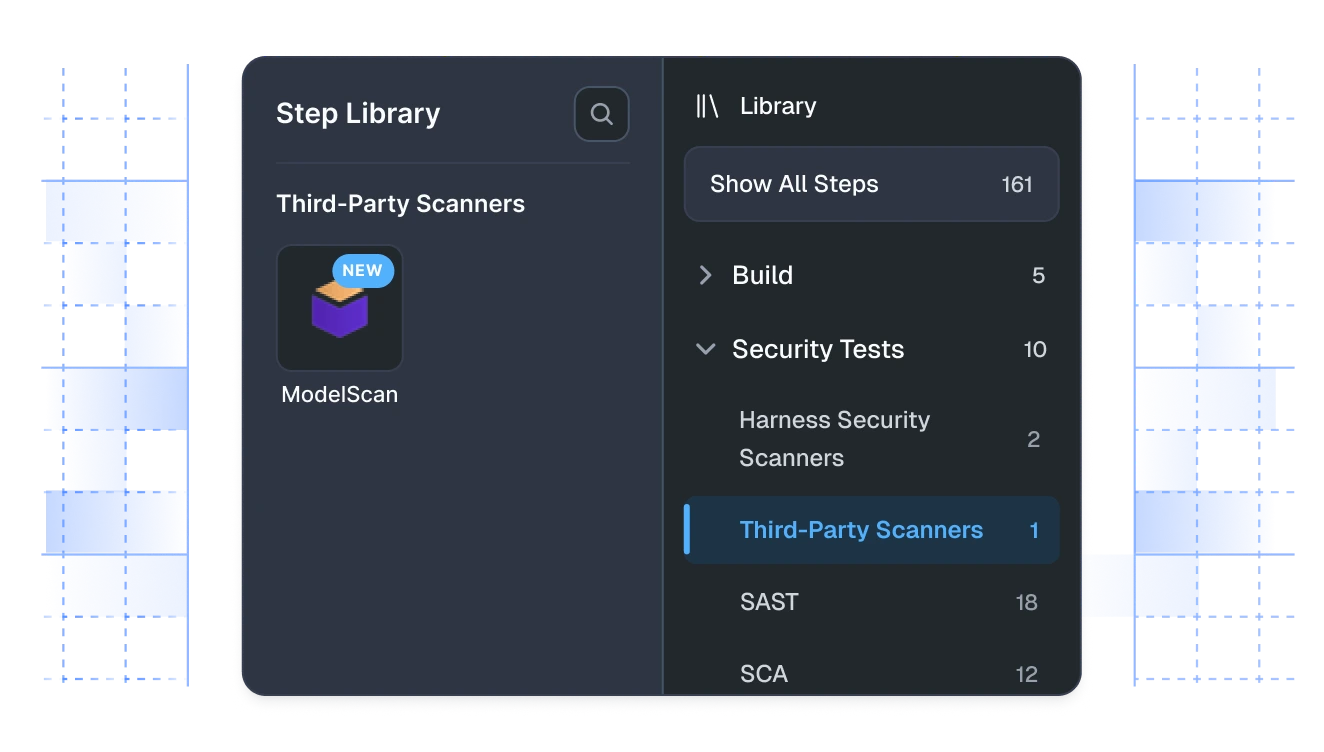
Model scanning
Traditional security was built for software that sits still. Agents don't. STO helps secure the Agent DLC by scanning models at build time to give an early risk signal on the AI components inside your agents.
Orchestrate Security Testing with 50+ Integrations
Tailor security to your unique software projects and pipelines, with a broad range of available application security testing options at every stage of the software development lifecycle (SDLC).


Best-of-Breed Harness AST
Start with best-of-breed Harness scanners for SAST, SCA, container scanning, and more.
Security Partner Integrations
Complement Harness scanners with 50+ partner integrations for additional security tests.
Pre-built integrations
Easily deploy Harness or partner AST across your pipelines in just few clicks with pre-built integrations.
Frequently Asked Questions
What is Security Testing Orchestration (STO)?
Security Testing Orchestration (STO) is a unified platform that orchestrates, manages, and correlates results from multiple application security testing tools across the software development lifecycle. Also known Application Security Orchestration and Correlation (ASOC) or Application Security Posture Management (ASPM), STO centralizes findings from SAST, DAST, SCA, container scanning, and other security tools into a single dashboard. By automating workflows and providing intelligent correlation, security testing orchestration enables DevSecOps teams to efficiently manage application security posture without switching between disparate tools.


What is Application Security Posture Management (ASPM)?
Application Security Posture Management (ASPM) is an emerging security category that provides comprehensive visibility and governance across an organization's entire application security program. ASPM platforms consolidate security findings from multiple testing tools, correlate vulnerabilities with business risk, and track remediation progress across portfolios. Security Testing Orchestration serves as the operational engine of ASPM, automating tool integration and workflow management. Together, STO and ASPM enable security teams to understand their complete application security posture, identify coverage gaps, and demonstrate compliance effectively.
How does Security Testing Orchestration improve DevSecOps?
Security Testing Orchestration transforms DevSecOps by eliminating security bottlenecks and automating tool coordination throughout CI/CD pipelines. STO platforms automatically trigger appropriate security tests based on code changes, application types, and deployment targets, ensuring consistent security validation without manual intervention. By providing developers with consolidated, prioritized findings within their existing workflows, Security Testing Orchestration accelerates vulnerability remediation while maintaining development velocity. This automation enables DevSecOps teams to scale security testing across hundreds of applications without proportionally increasing security headcount.
Why do organizations need Security Testing Orchestration?
Organizations need Security Testing Orchestration (STO) to manage the complexity of modern DevSecOps toolchains that often include five to 10 different security scanners. Without security testing orchestration, teams face fragmented results, duplicated vulnerabilities, inconsistent prioritization, and inefficient workflows. STO provides Application Security Posture Management by centralizing findings, automating policy enforcement, and enabling consistent security standards across development teams. Security testing orchestration reduces tool sprawl overhead while improving vulnerability remediation rates by 60% through intelligent correlation and prioritization.
What security tools can Security Testing Orchestration integrate?
Security Testing Orchestration platforms integrate virtually all application security testing tools including SAST, DAST, SCA, container security scanners, secrets detection, Infrastructure as Code scanning, and API security testing. Modern STO solutions provide pre-built connectors for popular security vendors alongside flexible APIs for custom integrations. By orchestrating these diverse tools, STO creates a unified DevSecOps security layer that normalizes findings across vendors, correlates related vulnerabilities, and presents consolidated results. This integration capability is essential for comprehensive application security posture management across heterogeneous technology stacks.
How does STO reduce alert fatigue in security teams?
Security Testing Orchestration dramatically reduces alert fatigue by deduplicating findings across multiple security tools, correlating related vulnerabilities, and applying intelligent prioritization based on exploitability, business context, and remediation effort. Instead of reviewing thousands of raw findings from disparate tools, security teams using STO receive consolidated, actionable alerts ranked by actual risk. Application security posture management features in STO platforms enable custom policies that suppress low-priority issues and escalate critical vulnerabilities automatically, ensuring DevSecOps teams focus on threats that matter most to the organization.
What are the key benefits of implementing Security Testing Orchestration?
Security Testing Orchestration delivers multiple benefits including reduced mean time to remediation through automated triage, improved DevSecOps efficiency by eliminating manual tool coordination, and enhanced application security posture management through comprehensive visibility. STO platforms reduce security tool sprawl costs, accelerate compliance reporting by centralizing evidence collection, and improve developer experience by presenting security findings in familiar development tools. Organizations implementing STO report 60-70% reduction in security management overhead while simultaneously improving application security posture and accelerating secure software delivery.
What should I look for when selecting an STO or ASPM platform?
When evaluating Security Testing Orchestration and Application Security Posture Management platforms, prioritize solutions offering broad security tool integration, flexible policy engines for custom prioritization, and native CI/CD integration for DevSecOps workflows. Essential STO capabilities include intelligent deduplication, correlation across security tools, and developer-friendly remediation guidance. For comprehensive application security posture management, seek platforms providing portfolio-level analytics, compliance reporting, trend analysis, and executive dashboards. Evaluate vendor support for your technology stack, scalability to support organizational growth, and ability to demonstrate measurable improvements in security posture and remediation velocity.
How does Application Security Posture Management (ASPM) differ from traditional security testing?
Application Security Posture Management (ASPM) provides continuous visibility and risk assessment across your entire application portfolio, while traditional security testing focuses on point-in-time scans. ASPM platforms like Security Testing Orchestration aggregate data from multiple sources, correlate vulnerabilities, prioritize remediation based on business context, and track security posture trends over time. Unlike standalone tools, Application Security Posture Management like STO enable DevSecOps teams to understand holistic risk, eliminate duplicate findings, and make data-driven security decisions.
What are the key features of an Application Security Posture Management platform?
Application Security Posture Management platforms built on security testing orchestration provide centralized vulnerability management, risk-based prioritization, security metrics dashboards, and policy automation. Key ASPM features include intelligent correlation through Application Security Orchestration and Correlation (ASOC) to eliminate duplicates, customizable security policies, compliance reporting, and remediation workflow automation. Leading Security Testing Orchestration solutions offer developer-friendly integrations, executive-level risk visibility, and trend analysis enabling continuous improvement of your DevSecOps security posture across applications and teams.