How Harness refactored a flat SQL table into a normalized schema, cutting storage per row from 400 bytes to 28 bytes and making API latency constant at any scale.

At Harness, we build an AI-powered software delivery platform, and test result data is core to how we help engineering teams ship faster. The table that stores it started small: one row per record, all the context right there on the row. Simple, readable, and it worked. Until it didn't.
This is the story of how we refactored it, what we learned, and what I'd tell you to watch for in your own systems.
What We're Working With
Within Harness Continuous Integration, we built a backend service, the Test Intelligence service (TI Service), that powers three critical features:
- Test Intelligence: Automatically selects only the tests that need to run based on code changes.
- Test Management: Tracks test trends, flakiness patterns, and health metrics.
- Flaky Test Detection: Identifies unreliable tests that pass and fail inconsistently.
These features help engineering teams ship faster by reducing test execution time and improving test reliability - but they only work if we can process and analyze test results at a massive scale.
Every time a CI pipeline runs, it produces test results in standard formats like JUnit XML: which tests ran, which passed or failed, how long each took, and any output they produced. Each report belongs to a build, each build belongs to a pipeline, each pipeline belongs to a project, and so on up to the account level. A busy organization can produce thousands of builds per day, with reports ranging from a handful of records to tens of thousands.
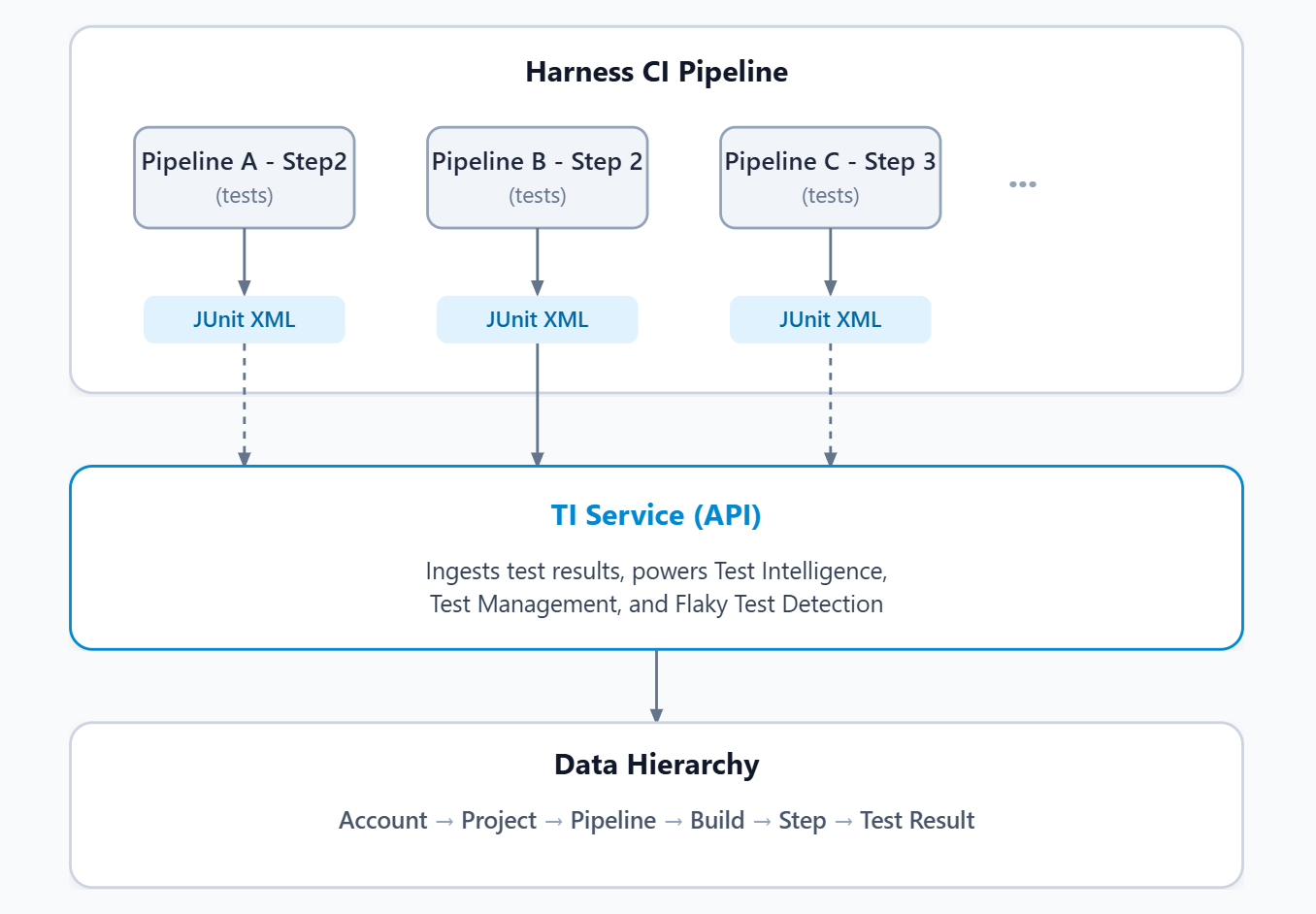
Why the Original Design Made Sense
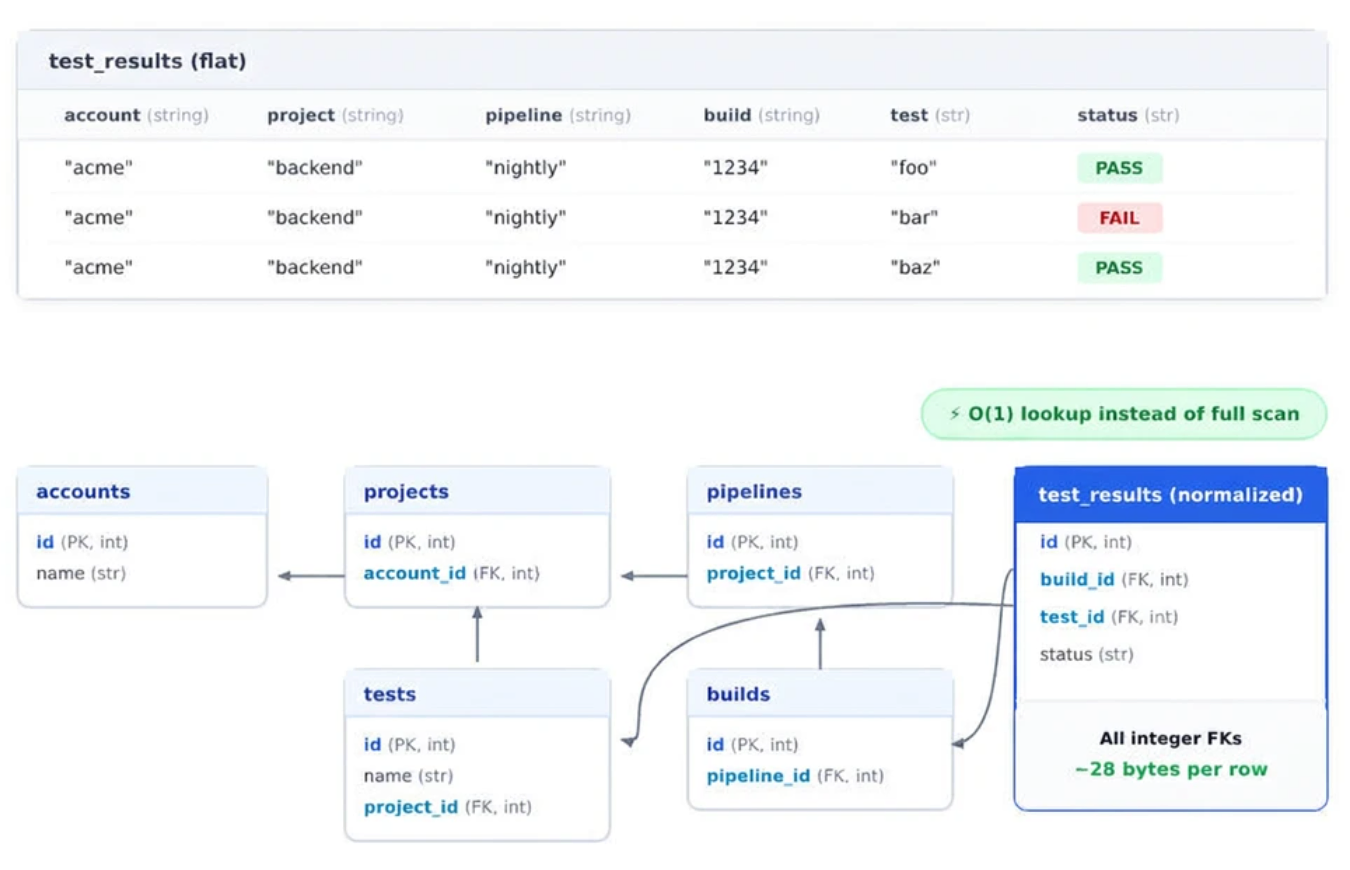
When you're building a new product with evolving requirements, simplicity wins. The first version of our report table used a flat, denormalized approach: one row per test result, with all the context stored as text strings directly on each row. Every level of the hierarchy lived right there on the row. If you've worked with document databases, this pattern looks familiar. It's essentially how you'd model a collection in a NoSQL store: every record is self-contained, carrying all the context it needs.
In the early days, before you know exactly what queries you'll need to support, this approach has real advantages. Inserts are dead simple: one row, all the data, done. Reads don't need joins. The schema is easy to reason about because it is the data. When you have thousands of rows, queries are fast, and the duplication barely matters. This is a perfectly valid design until the data grows. And ours did.
The Cracks
As the data scaled to millions of rows, the flat design started working against us. For a pipeline running 10,000 tests, every row carried the same hierarchical scope strings; that's 10,000 copies of identical context. Here's what started breaking:
- Every summary was a full scan. Want a count of passed vs. failed for a build? Scan every row, aggregate on the fly. No pre-computed totals anywhere.
- String comparisons on everything. Queries filtered on text columns across millions of rows. No integer keys, no index-friendly joins. Structural identifiers like account, project, and pipeline names were stored as repeated strings on every row instead of integer references. String comparisons take more CPU cycles and are less cache-friendly than integer comparisons - at millions of rows, queries were roughly 10x slower than they needed to be.
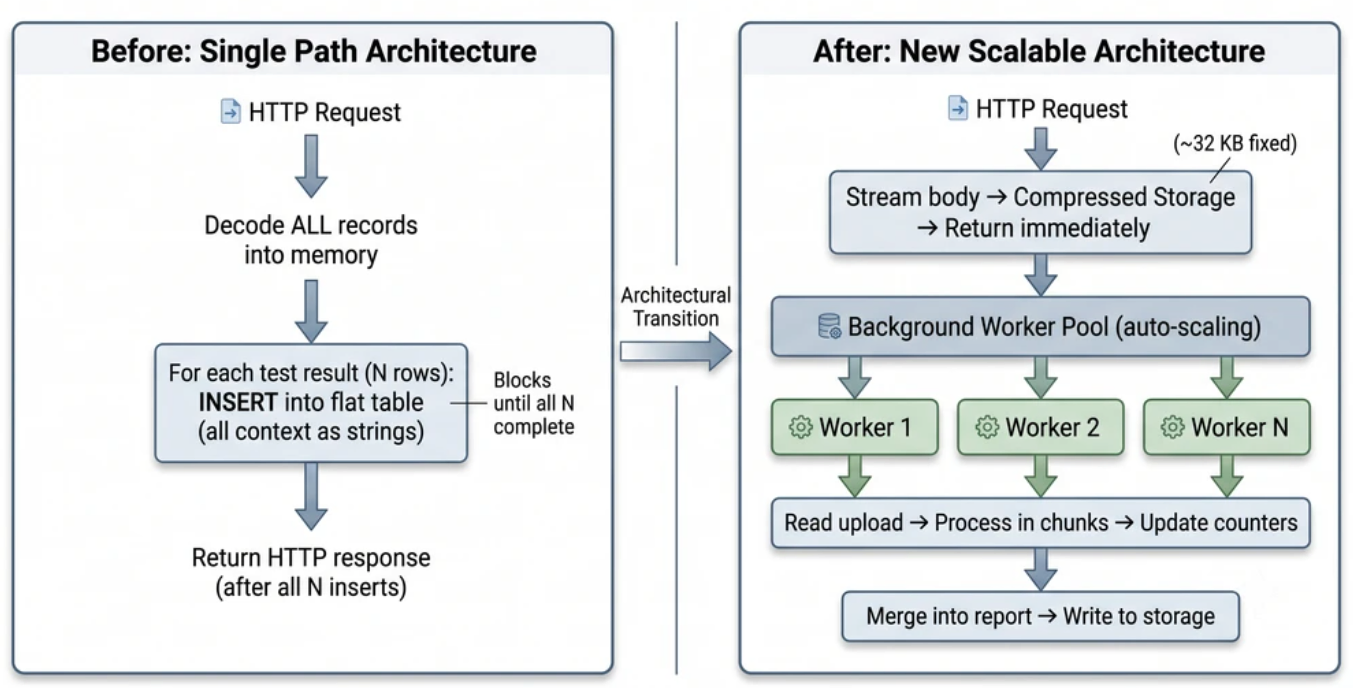
- API latency grew with the payload. The write handler inserted one row per test result inline in the HTTP request. A report with 50,000 results meant 50,000 INSERT statements before the API could respond.
- Massive duplication. About 93% of the storage on each row was repeated scope strings - the same values, over and over.
- Hot and cold data mixed together. Test output (stdout, stderr - sometimes very large) lived alongside lightweight metadata. Queries that only needed a count still had to wade past blob-sized columns.
These are smells. Individually, they're manageable. Together, at scale, they compound into something that's hard to patch.
But here's the thing: we only saw these clearly because we stress-tested. Before we call something "production-ready" at Harness, we load-test every API and processing path, pushing each to its limits. Not just typical load, but burst traffic - what happens when a thousand pipelines finish at once? What happens when a single report has 100,000 test results instead of 100? This approach comes from experience. We've seen systems fall over under real-world load that never appeared in testing. So we don't guess. We measure. We break things in test environments so they don't break in production. Load testing tells you exactly where your ceilings are and which to raise first.
The Principles We Followed
Before jumping into a rewrite, we defined the principles that would guide every decision. These apply to any system that ingests high-volume data behind an API.
- Keep API calls bounded. Never do O(N) work in the request path. Our old handler's latency and memory usage scaled with the number of records - processing each test meant keeping all that data in memory during the request. When multiple large reports came in concurrently, the service would crash with out-of-memory errors. Even when it didn't crash, slow-running requests would block others, causing API calls to hang and eventually timeout after minutes. The fix: make the API do a fixed number of operations and return immediately, whether the report has 100 records or 100,000. Store the input, return fast, process later.
- Offload variable work to workers. Everything proportional to data size runs in a background worker pool, decoupled from the API via a queue. Producer and consumer scale independently.
- Bound memory explicitly. Every component gets a hard cap. Process in fixed-size chunks and release between chunks. If memory usage is proportional to input size, you will eventually run out.
- Stream, don't buffer. Decode one record at a time. Our old path deserialized the full payload, then re-serialized it for storage- holding the data in memory twice. The new path streams directly from the HTTP body to compressed storage with roughly 32 KB of fixed overhead.
- Pre-aggregate at write time. A counter increment during a write is negligible. A full scan during a read is not. We maintain running totals directly on each execution row - summary queries become a single indexed lookup.
- Use integer foreign keys over string matching. Normalize once, join cheaply forever. A 4-byte integer comparison is orders of magnitude faster than comparing variable-length strings, and storage per row dropped from roughly 400 bytes to about 28.
- Design for horizontal scaling. Vertical scaling has hard limits. We designed for horizontal: stateless workers, distributed coordination via locks with TTL, and work that can be split across instances. When load increases, add instances, not resources.
What Changed - The Big Picture
The architectural shift boils down to one idea: separate the "accept" from the "process."
The Data Model Shift
The flat table with repeated strings became a set of normalized tables joined by integer foreign keys.
Key Moves on Writes
- Normalized schema: Small tables joined by integer foreign keys, replacing one wide table with repeated strings.
- Delta processing: Each upload is processed as a delta and merged incrementally—no double-counting, concurrent-safe.
- Auto-scaling worker pool: Workers scale up with load and down after idle. Distributed locks prevent duplicate processing.
Key Moves on Reads
- Pre-aggregated summaries: Counters maintained at write time mean summary queries hit a single row, no scanning.
- Hybrid tiered reads: Small reports are read from compressed blobs and streamed through memory one record at a time. Large reports are stored as columnar files and queried by an analytical engine that only reads the columns needed—a count query never touches output columns.
- Memory-bounded pagination: Instead of loading a full report to paginate, we use a two-pass approach: a lightweight first pass collects just enough metadata to filter and sort, then a second pass reads full data only for the requested page. Memory stays bounded regardless of report size.
Performance Improvements
| Metric | Before | After |
|---|---|---|
| Per-request memory | Proportional to payload size | ~32 KB fixed overhead (streaming) |
| Summary query cost | O(N) scan over all rows | O(1) single-row lookup |
| Storage per row | ~400 bytes (repeated strings) | ~28 bytes (integer FKs) |
| API latency | Proportional to record count | Constant—return immediately |
What to Watch For in Your Own Systems
If you're running a service that ingests detail data and serves aggregated views, here's a quick checklist:
- Are your summary queries scanning all detail rows? If getting a count requires touching every record, you need pre-aggregation.
- Is your API latency proportional to input size? If bigger payloads mean slower responses, you're doing too much work inline.
- Are you repeating the same strings on every row? That's a normalization opportunity—and the savings compound fast.
- Are you buffering entire payloads into memory? Stream when you can. Your memory profile should be constant, not proportional.
- Do your workers scale with demand? If it takes minutes to ramp up, you're leaving throughput on the table during burst load.
These patterns aren't unique to the report data. They show up anywhere you have high-cardinality detail tables behind an API - logs, events, metrics, audit trails.
And one more thing: this isn't the last refactor. At 10x or 100x the current scale, new bottlenecks will surface in different places, and the solutions will look different. That's fine. The goal is to define the requirements you need to support right now, find the right way there—even if that means a refactor—and leave room to evolve. No design is forever. Solve today's problem well, and grow from there.
--- A more technical deep dive ---
How It Actually Happened
Working with AI
We used AI extensively throughout this refactor, not just for writing code, but as a design partner. The process involved many back-and-forth iterations: propose a solution, challenge it with edge cases, refine, and repeat. The key difference from working solo was that we pushed every proposed design to handle 100% of cases, not just the 80% we might have settled for without that collaboration.
We went through 3-4 different refactoring designs before landing on the final approach. Each iteration surfaced assumptions that didn't hold or trade-offs we hadn't considered. The AI helped us explore those alternatives more thoroughly than we would have on our own. That said, AI didn't eliminate the hard parts. Testing remained a challenge, so we planned comprehensive unit and integration tests up front before starting implementation.
Design Philosophy
Our main goal was to preserve API contracts - same inputs, same outputs - while completely changing how the internals worked. We also made a conscious decision that API response time should be bounded and predictable. This led to two key strategies:
- If the work can be done asynchronously, push it to a worker. The API stores the input and returns immediately. Background workers handle the variable processing.
- If the work needs to be done synchronously, reconsider the data format. Sometimes we keep data in formats that are easy to query ad hoc but expensive to compute on every request. If you're aggregating the same raw data on every API call, you're doing it wrong. Pre-process it asynchronously and store a ready-to-serve report instead.
We also chose to process reports incrementally. Reports arrive over time - sometimes in chunks from parallel test runners, sometimes from retries. Instead of waiting for everything to arrive before processing, we merge incrementally.
Key Technical Choices
- Hybrid storage: Small reports as compressed blobs directly in the database and large reports as columnar files in object storage.
- In-process analytical engine: We chose an embedded analytical engine (DuckDB) instead of an external database because it eliminated a network hop and let us read columnar files directly from signed object storage URLs.
- Incremental aggregation and merge: Process each upload as a delta. When a new step report arrives or updates, we compute just that step's contribution and merge it into the running totals. This keeps memory bounded.
- Uniform summary storage: We store summaries for builds and steps in the same table, using a special marker value to distinguish them, keeping the query layer simple.
What We Learned from Scale Testing
We ran the system through heavy load testing - pushing services to their limits - and several issues surfaced that we wouldn't have caught otherwise.
Database insert performance degraded with table size.
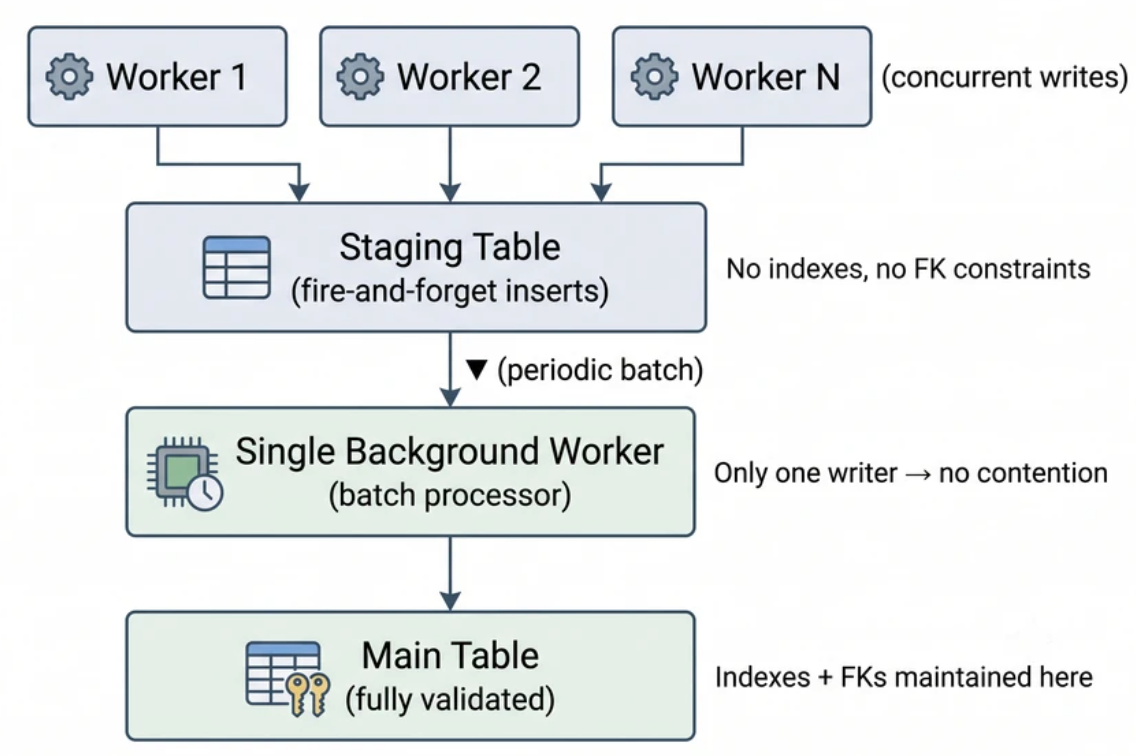
Tables that receive heavy writes slow down as they grow, especially if they have indexes and foreign keys. Every insert validates constraints, updates indexes, and writes to the database's write-ahead log (a sequential record of all changes for crash recovery). At high concurrency, workers contend for locks on the index and the write-ahead log, resulting in reduced throughput. Our solution was a staging pattern: workers insert into a separate staging table with no indexes or foreign key constraints. They fire and forget. A single background worker periodically batch-processes rows from the staging table into the main table.
ID lookups for new objects became a bottleneck. The insert-and-query pattern in the same transaction was extremely heavy on the database. We switched to a query-first pattern: first, select all existing IDs in a batch. Then insert only the objects that are missing. Finally, query again to get IDs only for the newly inserted rows.
Worker auto-scaling was too slow. During a traffic burst, it took almost 6 minutes to ramp from minimum to maximum workers. We changed the algorithm to calculate how many workers were actually needed (based on queue depth and current capacity) and spin them all up at once. Scaling became immediate.
Migration Strategy
Using feature flags, we controlled the rollout per customer, directing data to both the old and new systems during the transition. The strategy was simple: redirect writes first, then reads. This prevented data loss. Once we had confidence in the new system's correctness, we shifted read traffic over.
Closing Thought
Refactors aren't set in stone. You can refactor the refactor if needed, which we did during this exercise. Don't be afraid of it, but do it when it's actually needed - when the system tells you it's time, not because the architecture feels imperfect. In some cases, it's needed. This was one of them. Learn more about Harness CI.