Blog
Harness Platform

Test Intelligence™: Move Fast, Don’t Break Things | Harness Blog

Test Intelligence is a capability in our CI module that, at runtime, selects the tests that need to be run. Instead of running all the tests, which can take hours, the system selects a subset of tests and skips the rest.

TL;DR

Harness's Test Intelligence significantly reduces unit test cycle times by 20-60% by selectively running only necessary tests, enabling developers to merge PRs faster without compromising on quality. This innovation was validated through internal testing and open-source projects, showcasing substantial time savings and efficiency gains.

This post was written in collaboration with Uri Scheiner and Shivakumar Ningappa.

In the current day and age, everyone wants to move fast - especially developers. There have been multiple studies done about developers’ efficiency and how to help them move faster, and the most common conclusion is that testing is the biggest bottleneck of the software delivery process, because developers never compromise on quality. They want to make sure that the new code that is being merged is working as expected and the old code that was already working is still working.

After realizing the above, we asked ourselves the following: How do we solve this? How can we help developers move fast without compromising on test quality and coverage?

The solution is Test Intelligence. Test Intelligence is a capability in our CI module that, at runtime, selects the tests that need to be run. Instead of running all the tests, which can take hours, the system selects a subset of tests and skips the rest. It also provides visibility into which tests were selected and why. This doesn’t require any change in the source code, build, or test process as we instrument the byte code on the fly.

Test Intelligence: How Do We Do It?

Initially, we decided to focus on unit tests. Although other types of tests (functional, APIs, UI tests, etc.) might be more time-consuming, therefore the savings are greater, not all dev teams have adopted Continuous Testing (running tests as part of CI/CD pipeline). But since everyone runs unit tests, we started with that. Other types of tests will be supported later.

We built our solution around a model called “Test Graph.” It’s a model that correlates between the class methods and test methods that cover them. By using smart instrumentation, we make sure that the model is always up to date, and that we always sync the model when developers merge code to the main branch.

When a developer opens a pull request and runs unit tests, we use the Test Graph to understand which tests should be executed based on the following metrics:

Changed Code: By querying git, we know exactly which code has changed in the specific build, and we use this data to select all tests that are associated (directly or indirectly) with these changes. These tests become part of the subset of tests that is selected. Assuming the changes are frequent and incremental, the list of tests should not be too long, because it skips the tests that are not needed as no changes were made in the code.

  • Changed Tests: Another metric that we use is whether a specific test has changed. When such a change is identified in a test, it is picked even if the code that covers the test didn’t change. This is done to make sure the code is working as expected.
  • New Tests: As soon as we identify a new test, we automatically select it. It helps us to make sure it is running successfully, and helps find correlations between the test and new/existing code. This also keeps our Test Graph up to date.

After each test cycle, the user has full visibility into which tests were selected and why (based on the metrics above) and can see the Test Graph of the app.

Cool Story! But Does it Actually Work? 

To make sure this approach worked, we tested it on one of our biggest backend repositories called “Portal.”

Before we used Test Intelligence, our unit test cycles were quite long. We had ~16,300 tests running on every PR and it usually took about 5 hours to complete. We were able to run the tests in parallel (5 jobs at a time), and that helped us to reduce it to ~60 minutes. Great improvements, but still - quite a long time to wait for your PR to merge, right?

Portal test cycle time savings fluctuating between 10% and 60% over a one-month period using Test Intelligence

We saw amazing improvements that even we didn’t anticipate after using Test Intelligence. The graph above shows the time savings between average cycle time without using Test Intelligence, and a cycle time with Test Intelligence (during the evaluation phase, we executed each PR build twice - with and without Test Intelligence, to do the benchmark). Using Test Intelligence, we were able to gain somewhere between 20-60% in savings, which is time that goes back to developers!

It’s important to note that currently, we’re taking a very conservative approach. We are running all the tests whenever we are not certain about the changes in the PR. We are constantly improving our selection model, which will help to increase savings.

Within the Harness CI UI, this is an example of what Test Intelligence shows. On the right, you can see a breakdown of the selection of tests, based on the metrics mentioned earlier: 
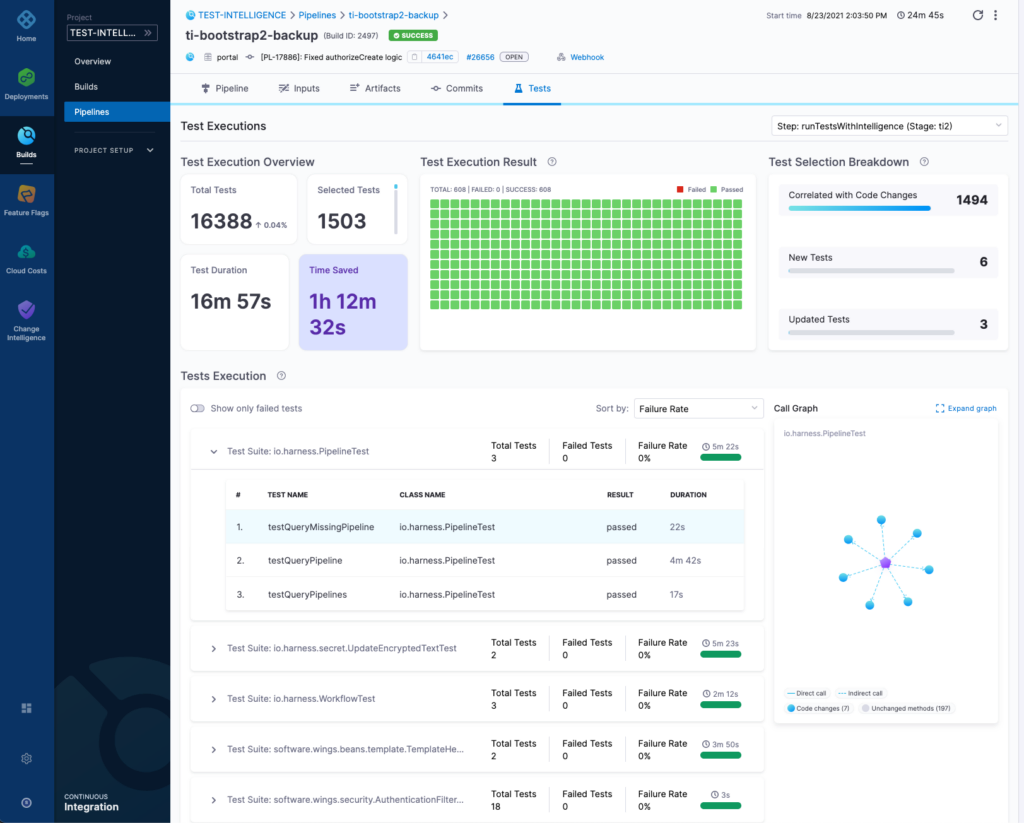
Harness CI Test Intelligence dashboard showing test selection breakdown, execution overview, and time saved

Harness also provides a full visualization of the Test Graph, so users can see why a specific test was selected.

By clicking on a specific test (the purple node), users can see all the classes and methods covered by this test that were changed in this build (the blue nodes), which led to the selection of that test:

Harness Test Graph showing a selected PipelineTest node connected to code changes and unchanged methods

But Wait, There’s More!

To further test the success of Test Intelligence, we wanted to see the savings from common open-source projects. We were able to provide significant savings for each PR cycle on these projects, which further validated our approach. Below were the results that we found:

A table showing cost savings of Harness <a href=
Continuous Integration Test Intelligence with common open-source projects">Cost savings of Harness Continuous Integration Test Intelligence with common open-source projects

What’s Next

We are currently working on expanding the languages that Test Intelligence supports, as of this blog post, it only supports Java. In addition, we’re designing and doing research on many things - test ordering (to reduce time to the first failure), flaky test detection and mitigation, supporting local builds, and more! We’d love to hear from you on what your challenges are when it comes to testing - and CI/CD bottlenecks in general. Please feel free to send us an email and we can discuss further.

If you are interested in trying Test Intelligence, it is available as part of our CI Enterprise free trial - sign up and give it a spin! 

← Previous:
Next: →

Related Resources

Continuous Integration Best Practices

Continuous Integration

Continuous Integration Best Practices

August 5, 2024

Chinmay Gaikwad

+ more
Time to Read

Continuous Integration (CI) is a software development practice where developers frequently integrate their code changes into a shared repository. Each integration triggers an automated build and test process, allowing teams to detect and address issues early in the development cycle. The main goal of CI is to ensure that the software remains functional and high-quality by continuously validating code changes through automated testing.

Commit early, commit often

Continuous Integration (CI) should lead to more minor code changes by encouraging developers to merge their work into the main codebase frequently. This practice promotes a workflow where changes are made incrementally rather than in large, infrequent batches.

Read the documentation 

Continuous integration implementation varies from vendor to vendor. So, it is important to read the vendor-specific documentation to understand how you can implement your ideal pipelines.

Optimize pipeline stages

Run multiple pipeline stages concurrently to make the most of available resources and reduce overall build times. Harness allows you to configure your pipeline to execute independent stages in parallel, which can significantly speed up the CI process.

Properly allocate resources to different stages to ensure that no single stage becomes a bottleneck. By optimizing resource usage, you can prevent delays and improve the throughput of your CI pipeline.

Make builds fast and simple

Run only unit tests that are associated with the corresponding code changes. Execute tests in parallel to reduce the time required for test completion.

Instead of rebuilding the entire codebase, use incremental builds to compile and test only the parts of the code that have changed. This approach reduces build times and makes the pipeline more efficient. Utilize caching mechanisms to store intermediate build artifacts and dependencies.

CI should support the growth of the codebase and accommodate increased development velocity. This way, it ensures that the integration process remains smooth and manageable as more developers join the project. This scalability is essential for handling larger projects and teams​.

Use failures to improve processes

Automate the integration and testing processes to reduce the chances of human error and ensure consistent and repeatable procedures. This consistency minimizes the risk of critical issues reaching production​. 

CI should provide immediate feedback on code changes through automated testing and deployment. This rapid feedback loop encourages iterative development and empowers developers to improve their code based on real-time insights.

The test environment should mirror the production

Ensuring that the test environment mirrors the production environment is a critical best practice in CI/CD pipelines. This alignment helps to minimize discrepancies and potential issues that could arise when building and deploying applications into production. 

By testing in an environment that mimics production, the results of automated tests are more reliable and relevant, reducing false positives and false negatives.

When the test environment is identical to production, issues encountered in production can be more easily reproduced and diagnosed in the test environment, speeding up the troubleshooting process.

A mirrored environment allows for comprehensive security testing that accounts for the same configurations and setups as in production, ensuring that security vulnerabilities are identified and mitigated early.

Learn more about CI best practices with Harness

Harness CI is designed to accelerate builds securely. Harness CI Intelligence features include Test Intelligence (where tests to run are selected based on code changes), Cache Intelligence (where dependencies such as libraries and packages are cached), Docker Layer Caching (where unchanged layers of a Docker image are cached), and Build Intelligence (where build outputs are cached to be reused in future builds).

Harness CI also provides root cause analysis for build failures and issues using AI. This helps fix pipelines quickly.

Harness enables you to add templates to create reusable logic and Harness entities (like steps, stages, and pipelines) in your pipelines. You can link templates in your pipelines or share them with your teams for improved efficiency. Templates enhance developer productivity, reduce onboarding time, and enforce standardization across the teams that use Harness.

Conclusion

The Ideal Continuous Integration (CI) process is essential for maintaining software functionality and quality. It is used frequently to integrate code changes into a shared repository and validate these changes through automated testing. The practice encourages small, incremental changes, optimizes pipeline stages to reduce build times, uses incremental builds and caching to enhance efficiency, and ensures the test environment mirrors production to minimize discrepancies and facilitate reliable testing. Additionally, CI supports rapid feedback and iterative development, automates processes to reduce human error, and leverages tools like Harness CI to accelerate and secure builds while providing advanced features like Test Intelligence, Cache Intelligence, and AI-driven root cause analysis.

More on Continuous Integration

Top Continuous Integration Tools
Implementing CI/CD Efficiently
Trigger Based Pipeline Automation
Integrating Automated Security Testing
Unlocking the Benefits of Continuous Integration for Agile Teams
Continuous Integration Tools

Continuous Integration

Continuous Integration Tools

September 11, 2024

Chinmay Gaikwad

+ more
Time to Read

Pillars of continuous integration

Continuous Integration (CI) is built on several key pillars that ensure the smooth and efficient integration of code changes during software development.

Version Control

Using a version control system like Git is foundational. Developers work in separate branches and merge changes frequently to avoid conflicts and ensure team-wide collaboration. Regular code reviews help ensure code quality, while continuous refinement of the CI pipeline improves efficiency over time.

Build automation

An automated build process should be triggered every time code is committed. This ensures the code is compiled, tested, and validated continuously without manual intervention. Immediate feedback loops, such as build status updates and notifications, help developers quickly identify issues and ensure a stable build.

Automated testing

Comprehensive automated testing (including unit, integration, and security tests) is crucial. Running these tests as part of the CI process allows teams to catch bugs early and maintain code quality.

Automated Deployments

Provide pre-built integrations and templates for popular tools and platforms to minimize the need for custom scripting. This allows teams to get up and running quickly without the overhead of extensive configuration and maintenance.

Continuous Integration Tools Comparison

Harness CI

Harness CI is designed to accelerate your builds and tests, providing lightning-fast performance through intelligent caching and optimized cloud builds. With Harness' Test Intelligence, you can optimize your test execution, focusing on the most critical tests and reducing feedback cycle times. With Harness Cache Intelligence, Docker Layer Caching, and Build Intelligence, you can cache all the relevant parts of the build - software dependencies, docker layers, and build outputs. 

Jenkins

Jenkins is a very useful tool, and it does many things well. But ultimately, as you scale up, you start seeing the limitations of building anything on top of Jenkins in the form of maintenance, toil, and outages. 

When we discuss Jenkins, the most important things we want to highlight are the return on investment and total cost of ownership. If you’re a small company with a handful of services, Jenkins can be a great return on investment. However, when you start scaling up use cases, services, developers, and more, your return on each hour invested tends to decrease at an exponential rate. 

GitHub Actions

GitHub Actions is a continuous integration and continuous delivery (CI/CD) platform. It enables users to automate various GitHub events, such as cloning a repository, generating Docker images, and testing scripts. It will kick off workflows with GitHub events like push, issue creation, or a new release. For example, you can create a workflow to run automatically to add the appropriate labels whenever someone creates a new issue in your repository, or you can develop one to set environment variables whenever someone kicks off one or more jobs. Learn more about GitHub Actions' pros and cons.

GitLab CI

GitLab offers a thorough software delivery platform with a core open-sourced version and features that are available for purchase. GitLab would like to be the single source of truth for CI/CD at an organization. All the software delivery fundamentals exist here, but the tool lacks advanced governance features such as automatic verification and automatic rollbacks.

The difficulty with GitLab is its all-or-nothing model. If you want to use any of the GitLab tools, you need to use all of the GitLab tools. So, if your team is opinionated when it comes to the tools they use, you’ll have to convince them to leave behind what’s familiar and switch to something new. GitLab CI provides basic caching to speed up builds.

CircleCI

CircleCI was founded in 2011 to help organizations get to market faster, with improved engineering team productivity and product quality. Boasting 1 million+ application builds a day, CircleCI enables engineering teams with automation for their software builds, tests, and deployments. CircleCI is a point solution mainly for CI with immature CD capabilities. More tools will need to be integrated within the tech stack to achieve the same results. While providing a large number of compute and execution environments, CircleCI users suffer from security and stability issues, a lack of pricing transparency, and a lack of governance.

What is the Best CI Tool For Your Company?

When choosing a Continuous Integration (CI) tool, consider several key factors to ensure the tool meets your team's needs:

  1. Ease of Use: Look for tools that offer a user-friendly interface and easy configuration. Some tools, like Harness, emphasize minimizing scripting requirements, which can streamline the setup process.
  2. Integration Capabilities: Ensure the CI tool integrates well with other essential platforms your team uses (e.g., Git, Jira, cloud services like AWS or GCP). Tools like Harness, GitLab, and Codefresh offer extensive integrations with these ecosystems.
  3. Scalability: As your team grows, your CI tool should scale with you. Some tools, like Jenkins, provide excellent flexibility but may require more manual configuration to scale efficiently. Others, like Harness, aim for out-of-the-box scalability with minimal additional setup.
  4. Cost: Some CI tools offer free tiers or open-source options (e.g., Jenkins or Travis CI), while others, like Harness, provide more enterprise-level features for larger teams and projects, which may come at a higher price.
  5. Governance and Security: Tools should offer robust security features such as role-based access control (RBAC), single sign-on (SSO), and secrets management. For example, Harness provides these as standard features, which are crucial for compliance and security audits.
  6. Automation & Speed: Look for tools that automate as much of the process as possible. Harness uses AI to help with deployment verification and rollback automation, which can be a big time-saver.

Choosing the right tool depends on your specific project size, budget, and desired feature set​.

Get Started with Harness CI

At Harness, we ensure we deliver all these benefits to customers using intelligent features such as Test Intelligence, Cache Intelligence, and Hosted builds. Try Harness CI today!

Checkout Harness Continuous Integration

Learn more: Unlocking the Benefits of Continuous Integration for Agile Teams, CI/CD Tools: The basics

Get Started

Get Started with Harness AI

Try the full platform free. No module restrictions, no credit card.

Uri Scheiner
General Manager & SVP
Since the Digital Transformation - our lives are completely online - and in order to deliver smooth, uninterrupted services and apps while constantly improving user experience and quality of their offerings - companies MUST adopt Continuous Delivery/Testing solutions
uri-scheiner
Uri Scheiner