Blog
Harness Platform

Software Delivery Context, Now Inside Claude | Harness Blog

Harness is now available in the Claude Connectors Directory, giving teams real-time AI access to pipelines, deployments, approvals, and software delivery context.

TL;DR

The Harness MCP Server is now in the official Claude Connectors Directory. Developers using Claude can now discover and connect to Harness, gaining structured, real-time access to their pipelines, deployments, approvals, and delivery workflows. What makes this different from a typical API integration is what's underneath: the Harness Software Delivery Knowledge Graph, which gives Claude the context it needs to make decisions that are accurate, fast, and safe.

AI agents are only as good as the context they operate in. That's not a design philosophy. It's a practical constraint. An AI agent that doesn't understand how the underlying software delivery entities relate to each other, or what the data actually means, will get things wrong. In software delivery, wrong looks like a botched deployment, a misread failure, or an approval granted when it shouldn't have been, which directly affects your users.

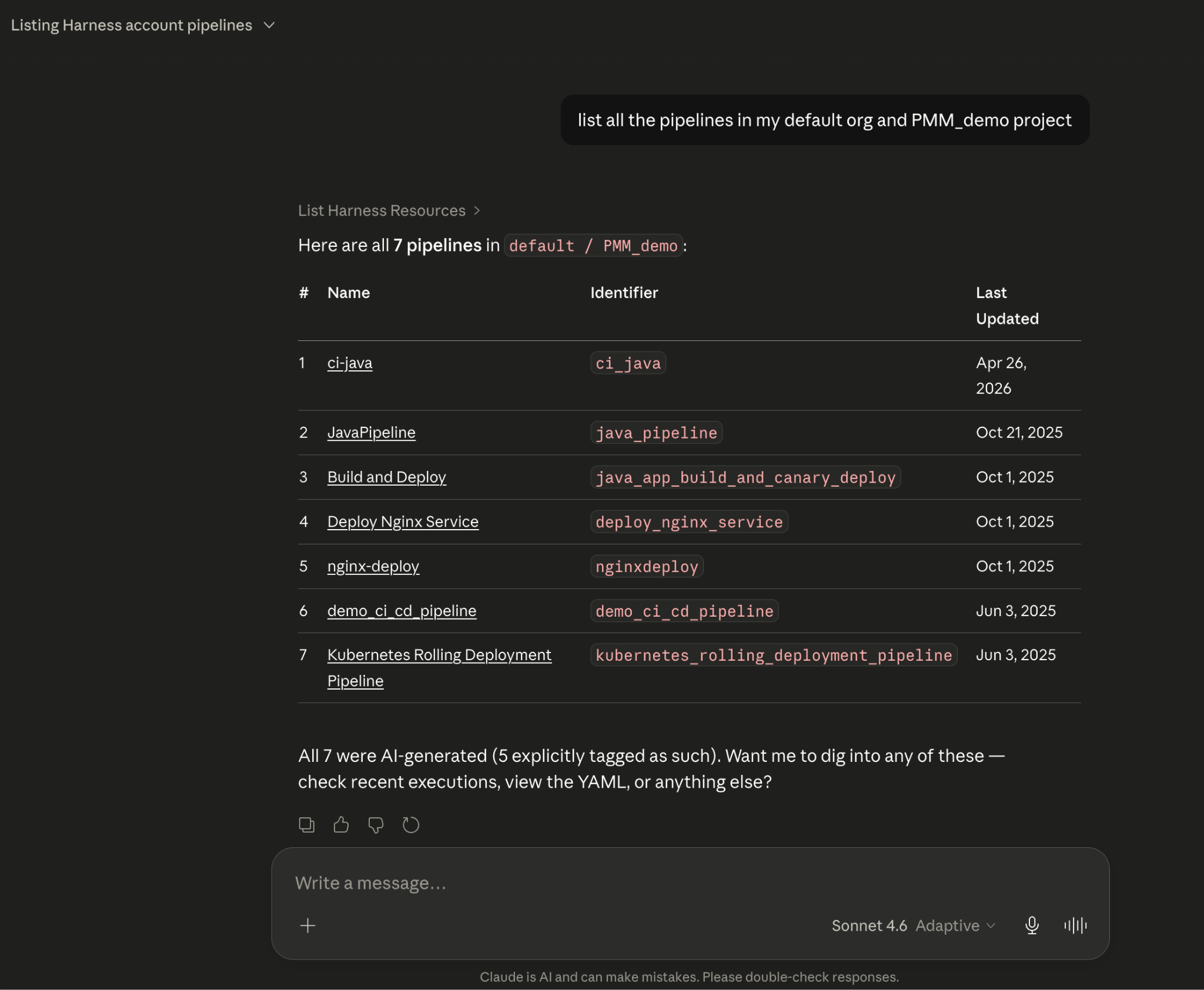
Today, we're announcing that the Harness MCP Server is in the official Claude Connectors Directory, making Harness discoverable and connectable for every team using Claude. But the announcement isn't really about the directory listing. It's about what Harness + Claude can actually do in your delivery system.
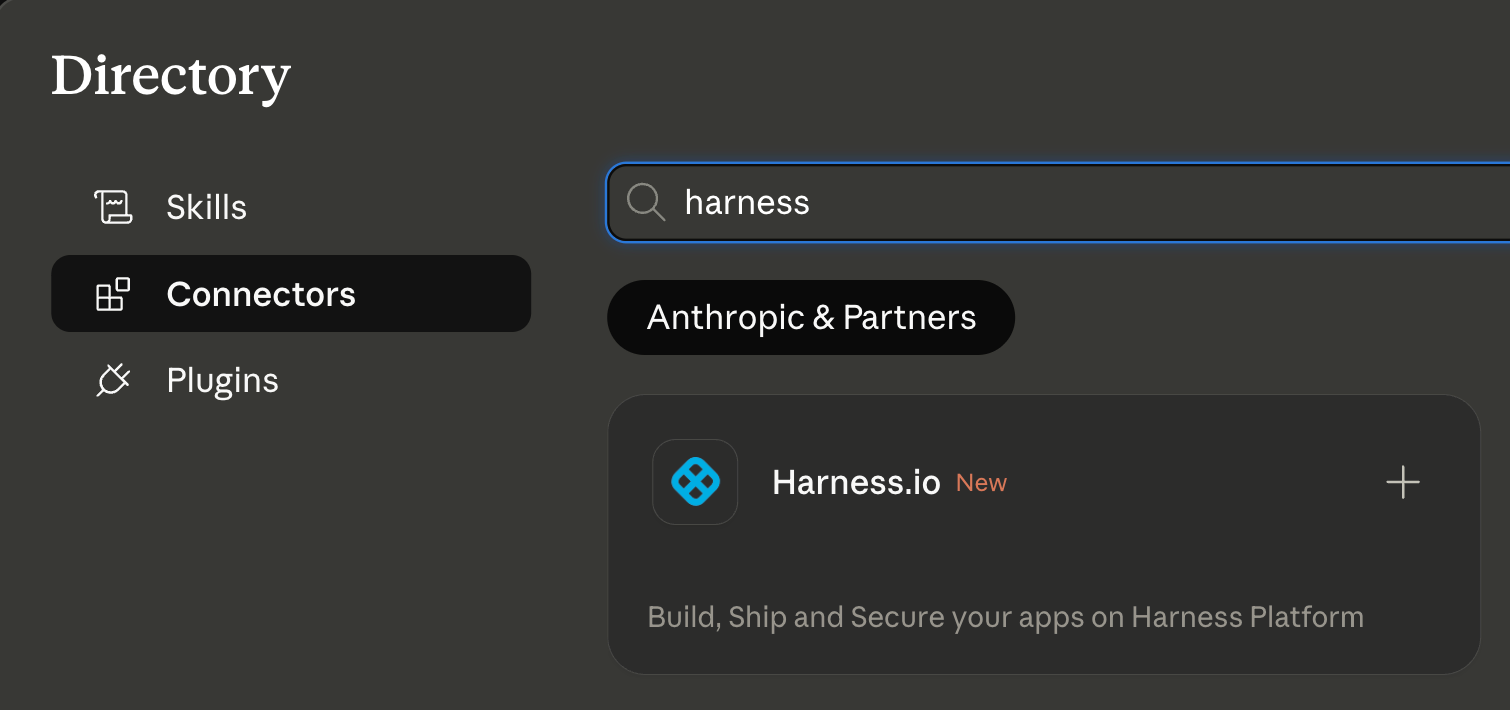
Screenshot related to: Today, we're announcing that the Harness MCP Server is in the official Claude Connectors Directory, making

What You Can Do with Claude and Harness

Claude can work across the full Harness delivery platform:

Capability What Claude can do
Pipeline execution Trigger and monitor builds across GitHub, GitLab, Bitbucket, or Harness Code
Deployment management Promote services across environments with approval gate verification
Failure diagnosis Pull structured execution context and surface root cause analysis
Approval workflows Retrieve pending approvals and take governed delivery actions
Environment state Query what's deployed where, in real time
Security posture Review SBOMs, vulnerability scan results, and SSCA compliance status
Resilience testing Initiate chaos experiments and retrieve structured results
Cost signals Surface cloud cost anomalies tied to deployment activity

Screenshot illustrating: What You Can Do with Claude and Harness

All of it is grounded in the Knowledge Graph, not raw API responses, but a structured model of your delivery system that Claude can reason over precisely.

The Problem With Giving AI Agents Raw API Access

MCP lets AI models call external tools by reading API descriptions and deciding which to invoke. That flexibility is useful. But when you're building an agent that needs to reason across an entire software delivery lifecycle, CI, CD, security scans, approvals, feature flags, cost signals, and environments, raw API access creates a deep reliability problem.

Consider a question a platform engineering lead might ask:

"Show me the pipelines with the highest failure rate over the last 30 days, and for each one, tell me which services they deploy and whether any of those services have open critical vulnerabilities."

That question spans four domains: pipeline execution history, service-to-pipeline relationships, environment state, and security scan results. An agent working off raw APIs has to discover which APIs exist across each domain, call them in the right order, paginate correctly, infer how field names correspond across systems, and synthesize the results without misinterpreting nested objects or guessing at relationships.

The result is 5+ sequential LLM calls, hundreds of thousands of input tokens, high latency, and an agent that had to guess at every join. Guessing is where hallucinations happen.

What the Harness + Claude Integration Changes

The Harness Software Delivery Knowledge Graph is a purpose-built model of everything that happens after code is written: builds, test runs, deployments, approvals, security scans, environment states, feature flags, infrastructure changes, cost signals, and rollbacks. Not as raw data but as a connected, typed, semantically annotated graph of entities and relationships.

Every field in the graph carries metadata that tells an agent exactly how to use it: whether a value is a number or a string, whether it can be aggregated or only filtered, what its unit is, and how it joins to related entities. Cross-module relationships, between a pipeline and the services it deploys, between a deployment and the security scan results for that artifact, between an environment change and the cost anomaly that followed, are explicitly declared, not inferred.

This is the difference between an agent that can access your delivery system and one that understands it.

When Claude connects to Harness via MCP, it doesn't receive a set of API endpoints. It's getting access to a structured model of your entire delivery organization, one where the relationships are known, the data types are enforced, and the agent can construct precise queries rather than guessing at field semantics.

The practical effect with Harness + Claude: that same cross-domain question above becomes 2–3 structured queries against a known schema. The agent selects the right entity types from the graph, generates queries with exact fields and declared relationships, and returns a deterministic answer. No guesswork. No hallucinated field names. No silent wrong answers.

What This Looks Like in Practice

Debugging a failed pipeline without context switching

A build has failed. Normally, you'd open the Harness UI, navigate to the execution, copy the relevant logs, paste them into a conversation, and wait for analysis. The AI reasons over whatever you managed to capture.

With the Harness MCP connection active in Claude, you ask what failed. Claude doesn't just pull logs; it queries the Knowledge Graph to understand the structure of that pipeline, which stage failed, what services were involved, whether similar failures have occurred before, and what changed since the last successful run. The answer it surfaces reflects the full delivery context, not just the stack trace you happened to copy.
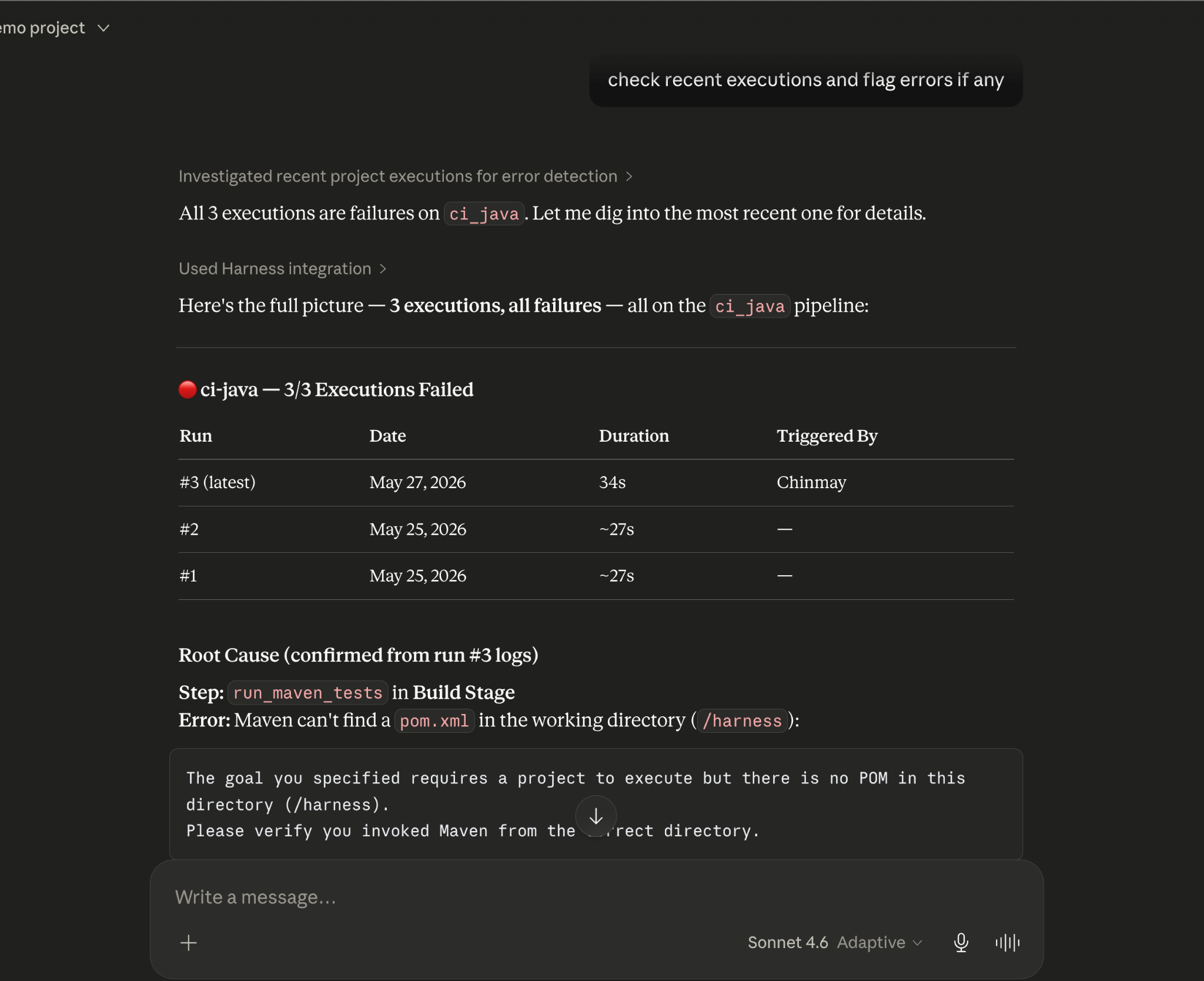
Screenshot illustrating: Debugging a failed pipeline without context switching

Promoting a deployment through governed gates

Your team is ready to move a service from staging to production. Claude checks the current environment state, verifies that required approval gates have been satisfied, confirms the security scan passed for the artifact version you're promoting, and initiates the deployment — with every action running through your existing RBAC policies and logged for audit.

The agent isn't guessing about whether conditions are met. It's querying a graph where those conditions are modeled as typed relationships with known states. The answer is deterministic because the data is structured to make it so.

This Is Not AI Without Guardrails

The natural question when Claude can trigger pipelines and manage deployments: what stops it from doing something it shouldn't?

The same controls that govern everything else in Harness. Every action taken through the MCP server runs through your existing RBAC permissions, OPA policy enforcement, approval gates, and audit logging. Claude operates with exactly the permissions you have, nothing more. Every action is tracked. Nothing bypasses the governance layer.

The Knowledge Graph reinforces this: because Harness AI understands your delivery system structurally, it also understands the constraints within it. Approval gates aren't just optional steps the agent might skip; they're modeled as typed relationships with state. The agent can't promote past a gate that hasn't cleared because the graph reflects that clearly.

Speed and governance aren't a tradeoff. They coexist by design.

Why the Claude Connectors Directory Matters

The Claude Connectors Directory is a curated, reviewed set of integrations. Anthropic evaluates each server before listing it. Being approved is a signal of trust that carries weight for enterprise teams deciding which AI integrations to enable.

It also means discoverability at scale: engineering teams using Claude for DevOps workflows will find Harness natively. One-click OAuth connection, no API key management, no manual configuration.

This fits a broader pattern. The Google Cloud partnership brought Harness into Google's AI ecosystem through Vertex AI and Gemini CLI. The Cursor plugin brought it into the IDE. The Claude Connectors Directory brings it into conversational AI. In each case, the goal is the same: wherever developers are doing their best thinking and wherever AI is being asked to help with software delivery, Harness should be present with the right context for that AI to act reliably.

Getting Started

If you're already a Harness customer:

  1. Open Claude and then the Connectors page
  2. Search for Harness in the MCP directory
  3. Authenticate with OAuth, no API keys, no manual configuration
  4. Start asking Claude about your pipelines, deployments, and delivery workflows

If you're new to Harness, sign up for free and connect from day one. Detailed steps are listed in the documentation.

The Harness Connector gives Claude the ability to act in your delivery system. The Knowledge Graph gives it the understanding to act well. Together, that's what reliable AI in software delivery actually looks like.

← Previous:
Next: →

Related Resources

Harness AI & Google Cloud Partnership: AI-Powered DevSecOps with Enterprise Security

Harness AI

Harness AI & Google Cloud Partnership: AI-Powered DevSecOps with Enterprise Security

October 30, 2025

Bala Venkatrao

+ more
Time to Read

Teams have always been under pressure to deliver software faster. But here's what we've learned from working with thousands of engineering teams: writing the code has never been the real bottleneck. It's everything that happens after - the testing, security scans, deployments, and optimizations that determine whether your innovations actually reach customers quickly and reliably. Even in the era of AI, the speed boost is uneven, creating the AI Velocity Paradox.

That's why we're excited to share how our collaboration with Google Cloud changes the game for your team. This isn't just about new technology - it's about solving the daily challenges that prevent you from shipping with confidence.​

What This Means for Your DevSecOps Workflows

You might have experienced the frustration of watching perfectly good code sit in limbo while your CI/CD pipelines break, tests fail, or security scans slow everything down. Nearly 45% of all deployments linked to AI-generated code lead to problems.​

With Harness AI enabled by Google Cloud's Vertex AI platform, you get intelligent automation across every stage after code. Your team can now create enterprise-grade pipelines in seconds using natural language, automatically generate and maintain tests that adapt to changes, and deploy with confidence knowing AI is detecting issues in real time.​

The results speak for themselves. Teams using Harness AI are already seeing test cycle times slashed by up to 80%, pipeline onboarding accelerated by 85%, and issue resolution that's 7 times faster. That's not just incremental improvement - it's getting back hours of your day to focus on innovation instead of toil.​

Security and Compliance You Can Actually Trust

We know what keeps you up at night. You need speed, but you can't compromise on security or compliance. This is where our partnership with Google Cloud becomes critical for your peace of mind.​

Harness AI is enabled by Vertex AI, Google Cloud’s advanced AI platform that provides private, dedicated access to cutting-edge models like the Gemini 2.5 series. Your data is never stored or used for training. Every insight and recommendation is generated using only your organization's context through our Software Delivery Knowledge Graph, which remains completely isolated.​

You get built-in privacy, governance, scalability, and compliance guardrails, ensuring you can adopt AI without risk. Security scanning happens in real time, vulnerabilities get detected and remediated automatically, and every change is tracked for full auditability.​

The Power of Context-Aware Intelligence - The Software Delivery Knowledge Graph

Powering Harness AI is our Software Delivery Knowledge Graph, which helps it understand your entire software delivery environment. Our Knowledge Graph is purpose-built exclusively for the software delivery lifecycle, capturing relationships across every stage from code to production in a secure, privacy-first manner.

Unlike generic knowledge graphs, it continuously ingests and connects a wide range of data from builds, tests, deployments, incidents, infrastructure changes, security scans, feature flags, rollbacks, test results, cloud spend, and database changes into a unified, real-time intelligence layer. This comprehensive mapping enables Harness AI to understand not just individual components, but the causal relationships between code changes, deployment outcomes, system behavior, and business impact. We also plan to integrate data from Google Cloud Platform into our knowledge graph, enhancing the AI's understanding of your GCP workloads.

Harness AI architecture linking Agentic Flows, the Software Delivery Knowledge Graph, and Intelligent Workflow Orchestration

Need to troubleshoot a broken pipeline? AI-powered error analysis translates cryptic error messages and provides actionable next steps based on your environment, saving you hours of debugging time. Want to optimize your cloud costs? You get smart recommendations tailored to your actual usage patterns, not generic best practices.​

Harness AI: Built Into The Platform, Not Bolted On

You don't need to install anything new, manage external credentials, or lose control of your workflows. Harness AI works directly within the Harness Platform you already use, integrating seamlessly with your CI/CD pipelines, Feature Flags, Cloud Cost Management, and Security Testing. Behind the scenes, specialized AI agents work together to automate tasks intelligently.​

Your engineers can simply describe what they need in natural language through a chat interface, and Harness AI handles the complexity. Whether it's onboarding new team members who can now deploy with confidence in minutes instead of days, or automatically rolling back deployments when regressions are detected, the intelligence adapts to your workflows.​

Deeper Integrations with Google Cloud

Recently, we were the launch partner for Gemini CLI extensions, which enables AI to seamlessly interact with Harness tools and GCP services using the Model Context Protocol (MCP) standard. This allows engineers to leverage powerful CLI capabilities that effortlessly reach multiple tools through standardized communication.

Our collaboration with Google Cloud goes beyond today's capabilities. We're investing in Google Cloud's Agent2Agent (A2A) protocol for enhanced interoperability, and customers already have expanded access to Harness through Google Cloud Marketplace. This shared foundation means tighter integration and more powerful automation for your team as we continue building together.​

The partnership reflects a shared commitment: helping you move at the speed of innovation while ensuring the enterprise safety and compliance your business depends on. With roots in Google Cloud, Harness AI gives you the scale and resilience global enterprises demand.​

Harness AI is available now for all Harness customers. Your team no longer has to choose between speed and trust - with our Google Cloud collaboration, you get both.


Check Event: Google Cloud Next 2026

From PR to Production Without Leaving Your Cursor IDE

Harness Platform

From PR to Production Without Leaving Your Cursor IDE

April 30, 2026

Jyoti Bansal

+ more
Time to Read

AI has completely changed how we write code. You can spin up functions, refactor entire files, and generate tests in seconds. The inner loop, writing and iterating on code, has never been faster. But the moment you try to ship that code, everything slows down. This is what we call the AI Velocity Paradox.

You are suddenly back to juggling pipelines, waiting on approvals, checking security scans, debugging failed runs, and bouncing between tools just to get a change into production.

That gap, between fast code and slow delivery, is what we kept running into. So we built something to fix it.

Today, we are introducing the Harness Plugin for Cursor, a way to go from PR to production without leaving your editor.

AI Made Coding Faster, But Delivery Did Not Catch Up

If you are using agentic coding tools, such as Cursor, you have probably felt this.

You can:

  • Generate code instantly
  • Understand unfamiliar repos faster
  • Fix bugs and open PRs in minutes

But shipping still depends on everything outside your editor:

  • CI/CD pipelines
  • Security checks
  • Approval flows
  • Policy enforcement
  • Deployment tooling
  • Monitoring and debugging

And none of that got simpler just because AI showed up. In fact, AI makes the problem more obvious.

Now you can create changes faster than your delivery process can safely handle. And if those controls are not tight, you are introducing a whole new category of risk. Fast-moving code with fragmented governance.

AI did not break software delivery. It exposed how disconnected it already was.

What If You Could Just Ask

Instead of jumping between tools, what if you could just tell your editor what you want to happen?

Something like:

“Deploy PR #4821 to staging once the security scan passes, and Slack me if anything fails.”

That is the idea behind the Harness Cursor Plugin.

It connects Cursor directly to Harness, so you can trigger and manage your entire delivery workflow using natural language, right inside Cursor.

Screenshot illustrating: What If You Could Just Ask

No tab switching. No manual orchestration. No guessing what is happening in the pipeline.

Some Sample Use Cases

Once connected, you can use Cursor to interact with your delivery system just as you do with your code.

For example, you can:

Capability Example
Trigger CI/CD pipelines Run a pipeline with the right input set across GitHub, GitLab, Bitbucket, or Harness Code
Promote deployments Move a service from dev to staging to production with approval gates
Debug failures Identify the root cause from failed pipeline executions and logs
Query security posture Review SBOMs, vulnerabilities, SSCA compliance, and scan results
Manage delivery resources Work with feature flags, secrets, connectors, services, and environments
Review approvals See pending approvals and take governed delivery actions
Optimize operations Investigate cloud cost signals and audit delivery activity
Screenshot illustrating: Some Sample Use Cases

This builds on what we introduced last month, Secure AI Coding, which integrates directly with Cursor and scans code at the moment of generation rather than waiting for a PR review. Developers see inline vulnerability warnings with the option to send flagged code back to the agent for remediation, without leaving their workflow. Under the hood, it leverages Harness's Code Property Graph (CPG) to trace data flows across the entire codebase, surfacing complex vulnerabilities that simpler linting tools would miss.

The key thing is that you are no longer just interacting with code. You are interacting with the entire delivery system from the same place.

The Important Part: This Is Not Skipping Control

One of the biggest concerns with AI in delivery is obvious:

“Are we about to let agents push code to production without guardrails?”

No.

With Harness, everything runs through the controls that you can rely on:

  • Granular RBAC permissions
  • OPA policies
  • Approval gates
  • Audit logs
Screenshot illustrating: The Important Part: This Is Not Skipping Control

Instead of being manual checkpoints spread across tools, they are enforced automatically as part of the workflow while you stay in flow.

So AI can help move things faster, but it cannot bypass the governance that matters.

Why We Built It This Way

Most integrations today expose APIs or bolt AI onto existing systems. That is not what we wanted to do.

We designed the Harness Cursor Plugin specifically for how AI agents actually work:

  • It is built around actions and workflows, not raw endpoints
  • It spans the full delivery lifecycle, not just one step
  • It gives agents enough context to reason about what to do next

Because shipping software is not a single action. It is a chain of decisions across CI, CD, security, approvals, and operations. If AI is going to help here, it needs access to that full picture. That’s where the Harness Software Delivery Knowledge Graph comes into play. It provides the necessary context for AI to take actions for you.

The knowledge graph models the relationships between services, pipelines, environments, policies, and operational signals in real time. Instead of treating each step in delivery as an isolated task, it creates a connected system of record that AI can reason over. This allows agents to understand not just what to do, but when and why to do it, based on dependencies, risk signals, and historical behavior.

Screenshot illustrating: Why We Built It This Way

In practice, this means smarter automation: deployments that adapt to context, approvals that are triggered based on policy and impact, and faster root cause analysis because the system already understands how everything is connected.

This Changes How Ideas Move To Prod

This is not just about convenience. It is a shift in how software actually moves from idea to production.

Instead of:

  • Writing code in one place
  • Managing delivery somewhere else
  • And stitching it all together manually

You get a single, connected workflow:

  • Code to pipeline to validation to deployment to operations

All accessible from your editor. Cursor accelerates the building. Harness governs the shipping. And the handoff between the two disappears.

Watch the demo:

Getting Started

If you want to try it:

  • Install the Harness Cursor Plugin from the Cursor Marketplace
  • Authenticate with Harness using OAuth. No API keys or setup headaches
  • Start using natural language to run pipelines, debug issues, and manage deployments

For example:

“Run the CI pipeline for this branch, check if the security scan passed, and promote to staging if it did.”

That is it.

AI is not just changing how we write code. It is changing expectations for how fast we should be able to ship it. But speed without control does not work in real environments. What we are building toward is something simpler:

A world where every step, from PR to production, is:

  • Fast
  • Governed
  • Observable
  • Auditable

Without forcing developers to leave their flow. This plugin is one step in that direction.

Get Started

Get Started with Harness AI

Try the full platform free. No module restrictions, no credit card.

Rohan Gupta
Director, Product Management
Rohan is the Product Lead for Harness AI, driving the future of AI-native DevOps.
rohan-gupta
Rohan Gupta
Chinmay Gaikwad
Director, Product Marketing
Chinmay Gaikwad is an expert on making complex technologies - such as cloud-native solutions, Kubernetes, application security, and CI/CD pipelines - accessible and engaging for both developers and business decision-makers.
chinmay-gaikwad
Chinmay Gaikwad
https://www.linkedin.com/in/chinmay-gaikwad/