The new Harness Cursor Plugin brings AI-native software delivery directly into Cursor, letting developers trigger pipelines, manage deployments, debug failures, and enforce governance using natural language all without leaving the editor.

TL;DR
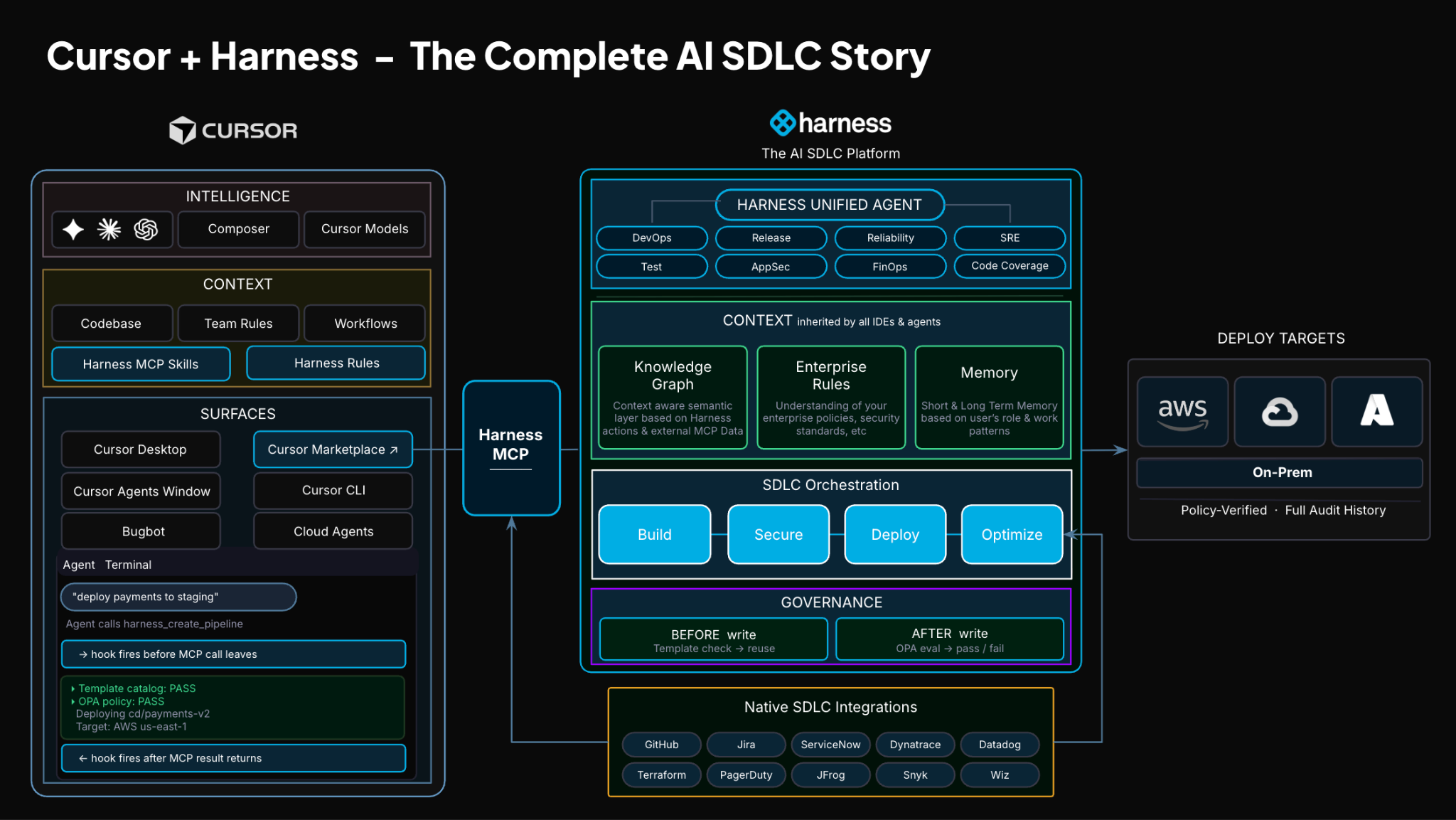
Today, Harness is introducing the Harness Cursor Plugin, bringing the power of the Harness AI-native software delivery platform directly into Cursor. This integration, along with the Harness Secure AI Coding hook for Cursor, allows developers and AI agents to move from code changes to vulnerability detection, CI/CD execution, security validation, approvals, deployments, and operational insight without leaving the editor.
AI has completely changed how we write code. You can spin up functions, refactor entire files, and generate tests in seconds. The inner loop, writing and iterating on code, has never been faster. But the moment you try to ship that code, everything slows down. This is what we call the AI Velocity Paradox.
You are suddenly back to juggling pipelines, waiting on approvals, checking security scans, debugging failed runs, and bouncing between tools just to get a change into production.
That gap, between fast code and slow delivery, is what we kept running into. So we built something to fix it.
Today, we are introducing the Harness Plugin for Cursor, a way to go from PR to production without leaving your editor.
AI Made Coding Faster, But Delivery Did Not Catch Up
If you are using agentic coding tools, such as Cursor, you have probably felt this.
You can:
- Generate code instantly
- Understand unfamiliar repos faster
- Fix bugs and open PRs in minutes
But shipping still depends on everything outside your editor:
- CI/CD pipelines
- Security checks
- Approval flows
- Policy enforcement
- Deployment tooling
- Monitoring and debugging
And none of that got simpler just because AI showed up. In fact, AI makes the problem more obvious.
Now you can create changes faster than your delivery process can safely handle. And if those controls are not tight, you are introducing a whole new category of risk. Fast-moving code with fragmented governance.
AI did not break software delivery. It exposed how disconnected it already was.
What If You Could Just Ask
Instead of jumping between tools, what if you could just tell your editor what you want to happen?
Something like:
“Deploy PR #4821 to staging once the security scan passes, and Slack me if anything fails.”
That is the idea behind the Harness Cursor Plugin.
It connects Cursor directly to Harness, so you can trigger and manage your entire delivery workflow using natural language, right inside Cursor.
No tab switching. No manual orchestration. No guessing what is happening in the pipeline.
Some Sample Use Cases
Once connected, you can use Cursor to interact with your delivery system just as you do with your code.
For example, you can:
| Capability | Example |
|---|---|
| Trigger CI/CD pipelines | Run a pipeline with the right input set across GitHub, GitLab, Bitbucket, or Harness Code |
| Promote deployments | Move a service from dev to staging to production with approval gates |
| Debug failures | Identify the root cause from failed pipeline executions and logs |
| Query security posture | Review SBOMs, vulnerabilities, SSCA compliance, and scan results |
| Manage delivery resources | Work with feature flags, secrets, connectors, services, and environments |
| Review approvals | See pending approvals and take governed delivery actions |
| Optimize operations | Investigate cloud cost signals and audit delivery activity |
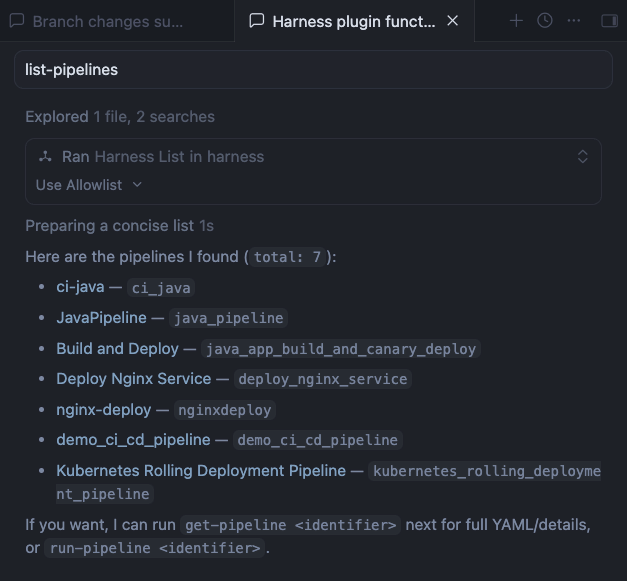
This builds on what we introduced last month, Secure AI Coding, which integrates directly with Cursor and scans code at the moment of generation rather than waiting for a PR review. Developers see inline vulnerability warnings with the option to send flagged code back to the agent for remediation, without leaving their workflow. Under the hood, it leverages Harness's Code Property Graph (CPG) to trace data flows across the entire codebase, surfacing complex vulnerabilities that simpler linting tools would miss.
The key thing is that you are no longer just interacting with code. You are interacting with the entire delivery system from the same place.
The Important Part: This Is Not Skipping Control
One of the biggest concerns with AI in delivery is obvious:
“Are we about to let agents push code to production without guardrails?”
No.
With Harness, everything runs through the controls that you can rely on:
- Granular RBAC permissions
- OPA policies
- Approval gates
- Audit logs
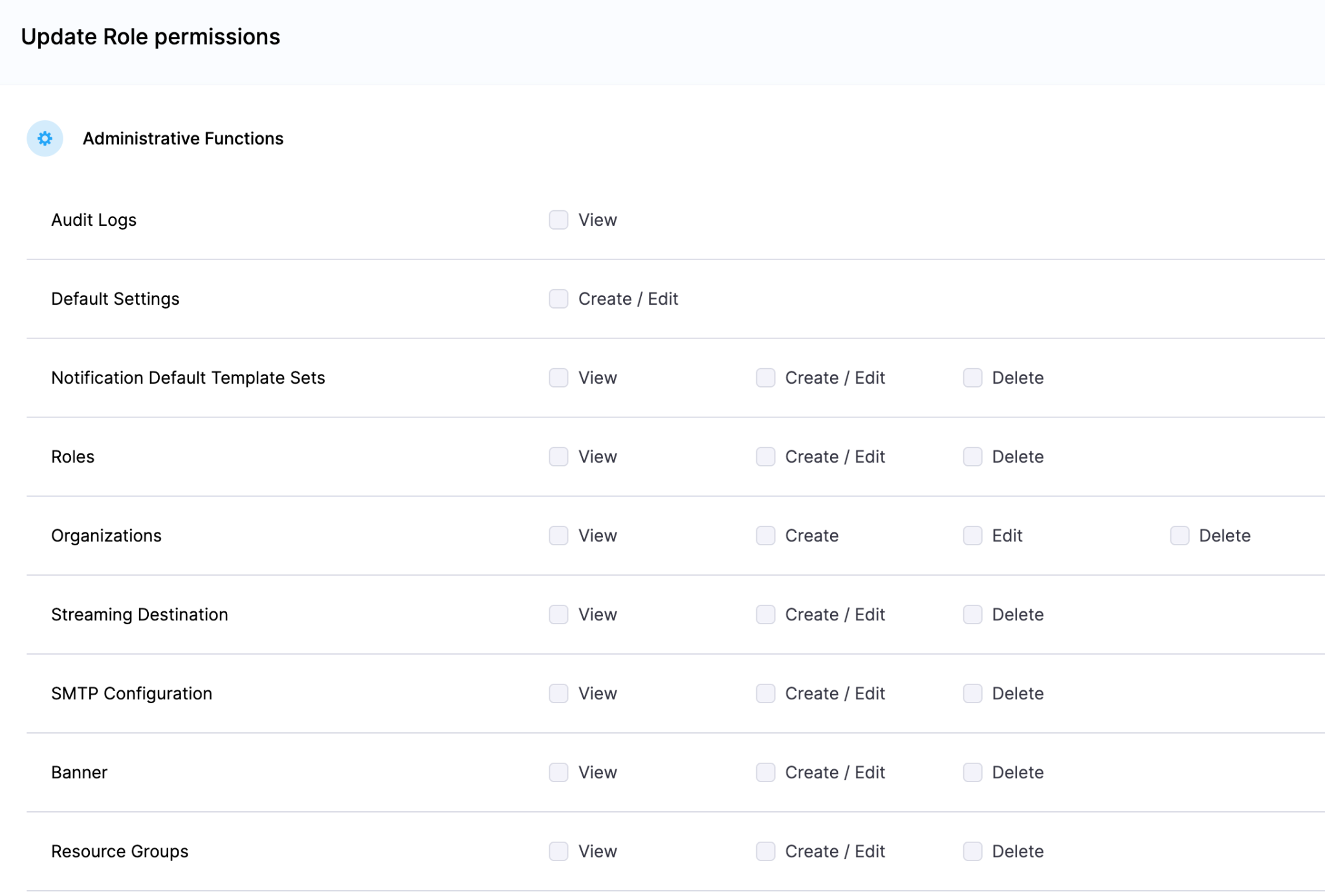
Instead of being manual checkpoints spread across tools, they are enforced automatically as part of the workflow while you stay in flow.
So AI can help move things faster, but it cannot bypass the governance that matters.
Why We Built It This Way
Most integrations today expose APIs or bolt AI onto existing systems. That is not what we wanted to do.
We designed the Harness Cursor Plugin specifically for how AI agents actually work:
- It is built around actions and workflows, not raw endpoints
- It spans the full delivery lifecycle, not just one step
- It gives agents enough context to reason about what to do next
Because shipping software is not a single action. It is a chain of decisions across CI, CD, security, approvals, and operations. If AI is going to help here, it needs access to that full picture. That’s where the Harness Software Delivery Knowledge Graph comes into play. It provides the necessary context for AI to take actions for you.
The knowledge graph models the relationships between services, pipelines, environments, policies, and operational signals in real time. Instead of treating each step in delivery as an isolated task, it creates a connected system of record that AI can reason over. This allows agents to understand not just what to do, but when and why to do it, based on dependencies, risk signals, and historical behavior.
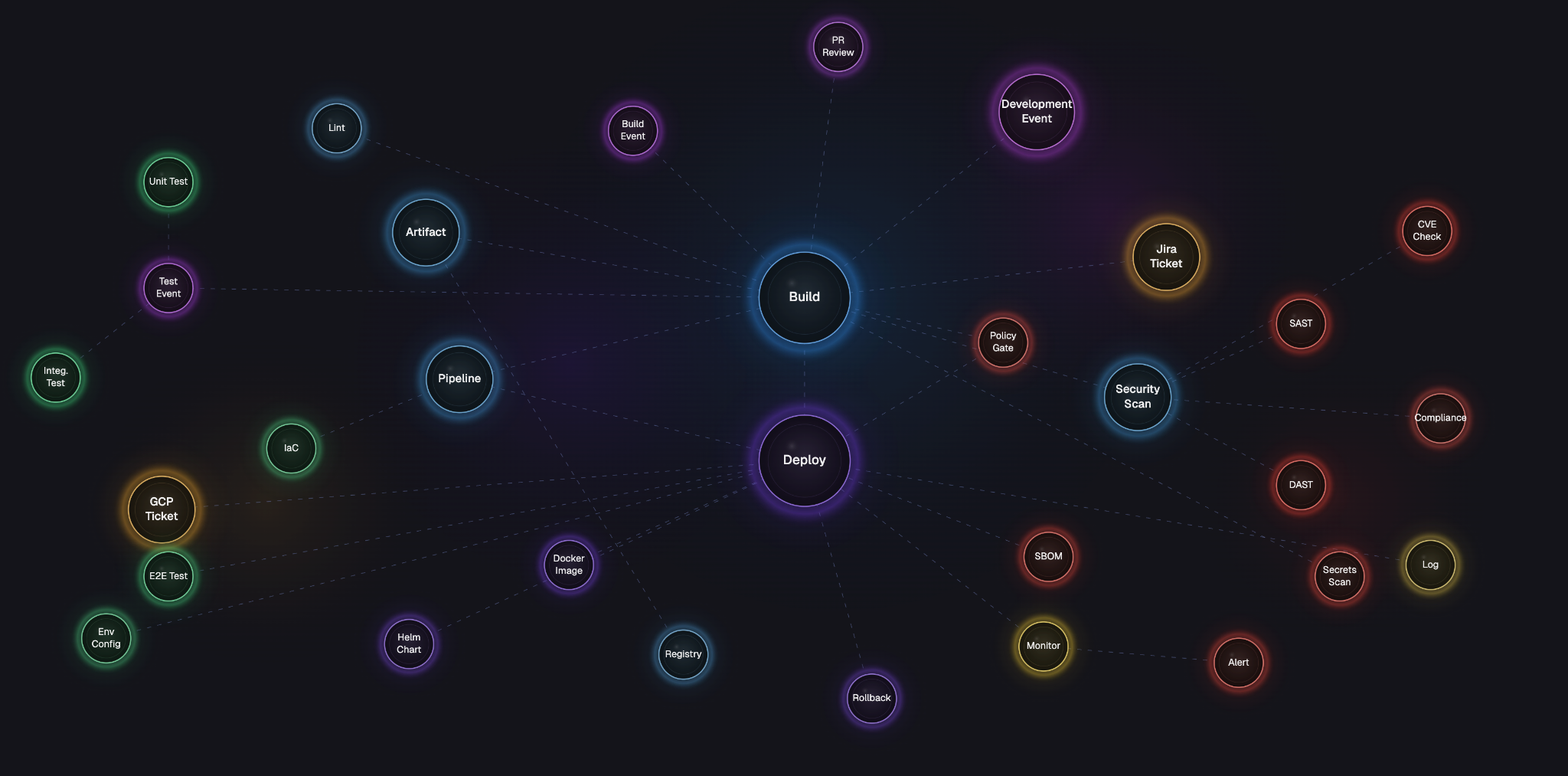
In practice, this means smarter automation: deployments that adapt to context, approvals that are triggered based on policy and impact, and faster root cause analysis because the system already understands how everything is connected.
This Changes How Ideas Move To Prod
This is not just about convenience. It is a shift in how software actually moves from idea to production.
Instead of:
- Writing code in one place
- Managing delivery somewhere else
- And stitching it all together manually
You get a single, connected workflow:
- Code to pipeline to validation to deployment to operations
All accessible from your editor. Cursor accelerates the building. Harness governs the shipping. And the handoff between the two disappears.
Watch the demo:
Getting Started
If you want to try it:
- Install the Harness Cursor Plugin from the Cursor Marketplace
- Authenticate with Harness using OAuth. No API keys or setup headaches
- Start using natural language to run pipelines, debug issues, and manage deployments
For example:
“Run the CI pipeline for this branch, check if the security scan passed, and promote to staging if it did.”
That is it.
AI is not just changing how we write code. It is changing expectations for how fast we should be able to ship it. But speed without control does not work in real environments. What we are building toward is something simpler:
A world where every step, from PR to production, is:
- Fast
- Governed
- Observable
- Auditable
Without forcing developers to leave their flow. This plugin is one step in that direction.