One MCP Gateway lets AI Chat call GitHub, Jira, and Confluence with per-tool permissions, RBAC visibility, and no dropped sessions at scale.

TLDR: When you work in Harness AI Chat, your work doesn't stop at Harness. Your pipelines live here, but the change you actually need to make might be a YAML file in GitHub, a Jira ticket, or a Confluence doc. So we built an MCP Gateway inside Harness that lets AI Chat reach those third-party apps for you: safely, under Harness's own access controls and secrets, and without dropped sessions across our distributed fleet. This is the story of what we built and why.
The problem we set out to solve
Harness is a software delivery platform: pipelines, builds, deployments, and security scans. Harness AI Chat is the conversational agent inside it that can act on your behalf. Our customers live in Harness, pipelines, services, environments, secrets, and connectors. But a lot of the real work, the actual change you need to ship, lives outside Harness: the source of truth for a pipeline change is often a GitHub repo, and the surrounding context lives in Jira, Confluence, and a long tail of other SaaS tools. We wanted Harness AI Chat to act on all of that in one conversation: “sync this YAML, fix this stage, open a PR, update the ticket”, without the user ever leaving the chat.
Doing that safely at Harness scale is hard: thousands of accounts, strict isolation between them, per-user access control, third-party credentials, and connections that can't drop in the middle of a task. Rather than bolt on a workaround, we built a proper piece of infrastructure for it, an MCP Gateway for our own distributed enterprise systems. To the AI agent, all of GitHub, Jira, and Confluence look like a single tool it can call. The Gateway is what makes that possible.
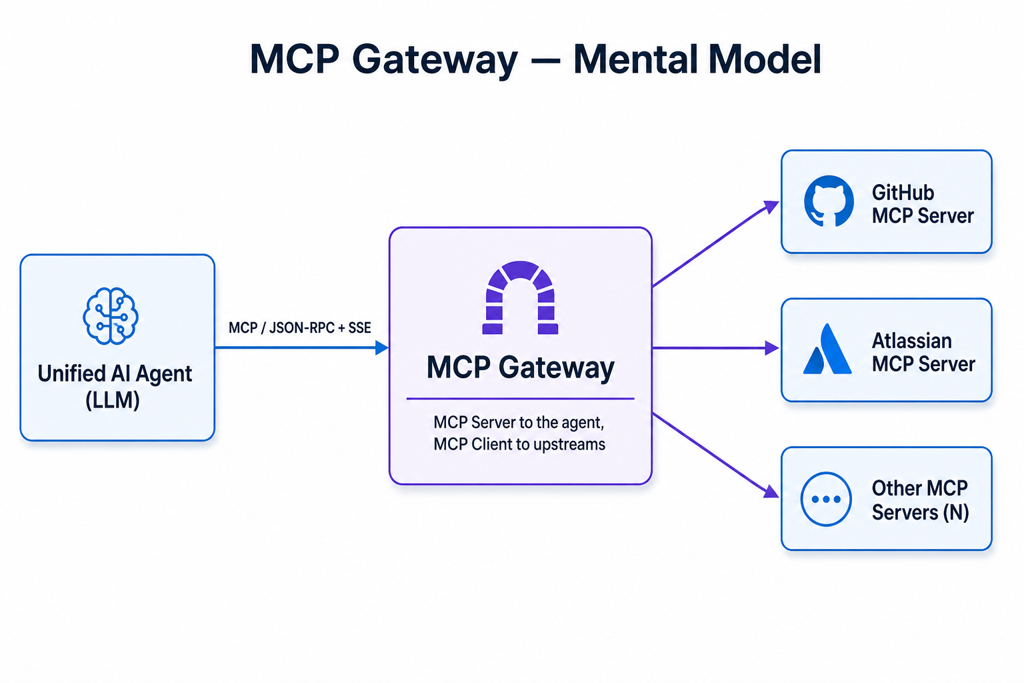
What we built: one governed doorway from Harness AI Chat to your other tools
The MCP Gateway sits between Harness AI Chat and the third-party apps you've connected. To the AI agent, it looks like a single tool provider; behind it, the gateway connects to every third-party MCP app you've set up as a Harness Connector. We deliberately did not reinvent security; the gateway reuses what Harness already has: Harness RBAC determines who can see what, the Harness Secret Manager stores credentials, and Harness Connectors define what's reachable.
- Connect an app once, then just use it in chat. An admin adds a third-party MCP app as a Harness Connector, no engineering work, no redeploy, and it becomes available in AI Chat.
- You only see what you're allowed to. Because it runs on Harness RBAC, a user only ever gets the apps they already have access to.
- Credentials stay protected. Secrets stay in the Harness Secret Manager; the gateway references them at runtime and never exposes them to the agent.
Why distributed systems made this hard, and how we kept it reliable
Harness doesn't run on a single box. Our infrastructure spans multiple servers, and connections can silently break when a server restarts. We built recovery that's invisible to you. A broken connection reconnects automatically instead of failing your task.
When an upstream session expires, the gateway quietly re-establishes it and retries, so AI Chat keeps working. And because a conversation's session state lives in a shared store rather than in any one pod's memory, if a gateway pod restarts, another pod simply picks the conversation up. The user never sees the seams.
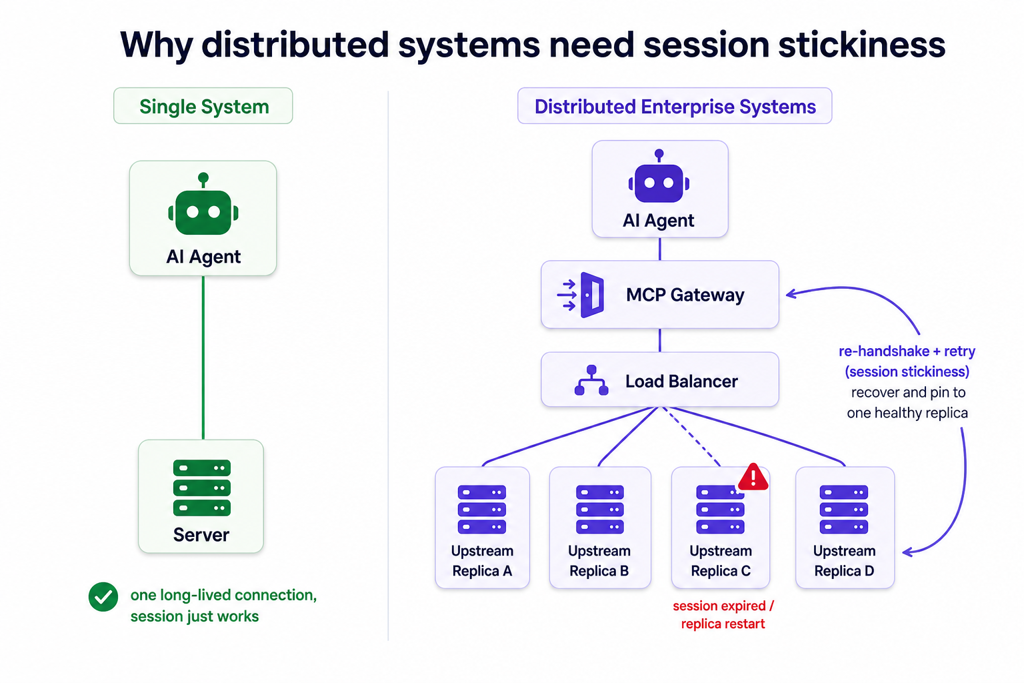
How do we keep it governed
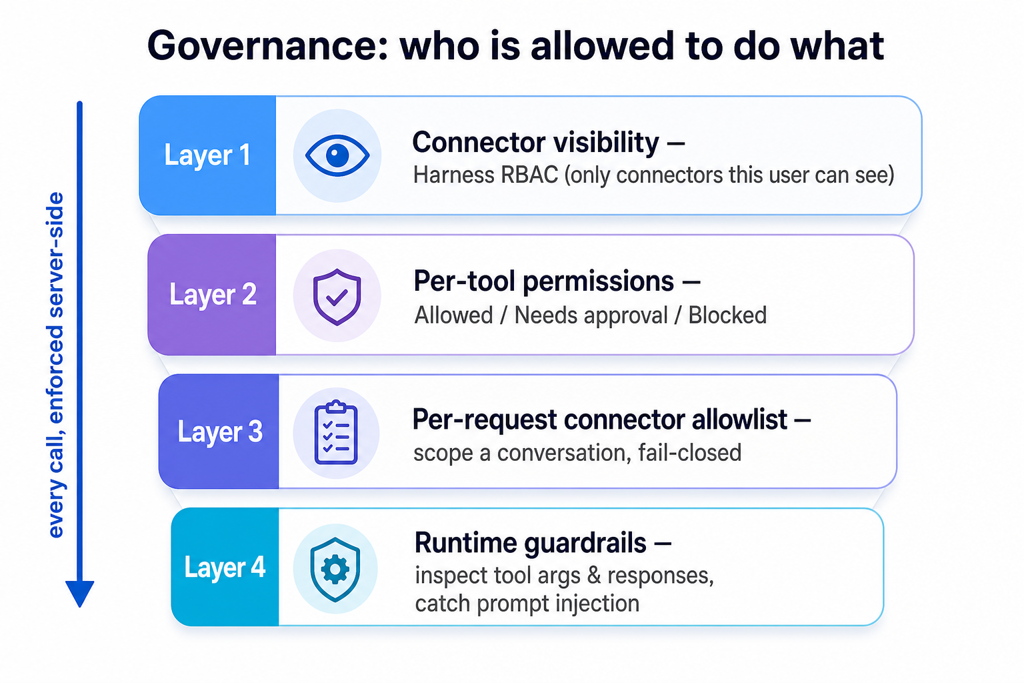
Every call is governed by Harness; the agent can neither see nor invoke anything it shouldn't, regardless of what a client sends.
- Visibility: users only get the apps their Harness access allows.
- Per-tool permissions: admins mark each capability as Allowed, Needs approval, or Blocked.
- Per-request scoping: a conversation can be narrowed to just the tools it needs (fail-closed by default).
- Runtime guardrails: tool inputs and outputs are inspected for prompt-injection and misuse, reusing the same protection layer that already guards the rest of Harness AI.
What it means for you in Harness AI Chat
| What do you want to do | What you get in Harness AI Chat |
|---|---|
| Work across your whole toolchain | Ask AI Chat to act across GitHub, Jira, Confluence, and more, in one conversation, without leaving Harness |
| Stay secure and compliant | Everything runs under the Harness RBAC, secrets, and guardrails you already trust |
| Rely on it at scale | Conversations keep working across pod restarts, replica changes, and idle timeouts |
| Enable a new app quickly | An admin connects it as a Harness Connector, no code, no redeploy |
| Keep it simple | It's built into Harness and reuses Harness's own connectors, secrets, and access controls, nothing new to stand up or keep in sync |
The takeaway
We didn't set out to build a standalone product. We built the piece Harness needed so AI Chat can safely reach the rest of your toolchain, using the connectors, secrets, and access controls you already run on. As a result, your third-party apps work seamlessly within Harness AI Chat.