Why Context is the New Code for Scaling Production AI

TL;DR
- Demos control all variables, but production Enterprise AI must handle messy real-world data, permissions, and siloed systems across thousands of customers.
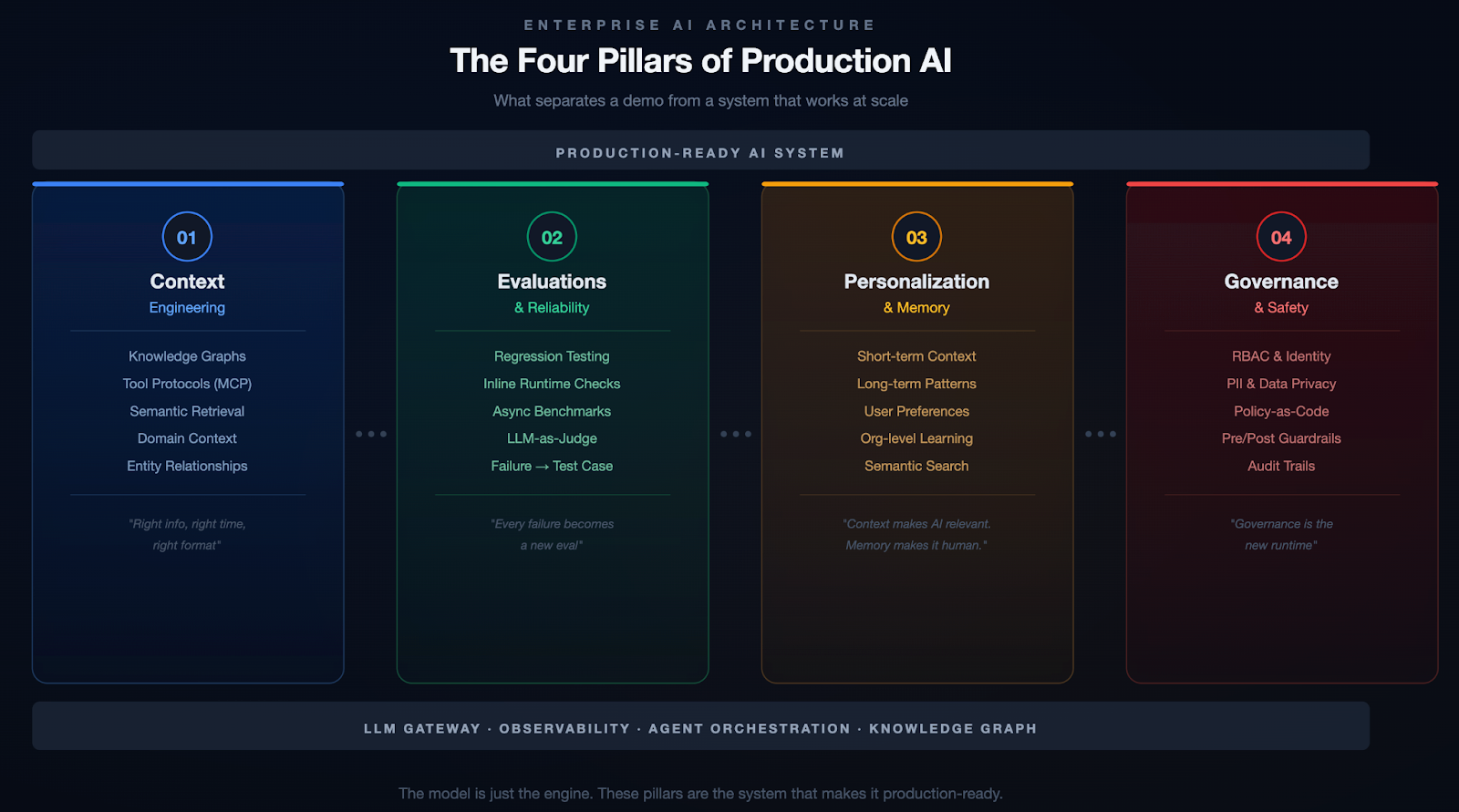
- The four pillars of Enterprise AI are Context Engineering (knowledge graphs), Evaluations (continuous testing), Personalization & Memory (stateful interactions), and Governance (access controls and auditability).
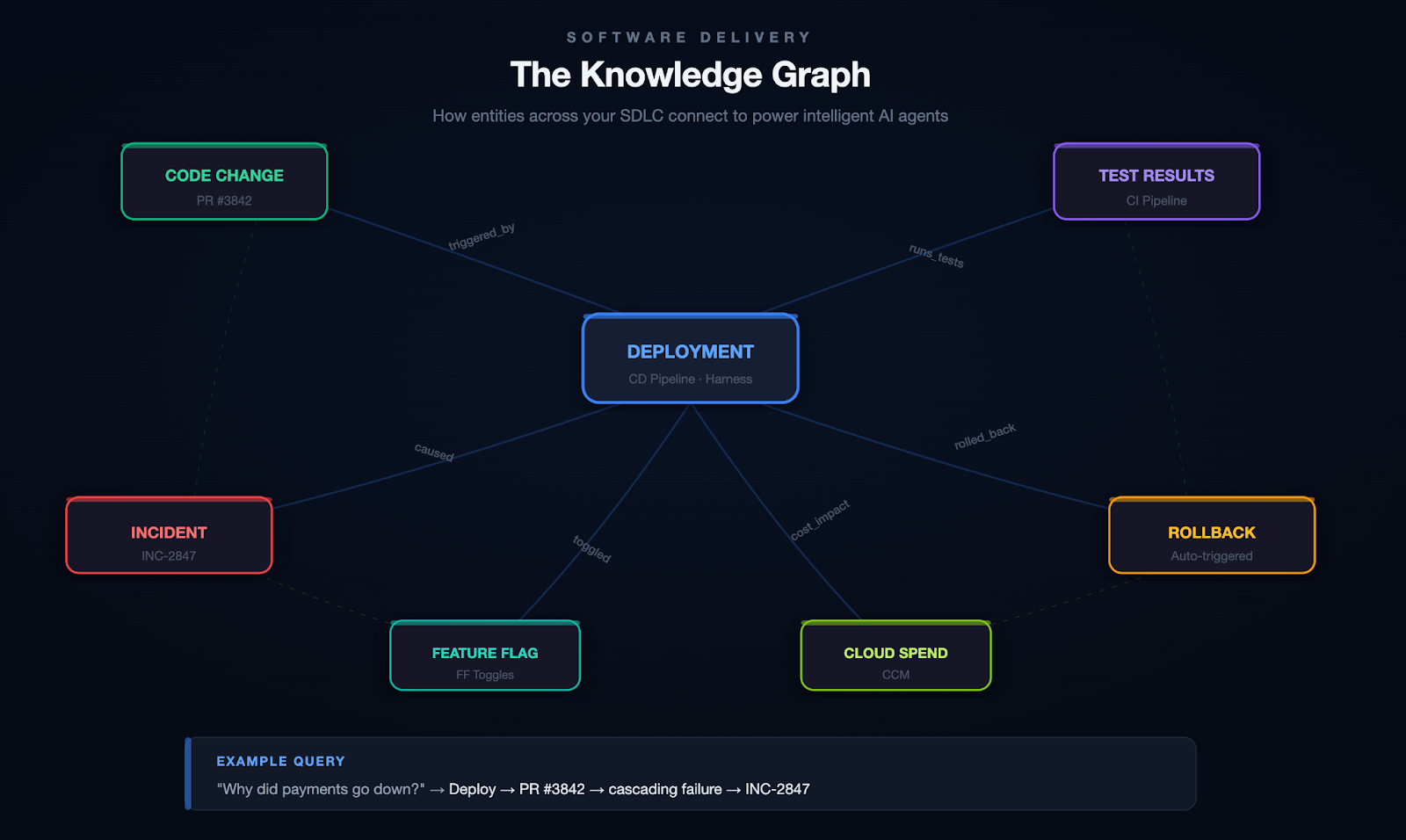
- Knowledge graphs outperform naive RAG by modeling relationships between entities (services, pipelines, deployments, incidents), enabling AI agents to trace full causal chains rather than just search results.
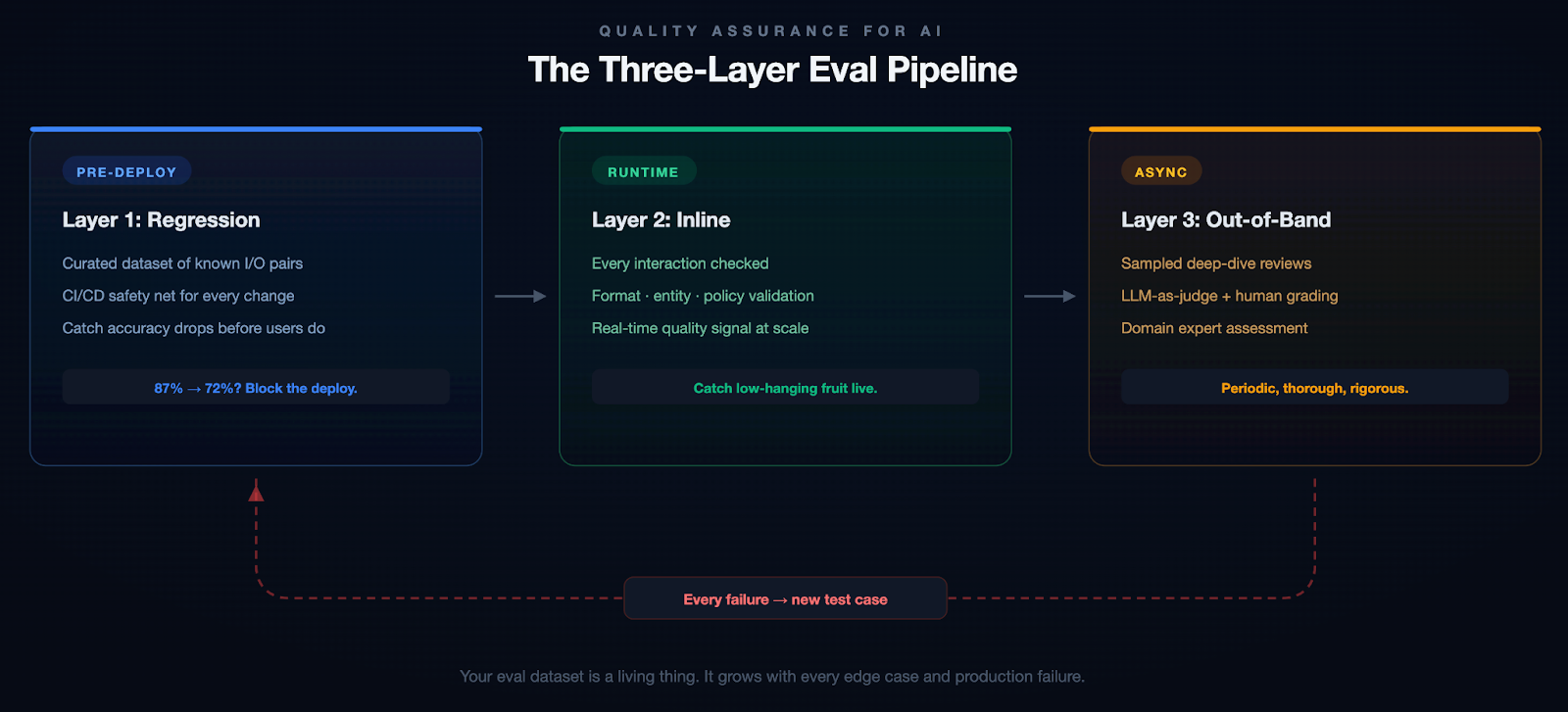
- Evaluation pipelines must treat every failure as a test case to prevent regressions, and should include inline checks, batch tests, and production monitoring.
- Governance is not bureaucracy but the difference between a tool your security team trusts and one they shut down; it includes RBAC, PII detection, policy-as-code, and full auditability.
Why 90% of AI prototypes never make it to production, and what to do about it.
Every week, someone on my team shows me a demo that looks incredible. An agent that writes deployment pipelines. A chatbot that triages incidents. A copilot that generates test cases from Jira tickets. The demo takes 20 minutes. The audience claps. Everyone leaves convinced we're six weeks from shipping it.
We're not.
I've spent the last two years building AI systems at an enterprise software company, and if there's one lesson I keep re-learning, it's this: the demo is the easy part. Getting from a compelling prototype to a system that works reliably, at scale, across thousands of customers with different configurations, permissions, and expectations? That's where the real engineering begins.
This isn't a hot take. It's an industry-wide pattern. Most AI prototypes stall somewhere between "wow, that's cool" and "okay, but can we actually ship this?" The reasons are predictable, and they have nothing to do with model quality. They have everything to do with context, evaluation, memory, and governance. The unglamorous infrastructure work that doesn't make it into the demo.
The Demo Trap
Here's why demos fool us. In a demo, you control everything. You pick the happy-path input. You choose the right model. You pre-load the context. You're essentially showing a curated performance. A magician who only performs the trick with the deck they've stacked.
Production is different. In production, a user types a half-formed sentence into a chat window at 2 AM while an incident is melting their deployment pipeline, and your agent needs to understand not just what they're asking, but who they are, what they're working on, which services are affected, and what they're actually allowed to do about it.
The gap between these two worlds isn't a gap in model capability. GPT-4, Claude, and Gemini are all remarkably good. The gap is in everything around the model.
I think of this as the four pillars of enterprise AI:
Pillar 1: Context Engineering
If you've been in the AI space for even six months, you've probably heard the term "prompt engineering." Write better prompts, get better results. That was the 2023 playbook. It's insufficient.
Context engineering is the delicate art and science of filling the context window with just the right information for the next step. — Andrej Karpathy
The keyword is just right. Not everything. Not nothing. The right information, at the right time, in the right format. In an enterprise setting, this is where it gets hard.
Your data is siloed. To help a developer debug a failed deployment, an AI agent needs pipeline config, recent code changes, service topology, incident history, and team ownership. That's five different systems, each with its own data model and access control. A demo grabs one of these. Production needs all of them, stitched together coherently.
Generic LLMs don't speak your language. Every organization has its own jargon, abbreviations, and naming conventions. Without domain-specific context, the model either hallucinates confidently or gives you a generic answer that's technically correct but operationally useless.
More context isn't always better. Many teams fall into this trap. They dump every document, log file, and metadata chunk into a massive prompt. And the model's performance degrades. Signal gets buried in noise, token costs go through the roof, and responses slow to a crawl.
What Actually Works: Knowledge Graphs
The approach that's worked for us is building a knowledge graph as the organizational memory layer. Instead of dumping raw data into the context window, you model the relationships between entities across your software delivery lifecycle: services, pipelines, deployments, code changes, feature flags, incidents, test results, security scans, infrastructure changes, and even cloud spend.
At Harness, we call this the Software Delivery Knowledge Graph. Here's what it looks like in practice:
Scenario: Root Cause Analysis
A developer asks: "Why did the payments service go down last night?" Without a knowledge graph, your agent searches logs and may find the error. With a knowledge graph, it traces the full causal chain:
Deploy 11:47 PM → PR #3842 (retry logic change) → cascading failure → fraud-detection svc → INC-2847 → on-call: @platform-eng
The graph connects the deploy to the code change, the code change to the author, the PR to the CI pipeline that ran (and the test that didn't catch it), and the incident to the engineer who responded. That's not a search result. That's a full causal narrative.
Scenario: Autonomous Remediation
Your agent detects that error rates on a canary deployment are spiking. It queries the knowledge graph to find which services are in the blast radius, checks whether a feature flag can isolate the change, confirms the rollback policy for this service tier, and executes the rollback. Then it files the incident, tags the PR that caused it, and notifies the team.
All of this depends on the graph knowing how these entities relate to each other.
On top of the knowledge graph, you need a way to get context to the model at runtime. This is where tool protocols like MCP (Model Context Protocol) become valuable. They give your agents a standardized way to discover and call tools, retrieve context, and interact with external systems without hardcoding every integration.
From 20+ Sub-Agents to One Unified Agent
We learned this the hard way. Our first DevOps agent had 20+ sub-agents, each responsible for a different domain (CI, CD, feature flags, infrastructure, etc.). It was a nightmare to maintain, slow to execute, and fragile. Responses took upwards of 40 seconds. Accuracy was inconsistent because each sub-agent had its own narrow view of the world.
When we consolidated into a single unified agent backed by a knowledge graph and a tool registry, the results weren't incremental:
| Response speed | 2× faster (40s → 20s) |
| Token usage | 90% reduction |
| Accuracy | Higher (cross-domain reasoning) |
One agent with full context consistently outperformed twenty agents with partial context.
Pillar 2: Evaluations
This is the pillar most teams skip entirely. And it's the one that bites hardest.
You cannot look at an LLM's output and reliably tell whether it's good. You might catch obvious failures (a hallucinated API endpoint, a completely wrong answer), but the subtle errors? The ones where the model gives a 90%-correct pipeline configuration that will silently break in a specific edge case? Those slip through.
Unlike traditional software, where a bug either crashes or doesn't, LLM outputs fail on a spectrum. They can be subtly wrong, misleadingly confident, or technically correct but contextually inappropriate.
The Three-Layer Eval Pipeline
The most important principle we adopted: when something breaks, it becomes a test case. Most teams fix the bug, update the prompt, and move on. Without adding the failure to their eval suite, they have no guarantee it won't regress.
Example: A Subtle Failure
Our pipeline generation agent once produced a valid-looking Kubernetes deployment manifest. It passed inline checks. But it defaulted the resource limits to values that worked in staging and would have OOM-killed the pods in production under real traffic. A human caught it in review. That edge case is now a regression test, and we added resource-limit validation to our inline evals.
We started with about 200 test cases for our pipeline generation agent. That number grows every week. And don't just include success cases. Include examples of what good rejection looks like. When should the model say "I don't know"? Those boundaries matter as much as the correct answers.
Pillar 3: Personalization & Memory
If you've ever used an AI assistant for a few weeks and noticed that it asks you the same clarifying questions every single time, you've experienced the memory problem. Most AI systems are stateless. Every conversation starts from scratch. They don't remember that you prefer YAML over JSON, that your team uses a specific branching strategy, or that last week's deployment issue was caused by a misconfigured feature flag.
This is fine for a chatbot. It's unacceptable for an enterprise tool.
Short-term memory is about maintaining context within a session. If you've already provided the service name, the error logs, and the deployment history, the system shouldn't ask for three messages again later.
Long-term memory is harder and more interesting. Which deployment strategies does this team prefer? What's this user's role and expertise level? When this organization encounters a certificate error, what's their typical resolution path?
Memory in Action
Without memory: A senior SRE asks the agent to help triage an incident. The agent asks which environment, which service, what the escalation policy is, and what monitoring stack they use. It does this every single time.
With memory: The agent already knows this SRE is responsible for the payments cluster in prod-west, that they prefer Datadog dashboards over raw logs, that their team's escalation policy involves PagerDuty, and that last month's similar incident was a connection pool exhaustion. It skips the 20 questions and gets straight to work.
The implementation involves extracting key information from recent interactions, comparing it against what you already know about the user, and deciding whether to store, update, or ignore it. Getting this right without the memory becoming stale or bloated is harder than it sounds.
Without memory, AI feels like talking to a brilliant amnesiac. With it, it feels like working with a colleague who's been paying attention.
Pillar 4: Governance & Safety
Nobody wants to talk about governance. It doesn't make for good demos, it doesn't generate engagement on X, and it's not the reason anyone got into AI. But if you're building AI for enterprises, especially in regulated industries or sensitive domains, governance isn't optional.
Governance breaks down into four areas:
Access & Identity. Your AI agent should respect the same RBAC policies as the rest of your application. If a developer can't deploy to production, neither should the agent.
Data & Privacy. PII detection, data residency, and GDPR compliance. These aren't things you bolt on after launch. They need to be baked in from the start.
Policy Enforcement. Pre- and post-generation guardrails via policy-as-code. Define rules in OPA, validate I/O, and reject anything outside the boundaries.
Auditability. Every action should be traceable: which model, what context, what output, what actions. Not just for compliance. It's how you debug and build trust.
Why This Matters
An AI agent with broad API access can do a lot of good. It can also delete a production database, expose customer PII in a log, or deploy untested code to a critical environment. These aren't hypothetical risks. They're the kind of thing that happens when you give an agent tool access without thinking through the permission model. Governance isn't bureaucracy. It's the difference between a tool your security team trusts and one they shut down.
Context is the new code. Governance is the new runtime.
The Evolution: From Chatbots to Autonomous Agents
These four pillars apply at every level of AI capability, but the stakes compound as systems become more autonomous.
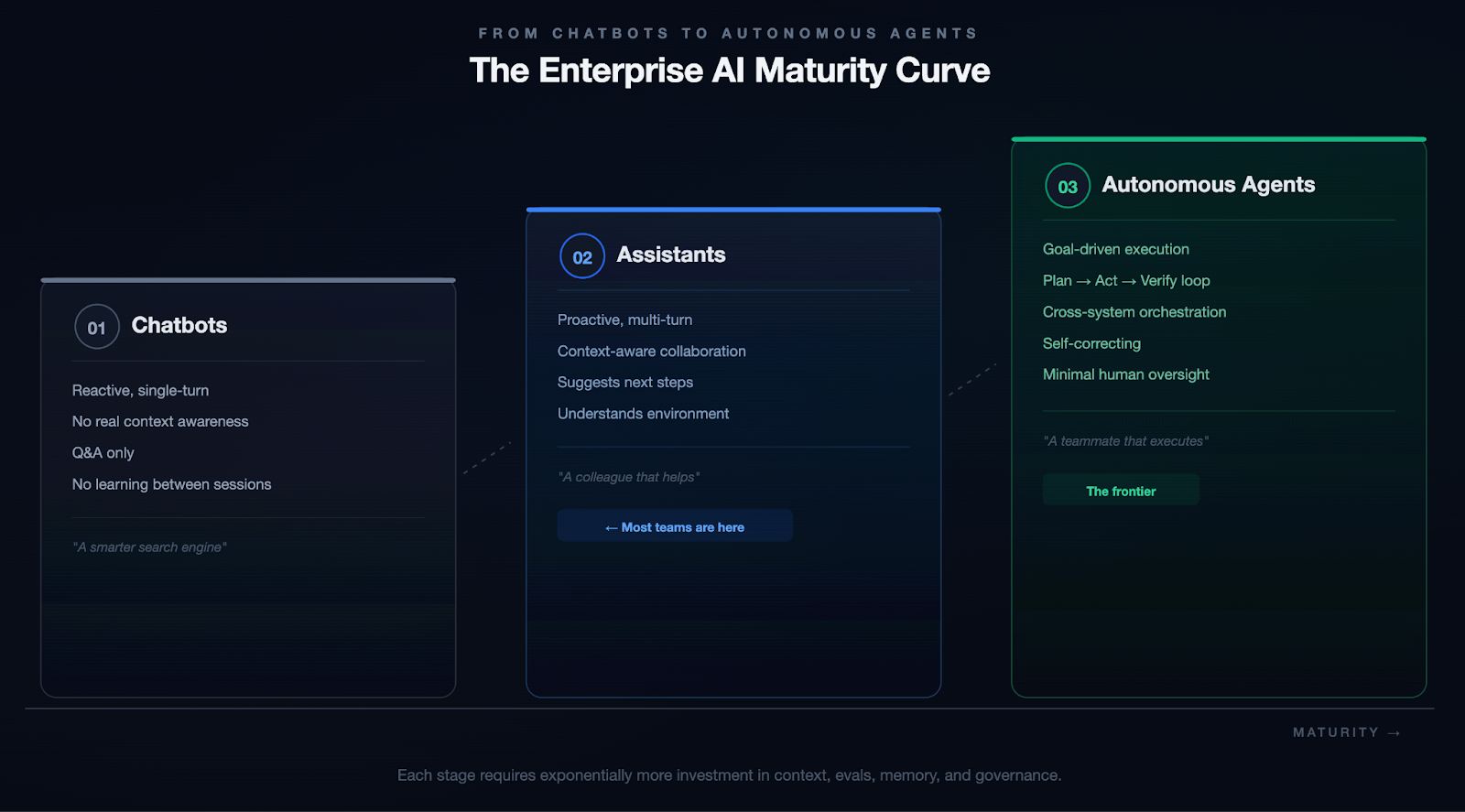
We're not fully at Stage 3 yet. Nobody is. But every investment in context, evals, memory, and governance compounds as you move along that spectrum.
The Practical Blueprint
If you're reading this and thinking, "Okay, but where do I actually start?" Here's the honest answer: start small, go deep, and resist the urge to build everything at once.
- Pick one use case with clear boundaries. A specific workflow (pipeline generation, incident triage, code review) where you have clean data, measurable outcomes, and users who will give you honest feedback.
- Build your context layer first. Before you optimize prompts or fine-tune models, invest in the plumbing. What data does the model need? Where does it live? How do you get it into the context window without drowning in noise?
- Instrument everything from day one. Set up tracing and observability before you ship. Not after. When (not if) something breaks, you need to trace through the entire chain.
- Write evals before you write prompts. Define what "good" looks like before you start iterating. Otherwise, you're optimizing by vibes, and vibes don't scale.
- Treat governance as architecture, not paperwork. Build access controls, data policies, and audit trails into your system from the start. It's ten times cheaper to build them in than to retrofit later.
Conclusion: The System Is the Product
Scaling AI is not about bigger models. The models are already incredibly capable. The real bottleneck is the infrastructure around them.
The teams that will win aren't chasing the newest model release or the flashiest demo. They're quietly building the systems that make AI reliable, trustworthy, and useful at scale.
The demo is the easy part. The system is the hard part. And the system is where the value lives.