Explore 70+ new features released by Harness in April 2026, including AI-powered SRE, CI/CD improvements, security enhancements, and faster software delivery tools.

TL;DR
- The Cursor IDE plugin brings Harness software delivery capabilities directly into the code editor, eliminating context switching for developers.
- AI SRE now generates complete post-mortem reports in seconds by synthesizing incident timelines, Slack conversations, and resolution actions automatically.
- Warehouse Native Experimentation runs A/B tests directly in Snowflake, Redshift, or BigQuery without exporting data from your analytics warehouse.
- SLSA provenance now covers Helm charts, JAR/WAR files, and standalone binaries, not just container images, providing end-to-end supply chain security.
- Native Terragrunt support and Multi-IaC Orchestration unify infrastructure provisioning across Terraform, OpenTofu, and Terragrunt in one platform.
It’s becoming increasingly clear that AI-generated code can create real challenges once it reaches production. At Harness, we’ve been focused on innovating fast and solving those problems, so teams can move quickly without sacrificing reliability.
In the past 30 days, we delivered 70+ new features. These features enable our users to ship fast, not by cutting corners, but by sharpening the feedback loops: faster builds, integrated security checks within the pipeline, deeper visibility into AI across discovery and testing, and deployment tools that are intuitive enough to use without a runbook.
Here’s a look at everything we shipped.
April Highlights
- Harness now lives inside the Cursor IDE. Developers and AI agents go from code change to vulnerability detection, CI/CD execution, security validation, approvals, deployments, and operational insight without leaving the editor.
- Google Cloud Developer Connect now integrates with our Software Delivery Knowledge Graph, giving teams a unified, AI-ready view of the entire software delivery lifecycle.
- With Warehouse Native Experimentation, you can run A/B tests and feature experiments directly in Snowflake, Redshift, or BigQuery, using your existing assignment and metric data as the source of truth. No data exports, no duplication outside your warehouse.
- With SLSA provenance for non-container artifacts, supply chain attestation now covers Helm charts, JAR/WAR files, and standalone binaries, not just container images. If you ship more than Docker images, your provenance story just got complete.
- When an incident closes, Harness AI SRE generates a structured six-section retrospective automatically. What typically takes 2-4 hours comes out in seconds, with action items captured in real time from Slack during the incident.
-
AI-Powered Development and Delivery
Cursor Plugin
Harness is introducing the Cursor Plugin, bringing AI-native software delivery directly into the Cursor editor. Developers and AI agents move from code changes to vulnerability detection, CI/CD execution, security validation, approvals, deployments, and operational insight without leaving the IDE. The integration includes the Harness Secure AI Coding hook for Cursor. Download the plugin.
Google Cloud Partnership for a unified AI for Software Delivery
We partnered with Google Cloud to integrate Developer Connect with our Software Delivery Knowledge Graph, giving teams a unified, AI-ready view of the entire software delivery lifecycle.
This enhanced context enables smarter, faster AI-driven decisions, helping engineering teams troubleshoot issues, improve accuracy, and deliver software with greater confidence and efficiency. Learn more: Harness Delivers Unified AI Intelligence Across Software Delivery with Google Cloud.
Harness MCP Server Updates
The biggest additions to this version of the MCP server are pipeline YAML support so agent-driven pipelines work with the current schema, OSS vulnerability lookup for supply chain security with anti-fabrication extractors, and added resilience support. Download and get started.
Security Baked Into the Pipeline
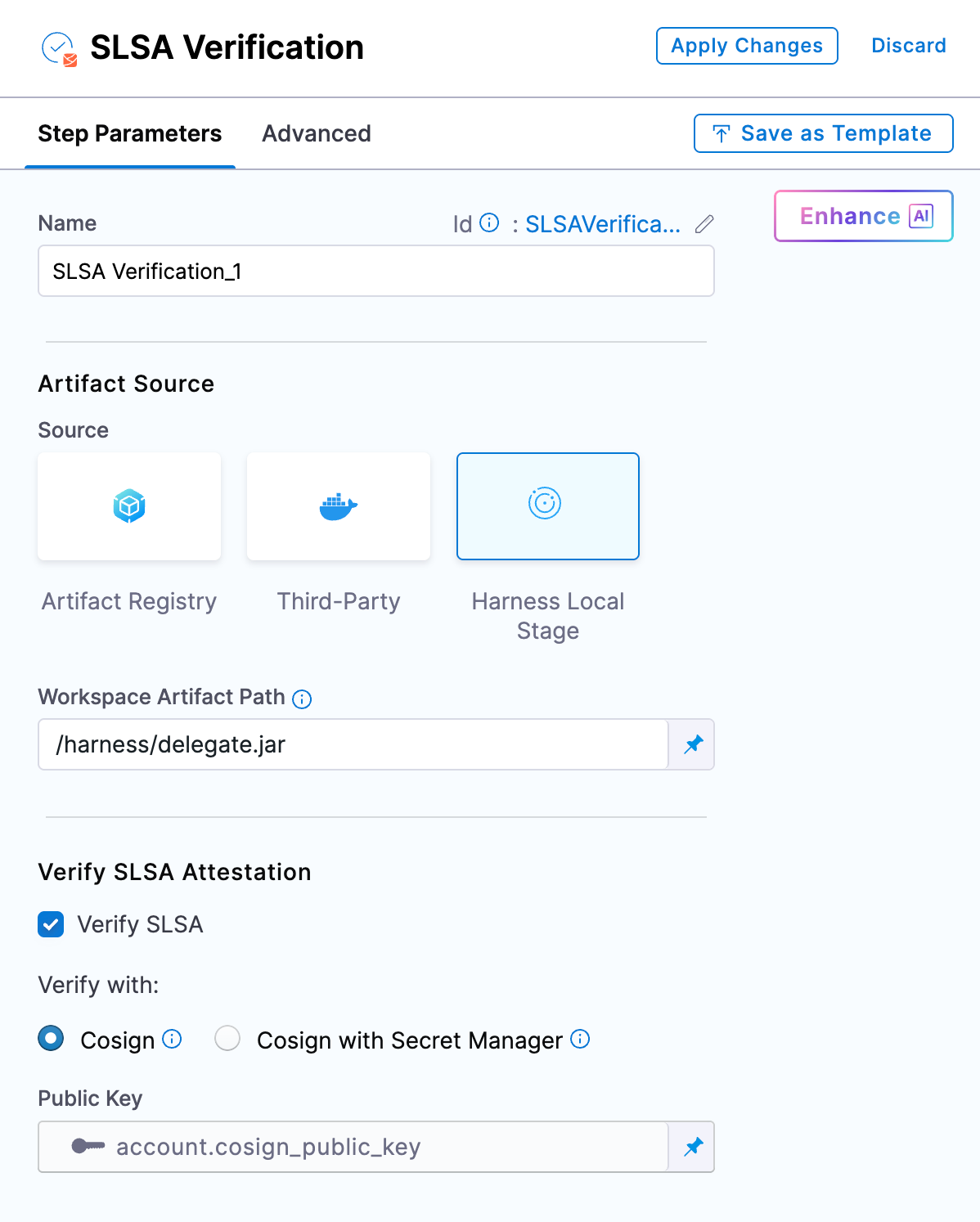
SLSA Provenance for Non-Container Artifacts
Supply chain attestation via SLSA now covers Helm charts, JAR/WAR files, standalone binaries, and other artifact types, not just container images. Generate and verify provenance across the full artifact portfolio. Learn more about Non-Container Artifacts .
OSS Remediation for Code Repositories
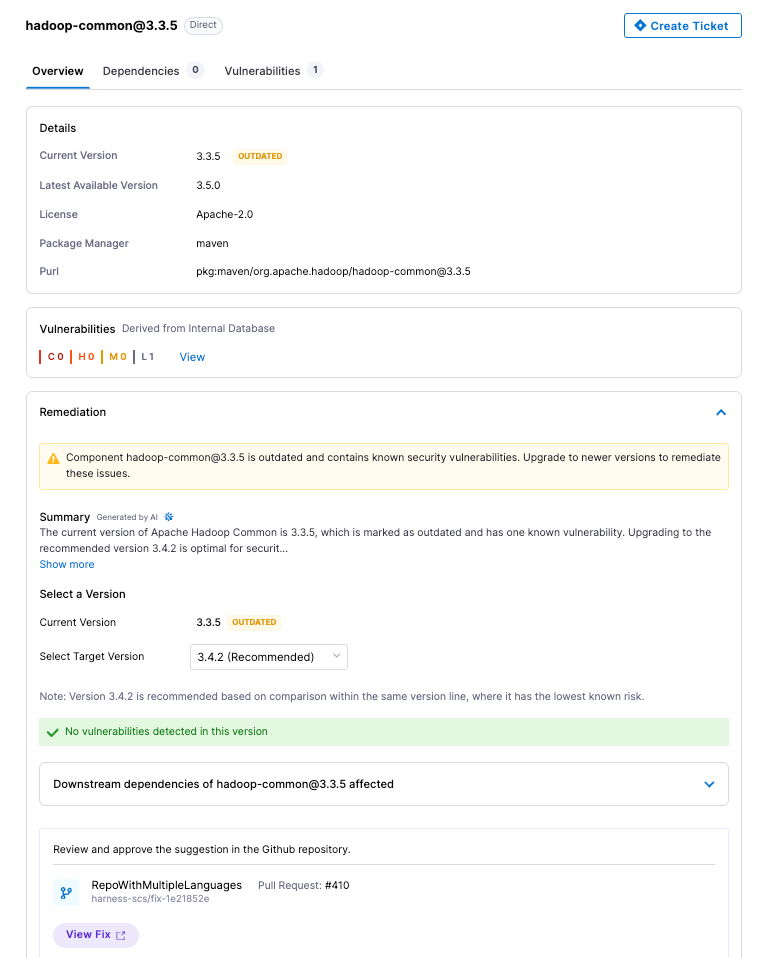
Automated and manual remediation for vulnerable open-source components now runs directly against code repositories. When a dependency has a fix available, the tooling can apply it.
API Security Scan Configuration Revamp
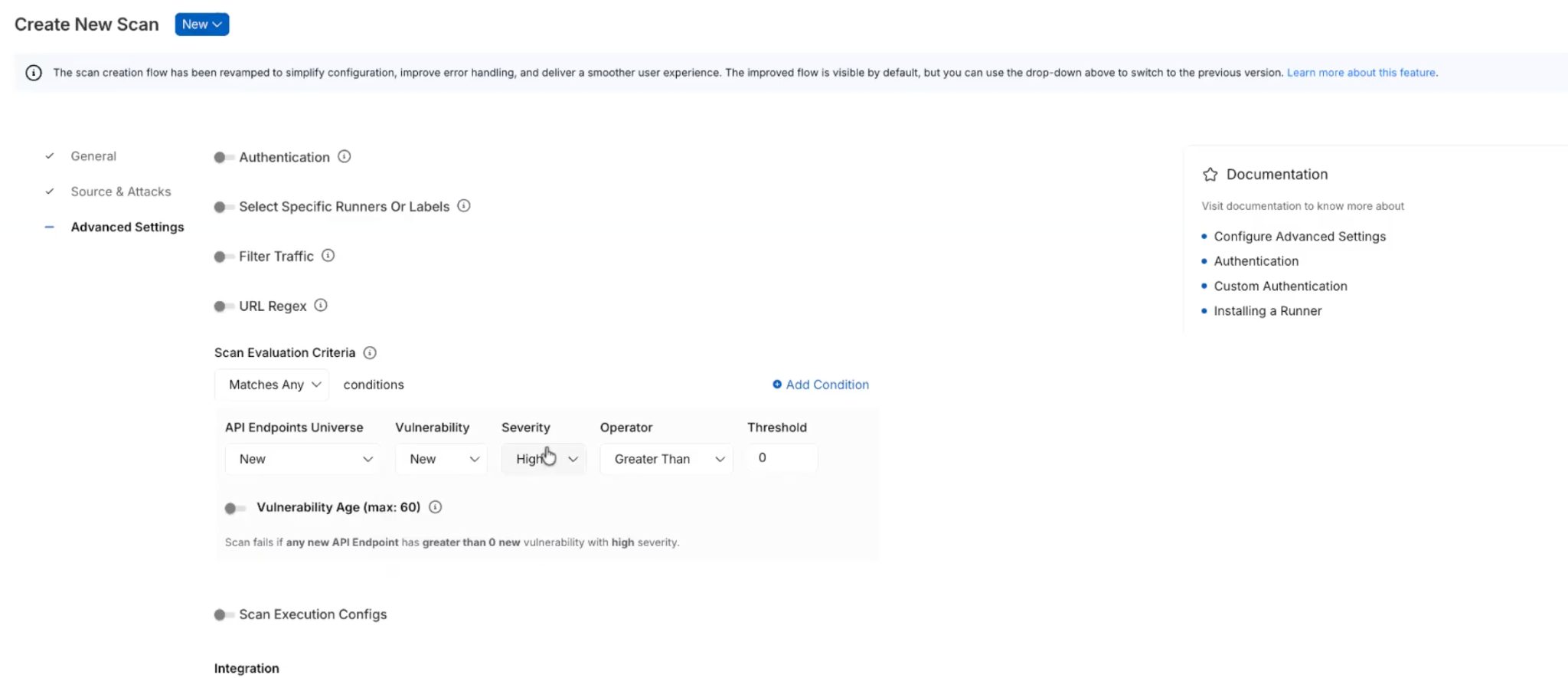
The scan creation flow has been simplified into three logical groups: General, Source and Attacks, and Advanced Settings. Every field now has a tooltip and step-level documentation. Field-level validation catches misconfigurations before a scan runs.
Reachability Test for DAST and API Security Scans
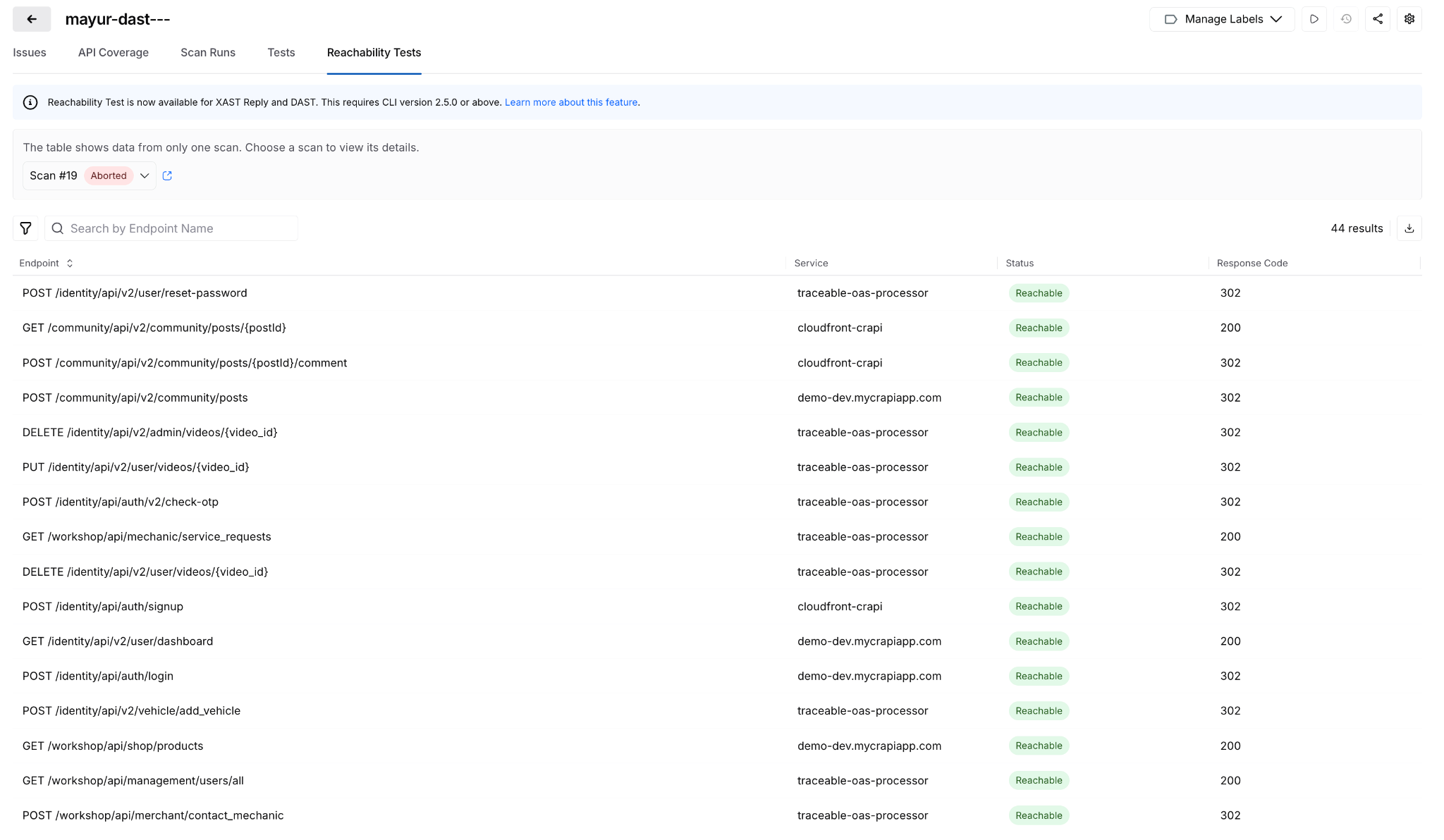
Before generating test cases, a new Reachability Test validates that each API endpoint is actually reachable. Endpoints that don't respond don't generate test cases. Reduces wasted scan time against dead endpoints.
Posture Events: Sensitive Data Evidence
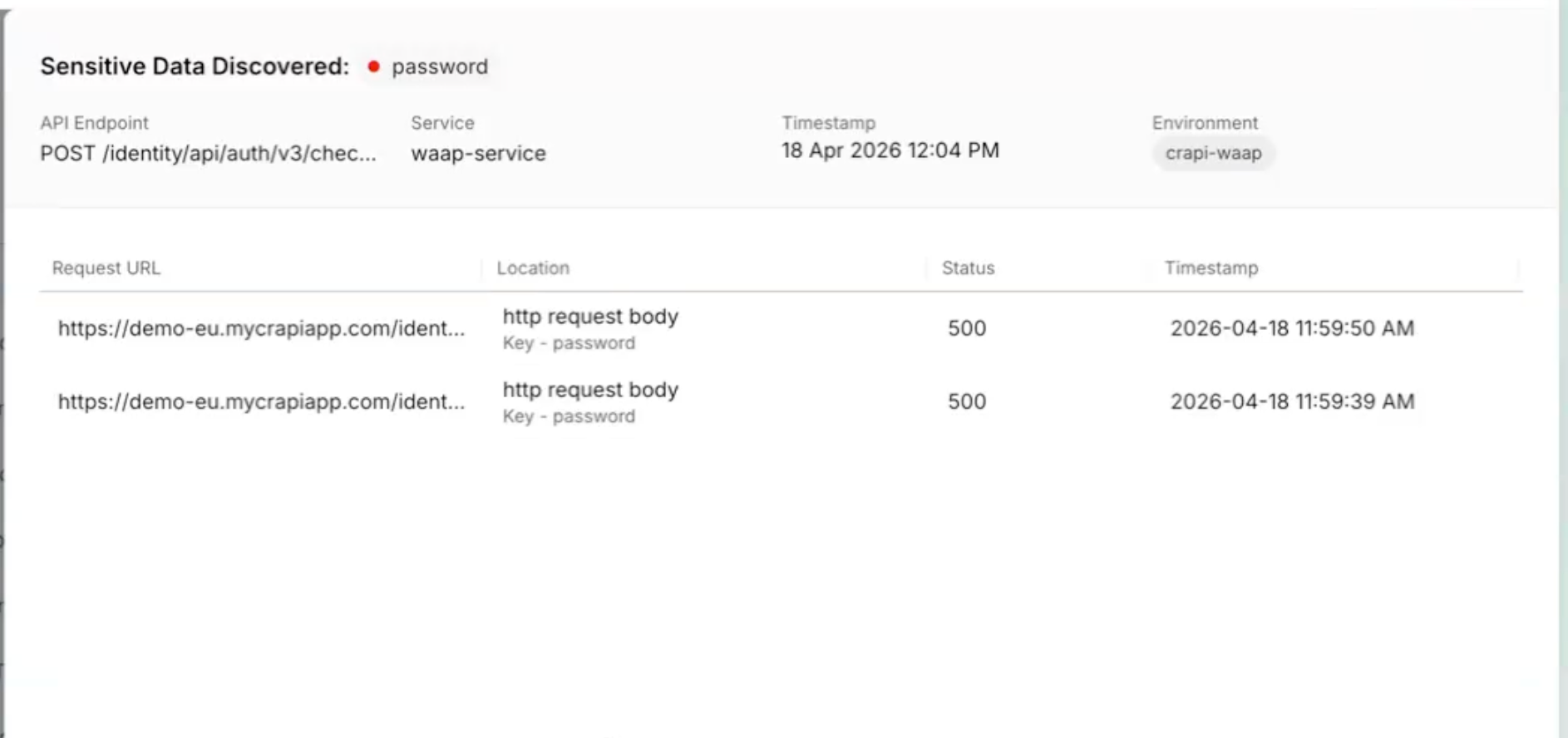
When a posture event involves sensitive data exposure, the finding now shows exactly where: which parameter, in the request or response, with the classification and dataset inline. Previously required navigating across modules to get this context.
All Occurrences Dashboard
A new account-level dashboard surfaces every raw vulnerability finding across all pipelines, not just the rolled-up view. Filter, export, and drill into file paths, line numbers, and repos. Useful when you need to understand whether a scanner finding is one instance or fifty. Release notes.
Prisma Cloud Scan Result Enhancements
Prisma Cloud (formerly Twistlock) scan results now include File Name, Distro, and Distro Release fields. The file name is derived from packagePath to improve traceability when the same vulnerability appears across multiple package locations.
AI Asset Discovery and Risk Visibility
Third-Party MCP Discovery
Extends AI asset discovery beyond your own application ecosystem. Harness now surfaces external MCP servers and the AI assets they expose, giving security and platform teams visibility into AI interactions that originate outside their direct control.

Behavioral Insights Extended to MCP Tools
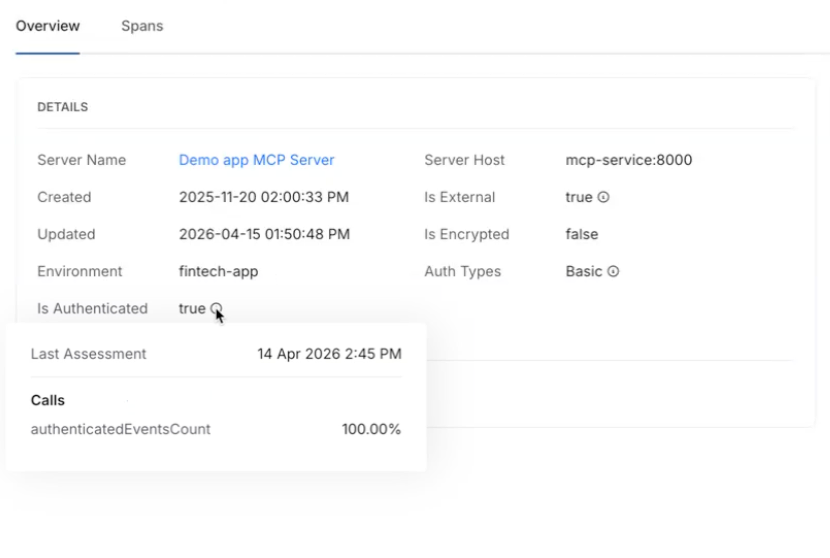
Internet exposure, encryption status, and authentication usage were previously available for APIs only. Those same behavioral signals now apply to MCP tools. View them via the info tooltip on any MCP tool in the inventory. Helps identify high-risk tools based on actual usage patterns, not configuration alone
Risk Score Enhancements for APIs and MCP Tools
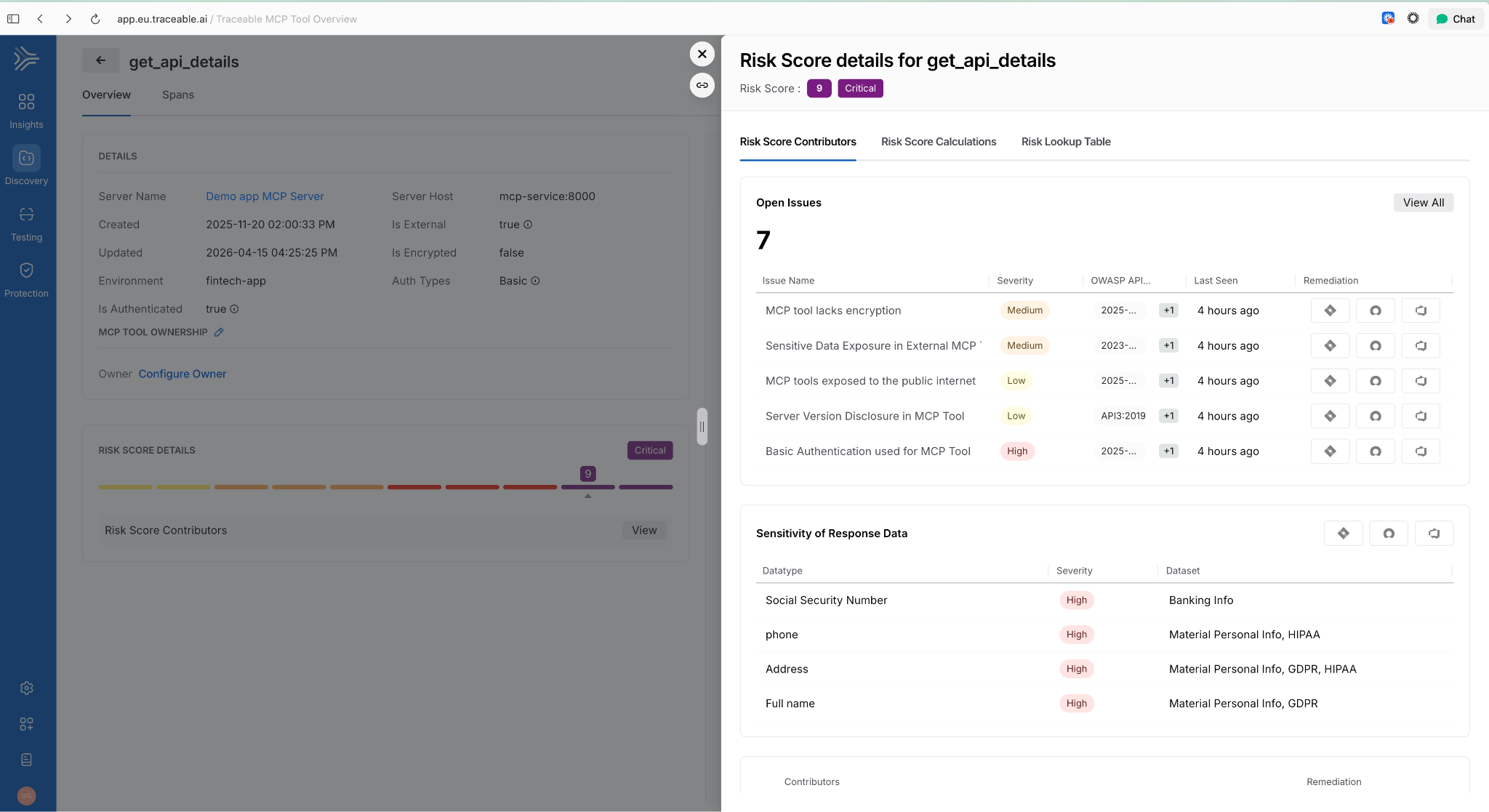
Two changes in one release: API risk now shows a unified view with contributing factors, the Likelihood vs. Impact calculation, and direct links to underlying issues. MCP tools now have their own dedicated risk scores using the same model. Side-sheet editing means you can act on a finding without leaving context.
AI Assets Tab and Licensing Visibility
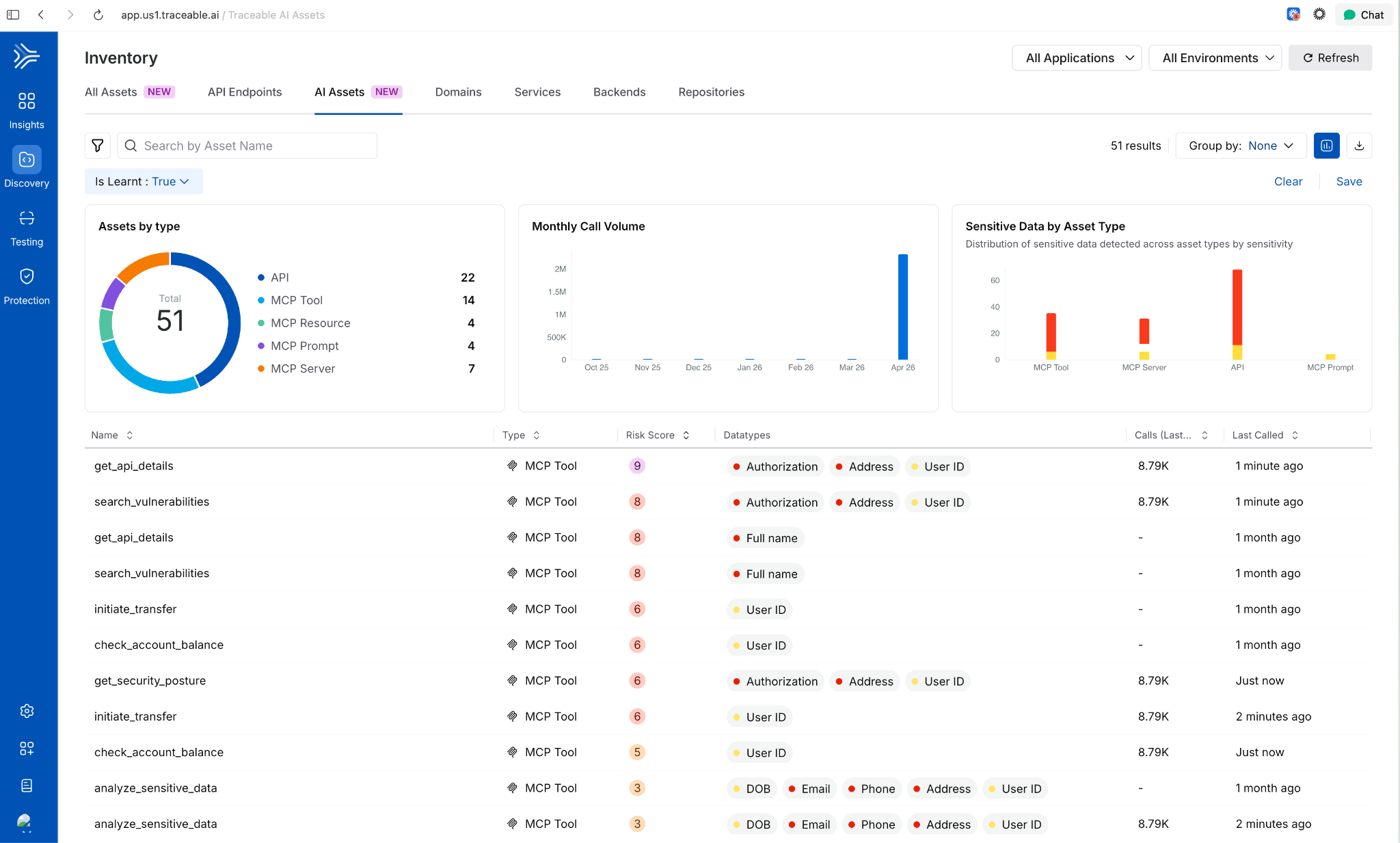
A dedicated AI Assets tab provides a single view of all AI-related assets discovered in customer environments: AI APIs, MCP tools, models, and their usage patterns. Licensing visibility is included so teams can track AI consumption against entitlements.
Deploy Faster and More Reliably
Improved Pipeline Execution Layout
The pipeline execution listing page now uses a card-based layout. The Service and Environment columns are replaced by an Update Summary column showing service-to-environment mappings for CD stages and schema-to-instance mappings for Database DevOps stages, i.e., more signal per row!
AWS Connector Validation Without ec2:DescribeRegions
AWS connector validation now uses sts:GetCallerIdentity instead of ec2:DescribeRegions. The new call requires no IAM permissions, which means tighter least-privilege configurations no longer block connector setup.
ApplicationSet TemplatePatch Support
TemplatePatch configuration in GitOps ApplicationSets is now preserved in the Manifest Edit panel. Previously, setting TemplatePatch in the UI and saving caused the configuration to disappear.
Faster Builds
Cache Storage Connector Override in YAML
Self-hosted builds can now specify a stage-level connector override for cache storage in YAML. If not set, the connector from Default Settings is used. Useful when different stages need to read from different cache backends.
Containerless Step Binary Path
Containerless CI steps now use app.harness.io as the default download path for step binaries. This reduces egress dependencies on external sources.
Feature Flags and Experimentation
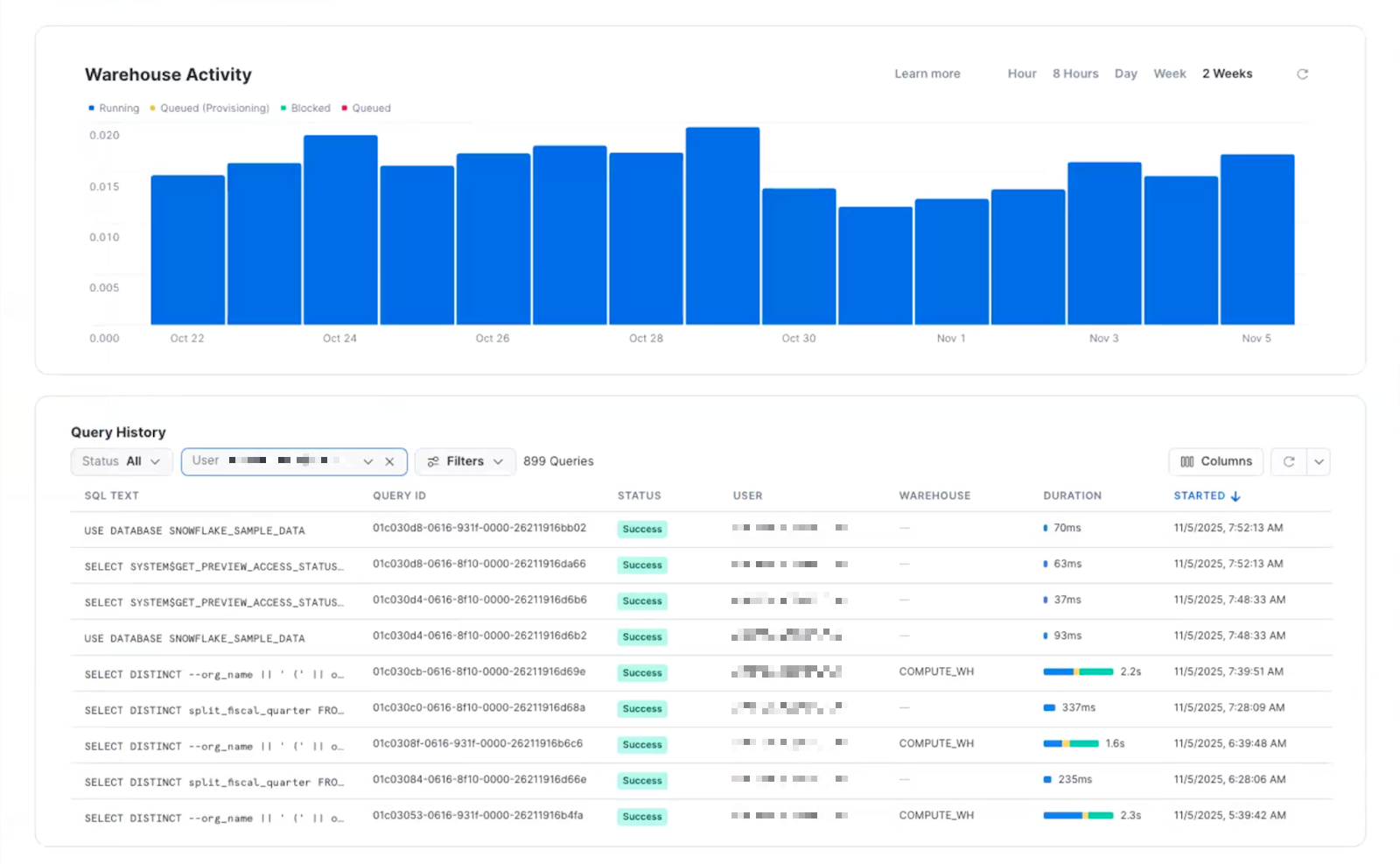
Warehouse Native Experimentation
Run experiments directly in your data warehouse using your own assignment and metric data. No exporting, no duplicating data outside your analytics source of truth. Supports Snowflake, Amazon Redshift, and Google BigQuery. Release notes.
Reallocate Traffic API
A new Reallocate Traffic endpoint lets you reset the bucketing seed for a feature flag in a specific environment via the API. Useful when you need to re-randomize user assignments without changing the flag configuration.
Infrastructure as Code
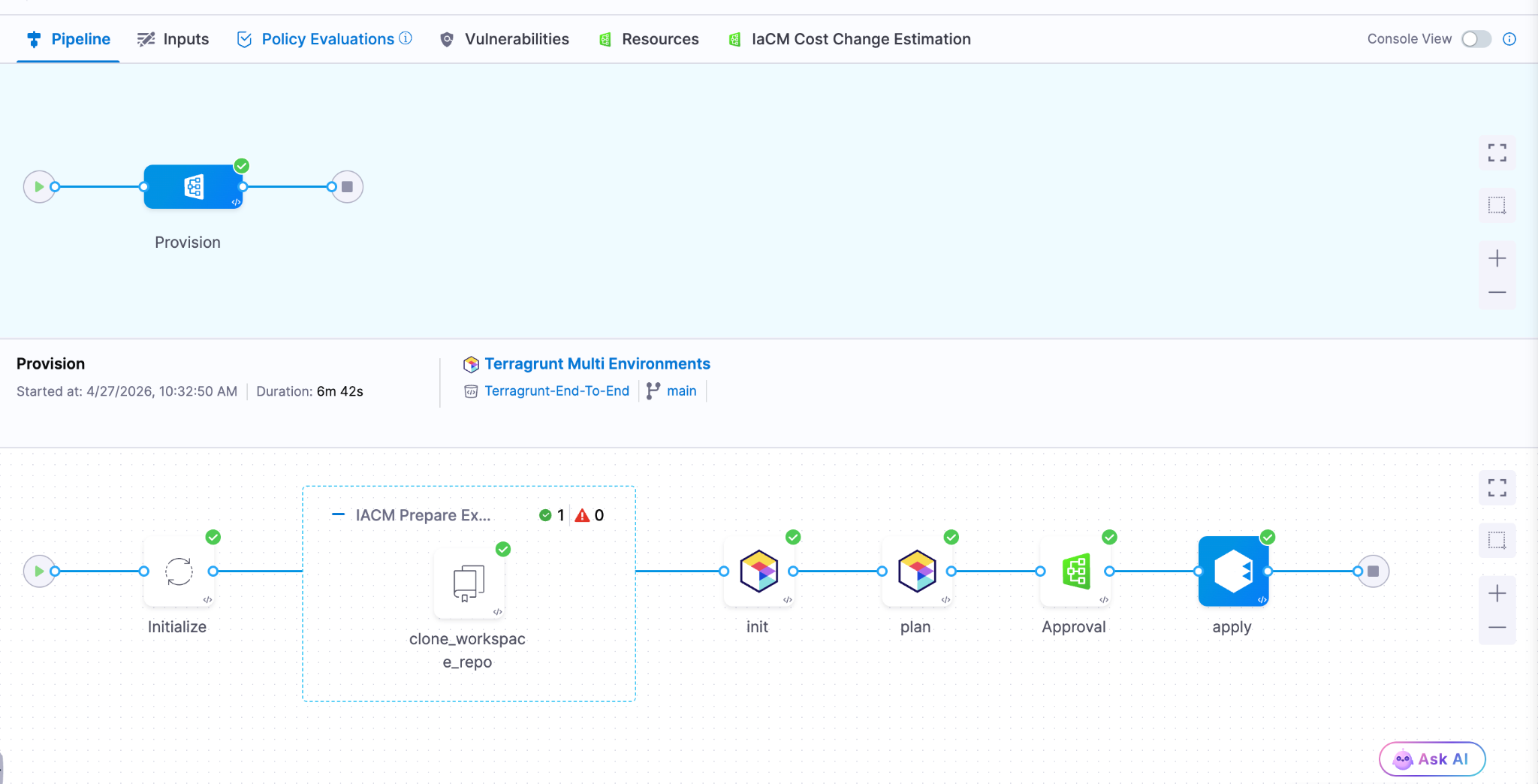
Native Terragrunt Support and Multi-IaC Orchestration
Teams can now orchestrate complex deployments across Terraform, OpenTofu, and Terragrunt in a single platform. A unified multi-IaC control plane eliminates fragmented tooling, standardizes workflows, and covers provisioning, configuration, and deployment consistently. Read the blog post.
AWS CDK Support (Beta) Define AWS infrastructure in TypeScript or Python using the AWS Cloud Development Kit and let Harness handle provisioning, state, and pipeline integration. Engineers who already write CDK don't need to learn HCL or adopt a separate tool.
Module Registry 2.0 Store IaC modules as artifacts natively in Harness, auto-sync new versions as they're published, and run module onboarding directly on Harness pipelines. A single place to manage the full module lifecycle: publishing, versioning, and consumption, without stitching together a registry, a pipeline tool, and a version tracker.
Terraform Sensitive Output Masking (Beta)
Output fields marked sensitive = true in your main.tf are now automatically masked in the pipeline Output tab during Terraform Apply step execution. Sensitive outputs remain accessible in downstream steps via Harness expressions, but don't appear in plain text in the UI.
Artifact Management
Swift Package Registry
Artifact Registry now supports Swift packages with full SwiftPM compatibility. Authenticate, publish, and resolve dependencies using the registry URL directly. Existing SwiftPM workflows work without changes. Release notes.
Raw File Registry
A new Raw File registry stores and retrieves arbitrary files by path: archives, reports, configuration files, binaries, anything that doesn't belong to a package manager. Upload and download via HTTP and curl. No specialized client required.
Copy Version Between Registries
Promote a specific package version from one Harness registry to another directly from the UI. No re-pushing from your machine, no scripts to move artifacts between project or organization registries.
Soft Delete for Artifacts and Versions
Deleting a package or version now moves it to a Deleted view where it remains recoverable until the retention window expires. Permanent delete is available from the same dialog when that's the intent.
Artifact Registry Audit Dashboard
An out-of-the-box dashboard records every artifact upload and download across all Harness Artifact Registries. Provisioned and maintained automatically for accounts with Artifact Registry enabled. No setup required.
Webhooks Extended to Python, Maven, and NuGet
Artifact Registry webhooks now cover Maven, NuGet, and Python (PyPI) in addition to existing package types. Use artifact events to trigger CI/CD, security scans, or notifications for more of your package ecosystem.
Database Changes Without the Drama
IBM DB2 Support
Database schema changes and migrations now work across all DB2 variants: DB2 LUW, DB2 for iSeries, and DB2 for z/OS. Mainframe and midrange databases now fit in the same pipeline workflow as everything else. Release notes.
Google BigQuery Support
Deploy database changes to BigQuery using the same Liquibase-based workflow used for relational databases. No separate tooling or custom scripting required.
Percona Toolkit for MySQL
Use Percona Toolkit natively in Harness Database DevOps to make MySQL schema changes safer and virtually downtime-free. Read the blog post.
ECS Support for Database Jobs (Early Access)
Database DevOps can now run deployment jobs on ECS Fargate instead of Kubernetes. For teams not running Kubernetes, this removes the requirement to stand up a cluster just to run database migrations. Contact Harness to enable. Read the docs.
Keyless Authentication for Google CloudSQL
Authenticate to CloudSQL (Postgres and MySQL variants) using the delegate's service account. No credentials to rotate, no secrets to manage. Read the docs.
OIDC Authentication for Google Cloud Databases
Authenticate to CloudSQL (Postgres and MySQL), Google Spanner, and Google BigQuery using OIDC. Works with any OIDC-compatible identity provider already in use for the rest of your Google Cloud infrastructure. Read the docs.
Engineering Metrics and Developer Portal
Environment Management
Developers can now self-serve dev, test, staging, and production environments directly from the developer portal. Platform teams configure the governance rules; developers provision within those bounds without opening a ticket. Read the blog post.
ServiceNow Integration for Engineering Metrics (Beta)
DORA metrics in the Efficiency Insights dashboard can now be calculated from ServiceNow incident and change management data. Deployment Frequency, Change Failure Rate, and MTTR all supported. Useful for teams where ServiceNow is the system of record for incidents, not a secondary tool.
Custom Dashboards in Engineering Metrics (Beta)
A new Canvas page (being renamed to Studio) lets teams build custom Insights dashboards using HQL queries across all data sources. Dashboards support Draft and Published states. Query Variables allow dashboards to adapt dynamically per team or environment.
Custom Entity Kinds in Developer Portal
Platform engineers can now define entity kinds beyond the built-in set (Component, API, Resource, Environment, System). Model domain-specific software components that don't fit existing kinds, with their own name, icon, and JSON Schema for validation. Release notes.
SonarQube Integration in Developer Portal
Harness connects to SonarQube Server (self-hosted) or SonarQube Cloud and brings projects into the developer portal catalog as catalog entities. Code quality data surfaces alongside the rest of your software catalog.
Scorecard Aggregation
Scorecard data can now be aggregated across multiple catalog entities. Roll up compliance and health metrics from individual components to systems or domains without manually combining reports.
Custom Dashboard Data Retention Extended to 12 Months
The data retention period for custom dashboards increased from 3 months to 12 months. Longer historical windows for trend analysis and compliance reporting.
Code Repository Language Breakdown
Developers can now see the language composition of any repository directly in the list view and repo detail page. Particularly useful when migrating off other source control systems and auditing what you're moving.
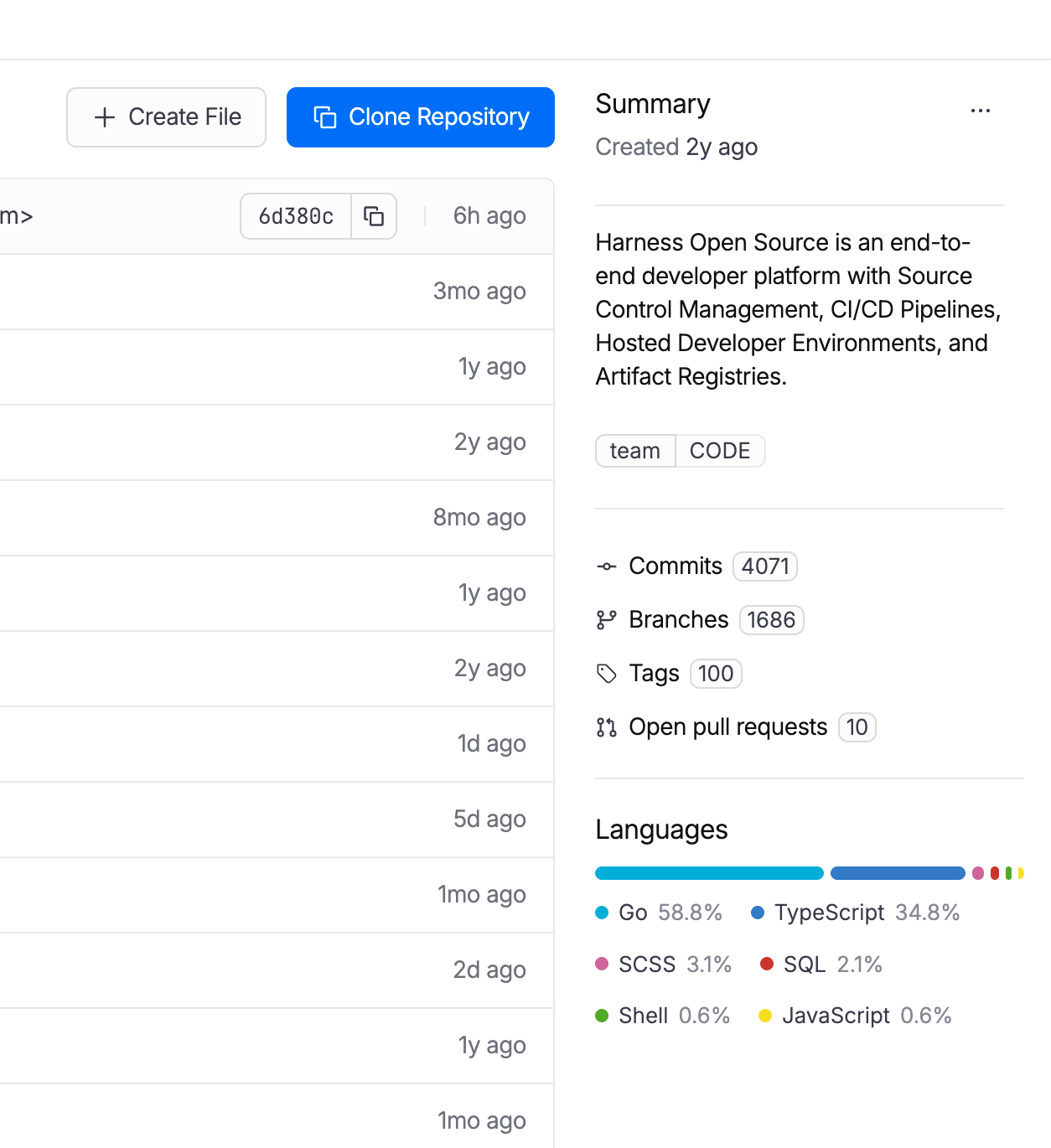
Code Repository Tags Repositories can now be tagged with metadata like team, intent, or domain, consistent with how pipelines, connectors, and other Harness entities are tagged. Useful for filtering, governance, and search at scale.
AI SRE
AI-Generated Post-Mortems with Action Item Detection
When an incident closes, AI SRE automatically generates a structured six-section retrospective: Summary, Impact, Root Cause, Resolution, Insights, and Lessons Learned. The AI synthesizes the full incident context: timeline events, Slack conversations, RCA theories, and responder actions. What typically takes a lead engineer 2-4 hours to write comes out in seconds. Action items are detected in real time from Slack conversations and meeting transcripts during the incident, with each item including a description and the responsible person extracted from context. They carry forward into the post-mortem automatically, so nothing gets reconstructed from memory days later. Release notes.
ServiceNow Change Record Correlation in RCA
When an incident fires, the AI Investigator automatically pulls recent ServiceNow change records and correlates them to the incident timeline. If your organization already has a Harness ServiceNow connector configured for pipelines or approvals, change data flows into root cause analysis immediately with zero additional setup. Change records appear alongside deploy events and code changes in the AI's correlation engine, reducing manual cross-referencing between tools. Documentation.
Stakeholder Status Updates
Incident commanders can now broadcast structured status updates to subscribed stakeholders (executives, customer support, dependent teams) without flooding the war room. Stakeholders subscribe to the services they care about and receive updates triggered by the Incident Lead. The system pre-populates a branded email with incident ID, title, summary, impacted services, and current status. The sender reviews, edits if needed, and sends. Eliminates the "what's the status?" interruptions that pull responders out of active response. Release notes.
Google Chat Integration
Teams running Google Workspace can now run incident response directly from Google Chat: create incident channels, post updates, receive notifications, and collaborate in real time. Uses a Pub/Sub-based architecture for reliable message delivery. Bring incident collaboration to Google Chat on par with the existing Slack integration. One-time admin setup per organization.
Runbook Slug Commands in Slack
On-call responders can now trigger runbook automations from Slack using short slug commands: /harness run <slug>. No UI navigation during high-pressure response. Common actions like restart-pods or scale-up become muscle memory. Removes a context switch from the critical path during active incidents. Release notes.
Chaos Engineering and Resilience Testing
MCP support for Resilience Testing
MCP support for Resilience Testing improves extensibility across chaos and resilience workflows.
Pipeline Integration with Chaos Step Templates
Any experiment template can now be referenced and used from any scope in a pipeline. Makes it easier to standardize chaos execution across delivery workflows.
Probes and Observability Splunk Enterprise and Datadog APM Probes
APM probes now support Splunk Enterprise and Datadog. Teams can validate system behavior during experiments using the observability tools they already rely on.
Namespace Label Filters in ChaosGuard
ChaosGuard conditions now support namespace label filters, giving teams finer-grained control over which namespaces chaos experiments can target. Release notes.
Experiment Run Reports
Experiment run reports are now available in the UI and accessible via a new API endpoint that returns report data as JSON. Useful for integrating chaos results into external dashboards or compliance workflows.
Docker Labels-Based Chaos Injection on ECS
Added support for targeting ECS in-VM SSM chaos injection using Docker labels. Expands targeting flexibility for teams running mixed ECS workloads.
Other Updates
- Service account token notifications: Configure alerts for token creation, rotation, updates, expiration, deletion, and upcoming expiration across your notification channels.
- Cloud cost RBAC enforcement: Users with CCM Viewer (view-only) access no longer see an enabled Save Preferences button in Cost Settings. RBAC is now consistently enforced across the Recommendations and Anomalies pages. Release notes.
- Rejected and Ignored recommendations moved to main view: These lists are now in the Recommendations list itself, enabling direct export without extra navigation.
- AI test automation task nesting limit: Tasks can now nest at most two levels deep, preventing runaway task hierarchies. Enforced in both UI and backend. Release notes.
- Chaos Engineering LLM optimization: Recommendation calls are now processed in chunks instead of one-by-one, reducing latency for experiment recommendation generation.
- IDP sync and delete for integrations: Integration instances (ServiceNow, Kubernetes, SonarQube, GitHub) now include sync and delete actions directly in the UI.
- IDP separates create and edit permissions: Environment and Blueprint permissions are split into distinct Create and Edit actions for finer-grained access control.
- IDP custom user identifiers: The saveDiscoverEntities API now accepts an explicit action_identifier field when registering catalog entities.
Closing
70+ features in 30 days. The teams using AI to accelerate code generation are now running into the same reality we tracked in March: the bottleneck isn't writing code, it's everything downstream. Artifact management, security posture, deployment reliability, incident response, and AI asset governance. April's releases push the feedback loop tighter at each of those stages. Post-mortems that took 4 hours now take seconds. The change record correlation that required manual cross-referencing now happens automatically.
The velocity compounds when the whole software delivery moves together, not just the part where the AI writes code.
See you in May!
