How we rebuilt a messy filters system in React using Context and inversion of control to create a scalable, reusable, and URL-synced architecture.

Filtering data is at the heart of developer productivity. Whether you’re looking for failed builds, debugging a service or analysing deployment patterns, the ability to quickly slice and dice execution data is critical.
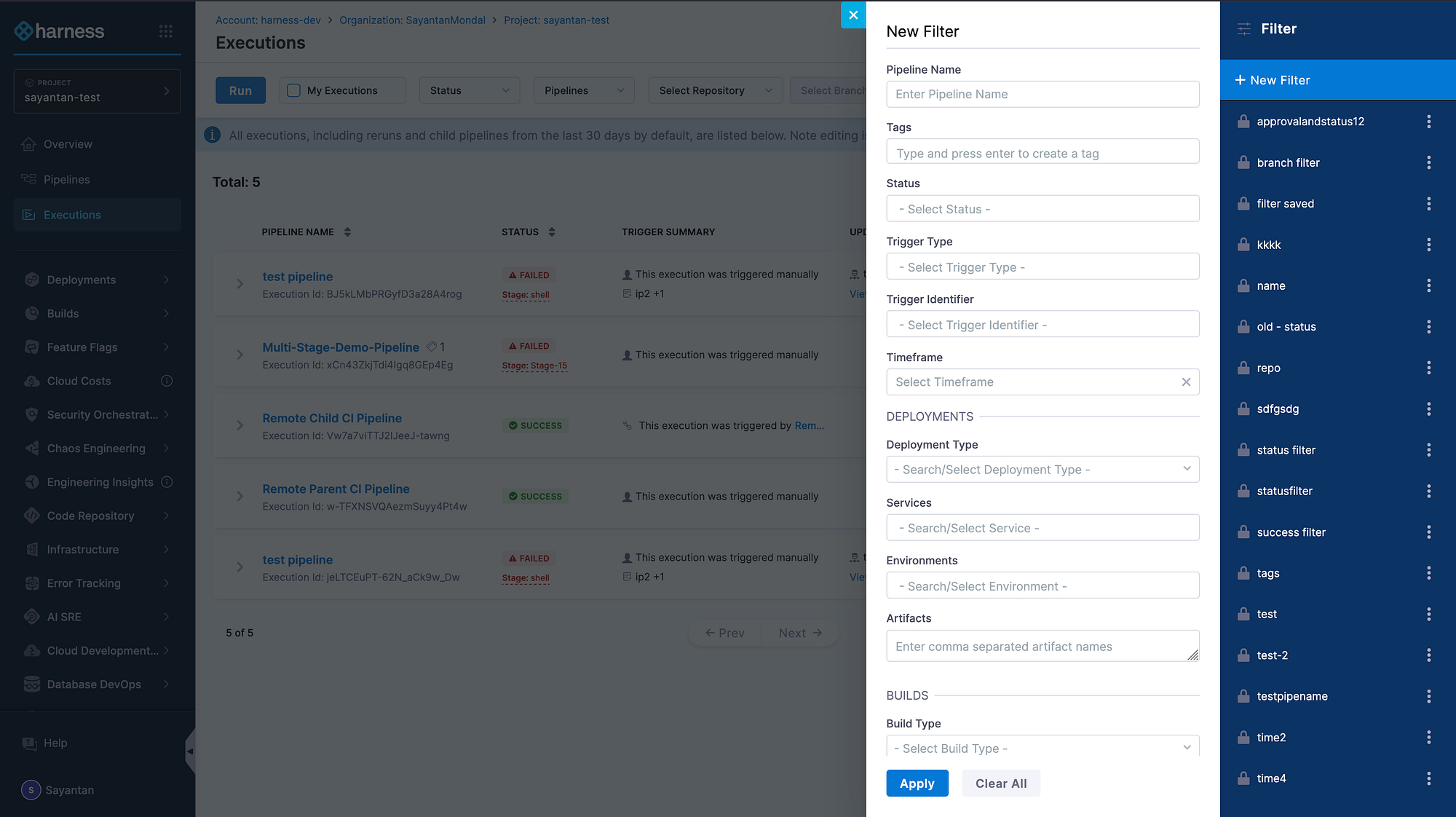
At Harness, users across CI, CD and other modules rely on filtering to navigate complex execution data by status, time range, triggers, services and much more. While our legacy filtering worked, it had major pain points — hidden drawers, inconsistent behaviour and lost state on refresh — that slowed both developers and users.
This blog dives into how we built a new Filters component system in React: a reusable, type-safe and feature-rich framework that powers the filtering experience on the Execution Listing page (and beyond).
Prefer Watching? Here’s the Talk
The Starting Point: Challenges with Our Legacy Filters
Our old implementation revealed several weaknesses as Harness scaled:
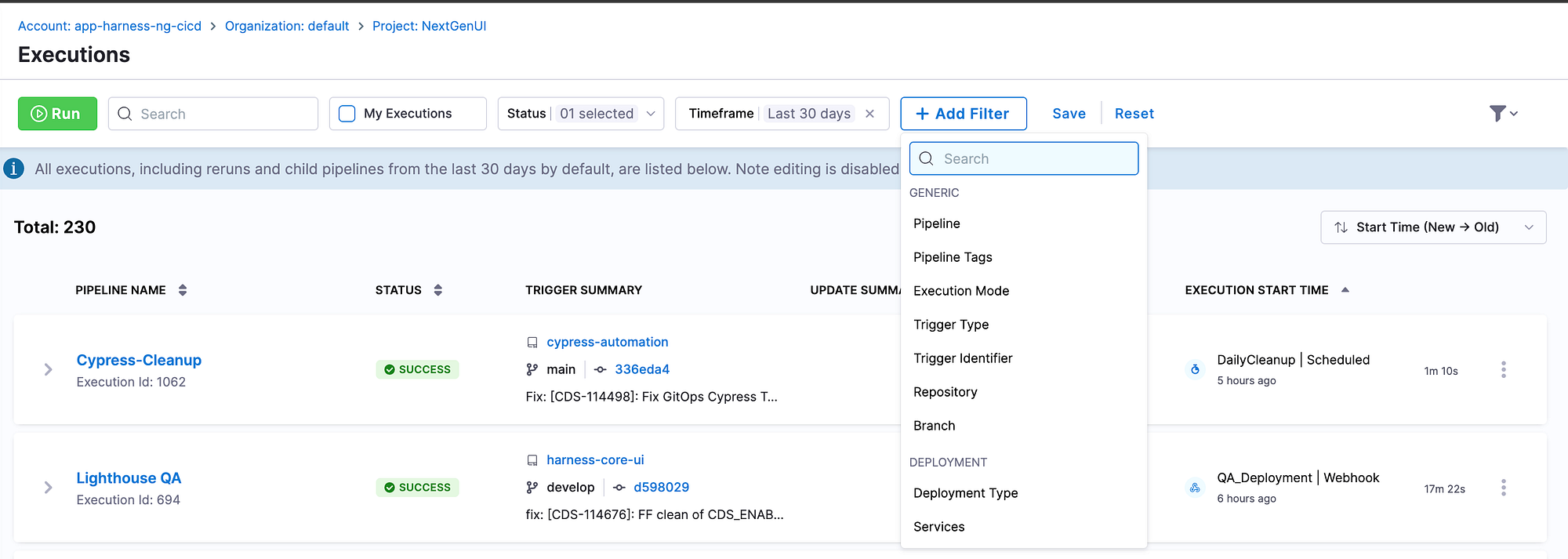
- Poor Discoverability and UX: Filters were hidden in a side panel, disrupting workflow and making applied filters non-glanceable. Users didn’t get feedback until the filter was applied/saved.
- Inconsistency Across Modules: Custom logic in modules like CI and CD led to confusing behavioural differences.
- High Developer Overhead: Adding new filters was cumbersome, requiring edits to multiple files with brittle boilerplate.
These problems shaped our success criteria: discoverability, smooth UX, consistent behaviour, reusable design and decoupled components.
The Evolution of Filters: A Design Journey
Building a truly reusable and powerful filtering system required exploration and iteration. Our journey involved several key stages and learning from the pitfalls of each:
Iteration 1: React Components (Conditional Rendering)
Shifted to React functional components but kept logic centralised in the FilterFramework. Each filter was conditionally rendered based on visibleFilters array. Framework fetched filter options and passed them down as props.
COMPONENT FilterFramework:
STATE activeFilters = {}
STATE visibleFilters = []
STATE filterOptions = {}
ON visibleFilters CHANGE:
FOR EACH filter IN visibleFilters:
IF filterOptions[filter] NOT EXISTS:
options = FETCH filterData(filter)
filterOptions[filter] = options
ON activeFilters CHANGE:
makeAPICall(activeFilters)
RENDER:
<AllFilters setVisibleFilters={setVisibleFilters} />
IF 'services' IN visibleFilters:
<DropdownFilter
name="Services"
options={filterOptions.services}
onAdd={updateActiveFilters}
onRemove={removeFromVisible}
/>
IF 'environments' IN visibleFilters:
<DropdownFilter ... />Pitfalls: Adding new filters required changes in multiple places, creating a maintenance nightmare and poor developer experience. The framework had minimal control over filter implementation, lacked proper abstraction and scattered filter logic across the codebase, making it neither “stupid-proof” nor scalable.
Iteration 2: React.cloneElement Pattern
Improved the previous approach by accepting filters as children and using React.cloneElement to inject callbacks (onAdd, onRemove) from the parent framework. This gave developers a cleaner API to add filters.
children.forEach(child => {
  if (visibleFilters.includes(child.props.filterKey)) {
    return React.cloneElement(child, {
      onAdd: (label, value) => {
        activeFilters[child.props.filterKey].push({ label, value });
      },
      onRemove: () => {
        delete activeFilters[child.props.filterKey];
      }
    });
  }
});
Pitfalls: React.cloneElement is an expensive operation that causes performance issues with frequent re-renders and it’s considered an anti-pattern by the React team. The approach tightly coupled filters to the framework’s callback signature, made prop flow implicit and difficult to debug and created type safety issues since TypeScript struggles with dynamically injected props.
Final Solution: Context API
The winning design uses React Context API to provide filter state and actions to child components. Individual filters access setValue and removeFilter via useFiltersContext() hook. This decouples filters from the framework while maintaining control.
COMPONENT Filters({ children, onChange }):
    STATE filtersMap = {}           // { search: { value, query, state } }
    STATE filtersOrder = []         // ['search', 'status']

    FUNCTION updateFilter(key, newValue):
        serialized = parser.serialize(newValue)   // Type → String
        filtersMap[key] = { value: newValue, query: serialized }
        updateURL(serialized)
        onChange(allValues)

    ON URL_CHANGE:
        parsed = parser.parse(urlString)          // String → Type
        filtersMap[key] = { value: parsed, query: urlString }

    RENDER:
        <Context.Provider value={{ updateFilter, filtersMap }}>
            {children}
        </Context.Provider>
END COMPONENT
Benefits: This solution eliminated the performance overhead of cloneElement, decoupled filters from framework internals and made it easy to add new filters without touching framework code. The Context API provides clear data flow that’s easy to debug and test, with type safety through TypeScript.
Inversion of Control (IoC)
The Context API in React unlocks something truly powerful — Inversion of Control (IoC). This design principle is about delegating control to a framework instead of managing every detail yourself. It’s often summed up by the Hollywood Principle: “Don’t call us, we’ll call you.”
In React, this translates to building flexible components that let the consumer decide what to render, while the component itself handles how and when it happens.
Our Filters framework applies this principle: you don’t have to manage when to update state or synchronise the URL. You simply define your filter components and the framework orchestrates the rest — ensuring seamless, predictable updates without manual intervention.
How Filters Inverts Control
Our Filters framework demonstrates Inversion of Control in three key ways.
- Logic via Props: The framework doesn’t know how to save filters or fetch data — the parent injects those functions. The framework decides when to call them, but the parent defines what they do.
- Content via Children (Composition): The parent decides which filters to render.
- Actions via Callbacks: The framework triggers callbacks when users type, select or apply filters, but it’s your code that decides what happens next — fetch data, update cache or send analytics.
The result? A single, reusable Filters component that works across pipelines, services, deployments or repositories. By separating UI logic from business logic, we gain flexibility, testability and cleaner architecture — the true power of Inversion of Control.
COMPONENT DemoPage:
    STATE filterValues
    FilterHandler = createFilters()

    FUNCTION applyFilters(data, filters):
        result = data
        IF filters.onlyActive == true:
            result = result WHERE item.status == "Active"
        RETURN result

    filteredData = applyFilters(SAMPLE_DATA, filterValues)

    RENDER:
        <RouterContextProvider>
            <FilterHandler onChange = (updatedFilters) => SET filterValues = updatedFilters>

                // Dropdown to add filters dynamically
                <FilterHandler.Dropdown>
                    RENDER FilterDropdownMenu with available filters
                </FilterHandler.Dropdown>

                // Active filters section
                <FilterHandler.Content>
                    <FilterHandler.Component parser = booleanParser filterKey = "onlyActive">
                        RENDER CustomActiveOnlyFilter
                    </FilterHandler.Component>
                </FilterHandler.Content>

            </FilterHandler>

            RENDER DemoTable(filteredData)
        </RouterContextProvider>
END COMPONENT
The URL Problem
One of the key technical challenges in building a filtering system is URL synchronization. Browsers only understand strings, yet our applications deal with rich data types — dates, booleans, arrays and more. Without a structured solution, each component would need to manually convert these values, leading to repetitive, error-prone code.
The solution is our parser interface, a lightweight abstraction with just two methods: parse and serialize.
parseconverts a URL string into the type your app needs.serializedoes the opposite, turning that typed value back into a string for the URL.
This bidirectional system runs automatically — parsing when filters load from the URL and serialising when users update filters.
const booleanParser: Parser<boolean> = {
parse: (value: string) => value === 'true', // "true" → true
serialize: (value: boolean) => String(value) // true → "true"
}FiltersMap — The State Hub
At the heart of our framework lies the FiltersMap — a single, centralized object that holds the complete state of all active filters. It acts as the bridge between your React components and the browser, keeping UI state and URL state perfectly in sync.
Each entry in the FiltersMap contains three key fields:
- Value — the parsed, typed data your components actually use (e.g. Date objects, arrays, booleans).
- Query — the serialized string representation that’s written to the URL.
- State — the filter’s lifecycle status: hidden, visible or actively filtering.
You might ask — why store both the typed value and its string form? The answer is performance and reliability. If we only stored the URL string, every re-render would require re-parsing, which quickly becomes inefficient for complex filters like multi-selects. By storing both, we parse only once — when the value changes — and reuse the typed version afterward. This ensures type safety, faster URL synchronization and a clean separation between UI behavior and URL representation. The result is a system that’s predictable, scalable, and easy to maintain.
interface FilterType<T = any> {
  value?: T              // The actual filter value
  query?: string         // Serialized string for URL
  state: FilterStatus    // VISIBLE | FILTER_APPLIED | HIDDEN
}
The Journey of a Filter Value
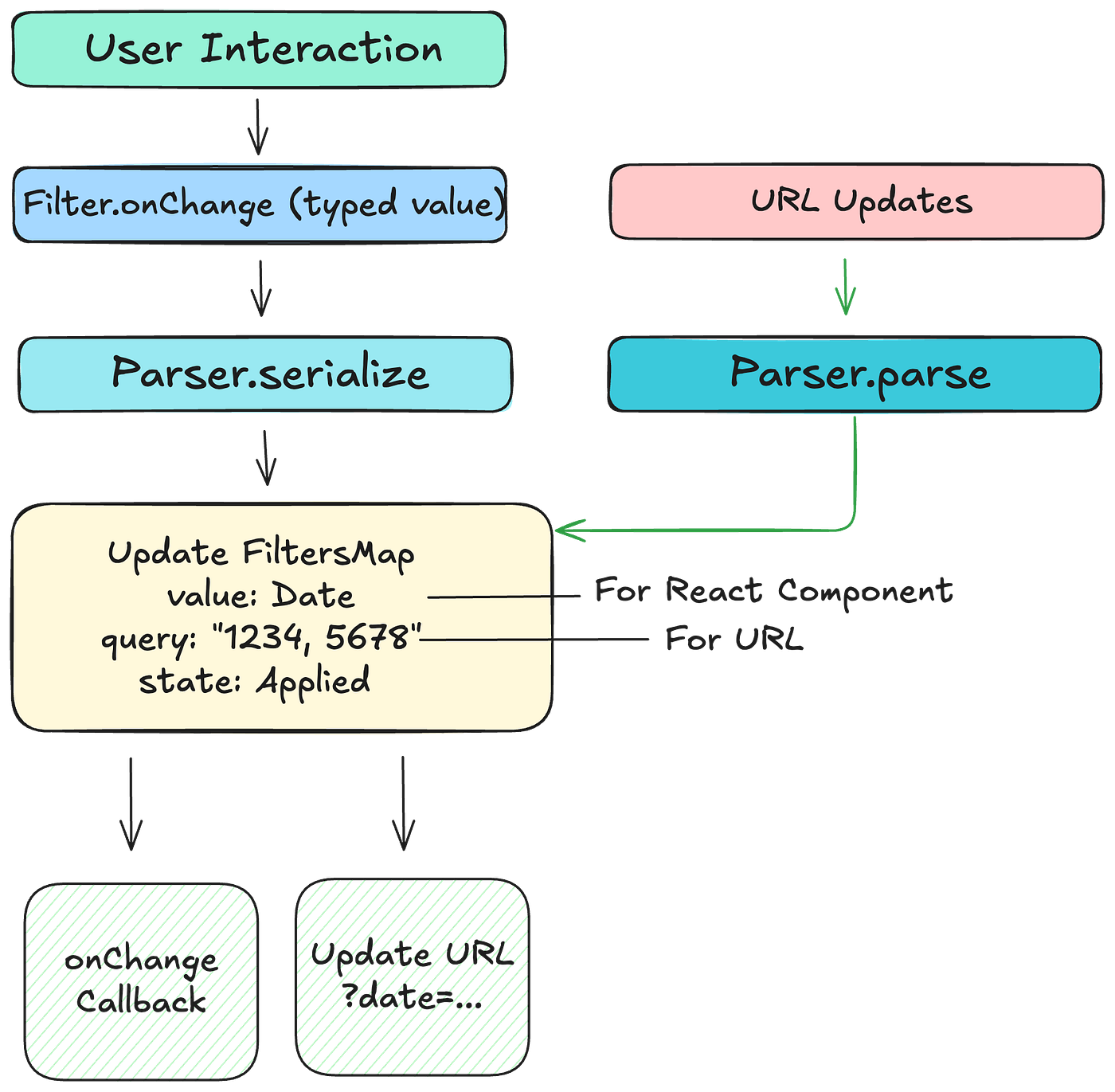
Let’s trace how a filter value moves through the system — from user interaction to URL synchronization.
It all starts when a user interacts with a filter component — for example, selecting a date. This triggers an onChange event with a typed value, such as a Date object. Before updating the state, the parser’s serialize method converts that typed value into a URL-safe string.
The framework then updates the FiltersMap with both versions:
- the typed value under
valueand - the serialized string under
query.
From here, two things happen simultaneously:
- The
onChangecallback fires, passing typed values back to the parent component — allowing the app to immediately fetch data or update visualizations. - The URL updates using the serialized query string, keeping the browser’s address bar in sync and making the current filter state instantly shareable or bookmarkable.
The reverse flow works just as seamlessly. When the URL changes — say, the user clicks the back button — the parser’s parse method converts the string back into a typed value, updates the FiltersMap and triggers a re-render of the UI.
All of this happens within milliseconds, enabling a smooth, bidirectional synchronization between the application state and the URL — a crucial piece of what makes the Filters framework feel so effortless.
Conclusion
For teams tackling similar challenges — complex UI state management, URL synchronization and reusable component design — this architecture offers a practical blueprint to build upon. The patterns used are not specific to Harness; they are broadly applicable to any modern frontend system that requires scalable, stateful and user-driven filtering.
The team’s core objectives — discoverability, smooth UX, consistent behavior, reusable design and decoupled elements — directly shaped every architectural decision. Through Inversion of Control, the framework manages the when and how of state updates, lifecycle events and URL synchronization, while developers define the what — business logic, API calls and filter behavior.
By treating the URL as part of the filter state, the architecture enables shareability, bookmarkability and native browser history support. The Context API serves as the control distribution layer, removing the need for prop drilling and allowing deeply nested components to seamlessly access shared logic and state.
Ultimately, Inversion of Control also paved the way for advanced capabilities such as saved filters, conditional rendering, and sticky filters — all while keeping the framework lightweight and maintainable. This approach demonstrates how clear objectives and sound architectural principles can lead to scalable, elegant solutions in complex UI systems.