Learn how Cloud AutoStopping complements Kubernetes autoscaling for maximum cost savings in non-production environments.

TL;DR
Harness Cloud AutoStopping and Kubernetes autoscaling together enhance cloud cost efficiency. AutoStopping halts idle resources, saving up to 80% on non-production costs, while autoscaling adjusts resources based on demand. This synergy optimizes resource usage and reduces overall cloud expenses effectively.
As businesses scale their cloud usage, managing cloud costs is imperative. Harness Cloud Cost Management features intelligent Cloud AutoStopping™, which uses artificial intelligence and machine learning (AI/ML) to actively manage cloud resource idle time, reducing cloud spend by up to 80% for non-production workloads.
We often get asked how to differentiate between the Harness Cloud AutoStopping feature and native Kubernetes cluster autoscaling capabilities, and whether these two features can be used together. The answer to that is definitely “yes” because they address two different aspects of your cloud usage. In this blog, we'll start by defining each feature and then delve into how they complement each other.
Harness Cloud AutoStopping
Development resources consume a significant portion of your cloud spend, especially when they are left running full-time. Your engineers don’t work 24 hours a day, so neither should their development resources. This is where Harness Cloud AutoStopping comes in to automate the management of idle development resources.
Harness Cloud AutoStopping goes beyond manual resource scheduling by providing a sophisticated and automated method to detect when cloud resources are idle and take action based on your policy settings. Cloud AutoStopping not only dynamically halts idle workloads, but it also transparently restarts them when it detects users accessing those workloads. Currently, Cloud AutoStopping supports Amazon Web Services (EC2, ASGs, ECS, RDS, EKS), Microsoft Azure (Azure VMs, AKS), Google Cloud Platform (Compute Engine VMs, Instance Groups, GKE), and Kubernetes clusters.
Native Kubernetes Cluster Autoscaling
Much like engineers don’t work 24 hours a day, neither do your customers, but production SaaS applications have to be available full-time in order to service requests from global customers. Demand can be unpredictable, but rather than create large clusters that can handle peak daily demand (which wastes money when demand is low), you can build flexible architectures that respond on demand using Kubernetes cluster autoscaling.
Kubernetes cluster autoscaling adjusts the size of a cluster based on end-user demand. It adds or removes nodes to your production clusters to match current workload demands, which optimizes resource utilization while ensuring strong performance. It’s best practice to have your non-production dev/test environments mirror your production environments, so you’ll want to turn on cluster autoscaling across both environments.
So how are Cloud AutoStopping and cluster autoscaling different? Let’s use building lighting as an analogy. When all employees leave for the weekend, motion detectors flip the switch and turn off all of the lights in the building, then turn them all back on again when someone walks in the door. That’s Cloud AutoStopping. However, during the week, some departments may be working different hours or customers may come in, so you still need some light, but not as much as when the building is full, so lighting levels are adjusted to meet active demand. That’s cluster autoscaling.
Advantages of Cloud AutoStopping for Non-Production Resources
For Kubernetes and Amazon Elastic Container Service (ECS) clusters, autoscaling should be the default choice for your architectures in product environments; however, for non-production environments, Cloud AutoStopping offers several cost savings advantages over cluster autoscaling. These advantages include:
- Based on more accurate metrics – Cloud AutoStopping operates on real-time traffic access to cloud resources, while autoscaling monitors CPU and memory metrics, which are less accurate indicators of activity and usage, especially for workloads that have watchdog processes that run in the background, even when idle.
- Increases savings by scaling all the way to zero – Cloud AutoStopping halts the entire Kubernetes cluster workload or ECS task and restarts them as new access requests come in. Autoscaling can only scale down the active Kubernetes workload replica count or ECS task count to a predetermined minimum node-count for a given service (and that is never zero). The cost of maintaining even a single Kubernetes workload replica or ECS task per service can accumulate significantly at scale. In contrast, Cloud AutoStopping can cut costs more aggressively.
- Support for dependencies – Cloud AutoStopping enables users to set dependencies across different services and rules that manage various resources. Consequently, dependent services or resources that do not directly receive traffic can also be scaled down to zero or shut down based on traffic at any endpoint, which is not feasible with native autoscaling. Harness Cloud AutoStopping considerably boosts overall cost savings.
Cloud Savings Example
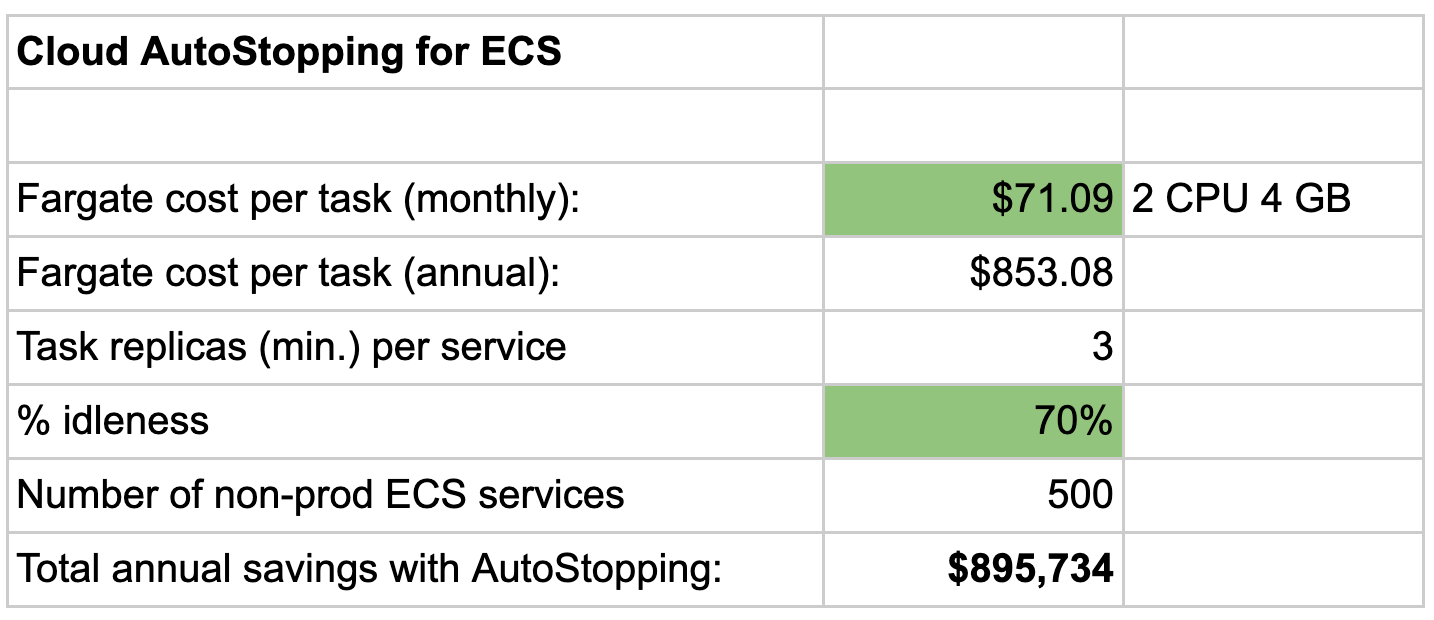
Consider a service from an Amazon ECS Fargate cluster with an Amazon RDS database in the same or different cluster. Harness Cloud AutoStopping can help achieve substantial cost savings by scaling down dependent resources based on traffic patterns. See more details of this example in the chart below.
Can Cloud AutoStopping and Cluster Autoscaling Work Together?
Yes! Harness Cloud AutoStopping and native Kubernetes cluster autoscaling can indeed work together and complement each other. Test and development cluster environments should be able to autoscale in the same manner as production clusters to ensure your production clusters are resilient to customer demand. Then use Cloud AutoStopping to turn them off completely when not in use. By integrating these solutions, organizations can achieve improved cost optimization and resource efficiency for their non-production workloads. This synergy allows users to manage their clusters in a more granular and intelligent manner while reducing overall costs.
Start Leveraging Harness Cloud Stopping and Cluster Autoscaling Today
Harness Intelligent Cloud AutoStopping offers a unique set of features that make it a valuable addition to your native Kubernetes and ECS cluster autoscaling capabilities. By leveraging both Cloud AutoStopping and autoscaling together, organizations can enhance resource management and cost optimization in their non-production environments. Manage your cloud resources intelligently and cost-effectively by combining these two powerful solutions.
To learn more about Harness Cloud AutoStopping and Harness Cloud Cost Management, request a demo or get started for free today!