The problem: our AI spend was growing faster than our understanding of its ROI.

Like most engineering organizations, Harness went from "a few people are trying out AI coding tools" to "AI tooling is a line item in the monthly finance review" in a matter of months.
The cost itself wasn't really the problem. The problem was that nobody could see it:
- User-level costs were sometimes available inside individual tools, but usually no one checked them, there was no consolidated view across providers, and there was no way to set or enforce a user-level AI budget across providers.
- Developers had no idea whether their own usage was normal, cheap, or wildly expensive. There was no signal to act on.
- Nothing distinguished "we're shipping more because of AI" from "we're paying frontier-model prices for work a fast model could do."
- With no feedback loop, the only lever left was a blunt one: turn tools off, or keep paying.
So we did the obvious thing: we treated our AI tooling bill exactly the way we tell our customers to treat their cloud bill, using the Harness Cloud Management Agent (CMA). Here's what we built and what it got us.
.png)
Step 1: Give every developer visibility into their own AI spend
The first thing we shipped wasn't a control. It was a mirror.
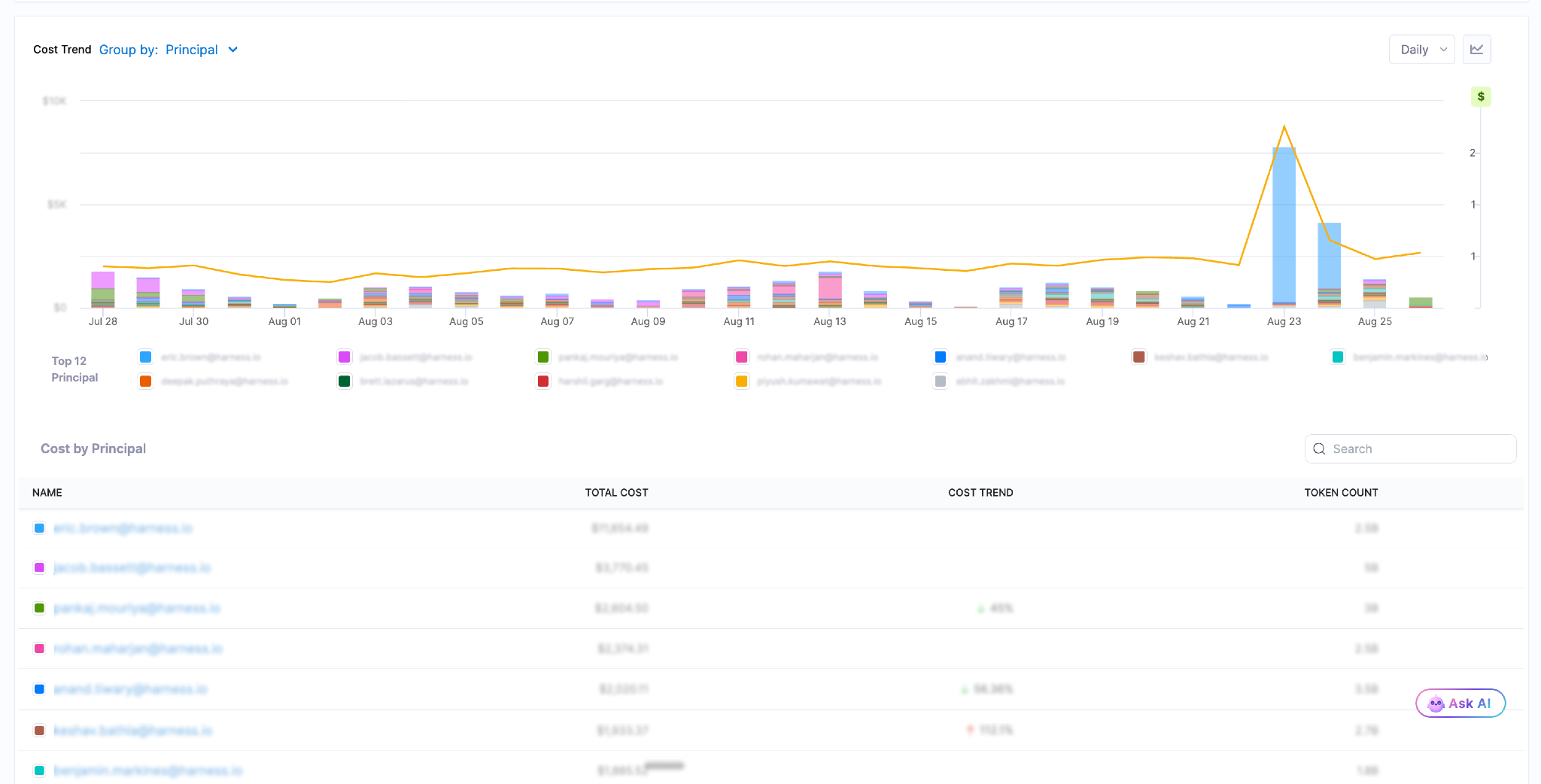
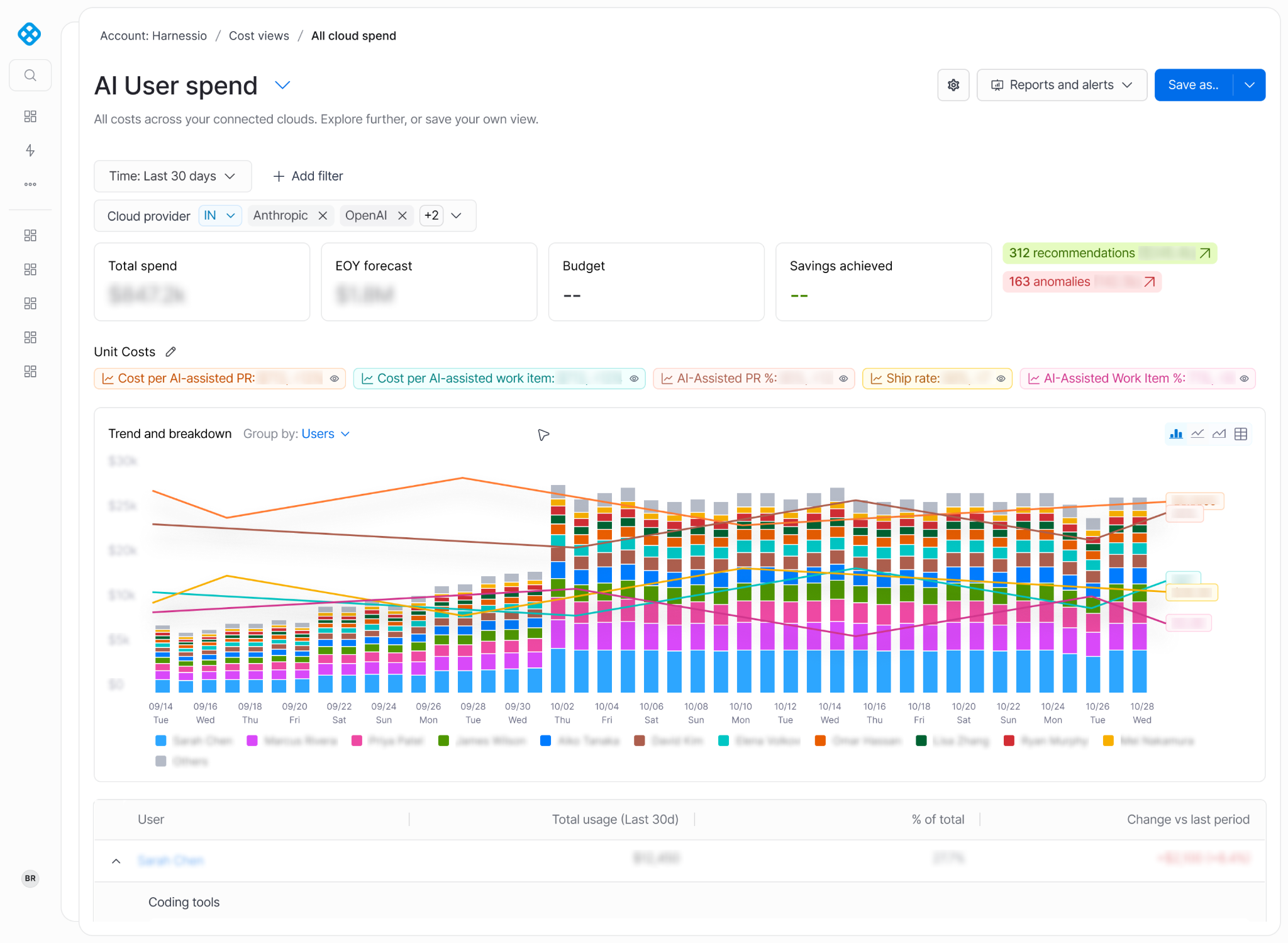
We ingested cost and usage data from every AI provider into our Cost Management Agent and built a Cost Explorer view that breaks spend down by:
- User: who is spending, not just what the company spent.
- Provider: Cursor, OpenAI, Claude Enterprise, Amazon Bedrock, Google Vertex, Gemini, Azure Foundry, Devin, and GitHub Copilot side by side in one view.
- Model: the gap between a frontier model and a fast model is often 10x on price for the same task.
- Token type: input, output, cached, reasoning. Cache behavior turned out to be one of the biggest hidden cost drivers.
- Cost per million tokens: our headline efficiency metric.
That last metric deserves a callout. Total spend tells you how much you used. Cost per million tokens tells you how well you used it. A team can double its token consumption and still cut its bill by moving the right workloads to the right models; absolute spend alone will never show you that.
Just publishing this changed behavior before we enforced anything.
Step 2: Weekly per-developer budgets with graduated notifications
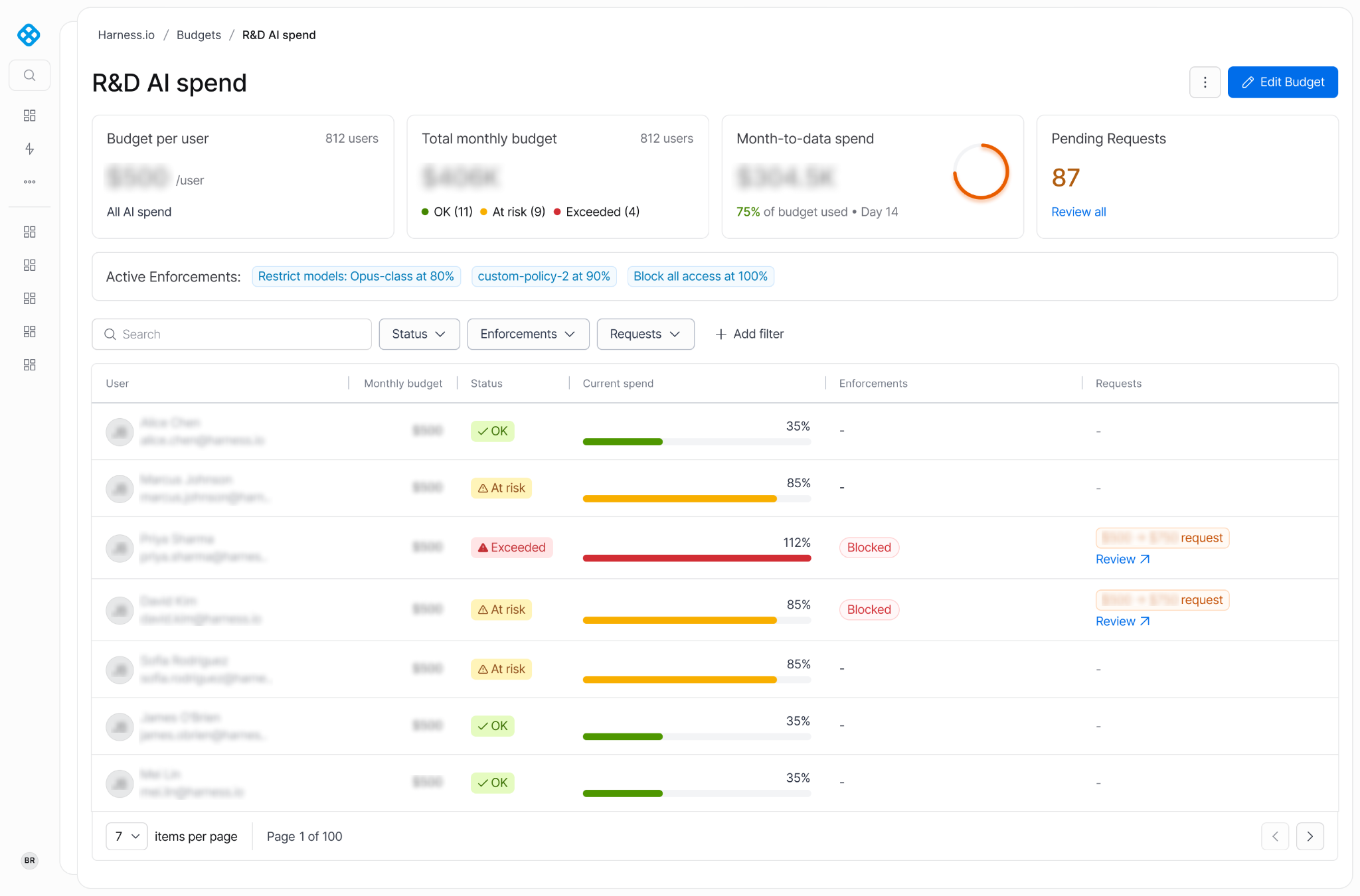
Cost visibility answers "what's happening?" It doesn't answer "what should I do differently, and by when?" For that, we added weekly per-developer budgets:
- Admins set the budget centrally for all users, instead of negotiating case by case.
- Developers are notified well before anything is restricted: You can configure alerts at customizable thresholds. For example, at 90% of the weekly budget, usage moves into the WARN tier: the developer is notified, but nothing is restricted yet, so the first signal is a nudge, not a wall.
- Past 100%, access fully stops. There's no partial-restriction zone: once weekly spend crosses budget, every model is blocked until the next weekly reset, or until a request for more budget is approved (more on that in Step 3). Either way, the budget is a real limit, not a dashboard widget.
- The weekly cadence matters. A monthly budget lets someone burn everything in week one. A weekly reset keeps the feedback loop tight and makes recovery fast.
The goal was never "use AI less." It was "notice the price tag at the moment you pick a model." A threshold alert halfway through the week is exactly that moment.
Step 3: Self-service budget increase requests, with tiered approvals
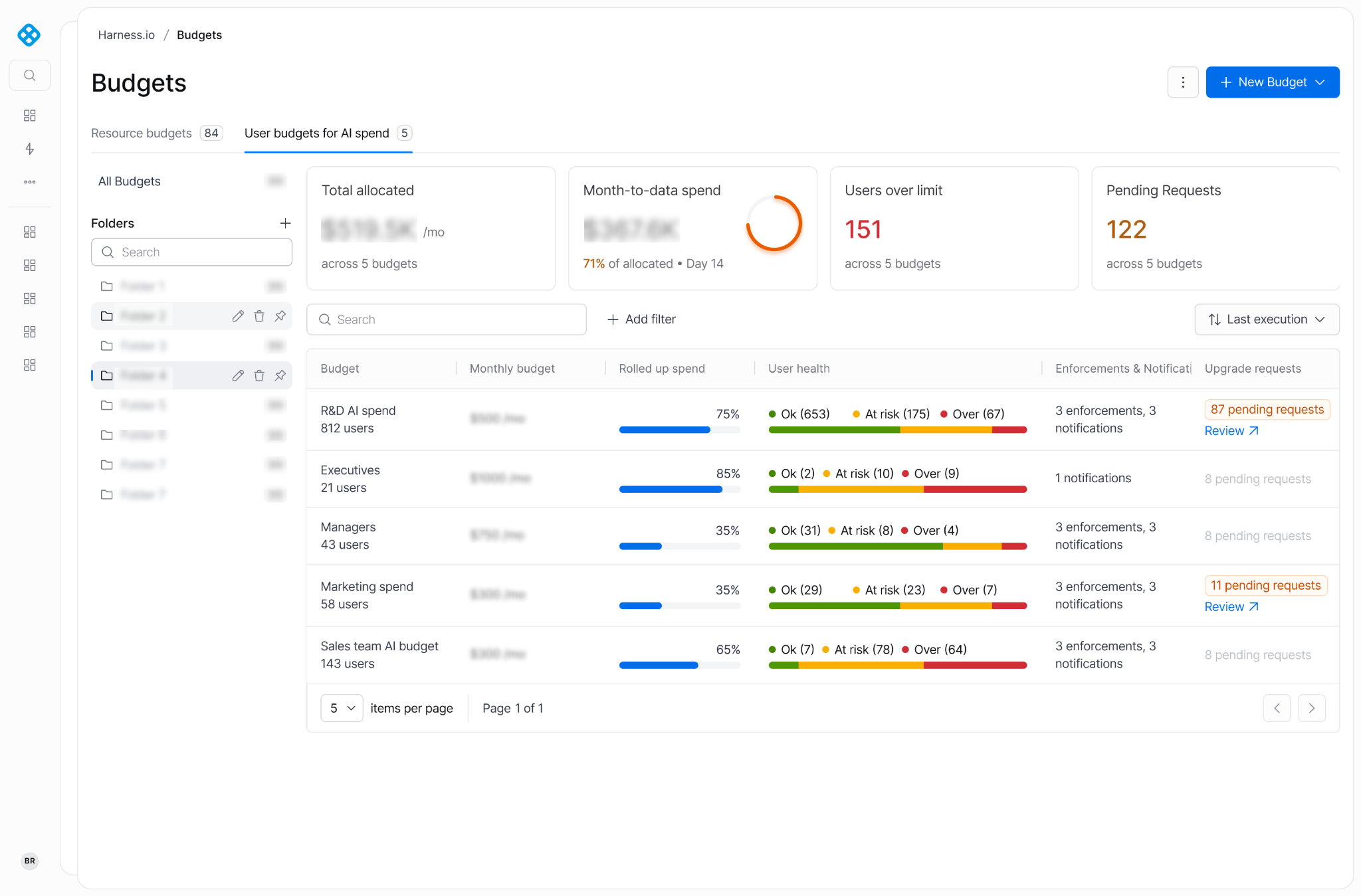
A hard block with no escape hatch is a productivity tax, and engineers route around productivity taxes. So the budget model includes an in-product request flow:
- Developers request an increase directly in the product. No ticket, no Slack archaeology.
- Approvals are tiered by amount. Small increases clear quickly at a low level; large ones escalate to the person who should actually own that call. This can be customized as needed.
- Guardrails on the request itself. Policy controls when in the cycle a user may ask for an increase, and the maximum increment per request.
This is the part that made governance easy to adopt. Developers accept a limit far more readily when raising it is a two-click, same-day operation with transparent criteria.
The results
Governance went live mid-July 2026. The figures below are expressed as per-developer ranges and percentage change, a truer signal of what changed for the person actually picking the model.
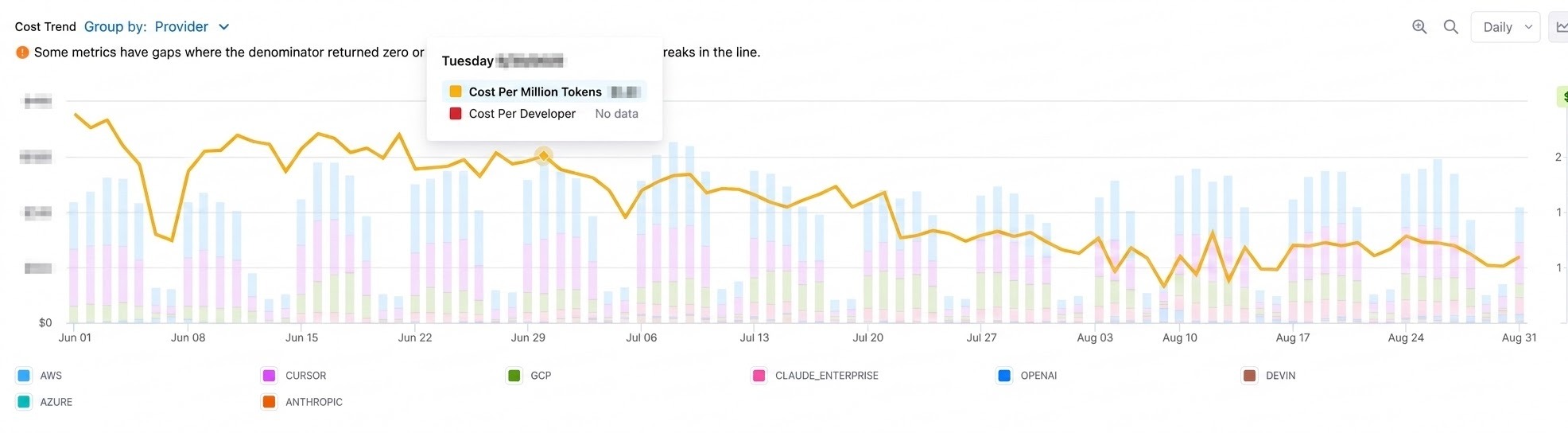
Cost per million tokens tells the story on its own: it held around $1.80 through most of June and July, then broke downward the week governance went live.
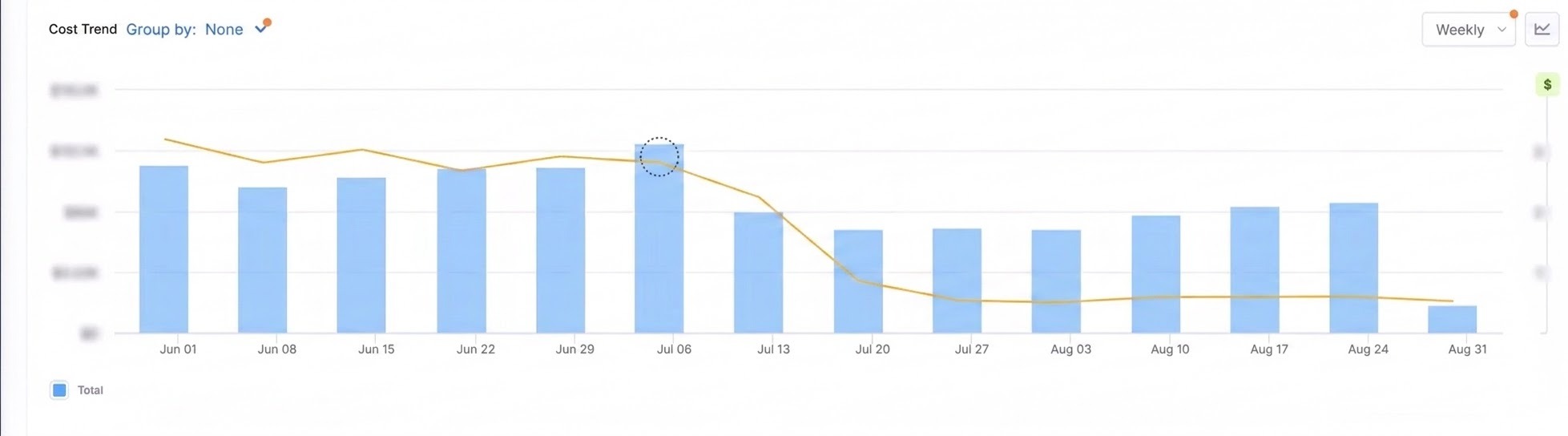
The same pattern holds at the org level: total weekly spend drops sharply in the two weeks after launch, then eases back up slightly as adoption normalizes. That's the 'settling period' we call out below, not a regression.
The number that matters most
Cost per million tokens fell harder than total spend did. Developers didn't stop using AI, they stopped reaching for a frontier model to do a fast model's job, started paying attention to cache-hit behavior, and right-sized context.
That's the difference between cost cutting and cost governance: the savings weren't bought with lost productivity.
Six things we learned
- Visibility before enforcement. Publishing per-developer cost changed behavior before a single budget existed. Leading with blocks would have started a fight instead of a conversation.
- Pick an efficiency metric, not just a spend metric. Cost per million tokens let us prove the savings came from better choices, not reduced usage.
- Weekly beats monthly. Short cycles keep the feedback loop tight and make a breach cheap to recover from.
- Always ship the escape hatch with the limit. Self-service increases with tiered approval are what made a hard block acceptable.
- Attribute to the individual. Team rollups tell you where the money went; developer-level attribution tells someone what to do differently this afternoon.
- Expect a settling period. Spend bottomed out early and drifted back up somewhat as adoption grew and that's healthy. The goal is a governed, efficient run rate, not a permanently suppressed one.
Doing this yourself
Everything above is in the Harness Cost Management Agent functionality, applied to AI tooling alongside cloud infrastructure:
- Ingest AI provider cost and usage from Cursor, OpenAI, Claude Enterprise, Amazon Bedrock, Google Vertex, Gemini, Azure Foundry, Devin, and GitHub Copilot
- Build Cost Explorer views sliced by user, provider, model, agent and token type.
- Track cost per million tokens as your efficiency KPI.
- Set weekly per-developer budgets with threshold alerts and a hard cap.
- Enable in-product budget increase requests with amount-based approval tiers.
We ran it on ourselves first. The results? A meaningful cut in weekly spend and a ~70% cut in the unit cost with no drop in AI usage.