Harness Blog
Featured Blogs
AI is writing more of the code. Software delivery, the work between writing code and running it in production, is where most of the day still goes. Building, testing, scanning, deploying, remediating, and operating still require the same, if not more, effort as before AI.
Today, we're introducing Autonomous Worker Agents for software delivery: the platform for enterprises to build and safely run AI agents that handle the work between writing code and shipping it to production.
Autonomous Worker Agents execute as pipeline steps and produce auditable outputs. Their memory is the organization: services, pipelines, deployments, incidents, policies, all connected through the Harness Knowledge Graph, and their capability is powered by the Harness MCP. They operate in production and support the deployment, security, remediation, and validation of your code.
They join Harness Expert Agents, which have been available to customers for some time, to form a complete AI layer across the platform.
Each agent runs as a step inside a Harness pipeline, on customer-controlled infrastructure, with full governance: scoped credentials, OPA policy enforcement, approval gates, and complete audit trails.
Safe to Run in Production
Autonomous Worker Agents are invoked as pipeline steps or independently. They inherit the governance Harness pipelines already provide. Instead of trying to teach an AI agent a massive list of corporate rules, the agent operates entirely within the constraints of your existing software delivery pipelines.
- OPA Policies that gate production deployments gate the agents.
- RBAC that controls who can push to production controls who can trigger an agent.
- Approval Gates apply before an agent's fix ships, just as they do before any release.
Safety is architected in as well. Workloads execute on Harness Delegates, lightweight runtimes installed inside the customer's own Kubernetes cluster or VPC. An agent that "shouldn't be able to merge to main" cannot merge to main, even if its prompt asks it to. The architecture enforces it.
We built RiskSentinel, a Harness Autonomous Worker Agent, to demonstrate that governed AI can move beyond identifying security issues to safely remediate them while maintaining enterprise controls, auditability, and compliance. When building with Harness, what stood out most was how intuitive the experience was — it enabled our team to move from an initial idea to a production-ready agent in just four days, allowing us to focus on solving a real enterprise challenge rather than the underlying platform. That combination of developer experience and enterprise-ready capabilities is what will enable organizations to confidently scale AI across software delivery.
- Ratna Devarapalli, Director IT, United Airlines
Six additional controls make Autonomous Worker Agents production-safe.
1. Sandboxing
Agents are run containerized, with non-root execution (UID 65534, "nobody"). Their filesystem is read-only except for the workspace. Network access is configurable per agent: unrestricted, restricted to allowed MCP servers, or fully disabled.
An agent that produces a malicious bash command has nowhere to send the data.
2. Scoped Credentials
When a pipeline triggers, Harness mints an ephemeral scoped token. Its scope is the intersection of the agent's permissions and the triggering user's RBAC.
Token deletes on completion. TTL as a failsafe. MongoDB TTL index as final backstop.
3. Policy Enforcement
OPA policies, the same framework Harness customers use to govern deployments, apply to agents. Policies govern the agent at runtime and during configuration.
4. Audit Trails
Every execution is captured in the Harness Audit Trail. This includes a full provenance chain: who or what triggered the agent, template version, every action taken, and final outcome.
Prompts and reasoning chains are sanitized before persistence: secrets stripped, and PII is stripped.
5. Cost Tracking
Token consumption and costs are surfaced per execution, per agent, and per pipeline. Running totals are shown live in the step header.
6. Chaining
Agents are architected to run within pipelines and can be naturally composed into multi-step workflows.
- Sequential: Agent B consumes Agent A's output.
- Parallel: agents run simultaneously.
- Conditional: an agent runs only if a previous step meets a condition.
- Matrix: same agent across repos, environments, or services.
Output handoff happens via pipeline expressions and shared workspace files.
Three ways to create an agent
Using YAML
A Worker Agent is defined in a single file. Here's a complete agent that reviews every pull request for security issues:
agent:
   group:
     steps:
       - name: Run Code Coverage Agent
         id: runCodeCoverageAgent
         if: <+Always>
         run:
           container:
             image: pkg.harness.io/vrvdt5ius7uwygso8s0bia/harness-agents/harness-ai-agent:latest
           env:yam
             ANTHROPIC_MODEL: ${{inputs.model_name}}
             PLUGIN_HARNESS_CONNECTOR: ${{inputs.llm_connector.id}}
             PLUGIN_MAX_TURNS: "150"
             PLUGIN_MCP_FORMAT: harness
             PLUGIN_MCP_SERVERS: <+connectorInputs.resolveList(<+inputs.mcp_connectors>)>
             PLUGIN_TASK: |
               Autonomous Harness Code Coverage Agent; no prompts. Resolve branch/repo/clone_url/account/org/project/execution strictly: input -> env -> MCP, never guess; branch must exist via SCM MCP or fail.
               Use /harness first, else $HARNESS_WORKSPACE; if repo missing, clone (SCM MCP preferred, git fallback) and checkout resolved branch.
               Detect language/test/coverage stack, run baseline coverage (overall + per-file), and target >=90% overall and >=80% per-file.
               Add meaningful tests for critical uncovered paths (happy/edge/error/boundary); allow only minimal production testability tweaks.
               Re-run full tests + coverage + lint + build; all must pass before continuing.
               Review full diff (SCM MCP preferred, git diff fallback); allow only tests + minimal testability tweaks (+ COVERAGE.md only if it already exists; never create it).
               Build report with overall before->after, per-file before/after for touched files, and key improvements.
               Stage files one-by-one only; never use git add -A or git add .; verify staged diff is clean and in-scope.
               Create exactly one commit: "Code coverage: automated test additions by Harness AI"; push plain to origin <branch> (no pull/rebase/merge/force).
               If push fails, print rejection, git reset --hard HEAD~1, exit non-zero; never commit unrelated changes, never weaken existing tests, never log secrets.
YAML frontmatter on top. Natural language below ---. The same convention Jekyll, Hugo, and AI agent definitions across the industry use.
Save the file, commit it to the repo, and the agent is live, governed, and in the catalog. Every PR triggers it. Every run is audited. Every action is scoped by RBAC. From a blank file to a live governed agent in minutes.
The Harness pipeline engine handles container runtime, scoped credentials, MCP server integration, audit logging, and cost tracking.
Using the UI
The Harness Agent Builder is a simple form for configuring your Agents. Define your prompts in plain English, referencing Harness constructs through common expressions. This experience makes it easy to see what you need to provide and set up your agent in minutes.
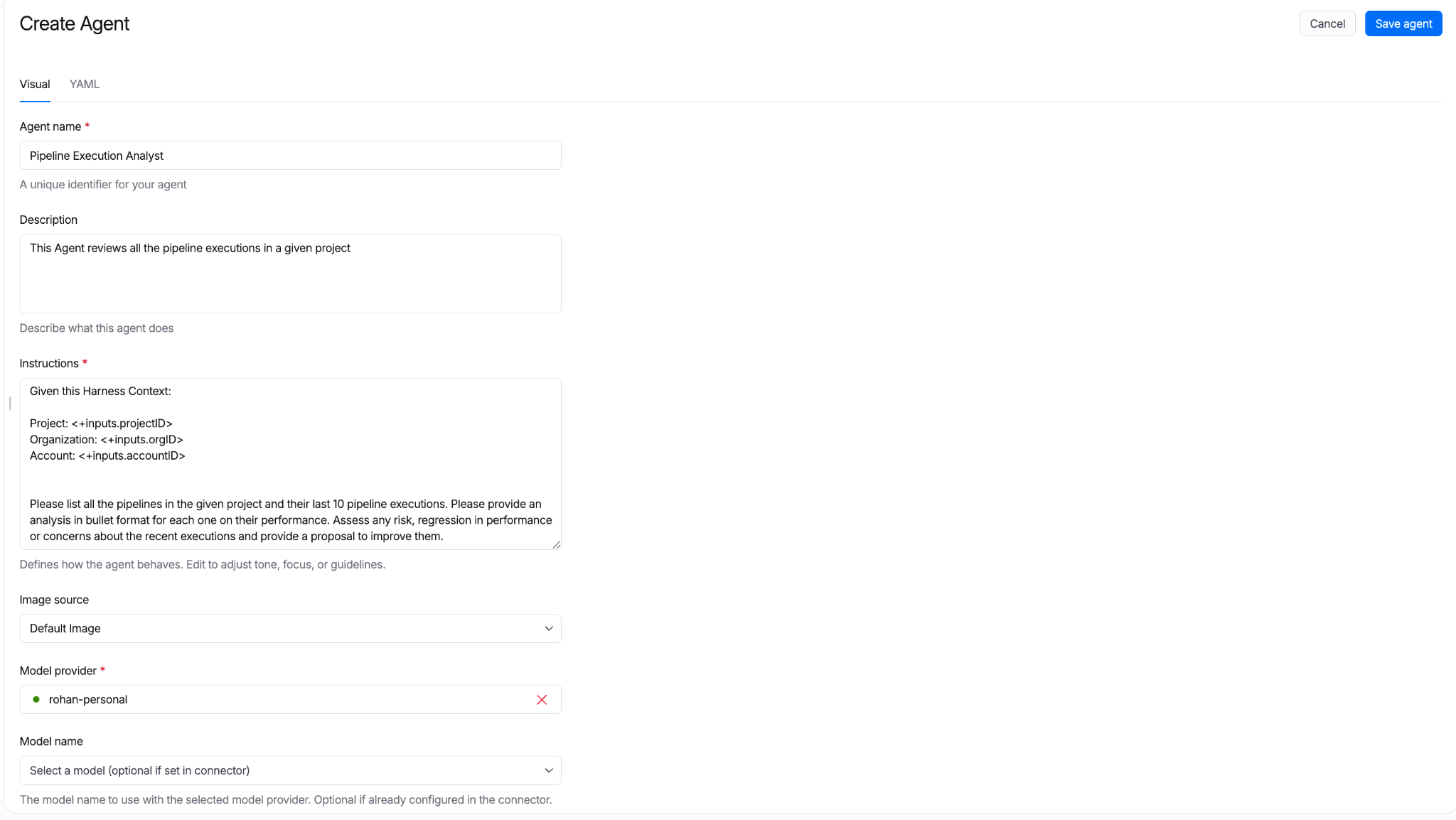
All agent definitions are stored in Harness. Their reference in pipelines can be managed in Git. Approval gates apply. Pipeline Branch-based versions let teams test new agent behavior in feature branches before merging to main.
"We built an agent that handles log analysis directly inside Harness. No tool switching, no context loss. The ability to stay on one platform and have the agent surface what's happening and review it for us was the biggest immediate win. We're planning to use it in production."
- Mandy Pearce, Senior Engineer, Cloud Automation, Verint
Create with MCP
Using your favorite coding agent, you can connect to Harness over the MCP. The MCP bridges the AI Coding agents’ inner-loop context and the outer-loop context and the constructs in Harness.
Agents as Pipeline Steps
Most software delivery workflows have more than one step. Autonomous Worker Agents compose with shell scripts, plugins, approval gates, and other agents to make full pipelines.
Referencing an Agent in a Pipeline
pipeline:
 stages:
   - steps:
       - name: Feature Agent
         template:
           uses: ca_feature_triage_agent@1.0.2
       - name: Plan Agent
         template:
           uses: ca_work_planning_agent@1.0.2
       - name: Build Feature Agent
         template:
           uses: ca_builder_agent@1.0.2
uses: references a Worker Agent template by name and version. The agent runs as one step alongside everything else a Harness pipeline can run.
Sequential: Output Handoff
Agent B consumes Agent A's output. The pipeline expression ${{ steps.<agent_id>.output }} carries the result forward.
pipeline:
 stages:
   - steps:
       - name: spec design
         parallel:
           steps:
             - name: Feature Agent
               template:
               uses: ca_feature_triage_agent@1.0.2
             - name: PR Body
               template:
                 uses: pr_body_writer
                 with:
                   artifactPath: ${{featureagent.output.artifact}}
                   issueKey: cds-1234
Parallel
Multiple agents run simultaneously:
 parallel:
           steps:
             - name: Feature Agent
               template:
                 uses: ca_feature_triage_agent@1.0.2
             - name: PR Body
               template:
                 uses: pr_body_writer
                 with:
                   artifactPath: ${{featureagent.output.artifact}}
                   issueKey: cds-1234
Step Groups
A Step Group bundles agents and deterministic steps into a single reusable unit:
         group:
           steps:
             - name: feature anaylzer
               template:
                 uses: feature_ingester_agent@1.0.2
             - name: work planner
               template:
                 uses: ca_work_planning_agent@1.0.4
Save the group as a template. Reference it from any pipeline. The PR Autofix workflow ships as a Step Group template.
Conditional and Matrix
An agent runs only when a condition is met:
  - steps:
         group:
           steps:
             - name: feature ingest
               template:
                 uses: feature_ingester_agent
             - name: work planner
               template:
                 uses: ca_work_planning_agent
     name: Spec Driven Development
     if: <+OnPipelineSuccess>
The same agent runs across multiple targets:
             - name: work planner
               template:
                 uses: ca_work_planning_agent
               strategy:
                 fail-fast: true
                 for:
                   iterations: 3
Approval gates, failure strategies, retry policies, and rollback work the same way they do for any other pipeline step.
Introducing the Harness Agent Marketplace
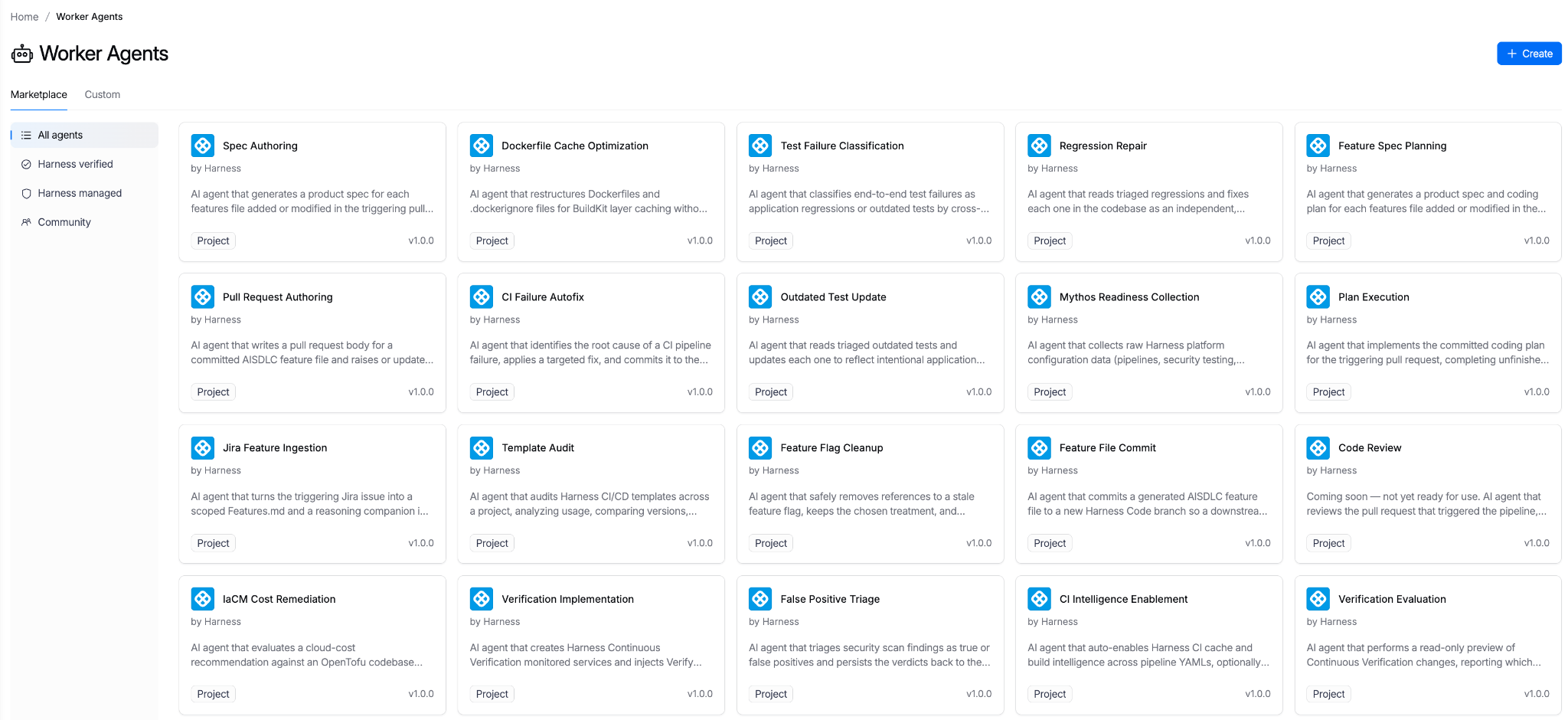
The Harness Agent Marketplace is where teams discover, install, fork, customize, and publish Autonomous Worker Agents.
Three publisher tiers anchor it:
- Harness Managed: Built and maintained by Harness. SLA-backed. Versioned. Pinnable (e.g., harness.autofix@1.2).
- Harness Certified: Partner-built. Reviewed and certified by Harness engineering and security. Examples: dependency vendors with their own scanning agents, cloud providers with cloud-specific deployment agents.
- Community: Published by the broader Harness community. Validated for schema, no secrets in prompt. Enterprise accounts can restrict via OPA policy. Allow only Managed and Certified in production, for instance.
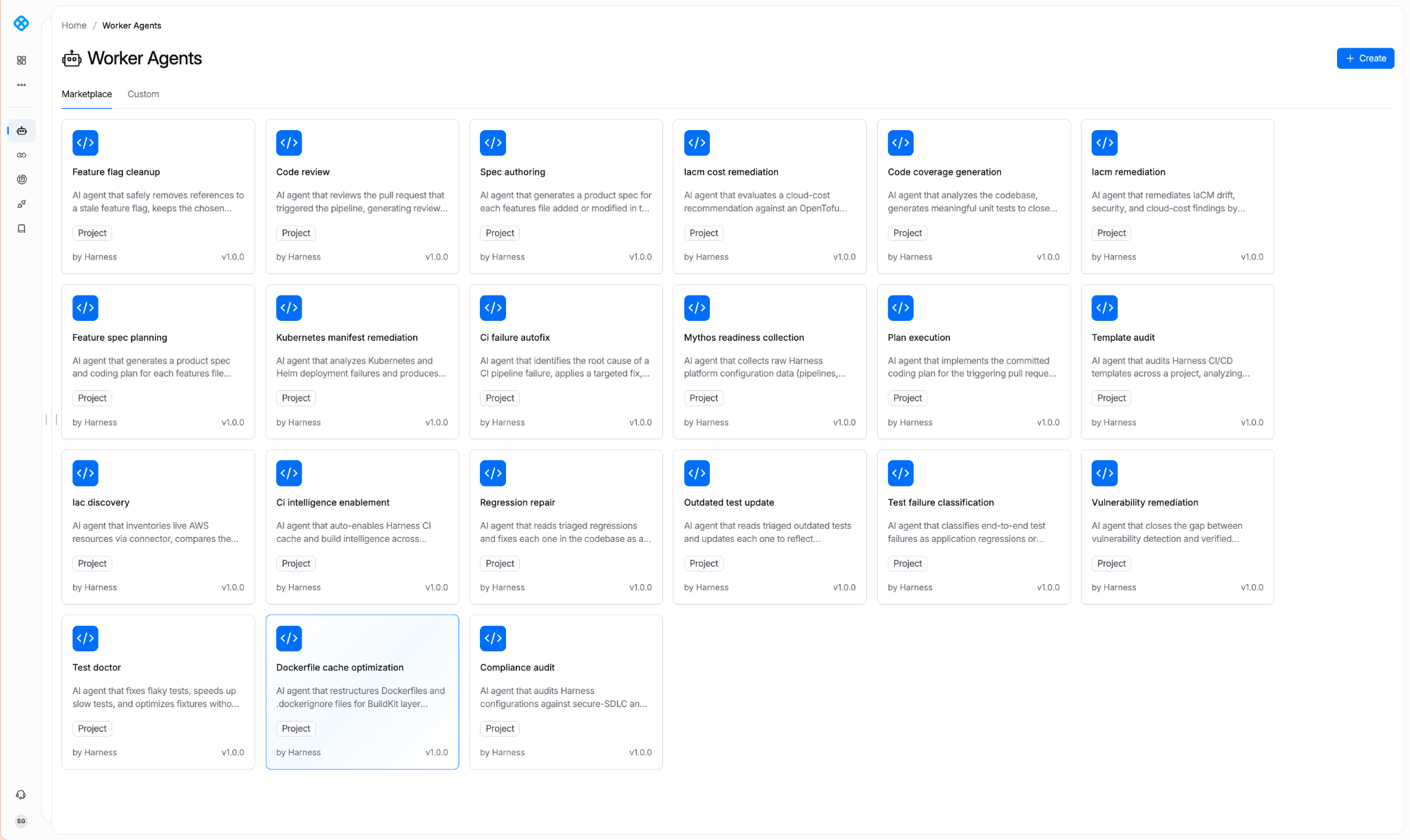
Harness Managed Agents
With today’s launch, Harness has pre-built agents for the most requested use cases. Here are some examples of what’s currently available:
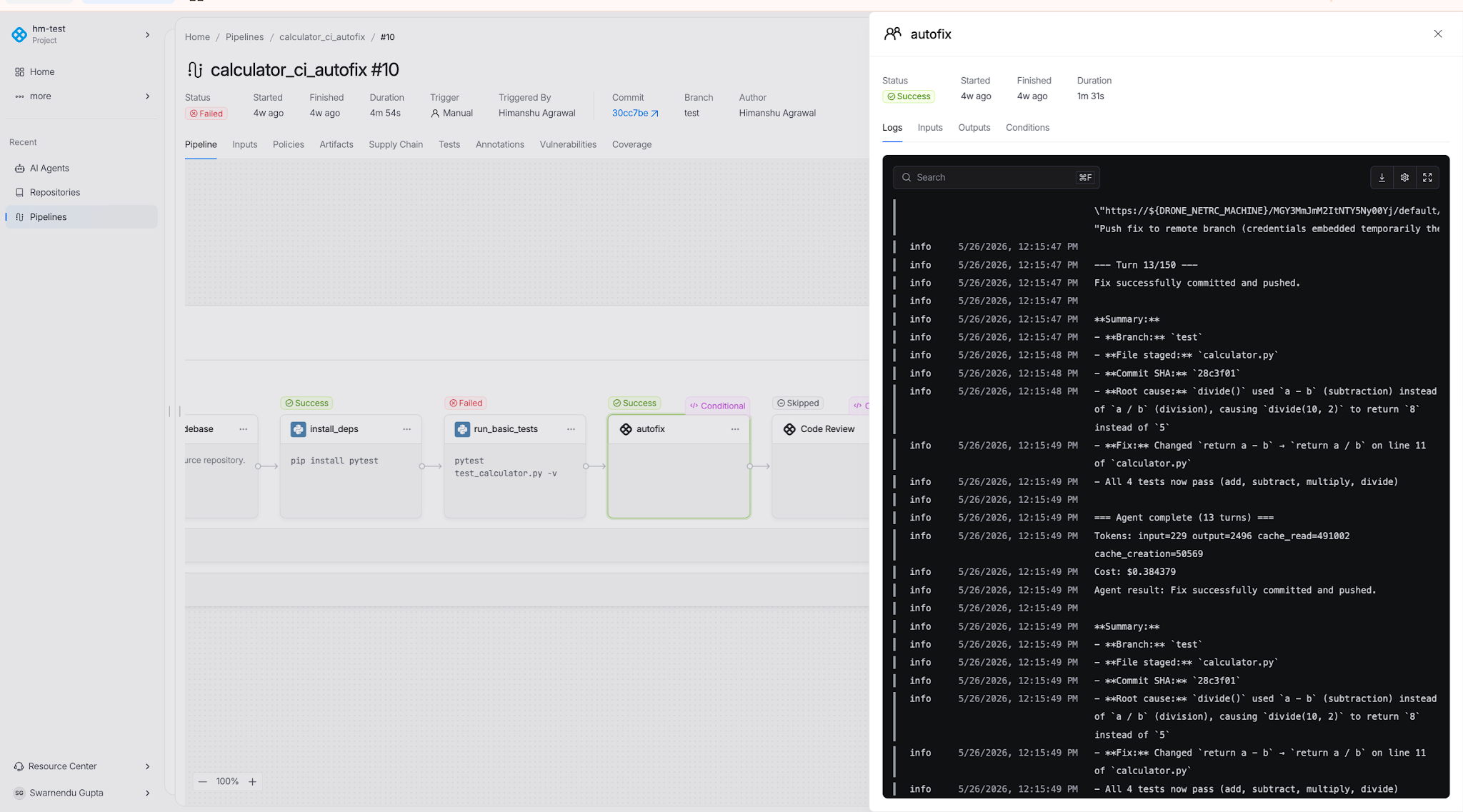
CI Autofix
Reads build logs from a failed PR build, identifies the root cause, commits a fix to the PR branch, re-triggers the build, and repeats until the build passes or the configured max-turns limit is reached.
Manifest Remediator
Analyzes failed Kubernetes deployments. Identifies whether the issue is the manifest, the cluster, or the workload. Fixes manifest issues. Used by teams managing dozens of services across multiple clusters.
Code Review
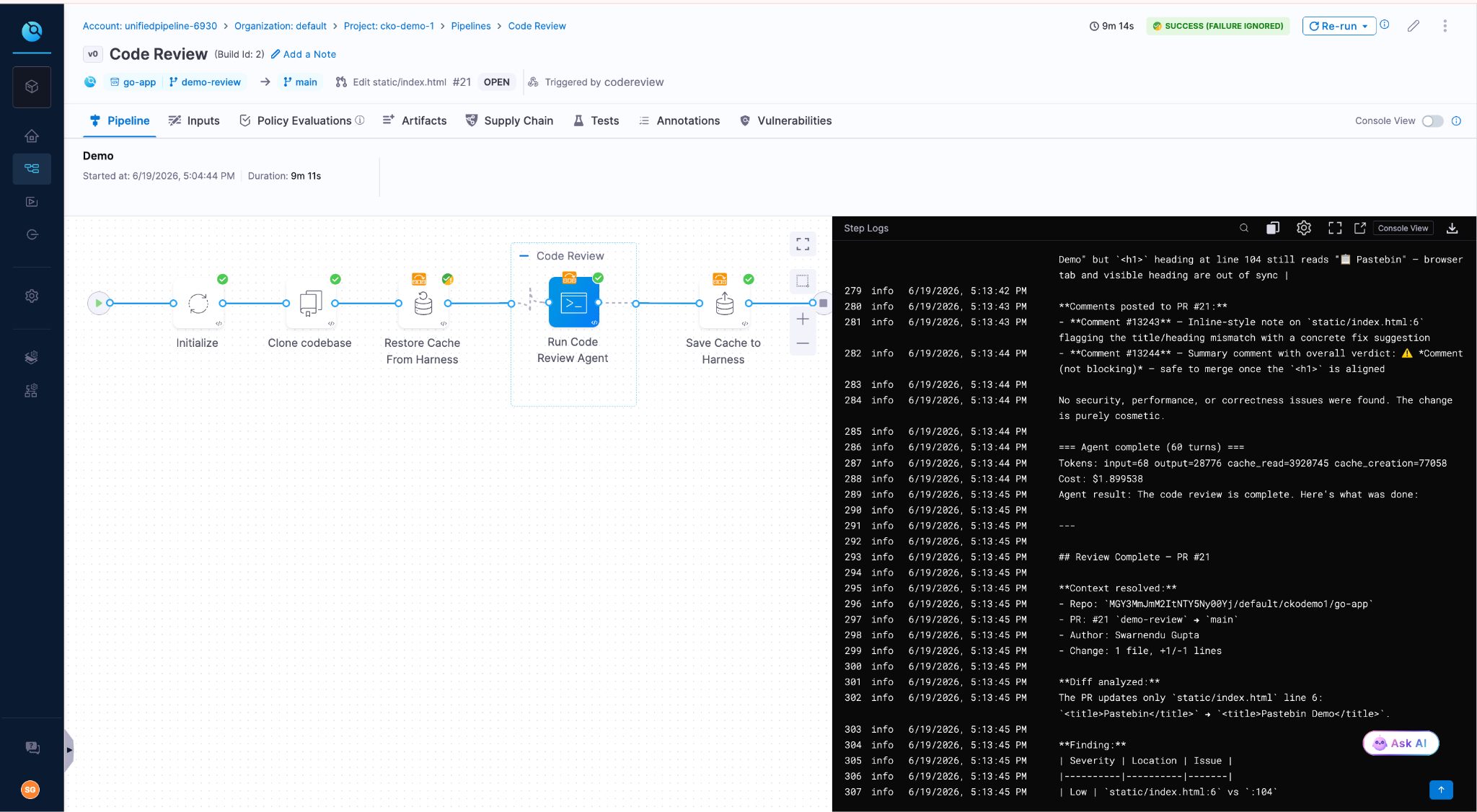
Reviews PR diffs across security, quality, and test coverage. Outputs structured findings with severity ratings and concrete remediation. Grounded in the Harness Knowledge Graph, the agent knows which services are production-critical, which have had recent incidents, and which historical anti-patterns have caused outages.
Feature Flag Cleanup
Reads code, config, and flag-system state to identify feature flags that are fully rolled out or fully off. Once it validates removal is safe, the agent generates a cleanup PR. With this agent, the status of your experiments automatically informs you when flags are cleaned up, reducing flag debt and the drudgery of cleaning up old flags.
Code Coverage
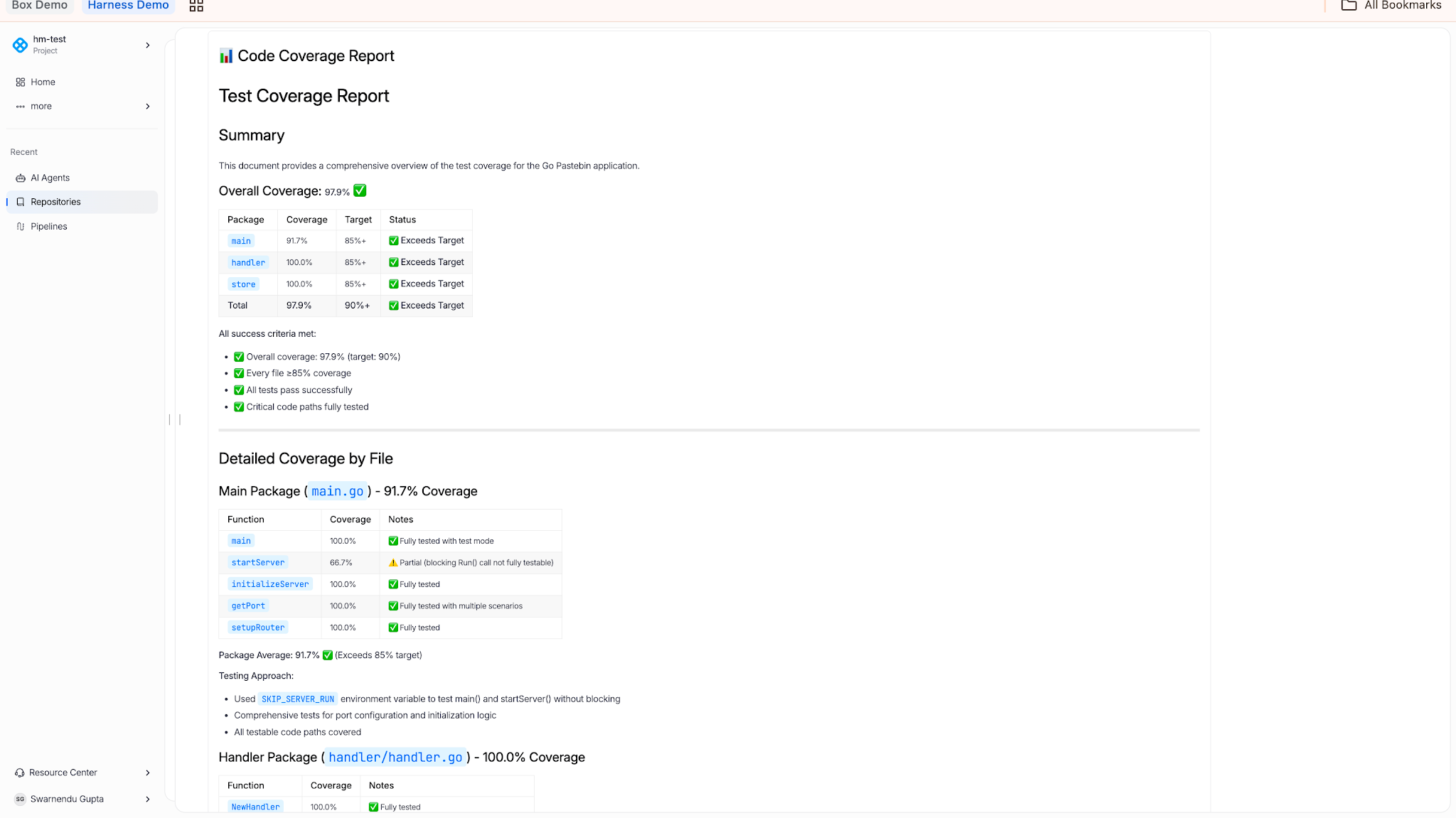
Reads coverage reports, identifies untested lines, branches, and functions, and generates tests to close gaps. Used when a team has inherited a codebase with weak coverage and needs to lift it before a release.
IaCM Remediation
Fixes configuration drift, security findings, and cloud cost issues by editing infrastructure configurations.
Bring Your Own Model
Autonomous Worker Agents are model-agnostic. Connect LLM providers through Harness connectors:
- OpenAI: Direct to Provider
- Anthropic: AWS Bedrock, Direct to Provider
The model can be specified at three levels: in the agent template, at the pipeline step level (overriding the template), or at the account level via environment variable defaults. Switch models per agent, per environment, or per pipeline without changing agent logic.
Three reasons this matters:
- Cost. Different models have different price points. Routing high-volume work through cheaper models is a common pattern.
- Compliance. Some teams require AWS-routed Bedrock for billing consolidation, VPC routing, or Bedrock-specific compliance attestations.
- Future-proofing. Model leaders change. The enterprise decides which model today, which model tomorrow.
Getting Started
Autonomous Worker Agents are available today for all Harness customers. Learn more about Harness Autonomous Worker Agents or request a demo to see them in production.
Visit the in-app Harness Marketplace in app to try out any of the Worker Agents. Add it to your pipeline and watch it run.
Harness has been recognized as a Leader in the 2026 Gartner® Magic Quadrant™ for DevSecOps Platforms for the third consecutive year. Harness was also positioned furthest on the Completeness of Vision axis in the report.
Our Key takeaways:
- Harness is named a Leader for the third consecutive year
- Harness is positioned furthest on the Completeness of Vision axis
- Harness continues investing in governed, AI-powered DevSecOps
Harness is the AI platform for engineering, security, and operations teams to build, secure, deploy, govern, and optimize software delivery across the SDLC.
We believe our recognition in the Gartner Magic Quadrant for DevSecOps Platforms reflects the continued evolution of the Harness platform and our commitment to helping teams deliver software faster, safer, and with greater governance across the software delivery lifecycle.
We’re thrilled to share this recognition, which we believe reflects the strength of our product strategy, the breadth of our platform, and our continued investment in helping enterprises modernize software delivery with security, reliability, cost management, and AI built into the development lifecycle.
Today, organizations across industries like United Airlines, Ancestry, and Citi rely on Harness to reduce delivery complexity, improve developer productivity, strengthen governance, and accelerate innovation across increasingly complex software environments.
Why This Matters Now
Software delivery has entered a new era. AI coding assistants are helping teams create software faster than ever, but faster code generation also means more changes, more tests, more vulnerabilities, more deployments, and more incidents for organizations to manage. The next era of DevSecOps will not be defined by who can generate code faster. It will be defined by who can safely convert that speed into reliable business outcomes.
Our view is that the future of DevSecOps is autonomous AI agents, governed and directed by expert engineers. As humans and AI agents both contribute to software change, enterprises will need one connected platform to understand, validate, secure, deploy, observe, optimize, roll back, and prove every change across the software delivery lifecycle.
Our Journey
As a pioneer in modern software delivery, Harness offers over 15 platform products and has built one of the industry’s most comprehensive platforms to support the full spectrum of application development, deployment, security, reliability, feature management, cost management, and operations.
Harness has evolved through a combination of product innovation, internal entrepreneurship, open source investment, and strategic acquisitions. We believe our recognition as furthest on the Completeness of Vision axis in the 2026 Gartner® Magic Quadrant™ for DevSecOps Platforms is proof that Harness is solving problems for our customers in a measurable way.
Over the past year, Harness has continued to expand platform capabilities and AI agents across:
- Security and risk management
- AI-native testing capabilities including flaky test detection and AI impact testing
- Feature Management and Experimentation
- Cloud and AI Cost Management
- AI DLC insights
- Resilience Testing, and more
This matters because software delivery is no longer just about building and deploying code. Teams must now manage security risk, release complexity, infrastructure cost, compliance requirements, production reliability, and the growing impact of AI-generated software. The Harness platform allows teams to adopt what they need, when they need it, in one place.
With operations across North America, Europe, APAC, Latin America, and India, Harness serves organizations of all sizes across industries. Customers choose Harness not only for the breadth of the platform but also for the flexibility to adopt individual modules or the full platform based on their needs, maturity, and business priorities.
What’s Next for Harness
This recognition in our opinion is a milestone, and we’re proud, but we’re even more excited by the road ahead.
We build security in the software delivery lifecycle natively, not as a separate stage or disconnected toolchain. As AI increases the volume of code, changes, and security findings, enterprises will need platforms that connect detection, prioritization, policy, remediation, deployment, and runtime defense into a single, governed workflow.
Harness is focused on helping enterprises meet that moment. We will continue investing in AI software delivery to help teams move faster without losing control. Our goal is to help every organization deliver software that is faster to build, safer to release, easier to govern, and more resilient in production.
Thank you to our customers, partners, employees, and community for your continued trust. We’re excited about the journey ahead and can’t wait to show you what’s next.
Learn More
Get a complimentary copy of the 2026 Gartner® Magic Quadrant™ for DevSecOps Platforms.
Or, to talk to someone about Harness, please contact us.
Gartner Disclaimer
Gartner, Magic Quadrant for DevSecOps Platforms, 2026, Keith Mann, Thomas Murphy, Bill Holz, 15 June 2026
Gartner does not endorse any vendor, product, or service depicted in its research publications and does not advise technology users to select only those vendors with the highest ratings or other designation. Gartner research publications consist of the opinions of Gartner’s research organization and should not be construed as statements of fact. Gartner disclaims all warranties, expressed or implied, with respect to this research, including any warranties of merchantability or fitness for a particular purpose.
GARTNER is a registered trademark and service mark of Gartner, and Magic Quadrant is a registered trademark of Gartner, Inc. and/or its affiliates in the U.S. and internationally, and is used herein with permission. All rights reserved.
TLDR: Today, Harness is introducing the Harness Cursor Plugin, bringing the power of the Harness AI-native software delivery platform directly into Cursor. This integration, along with the Harness Secure AI Coding hook for Cursor, allows developers and AI agents to move from code changes to vulnerability detection, CI/CD execution, security validation, approvals, deployments, and operational insight without leaving the editor.
AI has completely changed how we write code. You can spin up functions, refactor entire files, and generate tests in seconds. The inner loop, writing and iterating on code, has never been faster. But the moment you try to ship that code, everything slows down. This is what we call the AI Velocity Paradox.
You are suddenly back to juggling pipelines, waiting on approvals, checking security scans, debugging failed runs, and bouncing between tools just to get a change into production.
That gap, between fast code and slow delivery, is what we kept running into. So we built something to fix it.
Today, we are introducing the Harness Plugin for Cursor, a way to go from PR to production without leaving your editor.
AI Made Coding Faster, But Delivery Did Not Catch Up
If you are using agentic coding tools, such as Cursor, you have probably felt this.
You can:
- Generate code instantly
- Understand unfamiliar repos faster
- Fix bugs and open PRs in minutes
But shipping still depends on everything outside your editor:
- CI/CD pipelines
- Security checks
- Approval flows
- Policy enforcement
- Deployment tooling
- Monitoring and debugging
And none of that got simpler just because AI showed up. In fact, AI makes the problem more obvious.
Now you can create changes faster than your delivery process can safely handle. And if those controls are not tight, you are introducing a whole new category of risk. Fast-moving code with fragmented governance.
AI did not break software delivery. It exposed how disconnected it already was.
What If You Could Just Ask
Instead of jumping between tools, what if you could just tell your editor what you want to happen?
Something like:
“Deploy PR #4821 to staging once the security scan passes, and Slack me if anything fails.”
That is the idea behind the Harness Cursor Plugin.
It connects Cursor directly to Harness, so you can trigger and manage your entire delivery workflow using natural language, right inside Cursor.
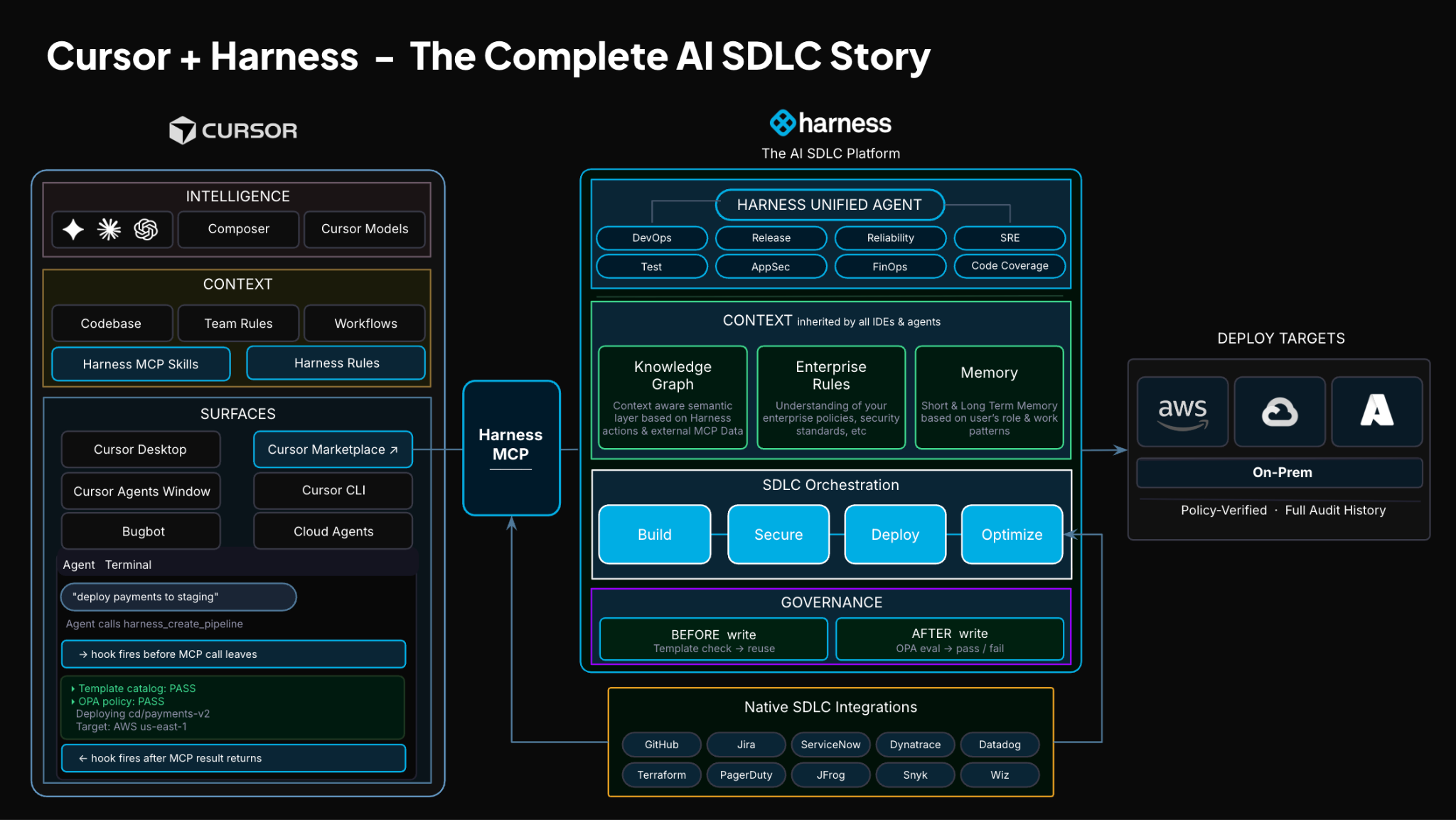
No tab switching. No manual orchestration. No guessing what is happening in the pipeline.
Some Sample Use Cases
Once connected, you can use Cursor to interact with your delivery system just as you do with your code.
For example, you can:

This builds on what we introduced last month, Secure AI Coding, which integrates directly with Cursor and scans code at the moment of generation rather than waiting for a PR review. Developers see inline vulnerability warnings with the option to send flagged code back to the agent for remediation, without leaving their workflow. Under the hood, it leverages Harness's Code Property Graph (CPG) to trace data flows across the entire codebase, surfacing complex vulnerabilities that simpler linting tools would miss.
The key thing is that you are no longer just interacting with code. You are interacting with the entire delivery system from the same place.
The Important Part: This Is Not Skipping Control
One of the biggest concerns with AI in delivery is obvious:
“Are we about to let agents push code to production without guardrails?”
No.
With Harness, everything runs through the controls that you can rely on:
- Granular RBAC permissions
- OPA policies
- Approval gates
- Audit logs
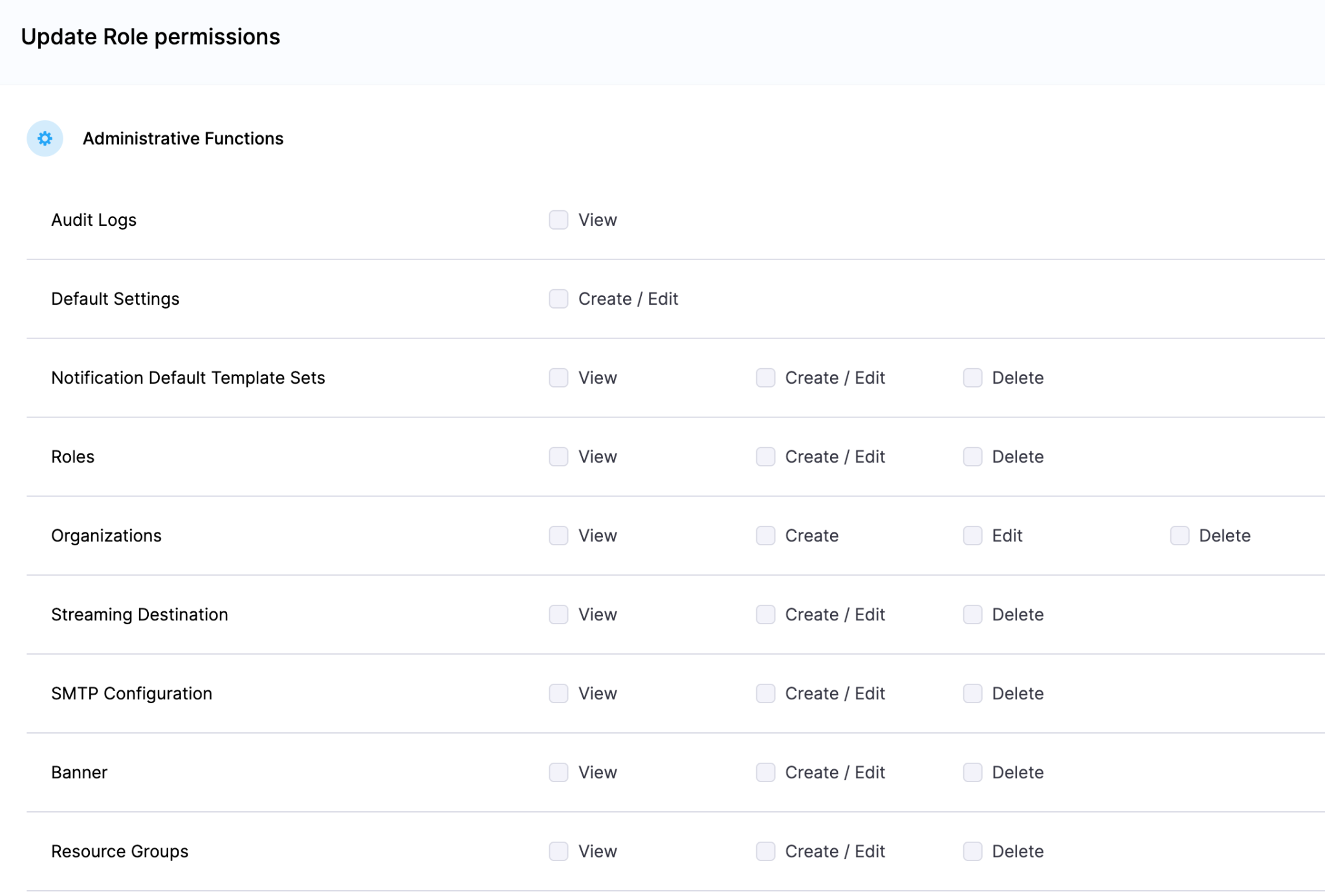
Instead of being manual checkpoints spread across tools, they are enforced automatically as part of the workflow while you stay in flow.
So AI can help move things faster, but it cannot bypass the governance that matters.
Why We Built It This Way
Most integrations today expose APIs or bolt AI onto existing systems. That is not what we wanted to do.
We designed the Harness Cursor Plugin specifically for how AI agents actually work:
- It is built around actions and workflows, not raw endpoints
- It spans the full delivery lifecycle, not just one step
- It gives agents enough context to reason about what to do next
Because shipping software is not a single action. It is a chain of decisions across CI, CD, security, approvals, and operations. If AI is going to help here, it needs access to that full picture. That’s where the Harness Software Delivery Knowledge Graph comes into play. It provides the necessary context for AI to take actions for you.
The knowledge graph models the relationships between services, pipelines, environments, policies, and operational signals in real time. Instead of treating each step in delivery as an isolated task, it creates a connected system of record that AI can reason over. This allows agents to understand not just what to do, but when and why to do it, based on dependencies, risk signals, and historical behavior.

In practice, this means smarter automation: deployments that adapt to context, approvals that are triggered based on policy and impact, and faster root cause analysis because the system already understands how everything is connected.
This Changes How Ideas Move To Prod
This is not just about convenience. It is a shift in how software actually moves from idea to production.
Instead of:
- Writing code in one place
- Managing delivery somewhere else
- And stitching it all together manually
You get a single, connected workflow:
- Code to pipeline to validation to deployment to operations
All accessible from your editor. Cursor accelerates the building. Harness governs the shipping. And the handoff between the two disappears.
Watch the demo:
Getting Started
If you want to try it:
- Install the Harness Cursor Plugin from the Cursor Marketplace
- Authenticate with Harness using OAuth. No API keys or setup headaches
- Start using natural language to run pipelines, debug issues, and manage deployments
For example:
“Run the CI pipeline for this branch, check if the security scan passed, and promote to staging if it did.”
That is it.
AI is not just changing how we write code. It is changing expectations for how fast we should be able to ship it. But speed without control does not work in real environments. What we are building toward is something simpler:
A world where every step, from PR to production, is:
- Fast
- Governed
- Observable
- Auditable
Without forcing developers to leave their flow. This plugin is one step in that direction.
Latest Blogs
.png)
Get Ship Done: Everything We Shipped in July 2026
Harness shipped 71 features in July, about one every 10 hours. That's more than June's 62, and the surge lines up with what AI is doing to the rest of the SDLC: coding agents are writing more of the code, test agents are now generating and running more of the tests by default, and every stage downstream: deployment, security, cost, and resilience has to absorb that pace without falling over.
This month's list runs from a canary strategy for Kubernetes to a test execution engine that's agentic by default to an AI bill of materials tracking components nobody was cataloging six months ago, and on top of all of it, Harness extended the entire platform to cover how agents themselves get built and shipped. Here's everything we shipped.
This month's biggest ships
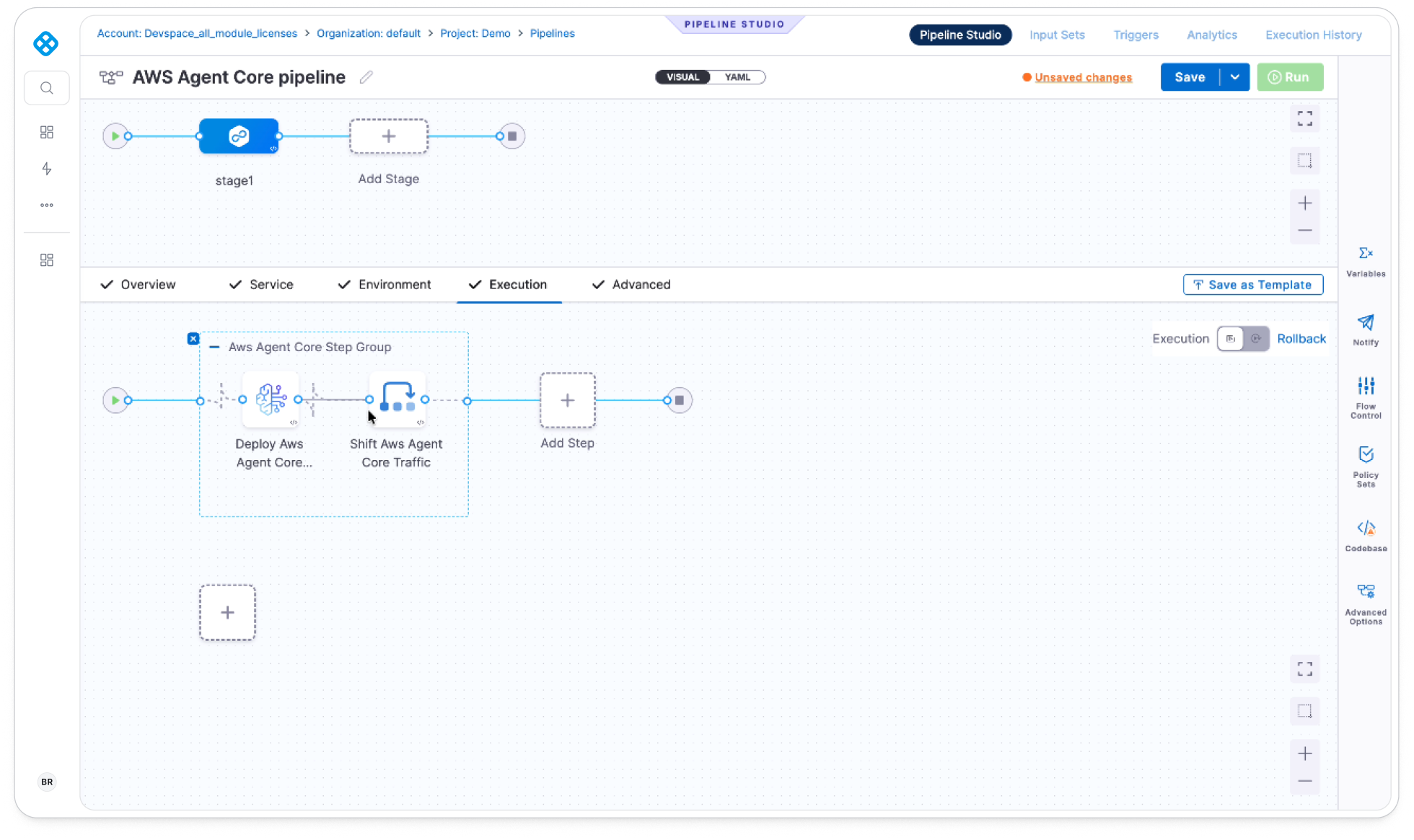
Harness Agent DLC: We extended our platform to cover the full agent lifecycle, build, test, store, deploy, operate, and govern, so teams ship AI agents through the same pipelines, policies, and audit trails they already use for every other service.
One command line for humans and agents: Harness CLI is a single binary, with one command grammar and one auth flow across pipelines, CD, Harness Code, Artifact Registry, Infrastructure as Code Management, feature flags, governance, and audit. It's now in public beta, and it's built to be driven by an AI agent as reliably as by a person typing at a terminal.
AI DLC Insights starts tying AI spend to outcomes: New session-level insights, PR and work-item attribution, and multi-layer developer identity resolution let engineering leaders see which developer, which AI agent, and which token spend produced which shipped work, with Cursor now joining Claude Code and GitHub Copilot as a supported source.
Here are the details:
Agent DLC brings the SDLC to AI agents
Agents don't behave like regular software: the same input can produce a different output twice, because the model underneath is deciding how to complete the task instead of running fixed code. That breaks the build-test-deploy playbook that took a decade to get right for applications. Harness Agent DLC extends the same platform used for services today to build, test, store, deploy, operate, and govern AI agents too, so a team doesn't need a separate toolchain just because the thing they're shipping is an agent instead of a service. Agents get built the same way services do, through Harness Continuous Integration, but testing needed new tools: Harness AI Evals scores agent output for correctness, performance, and safety and can gate a CD pipeline on the result, while AI Test Automation validates an agent through its actual chat interface using plain-English assertions instead of API hooks.
Everything downstream got the same treatment. Harness Artifact Registry now tracks the definitions, prompts, skills, MCP servers, models, and policies an agent is built from, with full version history. Agent Deployments extends Continuous Delivery's canary releases and approval gates to managed runtimes like Amazon Bedrock AgentCore and Google's Agent Runtime, governed by the same OPA policies as any other deployment. Cloud and AI Cost Management now attributes spend to individual agents and models, and a new AI Configs capability lets teams change prompts and models at runtime through the same feature flag infrastructure, with instant rollback. On governance, a new AI Asset Catalog auto-discovers and assigns owners to every agent, skill, and plugin, and security runs through the whole lifecycle: Primitive Scanning and an extended AI Bill of Materials catch risk before an agent ships, Harness AI Testing probes for adversarial behavior across the OWASP Top 10 for LLMs, and Agent Discovery, Posture Management, and a new AI Firewall watch agents once they're live. A new AgentTrace layer captures execution at the run and session level across all of it, and Harness is open-sourcing its foundational SDKs, harness-sdk and harness-evals, so teams can use the same tracing and eval primitives outside Harness. Learn more about Harness Agent DLC.
One CLI for humans and agents
Harness CLI 3.0 is now in public beta, and it replaces every per-module CLI Harness has shipped with one binary, one command grammar, and one auth flow. Every command follows the same shape, a verb, a noun, and an identifier, across pipelines, CD, Harness Code, Artifact Registry, Infrastructure as Code Management, feature flags, governance, and audit, so learning one command teaches you all of them. That consistency matters as much for AI agents as for people: the CLI exposes a closed, enumerable grammar and structured output in table, JSON, CSV, and several other formats, so an agent can predict what a command will return and chain it into a workflow instead of guessing at the shape of the output. It's fully open source under Apache 2.0. Learn more about the Harness CLI.

Worker Agents get scoped tokens, a graded marketplace, and more context
We launched Autonomous Worker Agents last month. Worker Agents running in step groups and stages now get scoped tokens instead of a broad session credential. You declare exactly which resources and verbs a stage needs, and Harness mints a token bound to that scope for the run, then discards it. Learn more about scoped tokens for Worker Agents.
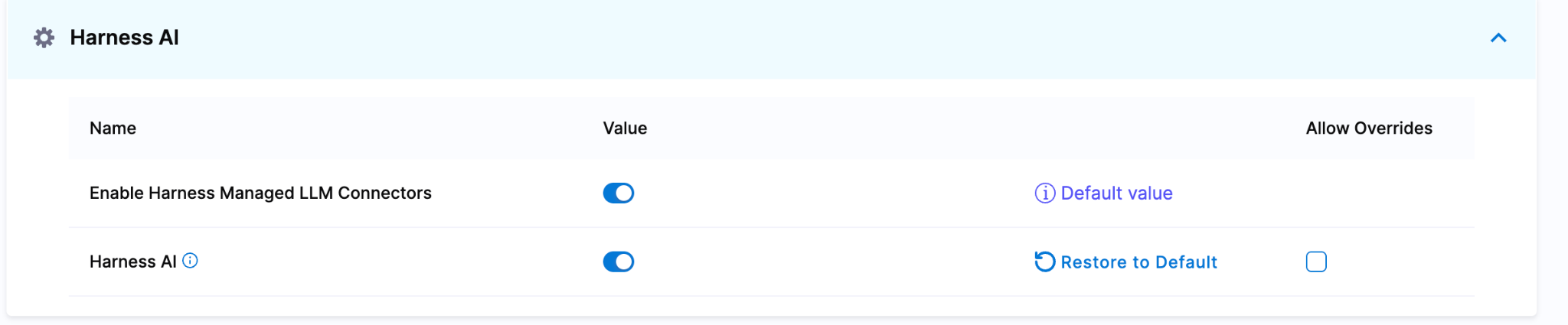
Harness now offers managed LLM connectors for Anthropic and OpenAI, running on Harness Cloud through AWS Bedrock. There's no separate API key to provision or rotate: Worker Agents reach the models through the Harness LLM Gateway, and access is controlled the same way any other platform permission is.
The Worker Agent Marketplace picked up a real taxonomy. Agents now show up as Managed, Verified, or Community, so a team browsing the catalog knows whether they're installing something Harness built and supports, something a trusted partner built that's been reviewed, or something the community contributed that hasn't gone through review yet.
Harness AI Chat can now reach third-party MCP connectors directly. Attach a connector for GitHub, GitLab, Jira, or any custom MCP server, and the assistant pulls context from those systems inside the same conversation instead of you copying data back and forth between tools.
AI-SRE's root cause analysis can now factor in Worker Agent and pipeline outputs alongside its built-in investigation logic, so teams can extend what the AI Investigator reasons over with their own data sources and domain-specific logic, without waiting on a Harness release.
AI takes on more of the SDLC and starts grading its own work
AI Test Automation now runs every test through a new agentic execution engine by default. The "Create Test with AI" workflow got a matching overhaul, so generating a test and running it both go through the same agent-driven path instead of two disconnected steps.
AI DLC Insights added Cursor as a supported source, joining Claude Code and GitHub Copilot. Whichever AI coding tool a team standardizes on, or however many they mix, the same instrumentation now covers it. A new AI Session Insights view gives engineering managers session-level detail on how their developers actually use AI tools, not just adoption counts, so managers can coach specific habits instead of guessing from an aggregate percentage. PR and work-item level attribution now connects individual AI token spend to the pull request and work item it produced, and multi-layer developer identity resolution ties usage back to the right person across whichever AI coding agent they used. Together, that's the difference between knowing an org spent money on AI and knowing which developer, which agent, and which PR that money turned into.
Deployments that flex without a rewrite
Kubernetes deployments now support a dedicated canary strategy that rolls a new version out in percentage-based phases, 25%, then 50%, then 100%, while Harness holds the total pod count to a fixed budget by shifting replicas between two Deployments. Verification or approval gates sit between each phase, so a bad rollout gets caught at 25% instead of 100%. Learn more about Canary Deployments for Kubernetes.
Post-production rollback now works in bulk. From the service dashboard, you can select multiple infrastructures where a service is deployed, choose the target execution for each one, and roll them all back together instead of walking through each infrastructure one at a time.
AWS Auto Scaling Group deployments got smarter about what they touch. Redeployments now compare lifecycle hooks, scaling policies, scheduled actions, load balancers, and target groups against your configuration and update only what changed, instead of deleting and recreating the group and losing in-flight instances in the process. ASG deployments also now support MixedInstancesPolicy, letting AWS pull from multiple instance types automatically, including spot instances with automatic fallback when capacity runs short, while Harness keeps the launch template version in that policy current across deployments.
A handful of other delivery upgrades this month: the Shell Script step can now declare named identities and get an independent OIDC ID token injected for each one at runtime, so a script authenticates as the workload itself instead of through a connector; the Kubernetes cluster connector supports the client credentials OIDC grant type for machine-to-machine access, useful for clusters fronted by Microsoft Entra ID; AWS CDK steps can now run on ECS-based delegates instead of requiring a Kubernetes delegate runtime; Google Cloud Run and GKE deployments support pause and rollout control, so you can deploy without traffic, shift a percentage, validate, and gate the rest behind manual approval; monitored service configurations can now live in Git through the new Git Experience; and Kubernetes Blue Green rollbacks now automatically scale the previous stable deployment back up so traffic actually has active pods to route to.
Security and supply chain for a world of AI-generated code
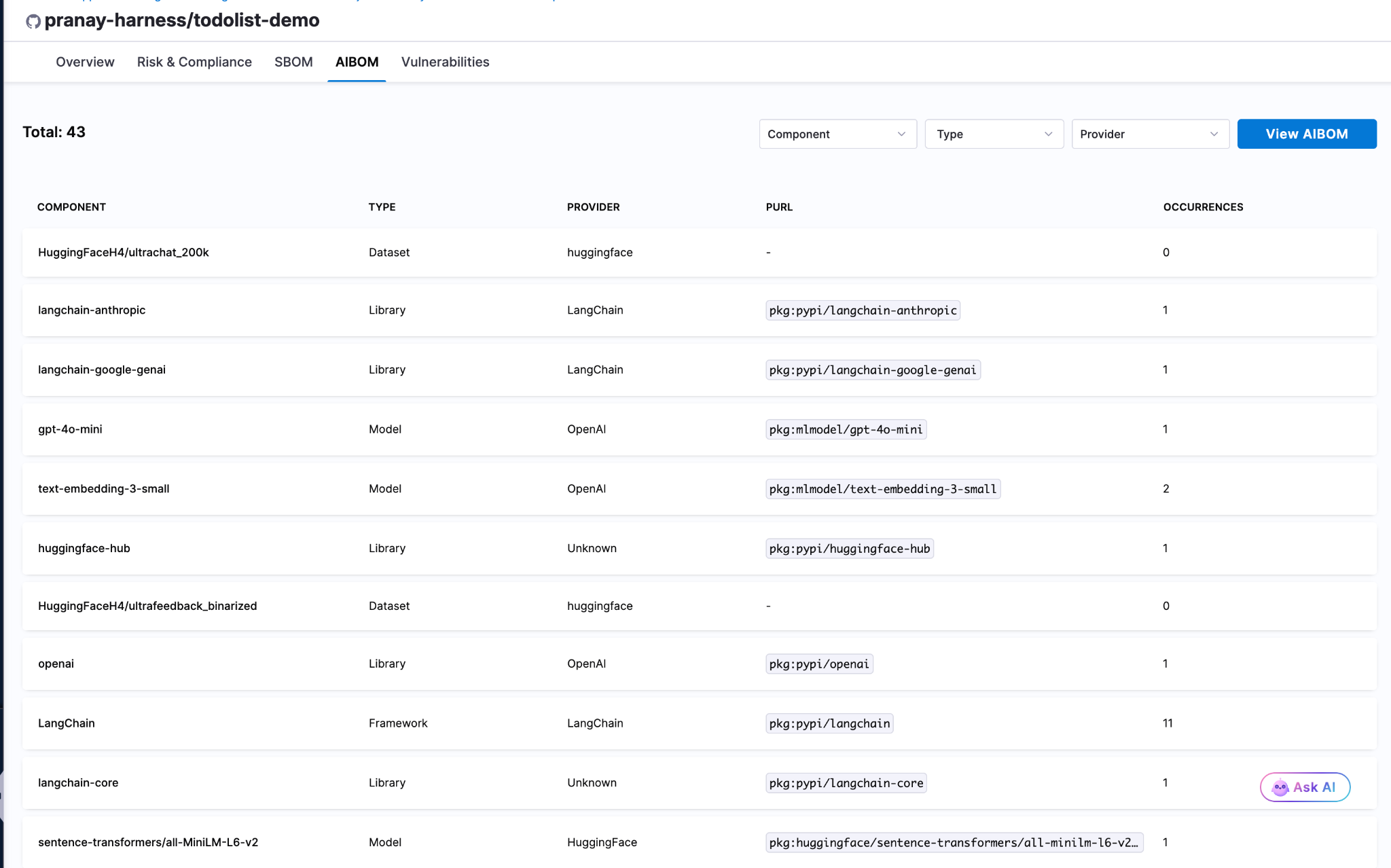
Harness Supply Chain Security can now generate an AI Bill of Materials, cataloging the models, datasets, agents, frameworks, and libraries embedded in a repository the same way an SBOM catalogs open-source packages. Traditional SBOMs miss all of this. As AI components spread through codebases faster than most security teams can inventory them by hand, that gap is becoming the more urgent one. Learn more about AI Bill of Materials support.
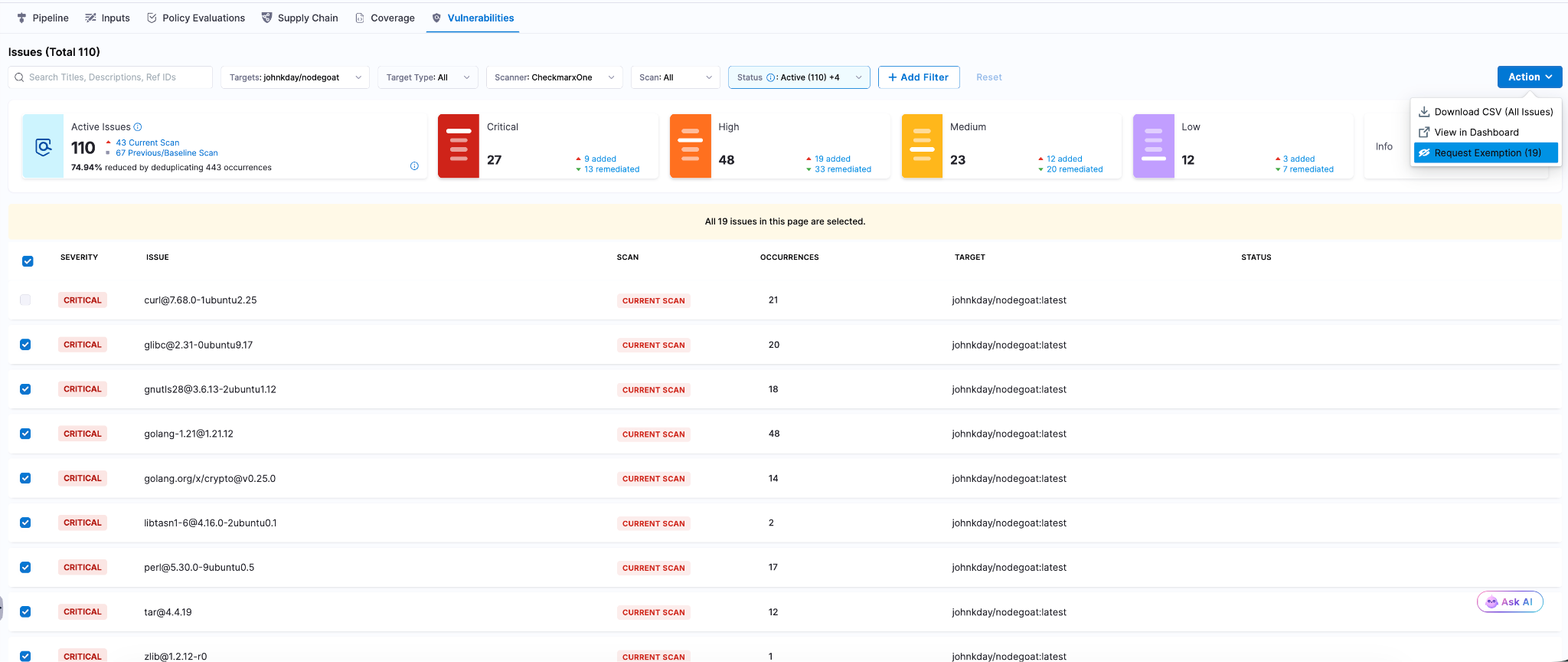
Security Testing Orchestration now supports bulk exemption requests. Teams managing findings at scale can request exemptions for multiple vulnerabilities in a single action instead of filing one at a time. Learn more about bulk exemption requests.
Supply Chain Security now runs inside GitLab CI pipelines directly, with reusable templates for generating SBOMs, creating SLSA provenance, signing artifacts, verifying attestations, and enforcing security policies, all without leaving GitLab. Learn more about GitLab CI support for SBOM, SLSA, and artifact signing.
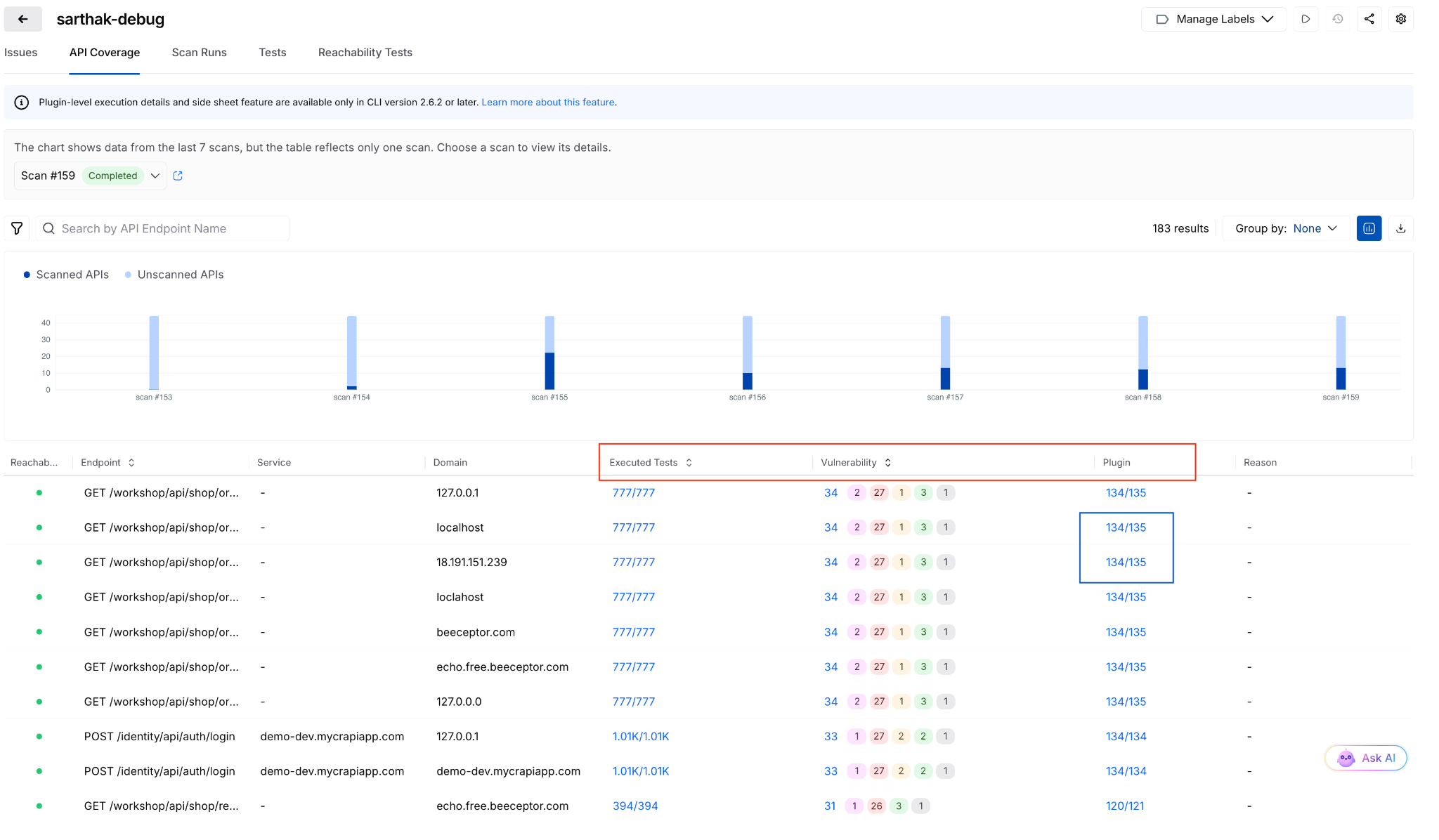
API Security Testing picked up three upgrades this month. The Traceable MCP Server now supports AI Security assets and issues, so teams running an AI Security proof of concept can generate a full AI Security posture report straight from a customer environment using Claude Desktop or any other MCP-compatible client. Scans also gained plugin-level visibility into execution, coverage, and performance for every API tested, and a new alerting framework lays the foundation for flexible, granular alert conditions across the platform. Learn more about generating AI Security Value Reports with the Traceable MCP Server.
The developer portal gets sharper eyes and fewer clicks
The Internal Developer Portal overview now shows each user a view tailored to their role. Developers, platform engineers, and engineering leaders see different cards by default, and platform admins configure the layout per view and assign it to the right user groups instead of shipping one generic dashboard to everyone.
OPA policy enforcement now covers every catalog entity, not just environments. Platform engineers can write Rego policies that block or warn on non-compliant entities at save time, enforcing naming conventions, ownership requirements, and lifecycle standards across the whole catalog instead of one corner of it.
Teams migrating off Backstage can now import catalog-info.yaml files directly from GitHub and Bitbucket, and the integration converts those entity definitions into the Harness IDP format automatically. No manual re-entry of everything Backstage already knew about your services.
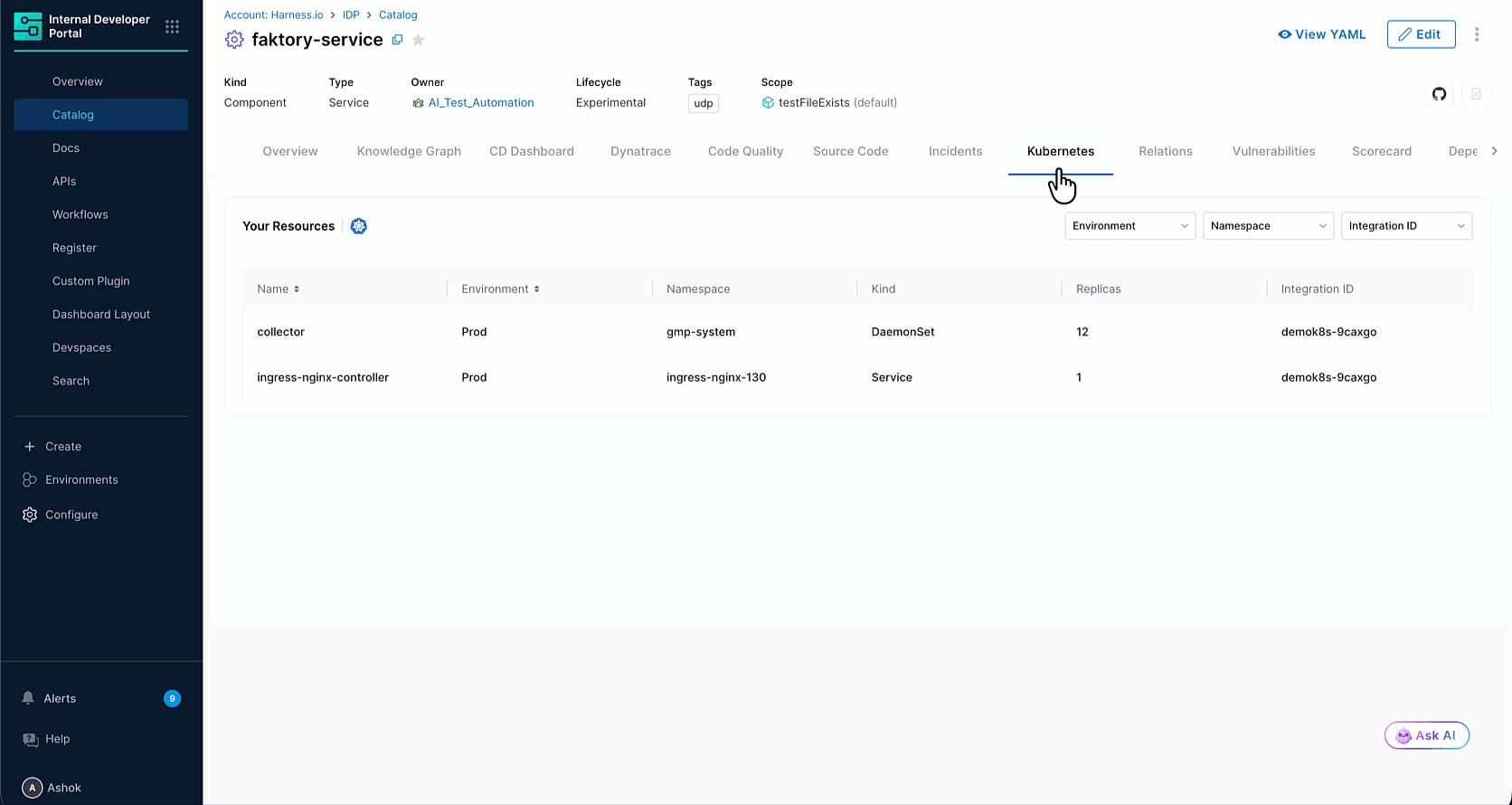
Smaller catalog upgrades round out the month: the Kubernetes integration now supports a persistent agent mode for near real-time resource updates alongside the existing cron mode, with a new Kubernetes tab on entity detail pages showing workloads, pods, nodes, and containers; the portal now parses OpenAPI specs automatically and surfaces individual endpoints as structured metadata that external tools can enrich with risk scores or ownership tags through the Catalog Custom Properties API; the Discovered tab can bulk-select and import every service recommended for merge or registration in one click instead of one at a time; and accounts with outbound network restrictions can now route sync traffic through their own vanity URL instead of the default Harness endpoint. Learn more about routing sync traffic through your vanity URL.
Infrastructure as code adds real guardrails
Infrastructure as Code Management now includes native Ansible configuration management, bringing provisioning and configuration into one governed workflow instead of handing configuration off to a separate tool once the infrastructure exists. Learn more about native Ansible configuration management.
AWS CDK provisioning, in beta, picked up Drift and Destroy steps, a dedicated approval step, and expanded language support, closing gaps between what CDK could do standalone and what it could do inside a governed Harness pipeline. Learn more about AWS CDK Phase.
Module Registry versions were previously all treated as equally supported, with no way to flag one as outdated. A new lifecycle rule, in beta, automatically classifies each module version as Supported, Update Required, or Deprecated based on how recent it is, configurable from the Lifecycle Management tab on any module.
Cloud and AI cost management gets more precise
AI Perspectives can now drill down by Principal into Provider, Sub Provider, Sub Account ID, Model, and Token Type, so teams can trace AI spend to the specific account and model generating it instead of stopping at a vendor-level total. Learn more in the Cloud and AI Cost Management release notes.
The Overview page can now be filtered by cost category, and most tiles respect the filter (optimization tiles are the exception). The Anomalies widget on that page picked up a time series chart and a count of stale anomalies, and the Budgets widget got a clearer read on status.
Commitment Orchestration now supports Database Savings Plan purchases for RDS across the Actions, Approvals, and Inventory views, so teams can track and approve those commitments the same way they already handle other savings plans.
A few smaller fixes rounded out the month: AI chat quick actions now match whichever cost experience you're in, offering "Create a View" in Cost Explorer or "Create a Perspective" in the classic experience instead of one generic label; Cluster Orchestrator schedules show a live status badge and countdown for each schedule; and Perspectives now display clearer badges for external data sources like Snowflake, so it's obvious at a glance which numbers came from where.
Database changes ship like code, and reach further
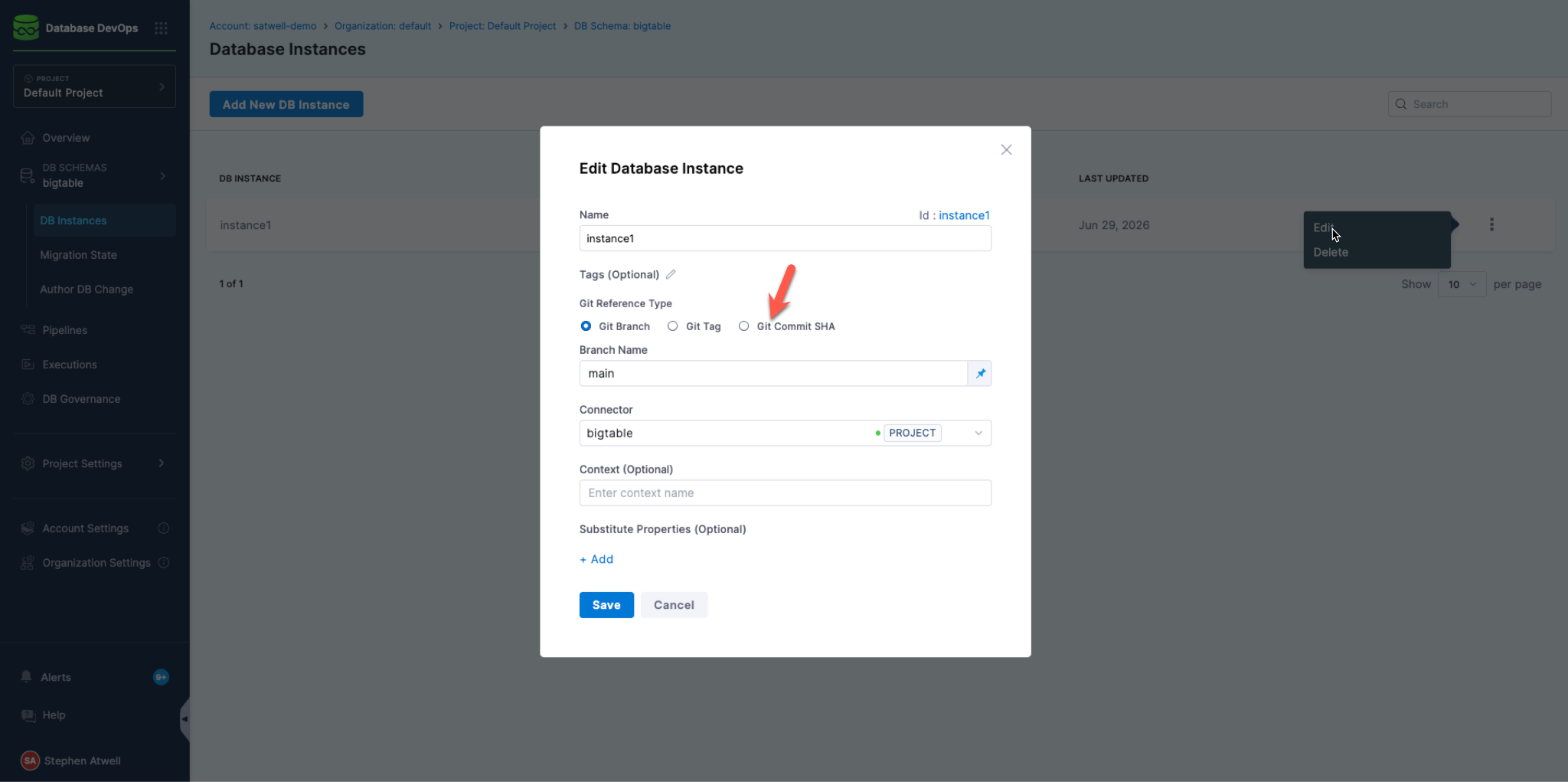
Database DevOps pipelines can now pin a database instance to a specific git SHA instead of always tracking the latest commit on a branch, useful for teams that need a migration to run against an exact, audited version of a schema.
Database DevOps now supports Google Cloud Bigtable, so teams can manage schema changes and migrations for Bigtable workloads through the same workflows they already use for other databases. Learn more in the Database DevOps release notes.
Two reliability fixes round out the month: custom Database DevOps pipelines can now configure reserved parameters without manual encoding, and long-running Google Cloud migrations now refresh their OIDC token automatically instead of risking an authentication failure partway through.
Artifact Registry grows into more of the deployment path
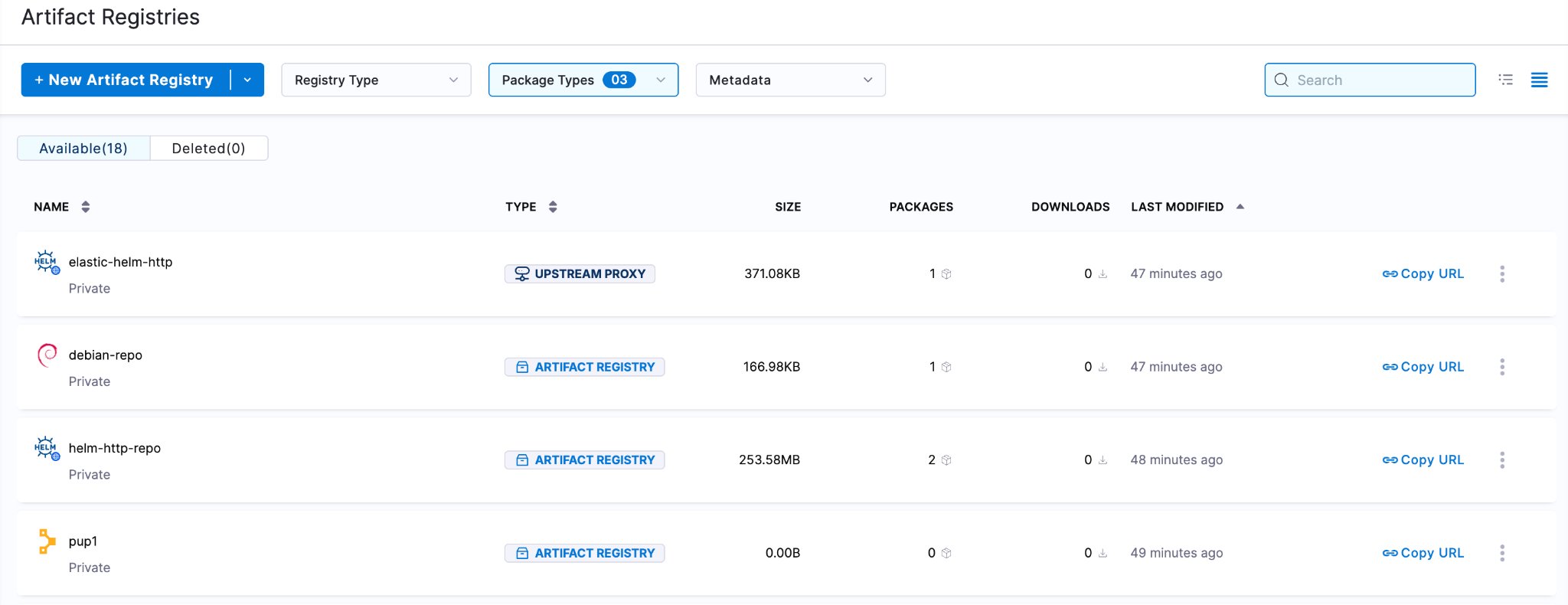
Harness Artifact Registry now supports three more package types: Puppet, Debian, and a new Helm HTTP registry type that hosts and serves Helm charts through the classic helm repo add and helm pull workflow. Unlike the existing Helm OCI registry, Helm HTTP speaks the protocol most Helm repositories still use, with upstream proxy pull-through for public repos. Learn more about the new Artifact Registry package types.
Continuous Delivery can now deploy Raw File artifacts from Artifact Registry directly to WinRM targets, so a .zip package or other file stored in a Raw File registry reaches a Windows target without a third-party artifact connector in between. Learn more in the Artifact Registry release notes.
Run steps inside a containerized Step Group can now pull images straight from Harness Artifact Registry, no Docker connector required. Set the registry type to Artifact Registry, pick the registry and image, and the step runs against it natively.
Resilience testing catches more before it becomes an incident
Resilience Testing shipped a prompt library that turns the entire chaos-testing lifecycle into copy-paste prompts for Cursor, Claude Desktop, Windsurf, or any MCP-compatible client, with a builder for filling in service names, environments, and tolerance thresholds. Learn more about the Resilience Testing prompt library.
Services can now onboard with their own custom chaos service agent instead of going through discovery-based onboarding only, giving teams a second path for services that don't fit the standard discovery flow. Learn more in the Chaos Engineering release notes.
Load testing picked up several upgrades this month: tests can now be linked to a service directly from the UI, image registry support spans the frontend, backend, and DDCR so runs can pull images from your own registry; JMeter load profiles now enforce consistent user counts, duration, and ramp-up across script, zip, and custom-image modes, and both the load step and composite load stage now run through templates instead of inline configuration.
Chaos dashboards now render natively instead of through an embedded view, and pipeline scans got dedicated list, detail, and scanned-risks pages so results are reviewable directly in the UI instead of buried in a run log.
A handful of smaller onboarding and API upgrades round out the month: infrastructure type selection during service onboarding associates a service with the right infrastructure from the start; probe tuning can now inherit inputs from a linked Chaos Service instead of requiring re-entry; the Enterprise ChaosHub added ready-made Datadog health-check probe templates; a new API lists every service associated with a given probe identity; experiment YAML can reference a specific service inside a probe reference; and a redundant validation check during network map and service creation was removed.
Smaller updates that still save time
Access management got a couple of real conveniences: Resource Groups and Access Control roles can now be cloned directly from the UI, so a new role or scope starts from an existing baseline instead of from scratch. Dynamic GCP Secrets Manager references also gained project ID support, so a JEXL expression can pull a secret from a different GCP project than the one the connector lives in. Learn more about GCP Secrets Manager project ID support.
Two smaller updates rounded out July: code comments in Harness Code Repository now support emoji reactions, and Feature Management & Experimentation added a bucketingKey column to Amazon S3 impression exports, making it easier to validate consistent treatment assignment and analyze account-level rollouts.
The pattern
Seventy-one features in 31 days, about one every 10 hours! The velocity story this month isn't just that Harness shipped more. It's what got shipped: an entire lifecycle framework for building and running AI agents themselves, attribution that ties AI token spend to the pull request it produced, and a scoped-token system for the Worker Agents already running in production pipelines. AI is doing more of the actual work this month, writing tests, running them, triaging security findings, and the platform underneath it is building the guardrails and the receipts to match. June put Worker Agents into the pipeline. July gave them a permission system, gave the entire agent lifecycle a home in the same platform as everything else, and gave engineering leaders a way to see exactly what all of it is producing.
We'll be back in August with more of it!

Control Runtime Behavior with Config Management
As organizations ship software faster than ever, runtime behavior changes are becoming just as frequent as code releases. Teams need a way to update application behavior without waiting for code deployments while maintaining visibility, governance, and control.
Now available in beta, Config Management provides a governed runtime control plane that separates runtime configuration from application deployments, enabling organizations to deliver configuration changes instantly across environments.
With Config Management, teams can:
- Change runtime values without redeploying applications
- Manage configurations across development, staging, and production
- Deliver configuration changes instantly through Harness SDKs
- Govern every configuration change with enterprise controls
Why Runtime Configuration Matters Today
Runtime configuration separates application logic from the values that control application behavior. Instead of embedding operational values directly into source code:
const maxRetries = 3;
const timeout = 5000;
Applications retrieve those values dynamically at runtime:
const maxRetries = client.getConfig("maxRetries");
const timeout = client.getConfig("timeout");
Changing a retry limit, timeout threshold, or feature parameter no longer requires a pull request, application rebuild, or production deployment. Teams can update the configuration on the Configs page, and the application receives the latest value through the Harness FME Configs SDK.
This enables organizations to iterate on application behavior at the speed their business requires, rather than at the speed their deployment pipeline allows.
Manage runtime configurations from a single project
Available today in beta, Config Management provides a centralized place to create, organize, and govern runtime configurations across your applications. The Configs page in Harness FME allows teams to search existing configurations, filter them by traffic type or tags, and quickly identify ownership across engineering and product teams.
Rather than scattering runtime values across source code, configuration files, or environment variables, Config Management centralizes application behavior into a single governed inventory that teams can manage collaboratively.
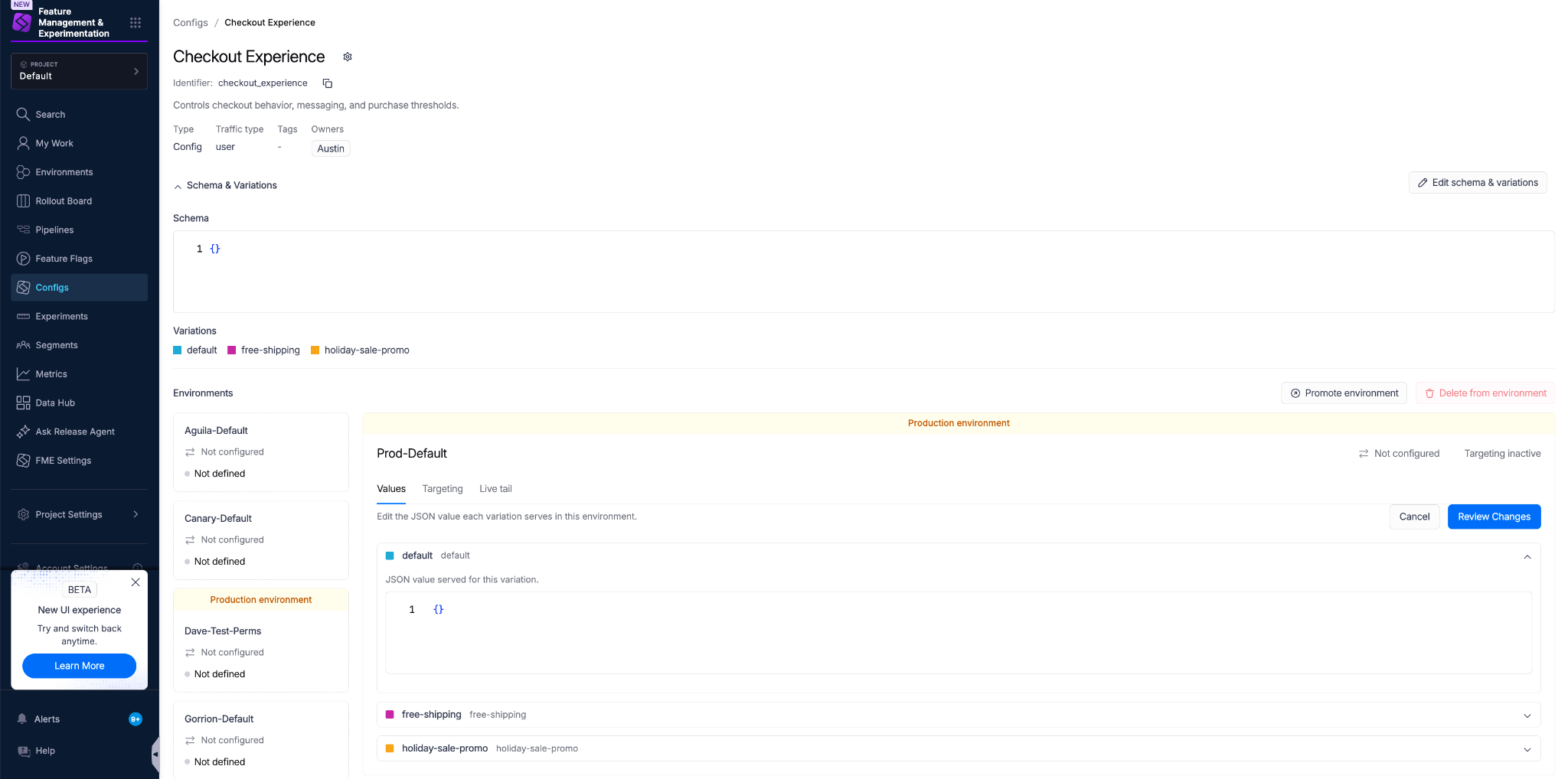
Creating a new configuration is equally straightforward. Clicking Create config opens a guided workflow where you define the configuration's name, immutable identifier, traffic type, owners, and one or more initial variations.

Each configuration begins with a shared structure that can later be delivered differently across environments. By defining variations up front, teams can prepare multiple runtime behaviors for targeted rollout and experimentation without changing application code.
Runtime control across the software delivery lifecycle
Harness provides dedicated capabilities for managing runtime behavior throughout the software delivery lifecycle.
One platform, complementary capabilities
Each capability answers a different question:
Altogether, these capabilities provide a unified platform for progressively releasing features, managing runtime behavior, monitoring production health, and validating outcomes through experimentation and warehouse native analytics.
Enterprise-grade configuration management
Configuration changes can have just as much impact on customers as application releases. Adjusting a retry count, modifying a pricing threshold, or changing a production timeout can immediately affect reliability, performance, and customer experience.
Config Management applies enterprise governance directly to runtime configuration.
Teams can:
- Require approvals before production changes
- Track every configuration change through version history
- Audit who changed what and when
- Validate configuration schemas before deployment
- Monitor configuration impressions through runtime evaluation
- Deliver configuration updates instantly through the Harness Configs SDK
Organizations have the flexibility to configure at runtime without sacrificing governance or operational control.
Common use cases for Config Management
Optimize application behavior
Adjust feature limits, business rules, onboarding flows, or customer messaging without requiring new deployments.
Improve operational performance
Tune retry counts, timeout values, concurrency limits, cache durations, and resource thresholds based on production telemetry.
Iterate through experimentation
Target different configuration values to specific users or environments to compare onboarding experiences, pricing thresholds, UI copy, or application workflows.
Prepare for AI-powered applications
Manage prompts, model selection, inference parameters, retrieval settings, and other AI behavior as runtime configurations rather than hardcoded application logic.
The foundation of AI Config Management
As Config Management continues to evolve beyond its beta release, it also provides the foundation for AI Config Management. As AI-powered applications become increasingly dynamic, teams need the same runtime control over AI behavior that they already require for traditional software.
Config Management provides the foundation for managing AI-specific configurations, including prompts, model selection, inference parameters, and agent behavior.
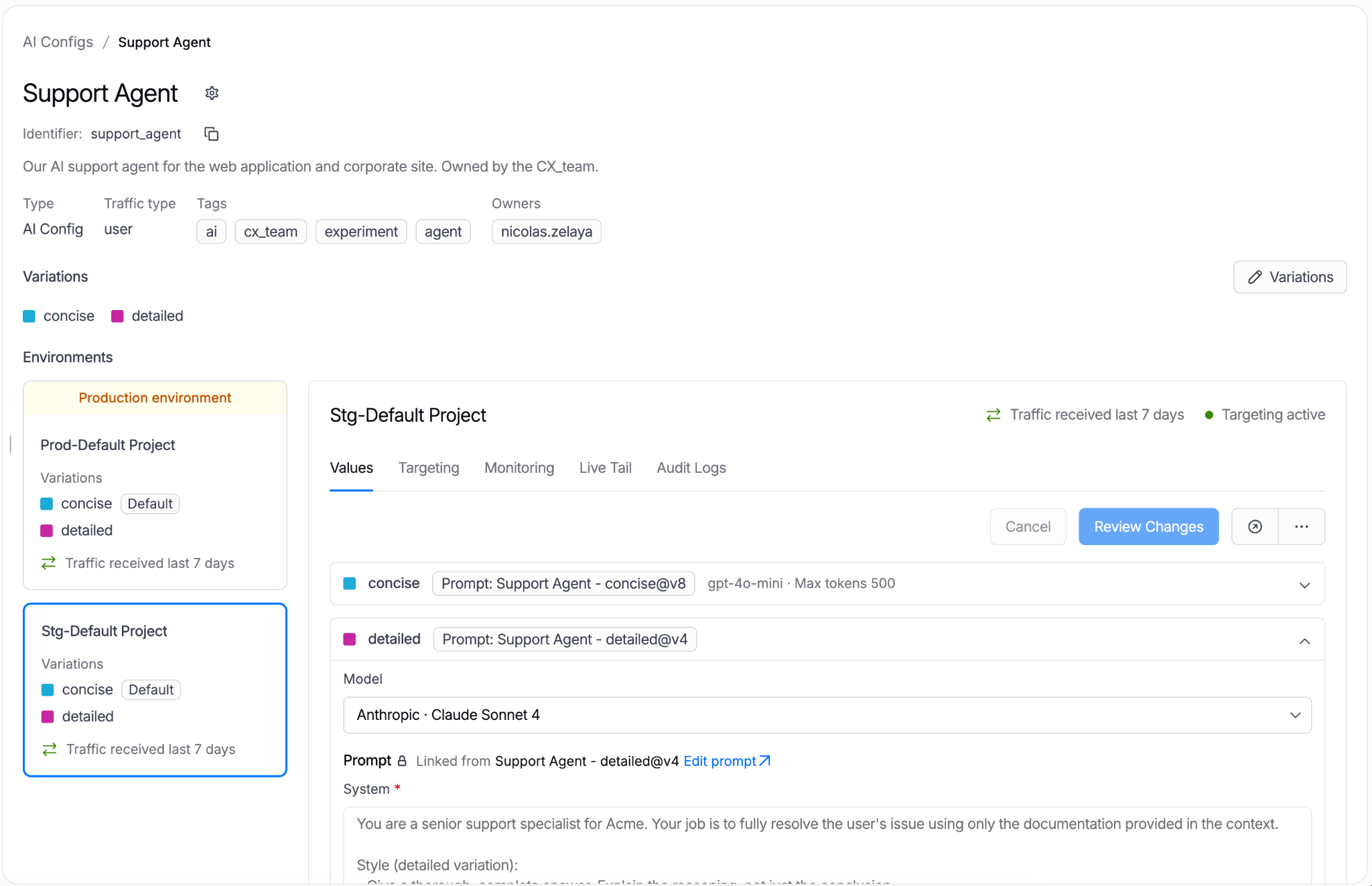
Rather than embedding these decisions directly into application code, teams can govern, target, and evolve AI behavior through the same runtime configuration platform.
Get started with Config Management today
Available now in beta, Config Management extends the Harness platform with a governed runtime control plane for modern applications.
Whether you’re tuning application behavior, optimizing operational performance, or preparing for AI-powered workloads, Config Management enables teams to safely evolve production behavior without waiting for code deployments.
To get started with the Config Management beta, explore the Config Management documentation. If you’re new to Harness, sign up for a free trial today.
.png)
Updating Reference Data with Rollbacks Using Harness Database DevOps
Modern applications do not just depend on schema changes. They also depend on data that powers the application itself.
Things like dropdown values, feature flags, country codes, user roles, pricing tiers, workflow statuses, or internal configurations are often stored inside database tables. This is called reference data. Even though this data may look small, it is critical to the application. A wrong value can break workflows, show incorrect information to users, or create production issues.
In this blog, we will look at a clean and safe way to manage reference data updates using Harness Database DevOps with Liquibase OSS compatible changelogs. We will also see how to safely roll back data changes when something goes wrong.
Why Reference Data Needs Version Control
Many teams still update reference data manually.
Someone runs an SQL update in production. Another person edits rows directly from a database UI. Sometimes CSV imports happen without tracking.
This creates several problems:
- Nobody knows who changed the data.
- There is no rollback process.
- Different environments become inconsistent.
- Testing becomes difficult.
- Deployments become risky.
Over time, this also creates environment drift between development, staging, and production databases.
Database DevOps solves this by treating reference data like application code. Where the data lives in Git and the changes are reviewed through pull requests. Database deployments take place through pipelines and rollback workflows become predictable.
This gives teams consistency, governance, and traceability across every environment.
A Better Pattern for Managing Reference Data
One of the safest patterns for updating reference data is:
- Store reference data inside versioned CSV files
- Commit those files to Git
- Use the loadUpdateData change type
- During deployment, apply the new CSV version
- During rollback, deploy the previous CSV version
This approach works especially well for database CI/CD and database deployment automation workflows. It also aligns nicely with GitOps-style database management where every change is versioned and auditable.
For example, the Harness community maintains a Terraform onboarding template that helps teams provision and onboard Harness Database DevOps resources directly from CSV files.
Real-World Examples of Reference Data
Teams commonly use this pattern for:
- Product pricing tiers
- Feature flags
- Internal application settings
- Country and currency mappings
- Approval workflow statuses
- Lookup tables used by frontend applications
These datasets are often tightly connected to application behavior, which makes safe deployments and rollback strategies extremely important.
Example Scenario
Imagine your application has a table called subscription_tiers. The application reads values from this table to display pricing plans inside the UI.
Your current data looks like this:
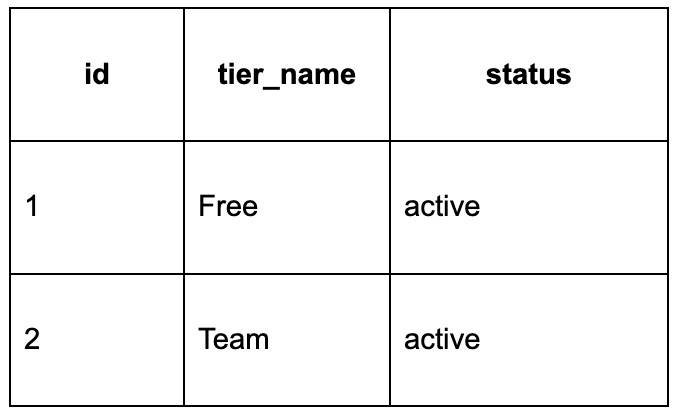
Now your product team wants to add a new Enterprise tier with help of subscription_tiers-v2.csv. Instead of manually inserting rows into production, we can version this data properly.
Step 1: Store Data in Versioned CSV Files
Inside your repository, create a folder for reference data.
reference-data/
├── subscription_tiers-v1.csv
├── subscription_tiers-v2.csv
The version suffix is important, this makes deployments predictable and makes rollback much easier and teams can quickly identify which dataset version was deployed to each environment.
Step 2: Use loadUpdateData
Now create a Liquibase OSS compatible changelog YAML file.
databaseChangeLog:
  - changeSet:
      id: subscription-tier-v2
      author: animesh
      changes:
        - loadUpdateData:
            file: reference-data/subscription_tiers-v2.csv
            tableName: subscription_tiers
            primaryKey: id
            separator: ","
            quotchar: "\""
      rollback:
        - loadUpdateData:
            file: reference-data/subscription_tiers-v1.csv
            tableName: subscription_tiers
            primaryKey: id
            separator: ","
            quotchar: "\""
This is the important part:
- During deployment, Harness Database DevOps executes the changelog and loads subscription_tiers-v2.csv.
- During rollback, the pipeline reloads subscription_tiers-v1.csv.
This creates a rollback-ready deployment workflow without requiring manual SQL fixes during incidents.
How This Fits into Database DevOps?
In a modern Database DevOps workflow, every database change should move through the same CI/CD process.
That includes:
- Schema changes
- Stored procedures
- Reference data
- Permissions
- Seed data
Reference data should not bypass governance. When reference data lives in Git, teams gain much better operational control:
- Developers can review changes before deployment.
- QA teams can validate updates in staging environments.
- DBAs keep database deployment automation in environments consistent.
- Rollback steps are already prepared before production deployment begins.
And this significantly reduces operational risk for the team.
Using Harness Database DevOps for Reference Data Deployments
While many teams have adopted CI/CD for application deployments, database updates often remain tied to manual workflows, increasing risk particularly with reference data.
Harness Database DevOps bridges this gap by enabling automated reference data management. By utilizing Liquibase OSS compatible changelogs and storing CSV files in Git as deployment artifacts, teams can bring database changes into their standard delivery pipelines.
This approach provides several key benefits:
- Full traceability through Git commits, pull requests, and pipeline history.
- Environmental consistency by moving the same reference data from development through production without manual intervention.
- Coordinated delivery by integrating database updates directly into existing application release pipelines.
- Enhanced governance via automated policy checks, audit logs, and approval gates.
Git-driven workflows are particularly advantageous for large-scale operations. To support this, the Harness community offers Terraform onboarding templates that facilitate CSV-driven resource provisioning, helping organizations standardize database operations.
This workflow ensures that rollbacks are integrated from the start. If an update causes an issue, teams can rapidly redeploy the previous CSV version using pre-defined rollback steps in the changelog. This result is a more predictable and secure delivery process for both operations and development teams.
But The Rollbacks Are the Real Advantage
Most teams focus mainly on deployments. But mature Database DevOps practices depend heavily on reliable rollback strategies. Reference data changes can fail for many reasons. The application may still expect an older value. Unexpected data changes can break the UI.
A feature flag might get enabled too early. Without rollback automation, production recovery becomes stressful and slow. Using versioned CSV files with loadUpdateData keeps the rollback process simple. Since the previous working version already exists, recovery becomes much faster. That simplicity becomes extremely valuable during production incidents.
Conclusion
This streamlined lifecycle leverages automated pipelines to manage updates and rapid recoveries. Standardizing reference data management aligns database deployments with modern CI/CD best practices. Explore how Harness Database DevOps can transform your delivery process today.
FAQs
How does Harness Database DevOps fit into this workflow?
Harness Database DevOps automates Liquibase OSS compatible changelogs through governed pipelines with Git traceability and rollback support.
Can Harness Database DevOps handle both schema and data deployments?
Yes. Harness Database DevOps supports schema changes, reference data updates, stored procedures, and rollbacks in one workflow.
What is the safest way to rollback reference data changes?
Use versioned CSV files with loadUpdateData. Deploy the new CSV during apply and reload the older CSV during rollback.
Is Liquibase OSS better than Flyway Community for reference data updates?
Liquibase OSS supports rollback logic and loadUpdateData, making reference data versioning easier than Flyway Community.

Cloud Asked What It Cost, AI Is Asking What It's Worth
A year ago, most of my customer conversations were about cloud cost attribution, commitment coverage, and rightsizing. Classic FinOps stuff. The occasional surprise bill, sure, but nothing that kept anyone up at night. I stopped asking “what was that ‘oh $*#@’ moment when you saw a bill and knew something had gone seriously wrong?” because no one had one of those moments anymore.
Somewhere in the last 12 months, the tables turned and our customers were asking me a serious question: why did my AI bill just do that, and how do I stop it from happening again?
Clearly, something changed. So we ran a study to figure out why.
We surveyed 700 engineering leaders and practitioners across five countries this spring to ask about their organization's FinOps practices. All respondents are at organizations with at least 1,000 employees and real, recurring AI spend, not startups experimenting on a credit card. What we found in the 2026 State of AI in FinOps survey report reads less like a new problem and more like an old one wearing a different jacket.
The pattern I keep seeing
I spent years in FinOps for cloud before AI spend was a line item anyone thought about. But the patterns in the AI billing data – the ownership confusion, the governance gaps, the invoice showing up before anyone understood why – are the same ones we saw in cloud 10-plus years ago. Now, however, the patterns are compressed into a much shorter timeframe and coming at an accelerated pace, if you can believe it.
67% of organizations now spend more than $250,000 a month on AI. 20% have already crossed $1 million a month. At that scale, AI isn't a tool cost anymore, it's a capital decision, which deserves the same governance and attribution discipline it took the industry a decade to build for cloud. We don't have a decade this time.
Ownership is the root, not the symptom
If you ask five people in a typical enterprise who owns AI costs, you'll get five different answers. 52% of respondents told us there's no clear, dedicated AI cost owner in their organization. And the deeper issue isn't that nobody's watching, it's that four different functions are each contributing to the bill. Platform and DevOps teams carry 30% of the accountability, with FinOps 27%, finance 23%, and engineering 19%. No single function comes close to a majority and that is one of the top problems enterprises are facing at the very start.
Meanwhile, engineering and platform teams hold the most influence over spending decisions, more than any function's share of accountability. The disconnect between decision-making and accountability is where a single cost overrun escalates into a full-blown P&L problem.
When the bill doubles overnight
72% of organizations have hit an unexpected AI cost spike or surprise bill in the past year. 1 in 3 have been caught off guard more than once. That alone wouldn't worry me as much if diagnosis were fast. It isn't. 79% report needing a full day or longer to trace a spike back to its source; and roughly a third need a full week. Meanwhile, the bill keeps running.
In the cloud, knowing a spike happened is only the first indication of a problem. Understanding the cause in real-time is where most organizations still fall short, and in today's AI-driven world, the stakes are higher because the spend curve is steeper.
The waste number that should get a CFO's attention
Across the dataset, organizations estimate that 26% of all AI spend is wasted — consistently, across infrastructure, software, models, and services alike. For a company spending $1 million a month, that's $260,000 a month with no measurable return. Just imagine what any enterprise could achieve with that amount of wasted money turned into investments?
Unlike waste in a traditional cloud landscape (are we really, already, calling cloud “traditional” or “legacy”?), this isn't an idle instance somebody forgot to shut down. It's embedded in usage patterns — prompt design, model selection, retry logic — none of which currently carries a cost signal. 56% of engineering leaders told us their teams don't have cost in mind when building AI features, and only 45% of engineers, on average, understand what their builds actually cost.
That's not a motivation problem. In our FinOps in Focus Report 2025, 62% of developers said they wanted more control over cloud costs, and there's no reason to think AI is any different. The problem is a lack of visibility, not a misalignment of intent. The data simply isn't in front of people when the decisions get made.
Policy on paper, not in practice
The instincts are right; the operational muscle isn't there yet. 73% of organizations say they have an AI cost policy. Only 47% fully enforce it. That's a 26-point gap between what's written down and what actually happens day to day. Policies that don't show up in the tools engineers actually use tend to get ignored, because the incentive to move fast usually wins.
Only 21% describe their AI cost management as fully mature company-wide, and only 26% have a robust way of measuring the business value of their AI spend at all. Four in five organizations simply aren't there yet.
Building an AI ROI Culture
What I keep coming back to is that the hardest part of this isn't technical. It's cultural and organizational. The tooling is catching up. The harder work is getting engineering teams to build with cost in mind from the start, not as a constraint, but as a design principle.
The organizations in our data that did reach maturity didn't try to fix everything at once. They followed a fairly consistent sequence:
- name an owner before buying a tool,
- build a unified cost view before optimizing,
- embed cost data into engineering workflows before writing policy,
- and establish unit economics tied to real business outcomes before chasing ROI.
Use this report to find out where your organization stacks up against others in the industry and how mature enterprises are getting ahead of AI cost blindspots..
Download and learn more about the 2026 State of AI in FinOps.

Your Production System Is Now in Your Pocket
Key takeaways:
- The Harness Cursor Plugin now works inside Cursor's new iOS app, with the same natural-language access to pipelines, security, and deployments as desktop.
- Reading works the same on iOS as on desktop. Write actions, like triggering a pipeline, are denied by default unless they pass confirm:true and the right RBAC role.
- Setup: connect the plugin's Cloud environment on desktop and enable Cloud Agents on your GitHub or GitLab repos.
---
The Harness Cursor Plugin now works on Cursor for iOS. Check pipeline status, security posture, and deployment health from your phone.
In April, Harness announced the Harness Cursor Plugin, a native integration that lets developers manage CI/CD pipelines, deployments, and security posture using natural language inside Cursor, governed by the same RBAC, OPA policies, and audit trails already enforced across the Harness platform. That experience has, until now, lived entirely at a desk.
If a pipeline failed, a security scan flagged something, or an approval needed clearing while a developer was away from a laptop, checking in meant waiting to get back to one. An on-call engineer paged about a failing deployment, for example, could do little more than acknowledge the alert until reaching a desk.
What This Unlocks
Cursor for iOS isn't about replacing the desktop experience. It's about removing unnecessary waiting. Whether you're reviewing the health of a deployment before boarding a flight, checking why a pipeline failed between meetings, or pulling security scan results before a release window closes, you no longer lose visibility simply because you aren't sitting in front of your laptop.
Introducing Harness on Cursor for iOS
Cursor's iOS app lets developers launch and track coding agents, review completed work, and merge pull requests from their phone. The Harness Cursor Plugin now works inside it too, using the same natural-language interface already available on desktop.
Here's how it works:
- On the desktop, open the Harness plugin's configuration and connect its Cloud environment, separate from the Local one already in use. Then enable Cloud Agents on the GitHub or GitLab repositories you want to reach from your phone.
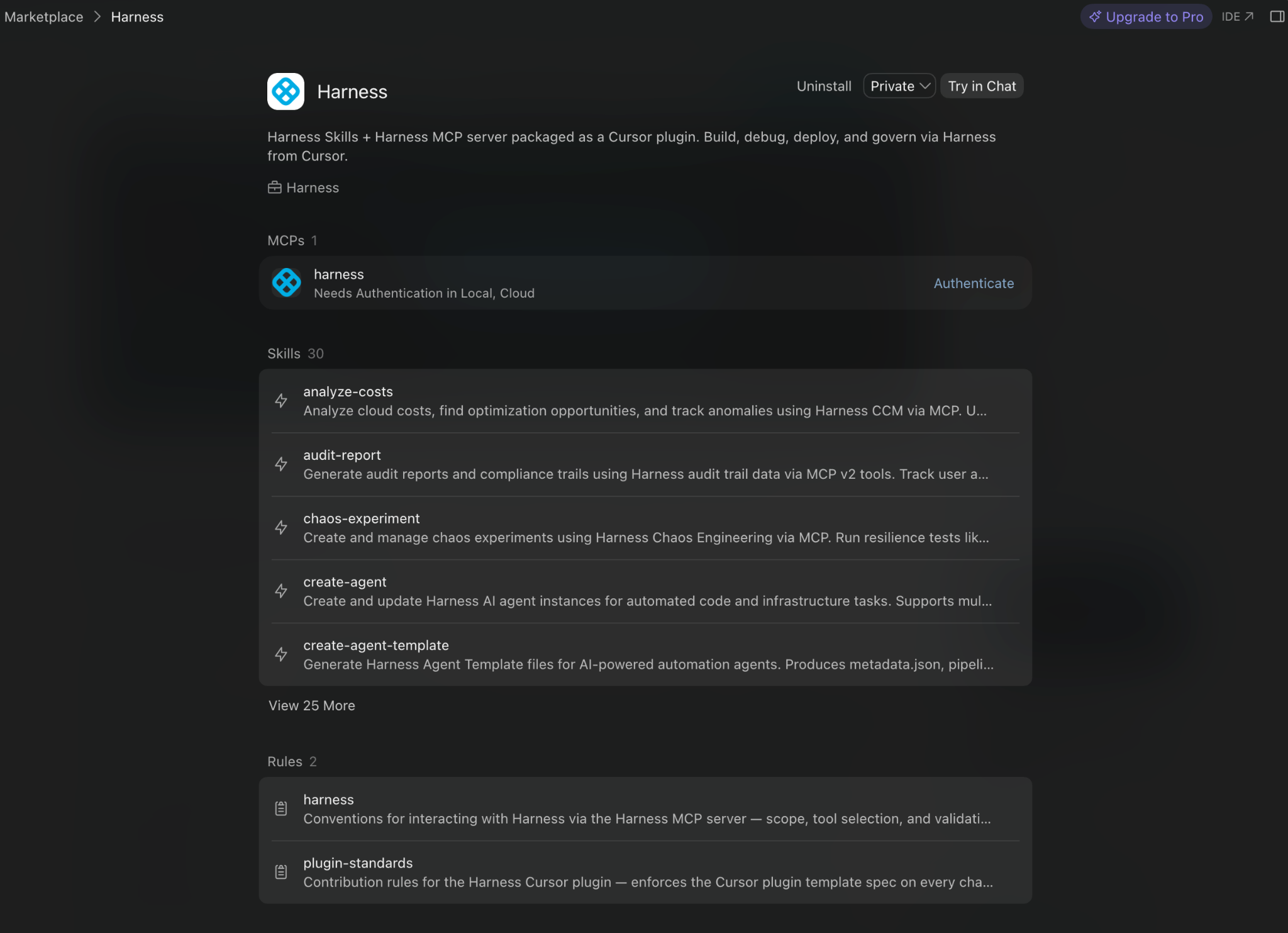
- Open Cursor for iOS and ask Harness what you'd ask on the desktop: pipeline status, deployment health, security posture. Read requests are answered live from the Software Delivery Knowledge Graph, the same source the desktop plugin uses.
- To take an action, like triggering a pipeline or promoting a deployment, confirm intent explicitly. Cursor's desktop app shows an on-screen prompt before running actions like these; iOS doesn't yet. So, without that prompt, Harness denies write requests by default unless you pass an explicit confirm:true parameter, and even then, the request only executes if the user's RBAC role permits that specific action.
The Paradox Doesn't Stay at the Desk
Harness's governance covers every surface a developer works from, not just the desktop. RBAC, approval gates, and audit trails are enforced at the pipeline and policy layer, no matter where the request comes from.
That consistency matters because of what Harness calls the AI Velocity Paradox: teams ship faster with AI, but the systems meant to catch problems before release haven't kept up. 63% of organizations now ship code to production faster since adopting AI. Only 41% are confident their governance processes can catch issues before release, and 72% have already had a production incident caused by AI-generated code.
Coding is already becoming untethered from any one device, and that pace isn't slowing down. If governance stayed deskbound while coding didn't, the paradox would only get worse. That's why Harness on Cursor for iOS keeps RBAC, approval gates, and audit trails traveling with the same pipeline, no matter where the request originates.
Getting Started
To use Harness inside Cursor for iOS:
- If you haven't already, install the Harness Cursor Plugin from the Cursor Marketplace and authenticate with OAuth.
- On the desktop, open the plugin's configuration and connect to the Cloud environment.
- Enable Cloud Agents on the GitHub or GitLab repositories you want to access from your phone.
- Download Cursor for iOS from the App Store.
- Ask Cursor any questions specific to your Harness delivery pipelines.
AI has already changed how software gets built. Now it's changing how software gets delivered. Extending Harness to Cursor for iOS isn't just about supporting another device. It's about making governed software delivery available wherever developers work, without compromising the security, policy enforcement, or visibility platform teams depend on.
For more on the underlying integration, see the Harness Cursor Plugin documentation or read the original launch announcement.
FAQ
Does the Harness Cursor Plugin work on Cursor for iOS? Yes. The Harness Cursor Plugin works inside Cursor's iOS app, giving developers the same natural-language access to pipeline status, security posture, and deployment health they already have on desktop, pulled live from the Software Delivery Knowledge Graph.
How do I set up Harness on Cursor for iOS? On desktop, open the Harness plugin's configuration, connect its Cloud environment (separate from the Local one already in use), and enable Cloud Agents on the GitHub or GitLab repositories you want to access. Then download Cursor for iOS from the App Store.

Install Terraform: Secure & Scalable IaC Setup Guide
When you install Terraform without considering security and scale from the start, you build technical debt that manifests as state corruption, credential leaks, and configuration drift across teams. A proper Terraform installation guide addresses these operational realities before the first `terraform apply` runs.
This article walks through how to install Terraform with security hardening and scalability built into the foundation. You'll learn platform-specific installation steps, configuration best practices that prevent common pitfalls, and setup patterns that support team workflows without creating bottlenecks. By the end, you'll have a production-ready Terraform configuration management approach that scales with your infrastructure needs.
Understanding Terraform Installation Requirements
Before you install Terraform, understand what changes when you move from local experimentation to production automation. The binary itself is stateless, but the workflows it enables are anything but. Production Terraform deployments require state management, secret handling, version control, and team coordination.
Naive Terraform setup best practices focus on getting the CLI working. Real infrastructure as code security starts with recognizing that Terraform manages privileged access to your infrastructure. Every installation decision affects how credentials are stored, how state is accessed, and how teams collaborate without stepping on each other's changes.
At scale, the installation becomes less about the binary and more about the surrounding toolchain: where state lives, how modules are versioned, how plans are reviewed, and how drift gets detected. The baseline installation must anticipate these concerns, not retrofit them later.
How to Install Terraform Across Platforms
The installation process varies by platform, but the security and scalability considerations remain consistent.
Linux Installation
For Linux systems, install Terraform using the package manager to ensure automatic updates and signature verification:
wget -O- https://apt.releases.hashicorp.com/gpg | sudo gpg --dearmor -o /usr/share/keyrings/hashicorp-archive-keyring.gpg
echo "deb [signed-by=/usr/share/keyrings/hashicorp-archive-keyring.gpg] https://apt.releases.hashicorp.com $(lsb_release -cs) main" | sudo tee /etc/apt/sources.list.d/hashicorp.list
sudo apt update && sudo apt install terraform
This approach ensures signature verification on every package update. Manual binary downloads bypass this verification, introducing supply chain risk that becomes significant at scale.
macOS Installation
On macOS, use Homebrew for managed updates and version control:
brew tap hashicorp/tap
brew install hashicorp/tap/terraform
Homebrew maintains the formula and handles dependency resolution. For teams managing multiple IaC tool versions, consider using `tfenv` to switch between Terraform versions without breaking existing workflows.
Windows Installation
For Windows environments, use Chocolatey for automated infrastructure provisioning:
choco install terraformAlternatively, download the binary and add it to your system PATH. For enterprise environments, package the binary in your internal software distribution system to control which versions reach production workstations.
Version Management
After installation, verify the version and establish a version pinning strategy:
terraform versionLock your Terraform version in version control using a `.terraform-version` file or required_version constraint in your configuration. This prevents the "works on my machine" problem that emerges when different team members run different CLI versions.
Secure Infrastructure Automation Configuration
Once Terraform is installed, configure it for secure operations. The default configuration works for learning, but production deployments require explicit security boundaries.
State Backend Configuration
Never store Terraform state locally in production. Configure a remote backend before applying any infrastructure changes:
terraform {
  backend "s3" {
    bucket         = "prod-terraform-state"
    key            = "infrastructure/terraform.tfstate"
    region         = "us-east-1"
    encrypt        = true
    dynamodb_table = "terraform-locks"
  }
}
Remote backends provide state locking, preventing concurrent modifications that corrupt infrastructure state. Encryption at rest protects sensitive values stored in state. State locking using DynamoDB prevents race conditions when multiple pipelines run simultaneously.
Credential Management
Configure Terraform to retrieve credentials from external systems, not from configuration files:
export AWS_PROFILE=prod-automation
export ARM_CLIENT_ID="${AZURE_CLIENT_ID}"
export GOOGLE_APPLICATION_CREDENTIALS="/path/to/service-account.json"
Avoid hardcoding credentials in provider blocks. Use environment variables, credential files outside the repository, or integrate with secret management systems like HashiCorp Vault. Each credential leak represents infrastructure-wide exposure, not just a single service compromise.
Provider Configuration
Pin provider versions explicitly to prevent breaking changes from automatic updates:
terraform {
  required_providers {
    aws = {
      source  = "hashicorp/aws"
      version = "~> 5.0"
    }
  }
}
The `~>` constraint allows patch updates while preventing major version changes that introduce breaking API modifications. Test provider updates in non-production environments before promoting to production workflows.
## Scalable IaC Deployment Setup
When teams grow beyond a few engineers, installation alone doesn't solve workflow problems. Scalability requires workspace organization, module management, and drift detection.
### Workspace Structure
Organize workspaces by environment and team ownership:
terraform workspace new prod-networking
terraform workspace new prod-compute
terraform workspace new staging-networking
Workspaces isolate state, but they share backend configuration. For stronger isolation, use separate backend configurations per environment. This prevents accidental production modifications when someone forgets to switch workspaces.
Module Registry Access
Configure access to private module registries if you're standardizing infrastructure patterns:
module "vpc" {
  source  = "app.terraform.io/org-name/vpc/aws"
  version = "2.1.0"
}
Private registries enforce versioning and provide a central distribution point for validated infrastructure patterns. Without this, teams copy-paste configurations and diverge over time.
CI/CD Pipeline Integration
Integrate Terraform into your deployment pipelines rather than running it manually:
terraform-plan:
  script:
    - terraform init
    - terraform plan -out=tfplan
  artifacts:
    paths:
Automated pipelines provide audit trails, prevent manual errors, and enforce approval workflows. The plan artifact becomes a reviewable object, not just terminal output that disappears.
Common Installation and Configuration Pitfalls
Even with proper installation, several failure modes appear at scale.
State File Mismanagement
Teams often start with local state and migrate to remote backends later. This migration is error-prone. State files contain the complete infrastructure mapping, and any corruption during migration creates reconciliation problems. Always initialize with remote backends, even in development environments, to avoid migration complexity.
Version Drift
Without version constraints, different team members run different Terraform versions. A feature that works in 1.6 might fail in 1.5, or worse, succeed with different behavior. Version drift causes "flaky" infrastructure that works sometimes and fails others, depending on who ran the command.
Credential Exposure
Storing credentials in Terraform configuration files or state exposes them in version control and state storage. Even encrypted backends store credentials if you hardcode them in provider blocks. Use dynamic credential retrieval from external systems, not static credentials embedded in code.
Concurrent Modifications
Without state locking, two people running `terraform apply` simultaneously corrupt state. The second run overwrites partial changes from the first, leaving infrastructure in an undefined state that doesn't match reality or the code. Always configure state locking before any team uses Terraform.
How Harness IaCM Extends Terraform Enterprise Installation
Installing and configuring Terraform solves the technical problem, but operational scale requires governance layers that prevent drift, enforce policies, and provide visibility across teams.
Harness Infrastructure as Code Management handles the surrounding operational concerns while treating the IaC engine choice as an implementation detail. It supports OpenTofu, Terraform, and Terragrunt, allowing teams to work with their existing tooling while gaining centralized governance.
The platform provides a module registry that acts as a single source of truth for validated infrastructure patterns. Instead of teams copy-pasting configurations or maintaining dozens of module repositories, they pull from a central registry with versioning and access controls. This solves the "how do we standardize without blocking teams" problem that manual installation approaches leave unaddressed.
Variable sets and workspace templates eliminate repetitive configuration. Define backend settings, provider configurations, and common variables once, then apply them across environments. This prevents the credential leaks and version drift that emerge when each team member configures Terraform independently.
Default pipelines automate the plan-review-apply workflow without requiring custom CI/CD setup. Every infrastructure change follows the same approval process, creating audit trails and preventing manual `terraform apply` commands that bypass governance. The pipeline becomes the interface, not the CLI.
Drift detection runs continuously, comparing actual infrastructure state against the declared configuration. When someone makes a manual change outside Terraform, drift detection flags it before it cascades into broader problems. This visibility prevents the "infrastructure doesn't match code" problem that invalidates Infrastructure as Code benefits.
Policy enforcement using Open Policy Agent blocks non-compliant configurations before they reach production. Instead of discovering security violations after deployment, policies fail the plan stage. This shifts compliance left without requiring manual review of every Terraform plan output.
For installation workflows, this means you set up Terraform once, configure it to work with Harness, and let the platform handle the operational complexity. Teams still write Terraform code, but they don't manage state backends, configure pipelines, or build custom drift detection. The installation becomes simpler because the surrounding automation is handled centrally.
Learn more about [Harness Infrastructure as Code Management] or explore the [documentation] for configuration details.
Frequently Asked Questions
What is the difference between installing Terraform locally versus in a CI/CD pipeline?
Local installation is for testing and development. CI/CD pipeline installation automates the deployment workflow, enforces consistency, provides audit trails, and prevents manual errors that bypass governance controls.
How do I manage multiple Terraform versions across projects?
Use version management tools like `tfenv` or `asdf` to switch between versions per project. Pin the required version in your Terraform configuration using the `required_version` constraint to prevent version drift.
Can I install Terraform without internet access in air-gapped environments?
Yes. Download the binary from HashiCorp's release page, verify the SHA256 checksum, and distribute it through your internal software management system. Configure private module registries and provider mirrors for dependency management.
What happens if I forget to configure state locking?
Concurrent Terraform runs will corrupt your state file, leaving infrastructure in an undefined state that doesn't match your code or reality. Always configure state locking using DynamoDB, Azure Blob Storage lease, or Google Cloud Storage consistency tokens.
How do I migrate from local state to a remote backend?
Run `terraform init -migrate-state` after configuring the backend block. Terraform will copy the local state to the remote backend and delete the local file. Back up your local state before migration in case the process fails.
Conclusion
Installing Terraform is straightforward, but setting it up for secure infrastructure automation and scalable IaC deployment requires planning beyond the binary download. Remote state backends, credential management, version pinning, and workspace organization prevent the operational failures that emerge when teams scale Infrastructure as Code beyond individual contributors.
The installation provides the foundation, but production reliability comes from the surrounding governance: how state is managed, how credentials are secured, how changes are approved, and how drift is detected. These concerns don't disappear with better tooling, but platforms like Harness IaCM centralize them, allowing teams to focus on infrastructure logic rather than operational mechanics.
Start with a secure Terraform installation guide that addresses backend configuration, credential management, and version control. Build workflows that enforce these patterns across teams. When operational complexity grows beyond manual coordination, evaluate platforms that automate the governance layer while preserving your existing Terraform workflows.

Cloud Cost Optimization Strategy: Fix Your Approach
Your cloud cost optimization strategy just flagged a $47,000 anomaly in last month's Kubernetes spend. Finance wants answers. Engineering claims everything is running normally. Platform teams are scrambling through logs. Three hours later, you discover the spike came from a staging environment that someone forgot to tear down after a load test two weeks ago. The tooling caught the symptom. Your approach missed the disease.
This scenario repeats across organizations daily. Teams invest in sophisticated monitoring, deploy dashboards, set up alerts, then watch their cloud bills climb anyway. The problem is not the tooling. It is the assumption that visibility alone drives accountability.
Why Traditional Cloud Cost Optimization Approaches Fail
Most cloud cost optimization challenges stem from treating cost management as a periodic cleanup exercise rather than an operational discipline. Organizations implement dashboards, generate monthly reports, and schedule quarterly reviews. Then they wonder why engineers ignore the recommendations and spend continues growing.
The gap lies in the feedback loop. When cost data arrives weeks after the spending decision, engineers cannot connect their architectural choices to financial outcomes. A developer deploys a new microservice with default resource requests. Three weeks later, someone in finance notices the overprovisioning. By then, the service is in production, and rightsizing it requires another deployment cycle that nobody prioritizes.
This delayed accountability creates a culture where cost optimization becomes someone else's problem. Engineering builds features. Finance tracks spending. Platform teams inherit the reconciliation work. Nobody owns the relationship between technical decisions and their financial consequences.
The Reactive Cycle That Perpetuates Cloud Cost Optimization Challenges
Reactive cloud cost management approaches follow a predictable pattern. Teams deploy infrastructure, operate services, receive bills, analyze spending, identify waste, create tickets, prioritize work, and finally implement fixes. By the time optimization happens, new inefficiencies have already accumulated.
Consider how teams handle idle resources. Someone notices an underutilized EC2 instance during the monthly cost review. They create a ticket to investigate. Engineering confirms it is no longer needed. The ticket goes into the backlog. Two sprints later, someone finally terminates the instance. Meanwhile, that resource consumed another $600 in unnecessary spend.
This reactive model fails at scale because cloud environments change faster than monthly review cycles can track. Teams launch experiments, provision temporary infrastructure for testing, scale services to handle traffic spikes, then forget to scale back down. Each decision makes sense in isolation. Collectively, they create persistent waste that compounds month over month.
The FinOps strategy required to break this cycle involves embedding cost accountability into the workflows where spending decisions actually happen, not bolting it on afterward through reporting.
Building a Cloud Cost Governance Framework That Scales
Effective cloud spend optimization requires governance mechanisms that operate in real time, not historical analysis. Teams need to understand the cost implications of their architectural choices before those choices reach production, not weeks later when bills arrive.
This means establishing cost guardrails at the infrastructure provisioning layer. When an engineer requests resources, they should see projected spend alongside technical specifications. When a team deploys a new service, cost allocation should happen automatically based on tagging policies. When usage patterns change, teams should receive immediate feedback about the financial impact.
The cloud cost governance framework must also address ownership boundaries. Which team owns the cost of shared infrastructure? How do you allocate spending for platform services consumed by multiple applications? Who decides when optimization work takes priority over feature development?
Organizations that answer these questions clearly create sustainable cloud cost optimization best practices. Those that leave ownership ambiguous end up with fragmented accountability where nobody feels responsible for the overall spend.
Implementing a Sustainable Cloud Cost Management Approach
A functioning cloud cost management approach requires three operational components: real-time visibility into spending patterns, automated allocation to responsible teams, and integration with existing development workflows.
Real-time visibility means engineers see cost data during development, not during retrospectives. When someone modifies resource requests in a Kubernetes manifest, they should understand the monthly cost difference immediately. When a team considers using a managed service versus self-hosting, cost implications should inform the architectural discussion.
Automated allocation eliminates the manual reconciliation work that consumes platform team capacity. Tags applied during resource provisioning should automatically map spending to teams, services, and environments. Cost data should flow into the same systems teams already use for capacity planning and incident management.
Workflow integration ensures cost optimization does not become isolated work. Rightsizing recommendations should appear in pull requests. Anomaly alerts should route to the same channels as performance alerts. Budget tracking should connect to the same approval workflows used for infrastructure changes.
This integration transforms cost optimization from something teams do occasionally to something embedded in how they operate continuously.
How Harness Cloud Cost Management Enables Governance at Scale
Harness Cloud & AI Cost Management addresses these operational requirements by treating cost visibility as infrastructure, not reporting. The platform provides real-time cost tracking across AWS, Azure, and GCP, with automatic allocation based on Kubernetes labels, cloud tags, and organizational structure.
Teams get cost breakdowns by service, environment, and business unit without manual tagging reconciliation. Budget tracking operates continuously with anomaly detection that routes alerts to the teams responsible for the spending. Optimization recommendations appear in context where engineers already work, not in separate dashboards they need to remember to check.
The governance capabilities extend beyond visibility. Harness CCM enables policy-based cost controls that prevent wasteful configurations before they reach production. Teams can set budget guardrails, enforce tagging policies, and establish approval workflows for high-cost resources.
This approach shifts cost accountability left in the development process. Engineers see the financial impact of their decisions during design and implementation, when changes are cheap to make. Platform teams get automated allocation that eliminates manual reconciliation. Finance gets accurate forecasting based on actual resource usage patterns.
Because Harness CCM integrates with broader platform and delivery workflows, cost optimization becomes part of the deployment process rather than separate cleanup work. Rightsizing recommendations flow into the same pipelines teams use for continuous delivery. Cost trends inform capacity planning alongside performance metrics.
For organizations implementing FinOps practices at scale, this integration matters. Cost management cannot operate in isolation from the technical workflows that generate spending. Tools that treat cost as an afterthought create friction that engineering teams route around. Platforms that embed cost visibility into existing processes enable the shared ownership required for sustainable optimization.
The platform documentation provides implementation patterns for teams moving from reactive cost management to proactive governance. The product roadmap shows ongoing investment in capabilities that strengthen cost accountability across the software delivery lifecycle.
Establishing Sustainable Cloud Cost Optimization Best Practices
Sustainable optimization requires treating cost as an operational concern, not a financial reporting problem. Teams that build cost awareness into their development practices avoid the accumulation of waste that reactive approaches never fully eliminate.
This cultural shift begins with transparency. When every team sees their spending in real time, cost becomes a shared responsibility. When budgets connect to technical decisions, engineers understand the financial consequences of architectural choices. When optimization recommendations appear during code review, addressing inefficiency becomes part of normal development work.
Organizations implementing this approach report sustained reductions in cloud spend without sacrificing delivery velocity. Engineering teams make better trade-offs because they understand cost implications alongside technical considerations. Platform teams spend less time on manual reconciliation and more time on automation that prevents waste. Finance gets predictable spending patterns because budgets connect to the workflows that generate costs.
The key is embedding cost accountability where spending decisions happen, then providing the guardrails and visibility required to act on that accountability continuously.
---
Your staging environment is still running. The difference is that now you know about it immediately, the responsible team gets an automatic alert, and your governance policies prevent similar waste from accumulating next time. That is not better reporting. That is a better approach.

You're Not Overspending, You're Under-Saving: A New FinOps Paradigm
Ever wonder why your FinOps savings optimization efforts feel like playing whack-a-mole with service quotas while your CFO still asks why cloud spend keeps climbing? You're not alone. Most teams approach cost management as a quarterly fire drill—identify overruns, kill underutilized resources, negotiate better rates, then repeat the cycle three months later.
In recent years a more accurate framing has emerged—and it’s reshaping how leading enterprises approach cloud economics:
You’re not overspending. You’re under-saving.
That shift isn’t just a catchy line. It’s the difference between reacting to cloud bills and systematically capturing savings before waste ever becomes spend. And once you see cloud cost through this lens, it becomes clear why so many cloud programs plateau: they’re trying to optimize after the fact.
The problem isn't that teams are spending recklessly. It's that they're systematically missing the largest pool of potential savings: the costs they never should have incurred in the first place.
The Real FinOps Paradigm Shift: From Cost Control to Value Creation
The traditional cloud cost savings strategy treats spend as a problem to solve after deployment. Teams spin up infrastructure, run workloads for weeks or months, then scramble when finance flags the variance. By then, architectural decisions are locked in. Instance families are chosen. Data transfer patterns are established.
The opportunity to prevent those costs expired the moment the first commit hit production.
The real FinOps paradigm shift isn’t better dashboards or faster anomaly alerts. It’s moving from cost control (looking backward) to value creation (looking forward). When we focus on overspending, we’re asking: What went wrong? When we focus on under-saving vs overspending, we’re asking: What could have been optimized?
Because here’s the uncomfortable truth:
Every unsaved dollar is a lost opportunity — and those opportunities can compound quickly.
Why Traditional FinOps Cost Optimization Frameworks Miss the Target
Standard FinOps cost optimization frameworks focus on three levers: rightsizing, commitment-based discounts, and resource lifecycle management. These tactics work. They're also insufficient at scale because they treat the symptom, not the cause.
- Rightsizing saves 15-20% on compute that shouldn’t be running at that scale in the first place.
- Reserved instances lock in discounts on workloads that might disappear next quarter.
- Automated shutdowns prevent idle waste but don’t question why the resource exists.
And most importantly: traditional FinOps often assumes you already have attribution solved.
But most organizations don’t.
At the last FinOpsX conference, one stat stood out because it explains why cost programs stall:
Only 37% of enterprise companies can achieve 80% or greater tagging accuracy for showback purposes.
Meaning: most enterprises are “flying blind” on a meaningful chunk of their spend. Not because they lack dashboards—but because they can’t reliably connect costs to owners, services, or outcomes.
The Foundation: You Can’t Optimize What You Can’t Attribute
The path to meaningful cloud optimization starts with a simple truth:
You can’t optimize what you can’t attribute.
Yet most organizations struggle with basic cost attribution, leaving 40–60% of their spend unallocated across:
- Shared resources with no clear ownership split
- Legacy systems with unknown owners
- Cross-functional services used by multiple teams
- Infrastructure components that span business units
This isn’t just a reporting problem. It’s an optimization blocker.
Because if teams can’t see their real costs, they can’t make informed decisions about architecture, service ownership, or operational tradeoffs. They default to safe-but-expensive patterns: overprovisioning, indefinite retention, and “just in case” redundancy.
That’s not overspending. That’s under-saving.
Proactive Cloud Cost Management Starts Before Deployment (Not After the Invoice)
Shifting to proactive cloud cost management requires embedding cost awareness into engineering workflows, not appending it afterward.
That means surfacing estimated spend during:
- Code review
- CI pipelines
- Infrastructure as Code changes
- deployment approvals
This isn’t about blocking deployments or adding bureaucratic gates. It’s about making cost a first-class design constraint, like latency or error rates.
The most innovative FinOps organizations are moving toward what is called a “zero drift” model: embedding cost optimization directly into the development and deployment pipeline so inefficiency never ships.
Instead of discovering optimization opportunities after resources are deployed, zero drift ensures that:
- Infrastructure is provisioned with optimal configurations from day one
- Tagging policies are enforced at deployment time
- Resource selections align with existing commitment purchases
- Guardrails prevent expensive mistakes before they happen
This is where the best cloud savings opportunities actually live: not in post-hoc cleanup, but in pre-production prevention.
Beyond Dashboards: Always-On Systems That Never Sleep
Real savings don’t come from dashboards. They come from systems that never sleep.
Traditional FinOps relies on periodic reviews and manual interventions. But modern cloud environments are too dynamic for that. Workloads shift daily. Teams deploy constantly. Kubernetes autoscaling changes cost behavior in real time. No human review process can keep up.
To maximize cloud cost efficiency, optimization has to be:
- Continuous
- Automated
- Anforced through governance
- Connected to engineering workflows
This is the difference between a FinOps program that “reports” and a FinOps program that actually saves.
Cloud Cost Governance Best Practices That Scale with Teams
Effective cloud cost governance best practices balance autonomy with accountability. Overly restrictive policies slow teams down and create shadow IT. Overly permissive policies lead to unchecked spend and architectural drift.
The solution is policy-driven guardrails that prevent obvious waste without requiring centralized approval for every resource change.
Examples include:
- Enforcing tagging standards for cost allocation
- Setting spend thresholds that trigger reviews
- Flagging resources that violate efficiency baselines
- Requiring approved instance families in production
- Blocking deployments when mandatory tags are missing
Tagging discipline remains the foundation. Without consistent tagging, showback and chargeback models collapse, and optimization becomes guesswork.
Engineering Economics: Making Optimization Everyone’s Job
One of the biggest blockers in traditional FinOps is the disconnect between:
- The teams who identify optimization opportunities (finance)
- And the teams who must implement them (engineering)
This is why cost optimization often feels like cost policing.
To fix it, organizations need to make cloud cost management an engineering discipline—supported by unit economics and workflow integration.
High-performing teams connect technical decisions to business outcomes using metrics like:
- Cost per transaction
- Cost per user
- Cost per deployment
- Cost per environment
- Cost per SKU
When engineers can see how their architectural choices translate to dollars, optimization becomes a natural part of delivery—not an external mandate.
How Harness Cloud Cost Management Enables Proactive FinOps Savings Optimization
Harness Cloud & AI Cost Management provides the visibility and control infrastructure needed to shift from reactive cost cuts to proactive savings.
Unlike platforms built primarily for post-invoice reporting, Harness integrates cost awareness directly into deployment workflows—surfacing spend data at the point where engineering decisions are made.
Harness CCM strengthens FinOps savings optimization through:
1) Intelligent rule-based retro-tagging
Most enterprises don’t reach consistent tagging accuracy manually. Harness CCM solves this with automated retro-tagging that classifies untagged resources using:
- resource groups
- naming conventions
- subscription metadata
- deployment pipeline data
This can help organizations achieve tagging accuracy up to 98%, unlocking reliable showback, chargeback, and accountability.
2) Shared cost allocation for real attribution
Harness CCM supports sophisticated shared cost allocation so organizations can distribute costs (like AWS support contracts) proportionally based on actual usage—not arbitrary splits.
3) Always-on optimization systems
Harness CCM replaces periodic reviews with continuous automation, including:
- AI-powered right-sizing based on real workload requirements
- commitment orchestration that executes optimization actions daily
- anomaly prediction that flags spikes before budgets are impacted
- policy-driven guardrails that prevent drift in new deployments
4) Shift-left “zero drift” enforcement
Harness integrates with CI/CD and IaC workflows so teams can enforce cost policies at deployment time, including mandatory tagging and approved resource patterns.
The Path Forward: From Cost Cutting to Systematic Under-Saving Recovery
The transition from reactive cost cutting to proactive savings optimization requires three shifts:
- Fix attribution first (tagging + shared cost allocation)
- Move optimization from periodic to always-on
- Shift left to prevent waste from being deployed
These aren’t cultural aspirations. They’re engineering problems with technical solutions.
The organizations winning at cloud cost management aren’t the ones cutting budgets or negotiating better discounts. They’re the ones that stopped accepting architectural inefficiency as inevitable and started designing cost efficiency into every deployment.
The opportunity isn’t in finding waste after it accumulates.
It’s in building systems that prevent waste from ever becoming spend in the first place.
What To Go Deeper?
Watch our webinar, You’re Not Overspending, You’re Under-saving to learn more.
For teams looking to implement a cloud cost savings strategy that goes beyond reactive cuts, Harness CCM provides the operational foundation for proactive cost management. Learn more at or explore technical implementation details.
Boost Developer Productivity: 8 Key Questions
Why does developer productivity feel like it's declining even as your team grows? You hire more engineers, yet features ship slower. Sprint velocity looks healthy on paper, but deployment frequency tells a different story. The standups get longer, the Slack channels multiply, and somehow everyone is busy but nothing feels finished.
This disconnect isn't about effort. It's about visibility. Most engineering leaders lack the instrumentation to distinguish between legitimate delivery constraints and workflow friction that scales linearly with headcount. They track story points and commit counts while the actual bottlenecks hide in handoff delays, review queues, and context switching that never shows up in a burndown chart.
The following eight questions cut through vanity metrics to expose what actually moves the needle on software engineering efficiency. They're not comfortable questions. Some will reveal problems you'd rather not acknowledge. But answering them honestly is the difference between scaling a team and scaling chaos.
What Does Developer Productivity Actually Mean for Your Team?
Before you can improve engineering productivity metrics, you need to define what productivity means in your context. A platform team optimizing infrastructure has different success signals than a feature squad shipping user-facing changes. Conflating these creates metrics theater where everyone reports green while delivery quality erodes.
Developer productivity breaks into three layers that often conflict. Individual throughput measures coding speed and task completion. Team velocity captures collaborative output including reviews, deployments, and knowledge transfer. Business impact tracks whether engineering work actually moves strategic objectives forward.
The mistake is optimizing one layer at the expense of others. A developer cranking out pull requests might be fragmenting the codebase. A team hitting sprint commitments might be ignoring technical debt that will crater velocity in six months. High deployment frequency means nothing if you're deploying the wrong features.
Define productivity through the lens of sustainable delivery. Can your team maintain current output six months from now without burning out? Are you building technical leverage or accumulating complexity tax? The answers shape which metrics matter.
Are You Measuring Activity or Outcomes?
Lines of code, commit frequency, and hours logged are activity metrics. They tell you what engineers are doing, not whether it matters. Activity metrics create perverse incentives where developers optimize for measurement rather than impact.
Developer workflow optimization requires outcome-based measurement. How long does it take to ship a customer-facing change from commit to production? What percentage of deployments require rollback? How many production incidents trace back to code merged in the last sprint? These questions connect engineering work to business consequences.
DORA metrics provide a framework grounded in delivery outcomes. Deployment frequency, lead time for changes, change failure rate, and time to restore service capture the feedback loops that separate high-performing teams from the rest. They're leading indicators of engineering health because they measure your ability to deliver value reliably.
The trap is collecting DORA metrics without understanding the workflows they represent. A team with high deployment frequency but terrible lead times might be shipping small cosmetic changes while complex features rot in long-lived branches. Context matters more than the numbers.
Where Are Your Team Productivity Measurement Blind Spots?
Most engineering organizations track what's easy to measure and ignore what actually constrains throughput. Pull request metrics are abundant. Build system performance data is scattered across Jenkins logs. Incident response times live in PagerDuty. Requirements churn never gets quantified at all.
Team productivity measurement fails when it doesn't capture the space between commits. How long do pull requests sit in review queues? What percentage of engineering time goes to unplanned work driven by production issues? How often do spec changes force rework after development starts? These invisible delays compound into delivery drag that conventional metrics miss entirely.
Workflow visibility requires stitching data across systems. Source control shows when code was written, not when it was ready for review. CI pipelines show build duration, not queue time. Issue trackers show ticket status, not the three days spent waiting for product clarification. Without integration, you're optimising local maxima while system-level bottlenecks persist.
The hardest blind spot is cultural. Are engineers afraid to flag blockers because leadership interprets them as excuses? Does your retrospective process surface genuine impediments or just generate action items that never get addressed? Measurement infrastructure means nothing if teams don't trust the data will be used constructively.
What Percentage of Your Engineering Capacity Goes to Unplanned Work?
Unplanned work is the silent killer of developer experience. Every production incident, urgent bug fix, and surprise escalation from sales interrupts flow state and fractures focus. A team that looks 80 percent utilized on sprint planning is actually 50 percent effective after accounting for firefighting.
Engineering velocity collapses under unplanned work load because context switching isn't free. Dropping a feature branch to fix a production issue costs more than the fix itself. You lose the mental model of what you were building, the architectural decisions that informed your approach, and the momentum toward completion. Regaining that context takes time measured in hours, not minutes.
Track interrupt ratio as a first-class metric. What percentage of story points delivered each sprint were unplanned? How many engineer-days per month go to incidents versus roadmap work? How often do critical path features miss deadlines because the team was pulled into emergency mode? These numbers reveal whether you're running an engineering organization or an operational fire brigade.
Reducing unplanned work requires investment in reliability, observability, and proactive incident prevention. It also requires saying no. Not every escalation is truly urgent. Not every bug justifies interrupting a sprint. Protecting engineering focus is a leadership decision, not a technical one.
How Long Does It Take to Get Feedback on Code Quality?
Developer productivity tools only matter if they shorten feedback loops. A test suite that takes four hours to run might catch bugs, but it trains developers to batch changes and avoid frequent commits. A pull request that sits for three days accumulates merge conflicts and bit rot. Delayed feedback is expensive feedback.
Fast feedback enables iterative improvement. Developers adjust their approach based on test results, review comments, and production behaviour. When that feedback arrives within minutes instead of days, quality improvements compound. Code reviews become conversations instead of asynchronous bottlenecks. Bugs get caught before they escape the developer's working memory.
The goal isn't just speed. It's actionability. A CI pipeline that fails instantly but produces cryptic error messages creates frustration, not productivity. A monitoring system that alerts on every minor blip trains teams to ignore signals. Feedback quality matters as much as feedback speed.
Measure feedback latency across the entire delivery pipeline. How long from commit to CI results? From pull request open to first review? From merge to production deploy? From deploy to user impact visibility? Each delay point represents an opportunity for improvement or a constraint that's being accepted as the cost of doing business.
Are Your Engineering Productivity Metrics Driving the Wrong Behavior?
Metrics shape behavior. Measure pull request volume and developers will split changes into trivially small commits. Measure story points completed and teams will game estimation. Measure individual output and collaboration suffers. The question isn't whether metrics influence behaviour but whether they're encouraging the behaviour you actually want.
Engineering productivity metrics should reinforce team health and sustainable delivery. DORA metrics work because they measure system-level outcomes that require collaboration to improve. You can't game deployment frequency without also improving your build and test infrastructure. You can't fake low change failure rates without investing in quality practices.
The danger is treating metrics as performance scorecards instead of diagnostic tools. When management uses productivity data to rank individuals or teams, trust evaporates. Engineers optimize for metrics instead of outcomes. The dashboards stay green while delivery quality degrades. Productivity measurement becomes counterproductive.
Use metrics to surface questions, not assign blame. Why did lead time spike last month? What's causing the increase in change failure rate? Where are the review bottlenecks that slow down this particular team? The goal is to identify improvable constraints, not to shame teams into working faster.
Do You Understand the Relationship Between Developer Experience and Business Outcomes?
Developer experience directly impacts business results through retention, velocity, and quality. Engineers who spend half their day fighting broken tooling deliver less value. Teams that can't deploy without manual approvals ship slower. Organisations that ignore developer frustration lose their best people to competitors with better engineering cultures.
Poor developer experience compounds. A slow build system adds minutes to every code change. A flaky test suite makes deployments risky. An overloaded review process creates merge conflicts. Each friction point individually seems minor. Together, they create an environment where shipping software feels like pushing a boulder uphill.
The business case for improving software engineering efficiency is straightforward. Faster feedback loops mean faster iteration. Lower change failure rates mean less time spent on incident response. Better tooling means engineers spend more time building and less time fighting infrastructure. These improvements show up in reduced time to market and higher team output.
Track developer experience through both quantitative and qualitative signals. Survey results capture sentiment. Turnover rates reveal whether frustration is driving attrition. Deployment frequency and lead time show whether workflow improvements translate to delivery acceleration. The combination paints a complete picture of engineering health.
How Does Harness SEI Answer These Questions?
Most engineering organizations already collect a lot of data. The problem isn’t a lack of metrics — it’s that the signals are scattered across different systems.
Code activity lives in source control. Build performance sits inside CI pipelines. Work tracking happens in ticketing systems. Incident response lives somewhere else entirely. Each tool tells part of the story, but none of them show how work actually flows through the delivery system.
Harness Software Engineering Insights (SEI) connects those signals so engineering leaders can understand what’s really happening across the development lifecycle.
Connecting the delivery data
SEI integrates with the tools engineering teams already use — including source control platforms and issue tracking systems — and consolidates that data into a unified view of engineering delivery.
Instead of looking at isolated reports from individual systems, teams can analyze how work moves from planning to development, through code review, and into deployment. This makes it easier to see where delays accumulate and how workflow patterns change over time.
Measuring delivery performance
SEI provides built-in engineering delivery metrics, including industry-standard indicators such as DORA metrics and pull request lifecycle analytics.
These metrics help answer questions like:
- How long does it take for a change to move from development to deployment?
- Where do pull requests spend the most time waiting?
- Are deployment and delivery patterns improving or slowing down?
Because these metrics track system-level outcomes rather than individual activity, they provide a more reliable view of engineering performance.
Visualizing workflow trends
SEI surfaces these signals through configurable Insights dashboards, where engineering leaders can explore delivery trends and drill into the underlying data.
These dashboards make it easier to identify patterns that aren’t obvious from individual tools — for example, whether review queues are slowing down merges, whether certain teams experience longer lead times, or whether workflow improvements are actually reducing delivery friction.
Instead of reacting to anecdotal feedback, teams can use these insights to investigate where bottlenecks might exist.
Adapting metrics to your organization
Developer productivity doesn’t look the same for every team. Platform teams, infrastructure teams, and product engineering groups often measure success differently.
SEI allows organizations to define custom metrics and measurement frameworks based on how their teams actually work. This flexibility helps engineering leaders evaluate delivery performance, workflow efficiency, or engineering investment without forcing every team into the same definition of productivity.
Understanding how engineering effort is spent
Beyond delivery speed, engineering leaders also need visibility into where engineering time goes.
SEI supports configurable profiles that help organizations analyze both delivery performance and engineering investment. Teams can examine how work is distributed across areas like feature development, maintenance, bugs, or technical debt — helping leaders understand whether engineering effort aligns with business priorities.
Turning visibility into better decisions
The goal of developer productivity measurement isn’t to monitor developers more closely. It’s to understand how the delivery system behaves.
By connecting engineering data, surfacing delivery metrics, and visualizing workflow trends, Harness SEI helps organizations move beyond guesswork and answer the kinds of questions that actually drive engineering improvement.
When teams can see where work slows down, where effort is being spent, and how delivery patterns evolve over time, they’re better equipped to remove friction and support sustainable developer productivity.
The Questions Lead to Better Answers
Developer productivity improvement starts with honest assessment of current state. The eight questions above force engineering leaders to confront uncomfortable truths about workflow inefficiencies, measurement gaps, and cultural barriers that prevent teams from performing at their potential.
The answers vary by organization, but the pattern is consistent. Teams improve when they have visibility into their delivery process, feedback loops that enable rapid iteration, and leadership that treats productivity metrics as diagnostic tools rather than performance scorecards. The technology enables visibility. The culture determines whether that visibility drives meaningful change.
Start by picking one question and answering it with data. Instrument the workflow. Track the metric. Review the trend. Use what you learn to inform the next improvement. Sustainable productivity gains compound through small, validated changes rather than large, disruptive transformations.
The goal isn't perfect measurement. It's sufficient visibility to make better decisions. You don't need to know everything about your engineering process. You need to know enough to identify the next constraint worth addressing. That's how high-performing teams stay high-performing even as they scale.
You can explore Harness SEI and review implementation details or explore the roadmap to learn how the platform continues evolving to address emerging engineering productivity challenges.

Strategic Cloud Cost Management: Evolution Guide
You receive an alert at 3 AM: your AWS bill for last month exceeded projections by 340 percent. Strategic cloud cost management wasn't on anyone's roadmap until finance demanded answers at the board meeting. Now platform engineering owns cloud spend optimization with no baseline, no tagging strategy, and three different teams provisioning infrastructure using five different methods. This scenario repeats across organizations that treated cloud costs as an operational afterthought rather than a strategic capability requiring the same rigor as security or reliability.
The shift from reactive cost monitoring to strategic governance represents a fundamental change in how engineering and finance collaborate on infrastructure decisions. Organizations that master this evolution gain predictable spending patterns, accelerate delivery velocity, and align technical decisions with business outcomes. Those that don't end up trapped in a cycle of emergency cost reviews and manual cleanup exercises that never address root causes.
The Reactive Cost Management Trap
Most platform teams begin their cloud journey with reactive approaches: monthly invoice reviews, spreadsheet-based tracking, and ad hoc optimization sprints triggered by finance escalations. This model breaks down at scale because it treats symptoms rather than causes. Engineering teams provision resources without visibility into cumulative impact. Finance teams flag overruns weeks after the spending occurred. Nobody owns the relationship between architecture decisions and their financial consequences.
The reactive model creates three operational failure modes. First, delayed visibility means optimization efforts target historical patterns that may no longer reflect current workload behavior. Second, the absence of cost accountability at the service or team level eliminates the feedback loop that drives sustainable spending discipline. Third, manual cleanup exercises address waste without preventing its recurrence, turning cost optimization into an endless cycle of fire drills rather than a continuous governance capability.
Organizations operating in reactive mode typically discover problems through monthly invoice shock rather than proactive monitoring. By the time finance raises flags, the spending has already occurred across dozens of services, multiple accounts, and various teams. Reconstruction efforts consume engineering cycles that could have prevented the overrun in the first place. The real cost isn't just the wasted cloud spend but the opportunity cost of diverting senior engineering time toward historical forensics.
Strategic Cloud Cost Management as Operational Discipline
Strategic cloud cost management treats financial accountability as a prerequisite for sustainable scale rather than a constraint on engineering autonomy. This requires real-time visibility into spending patterns, clear ownership boundaries at the service level, and automated guardrails that prevent common waste patterns before they compound. The goal isn't cost reduction for its own sake but alignment between technical architecture, delivery velocity, and business growth.
Organizations that implement strategic approaches shift accountability closer to provisioning decisions. Development teams receive cost feedback during sprint planning rather than months later. Platform teams establish governance policies that auto-scale resources based on actual utilization patterns. Finance teams gain predictive models that reflect engineering roadmaps rather than extrapolating from incomplete historical data. This shared ownership model eliminates the adversarial dynamic where engineering maximizes flexibility and finance minimizes spending without coordination.
The strategic model requires architectural patterns that support cost attribution and optimization at scale. Tagging strategies must extend beyond compliance requirements to enable meaningful cost allocation by service, team, environment, and business unit. Resource provisioning workflows must include budget validation before deployment. Monitoring systems must correlate performance metrics with spending patterns to identify efficiency opportunities. These capabilities don't emerge from one-time initiatives but from treating cost governance as a continuous operational discipline embedded in delivery workflows.
The FinOps Maturity Model and Cloud Cost Governance Framework
The FinOps maturity model provides a structured path from reactive monitoring to strategic optimization. The crawl phase establishes baseline visibility: accurate tagging, centralized reporting, and basic cost allocation. Organizations at this stage focus on understanding where money goes rather than optimizing spending patterns. The walk phase introduces accountability: team-level budgets, anomaly detection, and policy-based controls. The run phase integrates cost optimization into engineering culture: automated right-sizing, predictive modeling, and continuous improvement cycles tied to business metrics.
Most organizations stall between crawl and walk phases because they treat FinOps as a finance initiative rather than a platform capability. The transition requires engineering investment in governance frameworks, automation tooling, and cultural change management. Finance teams must learn enough about cloud architecture to ask meaningful questions about spending patterns. Engineering teams must accept that cost accountability enhances rather than constrains their ability to deliver value. Leadership must recognize that strategic cloud cost management requires dedicated platform engineering capacity, not just policy documents.
Cloud cost governance frameworks establish the boundaries within which teams operate autonomously. Policy-based controls prevent common mistakes: untagged resources, orphaned volumes, oversized instances, and unused reservations. Budget alerts create feedback loops before spending exceeds projections. Recommendation engines surface optimization opportunities based on actual utilization patterns. These guardrails enable decentralized decision-making while maintaining organizational visibility and control.
Enterprise Cloud Cost Optimization Tactics
Effective optimization starts with visibility into where spending occurs and why. Cost allocation by service, team, and environment reveals patterns that aggregate reporting obscures. A single service consuming 40 percent of infrastructure spend might represent legitimate scale or architectural inefficiency, but you can't distinguish between them without granular attribution. Tagging strategies must capture both organizational structure and technical context to enable meaningful analysis.
Right-sizing recommendations fail without workload context. An instance running at 15 percent CPU utilization might be oversized or might be handling bursty traffic that requires headroom. Automated policies that resize based purely on average utilization can create reliability issues during traffic spikes. Strategic optimization correlates utilization patterns with performance requirements to identify safe opportunities without introducing operational risk.
Reserved capacity and savings plans require predictive modeling grounded in engineering roadmaps rather than historical extrapolation. A three-year commitment based on last quarter's spending patterns becomes waste if architecture changes eliminate the underlying workload. Effective reservation strategies align commitment levels with stable baseline capacity while maintaining flexibility for variable workloads through on-demand and spot instances.
Cost anomaly detection provides early warning for spending deviations before they compound into invoice surprises. Automated alerts trigger investigation when daily spending exceeds expected patterns by threshold percentages. The key is tuning sensitivity to catch meaningful anomalies without generating alert fatigue from normal workload variance. Organizations that implement anomaly detection reduce time to detection from weeks to hours.
FinOps Best Practices and Cloud Financial Management Evolution
Sustainable FinOps practices embed cost accountability into delivery workflows rather than treating it as a separate governance exercise. Sprint planning includes budget impact assessment alongside feature requirements. Code review processes validate that infrastructure changes follow cost optimization guidelines. Deployment pipelines block resource provisioning that violates policy constraints. These practices transform cost management from a reactive cleanup exercise into a proactive design consideration.
Cross-functional collaboration between engineering, finance, and platform teams eliminates the information asymmetry that creates adversarial dynamics. Regular FinOps review meetings surface spending trends, discuss optimization opportunities, and align on priority trade-offs. Engineering teams explain architectural decisions that drive cost patterns. Finance teams provide business context that helps prioritize optimization efforts. Platform teams demonstrate how governance capabilities support both engineering velocity and financial discipline.
The evolution from reactive to strategic cloud financial management doesn't happen through big-bang transformations but through incremental capability building. Organizations start with basic visibility, add accountability mechanisms, implement automation guardrails, and gradually shift culture toward cost-conscious architecture. Each phase builds on previous capabilities while addressing the next constraint blocking maturity progression.
Harness Cloud Cost Management: Strategic Optimization at Scale
Harness Cloud & AI Cost Management implements strategic cost governance as an integrated platform capability rather than a standalone tool. The system provides real-time visibility into cloud spending across AWS, Azure, and GCP with cost allocation by service, team, environment, or business unit. This granular attribution enables accountability at the level where provisioning decisions occur rather than aggregating everything into organizational totals that obscure individual team impact.
Automated anomaly detection identifies spending deviations before they compound into monthly surprises. Budget tracking correlates actual spending against projections with alert thresholds tuned to organizational tolerance. Policy-based governance guardrails prevent common waste patterns: untagged resources, orphaned storage, oversized instances, and unutilized reservations. These controls maintain organizational standards while preserving team autonomy for legitimate architecture decisions.
The platform surfaces optimization recommendations grounded in actual utilization patterns rather than generic best practices. Right-sizing suggestions consider workload characteristics and performance requirements to avoid creating reliability issues while reducing waste. Reserved capacity planning integrates with engineering roadmaps to align commitment levels with predicted baseline capacity. The recommendations prioritize opportunities by potential impact to focus engineering effort on changes that drive meaningful savings.
Integration with broader delivery workflows embeds cost accountability into existing processes rather than requiring separate governance exercises. Cost feedback appears in planning tools, code review systems, and deployment pipelines where architecture decisions occur. Platform teams establish policy boundaries that auto-scale resources based on utilization patterns while maintaining budget controls. This integration transforms cost optimization from a monthly cleanup exercise into a continuous operational discipline.
Organizations implementing Harness CCM reduce time to cost visibility from weeks to minutes, shift accountability from centralized finance teams to distributed engineering teams, and replace manual cleanup sprints with automated governance that prevents waste before it occurs. The system supports the full FinOps maturity progression from basic visibility through strategic optimization without requiring teams to stitch together multiple point solutions.
Building Strategic Cost Management Capability
The transition from reactive monitoring to strategic governance requires sustained investment in three areas: technical capability, organizational process, and cultural change. Technical capability includes tagging infrastructure, implementing monitoring systems, and establishing automation guardrails. Process change embeds cost accountability into planning, development, and deployment workflows. Cultural change shifts engineering mindset from viewing cost governance as a constraint toward recognizing it as an enabler of sustainable scale.
Organizations that treat this transition as a finance initiative fail because engineering teams lack context for optimization decisions. Organizations that treat it as purely an engineering initiative fail because financial accountability remains disconnected from provisioning decisions. Success requires genuine collaboration where engineering teams gain visibility into business impact and finance teams develop sufficient technical literacy to ask meaningful questions about architecture trade-offs.
Strategic cloud cost management doesn't eliminate spending growth but aligns it with business value creation. Infrastructure costs should scale with customer growth, feature delivery, and revenue expansion. The goal is predictable, attributable spending where every dollar maps to a specific business outcome rather than accumulated waste from poor governance. Organizations that achieve this alignment accelerate delivery velocity because cost accountability becomes a design consideration rather than a post-deployment surprise.
The maturity progression from reactive to strategic cloud financial management represents a fundamental operational capability that differentiates organizations scaling cloud infrastructure sustainably from those trapped in cycles of emergency cost reviews and manual cleanup. Platform teams that invest in governance frameworks, automation tooling, and cross-functional collaboration eliminate the false choice between engineering velocity and financial discipline. The result is cloud infrastructure that scales efficiently with business growth while maintaining predictable spending patterns aligned with strategic objectives.
Learn more about strategic cloud cost management capabilities at Harness Cloud & AI Cost Management. Explore implementation details and governance patterns in the technical documentation. Review upcoming optimization features on the product roadmap.

Engineer Cloud Cost Awareness: Why It Fails & Fixes
Why does your platform team get blamed when engineer cloud cost awareness doesn't exist, even though they built perfectly functional infrastructure? Because someone deployed a compute-intensive job to production without checking if it would consume $40,000 of spot instances overnight. The engineer who shipped it had no visibility into cloud costs, no incentive to check, and no workflow that surfaced the impact until finance sent an escalation email three weeks later.
This isn't an engineering failure. It's a systems design failure. When cost visibility lives in a separate dashboard that developers never open, cost accountability for developers becomes impossible. Teams optimize for shipping velocity, reliability, and feature completeness because those metrics are visible, measured, and rewarded. Cloud spend remains invisible until it becomes a crisis.
Why Engineering Team Cost Visibility Fails at Scale
The root problem isn't awareness. Engineers care about operational impact when it affects their work directly. They care about latency because it shows up in monitoring. They care about error rates because on-call pages them at 3 AM. Cloud costs don't trigger any of these feedback loops. The bill arrives weeks after deployment, attributed to abstract cost centers that don't map to services or teams.
Most organizations hand engineers access to a FinOps dashboard and expect behavioral change. This approach fails because it treats cost awareness as an individual responsibility rather than a systemic property. Developers should not need to context-switch into a separate cost analysis tool to understand the impact of their architectural decisions. By the time they check, the damage is already done.
Traditional cost reporting tools create a 20 to 30-day delay between action and feedback. Engineers deploy infrastructure changes, move on to the next sprint, and only discover the cost impact during the monthly retrospective. At that point, the deployment is in production, dependencies have been built on top of it, and rolling back feels riskier than absorbing the cost. This delay decouples decision-making from consequences, which is the opposite of how platform engineering should work.
Cloud Cost Governance for Engineers Needs Guardrails, Not Guidelines
Most organizations approach developer cloud cost responsibility through documentation: cost allocation tagging standards, rightsizing recommendations, and quarterly cost reviews. These are necessary but insufficient. Documentation creates awareness but doesn't enforce accountability. Engineers will follow guidelines when they have time, which means they follow them inconsistently.
Effective engineering cloud spend optimization requires guardrails embedded into the deployment workflow. If a service exceeds its cost budget, the pipeline should surface that information before merge, not after deployment. If an environment spins up resources that violate governance policies, the provision request should be blocked, not logged for post-incident analysis.
This doesn't mean slowing down deployments with manual approval gates. It means making cost governance automated, predictive, and contextual. Engineers should know the cost implications of scaling decisions at the same moment they're making them. If a pull request changes autoscaling thresholds, the cost impact should appear in the code review, not in next month's bill.
The Incentive Misalignment Problem
Engineering team cost visibility fails when performance reviews, promotion criteria, and operational metrics ignore cost efficiency. Platform teams are measured on uptime, deployment frequency, and feature delivery. Nobody gets promoted for saving $200,000 in unnecessary compute spend. This creates a rational optimization strategy: prioritize what gets measured, ignore what doesn't.
Finance teams notice this misalignment when cloud budgets grow 40 percent year-over-year while engineering headcount stays flat. They respond by implementing cost controls, which engineers experience as friction. The typical result: shadow IT workarounds, requests for budget exceptions, and a growing adversarial relationship between engineering and finance.
The fix isn't tighter controls. It's making cost a first-class operational metric alongside latency, error rates, and throughput. If cost per transaction appears in the same dashboards engineers check during incidents, it becomes part of the operational model. If cost anomaly alerts route to the same channels as performance alerts, teams respond with the same urgency.
Building Cost-Aware Engineering Practices That Scale
FinOps culture adoption starts by treating cost visibility as infrastructure, not training. Engineers shouldn't need to learn a new cost analysis methodology to understand whether their deployment will double the monthly bill. Cost data should flow into the tools they already use: observability platforms, CI/CD pipelines, and service catalogs.
The shift from cost-oblivious to cost-aware engineering happens through three mechanisms: real-time feedback, team-level accountability, and policy automation. Real-time feedback means engineers see projected cost changes during development, not weeks after deployment. Team-level accountability means costs are allocated to services and owners, not abstract cost centers. Policy automation means governance rules are enforced by the platform, not spreadsheets.
Start with cost allocation. Every cloud resource should be tagged with the service, team, and environment that owns it. This enables accurate attribution, which is the foundation for accountability. Without it, platform teams end up playing cost detective, trying to figure out which $15,000 database instance belongs to which product team.
Next, integrate cost data into existing workflows. If engineers deploy through Terraform, cost estimates should appear in plan output. If they provision resources through an internal developer platform, cost projections should display before submission. If they query logs in Datadog or Splunk, cost per query should be surfaced alongside latency metrics.
Finally, implement budget guardrails that escalate based on severity. Minor overruns trigger notifications. Moderate overruns require acknowledgment. Critical overruns block deployments until reviewed. This creates proportional friction: small costs flow freely, large costs require deliberate decisions.
What Cost Accountability for Developers Actually Looks Like
Real cost accountability doesn't mean every developer needs to become a cloud economist. It means platform teams provide the infrastructure for cost-aware decision-making. Engineers should be able to answer: "Will this change increase our monthly cloud spend?" without leaving their IDE.
This requires cost visibility at multiple layers. At the service level, teams need dashboards showing spend trends, budget burn rate, and cost per transaction. At the environment level, they need to see whether dev and staging environments are consuming production-level resources. At the resource level, they need rightsizing recommendations that map to actual workload patterns.
The goal is to make the economically optimal choice also the path of least resistance. If oversized instances cost more and require justification, engineers will rightsize by default. If unutilized resources trigger automated cleanup workflows, teams won't accumulate zombie infrastructure. If cost-efficient architectures are templated and documented, they become the starting point for new services.
How Harness CCM Embeds Cost Awareness Into Platform Workflows
Harness Cloud & AI Cost Management treats cost visibility as a core platform capability, not a separate FinOps tool. It integrates cost data directly into delivery workflows, making engineering cloud spend optimization a natural part of the development process rather than an afterthought.
The platform provides real-time cost allocation across AWS, Azure, and GCP, breaking down spend by service, team, environment, or business unit. This eliminates the attribution problem that makes traditional cost reporting useless for engineering teams. Instead of seeing a $200,000 monthly bill with no context, teams see exactly which services, deployments, and resource types drive costs.
Budget tracking and anomaly detection run continuously, surfacing cost spikes before they compound into major overruns. When a deployment unexpectedly doubles compute costs, the alert routes to the engineering team that owns the service, not a centralized FinOps group. This creates the tight feedback loop that traditional cloud billing tools cannot provide.
Policy-based cost controls enforce governance at provision time, not during retrospectives. If a team attempts to deploy resources that violate cost policies, the request surfaces recommendations before execution. This prevents the "deploy first, optimize later" pattern that leads to permanent inefficiency.
Harness Cloud & AI Cost Management integrates with broader platform and delivery workflows, meaning cost data flows into CI/CD pipelines, observability dashboards, and service catalogs. Engineers don't need to context-switch into a separate cost tool to understand the financial impact of their decisions. Cost becomes part of the operational model, measured and optimized alongside performance and reliability.
The platform also provides optimization recommendations grounded in actual workload patterns. Rather than generic rightsizing suggestions, it analyzes utilization trends and suggests specific actions: terminate unused resources, convert on-demand instances to reserved capacity, or adjust autoscaling thresholds. These recommendations integrate into existing workflows, reducing the activation energy required to act on them.
For organizations implementing FinOps culture adoption, Harness Cloud & AI Cost Management supports the transition from reactive cost management to proactive governance. It provides the infrastructure for developer cloud cost responsibility without requiring every engineer to become a cost expert.
Learn more about Harness Cloud & AI Cost Management or explore implementation guides.
Making Cost Optimization a Sustainable Engineering Practice
The long-term solution to cloud cost accountability for developers isn't better dashboards or more training. It's making cost a first-class operational concern, measured and optimized with the same rigor as latency and error rates. This requires infrastructure that surfaces cost data in real time, allocates it to responsible teams, and enforces governance through automation rather than manual review.
Organizations that treat cost as an afterthought end up with runaway cloud bills and adversarial relationships between engineering and finance. Organizations that embed cost visibility into platform workflows build sustainable practices where optimization happens continuously, not during quarterly cost reduction sprints.
Start by instrumenting your infrastructure for accurate cost allocation. Then integrate cost data into the tools engineers already use. Finally, implement automated guardrails that enforce governance without blocking velocity. The result is a platform where cost-aware engineering becomes the default, not the exception.
If your platform team spends more time investigating cost anomalies than preventing them, it's time to rethink your approach. Engineer cloud cost awareness doesn't fail because developers don't care. It fails because the infrastructure for accountability doesn't exist yet.
.png)
A Step-by-Step Guide to Feature Flag Implementation in CI/CD Pipelines
- To ensure releases are safe, scalable, and compliant, Feature Flags should be built into CI/CD and GitOps workflows with the same level of governance, policy, and automation as code deployments.
- AI-driven automation and smart pipelines remove manual work by generating, verifying, and managing Feature Flag workflows across many services. This speeds up delivery while keeping enterprise safeguards in place.
- Strong Policy as Code, centralized visibility, and automated lifecycle management turn Feature Flags from possible governance gaps into controlled assets. This helps reduce risk and maintain compliance at an enterprise level.
Engineering teams often deploy code much faster than they can safely release new features to users. This gap can create risks if releases skip testing, approvals, or gradual rollouts. Feature flags help by separating deployment from release, so you can ship code continuously and control which features users see through configuration.
The solution isn't just adding flags to your code. The key is treating your Feature Flag implementation as part of your CI/CD system, not just application code. When flags flow through GitOps workflows with policy governance, automated verification, and rollback capabilities, teams can accelerate delivery across hundreds of services without creating bespoke pipelines. This approach transforms flags from tactical tools into enterprise-grade release orchestration components that maintain compliance while enabling developer velocity.
See how Harness Continuous Delivery & GitOps provides AI-powered automation and centralized governance to implement Feature Flags at scale across your entire deployment ecosystem.
How to Implement Feature Flags in Enterprise CI/CD Pipelines
Managing feature rollouts across more than 200 microservices without standard processes can quickly lead to pipeline sprawl in enterprise CI/CD environments. The answer is to use Feature Flags in enterprise CI/CD pipelines with the same strict governance as production code deployments. This organized approach removes the need for custom pipelines and keeps enterprise-level control.
Establish Governance and Policy as Code Foundation
Set clear categories for flags before teams start making toggles. For example, use release flags for deployment gates, operational flags for circuit breakers, and experiment flags for A/B testing. Make sure each category has defined ownership, lifecycle rules, and review steps.
Set up policies to block unauthorized changes to production flags and to enforce naming rules, including service ownership and expiration dates. This governance helps prevent technical debt from unmanaged flags and makes future operations simpler.
Instrument Services and Integrate with GitOps Workflows
Install Feature Flag SDKs in your services and make sure flag changes go through your GitOps processes, triggering the same reviews as application updates. Set up your deployment pipelines so flag updates are treated like deployment events, starting canary releases and health checks.
This setup makes sure flag changes get the right level of review without slowing down deployments. Link flag states to your observability tools, so metrics include toggle information, making it easier to troubleshoot quickly.
An enterprise platform like Harness Feature Management & Experimentation centralizes these flags and audits across services.
Automate Production Verification and Cleanup Processes
Set up automated rollback systems that watch performance metrics during flag rollouts and revert changes if problems appear. Use time-to-live policies for temporary toggles and automate their cleanup.
Plan regular audits of your flags to create removal tasks and pull requests for outdated configurations. This organized lifecycle management helps prevent configuration drift, which can slow down deployments and make debugging harder.
Security and Governance Best Practices for Feature Flags
Feature flags require robust governance to meet regulatory requirements and maintain compliance across enterprise environments. Implementing best practices for secure Feature Flag implementation in DevOps workflows becomes even more important when managing hundreds of microservices with strict audit requirements.
- Enforce role-based access controls with environment-specific permissions and mandatory approvals for production flags
- Encrypt flag configurations at rest and in transit, treating targeting rules as sensitive production data
- Implement Policy as Code governance using OPA to automatically enforce naming conventions and approval workflows across all services
- Set automatic expiration dates on temporary flags to prevent technical debt and reduce compliance exposure
- Enable complete audit trails with immutable logs that track every flag change and user action
These security steps turn Feature Flags from possible governance risks into controlled assets that make deployments safer at scale. With the right governance, you can automate flag workflows using AI-powered pipelines that keep things secure and speed up delivery across all your services.
Automating Feature Flag Workflows with AI-Driven Continuous Delivery
Context-aware AI changes how teams set up Feature Flag workflows by automatically building pipelines with canary deployments, approval gates, and verification steps. Rather than spending days making custom setups for each service, AI reviews your current templates, connectors, and policies to create ready-to-use pipelines in minutes.
This approach answers how Feature Flag implementation can be automated using AI-driven continuous delivery tools by removing manual scripting while maintaining enterprise governance through flexible templates and OPA policies.
Beyond pipeline generation, intelligent verification closes the loop between flag changes and production health by automatically connecting feature evaluations to observability data from Datadog, CloudWatch, or other monitoring systems.
When flags are switched, AI-powered checks automatically link flag changes to performance data and system logs to spot problems right away. This setup allows for quick, automated rollbacks, making Feature Flags a strong tool for protecting production without manual work.
Automated flag lifecycle management helps avoid technical debt by finding old flags and creating cleanup tasks as releases move to full rollout. AI spots flags that haven't changed for over 30 days, checks them against deployment history, and creates removal pull requests to keep your code clean.
This intelligent approach keeps flag configurations lean and compliant through Harness Continuous Delivery, reducing the operational burden of managing hundreds of feature toggles across enterprise-scale deployments while meeting audit requirements for configuration drift.
Feature Flag Implementation: FAQs for GitOps and ArgoCD
Platform engineers managing Feature Flags across hundreds of microservices and multiple ArgoCD instances face unique challenges around governance, visibility, and coordination at scale. These questions address common concerns about integrating Feature Flag management with GitOps and ArgoCD workflows at enterprise scale.
How do Feature Flag changes flow through GitOps so they're reviewed, promoted, and audited like code?
Store flag configurations as declarative YAML in dedicated config repositories, separate from application code. Changes trigger pull requests that require approval before merging. ArgoCD syncs these configs to target environments, creating an immutable audit trail. This approach follows GitOps best practices for declarative configuration management.
What's the best way to model flags across dozens of ArgoCD instances to avoid sprawl and maintain centralized visibility?
Use ApplicationSets to template flag configurations across environments and services. Create a centralized config repository with environment-specific overlays using Kustomize or Helm. Label applications consistently for filtering and grouping. This pattern, documented in OpenShift GitOps, enables unified dashboards while maintaining per-service autonomy.
How can Canary releases coordinate with flag toggles, health checks, and automated rollback without custom scripts per service?
Integrate flag state changes with deployment hooks in your ArgoCD applications. Configure health checks that monitor both deployment metrics and flag-specific KPIs. Use ArgoCD sync waves to sequence flag activation after successful canary validation. Automated rollback triggers can revert both deployment and flag states simultaneously when anomalies are detected.
Can Feature Flag changes bypass normal GitOps approval processes during incidents?
Emergency flag toggles should still flow through Git for auditability, but can use fast-track approvals for production incidents. Configure separate "hotfix" branches with relaxed approval requirements for production incidents. Emergency changes must include incident tickets and post-incident reviews. This maintains compliance while enabling rapid response during outages.
How do you prevent configuration drift when managing flags across multiple environments?
Use GitOps promotion pipelines that automatically sync flag configurations from lower to higher environments. Implement Policy as Code validation using OPA to catch configuration inconsistencies before deployment. Regular drift detection scans compare live flag states against Git sources, alerting when manual changes occur outside the GitOps workflow.
Ship Faster with Guardrails—Feature Flags + Harness CD & GitOps
Feature flags work well at enterprise scale when you manage them through your CI/CD pipelines with the same governance as code deployments. By integrating flags with GitOps workflows, policies, and automated checks, you avoid building custom pipelines for hundreds of services.
To make this work at scale, set up standard processes that automatically apply flag governance. Use centralized templates and Policy as Code enforcement as best practices. AI-powered checks can spot performance issues and trigger rollbacks without manual effort.
Want to speed up safe releases while keeping enterprise governance? Harness Continuous Delivery & GitOps brings together Feature Flags and AI-driven continuous delivery to cut down on deployment work and lower risk throughout your software delivery process.
_.png)
What Is Web App and API Protection (WAAP)?
- Traditional web application firewalls (WAF) are no longer sufficient for protecting modern, API-first applications. WAAP provides unified, comprehensive runtime security for applications & APIs.
- A WAAP platform should automate policy creation, reduce alert fatigue, and integrate seamlessly into CI/CD pipelines, eliminating ticket-ops bottlenecks and reducing developer and security toil.
- Best practices such as continuous API discovery, API testing, and application-layer threat detection & response enable platform teams to operationalize security at scale without sacrificing delivery speed or developer autonomy.
When APIs now handle the majority of web traffic, protecting only HTML requests creates a blind spot that puts your organization at risk. Traditional WAFs weren't built for this reality and miss API-specific vulnerabilities that define modern attack vectors. Your security platform needs complete visibility into every API endpoint, authentication flow, and data exchange.
A web application and API protection (WAAP) platform should unify API discovery, API testing, API protection, bot & abuse protection, and cloud-scale WAF capabilities into a single platform. Instead of bolting security on after deployment, WAAP should provide standard runtime security control that’s also integrated into your software delivery lifecycle. Harness Web Application & API Protection delivers this unified approach without reintroducing the ticket-ops bottlenecks that slow your teams down.
What Is WAAP?
Web Application and API Protection (WAAP) is a modern cybersecurity approach designed to protect web applications and APIs from a wide range of threats.
Instead of relying on a single layer of defense like a network firewall, WAAP combines multiple security technologies into a unified solution to safeguard modern cloud- and AI-native designs.
At its core, WAAP protects against:
- Application-layer attacks (like SQL injection and cross-site scripting)
- API-specific exploitation and data exposures
- Bots, abuse, and automated threats
- Distributed Denial-of-Service (DDoS) attacks
In simple terms:
WAAP ensures that the apps and APIs powering your business stay secure, available, and trustworthy.
Why WAAP Matters More Than Ever
The need for WAAP isn’t just theoretical. It’s driven by real shifts in how applications are built and operated today.
1. The Explosion of APIs
APIs are now the backbone of digital ecosystems. They allow different systems to communicate, power mobile apps, and enable integrations between platforms.
However, APIs are often:
- Poorly documented
- Exposed to the public internet
- Lacking strong authentication
This makes them a prime target for attackers.
2. Cloud and Microservices Architecture
Modern applications are no longer monolithic. They’re built using microservices distributed across cloud environments.
While this improves scalability and flexibility, it also:
- Increases the number of endpoints
- Makes security visibility more difficult
- Expands the attack surface significantly
3. Sophisticated Cyber Threats
Attackers today use automation, AI, and large-scale bot networks to exploit vulnerabilities faster than ever.
They’re not just targeting infrastructure. They’re targeting:
- Login forms
- Payment systems
- Data flows
- User sessions
4. Limitations of Traditional Security
Older security tools, such as network firewalls and basic WAFs, were designed for simpler environments. They often:
- Rely on static rules and attack signatures
- Lack context about user behavior
- Struggle to detect modern attack patterns
WAAP fills this gap by offering adaptive, intelligent, and application-aware protection.
The Core Components of WAAP
WAAP isn’t a single tool. It’s a collection of advanced security capabilities working together. Let’s explore each one in more detail.
1. Web Application Firewall (WAF)
A Web Application Firewall (WAF) is one of the foundational layers of WAAP.
It inspects incoming HTTP and HTTPS traffic and filters out malicious requests before they reach your application. But modern WAAP goes far beyond simple rule matching.
They now incorporate:
- Behavioral analysis
- Machine learning-powered detections
- Context-aware filtering
This allows them to detect not only known threats but also suspicious patterns that may indicate new or evolving attacks.
For example, if a user suddenly submits hundreds of unusual requests in a short time, a modern WAAP can flag and block that behavior, even if it doesn’t match a known attack signature.
2. API Security
APIs are one of the most critical and vulnerable parts of modern systems.
WAAP provides dedicated API security that goes beyond traditional protections by focusing on how APIs operate.
Key capabilities include:
- API Discovery
Identifies all APIs in your environment, including undocumented or “shadow” APIs that developers may have deployed without formal tracking as well as “zombie” APIs” that were abandoned. - API Schema Validation
Ensures that incoming requests follow the expected structure, preventing attackers from sending malformed or malicious data. - Authentication and Authorization Enforcement
Verifies that only authorized users and systems can access specific API endpoints. - API Attack Prevention
Prevents requests that exploit API functionality or extract sensitive data, including risks defined in the OWASP API Security Top 10.
This WAAP layer is crucial to application security because many breaches today occur as a result of poorly secured APIs.
3. Bot & Abuse Protection
Bots and automation account for a significant portion of internet traffic, and not all of them are friendly.
WAAP includes advanced bot & abuse protectionthat can distinguish between:
- Acceptable bot behavior (search engines, monitoring tools)
- Undesirable bot behavior (scrapers, account-targeting, transaction fraud)
Instead of blocking all automated traffic, WAAP uses techniques like:
- Behavioral analysis
- Device fingerprinting
- Interaction patterns
This allows it to:
- Block malicious bot behavior
- Challenge suspicious activity (e.g., insert CAPTCHA dynamically into an application flow)
- Allow legitimate automation
4. DDoS Protection
Distributed Denial-of-Service (DDoS) attacks aim to flood your system with traffic until it crashes or becomes unavailable.
WAAP provides robust DDoS protection by:
- Detecting abnormal traffic spikes
- Filtering malicious requests
- Distributing traffic across infrastructure
- Automatically scaling defenses
This ensures that your application remains accessible, even under heavy attack conditions.
5. Application Threat Intelligence and Analytics
One of WAAP’s most powerful features is its ability to provide deep visibility into application threats.
Instead of simply blocking attacks, WAAP helps you understand:
- Where attacks are coming from
- What methods are being used
- Which API endpoints are being targeted
- How frequently attacks occur
This data enables teams to:
- Improve application runtime security
- Identify complex attack chains
- Respond faster to security incidents
How WAAP Works in Practice
Let’s walk through a simplified example of how WAAP operates behind the scenes.
- A user (or bot) sends a request to your application
- WAAP intercepts the request before it reaches your servers
- The request is analyzed using multiple layers:
- Signature-based detection
- Behavioral analysis
- Machine learning models
- WAAP assigns a risk score to the request
- Based on that score:
- Safe requests are allowed
- Suspicious requests are challenged
- Malicious requests are blocked
All of this happens in real time, often within milliseconds, ensuring both security and performance.
WAAP vs. Traditional Security Tools
Understanding the difference between WAAP and older tools helps clarify its value.
Traditional Security Tools
- Focus on protecting networks rather than applications
- Use static, rule-based detection
- Provide limited visibility into API traffic
- Struggle with modern cloud environments and AI systems
WAAP
- Focuses on application-layer security
- Protects applications, APIs, and AI
- Uses adaptive, intelligent detection methods
- Designed for distributed cloud- and AI-native systems
In essence:
WAAP is built for modern application architectures, while other security tools were built for traditional infrastructure.
Common Threats WAAP Protects Against
WAAP is designed to defend against a wide range of modern threats, including:
- Injection Attacks - Attackers insert malicious code into inputs to manipulate databases or systems.
- Cross-Site Scripting (XSS) - Malicious scripts are injected into web pages to steal user data or hijack sessions.
- API Exploitation - Attackers misuse APIs to extract sensitive data or bypass security controls.
- Credential Stuffing & Account Takeovers (ATO) - Automated bots use stolen credentials or target account logins to compromise identities and gain unauthorized access.
- DDoS Attacks - Flooding systems with traffic to disrupt availability.
- Zero-Day Attacks - Previously unknown vulnerabilities that haven’t yet been patched.
WAAP’s behavioral and AI-driven detection helps identify these even before signatures exist.
Benefits of Implementing WAAP
Adopting WAAP provides several key advantages:
- Comprehensive Protection - A unified solution that covers multiple attack vectors.
- Enhanced Visibility - Clear insights into traffic, usage patterns, and threats.
- Reduced Complexity - Eliminates the need for multiple disconnected tools and point solutions.
- Improved User Experience - Minimizes false positives, ensuring legitimate users aren’t blocked and availability is maintained.
- Scalability - Designed to grow with your applications and handle global traffic.
Who Needs WAAP?
WAAP is essential for any organization that relies on web applications or APIs, especially:
- SaaS companies
- E-commerce platforms
- Financial institutions
- Healthcare providers
- Enterprises with digital services
If your business operates online, WAAP is no longer optional and is a critical defense layer.
Best Practices for Implementing WAAP
Platform teams can't protect what they can't see, and the scale of the problem is often shocking. Most organizations discover they have three times as many APIs as they thought once they enable continuous discovery.
These enterprise API protection best practices turn visibility gaps and manual processes into automated guardrails that scale with your delivery velocity.
- Inventory everything first - Deploy continuous API discovery across all clusters and regions to eliminate shadow endpoints.
- Map sensitive data flows early - Identify which APIs handle PII, authentication, and critical business functionality before attackers do.
- Fail builds on high-severity issues: Integrate API testing into CI pipelines with contextual remediation guidance for developers.
- Enforce policies as code - Embed org-wide security rules in templates and gateway configurations, not manual reviews.
- Start with controlled rollouts - Operationalize protection for 7-10 critical services first to prove low friction before expanding.
Smart platform teams treat API protection like any other infrastructure component. Start small, automate the repetitive work, and let unified WAAP capabilities handle the scale while developers focus on shipping features.
Operationalize WAAP With Harness
Platform teams can't afford to treat API security as an afterthought when most incidents start with compromised endpoints. Harness Web Application & API Protection transforms security from a bottleneck into an automated control that fits your delivery pipelines. AI-powered detection cuts through alert noise while continuous API discovery eliminates shadow endpoints across your entire infrastructure.
The right WAAP solution integrates with your existing CI/CD workflows without creating new ticket-ops friction. Teams get runtime protection that adapts to application changes and shift-left testing that catches vulnerabilities before production.
Ready to gain full API visibility and protect applications at the speed of modern delivery? Try Harness Web Application & API Protection and see how unified API discovery, API testing, API protection, bot & abuse protection, and WAF can eliminate security toil for your application security program.
WAAP In Practice: CI/CD Integration And Governance FAQ
Platform teams need concrete answers about WAAP integration that avoid new approval workflows and maintain engineering’s ability to deliver quickly. These WAAP FAQ responses address deployment scenarios andstrengthening security posture.
How does WAAP integrate with CI/CD without slowing builds?
WAAP runs API testing as part of your existing pipeline stages, not as a separate gate, to detect issues such as those defined in the OWASP API Security Top 10. Tests run against live traffic patterns and API schemas. Builds fail only on high-severity issues like broken authentication or data exposure, following NIST guidance for automated security enforcement without review delays.
What reduces false positives compared to traditional WAF solutions?
WAAP correlates full user journeys and API call chains (the sequence of service-to-service requests) to understand user intent rather than inspecting isolated requests. Machine learning models tune to your actual application configurations and data flows, not generic signature databases. This contextual approach reduces alert noise significantly compared to rule-based WAFs and catches threats that bypass traditional detection methods.
Which deployment options work for hybrid multi-cloud environments?
Any WAAP should support agentless edge routing, in-line integration with API gateways and load balancers, and out-of-band collection via traffic mirroring or eBPF. Teams should be able to combine deployment methods for different services to support their given application architecture. Kubernetes and container environments may also require native ingress controller and sidecar support for east-west microservices traffic protection. Harness WAAP provides 30+ integrations to support modern designs.
How do you enforce governance without creating ticket-ops?
Policy-as-code templates can be used to embed WAAP deployment directly into service deployment pipelines. Teams inherit org-wide protections automatically when using approved templates, providingguardrails that scale without approval bottlenecks.
What operational overhead should platform teams expect?
AI-assisted policy generation eliminates the need for signature writing and weekly change windows. Runtime protection automatically adapts to application changes. Platform teams generally see a 60-70% reduction in security-related tickets compared to traditional WAF management. Most operational tasks shift to self-service developer workflows.
How do you measure WAAP ROI and security improvements?
WAAP provides metrics on API discovery coverage, vulnerability remediation time, and blocked attacks. Platform teams track developer velocity through build time impact and ticket reduction. Security posture improves through measurable reductions in exposed APIs, faster incident response, and more efficient compliance audits.

Staying in Control: Auditing and Reporting with Harness Artifact Registry
At some point, every engineering team gets asked a version of the same uncomfortable question: "Where exactly are we using this package?"
Maybe it comes after a CVE drops. Maybe it's a compliance audit. Maybe it's just a principal engineer trying to clean up years of accumulated technical debt. Whatever the trigger, the answer is almost always the same: a lot of shoulder shrugging, Slack messages to people who might know, and a mad scramble through repos.
This is what happens when artifact management has no well-defined governance. Packages get pulled, images get built, dependencies pile up, and nobody has a real record of any of it.
Harness Artifact Registry is built with this problem front and centre. Alongside storing and distributing your artifacts, it gives your organization genuine visibility into what's happening with them, through audit trails and compliance-ready reporting.
Let's walk through what that actually looks like.
Every Action, Recorded
The foundation of auditing in Harness Artifact Registry is simple: nothing happens silently.
Every push, pull, deletion, policy evaluation, and quarantine action is logged, along with who or what triggered it and when. That applies to human users, automated pipelines, and service accounts alike. If something touched an artifact, there's a record of it.
Because Harness Artifact Registry is natively integrated into the Harness platform, these logs don't exist in isolation. When a pipeline pulls an image during a deployment, the audit trail connects that download to the specific pipeline run, the environment it deployed to, and the user or trigger that kicked it off. You're not just seeing that something was downloaded. You're seeing the full context around why.
Try it yourself: If you have Harness Artifact Registry set up, you can check the audit trail for your account right now. Navigate to Account Settings > Audit Trail, and filter by module:
Module: Artifact Registry
Resource Type: ARTIFACT_REGISTRY
You'll see every registry-level event with the actor, timestamp, and action. For pipeline-linked events, click through to see the full execution context.
You can also query audit events programmatically via the Harness API:
curl -X POST 'https://app.harness.io/v1/audit-events' \
  -H 'x-api-key: YOUR_API_KEY' \
  -H 'Harness-Account: YOUR_ACCOUNT_ID' \
  -H 'Content-Type: application/json' \
  -d '{
    "filterType": "AuditEvent",
    "modules": ["CORE"],
    "resourceTypes": ["ARTIFACT_REGISTRY"],
    "startTime": 1714003200000,
    "endTime": 1714089600000
  }'
This matters enormously during incident response. If a vulnerability surfaces in a package, you don't need to start guessing or digging through repos manually. You pull up the artifact, check its audit history, and you have a clear map of every pipeline and service that has consumed it. What might otherwise take days to piece together becomes a focused, time-bounded task.
Compliance Without the Scramble
For teams operating in regulated environments, audit trails aren't just useful, they're mandatory.
Harness Artifact Registry is built to support compliance with SOC 2, HIPAA, PCI-DSS, and other regulations out of the box. The audit trail covers the full artifact lifecycle, so when an auditor asks for evidence of access controls, artifact provenance, or quarantine procedures, you're not building that record from scratch. It's already there
Access to artifacts is governed through Harness's role-based access control (RBAC). Harness Artifact Registry supports three pre-built roles, Viewer, Contributor, and Admin, allowing you to define who has permission to push, pull, or manage artifacts at the registry level. Every access event is logged against those permissions, giving you a traceable, defensible record of who was allowed to do what and what they actually did.
What the RBAC roles look like in practice:
These roles can be assigned to individual users, user groups, or service accounts. To check your current role assignments via the Harness CLI:
# List all role assignments for a specific registry project
harness role-assignment list \
  --account-id YOUR_ACCOUNT_ID \
  --org-id YOUR_ORG \
  --project-id YOUR_PROJECT
When Security Meets Auditability
One of the more distinctive things about Harness Artifact Registry is how tightly it integrates with the platform's security modules. Artifact Registry doesn't try to be a scanner or a policy engine on its own. Instead, it plugs directly into Harness Security Testing Orchestration (STO) for vulnerability scanning and Harness Supply Chain Security (SCS) for SBOM generation, policy enforcement, and compliance checks. The result is that security findings flow straight into the artifact record rather than living in a separate tool.
Through integration with Harness Security Testing Orchestration (STO) and Harness Supply Chain Security (SCS), every container image that lands in the registry can be automatically evaluated for vulnerabilities and compliance. If an image fails a security or policy check, can be quarantined automatically, before it can be consumed by any downstream pipeline.
Critically, all of that is auditable. Every quarantine action, every policy evaluation outcome, and every SBOM generated through SCS is logged, timestamped, and tied to the artifact in question. So your audit trail doesn't just tell you who accessed what; it tells you what the security posture of every artifact was at the time it was accessed.
Seeing it in action: On any artifact's detail page, you'll find dedicated tabs for security and supply chain data:
- SBOM tab - Full bill of materials including dependency lists, software suppliers, and package managers (requires the SCS module)
- Vulnerabilities tab - Security test results from STO scans (requires the STO module)
- Deployments tab - Which environments this artifact has been deployed to and how many instances are running (requires the CD module)
For example, to check the supply chain posture of a specific artifact version using the Harness API, you can query its chain of custody:
# Step 1: List artifact sources registered in SCS
curl -X GET 'https://app.harness.io/v1/orgs/{org}/projects/{project}/scs/artifact-sources' \
  -H 'x-api-key: YOUR_API_KEY' \
  -H 'Harness-Account: YOUR_ACCOUNT_ID'

# Step 2: Get the chain of custody for a specific artifact
curl -X GET 'https://app.harness.io/v1/orgs/{org}/projects/{project}/scs/artifacts/{artifact_id}/chain-of-custody' \
  -H 'x-api-key: YOUR_API_KEY' \
  -H 'Harness-Account: YOUR_ACCOUNT_ID'
The chain of custody shows every orchestration event (SBOM generation, policy enforcement, signing) that has occurred for that artifact, giving you a full security timeline.
Understanding Usage: What's Available Now
Beyond the transactional audit log, Harness Artifact Registry gives you practical tools to understand and manage how your artifacts are actually being used.
The Deployments tab on any artifact shows which environments it has been deployed to and how many instances are running, so you can answer "where is this version live?" without leaving the registry. Cleanup policies let you automatically remove artifacts based on age, usage, tags, or custom rules, keeping your registry lean without manual housekeeping.
You can also attach custom metadata to artifact versions, such as build IDs, Git commit SHAs, approval status, and environment tags. This makes it possible to query and reason about your artifacts in ways that reflect your actual workflow, rather than just generic registry metadata.
Custom metadata in practice: You can tag artifact versions with whatever context matters to your team. For example, after a build pipeline runs:
# Example: Harness pipeline step to push with metadata
- step:
    type: BuildAndPushDockerRegistry
    name: Build and Push
    spec:
      connectorRef: my_ar_connector
      repo: my-registry/my-app
      tags:
        - <+pipeline.sequenceId>
      labels:
        build-id: <+pipeline.executionId>
        git-commit: <+codebase.commitSha>
        branch: <+codebase.branch>
        approved-by: <+pipeline.triggeredBy.email>
Once metadata is attached, you can filter and search artifacts by these fields in the UI, making questions like "which version was approved for production?" answerable without digging through pipeline logs.
The Bigger Picture
What's worth stepping back to appreciate is that auditing and reporting in Harness Artifact Registry isn't a separate module or a dashboard you check once a quarter. It's woven into how the registry works. Every interaction generates a record, every security evaluation produces an insight, and all of it is accessible within the same Harness platform your pipelines already run on.
For teams that are new to centralised artifact management, this is one of the most immediately valuable things you gain. Not just control over your artifacts, but actual visibility into them.
And when the next CVE drops, that visibility is going to matter.
New to Harness Artifact Registry? Check out the quickstart guide to get up and running.

DevOps Technologies in 2026: What's Changed and What Actually Matters
What are DevOps technologies?
DevOps technologies are the infrastructure that enables teams to ship code frequently, safely, and reliably. They automate repetitive work, provide visibility into system behavior, enforce governance, and give teams the confidence to deploy multiple times per day without breaking production. The best DevOps technologies aren't the fanciest, they're the ones that actually reduce toil and risk.
How has the DevOps tool stack and technology landscape changed?
2015: Point tools dominated. Teams picked a specialised tool for each stage: Jenkins for CI, Ansible for infrastructure, Splunk for logs, PagerDuty for incidents. Each tool had its own interface, permissions model, and failure modes. Teams owned 8 to 12 tools, context-switching was constant, and integration was manual.
2020: Consolidation began. Cloud-native tools emerged (Kubernetes, GitHub Actions, ArgoCD). Teams started asking: can we reduce tools instead of adding more? The problem: consolidation is hard, tools do not integrate cleanly, and switching costs are high.
2026: Platforms emerge. The trend accelerates. Teams adopt unified platforms that handle CI, CD, infrastructure, security, and observability in one place. The shift is economic: fragmentation costs more in toil and governance gaps than a unified platform costs in licensing.
The core shift: DevOps technologies used to be evaluated individually. Now they are evaluated as ecosystems, and the devops tool stack you build is as important as any individual tool in it.
How AI is reshaping DevOps technologies and the delivery lifecycle
AI coding assistants are changing the math. According to Harness research, 63% of organizations use AI tools like Copilot or Claude to write code. Code arrives faster, but it is also different: AI-generated code has different patterns, edge cases, and failure modes than handwritten code.
72% of organizations have experienced at least one production incident from AI-generated code. That is the AI Velocity Paradox. DevOps technologies must evolve to keep up. The testing, security scanning, and deployment gates that worked for handwritten code may not work for machine-generated code at scale.
DevOps technologies in the AI era need to focus on automated governance, fast rollback, and continuous observability. You cannot safely ship AI code without automated testing that catches AI-specific failure modes, security scanning that covers generated code patterns, deployment gates fast enough to match code volume, and rollback strategies that revert instantly.
What are the most important DevOps technologies and devops engineer tools to invest in?
Not all DevOps technologies are equally important. The devops practices and tools that earn a place in your stack cluster around three pillars.
- Continuous Integration and Delivery (CI/CD). This is where code gets tested and deployed. Invest in platforms that can scale with AI-generated code volume.
- Infrastructure as Code Management. Define infrastructure in code so it is version-controlled, auditable, and repeatable.
- Observability and AI SRE. You cannot manage what you cannot see. Real-time visibility into application performance, errors, and user impact is critical as code volume increases.
- Security testing. Embed scanning into the pipeline rather than bolting it on after. DevOps engineer tools that enforce policy-as-code at every stage prevent the governance gaps that incident postmortems trace back to.
DevOps best practices: evaluating devops practices and tools for your stack
Choosing well is itself one of the core DevOps best practices: the strongest stacks are built on a few deliberate decisions, not an ever-growing pile of tools. When evaluating DevOps technologies, ask five questions.
- Does it reduce toil? Can it automate the repetitive work that is consuming engineering time? If not, it is not worth the cost.
- Does it integrate with your existing stack? Can it work alongside the tools you already use, or does it require ripping out and replacing everything?
- Can it scale? Can it handle 10x more deployments, services, or teams without requiring a complete overhaul?
- Does it enforce governance? Can you apply policy-as-code, audit access, and maintain control across teams without manual coordination?
- What is the total cost of ownership? Factor in licensing, integration, training, and the fragmentation cost of choosing point tools.
How Harness approaches the DevOps technology strategy
The challenge
DevOps technology sprawl is real. Teams run 8 to 10 AI tools plus another 20 or more for the delivery pipeline. Each tool has its own logs, permissions, and failure modes. That fragmentation slows everything down: context-switching drains productivity, governance gaps create risk, and incident response is painful because no single tool has the full picture.
The approach
Harness consolidates the delivery platform with unified products: Continuous Integration, Continuous Delivery and GitOps, Infrastructure as Code Management, the Internal Developer Portal, Application Security Testing, AI SRE, and AI-native delivery. The unifying mechanism is the Software Delivery Knowledge Graph: an intelligence layer that connects code, commits, deployments, and outcomes into one source of truth.
The outcome
Teams consolidate their DevOps technology stack, reduce tool sprawl, lower governance risk, and operate at scale. The average team reclaims 10–15 hours per week previously lost to context-switching and integration work.
How have teams modernized their DevOps tool stack?
The shift from fragmented tools to a unified platform shows up in delivery metrics, not just in tooling inventories.
How did Vivun achieve a 300% improvement in DevOps engineer efficiency?
A SaaS company struggled with fragmented DevOps technologies. Each product feature required manual coordination across CI, CD, and infrastructure tools; engineers spent more time integrating than delivering. Consolidating onto Harness transformed the devops practices and tools the team used daily.
“Harness has been the catalyst for faster delivery and more DevOps engineers shipping higher-quality products every day.”
Jon Call, Engineering Manager for SRE, Vivun
Source: Vivun scales DevOps with Harness
How did Citi cut deployment lead time from days to 7 minutes?
A global financial services company with 20,000 or more engineers needed DevOps technologies that could scale and govern delivery across a heavily regulated environment. Their legacy approach was slow and fragile. Moving onto Harness CD reduced deployment lead time from days to minutes.
“Harness CD let us release each change within minutes of a pull request being merged.”
Stefanos Piperoglou, Technical Program Manager, Citi
Source: Citi improves software delivery performance with Harness CD
Different industries, same pattern: when DevOps technologies consolidate onto one governed platform, delivery gets faster and governance gets tighter at the same time.
Invest in the ecosystem, not just the tool
DevOps technologies in 2026 are not evaluated in isolation. The question is whether they reduce toil, integrate cleanly, scale without re-engineering, and enforce governance automatically. That is a different question from whether a tool is powerful. Many powerful tools fail this test because they add integration seams faster than they remove them.
The teams pulling ahead are not using the most tools. They are using the fewest well-integrated ones, built on shared governance, shared data, and shared audit trails. See how Harness brings the full after-code lifecycle onto one AI-native platform.
FAQs about DevOps technologies
Should teams build their own DevOps technology stack or buy a unified platform?
Building offers flexibility but requires ongoing maintenance, integration work, and engineering time. Buying a platform trades some flexibility for speed and governance. Most teams find that buying and customizing is faster and cheaper than building from scratch, particularly for the after-code delivery stages where the integration complexity is highest.
How do you migrate from current DevOps technologies to a new platform?
Migration is a process, not an event. Start with one team or one pipeline. Run it in parallel with existing tools for 2 to 4 weeks to validate. Once confident, gradually move other teams and pipelines over. A big-bang cutover creates risk; incremental migration lets you prove value and build confidence at each step.
What DevOps technologies does every engineering team actually need?
At minimum: CI (to build and test), CD (to deploy), infrastructure automation (to manage environments), and observability (to see what is happening). Everything else is additive. Start with these four and add based on actual pain, not theoretical coverage.
How do DevOps technologies relate to platform engineering?
DevOps technologies are the tools. Platform engineering is the discipline of using those tools to build internal platforms (golden paths, self-service workflows, software catalogs) that make developers more productive. They are complementary: platform engineering determines how the technologies are packaged and delivered to developers.
How often should teams reevaluate their DevOps technology choices?
Annually. Check whether tools are still reducing toil, whether the landscape has shifted, and whether new options would lower risk or cost. You do not need to rip and replace on every review; you need to stay aware of where your integration seams are creating the most friction.
What is the difference between DevOps best practices and DevOps technologies?
DevOps best practices are the principles (automate everything you can, measure what matters, ship small and often). DevOps technologies are the tools that put those principles into practice. Best practices without the right technologies rely on human consistency. Technologies without the right practices create automation of the wrong things.
The Modern Software Delivery Platform®
Need more info? Contact Sales