Learn how to enrich OpenTelemetry spans with feature flag context to better understand performance and behavior across flag treatments.

TL;DR
- Feature flag context added to OpenTelemetry spans enables trace-level correlation between flag treatments and application performance or errors.
- Adding flag treatments as span attributes allows you to query and filter traces by specific flag states in your observability platform.
- This integration pattern works across any language that supports OpenTelemetry, not just Java, making it a portable observability strategy.
- Manual instrumentation is required because Harness FME does not automatically export flag data to OpenTelemetry spans.
- Queryable flag impressions in traces reduce debugging time and increase confidence when rolling out features in production.
When you toggle a feature flag, you're changing the behavior of your application; sometimes, in subtle ways that are hard to detect through logs or metrics alone. By adding feature flag attributes directly to spans, you can make these changes observable at the trace level. This enables you to correlate performance, errors, or unusual behavior with the exact flag treatment a user received.
In practice, adding feature flag attributes to your spans allows faster debugging, clearer insights, and more confidence when rolling out flags in production. As teams ship code faster than ever, often with the help of AI, feature flags have become a primary tactic for controlling risk in production. However, when something goes wrong, it’s not enough to know that a request was slow or errored; you need to know which feature flag configuration caused the issue.
Without surfacing feature flag context in traces, teams are left to guess which rollout, experiment, or configuration change affected the behavior. Adding feature flag treatments directly to spans closes this gap by making flag-driven behavior observable, debuggable, and auditable in real time.
Enhancing Observability with Feature Flags and OpenTelemetry
If you’re already using OpenTelemetry, you may want to understand how to surface feature flag behavior in your traces. This article walks you through one approach to achieving this: manually enriching spans with feature flag attributes, allowing you to query traces based on specific flag states.
While this isn’t a native Harness FME integration, you can apply a simple pattern in your own applications to improve observability:
- Identify the spans in your code where feature flag behavior impacts execution. This could be a request handler, a background job, or any logical unit of work.
- Start a span (or use an existing one) for that unit of work using your OpenTelemetry tracer.
- Retrieve the relevant feature flag treatments for the context (for example, a user ID or session).
- Add each flag treatment as a span attribute so your traces can capture the state of feature flags during execution.
- Use these attributes in your observability platform (e.g., Honeycomb) to filter or query traces by flag state.
This approach requires adding feature flag treatments as span attributes in your application code. Feature flags are not automatically exported to OpenTelemetry in Harness FME.
For this demonstration, we will use Honeycomb’s Java Agent and a small sample application (a threaded echo server) to show how feature flag treatments can be added to spans for improved visibility. While this example uses Java, this pattern is language-agnostic and can be applied in any application that supports OpenTelemetry. The same steps apply to web services, background jobs, or any application logic where you want to track the impact of feature flags.
Prerequisites
Before you begin, ensure you have the following requirements:
- Java installed (v11 or later)
- A working local development environment
- Basic familiarity with Java sockets and threads
- Permission to bind to local ports (the sample server listens on port 5009)
Setup
Follow these instructions to prepare your workspace for running the sample threaded echo server:
- Create a working directory for your project by running the following command:
mkdir threaded-echo-server && cd threaded-echo-server. - Add your Java files module (for example, `ThreadedEchoServer.java` and `ClientHandler.java`).
- Compile the server by running the following command:
javac ThreadedEchoServer.java. - Run the server with
java ThreadedEchoServer.
How the Threaded Echo Server works
To illustrate this approach, we’ll use a small Java example: a threaded socket server that listens on port 5009 and echoes back whatever text the client sends.
The example below introduces a simple Java-based Threaded Echo Server. This server acts as our testbed for adding flag-aware span instrumentation.
When the feature flag next_step is on, the server sleeps for two seconds. The sleep is wrapped with a span named "next_step" / "span2". When the flag is off, the server executes the normal doSomeWork behavior without the added wait time.
This produces the visible difference in performance shown by OpenTelemetry in the chart below. With the flag turned on, the spans appear in your Honeycomb trace.

In this trace, the client sends four words. Each word shows nearly two seconds of processing time, which is the exact duration introduced by the feature flag.
With the flag turned off, the resulting trace shows the normal, faster echo processing flow:

The feature flag impacts the trace in two ways:
- A new nested span appears, named after the feature flag. These green bars displayed in each span show how the flag creates explicit instrumented regions within a single client session.
- Two seconds of artificial latency make the spans easy to identify.
Adding Feature Flag Treatments to Spans
So far, we’ve seen that feature flags can create additional spans in a trace. We can take this a step further: making the flags themselves queryable by adding their treatments as attributes to the top-level span. This lets you filter and analyze traces based on flag behavior.
The example below shows how the server evaluates its feature flags and attaches each treatment to the root echo span.
The program evaluates three feature flags: next_step, multivariant_demo, and new_onboarding. Using Harness FME, all flags are evaluated up front and stored in a flag2treatments map. Any dynamic changes to a flag during execution are ignored for the remainder of the program's run; however, there are ways to handle this in more advanced scenarios.
For this example, caching the treatments is fine, and each treatment is also added as a span attribute. By including the flag “impression” in the span, you can query traces to see which sessions were affected by a particular flag or treatment. This makes it easier to isolate and analyze trace behavior driven by specific feature flags.
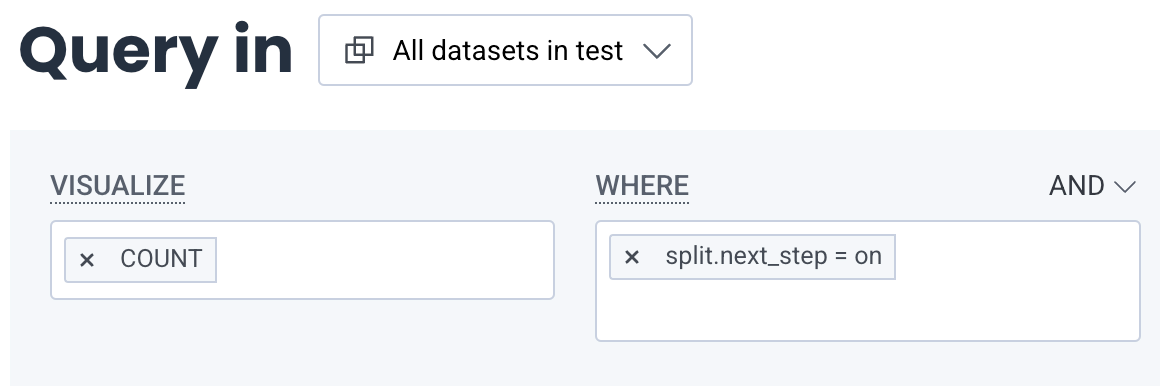
In Honeycomb, you can query traces by feature flag “impressions” by setting COUNT in the Visualize section and adding split.next_step = on in the Where section (using AND if you have multiple conditions).
Next Steps for Feature Flag Observability
Feature flags aren’t ideal candidates for bytecode instrumentation. The challenge here isn’t in the SDK itself, but rather in determining what behavior you want to observe when a flag is toggled on or off.
Looking ahead, one possible approach is to treat spans as proxies for flags: a span could represent a flag, allowing you to enable or disable entire sections of live application code by identifying the associated spans. While conceptually powerful, this approach can be complex and may not scale well, depending on the number of spans your application uses.
In the short term, a simpler pattern works well: manually wrap feature flag changes with a span and add the flag treatments as span attributes. This provides you with visibility, powered by OpenTelemetry, into how feature flags impact your application's behavior, enabling better traceability and faster debugging.
To get started with feature flags, see the Harness FME Feature Management documentation. If you’re brand new to Harness FME, sign up for a free trial today.

