Featured Blogs
.png)
Google's GKE Autopilot provides fully managed Kubernetes without the operational overhead of node management, security patches, or capacity planning. However, running chaos engineering experiments on Autopilot has been challenging due to its security restrictions.
We've solved that problem.
Why This Matters
Chaos engineering helps you identify issues before they impact your users. The approach involves intentionally introducing controlled failures to understand how your system responds. Think of it as a fire drill for your infrastructure.
GKE Autopilot secures clusters by restricting many permissions, which is excellent for security. However, this made running chaos experiments difficult. You couldn't simply deploy Harness Chaos Engineering and begin testing.
That changes today.
What Changed
We collaborated with Google to add Harness Chaos Engineering to GKE Autopilot's official allowlist. This integration enables Harness to run chaos experiments while operating entirely within Autopilot's security boundaries.
No workarounds required. Just chaos engineering that works as expected.
How to Set It Up
1. Apply the Allowlist
First, you need to tell GKE Autopilot that Harness chaos workloads are okay to run. Copy this command:
kubectl apply -f - <<'EOF'
apiVersion: auto.gke.io/v1
kind: AllowlistSynchronizer
metadata:
  name: harness-chaos-allowlist-synchronizer
spec:
  allowlistPaths:
  - Harness/allowlists/chaos/v1.62/*
  - Harness/allowlists/service-discovery/v0.42/*
EOF
Then wait for it to be ready:
kubectl wait --for=condition=Ready allowlistsynchronizer/harness-chaos-allowlist-synchronizer --timeout=60s
That's it for the cluster configuration.
2. Enable Autopilot Mode in Harness
Next, configure Harness to work with GKE Autopilot. You have several options:
If you're setting up chaos for the first time, just use the 1-click chaos setup and toggle on "Use static name for configmap and secret" during setup.
If you already have infrastructure configured, go to Chaos Engineering > Environments, find your infrastructure, and enable that same toggle.

You can also set this up when creating a new discovery agent, or update an existing one in Project Settings > Discovery.

What You Can Test
You can run most of the chaos experiments you'd expect:
The integration supports a comprehensive range of chaos experiments:
Resource stress: Pod CPU Hog, Pod Memory Hog, Pod IO Stress, Disk Fill. These experiments help you understand how your pods behave under resource constraints.
Network chaos: Pod Network Latency, Pod Network Loss, Pod Network Corruption, Pod Network Duplication, Pod Network Partition, Pod Network Rate Limit. Production networks experience imperfections, and your application needs to handle them gracefully.
DNS problems: Pod DNS Error to disrupt resolution, Pod DNS Spoof to redirect traffic.
HTTP faults: Pod HTTP Latency, Pod HTTP Modify Body, Pod HTTP Modify Header, Pod HTTP Reset Peer, Pod HTTP Status Code. These experiments test how your APIs respond to unexpected behavior.
API-level chaos: Pod API Block, Pod API Latency, Pod API Modify Body, Pod API Modify Header, Pod API Status Code. Good for testing service mesh and gateway behavior.
File system chaos: Pod IO Attribute Override, Pod IO Error, Pod IO Latency, Pod IO Mistake. These experiments reveal how your application handles storage issues.
Container lifecycle: Container Kill and Pod Delete to test recovery. Pod Autoscaler to see if scaling works under pressure.
JVM chaos if you're running Java: Pod JVM CPU Stress, Pod JVM Method Exception, Pod JVM Method Latency, Pod JVM Modify Return, Pod JVM Trigger GC.
Database chaos for Java apps: Pod JVM SQL Exception, Pod JVM SQL Latency, Pod JVM Mongo Exception, Pod JVM Mongo Latency, Pod JVM Solace Exception, Pod JVM Solace Latency.
Cache problems: Redis Cache Expire, Redis Cache Limit, Redis Cache Penetration.
Time manipulation: Time Chaos to introduce controlled time offsets.
What This Means for You
If you're running GKE Autopilot and want to implement chaos engineering with Harness, you can now do both without compromise. There's no need to choose between Google's managed experience and resilience testing.
For teams new to chaos engineering, Autopilot provides an ideal starting point. The managed environment reduces infrastructure complexity, allowing you to focus on understanding application behavior under stress.
Getting Started
Start with a simple CPU stress test. Select a non-critical pod and run a low-intensity Pod CPU Hog experiment in Harness. Observe the results: Does your application degrade gracefully? Do your alerts trigger as expected? Does it recover when the experiment completes?
Start small, understand your system's behavior, then explore more complex scenarios.
You can configure Service Discovery to visualize your services in Application Maps, add probes to validate resilience during experiments, and progressively explore more sophisticated fault injection scenarios.
Check out the documentation for the complete setup guide and all supported experiments.
The goal of chaos engineering isn't to break things. It's to understand what breaks before it impacts your users.
Recent Blogs

Theory to Turbulence: Building a Developer-Friendly E2E Testing Framework for Chaos Platform
As an enterprise chaos engineering platform vendor, validating chaos faults is not optional — it’s foundational. Every fault we ship must behave predictably, fail safely, and produce measurable impact across real-world environments.
When we began building our end-to-end (E2E) testing framework, we quickly ran into a familiar problem: the barrier to entry was painfully high.
Running even a single test required a long and fragile setup process:
- Installing multiple dependencies by hand
- Configuring a maze of environment variables
- Writing YAML-based chaos experiments manually
- Debugging cryptic validation failures
- Only then… executing the first test
This approach slowed feedback loops, discouraged adoption, and made iterative testing expensive — exactly the opposite of what chaos engineering should enable.
The Solution: A Simplified Chaos Fault Validation Framework
To solve this, we built a comprehensive yet developer-friendly E2E testing framework for chaos fault validation. The goal was simple: reduce setup friction without sacrificing control or correctness.
The result is a framework that offers:
- An API-driven execution model instead of manual YAML wiring
- Real-time log streaming for faster debugging and observability
- Intelligent target discovery to eliminate repetitive configuration
- Dual-phase validation to verify both fault injection and system impact
What previously took 30 minutes (or more) to set up and run can now be executed in under 5 minutes — consistently and at scale.
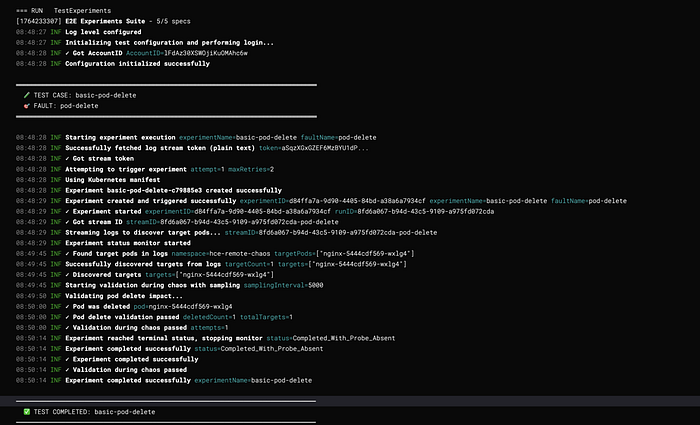
System Architecture
High-Level Architecture

Layer Responsibilities
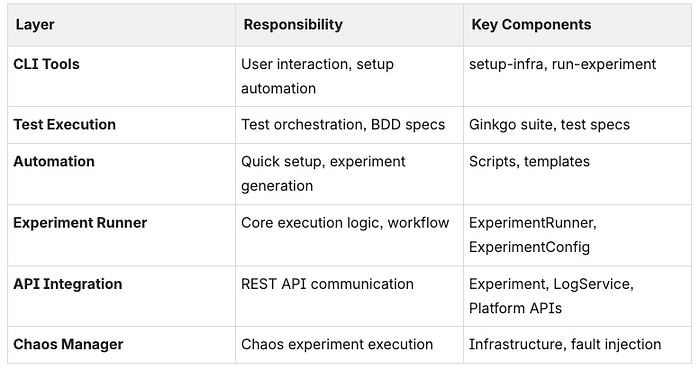
Core Components
1. Experiment Runner
Purpose: Orchestrates the complete chaos experiment lifecycle from creation to validation.
Key Responsibilities:
- Experiment creation with variable substitution
- Log streaming and target discovery
- Concurrent validation management
- Status monitoring and completion detection
- Error handling and retry logic
Architecture Pattern: Template Method + Observer
type ExperimentRunner struct {
    identifiers utils.Identifiers
    config      ExperimentConfig
}
type ExperimentConfig struct {
    Name                  string
    FaultName             string
    ExperimentYAML        string
    InfraID               string
    InfraType             string
    TargetNamespace       string
    TargetLabel           string
    TargetKind            string
    FaultEnv              map[string]string
    Timeout               time.Duration
    SkipTargetDiscovery   bool
    ValidationDuringChaos ValidationFunc
    ValidationAfterChaos  ValidationFunc
    SamplingInterval      time.Duration
    }
Execution Flow:
Run() →
  1. getLogToken()
  2. triggerExperimentWithRetry()
  3. Start experimentMonitor
  4. extractStreamID()
  5. getTargetsFromLogs()
  6. runValidationDuringChaos() [parallel]
  7. waitForCompletion()
  8. Validate ValidationAfterChaos
2. Experiment Monitor
Purpose: Centralized experiment status tracking with publish-subscribe pattern.
Architecture Pattern: Observer Pattern
type experimentMonitor struct {
    experimentID string
    runResp      *experiments.ExperimentRunResponse
    identifiers  utils.Identifiers
    stopChan     chan bool
    statusChan   chan string
    subscribers  []chan string
}
Key Methods:
start(): Begin monitoring (go-routine)subscribe(): Create subscriber channelbroadcast(status): Notify all subscribersstop(): Signal monitoring to stop
Benefits:
- 80% reduction in API calls
- 92% faster failure detection
- Single source of truth
- Easy to add new consumers
3. Validation Framework
Purpose: Dual-phase validation system for concrete chaos impact verification.
ValidationDuringChaos
- Runs in parallel during experiment
- Continuous sampling at configurable intervals
- Stops when validation passes
- Use case: Verify active fault impact
ValidationAfterChaos
- Runs once after experiment completes
- Single execution for final state
- Use case: Verify recovery and cleanup
Function Signature:
type ValidationFunc func(targets []string, namespace string) (bool, error)
// Returns: (passed bool, error)
Sample Validation Categories:

Experiment Execution Engine
Execution Phases
Phase 1: Setup
├─ Load configuration
├─ Authenticate with API
└─ Validate environment

Phase 2: Preparation
├─ Get log stream token
├─ Resolve experiment YAML path
├─ Substitute template variables
└─ Create experiment via API

Phase 3: Execution
├─ Trigger experiment run
├─ Start status monitor
├─ Extract stream ID
└─ Discover targets from logs

Phase 4: Validation (Concurrent)
├─ Validation During Chaos (parallel)
│  ├─ Sample at intervals
│  ├─ Check fault impact
│  └─ Stop when passed/completed
└─ Wait for completion

Phase 5: Post-Validation
├─ Validation After Chaos
├─ Check recovery
└─ Final assertions

Phase 6: Cleanup
├─ Stop monitor
├─ Close channels
└─ Log results
State Machine
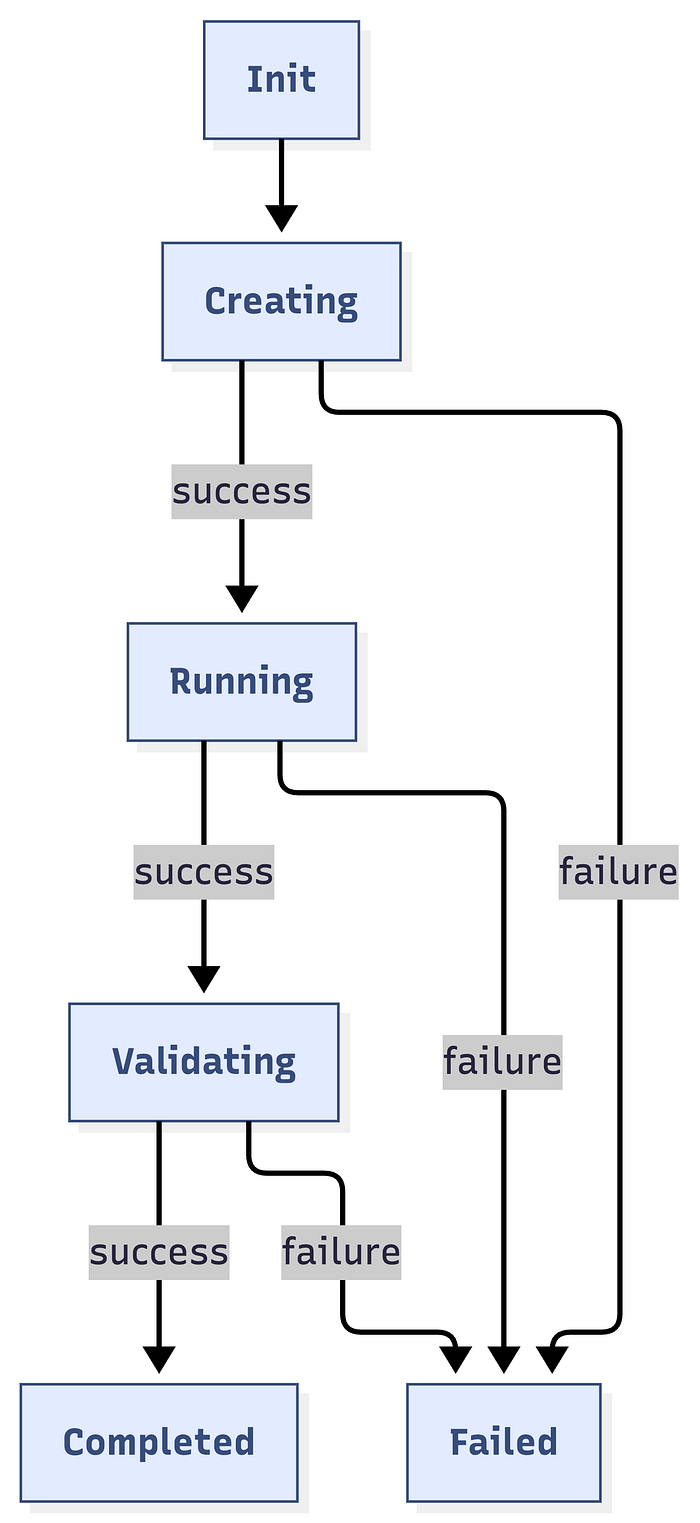
Concurrency Model
Main Thread:
├─ Create experiment
├─ Start monitor goroutine
├─ Start target discovery goroutine
├─ Start validation goroutine [if provided]
└─ Wait for completion
Monitor Goroutine:
├─ Poll status every 5s
├─ Broadcast to subscribers
└─ Stop on terminal status
Target Discovery Goroutine:
├─ Subscribe to monitor
├─ Poll for targets every 5s
├─ Listen for failures
└─ Return when found or failed
Validation Goroutine:
├─ Subscribe to monitor
├─ Run validation at intervals
├─ Listen for completion
└─ Stop when passed or completed
API Integration Layer
API Client Architecture

Variable Substitution System
Template Format: {{ VARIABLE_NAME }}
Built-in Variables:
INFRA_NAMESPACE          // Infrastructure namespace
FAULT_INFRA_ID          // Infrastructure ID (without env prefix)
EXPERIMENT_INFRA_ID     // Full infrastructure ID (env/infra)
TARGET_WORKLOAD_KIND    // deployment, statefulset, daemonset
TARGET_WORKLOAD_NAMESPACE // Target namespace
TARGET_WORKLOAD_NAMES   // Specific workload names (or empty)
TARGET_WORKLOAD_LABELS  // Label selector
EXPERIMENT_NAME         // Experiment name
FAULT_NAME              // Fault type
TOTAL_CHAOS_DURATION    // Duration in seconds
CHAOS_INTERVAL          // Interval between chaos actions
ADDITIONAL_ENV_VARS     // Fault-specific environment variables
Custom Variables: Passed via FaultEnv map in ExperimentConfig.
Validation Framework
Architecture
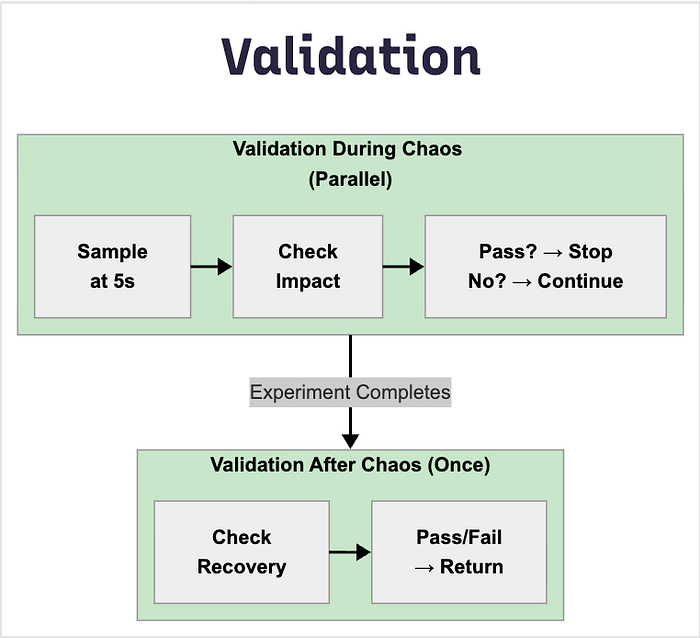
Validation Categories
1. Resource Validators
ValidatePodCPUStress(targets, namespace) (bool, error)
ValidatePodMemoryStress(targets, namespace) (bool, error)
ValidateDiskFill(targets, namespace) (bool, error)
ValidateIOStress(targets, namespace) (bool, error)
Detection Logic:
- CPU: Usage > baseline + 30%
- Memory: Usage > baseline + 20%
- Disk: Usage > 80%
- I/O: Read/write operations elevated
2. Network Validators
ValidateNetworkLatency(targets, namespace) (bool, error)
ValidateNetworkLoss(targets, namespace) (bool, error)
ValidateNetworkCorruption(targets, namespace) (bool, error)
Detection Methods:
- Ping latency measurements
- Packet loss percentage
- Checksum errors
3. Pod Lifecycle Validators
ValidatePodDelete(targets, namespace) (bool, error)
ValidatePodRestarted(targets, namespace) (bool, error)
ValidatePodsRunning(targets, namespace) (bool, error)
Verification:
- Pod age comparison
- Restart count increase
- Ready status check
4. Application Validators
ValidateAPIBlock(targets, namespace) (bool, error)
ValidateAPILatency(targets, namespace) (bool, error)
ValidateAPIStatusCode(targets, namespace) (bool, error)
ValidateFunctionError(targets, namespace) (bool, error)
5. Redis Validators
ValidateRedisCacheLimit(targets, namespace) (bool, error)
ValidateRedisCachePenetration(targets, namespace) (bool, error)
ValidateRedisCacheExpire(targets, namespace) (bool, error)
Direct Validation: Executes redis-cli INFO in pod, parses metrics
Validation Best Practices

Data Flow & Lifecycle
Complete Experiment Lifecycle
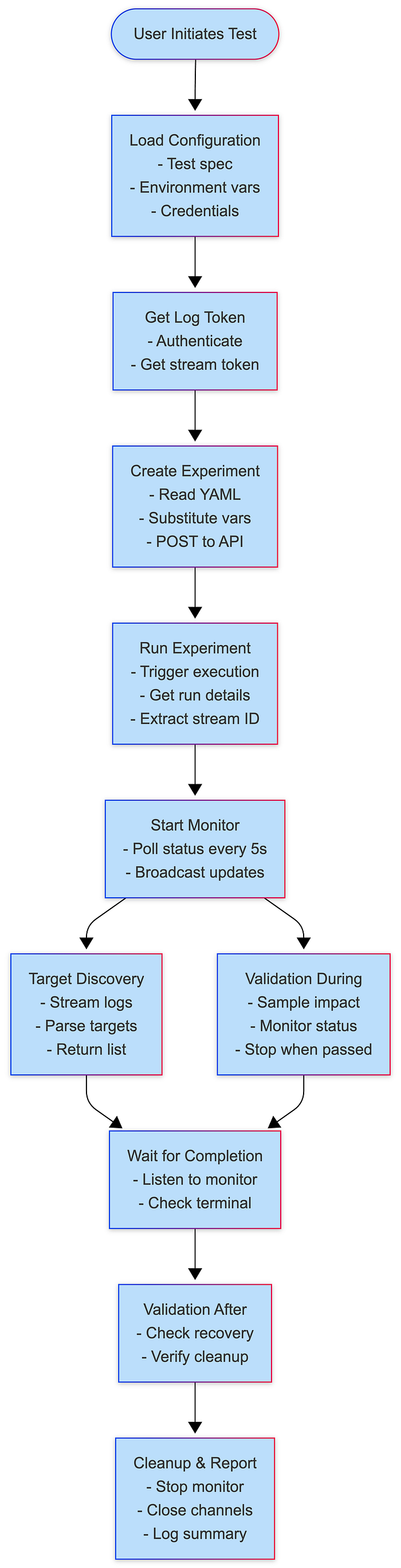
Data Structures Flow
// Input
ExperimentConfig
    ↓
// API Creation
ExperimentPayload (JSON)
    ↓
// API Response
ExperimentResponse {ExperimentID, Name}
    ↓
// Run Request
ExperimentRunRequest {NotifyID}
    ↓
// Run Response
ExperimentRunResponse {ExperimentRunID, Status, Nodes}
    ↓
// Log Streaming
StreamToken + StreamID
    ↓
// Target Discovery
[]string (target pod names)
    ↓
// Validation
ValidationFunc(targets, namespace) → (bool, error)
    ↓
// Final Result
Test Pass/Fail with error details
Performance & Scalability
Performance Metrics

Concurrent Test Execution
- Each test gets isolated namespace
- Separate experiment instances
- No shared state between tests
- Parallel execution supported
Example Usage of Framework
RunExperiment(ExperimentConfig{
    Name: "CPU Stress Test",
    FaultName: "pod-cpu-hog",
    InfraID:         infraID,
    ProjectID:       projectId,
    TargetNamespace: targetNamespace,
    TargetLabel:     "app=nginx", // Customize based on your test app
    TargetKind:      "deployment",
    FaultEnv: map[string]string{
     "CPU_CORES":            "1",
     "TOTAL_CHAOS_DURATION": "60",
     "PODS_AFFECTED_PERC":   "100",
     "RAMP_TIME":            "0",
    },
    Timeout:          timeout,
    SamplingInterval: 5 * time.Second, // Check every 5 seconds during chaos

    // Verify CPU is stressed during chaos
    ValidationDuringChaos: func(targets []string, namespace string) (bool, error) {
         clientset, err := faultcommon.GetKubeClient()
         if err != nil {
          return false, err
         }
         return validations.ValidatePodCPUStress(clientset, targets, namespace)
    },

    // Verify pods recovered after chaos
    ValidationAfterChaos: func(targets []string, namespace string) (bool,error) {
        clientset, err := faultcommon.GetKubeClient()
        if err != nil {
         return false, err
        }
        return validations.ValidateTargetAppsHealthy(clientset, targets, namespace)
    },
})
Knowledge Sharing and Learning
While this framework is proprietary and used internally, we believe in sharing knowledge and best practices. The patterns and approaches we’ve developed can help other teams building similar testing infrastructure:
Key Takeaways for Your Team
Whether you’re building a chaos engineering platform, testing distributed systems, or creating any complex testing infrastructure, these principles apply:
- Measure your baseline — Know how long things take today
- Set ambitious goals — 10x improvements are possible
- Prioritize DX — Developer experience drives adoption
- Automate ruthlessly — Eliminate manual steps
- Share your learnings — Help others avoid the same pitfalls
- Collect user feedback
- Celebrate improvements!
We hope these insights help you build better testing infrastructure for your team!
Questions? Feedback? Ideas? Join Harness community. We’d love to hear about your testing challenges and how you’re solving them!

Recommended Experiments for Production Resilience in Harness Chaos Engineering
Building reliable distributed systems isn't just about writing good code. It's about understanding how your systems behave when things go wrong. That's where chaos engineering comes in.
If you've been wondering where to start with chaos experiments or what scenarios matter most for your infrastructure, this guide walks through battle-tested experiments that engineering teams use to validate production resilience.
Why These Experiments Matter
Here's the thing about production failures: they're not just theoretical. Network issues happen. Availability zones go down. Resources get exhausted. The question isn't whether these failures will occur, but whether your system can handle them gracefully when they do.
The experiments we'll cover are based on real-world failure scenarios that teams encounter in production. We've organized them by infrastructure type so you can quickly find what's relevant to your stack.
A quick tip before we dive in: Start with lower blast radius experiments (like pod-level faults) before progressing to higher impact scenarios (like node or zone failures). This gives you confidence in your testing approach and helps you understand your system's behavior patterns.
Understanding Your Infrastructure Needs
Different infrastructure types face different challenges. Here's what we'll cover:
- Kubernetes Experiments
- AWS Experiments
- Azure Experiments
- GCP Experiments
Let's explore each of these in detail.
Kubernetes: The Foundation of Modern Applications
For Kubernetes environments, chaos experiments typically focus on four key areas. Let's walk through each one.
Network Resilience Testing
Network-related failures are among the most common issues in distributed systems. Your application might be perfectly coded, but if it can't handle network degradation, you're setting yourself up for production incidents.
Here are the experiments that matter:
Pod Network Loss tests application resilience to network packet loss at the pod level. This is your first line of defense for understanding how individual components handle network issues.
Node Network Loss simulates network issues affecting entire nodes. This is a node-level experiment that helps you understand how your system behaves when an entire node becomes unreachable.
Pod Network Latency tests application behavior under high latency conditions at the pod level. Latency often reveals performance bottlenecks and timeout configuration issues.
Pod API Block allows you to block specific API endpoints or services at the pod level. This is particularly useful for testing service dependencies and circuit breaker implementations.
Resource Exhaustion Testing
Resource exhaustion is another common failure mode. How does your application behave when CPU or memory becomes constrained? These experiments help you understand whether your resource limits are set correctly and how your application handles resource constraints before they become production problems.
Pod CPU Hog tests application behavior under CPU pressure at the pod level. This helps validate whether your CPU limits are appropriate and how your application degrades under CPU constraints.
Pod Memory Hog validates memory limit handling and out-of-memory (OOM) scenarios at the pod level. Understanding memory behavior prevents unexpected pod restarts in production.
Node CPU Hog tests node-level CPU exhaustion. This experiment reveals how your cluster handles resource pressure when an entire node's CPU is saturated.
Node Memory Hog simulates node memory pressure at the node level. This is critical for understanding how Kubernetes evicts pods and manages memory across your cluster.
Availability Zone Failures
Multi-AZ deployments are great for resilience, but only if they're actually resilient. Zone failure experiments validate that your multi-AZ setup works as expected.
Node Network Loss can simulate complete zone failure when configured with node labels to target specific zones. This is your primary tool for validating zone-level resilience.
Pod Network Loss enables zone-level pod network isolation by targeting pods in specific zones. This gives you more granular control over which applications you test during zone failures.
For detailed zone failure configurations, see the Simulating Zonal Failures section below.
Pod Lifecycle Testing
Pods come and go. That's the nature of Kubernetes. But does your application handle these transitions gracefully? These experiments ensure your application handles the dynamic nature of Kubernetes without dropping requests or losing data.
Pod Delete tests graceful shutdown and restart behavior at the pod level. This is fundamental for validating that your application can handle rolling updates and scaling events.
Container Kill validates container restart policies at the container level. This ensures that individual container failures don't cascade into broader application issues.
Pod Autoscaler tests Horizontal Pod Autoscaler (HPA) behavior under load at the pod level. This validates that your autoscaling configuration responds appropriately to demand changes.
Simulating Zonal Failures
Zonal failures simulate complete availability zone outages, which are critical for validating multi-AZ deployments. Let's look at how to configure these experiments properly.
Node Network Loss for Zonal Failures
The Node Network Loss experiment simulates a complete zone failure by blocking all network traffic to nodes in a specific availability zone.
Key Parameters:
TOTAL_CHAOS_DURATION should be set to 300 seconds (5 minutes) for realistic zone failure testing. This duration gives you enough time to observe failover behavior and recovery processes.
NETWORK_PACKET_LOSS_PERCENTAGE should be set to 100% to achieve complete network isolation, simulating a total zone failure rather than degraded connectivity.
NETWORK_INTERFACE typically uses eth0 as the primary network interface. Verify your cluster's network configuration if you're using a different interface name.
NODES_AFFECTED_PERC should be set to 100 to affect all nodes matching the target label, ensuring complete zone isolation.
NODE_LABEL is critical for targeting specific availability zones. Use topology.kubernetes.io/zone=<zone-name> to select nodes in a particular zone.
Common Zone Labels:
For AWS deployments, use topology.kubernetes.io/zone=us-east-1a (or your specific zone).
For GCP deployments, use topology.kubernetes.io/zone=us-central1-a (or your specific zone).
For Azure deployments, use topology.kubernetes.io/zone=eastus-1 (or your specific zone).
Pod Network Loss for Zonal Failures
The Pod Network Loss experiment provides more granular control by targeting specific applications within a zone. This is useful when you want to test how individual services handle zone failures without affecting your entire infrastructure.
Key Parameters:
TARGET_NAMESPACE specifies the namespace containing your target application. This allows you to isolate experiments to specific environments or teams.
APP_LABEL uses an application label selector (e.g., app=frontend) to target specific applications. This gives you precise control over which services are affected.
TOTAL_CHAOS_DURATION should be set to 300 seconds for realistic zone failure scenarios, matching the duration used in node-level experiments.
NETWORK_PACKET_LOSS_PERCENTAGE should be 100% to simulate complete network isolation for the targeted pods.
PODS_AFFECTED_PERC determines the percentage of pods matching your criteria to affect. Set to 100 for complete zone failure simulation, or lower values for partial failures.
NETWORK_INTERFACE typically uses eth0 as the primary network interface for pod networking.
NODE_LABEL should use topology.kubernetes.io/zone=<zone-name> to target pods running in a specific availability zone.
Network Experiment Best Practices
When running network experiments, there are some important considerations to keep in mind.
General Guidelines
Start Small: Begin with shorter durations (30-60 seconds) and gradually increase as you build confidence in your experiments and understand your system's behavior.
Use Probes: Always configure health probes to validate application behavior during experiments. This gives you objective data about whether your hypothesis was correct.
Monitor Metrics: Track application and infrastructure metrics during experiments. CPU usage, memory consumption, request latency, and error rates are all critical indicators.
Schedule Wisely: Run experiments during maintenance windows or low-traffic periods initially. As you build confidence, you can move to running experiments during normal operations.
Document Results: Keep records of experiment outcomes and system behavior. This creates institutional knowledge and helps track improvements over time.
Pod Network Loss Considerations
One important thing to understand: Pod Network Loss experiments always block egress traffic from the target pods. This is crucial for experiment design. You can configure specific destination hosts or IPs to block, or you can simulate complete network isolation.
Important Parameters:
TARGET_NAMESPACE specifies your target namespace (e.g., production). This ensures experiments run in the correct environment.
APP_LABEL uses an application label selector like app=api-service to target specific applications precisely.
TOTAL_CHAOS_DURATION sets the experiment duration, typically 180 seconds (3 minutes) for most scenarios.
DESTINATION_HOSTS allows you to specify particular services to block using comma-separated hostnames (e.g., database.example.com). Leave empty to block all egress traffic.
DESTINATION_IPS lets you block specific IP addresses using comma-separated values (e.g., 10.0.1.50). This is useful when you know the exact IPs of backend services.
PODS_AFFECTED_PERC determines what percentage of matching pods to affect. Set to 100 to test complete service isolation.
NETWORK_INTERFACE specifies the network interface to target, typically eth0 for standard Kubernetes deployments.
Pod API Block for Egress Traffic
When using Pod API Block, you have fine-grained control. You can block specific API paths, target particular services, and choose whether to block egress or ingress traffic.
Important Parameters for Egress:
TARGET_CONTAINER specifies the container name within the pod that will experience the API block.
TARGET_SERVICE_PORT sets the target service port (e.g., 8080) for the API endpoint you're testing.
TOTAL_CHAOS_DURATION determines experiment duration, typically 180 seconds for API-level testing.
PATH_FILTER allows you to block a specific API path like /api/v1/users, enabling surgical testing of individual endpoints.
DESTINATION_HOSTS specifies target service hostnames using comma-separated values (e.g., api.example.com).
SERVICE_DIRECTION should be set to egress for blocking outbound API calls from the target container.
PODS_AFFECTED_PERC determines the percentage of pods to affect, typically 100 for comprehensive testing.
Pod API Block for Ingress Traffic
For ingress testing, you could block incoming health check requests to see how your monitoring responds.
Important Parameters for Ingress:
TARGET_CONTAINER specifies the container name within the pod that will block incoming requests.
TARGET_SERVICE_PORT sets the port receiving traffic, typically 8080 or your application's serving port.
TOTAL_CHAOS_DURATION determines the experiment duration, usually 180 seconds for health check testing.
PATH_FILTER allows you to block a specific incoming path like /health to test monitoring resilience.
SOURCE_HOSTS specifies source hostnames using comma-separated values (e.g., monitoring.example.com).
SOURCE_IPS lets you target specific source IP addresses using comma-separated values (e.g., 10.0.2.100).
SERVICE_DIRECTION should be set to ingress for blocking incoming requests to the target container.
PODS_AFFECTED_PERC determines the percentage of pods to affect, typically 100 for complete testing.
AWS: Cloud Infrastructure Resilience
AWS infrastructure brings its own set of failure modes. Here's what matters most for AWS workloads.
Recommended AWS Experiments
EC2 Stop simulates EC2 instance failure with high impact. This tests your application's ability to handle sudden instance termination and validates auto-scaling group behavior.
EBS Loss tests application behavior on volume detachment with high impact. This is critical for applications with persistent storage requirements.
ALB AZ Down simulates load balancer AZ failure with medium impact. This validates that your multi-AZ load balancer configuration works as expected.
RDS Reboot tests database failover with high impact. This ensures your database layer can handle planned and unplanned reboots.
Important: AWS experiments require proper IAM permissions. See AWS Fault Permissions for details.
EC2 Stop by ID
The EC2 Stop by ID experiment stops EC2 instances to test application resilience to instance failures and validate failover capabilities.
Key Parameters:
EC2_INSTANCE_ID accepts a comma-separated list of target EC2 instance IDs. You can target a single instance or multiple instances simultaneously.
REGION specifies the AWS region name of the target instances (e.g., us-east-1). All instances in a single experiment must be in the same region.
TOTAL_CHAOS_DURATION is typically set to 30 seconds, which is long enough to trigger failover mechanisms while minimizing impact.
CHAOS_INTERVAL determines the interval between successive instance terminations, typically 30 seconds for sequential failures.
SEQUENCE can be either parallel or serial. Use parallel to stop all instances simultaneously, or serial to stop them one at a time.
MANAGED_NODEGROUP should be set to disable for standard EC2 instances, or enable for self-managed node groups in EKS.
EBS Loss by ID
The EBS Loss by ID experiment detaches EBS volumes to test application behavior when storage becomes unavailable.
Key Parameters:
EBS_VOLUME_ID accepts a comma-separated list of EBS volume IDs to detach. Choose volumes that are critical to your application's operation.
REGION specifies the region name for the target volumes (e.g., us-east-1). Ensure volumes and instances are in the same region.
TOTAL_CHAOS_DURATION is typically 30 seconds, giving you enough time to observe storage failure behavior without extended downtime.
CHAOS_INTERVAL sets the interval between attachment and detachment cycles, usually 30 seconds.
SEQUENCE determines whether volumes are detached in parallel or serial order. Parallel tests simultaneous storage failures.
ALB AZ Down
The ALB AZ Down experiment detaches availability zones from Application Load Balancer to test multi-AZ resilience.
Key Parameters:
LOAD_BALANCER_ARN specifies the target load balancer ARN. You can find this in your AWS console or CLI.
ZONES accepts comma-separated zones to detach (e.g., us-east-1a). Choose zones strategically to test failover behavior.
REGION specifies the region name for the target ALB (e.g., us-east-1).
TOTAL_CHAOS_DURATION is typically 30 seconds for ALB experiments, sufficient to test traffic redistribution.
CHAOS_INTERVAL determines the interval between detachment and attachment cycles, usually 30 seconds.
SEQUENCE can be parallel or serial for detaching multiple zones.
Note: A minimum of two AZs must remain attached to the ALB after chaos injection.
RDS Instance Reboot
The RDS Instance Reboot experiment reboots RDS instances to test database failover and application recovery.
Key Parameters:
CLUSTER_NAME specifies the name of the target RDS cluster. This is required for cluster-level operations.
RDS_INSTANCE_IDENTIFIER sets the name of the target RDS instance within the cluster.
REGION specifies the region name for the target RDS (e.g., us-east-1).
TOTAL_CHAOS_DURATION is typically 30 seconds for the chaos duration, though the actual reboot may take longer.
INSTANCE_AFFECTED_PERC determines the percentage of RDS instances to target. Set to 0 to target exactly 1 instance.
SEQUENCE can be parallel or serial for rebooting multiple instances.
Azure: Testing Your Azure Workloads
For Azure deployments, focus on these key experiments to validate resilience to Azure-specific failures and service disruptions.
Recommended Azure Experiments
Azure Instance Stop simulates VM failure with high impact. This validates that your Azure-based applications can handle unexpected VM termination.
Azure Disk Loss tests disk detachment scenarios with high impact. This is essential for applications with persistent storage on Azure.
Azure Web App Stop validates App Service resilience with medium impact. This tests your PaaS-based applications' ability to handle service disruptions.
Azure Instance Stop
The Azure Instance Stop experiment powers off Azure VM instances to test application resilience to unexpected VM failures.
Key Parameters:
AZURE_INSTANCE_NAMES specifies the name of target Azure instances. For AKS clusters, use the Scale Set name, not the node name from the AKS node pool.
RESOURCE_GROUP sets the name of the resource group containing the target instance. This is required for Azure resource identification.
SCALE_SET should be set to disable for standalone VMs, or enable if the instance is part of a Virtual Machine Scale Set.
TOTAL_CHAOS_DURATION is typically 30 seconds, providing enough time to observe failover without extended disruption.
CHAOS_INTERVAL determines the interval between successive instance power-offs, usually 30 seconds.
SEQUENCE can be parallel or serial for stopping multiple instances.
Tip: For AKS nodes, use the Scale Set instance name from Azure, not the node name from AKS node pool.
GCP: Google Cloud Platform Resilience
For GCP workloads, these experiments validate compute and storage resilience.
Recommended GCP Experiments
GCP VM Instance Stop simulates compute instance failure with high impact. This tests your GCP-based applications' resilience to unexpected instance termination.
GCP VM Disk Loss tests persistent disk detachment with high impact. This validates how your applications handle storage failures on GCP.
GCP VM Instance Stop
The GCP VM Instance Stop experiment powers off GCP VM instances to test application resilience to unexpected instance failures.
Key Parameters:
GCP_PROJECT_ID specifies the ID of the GCP project containing the VM instances. This is required for resource identification.
VM_INSTANCE_NAMES accepts a comma-separated list of target VM instance names within the project.
ZONES specifies the zones of target instances in the same order as instance names. Each instance needs its corresponding zone.
TOTAL_CHAOS_DURATION is typically 30 seconds, sufficient for testing instance failure scenarios.
CHAOS_INTERVAL determines the interval between successive instance terminations, usually 30 seconds.
MANAGED_INSTANCE_GROUP should be set to disable for standalone VMs, or enable if instances are part of a managed instance group.
SEQUENCE can be parallel or serial for stopping multiple instances.
Required IAM Permissions:
Your service account needs compute.instances.get to retrieve instance information, compute.instances.stop to power off instances, and compute.instances.start to restore instances after the experiment.
Experiment Design Best Practices
Now that we've covered the experiments, let's talk about how to run them effectively.
1. Define Clear Hypotheses
Before running any experiment, define what you expect to happen. For example: "When 50% of pods lose network connectivity, the application should continue serving requests with increased latency but no errors."
This clarity helps you know what to measure and when something unexpected happens.
2. Use Resilience Probes
Always configure probes to validate your hypothesis:
HTTP Probes monitor application endpoints to verify they're responding correctly during chaos.
Command Probes check system state by running commands and validating output.
Prometheus Probes validate metrics thresholds to ensure performance stays within acceptable bounds.
Learn more about Resilience Probes.
3. Gradual Blast Radius Increase
Follow this progression:
Single Pod/Container experiments test individual component resilience. Start here to understand how your smallest units behave.
Multiple Pods validate load balancing and failover at the service level. This ensures traffic distributes correctly.
Node Level tests infrastructure resilience by affecting entire nodes. This reveals cluster-level behaviors.
Zone Level validates multi-AZ deployments by simulating complete zone failures. This is your ultimate resilience test.
4. Schedule Regular Experiments
Make chaos engineering a continuous practice:
Weekly: Run low-impact experiments like pod delete and network latency. These keep your team sharp and validate recent changes.
Monthly: Execute medium-impact experiments including node failures and resource exhaustion. These catch configuration drift.
Quarterly: Conduct high-impact scenarios like zone failures and major service disruptions. These validate your disaster recovery plans.
Use GameDays to organize team chaos engineering events.
5. Monitor and Alert
Ensure proper observability during experiments:
Configure alerts for critical metrics before running experiments. You want to know immediately if something goes wrong.
Monitor application logs in real-time during experiments. Logs often reveal issues before metrics do.
Track infrastructure metrics including CPU, memory, and network utilization. These help you understand resource consumption patterns.
Use Chaos Dashboard for visualization and real-time monitoring of your experiments.
Getting Started
The best way to get started with chaos engineering is to pick one experiment that addresses your biggest concern. Are you worried about network reliability? Start with Pod Network Loss. Concerned about failover? Try Pod Delete or EC2 Stop.
Run the experiment in a test environment first. Observe what happens. Refine your hypothesis. Then gradually move toward production environments as you build confidence.
Here are some helpful resources to continue your chaos engineering journey:
- Create Your First Experiment
- Configure Resilience Probes
- Set Up GameDays
- Integrate with CI/CD
- Explore All Kubernetes Faults
Remember, chaos engineering isn't about breaking things for the sake of breaking them. It's about understanding your system's behavior under stress so you can build more resilient applications. Start small, learn continuously, and gradually expand your chaos engineering practice.
What failure scenarios keep you up at night? Those are probably the best experiments to start with.

Making Your Business Resilient Against Cloudflare Like Outages
In the fast-paced digital world, a single point of failure can ripple across the globe, halting operations and frustrating millions. On November 18, 2025, that's exactly what happened when Cloudflare—a backbone for internet infrastructure—experienced a major outage. Sites like X (formerly Twitter), ChatGPT, and countless businesses relying on Cloudflare's CDN, DNS, and security services ground to a halt, serving 5xx errors and leaving users staring at blank screens. If your business depends on cloud services, this event is a stark reminder: resilience isn't optional; it's essential.
As sponsors of the Chaos Engineering tool LitmusChaos and as providers of resilience testing solutions from Harness, we've seen firsthand how proactive testing can turn potential disasters into minor blips. In this post, we'll break down what went wrong, the ripple effects on businesses, proven strategies to bounce back stronger, and why tools like ours are game-changers. Let's dive in.
What Happened During The Cloudflare Outage?
The outage kicked off around 11:20 UTC on November 18, with a surge in 5xx errors hitting a "huge portion of the internet." Cloudflare's internal systems degraded due to a configuration or database schema mismatch during a software rollout, triggering panic in shared mutable state initialization. This wasn't a cyberattack but a classic case of human error amplified by scale—think of it as deploying a patch that accidentally locks the front door while everyone's inside.
Affected services spanned the board: the Cloudflare Dashboard saw intermittent login failures, Access and WARP clients reported elevated error rates (with WARP temporarily disabled in London during fixes), and application services like DNS resolution and content delivery faltered globally. High-profile casualties included X, where thousands of users couldn't load feeds, and OpenAI's ChatGPT, which became unreachable for many. The disruption lasted about eight hours, with full resolution by 19:28 UTC after deploying a rollback and monitoring fixes.
Cloudflare's transparency in their post-mortem is commendable, but the event underscores how even giants aren't immune. For businesses, it was a costly lesson in third party dependency and not having enough confidence on the service being resilient.
How Can Your Business Be affected?
You may be depending on service providers like Cloudflare for handling DNS, DDoS protection, and edge caching. When they hiccup, the fallout is immediate and far-reaching:
- Revenue Loss: Online retailers like Shopify stores or Amazon affiliates saw carts abandoned mid-checkout. A single hour of downtime can cost mid-sized e-commerce businesses $10,000–$100,000 in lost sales, per industry benchmarks.
- User Experience Degradation: Streaming services buffered endlessly, social platforms froze, and collaboration tools like Slack integrations failed, eroding trust. Frustrated users churn—studies show a 7% drop in conversions per second of delay.
- Operational Chaos: DevOps teams scrambled with alerts firing, while customer support lines lit up. For global firms, the staggered impact across time zones meant 24/7 firefighting.
- Long-Term Hits: SEO rankings dip from crawl errors, and compliance headaches arise if SLAs are breached. In regulated sectors like finance or healthcare, this could trigger audits or fines.
This outage hit during peak hours for Europe and the Americas, amplifying the pain for businesses already stretched thin post-pandemic. It's a reminder: your uptime is only as strong as your weakest link.
Recommended Resilience Architecture For Your Business Services
Staying resilient doesn't require reinventing the wheel—just smart layering. Here are five battle-tested practices, each with a quick how-to:
1. Multi-Provider Redundancy: Don't put all eggs in one basket. Route traffic through alternatives like Akamai or Fastly for failover. Tip: Use anycast DNS to auto-switch providers in under 60 seconds.
2. Aggressive Caching and Edge Computing: Pre-load static assets at the edge to survive backend blips. Tip: Implement immutable caching with TTLs of 24+ hours for non-volatile content.
3. Robust Monitoring and Alerting: Tools like Datadog, Dynatrace or Prometheus can detect anomalies early. Tip: Set up synthetic monitors that simulate user journeys, alerting on >1% error rates.
4. Graceful Degradation and Offline Modes: Design apps to work partially offline—queue actions for retry. Tip: Use service workers in PWAs to cache critical paths.
These aren't silver bullets, but combined, they can cut recovery time from hours to minutes.
Cloudflare also must be doing everything that is possible to stay resilient. However, small failures either in the infrastructure, or applications or third party dependencies are inevitable. Your services must continue to stay resilient against potential failures. How? The answer lies in verifying as frequently as possible that your business services are resilient and if not, keep making corrections.

Why Is Regular Resilience Testing Non-Negotiable?
Outages like Cloudflare's expose the "unknown unknowns"—flaws that only surface under stress. Regular testing flips the script: instead of reactive firefighting, you're proactive architects.
Even though you have architected and implemented the good practices for resilience, there are lot of variables which can change your resiliency assumptions.
- Code changes are deployed and software is updated on your application or underlying infrastructure clusters.
- Configurations/behavior of the underlying infrastructure is updated. E.g: One of the services is moved from one VM to another VM with a lower configuration.
- New dependent services are introduced.
Unless you have enough resilience testing coverage with every change, you always will have unknown unknowns. With known unknowns, you at least have a tested mechanism on how to respond and recovery quickly.
Harness Chaos Engineering Strengthens Your Resilience Posture
- Network Latency and Packet Loss: Mimic DNS resolution delays or edge routing fails. Probe how your app handles 500ms+ lags—perfect for testing failover to secondary CDNs.
- Service Outage Simulation: "Kill" external dependencies like API calls to Cloudflare services. Use resilience probes to verify if your system auto-retries or degrades gracefully.
- Resource Contention Faults: Stress CPU/memory to echo overload from traffic spikes. ChaosGuard ensures experiments stay within guardrails, preventing cascade failures.
- Pod/Node Terminations (for K8s Users): Randomly evict resources to test scaling. Integrate with GitOps for automated rollbacks if thresholds breach.
- File or Disk size increases: Increase the files size, fill the underly disks or fill the database tables with fillers. Use resilience probes to verify if other services are functional. In the case of the Cloudflare outage, the root cause on their side appears to be increased file size or database changes, which might have been averted with regular resilience testing practice.
These aren't one-offs; run them in steady-state probes for baseline metrics, then blast radius tests for full-system validation. With AI-driven insights, Harness flags weak spots pre-outage—like over-reliance on a single provider—and suggests fixes. Early adopters report 30% uptime gains and halved incident severity.
Harness Chaos Engineering provides hundreds of ready to use fault templates to create required faulty scenarios and integrations with your APM systems to verify the resilience of your business services. The created chaos experiments are easy to add to either your deployment piplelines like Harness CD, GitLab, GitHub actions or to your GameDays.

Ready To Outage-Proof Your Business?
The Cloudflare outage was a global gut-check, but it's also an opportunity. By auditing dependencies today and layering in resilience practices—capped with tools like Harness—you'll sleep better knowing your services can weather the storm.
What's your first step? Audit your Cloudflare integrations or spin up a quick chaos experiment. Head to our Chaos Engineering page to learn more or sign up for our free tier with all the features that only limits the number of chaos experiments you can run in a month.
If you wish to learn more about resilience testing practices using Harness, this article will help.
Are you ready to outage-proof your business? Let's build a more unbreakable internet together, one test at a time.

Automating Chaos Engineering with Terraform
Infrastructure as Code (IaC) has revolutionized how we manage and provision infrastructure. But what about chaos engineering? Can you automate the setup of your chaos experiments the same way you provision your infrastructure?
The answer is yes. In this guide, I'll walk you through how to integrate Harness Chaos Engineering into your infrastructure using Terraform, making it easier to maintain resilient systems at scale.
Why Automate Chaos Engineering?
Before diving into the technical details, let's talk about why this matters.
Managing chaos engineering manually across multiple environments is time-consuming and error-prone. You need to set up infrastructures, configure service discovery, manage security policies, and maintain consistency across dev, staging, and production environments.
With Terraform, you can:
- Version control your entire chaos engineering setup
- Replicate configurations across environments reliably
- Integrate chaos engineering into your existing IaC workflows
- Collaborate with your team using familiar tools
What You Can Automate
The Harness Terraform provider lets you automate several key aspects of chaos engineering:
Infrastructure Setup - Enable chaos engineering on your existing Kubernetes clusters or provision new ones with chaos capabilities built in.
Service Discovery - Automatically detect services that can be targeted for chaos experiments, eliminating manual configuration.
Image Registries - Configure custom image registries for your chaos experiment workloads, giving you control over where container images are pulled from.
Security Governance - Define and enforce policies that control when and how chaos experiments can run, particularly important for production environments.
ChaosHub Management - Manage repositories of reusable chaos experiments, probes, and actions at the organization or project level.
Getting Started
Before you begin, make sure you have:
- Terraform installed and configured
- The Harness Terraform provider set up (see the official documentation)
- A Kubernetes infrastructure where you want to enable chaos engineering
Currently, the Harness Terraform provider for chaos engineering supports Kubernetes infrastructures.
Building Your Configuration
Let's walk through the key resources you'll need.
Setting Up Common Configuration
Start by defining common variables that will be used across all your resources:
locals {
  org_id = var.org_identifier != null ? var.org_identifier : harness_platform_organization.this[0].id

  project_id = var.project_identifier != null ? var.project_identifier : (
    var.org_identifier != null ? "${var.org_identifier}_${replace(lower(var.project_name), " ", "_")}" :
    "${harness_platform_organization.this[0].id}_${replace(lower(var.project_name), " ", "_")}"
  )

  common_tags = merge(
    var.tags,
    {
      "module" = "harness-chaos-engineering"
    }
  )

  tags_set = [for k, v in local.common_tags : "${k}=${v}"]
}
This approach keeps your configuration DRY and makes it easy to reference organization and project identifiers throughout your setup.
Creating Organization and Project
If you don't have an existing organization or project, Terraform can create them:
resource "harness_platform_organization" "this" {
  count       = var.org_identifier == null ? 1 : 0
  identifier  = replace(lower(var.org_name), " ", "_")
  name        = var.org_name
  description = "Organization for Chaos Engineering"
  tags        = local.tags_set
}

resource "harness_platform_project" "this" {
  depends_on = [harness_platform_organization.this]

  count       = var.project_identifier == null ? 1 : 0
  org_id      = local.org_id
  identifier  = local.project_id
  name        = var.project_name
  color       = var.project_color
  description = "Project for Chaos Engineering"
  tags        = local.tags_set
}
Setting Up Kubernetes Connector
Connect your Kubernetes cluster to Harness:
resource "harness_platform_connector_kubernetes" "this" {
  depends_on = [harness_platform_project.this]

  identifier = var.k8s_connector_name
  name       = var.k8s_connector_name
  org_id     = local.org_id
  project_id = local.project_id

  inherit_from_delegate {
    delegate_selectors = var.delegate_selectors
  }

  tags = local.tags_set
}
Creating Environment and Infrastructure
Set up your environment and infrastructure definition:
resource "harness_platform_environment" "this" {
  depends_on = [
    harness_platform_project.this,
    harness_platform_connector_kubernetes.this
  ]

  identifier = var.environment_identifier
  name       = var.environment_name
  org_id     = local.org_id
  project_id = local.project_id
  type       = "PreProduction"

  tags = local.tags_set
}

resource "harness_platform_infrastructure" "this" {
  depends_on = [
    harness_platform_environment.this,
    harness_platform_connector_kubernetes.this
  ]

  identifier      = var.infrastructure_identifier
  name            = var.infrastructure_name
  org_id          = local.org_id
  project_id      = local.project_id
  env_id          = harness_platform_environment.this.id
  deployment_type = var.deployment_type
  type            = "KubernetesDirect"

  yaml = <<-EOT
  infrastructureDefinition:
    name: ${var.infrastructure_name}
    identifier: ${var.infrastructure_identifier}
    orgIdentifier: ${local.org_id}
    projectIdentifier: ${local.project_id}
    environmentRef: ${harness_platform_environment.this.id}
    type: KubernetesDirect
    deploymentType: ${var.deployment_type}
    allowSimultaneousDeployments: false
    spec:
      connectorRef: ${var.k8s_connector_name}
      namespace: ${var.namespace}
      releaseName: release-${var.infrastructure_identifier}
  EOT

  tags = local.tags_set
}
Enabling Chaos Infrastructure
Now enable chaos engineering capabilities on your infrastructure:
resource "harness_chaos_infrastructure_v2" "this" {
  depends_on = [harness_platform_infrastructure.this]

  org_id         = local.org_id
  project_id     = local.project_id
  environment_id = harness_platform_environment.this.id
  infra_id       = harness_platform_infrastructure.this.id
  name           = var.chaos_infra_name
  description    = var.chaos_infra_description

  namespace  = var.chaos_infra_namespace
  infra_type = var.chaos_infra_type

  ai_enabled           = var.chaos_ai_enabled
  insecure_skip_verify = var.chaos_insecure_skip_verify

  service_account = var.service_account_name
  tags            = local.tags_set
}
Automating Service Discovery
Service discovery eliminates the need to manually register services for chaos experiments:
resource "harness_service_discovery_agent" "this" {
  depends_on = [harness_chaos_infrastructure_v2.this]

  name                   = var.service_discovery_agent_name
  org_identifier         = local.org_id
  project_identifier     = local.project_id
  environment_identifier = harness_platform_environment.this.id
  infra_identifier       = harness_platform_infrastructure.this.id
  installation_type      = var.sd_installation_type

  config {
    kubernetes {
      namespace = var.sd_namespace
    }
  }
}
Once deployed, the agent will automatically detect services running in your cluster, making them available for chaos experiments.
Configuring Custom Image Registries
For organizations that use private registries or have specific image sourcing requirements, you can configure custom image registries at both organization and project levels:
resource "harness_chaos_image_registry" "org_level" {
  depends_on = [harness_platform_organization.this]

  count = var.setup_custom_registry ? 1 : 0

  org_id = local.org_id

  registry_server  = var.registry_server
  registry_account = var.registry_account

  is_default          = var.is_default_registry
  is_override_allowed = var.is_override_allowed
  is_private          = var.is_private_registry
  secret_name         = var.registry_secret_name != "" ? var.registry_secret_name : null

  use_custom_images = var.use_custom_images
  dynamic "custom_images" {
    for_each = var.use_custom_images ? [1] : []
    content {
      log_watcher = var.log_watcher_image != "" ? var.log_watcher_image : null
      ddcr        = var.ddcr_image != "" ? var.ddcr_image : null
      ddcr_lib    = var.ddcr_lib_image != "" ? var.ddcr_lib_image : null
      ddcr_fault  = var.ddcr_fault_image != "" ? var.ddcr_fault_image : null
    }
  }
}

resource "harness_chaos_image_registry" "project_level" {
  depends_on = [harness_chaos_image_registry.org_level]

  count = var.setup_custom_registry ? 1 : 0

  org_id     = local.org_id
  project_id = local.project_id

  registry_server  = var.registry_server
  registry_account = var.registry_account

  is_default          = var.is_default_registry
  is_override_allowed = var.is_override_allowed
  is_private          = var.is_private_registry
  secret_name         = var.registry_secret_name != "" ? var.registry_secret_name : null

  use_custom_images = var.use_custom_images
  dynamic "custom_images" {
    for_each = var.use_custom_images ? [1] : []
    content {
      log_watcher = var.log_watcher_image != "" ? var.log_watcher_image : null
      ddcr        = var.ddcr_image != "" ? var.ddcr_image : null
      ddcr_lib    = var.ddcr_lib_image != "" ? var.ddcr_lib_image : null
      ddcr_fault  = var.ddcr_fault_image != "" ? var.ddcr_fault_image : null
    }
  }
}
Setting Up Git Connector for ChaosHub
To manage your chaos experiments in Git repositories, first create a Git connector:
resource "harness_platform_connector_git" "chaos_hub" {
  depends_on = [
    harness_platform_organization.this,
    harness_platform_project.this
  ]

  count = var.create_git_connector ? 1 : 0

  identifier      = replace(lower(var.git_connector_name), " ", "-")
  name            = var.git_connector_name
  description     = "Git connector for Chaos Hub"
  org_id          = local.org_id
  project_id      = local.project_id
  url             = var.git_connector_url
  connection_type = "Account"

  dynamic "credentials" {
    for_each = var.git_connector_ssh_key != "" ? [1] : []
    content {
      ssh {
        ssh_key_ref = var.git_connector_ssh_key
      }
    }
  }

  dynamic "credentials" {
    for_each = var.git_connector_ssh_key == "" ? [1] : []
    content {
      http {
        username     = var.git_connector_username != "" ? var.git_connector_username : null
        password_ref = var.git_connector_password != "" ? var.git_connector_password : null

        dynamic "github_app" {
          for_each = var.github_app_id != "" ? [1] : []
          content {
            application_id  = var.github_app_id
            installation_id = var.github_installation_id
            private_key_ref = var.github_private_key_ref
          }
        }
      }
    }
  }

  validation_repo = var.git_connector_validation_repo

  tags = merge(
    { for k, v in var.chaos_hub_tags : k => v },
    {
      "managed_by" = "terraform"
      "purpose"    = "chaos-hub-git-connector"
    }
  )
}
This connector supports multiple authentication methods including SSH keys, HTTP credentials, and GitHub Apps, making it flexible for different Git hosting providers.
Managing ChaosHubs
ChaosHubs let you create libraries of reusable chaos experiments:
resource "harness_chaos_hub" "this" {
  depends_on = [harness_platform_connector_git.chaos_hub]

  count = var.create_chaos_hub ? 1 : 0

  org_id      = local.org_id
  project_id  = local.project_id
  name        = var.chaos_hub_name
  description = var.chaos_hub_description

  connector_id    = var.create_git_connector ? one(harness_platform_connector_git.chaos_hub[*].id) : var.chaos_hub_connector_id
  repo_branch     = var.chaos_hub_repo_branch
  repo_name       = var.chaos_hub_repo_name
  is_default      = var.chaos_hub_is_default
  connector_scope = var.chaos_hub_connector_scope

  tags = var.chaos_hub_tags

  lifecycle {
    ignore_changes = [tags]
  }
}
The configuration intelligently uses either a newly created Git connector or an existing one based on your variables, providing flexibility in how you manage your infrastructure.
Implementing Security Governance
This is where things get interesting. Chaos Guard lets you define rules that control chaos experiment execution.
First, create conditions that define what you want to control:
resource "harness_chaos_security_governance_condition" "this" {
  depends_on = [
    harness_platform_environment.this,
    harness_platform_infrastructure.this,
    harness_chaos_infrastructure_v2.this,
  ]

  name        = var.security_governance_condition_name
  description = "Condition to block destructive experiments"
  org_id      = local.org_id
  project_id  = local.project_id
  infra_type  = var.security_governance_condition_infra_type

  fault_spec {
    operator = var.security_governance_condition_operator

    dynamic "faults" {
      for_each = var.security_governance_condition_faults
      content {
        fault_type = faults.value.fault_type
        name       = faults.value.name
      }
    }
  }

  dynamic "k8s_spec" {
    for_each = var.security_governance_condition_infra_type == "KubernetesV2" ? [1] : []
    content {
      infra_spec {
        operator  = var.security_governance_condition_infra_operator
        infra_ids = ["${harness_platform_environment.this.id}/${harness_chaos_infrastructure_v2.this.id}"]
      }

      dynamic "application_spec" {
        for_each = var.security_governance_condition_application_spec != null ? [1] : []
        content {
          operator = var.security_governance_condition_application_spec.operator

          dynamic "workloads" {
            for_each = var.security_governance_condition_application_spec.workloads
            content {
              namespace = workloads.value.namespace
              kind      = workloads.value.kind
            }
          }
        }
      }

      dynamic "chaos_service_account_spec" {
        for_each = var.security_governance_condition_service_account_spec != null ? [1] : []
        content {
          operator         = var.security_governance_condition_service_account_spec.operator
          service_accounts = var.security_governance_condition_service_account_spec.service_accounts
        }
      }
    }
  }

  dynamic "machine_spec" {
    for_each = contains(["Windows", "Linux"], var.security_governance_condition_infra_type) ? [1] : []
    content {
      infra_spec {
        operator  = var.security_governance_condition_infra_operator
        infra_ids = var.security_governance_condition_infra_ids
      }
    }
  }

  lifecycle {
    ignore_changes = [name]
  }

  tags = [
    for k, v in merge(
      local.common_tags,
      {
        "platform" = lower(var.security_governance_condition_infra_type)
      }
    ) : "${k}=${v}"
  ]
}
This configuration supports multiple infrastructure types including Kubernetes, Windows, and Linux, with specific specifications for each platform type.
Then, create rules that apply these conditions with specific actions:
resource "harness_chaos_security_governance_rule" "this" {
  depends_on = [harness_chaos_security_governance_condition.this]

  name          = var.security_governance_rule_name
  description   = var.security_governance_rule_description
  org_id        = local.org_id
  project_id    = local.project_id
  is_enabled    = var.security_governance_rule_is_enabled

  condition_ids  = [harness_chaos_security_governance_condition.this.id]
  user_group_ids = var.security_governance_rule_user_group_ids

  dynamic "time_windows" {
    for_each = var.security_governance_rule_time_windows
    content {
      time_zone  = time_windows.value.time_zone
      start_time = time_windows.value.start_time
      duration   = time_windows.value.duration

      dynamic "recurrence" {
        for_each = time_windows.value.recurrence != null ? [time_windows.value.recurrence] : []
        content {
          type  = recurrence.value.type
          until = recurrence.value.until
        }
      }
    }
  }

  lifecycle {
    ignore_changes = [name]
  }

  tags = [
    for k, v in merge(
      local.common_tags,
      {
        "platform" = lower(var.security_governance_condition_infra_type)
      }
    ) : "${k}=${v}"
  ]
}
This setup ensures that certain types of chaos experiments require approval or are blocked entirely in production environments, giving you confidence to enable chaos engineering without fear of accidental damage. You can also configure time windows for when experiments are allowed to run.
What Happens After Deployment
Once you've applied your Terraform configuration:
- Your service discovery agent starts detecting applications in your configured environments automatically
- Your security governance rules are active, controlling how chaos experiments can be executed
- Your custom ChaosHubs are synchronized and available for use
- Custom image registries are configured if you're using private registries
At this point, you can use the Harness UI to create and configure specific chaos experiments, then execute them against your discovered services. The infrastructure and governance layer is handled by Terraform, while the experiment design remains flexible and can be adjusted through the UI.
Putting It All Together
Here's a practical example of what a complete module structure might look like:
module "chaos_engineering" {
  source = "./modules/chaos-engineering"

  # Organization and Project
  org_identifier     = "my-org"
  project_identifier = "production"

  # Infrastructure
  environment_id    = "prod-k8s"
  infrastructure_id = "k8s-cluster-01"
  namespace         = "default"

  # Chaos Infrastructure
  chaos_infra_name      = "prod-chaos-infra"
  chaos_infra_namespace = "harness-chaos"
  chaos_ai_enabled      = true

  # Service Discovery
  service_discovery_agent_name = "prod-service-discovery"
  sd_namespace                 = "harness-delegate-ng"

  # Custom Registry (optional)
  setup_custom_registry = true
  registry_server       = "my-registry.io"
  registry_account      = "chaos-experiments"
  is_private_registry   = true

  # Git Connector for ChaosHub
  create_git_connector   = true
  git_connector_name     = "chaos-experiments-git"
  git_connector_url      = "https://github.com/myorg/chaos-experiments"
  git_connector_username = "myuser"
  git_connector_password = "account.github_token"

  # ChaosHub
  create_chaos_hub      = true
  chaos_hub_name        = "production-experiments"
  chaos_hub_repo_branch = "main"
  chaos_hub_repo_name   = "chaos-experiments"

  # Security Governance
  security_governance_condition_name = "block-destructive-faults"
  security_governance_condition_faults = [
    {
      fault_type = "pod-delete"
      name       = "pod-delete"
    }
  ]

  security_governance_rule_name         = "production-safety-rule"
  security_governance_rule_user_group_ids = ["platform-team"]
  security_governance_rule_is_enabled   = true

  # Tags
  tags = {
    environment = "production"
    managed_by  = "terraform"
    team        = "platform"
  }
}
Best Practices
As you build out your chaos engineering automation, keep these practices in mind:
Start with non-production environments - Test your Terraform configurations and governance rules in development or staging before rolling out to production.
Use separate state files - Maintain separate Terraform state files for different environments to prevent accidental cross-environment changes.
Version your chaos experiments - Store experiment definitions in Git repositories and reference them through ChaosHubs for better collaboration and change tracking.
Leverage conditional resource creation - Use count parameters to optionally create resources like custom registries or Git connectors based on your needs.
Implement proper authentication - Use Harness secrets management for storing sensitive credentials like registry passwords and Git authentication tokens.
Review governance rules regularly - As your understanding of system resilience grows, update your governance conditions and rules to reflect new insights.
Use time windows strategically - Configure governance rules with time windows to allow experiments only during business hours or maintenance windows.
Tag everything - Proper tagging helps with cost tracking, resource management, and understanding relationships between resources.
Combine with CI/CD - Integrate your chaos engineering Terraform configurations into your CI/CD pipelines for fully automated infrastructure deployment.
Moving Forward
Automating chaos engineering with Terraform removes friction from adopting resilience testing practices. You can now treat your chaos engineering setup like any other infrastructure component, with version control, code review, and automated deployment.
The key is starting small. Pick one environment, set up the basic infrastructure and service discovery, then gradually add governance rules and custom experiments as you learn what works for your systems.
For more details on specific resources and configuration options, check out the Harness Terraform Provider documentation.
What aspects of chaos engineering do you think would benefit most from automation in your organization?
Important Links:
New to Harness Chaos Engineering? Signup here.
Trying to find the documentation for Chaos Engineering? Go here: Chaos Engineering
Learn more: What is Terraform
Running Chaos Engineering on GKE Autopilot Just Got Easier
Google's GKE Autopilot provides fully managed Kubernetes without the operational overhead of node management, security patches, or capacity planning. However, running chaos engineering experiments on Autopilot has been challenging due to its security restrictions.
We've solved that problem.
Why This Matters
Chaos engineering helps you identify issues before they impact your users. The approach involves intentionally introducing controlled failures to understand how your system responds. Think of it as a fire drill for your infrastructure.
GKE Autopilot secures clusters by restricting many permissions, which is excellent for security. However, this made running chaos experiments difficult. You couldn't simply deploy Harness Chaos Engineering and begin testing.
That changes today.
What Changed
We collaborated with Google to add Harness Chaos Engineering to GKE Autopilot's official allowlist. This integration enables Harness to run chaos experiments while operating entirely within Autopilot's security boundaries.
No workarounds required. Just chaos engineering that works as expected.
How to Set It Up
1. Apply the Allowlist
First, you need to tell GKE Autopilot that Harness chaos workloads are okay to run. Copy this command:
kubectl apply -f - <<'EOF'
apiVersion: auto.gke.io/v1
kind: AllowlistSynchronizer
metadata:
  name: harness-chaos-allowlist-synchronizer
spec:
  allowlistPaths:
  - Harness/allowlists/chaos/v1.62/*
  - Harness/allowlists/service-discovery/v0.42/*
EOF
Then wait for it to be ready:
kubectl wait --for=condition=Ready allowlistsynchronizer/harness-chaos-allowlist-synchronizer --timeout=60s
That's it for the cluster configuration.
2. Enable Autopilot Mode in Harness
Next, configure Harness to work with GKE Autopilot. You have several options:
If you're setting up chaos for the first time, just use the 1-click chaos setup and toggle on "Use static name for configmap and secret" during setup.
If you already have infrastructure configured, go to Chaos Engineering > Environments, find your infrastructure, and enable that same toggle.
You can also set this up when creating a new discovery agent, or update an existing one in Project Settings > Discovery.
What You Can Test
You can run most of the chaos experiments you'd expect:
The integration supports a comprehensive range of chaos experiments:
Resource stress: Pod CPU Hog, Pod Memory Hog, Pod IO Stress, Disk Fill. These experiments help you understand how your pods behave under resource constraints.
Network chaos: Pod Network Latency, Pod Network Loss, Pod Network Corruption, Pod Network Duplication, Pod Network Partition, Pod Network Rate Limit. Production networks experience imperfections, and your application needs to handle them gracefully.
DNS problems: Pod DNS Error to disrupt resolution, Pod DNS Spoof to redirect traffic.
HTTP faults: Pod HTTP Latency, Pod HTTP Modify Body, Pod HTTP Modify Header, Pod HTTP Reset Peer, Pod HTTP Status Code. These experiments test how your APIs respond to unexpected behavior.
API-level chaos: Pod API Block, Pod API Latency, Pod API Modify Body, Pod API Modify Header, Pod API Status Code. Good for testing service mesh and gateway behavior.
File system chaos: Pod IO Attribute Override, Pod IO Error, Pod IO Latency, Pod IO Mistake. These experiments reveal how your application handles storage issues.
Container lifecycle: Container Kill and Pod Delete to test recovery. Pod Autoscaler to see if scaling works under pressure.
JVM chaos if you're running Java: Pod JVM CPU Stress, Pod JVM Method Exception, Pod JVM Method Latency, Pod JVM Modify Return, Pod JVM Trigger GC.
Database chaos for Java apps: Pod JVM SQL Exception, Pod JVM SQL Latency, Pod JVM Mongo Exception, Pod JVM Mongo Latency, Pod JVM Solace Exception, Pod JVM Solace Latency.
Cache problems: Redis Cache Expire, Redis Cache Limit, Redis Cache Penetration.
Time manipulation: Time Chaos to introduce controlled time offsets.
What This Means for You
If you're running GKE Autopilot and want to implement chaos engineering with Harness, you can now do both without compromise. There's no need to choose between Google's managed experience and resilience testing.
For teams new to chaos engineering, Autopilot provides an ideal starting point. The managed environment reduces infrastructure complexity, allowing you to focus on understanding application behavior under stress.
Getting Started
Start with a simple CPU stress test. Select a non-critical pod and run a low-intensity Pod CPU Hog experiment in Harness. Observe the results: Does your application degrade gracefully? Do your alerts trigger as expected? Does it recover when the experiment completes?
Start small, understand your system's behavior, then explore more complex scenarios.
You can configure Service Discovery to visualize your services in Application Maps, add probes to validate resilience during experiments, and progressively explore more sophisticated fault injection scenarios.
Check out the documentation for the complete setup guide and all supported experiments.
The goal of chaos engineering isn't to break things. It's to understand what breaks before it impacts your users.
.png)
Validating chaos experiments with GCP Cloud Monitoring probes
Running infrastructure on Google Cloud Platform means you're already collecting metrics through Cloud Monitoring. But here's the question: when you deliberately break things during chaos experiments, how do you know if your systems actually stayed healthy?
The GCP Cloud Monitoring probe in Harness Chaos Engineering answers this by letting you query your existing GCP metrics using PromQL and automatically validate them against your SLOs. No manual dashboard watching, no guessing whether that CPU spike was acceptable. Just automated, pass/fail validation of whether your infrastructure held up during controlled chaos.
The Challenge with GCP Infrastructure Testing
Here's a common scenario: you run a chaos experiment that kills pods in your GKE cluster. You watch your GCP Console, see some metrics fluctuate, and everything seems fine. But was it actually fine? Did CPU stay under 80%? Did memory pressure trigger any OOM kills? Did disk I/O queues grow beyond acceptable levels?
Without objective measurement, you're relying on gut feel. GCP Cloud Monitoring probes solve this by turning your existing monitoring into automated test assertions for chaos experiments.
The beauty is that you're already collecting these metrics. GCP Cloud Monitoring tracks everything from compute instance performance to Cloud Run request latency. These probes simply tap into that data stream during chaos experiments and validate it against your defined thresholds.
What You'll Need
Before configuring a GCP Cloud Monitoring probe, ensure you have:
- An active GCP account with Cloud Monitoring enabled for your project
- Network access to the GCP Cloud Monitoring API from your Kubernetes execution plane
- Either a chaos infrastructure with IAM and workload identity configured, or GCP service account credentials with the monitoring.timeSeries.list permission
The authentication flexibility here is powerful. If you've already set up workload identity for your chaos infrastructure, you can leverage those existing credentials. Otherwise, you can use a specific service account key for more granular control.
Setting Up Your GCP Cloud Monitoring Probe
Creating the Probe
Navigate to the Probes & Actions section in the Harness Chaos module and click New Probe. Select APM Probe, give it a descriptive name, and choose GCP Cloud Monitoring as the APM type.

Authentication: IAM or Service Account Keys?
One of the nice things about GCP Cloud Monitoring probes is the authentication flexibility. You get two options, and the right choice depends on your security posture and infrastructure setup.
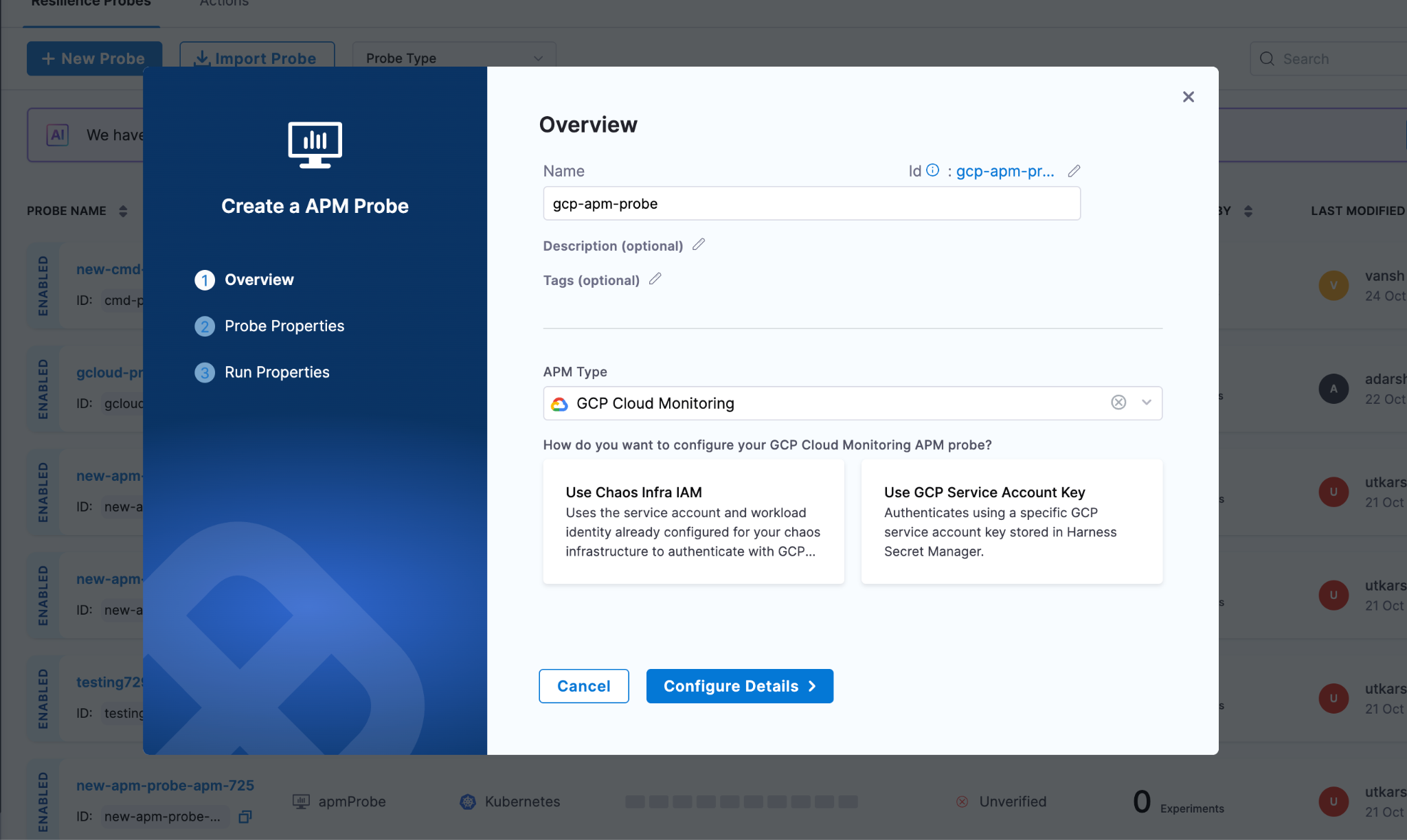
Chaos Infra IAM with Workload Identity
If your chaos infrastructure already runs in GCP with workload identity configured, this is the path of least resistance. Your chaos pods inherit the service account permissions you've already set up. No additional secrets to manage, no credential rotation headaches. The probe just works using the existing IAM context.
This approach shines when you're running chaos experiments within the same GCP project (or organization) where your chaos infrastructure lives. It's also the more secure option since there's no long-lived credential sitting in a secret store.
GCP Service Account Keys
Sometimes you need more control. Maybe your chaos infrastructure runs outside GCP, or you want specific experiments to use different permission sets. That's where service account keys come in.
You create a dedicated service account with just the monitoring.timeSeries.list permission (usually through the Monitoring Viewer role), generate a JSON key, and store it in Harness Secret Manager. The probe authenticates using this key for each query.
The tradeoff is credential management. You're responsible for rotating these keys and ensuring they don't leak. But you gain the ability to run chaos from anywhere and fine-tune permissions per experiment type.
Defining Your Probe Logic
Once authentication is configured, specify what metrics to monitor and what constitutes success.
Setting Your Project Context
Enter your GCP project ID, which you can find in the GCP Console or extract from your project URL. This tells the probe which project's metrics to query. For example: my-production-project-123456.
Crafting Your PromQL Queries
GCP Cloud Monitoring speaks PromQL, which is good news if you're already familiar with Prometheus. The query structure is straightforward: metric name, resource labels for filtering, and time range functions for aggregation.
Let's say you're chaos testing a Compute Engine instance and want to ensure CPU doesn't exceed 80%. Your query might look like:
avg_over_time(compute.googleapis.com/instance/cpu/utilization{instance_name="my-instance"}[5m])
This averages CPU utilization over 5 minutes for a specific instance. The time window should match your chaos duration. If you're running a 5-minute experiment, query the 5-minute average.
For GKE workloads, you might monitor container memory usage across a cluster:
avg(container.googleapis.com/container/memory/usage_bytes{cluster_name="production-cluster"})
The metric path follows GCP's naming convention: service, resource type, then the specific metric. Resource labels let you filter to exactly the infrastructure under test.
Defining Pass/Fail Thresholds
Once you have your query, set the success criteria. Pick your data type (Float for percentages and ratios, Int for counts and bytes), choose a comparison operator, and set the threshold.
For that CPU query, you'd set: Type=Float, Operator=<=, Value=80. If CPU stays at or below 80% throughout the chaos, the probe passes. If it spikes to 85%, the probe fails, and your experiment fails.
Tuning Probe Behavior
The runtime properties control how aggressively the probe validates your metrics. Getting these right depends on your experiment characteristics and how quickly you expect problems to surface.
Interval and Timeout work together to create your validation cadence. Set interval to 5 seconds with a 10-second timeout, and the probe checks metrics every 5 seconds, allowing up to 10 seconds for each query to complete. GCP Cloud Monitoring is usually fast, but if you're querying large time ranges or hitting rate limits, increase the timeout.
Initial Delay is critical for chaos experiments where the impact isn't immediate. If you're gradually increasing load or waiting for cache invalidation, delay the first probe check by 30-60 seconds. No point in failing the probe before the chaos has actually affected anything.
Attempt and Polling Interval handle transient failures. Set attempts to 3 with a 5-second polling interval, and the probe retries up to 3 times with 5 seconds between attempts if a query fails. This handles temporary API throttling or network blips without marking your experiment as failed.
Stop On Failure is your circuit breaker. Enable it if you want the experiment to halt immediately when metrics exceed thresholds. This prevents prolonged disruption when you've already proven the system can't handle the chaos. Leave it disabled if you want to collect the full time series of how metrics degraded throughout the experiment.
Making GCP Metrics Actionable During Chaos
The real power of GCP Cloud Monitoring probes isn't just automation. It's turning passive monitoring into active validation. Your GCP metrics go from "interesting data to look at" to "the definitive measure of experiment success."
When a probe executes, it:
- Queries your GCP project's Cloud Monitoring data using the PromQL you defined
- Extracts the metric value from the time series results
- Evaluates it against your threshold (<=80%, >1000ms, etc.)
- Records a pass or fail for that check
- Aggregates all checks to influence the experiment's final verdict
This creates an audit trail. You can prove that during the January 15th chaos experiment, CPU never exceeded 75% even when you killed 30% of pods. Or you can show that the December deployment broke something because memory usage spiked to 95% during the same test that passed in November.
That historical data becomes valuable for capacity planning, SLO refinement, and arguing for infrastructure budget. You're not just doing chaos for chaos's sake. You're building a quantitative understanding of your system's limits.
Start with Your Dashboard Metrics
The easiest way to begin using GCP Cloud Monitoring probes is to look at your existing dashboards. What metrics do you check during incidents? CPU, memory, request latency, error rates? Those are your probe candidates.
Pick one critical metric, write a PromQL query for it, set a reasonable threshold, and add it to your next chaos experiment. Run the experiment. See if the probe passes or fails. Adjust the threshold if needed based on what you learn.
Over time, you'll build a suite of probes that comprehensively validate your infrastructure's resilience. And because these probes use your existing GCP monitoring data, there's no additional instrumentation burden. You're just making better use of what you already collect.
Remember, the goal of chaos engineering is learning. GCP Cloud Monitoring probes accelerate that learning by giving you objective, repeatable measurements of how your systems behave under failure conditions. And objective measurements beat subjective observations every time.

Load Testing at Scale: Understanding Locust Loadgen in Harness Chaos Engineering
When it comes to building resilient applications, one of the most critical questions you need to answer is this: how will your system perform under heavy load? That's where the Locust loadgen fault in Harness Chaos Engineering comes into play. This powerful chaos experiment helps you simulate realistic load conditions and uncover potential bottlenecks before they impact your users.
What is Locust Loadgen?
Locust loadgen is a chaos engineering fault that simulates heavy traffic on your target hosts for a specified duration. Think of it as a stress test that pushes your applications to their limits in a controlled environment. The fault leverages Locust, a popular open-source load testing tool, to generate realistic user traffic patterns.
The primary goals are straightforward yet crucial. You're stressing your infrastructure by simulating heavy load that could slow down or make your target host unavailable. You're evaluating application performance by observing how your services behave under pressure. And you're measuring recovery time to understand how quickly your systems bounce back after experiencing load-induced failures.
Why Load Testing Matters in Chaos Engineering
Load-related failures are among the most common causes of production incidents. A sudden spike in traffic, whether from a successful marketing campaign or an unexpected viral moment, can bring even well-architected systems to their knees. The Locust loadgen fault helps you answer critical questions.
Can your application handle Black Friday levels of traffic? How does your system degrade when pushed beyond its designed capacity? What's your actual recovery time when load subsides? Where are the weak points in your infrastructure that need reinforcement?
By proactively testing these scenarios, you can identify and fix issues before they affect real users.
Getting Started Prerequisites
Before you can start injecting load chaos into your environment, you'll need a few things in place.
You'll need Kubernetes version 1.17 or higher. This is the foundation that runs your chaos experiments. Make sure your target application or service is reachable from within your Kubernetes cluster.
Here's where things get interesting. You'll need a Kubernetes ConfigMap containing a config.py file that defines your load testing behavior. This file acts as the blueprint for how Locust generates traffic.
Here's a basic example of what that ConfigMap looks like:
apiVersion: v1
kind: ConfigMap
metadata:
  name: load
  namespace: <CHAOS-NAMESPACE>
data:
  config.py: |
    import time
    from locust import HttpUser, task, between

    class QuickstartUser(HttpUser):
        wait_time = between(1, 5)

        @task
        def hello_world(self):
            self.client.get("")
Configuring Your Load Test
The beauty of the Locust loadgen fault lies in its flexibility. Let's walk through the key configuration options that control your chaos experiment.
Target Host
The HOST parameter specifies which application or service you want to test. This is mandatory and could be an internal service URL, an external website, or any HTTP endpoint you need to stress test:
- name: HOST
  value: "https://www.google.com"
Chaos Duration
The TOTAL_CHAOS_DURATION parameter controls how long the load generation runs. The default is 60 seconds, but you should adjust this based on your testing needs. For instance, if you're testing autoscaling behavior, you might want a longer duration to observe scale-up and scale-down events:
- name: TOTAL_CHAOS_DURATION
  value: "120"
Number of Users
The USERS parameter defines how many concurrent users Locust will simulate. This is perhaps one of the most important tuning parameters. Start conservatively and gradually increase to find your system's breaking point:
- name: USERS
  value: "100"
Spawn Rate
The SPAWN_RATE parameter controls how quickly users are added to the test. Rather than hitting your system with 100 users instantly, you might spawn them at 10 users per second, giving you a more realistic ramp-up scenario:
- name: SPAWN_RATE
  value: "10"
Custom Load Image
For advanced use cases, you can provide a custom Docker image containing specialized Locust configurations using the LOAD_IMAGE parameter:
- name: LOAD_IMAGE
  value: "chaosnative/locust-loadgen:latest"
Seeing It in Action
The real power of the Locust loadgen fault becomes evident when you combine it with observability tools like Grafana. When you run the experiment, you can watch in real-time as your metrics respond to the load surge.
Here's what a complete experiment configuration looks like in practice:
apiVersion: litmuschaos.io/v1alpha1
kind: KubernetesChaosExperiment
metadata:
  name: locust-loadgen-on-frontend
  namespace: harness-delegate-ng
spec:
  cleanupPolicy: delete
  experimentId: d5d1f7d5-8a98-4a77-aca3-45fb5c984170
  serviceAccountName: litmus
  tasks:
    - definition:
        chaos:
          components:
            configMaps:
              - mountPath: /tmp/load
                name: load
          env:
            - name: TOTAL_CHAOS_DURATION
              value: "60"
            - name: USERS
              value: "30"
            - name: SPAWN_RATE
              value: "1000"
            - name: HOST
              value: http://your-load-balancer-url.elb.amazonaws.com
            - name: CONFIG_MAP_FILE
              value: /tmp/load/config.py
          experiment: locust-load-generator
          image: docker.io/harness/chaos-ddcr-faults:1.55.0
      name: locust-loadgen-chaos
      probeRef:
        - mode: OnChaos
          probeID: app-latency-check
        - mode: OnChaos
          probeID: number-of-active-requests
        - mode: Edge
          probeID: app-health-check
Notice how this experiment includes probe references. These probes run during the chaos experiment to validate different aspects of your system's behavior, like latency checks, active request counts, and overall health status.
Monitoring the Impact in Grafana
When you run this experiment and monitor your application in Grafana, you'll see the surge immediately. Your dashboards will show operations per second graphs spiking as Locust generates load, access duration metrics increasing as your services come under pressure, request counts climbing across your frontend, cart, and product services, and response times varying as the system adapts to the load.
The beauty of this approach is that you're not just generating load blindly. You're watching how every layer of your application stack responds. You might see your frontend service handling the initial surge well, while your cart service starts showing increased latency. These insights are invaluable for capacity planning and optimization.
Integrating with Chaos Probes
The experiment configuration includes three types of probes that run during chaos.
OnChaos Probes run continuously during the chaos period. In this example, they monitor application latency and the number of active requests. If latency exceeds your SLA thresholds or request counts drop unexpectedly, the probe will catch it.
Edge Probes run at the beginning and end of the experiment. The health check probe ensures your application is healthy before chaos starts and verifies it recovers properly afterward.
This combination of load generation and continuous validation gives you confidence that you're not just surviving the load, but maintaining acceptable performance throughout.
Permissions Required
Security is paramount in any Kubernetes environment. The Locust loadgen fault requires specific RBAC permissions to function properly. Here are the key permissions needed.
You need pod management permissions to create, delete, and list pods for running the load generation. Job management allows you to create and manage Kubernetes jobs that execute the load tests. Event access lets you record and retrieve events for observability. ConfigMap and secret access enables reading configuration data and sensitive information. And chaos resource access allows interaction with ChaosEngines, ChaosExperiments, and ChaosResults.
These permissions should be scoped to the namespace where your chaos experiments run, following the principle of least privilege. The documentation provides a complete RBAC role definition that you can use as a starting point and adjust based on your security requirements.
Best Practices for Load Testing with Locust Loadgen
Start small and scale up. Don't immediately test with production-level loads. Start with a small number of users and gradually increase to understand your system's capacity curve.
Monitor everything. During the chaos experiment, keep a close eye on your application metrics, infrastructure metrics, and logs. The insights you gain are just as important as whether the system stays up.
Test in non-production first. Always validate your chaos experiments in staging or testing environments before running them in production. This helps you understand the fault's impact and refine your configuration.
Customize your load patterns. The default configuration is a starting point. Modify the config.py file to match your actual user behavior patterns for more realistic testing.
Consider time windows. If you do run load tests in production, use the ramp time features to schedule them during low-traffic periods.
Measuring Success
A successful load test isn't just about whether your application survives. Look for response time degradation and how response times change as load increases. Watch error rates to identify at what point errors start appearing. Monitor resource utilization to see if you're efficiently using CPU, memory, and network resources. Observe autoscaling behavior to confirm your horizontal pod autoscalers kick in at the right time. And measure recovery time to understand how long it takes for your system to return to normal once the load subsides.
Wrapping Up
The Locust loadgen fault in Harness Chaos Engineering gives you a powerful tool for understanding how your applications behave under stress. By regularly testing your systems with realistic load patterns and monitoring the results in tools like Grafana, you can identify weaknesses, validate capacity planning, and build confidence in your infrastructure's resilience.
Remember, chaos engineering isn't about breaking things for the sake of it. It's about learning how your systems fail so you can prevent those failures from impacting your users. Load testing with Locust loadgen, combined with continuous monitoring and validation through probes, is an essential part of that journey.
Ready to start your load testing journey? Configure your first Locust loadgen experiment, set up your Grafana dashboards, and watch how your applications respond to pressure. The insights you gain will be invaluable for building truly resilient systems.
Important Links:
New to Harness Chaos Engineering ? Signup here
Trying to find the documentation for Chaos Engineering ? Go here: Chaos Engineering
Want to build the Harness MCP server here ? Go here: GitHub
Want to know how to setup Harness MCP servers with Harness API Keys ? Go here: Manage API keys
Harness Celebrates Hacktoberfest with LitmusChaos
Every October the open-source world comes alive for Hacktoberfest, a month dedicated to contribution, mentorship, and community. This Hacktoberfest, Harness is celebrating alongside the LitmusChaos community: inviting contributors, opening curated issues, hosting office hours, and helping surface work that will feed into the upcoming Litmus 4.0 roadmap. If you’ve ever wanted to get involved in chaos engineering, this is your chance.
What is Hacktoberfest?
Hacktoberfest is DigitalOcean’s annual month-long celebration of open source where developers of every skill level contribute to public repositories and learn from maintainers and peers. Typical participation mechanics and rewards vary year to year (pull/merge request goals, swag, events), but the heart of Hacktoberfest is hands-on contribution and community support. If you’re new to open source, Hacktoberfest is a welcoming way to start.
What is LitmusChaos?
LitmusChaos is a community-driven, cloud-native chaos engineering platform for SREs and developers to validate resilience hypotheses by safely introducing failures and measuring system behavior. It’s a CNCF-incubated open-source project with an active GitHub, docs, and community channels.
Harness has been investing in chaos engineering and the Litmus ecosystem, bringing Litmus capabilities closer to enterprise customers while keeping community roots intact. Harness welcomed Litmus into the Harness family as part of that journey. Our goal is to help scale the project and amplify community contributions.
Litmus maintainers and contributors have been actively discussing and shaping a major next iteration (4.0) improvements. The community contributions during Hacktoberfest will be intentionally curated so that small fixes, experiments, docs, and tests can be picked up for the 4.0 milestone.
What we’re doing this Hacktoberfest?
- Curated issue lists: a mix of good-first-issues, docs improvements, test flake fixes, and features that map to Litmus 4.0 priorities. Look for labels like hacktoberfest / good-first-issue.
- Office hours & mentoring: weekly open sessions where Litmus maintainers help contributors get unblocked. Join our community to get invite.
- Recognition & community shoutouts: highlighting first-time contributors, helpful reviewers, and notable PRs.
How you can take part?
- Register for Hacktoberfest (if you want the official track and rewards) and read the participation rules.
- Browse Litmus repos (core, chaos-experiments, docs) and filter by hacktoberfest / good-first-issue. Jump on anything labeled for Hacktoberfest.
- Join office hours / community channels to ask maintainers for pairing help.
- Open your PR early and link it to the relevant issue; maintainers will help iterate, small PRs that are well described and testable are easiest to review and merge.
- Share your work on social channels and tag Harness/LitmusChaos, help grow the community.
Hacktoberfest is the perfect season to give back. For Litmus, the community’s contributions are the lifeblood of the project. For Harness, supporting those contributions means helping build a more resilient cloud-native future. If you’re curious about chaos engineering or Open source, there’s no better month than October to jump in.
Sources & further reading
Hacktoberfest info & how to participate (DigitalOcean).
LitmusChaos official site & docs.
Litmus GitHub (repos, labels, issues).
Litmus community and contributors meeting sneak peek.
%20(1).png)
AI-Powered Chaos Engineering with Harness MCP Server and Cursor
AI-powered chaos engineering with Harness MCP Server and Cursor eliminates the complexity of resilience testing by enabling teams to discover, execute, and analyze chaos experiments through simple natural language prompts. This integration democratizes chaos engineering across DevOps, QA, and SRE teams, allowing them to build robust applications without deep vendor-specific knowledge.
The complexity of modern distributed systems demands proactive resilience testing, yet traditional chaos engineering often presents a steep learning curve that can slow adoption across teams. What if you could perform chaos experiments using simple, natural language conversations directly within your AI-powered code editor?
The integration of Harness Chaos Engineering with Cursor through the Model Context Protocol (MCP) makes this vision a reality. This powerful combination enables DevOps, QA, and SRE teams to discover, execute, and analyze chaos experiments without deep vendor-specific knowledge, accelerating your organization's journey toward building a resilience testing culture.
Simplifying Chaos Engineering
Chaos engineering has proven its value in identifying system weaknesses before they impact production. However, traditional implementations face common challenges:
Technical Complexity: Setting up experiments requires deep understanding of fault injection mechanisms, blast radius calculations, and monitoring configurations.
Learning Curve: Teams need extensive training on vendor-specific tools and chaos engineering principles before becoming productive.
Context Switching: Engineers constantly move between documentation, experiment configuration interfaces, and result analysis tools.
Skill Scaling: Organizations struggle to democratize chaos engineering beyond specialized reliability teams.
The Harness MCP integration changes this landscape by bringing chaos engineering capabilities directly into your AI-powered development workflow with Cursor.
Understanding Harness Chaos Engineering MCP Tools
The Harness Chaos Engineering MCP server provides six specialized tools that cover the complete chaos engineering lifecycle:
Core Experiment Tools
chaos_experiments_list: Discover all available chaos experiments in your project. Perfect for understanding your resilience testing capabilities and finding experiments relevant to specific services.
chaos_experiment_describe: Get details about any experiment, including its purpose, target infrastructure, expected impact, and success criteria.
chaos_experiment_run: Execute chaos experiments with intelligent parameter detection and automatic configuration, removing the complexity of manual setup.
chaos_experiment_run_result: Retrieve detailed results including resilience scores, performance impact analysis, and actionable recommendations for improvement.
Advanced Monitoring Tools
chaos_probes_list: Discover all available monitoring probes that validate system health during experiments, giving you visibility into your monitoring capabilities.
chaos_probe_describe: Get detailed information about specific probes, including their validation criteria, monitoring setup, and configuration parameters.
Setting Up Harness MCP Server with Cursor
Prerequisites
Before beginning the setup, ensure you have:
- Cursor IDE installed
- Harness Platform access with Chaos Engineering enabled
- Harness API key with appropriate permissions
- Go 1.23+ (to build from source)
Step 1: Build the Harness MCP Server Binary
You have multiple installation options. Choose the one that best fits your environment:
Building from Source
For advanced users who prefer building from source:
Clone the Repository:
git clone https://github.com/harness/mcp-server.git

cd mcp-server
Build the Binary:
go build -o cmd/harness-mcp-server/harness-mcp-server ./cmd/harness-mcp-server
Step 2: Configure the Harness MCP Server in Cursor
- Navigate to Cursor Settings
- Go to MCP tab
- Click "Edit Config" to open your MCP configuration
Add the following configuration:
{
  "mcpServers": {
    "harness": {
      "command": "/path/to/harness-mcp-server",
      "args": ["stdio"],
      "env": {
        "HARNESS_API_KEY": "your-api-key-here",
        "HARNESS_DEFAULT_ORG_ID": "your-org-id",
        "HARNESS_DEFAULT_PROJECT_ID": "your-project-id",
        "HARNESS_BASE_URL": "https://app.harness.io"
      }
    }
  }
}
Step 3: Add Your Harness Credentials
Gather the following information and add it to the configuration:
- Command: Path to your built harness-mcp-server binary
- API Key: Generate from your Harness account settings (Profile > My API Keys)
- Organization ID: Found in your Harness URL or organization settings
- Project ID: The project containing your chaos experiments
- Base URL: Your Harness instance URL (typically https://app.harness.io)
Step 4: Verify Installation
- Restart Cursor: Close and reopen Cursor to load the new configuration
- Check MCP Status: In Cursor settings, verify the Harness MCP server appears as connected
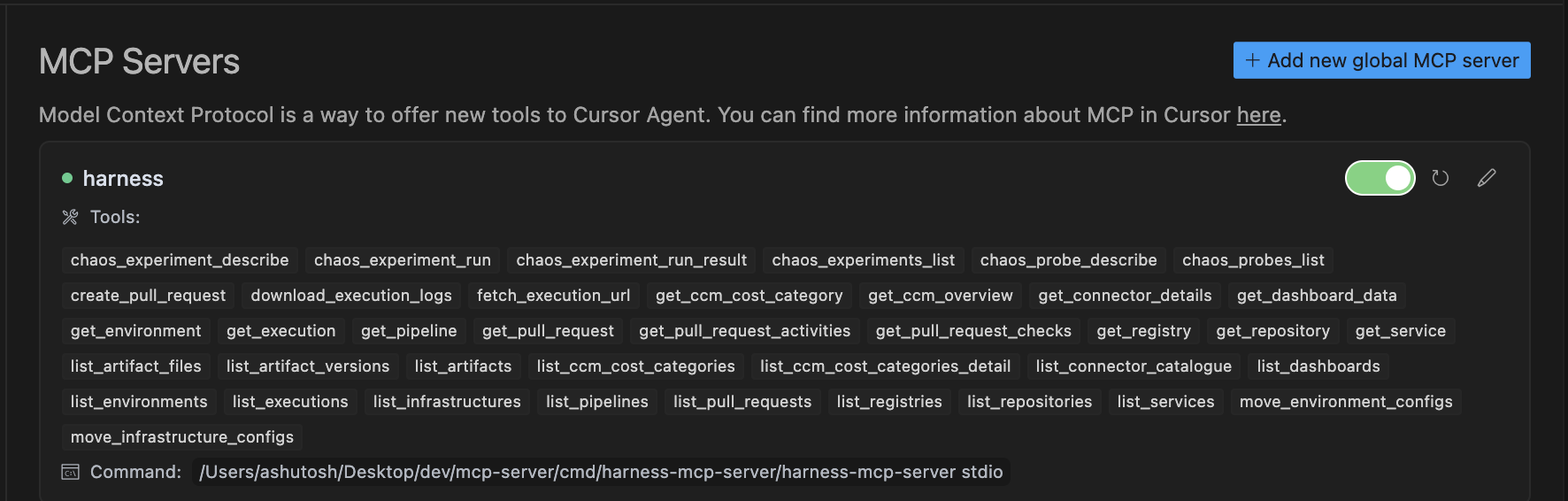
- Test Connection: Open Cursor Chat (Cmd/Ctrl + L) and try a simple prompt like:
"List all chaos experiments available in my project"
If successful, you should see chaos-related tools available and receive a response with your experiment list.
AI-Powered Chaos Engineering in Action
With your setup complete, let's explore how to leverage these tools effectively through natural language interactions in Cursor Chat.
Discovery and Learning Phase
Service-Specific Exploration:
"I am interested in catalog service resilience. Can you tell me what chaos experiments are available?"
Expected Output: Filtered list of experiments targeting your catalog service, categorized by fault type (network, compute, storage).
Deep-Dive Analysis:
"Describe briefly what the pod deletion experiment does and what services it targets"
Expected Output: Technical details about the experiment, including fault injection mechanism, expected impact, target selection criteria, and success metrics.
Understanding Resilience Metrics:
"Describe the resilience score calculation details for the network latency experiment"
Expected Output: Detailed explanation of scoring methodology, performance thresholds, and interpretation guidelines.
Experiment Execution Phase
Targeted Experiment Execution:
"Can you run the pod deletion experiment on my payment service?"
Expected Output: Automatic parameter detection, experiment configuration, execution initiation, and real-time monitoring setup.
Structured Overview Creation:
"Can you list the network chaos experiments and the corresponding services targeted? Tabulate if possible."
Expected Output: Well-organized table showing experiment names, target services, fault types, and current status.
Monitoring Probe Discovery:
"Show me all available chaos probes and describe how they work"
Expected Output: Complete catalog of available probes with their monitoring capabilities, validation criteria, and configuration details.
Analysis and Reporting Phase
Result Interpretation:
"Summarise the result of the database connection timeout experiment"
Expected Output: Comprehensive analysis including performance impact, resilience score, business implications, and specific recommendations for improvement.
Probe Configuration Details:
"Describe the HTTP probe used in the catalog service experiment"
Expected Output: Detailed probe configuration, validation criteria, success/failure thresholds, and monitoring setup instructions.
Comprehensive Resilience Assessment:
"Scan the experiments that were run against the payment service in the last week and summarise the resilience posture for me"
Expected Output: Executive-level resilience report with trend analysis, critical findings, and actionable improvement recommendations.
Why Cursor for Chaos Engineering?
Cursor's AI-first approach makes it an ideal platform for chaos engineering workflows:
- Contextual Intelligence: Cursor understands your codebase, making chaos experiment recommendations more relevant to your specific architecture
- Seamless Integration: Native AI chat interface eliminates context switching between tools
- Code-Aware Analysis: Results and recommendations can be directly tied to specific code sections and architectural decisions
- Real-Time Collaboration: Share chaos engineering insights directly within your development environment
The Road Ahead
The convergence of AI and chaos engineering represents more than a technological advancement - it's a fundamental shift toward more accessible and intelligent resilience testing. By embracing this approach with Harness and Cursor, you're not just testing your systems' resilience, you're building the foundation for reliable, battle-tested applications that can withstand the unexpected challenges of production environments.
The integration of natural language processing with chaos engineering tools democratizes resilience testing, making it accessible to every developer, not just specialized SRE teams. With Cursor's AI-powered development environment, chaos engineering becomes a natural part of your coding workflow.
Start your AI-powered chaos engineering journey today with Cursor and discover how natural language can transform the way your organization approaches system reliability. The future of resilient systems is conversational, intelligent, and integrated directly into your development process.
Important Links:
New to Harness Chaos Engineering ? Signup here
Trying to find the documentation for Chaos Engineering ? Go Chaos Engineering here
Want to build the Harness MCP server here ? Go GitHub here
Want to know how to setup Harness MCP servers with Harness API Keys ? Go Manage API keys here

AI-Powered Resilience Testing with Harness MCP Server and Windsurf
The complexity of modern distributed systems demands proactive resilience testing, yet the old-school chaos engineering often presents a steep learning curve that can slow adoption across teams. What if you could perform chaos experiments using simple, natural language conversations directly within your development environment?
The integration of Harness Chaos Engineering with Windsurf through the Model Context Protocol (MCP) makes this vision a reality. This powerful combination enables DevOps, QA, and SRE teams to discover, execute, and analyze chaos experiments without deep vendor-specific knowledge, accelerating your organization's journey toward building a resilience testing culture.
Simplifying Chaos Engineering
Chaos engineering has proven its value in identifying system weaknesses before they impact production. However, traditional implementations face common challenges:
Technical Complexity: Setting up experiments requires deep understanding of fault injection mechanisms, blast radius calculations, and monitoring configurations.
Learning Curve: Teams need extensive training on vendor-specific tools and chaos engineering principles before becoming productive.
Context Switching: Engineers constantly move between documentation, experiment configuration interfaces, and result analysis tools.
Skill Scaling: Organizations struggle to democratize chaos engineering beyond specialized reliability teams.
The Harness MCP integration changes this landscape by bringing chaos engineering capabilities directly into your AI-powered development workflow.
Understanding Harness Chaos Engineering MCP Tools
The Harness Chaos Engineering MCP server provides six specialized tools that cover the complete chaos engineering lifecycle:
Core Experiment Tools
chaos_experiments_list: Discover all available chaos experiments in your project. Perfect for understanding your resilience testing capabilities and finding experiments relevant to specific services.
chaos_experiment_describe: Get details about any experiment, including its purpose, target infrastructure, expected impact, and success criteria.
chaos_experiment_run: Execute chaos experiments with intelligent parameter detection and automatic configuration, removing the complexity of manual setup.
chaos_experiment_run_result: Retrieve detailed results including resilience scores, performance impact analysis, and actionable recommendations for improvement.
Advanced Monitoring Tools
chaos_probes_list: Discover all available monitoring probes that validate system health during experiments, giving you visibility into your monitoring capabilities.
chaos_probe_describe: Get detailed information about specific probes, including their validation criteria, monitoring setup, and configuration parameters.
Setting Up Harness MCP Server with Windsurf
Prerequisites
Before beginning the setup, ensure you have:
- Windsurf IDE installed
- Harness Platform access with Chaos Engineering enabled
- Harness API key with appropriate permissions
- Go 1.23+ (to build from source)
Step 1: Build the Harness MCP Server Binary
You have multiple installation options. Choose the one that best fits your environment:
Building from Source
For advanced users who prefer building from source:
- Clone the Repository:
git clone https://github.com/harness/mcp-server
cd mcp-server
- Build the Binary:
go build -o cmd/harness-mcp-server/harness-mcp-server ./cmd/harness-mcp-server
Step 2: Configure the Harness MCP Server in Windsurf
- Navigate to your Windsurf Settings, click on Cascade, then Manage MCPs.

- Click on View raw config to open your mcp_config.json file
- Add the below configuration to the file
{
  "mcpServers": {
    "harness": {
      "command": "/path/to/harness-mcp-server",
      "args": ["stdio"],
      "env": {
        "HARNESS_API_KEY": "your-api-key-here",
        "HARNESS_DEFAULT_ORG_ID": "your-org-id",
        "HARNESS_DEFAULT_PROJECT_ID": "your-project-id",
        "HARNESS_BASE_URL": "https://app.harness.io"
      }
    }
  }
}
Step 3: Add the Path of your Binary and Harness Credentials
Gather the following information, add it to the placeholders and save the mcp_config.json file.
- Command: Path to your built harness-mcp-server binary
- API Key: Generate from your Harness account settings (Profile > My API Keys)
- Organization ID: Found in your Harness URL or organization settings
- Project ID: The project containing your chaos experiments
- Base URL: Your Harness instance URL (typically https://app.harness.io)
Step 4: Verify Installation
- Restart Windsurf: Close and reopen Windsurf to load the new configuration
- Go back to Mange MCPs, you should see a list of tools available

- Test Connection: Try a simple prompt like:
"List all chaos experiments available in my project"
If successful, you should see chaos-related tools with the "chaos" prefix and receive a response with your experiment list.
AI-Powered Chaos Engineering in Action
With your setup complete, let's explore how to leverage these tools effectively through natural language interactions.
Discovery and Learning Phase
Service-Specific Exploration:
"I am interested in catalog service resilience. Can you tell me what chaos experiments are available?"
Expected Output: Filtered list of experiments targeting your catalog service, categorized by fault type (network, compute, storage).
Deep-Dive Analysis:
"Describe briefly what the pod deletion experiment does and what services it targets"
Expected Output: Technical details about the experiment, including fault injection mechanism, expected impact, target selection criteria, and success metrics.
Understanding Resilience Metrics:
"Describe the resilience score calculation details for the network latency experiment"
Expected Output: Detailed explanation of scoring methodology, performance thresholds, and interpretation guidelines.
Experiment Execution Phase
Targeted Experiment Execution:
"Can you run the pod deletion experiment on my payment service?"
Expected Output: Automatic parameter detection, experiment configuration, execution initiation, and real-time monitoring setup.
Structured Overview Creation:
"Can you list the network chaos experiments and the corresponding services targeted? Tabulate if possible."
Expected Output: Well-organized table showing experiment names, target services, fault types, and current status.
Monitoring Probe Discovery:
"Show me all available chaos probes and describe how they work"
Expected Output: Complete catalog of available probes with their monitoring capabilities, validation criteria, and configuration details.
Analysis and Reporting Phase
Result Interpretation:
"Summarise the result of the database connection timeout experiment"
Expected Output: Comprehensive analysis including performance impact, resilience score, business implications, and specific recommendations for improvement.
Probe Configuration Details:
"Describe the HTTP probe used in the catalog service experiment"
Expected Output: Detailed probe configuration, validation criteria, success/failure thresholds, and monitoring setup instructions.
Comprehensive Resilience Assessment:
"Scan the experiments that were run against the payment service in the last week and summarise the resilience posture for me"
Expected Output: Executive-level resilience report with trend analysis, critical findings, and actionable improvement recommendations.
The Road Ahead
The convergence of AI and chaos engineering represents more than a technological advancement, it's a fundamental shift toward more accessible, and intelligent resilience testing. By embracing this approach with Harness and Windsurf, you're not just testing your systems' resilience, you're building the foundation for reliable, battle-tested applications that can withstand the unexpected challenges of production environments.
Start your AI-powered chaos engineering journey today and discover how natural language can transform the way your organization approaches system reliability.

Resilience Testing using Harness
In today's fast-paced digital landscape, ensuring the reliability and resilience of your systems is more critical than ever. Downtime can lead to significant business losses, eroded customer trust, and operational headaches. That's where Harness Chaos Engineering comes in—a powerful module within the Harness platform designed to help teams proactively test and strengthen their infrastructure. In this blog post, we'll dive into what Harness Chaos Engineering is, how it works, its key features, and how you can leverage it to build more robust systems.
What is Harness Chaos Engineering?
Harness Chaos Engineering is a dedicated module on the Harness platform that enables efficient resilience testing. It's trusted by a wide range of teams, including developers, QA engineers, performance testing specialists, and Site Reliability Engineers (SREs). By simulating real-world failures in a controlled environment, it helps uncover hidden weaknesses in your systems and identifies potential risks that could impact your business.
At its core, resilience testing involves running chaos experiments. These experiments inject faults deliberately and measure how well your system holds up. Harness uses resilience probes to verify the expected state of the system during these tests, culminating in a resilience score ranging from 0 to 100. This score quantifies how effectively your system withstands injected failures.
But Harness goes beyond just resilence scoring— it also provides resilience test coverage metrics. Together, these form what's known as your system's resilience posture. This actionable insight empowers businesses to prioritize improvements and enhance overall service reliability.
Comprehensive Capabilities for End-to-End Resilience Testing
Harness Chaos Engineering is equipped with everything you need for thorough, end-to-end resilience testing. Here's a breakdown of its standout features:
- Extensive Chaos Fault Library: Access over 200 out-of-the-box chaos faults through the enterprise Chaos Hub. These cover a broad spectrum of environments, including major cloud platforms, Linux and Windows systems, Kubernetes, Pivotal Cloud Foundry (PCF), and application runtimes like JVM.
- Automated Resilience Probes: Measure resilience scores effortlessly with integrations to popular monitoring tools and services. Connect seamlessly with Kubernetes, Prometheus, Dynatrace, Datadog, New Relic, Splunk, and various cloud provider monitoring solutions to automate assessments.
- ChaosGuard for Governance: Maintain control over chaos experiments with robust governance features. Define policies on who can run specific types of experiments, on which systems, and during designated time windows—ensuring safe and compliant testing.
- GameDay Portal: SREs can easily orchestrate GameDays in production environments using the built-in portal. This facilitates collaborative, real-time exercises to prepare teams for actual incidents.
- AI Reliability Agent: Harness incorporates AI to supercharge your chaos engineering efforts. Get intelligent recommendations for creating new experiments, optimizing existing ones, and troubleshooting probe failures.
Once you've created your chaos experiments and organized them into custom Chaos Hubs, the possibilities are endless.
Real-World Use Cases for Harness Chaos Experiments
Harness Chaos Engineering isn't just theoretical—it's built for practical application across your workflows. Here are some key use cases:
- Integration with Deployment Pipelines: Embed chaos experiments directly into tools like Harness Continuous Delivery (CD), GitHub Actions, Jenkins, or GitLab. This ensures resilience is validated as part of your CI/CD process.
- Combining with Load Testing: Run chaos alongside performance tools such as LoadRunner, Gatling, Locust, or JMeter to simulate high-stress scenarios and measure true system behavior under pressure.
- GameDays and Production Testing: Use the GameDay portal to conduct structured exercises in live environments, fostering a culture of preparedness.
- Disaster Recovery (DR) Testing: Validate your DR strategies by injecting faults that mimic outages, ensuring your failover mechanisms work as intended.
These integrations make it simple to incorporate chaos engineering into your existing processes, turning potential vulnerabilities into opportunities for improvement.
Easy Onboarding and Scalability
Getting started with Harness Chaos Engineering is straightforward, and it's designed to scale with your needs. Key features that support seamless adoption and growth include:
- Centralized Chaos Execution Plane (Agentless Chaos): Manage experiments from a single, agentless control plane, simplifying operations across distributed environments.
- Templates and Terraform Support: Reuse proven experiment templates and automate infrastructure with Terraform for faster setup.
- Platform RBACs and Custom Chaos Hubs: Fine-tune access controls with Role-Based Access Control (RBAC) and create tailored Chaos Hubs to organize experiments by team or project.
Whether you're a small team just dipping your toes into chaos engineering or a large enterprise scaling across multiple clouds, Harness makes it efficient and manageable.
Deployment Options: SaaS and On-Premise
Harness Chaos Engineering is flexible in how you deploy it. The SaaS version offers a free plan that includes all core capabilities—even AI-driven features—to help you kickstart your resilience testing journey without upfront costs. For organizations preferring more control, an On-Premise option is available, ensuring compliance with internal security and data policies.
Conclusion: Build Resilient Systems with Harness
In an era where system failures can have cascading effects, Harness Chaos Engineering empowers you to test, measure, and improve resilience proactively. By discovering weaknesses early, you not only mitigate risks but also boost confidence in your infrastructure. Whether through automated probes, AI insights, or integrated workflows, Harness provides the tools to achieve a superior resilience posture.
Ready to get started? Explore the free SaaS plan today and transform how your teams approach reliability. For more details, visit the Harness platform or check out our documentation. Let's engineer chaos—for a more reliable tomorrow!
Learn How to Build a Chaos Lab for Real-World Resilience Testing

How Harness is Using AI to Simplify Chaos Engineering Adoption
Chaos engineering has proven essential for building resilient systems, but scaling these practices across teams remains challenging. The biggest hurdle? Not everyone has the specialized knowledge needed to create effective chaos experiments, interpret results, or implement fixes when problems are discovered.
To address this challenge, Harness has developed an AI-powered approach within their Chaos Engineering module. The AI Reliability Agent leverages artificial intelligence to make chaos engineering more accessible and effective for teams at different skill levels.
The Scaling Problem in Chaos Engineering
Most organizations face similar challenges when trying to expand their chaos engineering practices. Teams need to develop expertise in creating meaningful experiments with appropriate parameters, running them effectively, and most importantly, knowing what to do when experiments reveal system weaknesses.
This learning curve often creates bottlenecks where only a few team members can effectively use chaos engineering tools, limiting how widely these practices can be adopted across the organization.

How the AI Reliability Agent Works
The AI Reliability Agent in Harness Chaos Engineering addresses these challenges by automating many of the decision-making processes that traditionally required deep expertise. Instead of teams figuring everything out from scratch, the AI provides intelligent guidance based on your specific environment and infrastructure patterns
Currently, the agent works with Kubernetes infrastructures that are driven by Harness Delegate, where there's enough standardization to provide meaningful recommendations.
Core Capabilities
Intelligent Experiment Creation
The AI analyzes your environment monitoring data and recommends new chaos experiments with pre-tuned parameters. Rather than guessing which experiments might be valuable, teams get specific suggestions tailored to their infrastructure's characteristics and potential failure modes.
Targeted Experiment Execution
Instead of running experiments randomly, the agent provides strategic guidance on which specific experiments to run, complete with clear reasoning about what resilience aspects are being verified. This helps teams focus their testing efforts on the most impactful areas.
Automated Remediation Guidance
When chaos experiments reveal weaknesses through failed probes, the AI doesn't just identify problems. It provides customized fix recommendations specifically designed to improve application resilience, turning discovered vulnerabilities into actionable improvement opportunities.
One-Click Implementation
The agent streamlines the entire process by allowing teams to create recommended experiments or apply suggested fixes with minimal effort, reducing the friction between insight and action.
Getting Started with AI Reliability Agent
Setting up the AI Reliability Agent in Harness is straightforward, though it requires coordination with your Harness account team since this is currently an experimental feature.
Enabling the Feature
The first step is reaching out to your Harness sales representative to enable the AI Reliability Agent feature flag for your account. Since this is an experimental feature under the CHAOS_AI_RECOMMENDATION_DEV flag, it's not available by default.
Configuration Process
Once the feature flag is enabled, configuration happens within your existing Harness Chaos Engineering module:
Navigate to Your Environment In the Harness platform, go to the Chaos Engineering module and select "Environments" from the left navigation menu. Choose the environment where you want to enable AI capabilities.
Enable AI for Infrastructure Select an existing Kubernetes infrastructure and access the edit options through the "More Options" menu. In the infrastructure edit panel, you'll find an "Enable AI" toggle at the top of the interface.
Activate and Save Turn on the toggle to enable the Harness AI Agent to perform tasks on this infrastructure, then save your changes. The AI Reliability Agent will immediately begin analyzing your experiment results and providing recommendations.

You can easily identify which infrastructures have AI enabled by looking for the "AI Enabled" badge next to their names in the infrastructure list.
Important Considerations
While the AI Reliability Agent provides powerful automation capabilities, it's important to understand how it works. The agent may leverage public LLMs such as OpenAI when generating fix recommendations, so you should always validate these suggestions with your application or infrastructure experts before implementing them in production.
The goal is to augment human expertise, not replace it. The AI provides intelligent recommendations, but the final decisions about implementation should always involve people who understand your specific systems and business requirements.
Platform Integration
What makes this approach particularly valuable is how it integrates with the broader Harness platform. Teams can leverage AI recommendations within their existing chaos engineering workflows without having to learn new tools or processes. The AI works behind the scenes, analyzing patterns and providing guidance through the same interface teams are already using.
Chaos MCP Tools
Beyond the AI Reliability Agent, Harness has developed Model Context Protocol (MCP) tools for Chaos Engineering that extend AI integration even further. These tools allow you to integrate chaos engineering capabilities directly with popular AI development environments like Windsurf, VSCode, Claude Desktop, and Cursor.
This means you can interact with your chaos engineering workflows using natural language directly within your preferred development tools. Whether you're planning experiments, analyzing results, or implementing fixes, the MCP tools provide a seamless bridge between your AI assistant and Harness Chaos Engineering capabilities. Check out the video tutorial and blog about it.
Looking Ahead
The AI Reliability Agent represents an interesting evolution in chaos engineering tooling. By making these practices more accessible, tools like this can help more teams adopt resilience testing without requiring everyone to become chaos engineering experts.
As distributed systems continue to grow in complexity, having intelligent assistance for reliability testing becomes increasingly valuable. The combination of proven chaos engineering principles with AI guidance offers a practical path for organizations using Harness to scale their resilience practices effectively.
For teams already using Harness Chaos Engineering, the AI Reliability Agent provides a natural next step in evolving their reliability practices. The key is finding the right balance between automation and human oversight, ensuring that AI enhances capabilities while maintaining the critical thinking that effective chaos engineering requires.
New to Harness Chaos Engineering ? Signup here
Trying to find the documentation for Chaos Engineering ? Go here: Chaos Engineering

Harness launches MCP tools to enhance its AI powered Chaos Engineering Capabilities
The practice of Chaos Engineering helps in doing resilience testing to get the measurable data for resilience of services or discover the weaknesses in them. Either way, the users will have actionable resilience data around their application services to check compliance and take proactive actions for improvements. This practice is on the rise in recent years because of heavy digital modernisation and move to cloud native systems. A successful adoption of this practice in an Enterprise requires consistent skilling of developers around chaos experimentation and resilience management, which is a challenge in itself.
The uprise in the availability of AI LLMs and associated technology advancements such as AI Agents and MCP Tools make it possible to significantly reduce the skills required to do efficient resilience testing. Users will be able to do the resilience testing successfully with very little knowledge of the vendor tools and the actual chaos experiments details. The MCP tools will do the job of converting simple user prompts in the natural language to the required product API and provide the responses, which then are interpreted nicely by the LLMs.
Harness has published it's MCP server in open source here and the documentation is found here. In this article we are announcing the MCP tools for Chaos Engineering on Harness.
Introducing Chaos MCP tools:
The initial set of chaos tools that is released will help in discovering, understanding and planning the orchestration of chaos experiments for the end users. Following are the tools
- chaos_experiments_list: List all the chaos experiments for a specific project in the account.
- chaos_experiment_describe: Get details of a specific chaos experiment.
- chaos_experiment_run: Run a specific chaos experiment.
- chaos_experiment_run_result: Get the result of a specific chaos experiment run.
These MCP tools will help the user to start and make progress on resilience testing using simple natural language prompts.
Following are some of the prompts that user can effectively use with the above tools:
- I am interested in catalog service resilience. Can you tell me what chaos experiments are available?
- Describe briefly what a particular chaos experiment does?
- Describe the resilience score calculation details of a specific chaos experiment?
- Can you run a specific experiment for me?
- Can you list the network chaos experiments and the corresponding services targeted? Tabulate if possible.
- Summarise the result of a particular chaos experiment
- Scan the experiments that were run against particular service in the last one week and summarise the resilience posture for me.
An example report would look like the following with Claude Desktop
.png)
.png)
How to setup the Harness MCP Server?
Harness MCP server can be setup in various ways. The installation setup of MCP server is available on the documentation site. Chaos tools are part of the Harness MCP server. Follow the instructions and setup the harness-mcp-server on your AI-editors or local AI desktop application like Claude Desktop.
How do I get started with resilience testing using Harness MCP tools?
Once MCP server is setup, provide simple natural language prompts to
- First, discover the list of chaos experiment capabilities. You can even describe the resilience test scenario that you have in mind and check if your Harness project has suitable chaos experiments
- Then, understand what each experiment does in detail.
- Then, run chaos experiment of your choice and observe the resilience reports
- Generate resilience summary or brief reports or detailed reports of a particular service or a set of service
- Tabulate the results of resilience tests
Video Tutorial:
In the below video you can find details of how to configure Harness MCP server on Claude Desktop and do the resilience testing using simple natural language prompts.
Important Links:
New to Harness Chaos Engineering ? Signup here
Trying to find the documentation for Chaos Engineering ? Go here: Chaos Engineering
Want to build the Harness MCP server here ? Go here: GitHub
Want to know how to setup Harness MCP servers with Harness API Keys ? Go here: Manage API keys

www.harness.io/blog/resilience-testing-your-applications-under-load-using-grafana-k6
In the real world, high traffic doesn’t arrive alone, it brings chaos with it.
Imagine your eCommerce site during a Black Friday sale. Users are flooding in, carts are filling up, and payment gateways are firing requests by the second. Your team has tested for load, and everything looks good in isolation. But what happens if the checkout service experiences latency, or the cart service pod restarts mid-transaction? Will customers still be able to check out? Will your system fail gracefully—or just fail?
This is where combining load testing with chaos engineering becomes critical.
Load testing validates performance under pressure. Chaos engineering ensures your app behaves reliably when key components fail, slow down, or misbehave—at the exact moment your system is under stress. By running both together, you move beyond just preparing for scale—you prepare for reality.
Let’s walk through a specific step by step guide!
Summary
Goal: Measure the resilience score of the Cart service under real-world load by injecting chaos experiments and tracking system health via resilience probes.
Sample Application: Boutique ECommerce Portal
Load Test Tool: Grafana K6, deployed locally at runtime.
Chaos Experiments: Network Loss, Network Latency, Pod Deletes, and HTTP API Status code errors.
Deployment and Test Setup

As shown above, the policies and experiments are configured on the control plane, and the constructed chaos experiments are sent to the target hosts or clusters on the execution plane. The first step is to get access to the Harness platform.
Get Access to the Platform
Sign up for a free Chaos Engineering on Harness plan that is fully featured and allows you to run a certain number of chaos experiments per month.
Otherwise, if you are a current Harness customer, someone (harness-account-admin) would have invited you to join an existing account at Harness that allows you access to the Chaos Engineering product.
Once you get access through either of the above methods, you can view/create and run chaos experiments along with the load tests. Before we get into the details of setting up and running the specific chaos experiments, it is essential to understand the roles and permissions required to do the proper setup.
We are considering three types of users for this resilience test setup.
- Harness Account Administrator (harness-acc-admin)
- Kubernetes and Application Administrator (service-admin)
- Application developer / Performance tester (service developer)
First, harness-acc-admin configures the required roles for the service developer to create and run the chaos experiments.
Second, the service admin must set up a service account on the target application cluster, which will be used to run the load generation and chaos experiments.
Once the above two roles and permissions are set up, you can create and run the chaos experiments and load generation tasks as an application developer, QA engineer, or performance tester.
Before showing the actual chaos experiments, let's explore the application and the test scenarios in more detail.
The Application and Test Scenario
OnlineBoutique is a sample application we will use in this resilience testing under load scenario. It consists of multiple microservices that interact with each other through simple APIs and store transaction data in a database. The architecture is shown below:
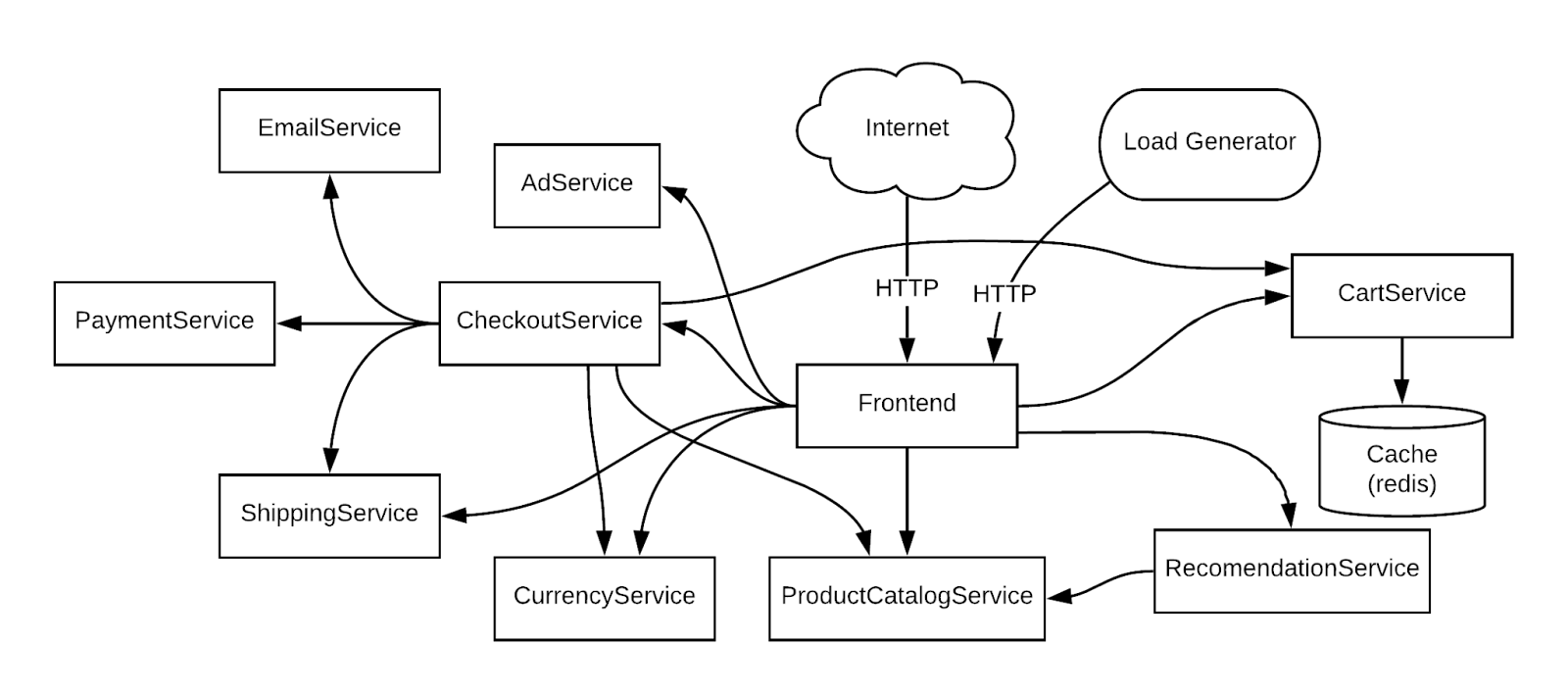
In the above diagram, the load generation is done using the Grafana K6 load generation tool. The OnlineBoutique can be set up on various platforms. In the current example, we have set up the application on a Kubernetes platform.
For resilience testing with Harness Chaos Engineering, the following two things are essential:
- Chaos faults and targets: This defines what chaos faults to be injected. In our examples, we will run a K6 load generator using one chaos experiment and run another parallel chaos experiment that does one of the following:
- Cause network latency between Checkout and PaymentServices
- Cause network loss between Frontend and CheckoutServices
- Injects an HTTP error code between Frontend and CartService
- Delete a pod on the ProductCatalog service
- The meaning of resilient state: In chaos engineering terminology, this is also called the "Steady State Hypothesis." In Harness Chaos Engineering, resilient states are defined using Resilience Probes. We are considering the following probes.
- Check if the queries per second on the frontend are less than 2000ms at any time.
- Check if the latency between the user and frontend is less than 20ms at any time.
- Check if the number of queries per second on the CartService is less than 1000ms at any time.
- Check if the pod replica count is the same (2) before and after the chaos execution.
- Check if the Kubernetes nodes are healthy during the chaos execution.
- Check if the latency between checkout and frontend is less than 20ms at any time.
- Check if the latency between the CartService and frontend is less than 20ms at any time.
Step-by-Step Guide
The first steps are signing up at Harness and connecting your application to the Harness control plane.
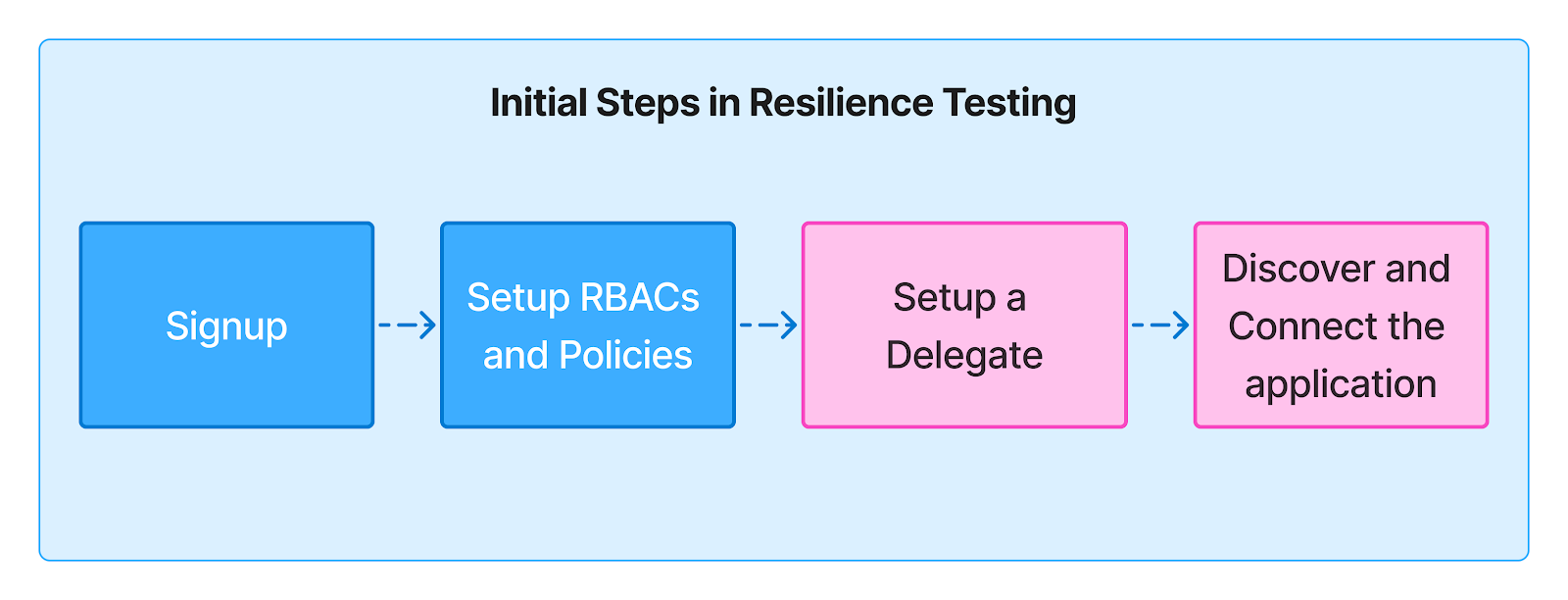
Step 1: Signup
Sign up at Harness to access the fully featured FREE Chaos Engineering plan. Alternatively, you may have received an invitation from someone in your organization who can access the Harness trail or enterprise plan.
In either case, identify your role and others with admin permissions on the Harness control plane and your application’s host/cluster.
Step 2: RBACs and Permissions
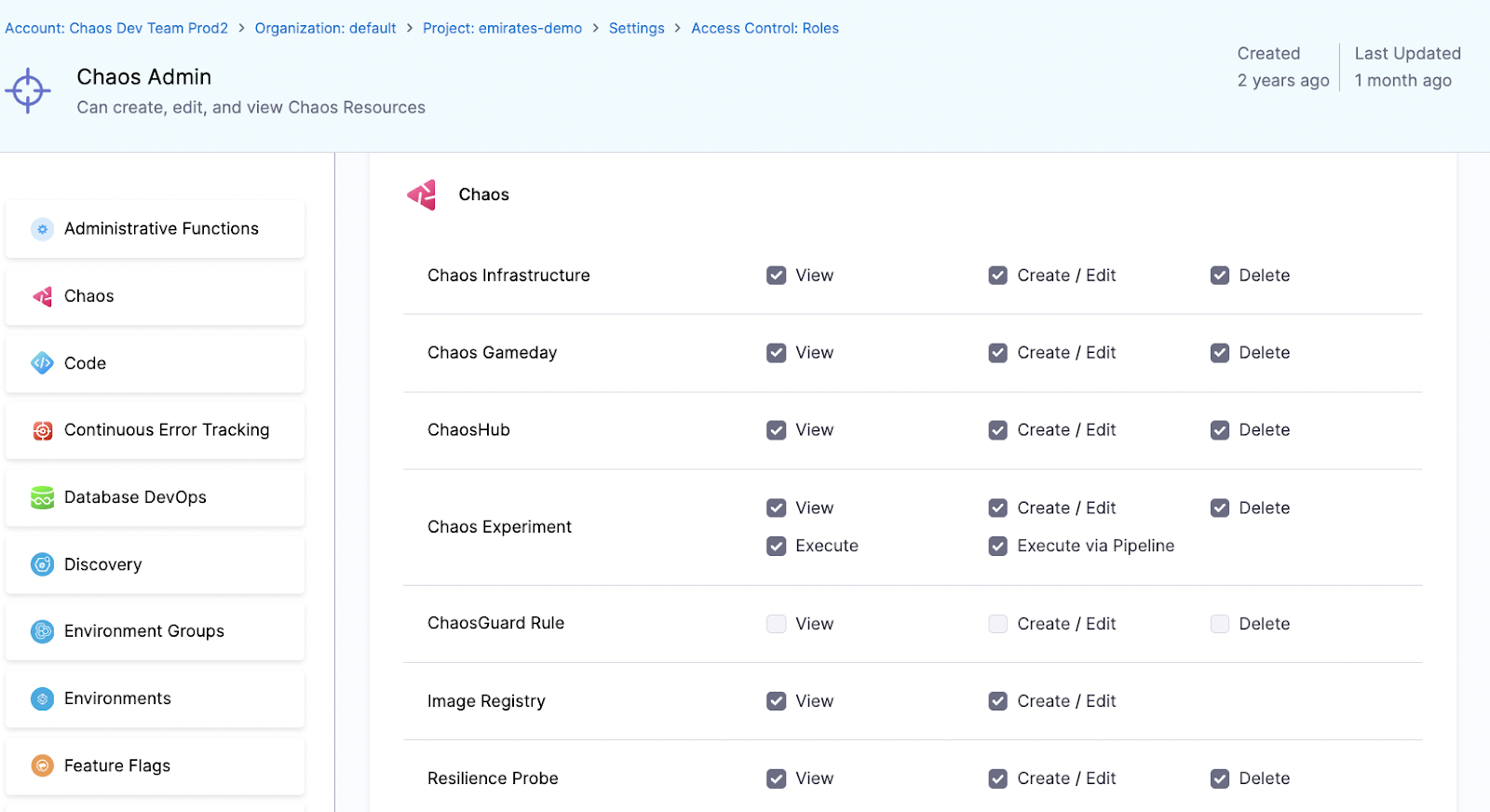
The Chaos Admin role is the easiest way to access the overall Chaos administrative functions. You should also have admin access to the target application cluster to set up the Harness Delegate in the next step, run chaos experiments, and load tests later.
Step 3: Setup a Delegate
Install the Harness Delegate on one of your Kubernetes clusters with network access to the cluster on which the application (in this case, the OnlineBoutique) is running. For help with the Delegate installation, see this link.
Step 4: Discover and Connect your Application
Harness Chaos Engineering provides an easy process for onboarding a chaos agent onto a Kubernetes cluster. Follow this link to discover the resources and automatically create basic chaos experiments.
Once the control and execution planes are set, specific steps for chaos experiments and load tests are followed.
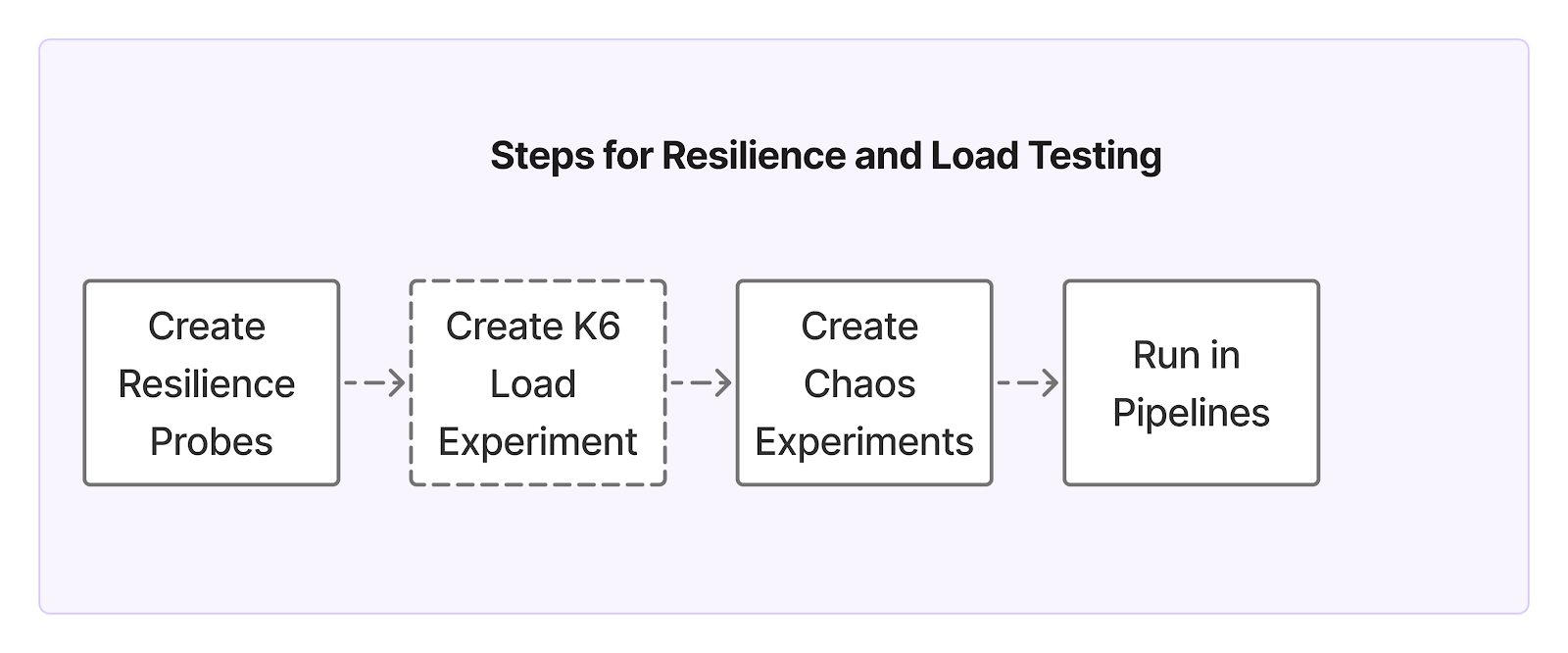
Step 5: Create Resilience Probes
We are using three kinds of resilience probes:
- Prometheus probe to check the latency of the services.
- HTTP probe to check if a service is responding to the requests as expected.
- Command probe that is custom-written for checking the node and replica checks.
Example Prometheus Probe:
The Prometheus probe uses Prometheus query to compute the latency, as shown below.

name: boutique-frontend-latency-check
type: prom
ProbepromProbe/inputs:
	endpoint: http://XX.XX.XX.XX:9090/
  query: avg_over_time(probe_duration_seconds{job=\"prometheus-blackbox-exporter\",
  instance=\"frontend.boutique.svc.cluster.local:80\"}[60s:1s])*1000
  comparator:
  	type: float
    criteria: <=
    value: "50"
runProperties:
  probeTimeout: 10s
  interval: 2s
  attempt: 1
  probePollingInterval: 3s
  initialDelay: 1s
mode: Continuous
Example Command Probe:
A command probe that checks the number of pod replicas:

name: productcatalog-svc-replica-check
type: cmdProbe
cmdProbe/inputs:
	command: kubectl get pods -l app=productcatalogservice  -n    boutique  --no-headers | wc -l
  comparator:
  	type: float
    criteria: ==
    value: "1"
runProperties:
  	probeTimeout: 10s
    interval: 2s
    attempt: 1
    probePollingInterval: 3s
    initialDelay: 1s
mode: Continuous
The list of resilience probes for checking the resilient state of various services is shown below.

Step 6: Create K6 Load Experiment
The K6 load generator experiment is available as a native chaos fault in the Enterprise ChaosHub of Harness Chaos Engineering. It is configured for the load parameters, as shown below.

Step 7: Create chaos experiments for various scenarios
The chaos experiments required for test scenarios are constructed from the native chaos faults like:
- Network Latency
- Network Loss
- API Error Code and
- Pod Delete
The experiments are created using the above faults and tuning them for the targeted services such as Frontend, Checkout, and ProductCatalog in the OnlineBoutique All the resilience probes created above can be attached to each experiment so that the resilient state is checked with each experiment.
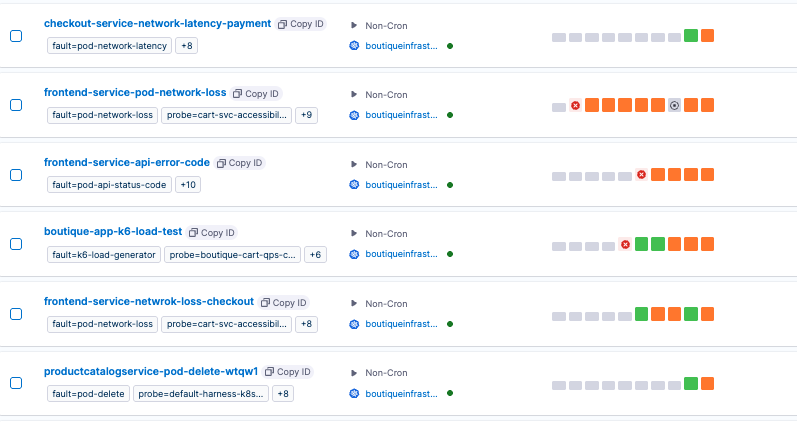
Step 8: Run the load test and chaos test in parallel
The Harness Chaos Engineering pipeline capability is used to run parallel chaos experiments. "Chaos Step" pulls a chaos experiment from the user's project into the pipeline stage, as shown below.

The pipelines can be run manually or through an API.
Observing the resilience test results
From the execution view, you can get the resilience score and the percentage of successful resilience probes when chaos is injected under load. A sample execution view is shown below.
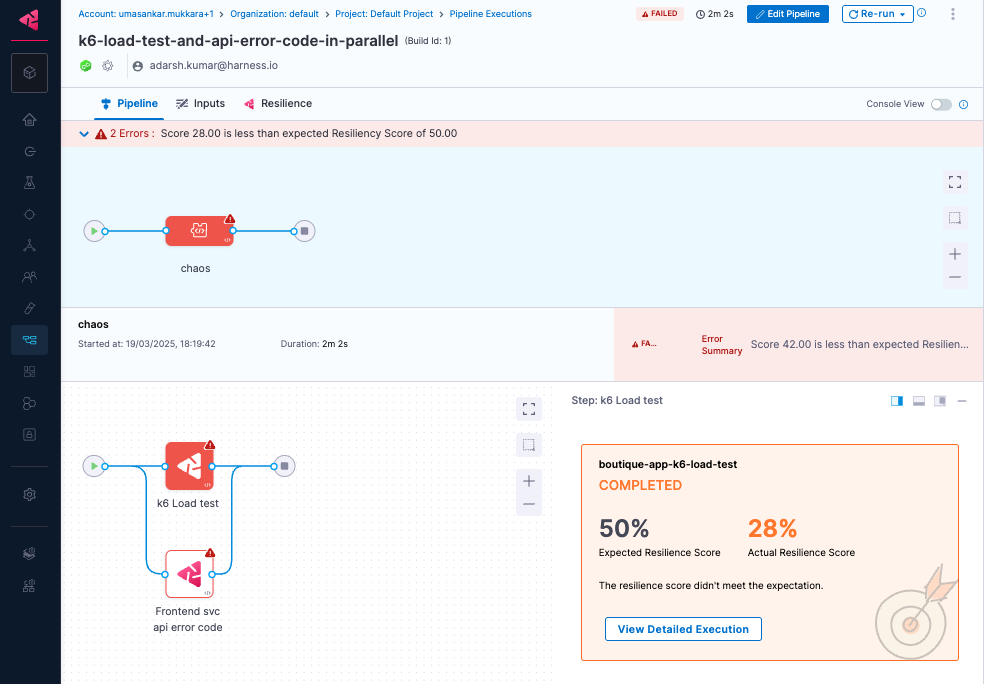
The summary of resilience probes is shown in the Resilience tab of the pipeline execution view.
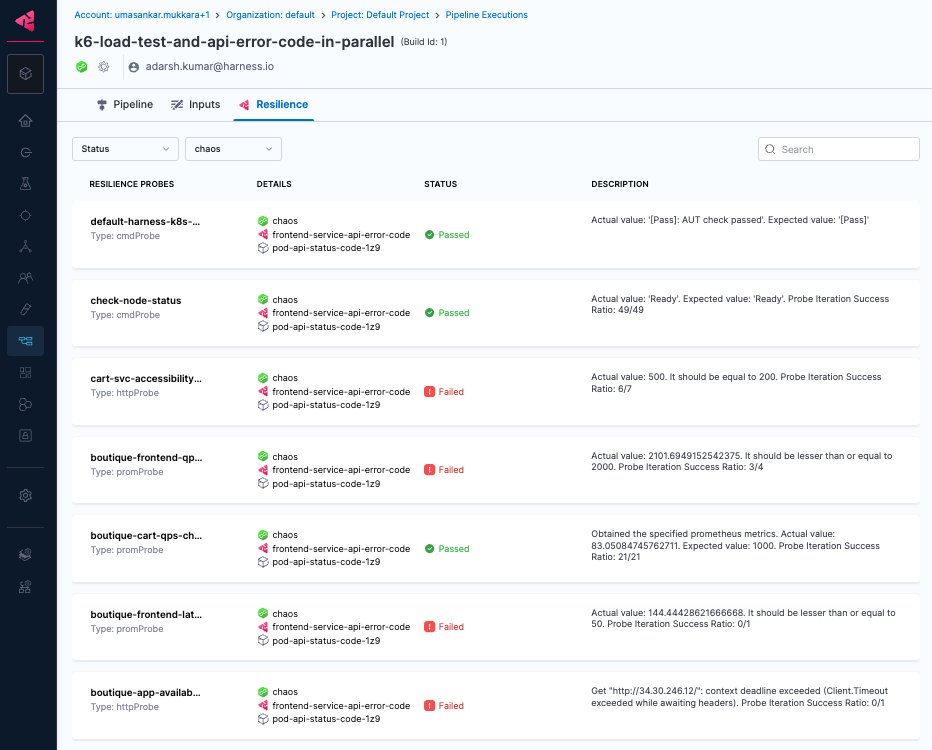
In summary, chaos experiments and Grafana K6 load tests are created using the out-of-the-box faults and can be run parallel using the pipelines.
Run Your First Chaos + Load Test Now
Ready to see how your systems behave when it matters most?
Sign up for Harness Chaos Engineering and start combining real-world failure scenarios with load testing using Grafana K6. Whether you're preparing for your next peak traffic event or hardening your microservices for long-term resilience, this integrated approach helps you move from theory to reality—fast.
🔧 Get Started Free with Harness Chaos Engineering
📚 Need help setting up? Check out the Docs
🚀 Already onboard? Try injecting your first chaos experiment with load today and discover your resilience score.

Linux Resilience Testing with Harness Chaos Engineering
A History of Chaos (Engineering, not the Universe)
Once upon a time, engineers believed that if they built their systems strong enough, nothing would ever fail. Then reality happened. Networks dropped. Servers crashed. Applications froze. And thus, Chaos Engineering was born—not as an act of destruction, but as a method to test things in a controlled way so we can fix them before customers even notice something’s wrong.
The concept gained traction in 2010 when Netflix unleashed Chaos Monkey, a tool that randomly shut down production instances to test resilience. Fast forward to today, and organizations across industries—like Netflix, Amazon, Google, Target, and Harness—are embracing chaos engineering as a core reliability practice to ensure system resilience and uptime.
But what about Linux-based systems—the backbone of modern infrastructure? From cloud servers to on-premises environments, Linux runs the world. And just like any system, it needs to be battle-tested. That’s where Harness Chaos Engineering steps in, providing powerful, safe, and automated resilience testing for Linux environments.
Let’s explore five critical Linux chaos experiments you can run today to harden your applications and infrastructure against failure.
1️⃣ CPU Stress: Can Your System Handle the Heat?
🔥 What happens when your system maxes out its CPU?
Imagine your application is humming along fine—until a sudden traffic spike (or a rogue process) consumes all CPU resources. Will your system stay responsive, or will it grind to a halt?
👉 Test It: The CPU Stress experiment overloads your processor to see how well your system prioritizes critical processes under high CPU usage. Start small configuring it to consume 20% of the CPU and gradually increase to 100%.
✅ Why It Matters: Ensures your services stay responsive during peak loads and prevents CPU starvation.
2️⃣ Memory Stress: Running Out of RAM?
🧠 How does your system behave when memory is depleted?
Memory leaks, inefficient caching, or high loads can lead to Out-Of-Memory (OOM) crashes. This test simulates high RAM consumption to check whether your application can recover or panics and dies.
👉 Test It: The Memory Stress experiment overloads system memory to evaluate how your applications handle OOM conditions gracefully.
✅ Why It Matters: Helps prevent crashes caused by unoptimized memory usage, ensuring smooth operation even under heavy load.
3️⃣ Network Latency: The Internet’s Favorite Saboteur
🌐 What happens when your network slows down?
A microservices architecture is only as strong as its weakest network link. Network latency can quickly degrade performance if your system relies on APIs or external services.
👉 Test It: The Network Latency experiment introduces artificial delays in network traffic, letting you observe how your application behaves under laggy conditions. Start testing with 500ms and gradually increase to find your tipping points of failure.
✅ Why It Matters: Ensures critical functions don’t time out or fail under poor network conditions.
4️⃣ Disk Fill: What Happens When You Run Out of Space?
💾 Does your system gracefully handle full disks?
Running out of storage is a nightmare. Logs, databases, or file uploads can rapidly consume disk space, potentially halting everything.
👉 Test It: The Disk Fill experiment simulates a near-full disk to test how your system reacts when storage resources are depleted.
✅ Why It Matters: This role ensures applications don’t break when storage runs low and verifies cleanup mechanisms, such as automated log rotation, temporary file cleanup, and proactive disk space monitoring, work as expected.
5️⃣ Service Restart: Can Your Apps Recover?
🔄 If a critical service crashes, does it restart smoothly?
In distributed systems, services stop and restart constantly. But what if your app doesn’t handle this well? You could experience cascading failures and extended downtime.
👉 Test It: The Service Restart experiment forcefully stops and restarts a system service, testing how well your application recovers.
✅ Why It Matters: Ensures mission-critical services restart automatically and correctly, minimizing downtime.
Try These Experiments for Free with Harness Chaos Engineering 🚀
Chaos Engineering isn’t about breaking things for fun—it’s about finding weaknesses before they cause real-world outages. With Harness Chaos Engineering, you can safely run these tests in staging or production, with built-in safeguards to avoid accidental disasters.
And the best part? You can try it for free! 🎉
🔗 Start testing today with over 30 Linux resilience tests!