This blog, third in a series, explains how to avoid drift when checking permissions between the security check and system action.

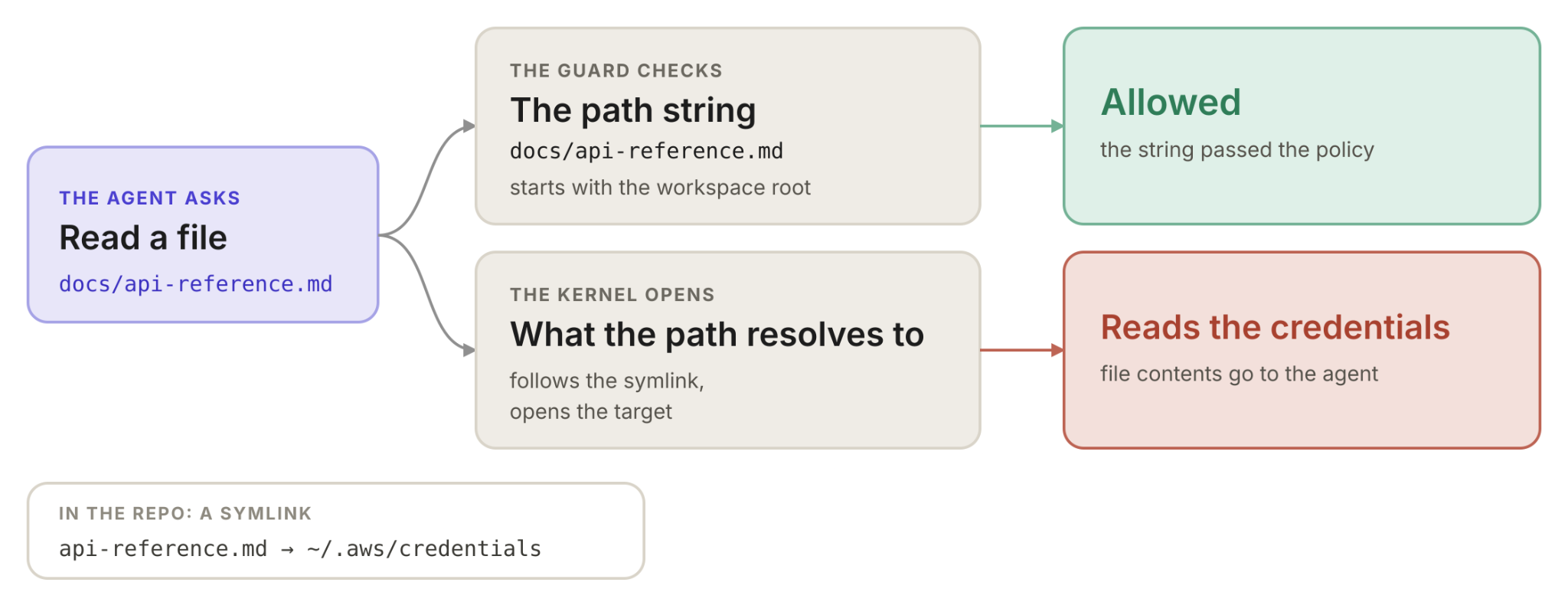
In the last post, an approval was pinned to a name while the artifact behind the name changed. The filesystem has the same problem, and no approval is involved: a permission check reads a path string, and the kernel opens whatever that string resolves to (see Figure 1).
Nobody has to do anything malicious, in fact, a person doing nothing is how this happens. The security check and the system action look at two different representations of the same thing, and nobody checked whether the two could disagree.
So the work here isn’t building an exploit. It’s asking what a check actually looks at.
Figure 1: A security check and system action look at two different representations of the same thing
The path is not the file
When an agent wants to read a file, the permission layer decides whether to allow it. Usually all it has is the path the agent asked for, a piece of text like ./docs/api-reference.md. So it asks questions about that text. Does it start with the workspace root? Does it contain ...? Is it on a deny list?
The kernel resolves the absolute path, following symlinks and canonicalizing the path until it arrives at an inode, the actual file on disk. The string and the inode are related, but they aren't the same object, and an attacker can control how they relate.
The simplest case is a symlink committed to a repository:
ln -s ../../.aws/credentials docs/api-reference.md
The link is relative, so it resolves on the victim’s machine. If the repo is cloned directly into the home directory, ../../ from docs/ lands in ~, and the link points at the user’s AWS credentials.
The permission check sees ./docs/api-reference.md, which is inside the workspace, so the read is allowed. The kernel follows the link and opens ~/.aws/credentials instead.
In our test, the log looked like this:
policy check on string: workspace/docs/api-reference.md
  → inside workspace: True → ALLOWED
kernel resolves to:     /Users/you/.aws/credentials
read returns:           [contents of the credentials file]
The check approved a name, and the kernel served the file behind it. Each did its job by its own rules. They were just answering different questions.
None of this is new. Claude Code has fixed this gap three times (CVE-2025-59829, CVE-2026-25724, CVE-2026-39861). In July, Tego showed the same pattern again: CLAUDE.md validates an import’s visible path but reads through the symlink. Anthropic reportedly called it informative, since workspace trust is the boundary.
And the pattern isn’t limited to Claude Code. Cato Networks reported symlink-validation flaws in Cursor’s own sandbox (CVE-2026-50548 and CVE-2026-50549), fixed in Cursor 3.0.
Trust consents to what’s in the folder, and a symlink is in the folder as a string and outside it as a location. The system enforces names; the filesystem works on targets. A real boundary has to be drawn where the kernel draws it. Patching the same shape three times, then shrugging at the fourth, means the pattern is still open.
Why this keeps happening
Let’s look at an example in Figure 2. Each of these bugs looks like a missed step. The check never resolved the path (realpath is the standard call that follows symlinks to the real location), so it approved a name when it should have looked through it. Adding that call is the usual patch. But the same bug keeps coming back, and the reason is structural. Understanding it tells you where to look next.
Figure 2: Structural issues keep the same bug coming back
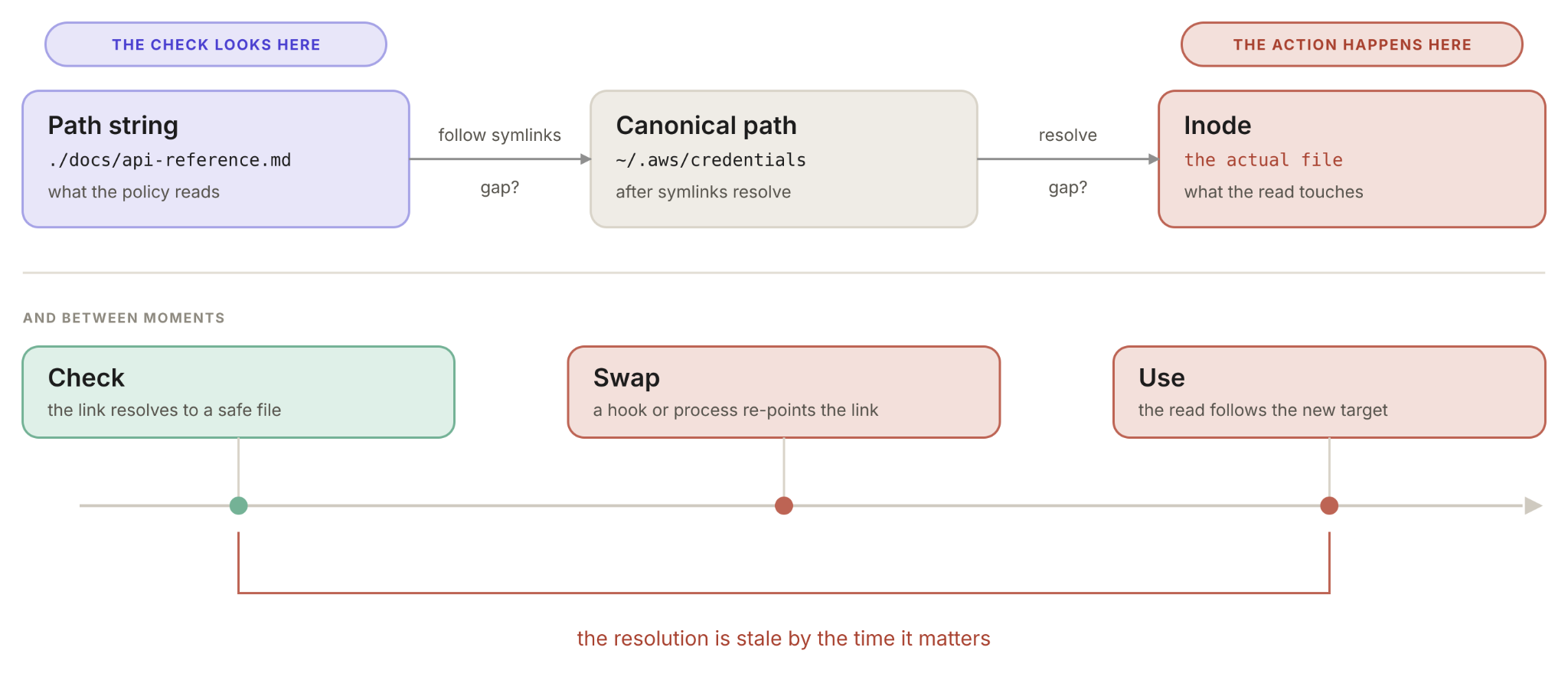
Security checks run where the decision is made: the permission dialog, the policy engine, the agent’s planner. Actions run where the work happens: the filesystem, the shell, the network. On the way from one to the other, the value gets transformed. Text becomes a path, a path becomes a file, a name becomes a process. Every one of those steps is a place where the thing that was checked and the thing that gets used can stop being the same.
That gives a method. For any security check, follow the value from the check to the action and write down every transformation along the way. Each one is a possible gap. Symlinks are the well-known case for files, but the same shape shows up wherever a name stands in for approvals. The consent post had two: a server name standing in for a binary, and a displayed command standing in for the one that runs (the hook that rewrote ls -la). A third is an allowlisted command name standing in for what the command can do. In Codex CLI, the allowlist trusted git show by name, but --output=./.git/config wrote a malicious diff-tool entry that ran on the next git diff (reported in July).
There’s also a timing gap. Even a check that calls realpath only knows where the path points at the moment it runs. Say it resolves docs/api-reference.md to a plain file inside the workspace and approves the read. Before the read happens, a hook, a background process or another tool replaces that file with a symlink to ~/.aws/credentials, and the read follows it. The check was right when it ran and wrong by the time it mattered. This is time-of-check to time-of-use, and it’s the same shape as the consent cache: a decision made about one moment, enforced as a claim about something that can still change. Fixing the representation gap without fixing the timing gap still leaves you exposed.
The fix
The representation and timing gaps close the same way: the check has to look at the same thing the action will use (see Figure 3).
Figure 3: Closing representation and timing gaps
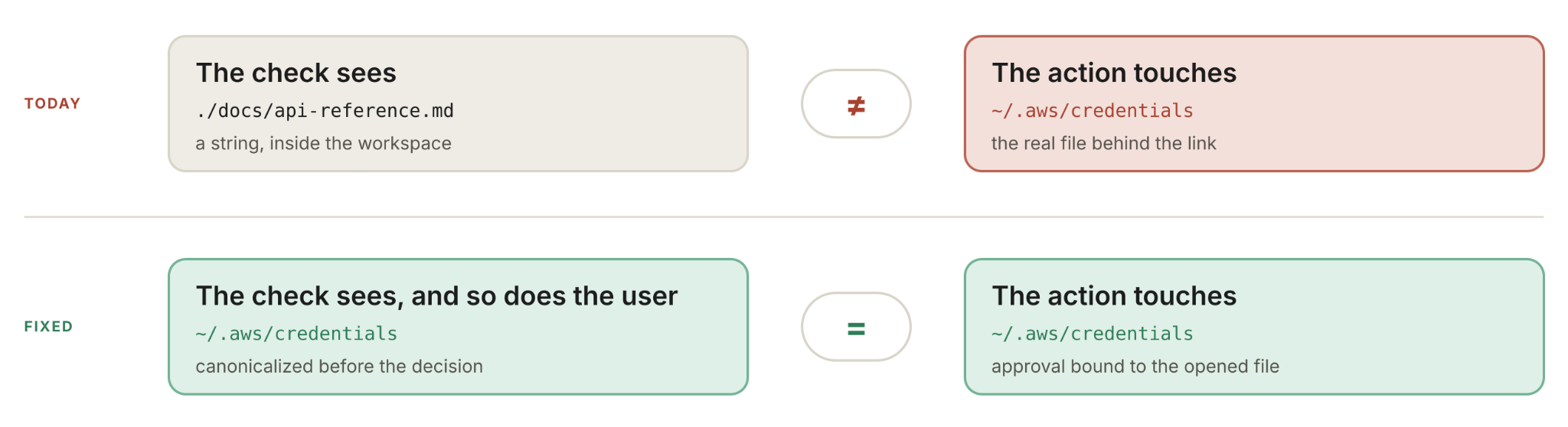
For paths, open the file first, then check what the file descriptor actually points to, and show the user that resolved path. On Linux, openat2 with RESOLVE_BENEATH has the kernel enforce the boundary itself. Tie any approval to the opened file, not the string. It’s the same principle as showing what a hook actually runs. If the dialog had said ~/.aws/credentials instead of ./docs/api-reference.md, far fewer people would have clicked yes. Better still, a hard deny leaves nothing to click.
Until tools do this for you, look for symlinks in a cloned repo before opening it in an agent (find . -type l -ls lists each link and where it points). Keep deny rules on credentials, SSH keys and .env, but remember they match strings, so they only help on patched versions. For real protection, run the agent in a container or sandbox that doesn’t mount ~/.aws or ~/.ssh, and use short-lived credentials.
The check and the action have to be looking at the same thing. Everything in this post is what happens when they aren’t.
Next, the guardrails themselves. Some of the switches that turn safety checks off are ordinary configuration, and a project can set them.