Learn smoke testing vs sanity testing, key differences, examples, when to use each, and how modern CI/CD and feature flags improve reliability.

TL;DR
- Smoke testing verifies that a new build is stable enough for further testing by checking core functionality across the application, typically running after every build or major integration.
- Sanity testing validates that specific bug fixes or minor changes work correctly without breaking related features, focusing narrowly on the areas touched by recent updates.
- Smoke tests run broad and shallow across the entire system, while sanity tests run narrow and deeper within a specific module or feature area.
- Combining both testing approaches in automated CI/CD pipelines with feature flags reduces deployment risk, accelerates feedback loops, and helps teams maintain high velocity without sacrificing quality.
- Smoke testing gives a quick, broad check that a new build is stable enough for deeper testing.
- Sanity testing gives a fast, focused check that specific changes behave as expected.
- Teams get the best results by combining both in automated CI/CD workflows with smart test selection and feature flags.
Software testing is an integral part of the software development lifecycle. It helps ensure that software meets quality expectations and behaves as intended. There are many testing techniques available: functional testing, acceptance testing, regression testing, and more.
In this post, we focus on smoke testing vs sanity testing. You will see what each one is, how they differ, where they fit in continuous integration and continuous delivery (CI/CD) pipelines, and how platforms like Harness help teams automate these checks so they get fast, reliable feedback on every build instead of relying on ad hoc manual runs.
What Is Smoke Testing?
Smoke testing, often called build verification testing (BVT), especially in build-centric QA workflows, is a quick check that confirms whether the most important parts of a new build work at all. It answers a simple question: Is this build stable enough to test further?
Purpose of Smoke Testing in Software Development
Smoke testing aims to validate the stability of a build at a high level. Instead of exploring every path, it touches the essentials, so the team does not waste time on a broken build.
Typical goals:
- Verify that the application starts correctly.
- Check that primary flows such as login, navigation, and core transactions work.
- Catch obvious integration failures early.
- Decide whether to proceed with regression, integration, and user acceptance tests.
Role in Early Detection of Major Issues
Smoke testing acts as a safety filter:
- It runs immediately after a new build or significant integration.
- It highlights show-stopper issues such as broken dependencies, configuration errors, or failed database connections.
- It keeps unstable builds from entering deeper, more expensive testing stages.
Instead of discovering a trivial configuration issue during a long regression run, the team gets fast feedback in minutes.
Key Characteristics of Smoke Testing
You can recognize smoke testing by these characteristics:
- Scope: Broad, focused on critical paths across the application.
- Depth: Shallow, just enough to confirm that major features do not fail immediately.
- Size of test suite: Small, predefined set of high-value tests.
- Frequency: Often run on every new build or integration.
- Execution style: Usually scripted and automated, but can be manual in smaller teams.
Common Scenarios for Smoke Testing
Teams typically run smoke tests in situations like:
- After every commit or pull request is merged into the main branch.
- After creating a new build candidate for staging or test environments.
- Before starting a scheduled regression testing cycle.
- Before deploying a release candidate to production.
In a Java-based API service, for example, smoke testing might validate that:
- The service starts successfully.
- Key API endpoints return expected status codes.
- Basic database queries execute without error.
Automation Tools and Automated Smoke Testing
In modern pipelines, smoke testing is almost always automated. Common approaches include:
- Writing smoke tests in tools like Selenium, Cypress, Playwright, or REST clients.
- Triggering smoke suites automatically from CI tools such as Jenkins, GitHub Actions, or Harness CI.
- Running smoke tests in isolated, repeatable environments such as containers.
This is where intelligent CI becomes valuable. For example:
- Intelligent test selection: Test impact analysis can help optimize broader automated suites, though many teams keep smoke suites intentionally small and stable rather than dynamically selected.
- Incremental builds and caching: You can reduce build time so smoke tests start earlier.
Automation keeps smoke testing consistent and fast, which is critical if you run it on every build.
What Is Sanity Testing?
Sanity testing, sometimes called a sanity check, is a narrow and focused test run performed after a bug fix, patch, or small enhancement. It answers a different question: Did this specific change behave as expected without breaking nearby behavior?
The Purpose of Sanity Testing
Sanity testing is used when you already believe the build is stable. The goal is not to explore the entire application again. Instead, you verify that:
- The reported bug is fixed.
- The new or modified feature works in the most important scenarios.
- Related, nearby functionality still behaves correctly.
If sanity testing fails, the build is usually rejected or sent back to development for further fixes before more thorough testing resumes.
Sanity Testing’s Role in Software Development
Sanity testing is especially helpful:
- Late in the release cycle, when time is tight, you cannot run a full regression on every update.
- For hotfixes and production patches, you only need to confirm a specific area of change.
- In Agile iterations, the goal is to validate recent changes quickly and keep momentum.
The result is a focused confirmation that the modification is reasonable and safe to progress.
Key Characteristics and Common Scenarios
Sanity testing typically has these traits:
- Scope: Narrow, limited to modules or flows touched by the recent change.
- Depth: Deeper than smoke, within the small targeted area.
- Test basis: Often reuses a subset of regression tests that cover the affected functionality.
- Documentation: Sometimes, less formal scripts, more checklist-driven, especially for urgent fixes.
Common scenarios include:
- Verifying that a login bug fix now allows valid users to sign in and does not break password reset.
- Checking that a new filter option in a search feature behaves correctly and does not break existing filters.
- Validating that a patch to an API endpoint returns correct data for a few representative inputs.
In short, in smoke testing vs sanity testing, smoke looks across the build, and sanity looks deep into a specific change.
Smoke Testing vs Sanity Testing at a Glance
Readers often mix up these two practices because they are both fast and often run early. This side-by-side view clarifies the difference between smoke testing and sanity testing.
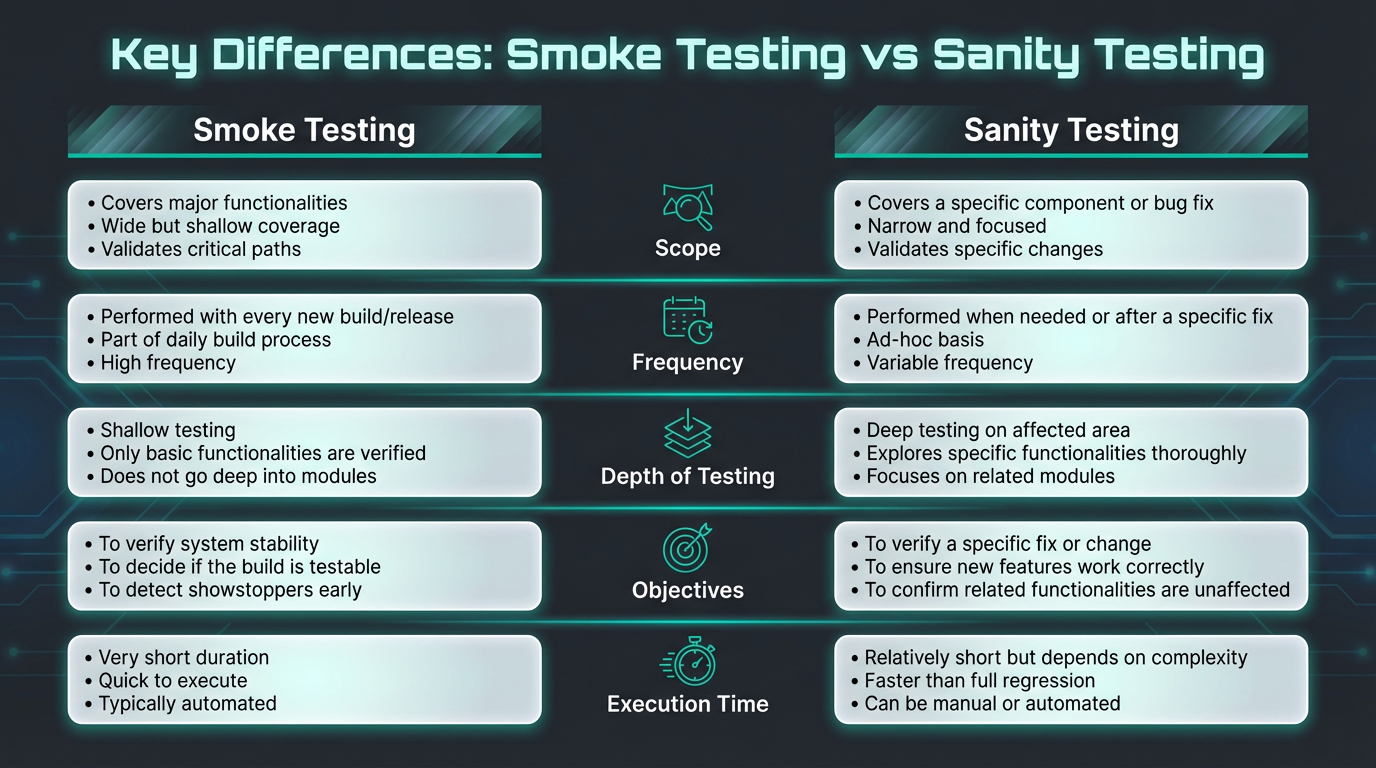
| Aspect | Smoke Testing | Sanity Testing |
|---|---|---|
| Main question | Is this build stable enough to test further? | Did this specific change behave correctly? |
| Scope | Broad, core end-to-end flows. | Narrow, only impacted modules or features. |
| Depth | Shallow but wide. | Deeper checks in a small area. |
| Timing | After a new build or integration. | After a bug fix, patch, or minor update on a stable build. |
| Relation to other tests | Often, a subset of acceptance or system testing. | Often, a subset of regression testing. |
| Typical ownership | Developers or testers. | Typically, QA engineers, SDETs, or developers, depending on the team structure. |
| Automation level | Usually scripted and automated in CI. | Often, a mix of manual and automated tests. |
In short,
Smoke testing: broad scope, shallow depth, run after a new build, checks build stability
Sanity testing: narrow scope, deeper focus, run after a fix or patch, checks a specific change
This is the practical distinction behind smoke testing vs sanity testing: smoke validates build stability, while sanity validates targeted changes.
When to Use Smoke Testing vs Sanity Testing
Teams do not choose one or the other forever. They use both at different points in the lifecycle.
When to Use Smoke Testing
Use smoke testing when you need to validate a new build at a high level:
- After a commit is pushed or a pull request is merged into the main branch.
- When new services are added or major refactors land.
- When promoting builds between environments such as dev, QA, staging, and production.
- Before handing a build to a manual QA team, it is important to avoid wasting human effort on obviously broken software.
When to Use Sanity Testing
Use sanity testing when you already have a reasonably stable build and need to confirm specific changes:
- After fixing a high-priority bug that blocked users.
- After applying a small patch in a production hotfix workflow.
- After adjusting a configuration or integration with a third-party service.
- When there is limited time before a release, you must focus only on high-risk changes.
Choosing correctly between smoke testing and sanity testing at each stage keeps feedback fast, protects developer flow, and avoids test fatigue.
Real World Examples of Smoke and Sanity Tests
Example 1: E-Commerce Web Application
- Smoke tests might cover:
- Home page loads and main navigation works.
- User registration and login function correctly.
- Search returns results, and product detail pages load.
- Adding items to the cart and checking out works with a basic payment flow.
- Home page loads and main navigation works.
- Sanity tests after a bug fix in the checkout flow might cover:
- The specific case that failed before, such as applying a discount code.
- A few nearby flows, such as removing an item from the cart and recalculating totals.
- Confirm that payment is still captured correctly and the order confirmation page loads.
Example 2: REST API Service
- Smoke tests might cover:
- Health endpoint returns success.
- Core CRUD endpoints respond with expected status codes.
- Basic authentication and authorization checks work for a sample user.
- Health endpoint returns success.
- Sanity tests after changing a data validation rule might cover:
- The new validation rule accepts valid data and rejects invalid data with correct error messages.
- The related endpoints reading that data still function.
- That logging and metrics for that path look correct.
- The new validation rule accepts valid data and rejects invalid data with correct error messages.
How Smoke and Sanity Tests Fit into CI/CD
In CI/CD pipelines, both smoke and sanity tests act as automated quality gates.
In Continuous Integration (CI)
Typical CI workflow:
- The developer pushes code or merges a pull request.
- CI system builds the application.
- Automated smoke tests run against the newly built artifact.
- If smoke tests pass, the pipeline proceeds to additional unit, integration, or regression tests.
- If smoke tests fail, the pipeline stops and alerts the team.
Sanity tests fit in when:
- A fix branch is created for a specific defect.
- The CI pipeline runs a tailored sanity test suite focused on the area impacted by that defect.
- The build is accepted only if the targeted sanity checks pass.
In Continuous Delivery and Deployment (CD)
In CD pipelines, smoke and sanity tests can also run against staging or canary environments:
- After a successful build, the pipeline deploys a candidate version to a test environment.
- A smoke test suite runs to confirm critical functions still behave correctly in that environment.
- For high-risk or late-stage changes, a sanity test suite may run on top of smoke tests, focused on new features or bug fixes.
- Only then does the pipeline promote the build to production or a canary subset of traffic.
Modern CD tools help teams:
- Deploy the same tests and checks consistently across Kubernetes clusters, VMs, and serverless platforms.
- Model smoke and sanity gates in visual, reusable pipelines
- Enforce approvals and policy rules so that smoke and sanity tests are not skipped under pressure.
Feature Flags and Their Role in Smoke and Sanity Testing
Feature flags, also called feature toggles, allow teams to turn features on or off at runtime without redeploying code. They are powerful for controlling risk during both smoke and sanity testing.
How Feature Flags Help Smoke Testing
In smoke testing, feature flags can:
- Keep experimental or incomplete features disabled so they do not break core smoke tests.
- Isolate new features behind flags so the smoke suite can run only on stable functionality.
- Allow teams to turn off a problematic feature quickly while keeping the rest of the build intact.
This keeps smoke tests focused on the core quality of the build, not on optional features that are still under development.
How Feature Flags Help Sanity Testing
In sanity testing, feature flags can:
- Enable a new feature only for testers or internal users while sanity tests run.
- Limit the blast radius of a change by exposing it to a small cohort first.
- Let teams roll back a flag instantly if sanity checks or early production signals show problems.
Harness Feature Management & Experimentation builds on this idea by combining feature flags, monitoring, and experimentation in a single platform so teams can safely test and iterate on features in production.
Benefits and Drawbacks of Smoke and Sanity Testing
Advantages of Smoke Testing
- Provides a rapid check on build stability.
- Catches major integration and configuration issues early.
- Prevents QA teams from wasting time on obviously broken builds.
- Fits naturally into automated CI pipelines.
- It can be a small, stable suite that rarely changes.
Advantages of Sanity Testing
- Targets the highest risk areas after a change.
- Gives confidence that fixes work as expected without re-running the full regression.
- Helps teams move quickly late in the release cycle.
- Can be run frequently across multiple builds when patching urgent defects.
Potential Challenges and How to Address Them
Challenges:
- Smoke tests may miss deeper issues, since they cover only happy paths.
- Sanity tests may miss unrelated regressions, since they focus on a narrow area.
- Maintaining test suites over time can be time-consuming if the system changes frequently.
Ways to address these:
- Treat smoke and sanity tests as complements to, not replacements for, comprehensive regression and exploratory testing.
- Use analytics to track which tests catch the most failures and adjust your suites accordingly.
- Model smoke and sanity stages directly in your pipelines with clear ownership and governance, so they are not bypassed under pressure
When combined with broader testing practices and observability, smoke and sanity testing add fast, reliable guardrails.
Feature Management & Experimentation Can Help
Harness Feature Management & Experimentation lets teams move quickly without blind risk.
You can:
- Set up feature flags and safely deploy to production, controlling who sees which features and when.
- Attach flags to metrics so you know whether a new feature improves or degrades performance, reliability, or user behavior.
- Run experiments such as A/B tests using the same flag infrastructure, instead of building a separate experimentation stack.
- Clean up stale flags and reduce technical debt through lifecycle management.
Smoke Testing vs Sanity Testing: Frequently Asked Questions (FAQ)
Here are concise answers to common questions about smoke testing vs sanity testing, including when to use each, how they fit into CI/CD, and how feature flags enhance both.
What is the main difference between smoke testing and sanity testing?
Smoke testing checks whether a new build is stable enough for deeper testing by quickly exercising core flows. Sanity testing checks whether specific changes or fixes behave as expected without obviously breaking related behavior.
Which usually comes first: smoke testing or sanity testing?
Smoke testing usually comes first. It runs on a fresh build to confirm basic stability. Once a build passes smoke testing and other core checks, sanity testing can validate targeted changes on that stable build.
Is smoke testing or sanity testing better for CI/CD pipelines?
Both are useful in CI/CD. Smoke tests are commonly used as a fast gate on new builds, merges, or deployment candidates. Sanity tests are ideal as focused checks around risky changes or hotfixes. Together, they keep feedback fast while controlling the cost of running full regression on every commit.
Can smoke and sanity testing be automated?
Yes. Both can be implemented as automated suites triggered from CI/CD pipelines. Many teams start with manual sanity testing and then automate the highest value scenarios. Automation ensures consistent, repeatable checks on every relevant build.
How do smoke and sanity tests relate to regression testing?
Smoke and sanity tests can be seen as small slices of regression testing. Smoke testing samples key flows across the application. Sanity testing reuses a subset of regression tests for the changed area. Full regression goes wider and deeper, but takes more time.
How do feature flags improve smoke testing vs sanity testing?
Feature flags let teams isolate new functionality during both smoke and sanity testing. You can keep risky features turned off during smoke tests, then enable them for focused sanity checks or progressive rollouts to small user groups. If a problem appears, you revert the flag quickly without redeploying.
