Discover the range of chaos faults supported by Harness Chaos Engineering, enhancing system resilience across various infrastructures and platforms.

TL;DR
Harness Chaos Engineering offers a diverse library of chaos faults for Kubernetes, VMware, Linux, Windows, and cloud resources. These faults help simulate failures, test system resilience, and improve reliability. Users can construct chaos experiments, measure resilience scores, and gain insights to fortify their infrastructure.
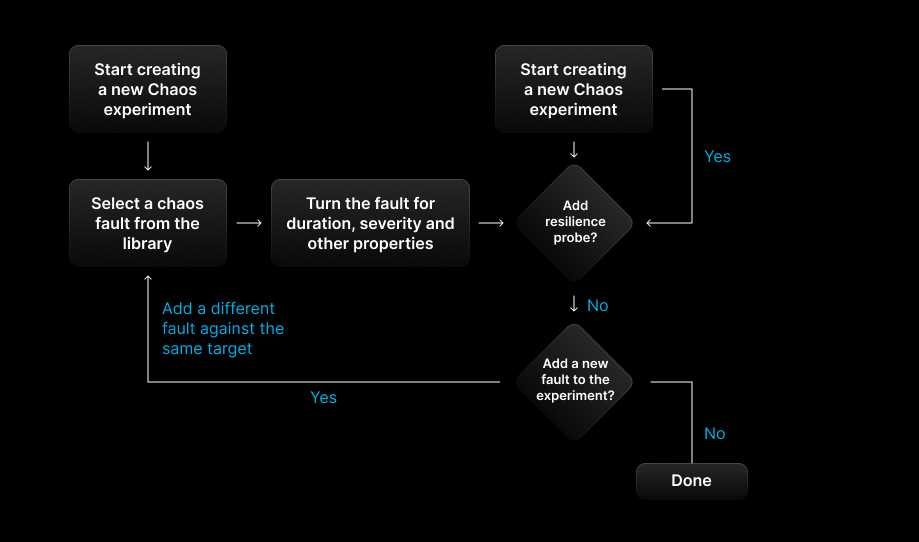
Harness Chaos Engineering provides a library of chaos faults using which chaos experiments are constructed and run. It is simple and intuitive to construct the chaos experiments using the given set of chaos faults. Before we delve into the details of the faults, let's look at the anatomy of a chaos experiment and the role of the chaos faults in the chaos experiments.
Quick Review of a Chaos Fault and a Chaos Experiment
A chaos fault is an actual fault or some distress injected around a system resource like CPU, Memory, Network, Time, IO system, Nodes, etc. A chaos experiment is an attempt to measure the resilience of a system when one or more chaos faults are run on it. In Harness Chaos Engineering, an experiment not only runs chaos faults, but it measures the resilience of the system in the context of the faults that were run.
When a chaos experiment is completed running, it provides a “Resilience Score,” which indicates the resilience of the target system against the faults that are injected. The Resilience Score is the % of successful steady state measurements measured during the chaos experiment execution.

Resilience Score of a Chaos Experiment
A developer who is designing and implementing the chaos experiment controls the meaning of a Resilience Score. The higher the number of steady state checks or probes passed during the experiment execution, the more it contributes to the resilience score. The steady state measurements in Harness CE are done through the Resilience Probes. Many resilience probes can be attached to a fault. The more probes you add to the faults inside the experiment, the more realistic the resilience score of the experiment will become.
The Resilience score of a chaos experiment = The percentage of successful resilience probes in the experiment.
Construction of a Chaos Experiment
Chaos Fault Landscape in Harness Chaos Engineering

Faults for Kubernetes Resources
Runs via the Kubernetes Chaos Infrastructure or Agent
Supported Faults:
All Pod related faults, Node faults, http faults, IO/database chaos, network faults and load chaos. These faults are certified for the cloud Kubernetes services like EKS, AKE and GKE as well as for the on-prem versions like RedHat OpenShift, SuSE Rancher and VMware Tanzu.

Faults for VMWare Resources
Runs via the Kubernetes Chaos Infrastructure or Agent
Supported Faults:
Chaos faults are either injected through the VCenter APIs or through the VMware Tools directly on the operating system running inside the VM. Some faults such as VM power off, VM disk detach and VM host reboot are performed at the VCenter Level. Most of the common faults related to CPU/Memory/IO/Disk stress, http, DNS and Network faults are performed through the operating system through VMware tools. All the common faults are supported for the VMs running on Linux or Windows.

Faults for Linux Resources
Runs via the dedicated LinuxChaos Infrastructure or Agent
Supported Faults:
All faults related to resource stress, network and process. DNS error and spoof, Time Chaos and Disk are also supported. With ssh fault, network switches can also be targeted.

Faults for Windows Resources
Runs via the Kubernetes Chaos Infrastructure or Agent
Supported Faults:
All faults related to resource stress, network and process. Time Chaos and Disk fill are also supported. These are supported for Windows instances that are running on Azure, VMware and AWS.

Faults for AWS Resources
Runs via the Kubernetes Chaos Infrastructure or Agent
Supported Faults:
Deep coverage in the chaos faults for EBS, EC2, ECS and Lambda. AZ down faults for NLB, ALB and CLB. Some faults for RDS. All Kubernetes faults are supported for EKS on AWS.

Faults for GCP Resources
Runs via the Kubernetes Chaos Infrastructure or Agent
Supported Faults:
Faults for GCP VM disk and instance. All Kubernetes faults for GKE.

Faults for Azure Resources
Runs via the Kubernetes Chaos Infrastructure or Agent
Supported Faults:
Faults for Azure VM disk, instance and web app. All Kubernetes faults for AKS.

Faults for Cloud FoundryResources
Runs via the dedicated LinuxChaos Infrastructure or Agent
Supported Faults:
Support is extended for Pivotal Cloud Foundry as well as any other Cloud Foundry versions. Faults for Cloud Found App like Delete App, remove routes to app, stop app, unbind service from app etc are supported.

Faults for Spring Boot Resources
Runs via the Kubernetes Chaos Infrastructure or Agent
Supported Faults:
Chaos faults for Spring Boot Apps. App Kill, CPU Stress, Memory Stress, Latency, Exceptions and any chaos monkey fault as wrapper.
Conclusion
Harness Chaos Engineering supports a wide variety of chaos faults that spans across Operating systems, Cloud platforms and Kubernetes. These faults enable end users to verify the resilience of the code being deployed to the target systems or of the systems serving business critical applications. Check out all the Harness Chaos Faults on the Harness Developer Hub.

Sign up FREE to experience the ease of resilience verification using chaos experiments. Harness provides a free plan that enables you to run a few chaos experiments free of charge for unlimited time.