A Harness product lead on why humans shouldn't be the status-tracking layer during incidents, and how automated summaries and postmortems replace the scribe.

TL;DR
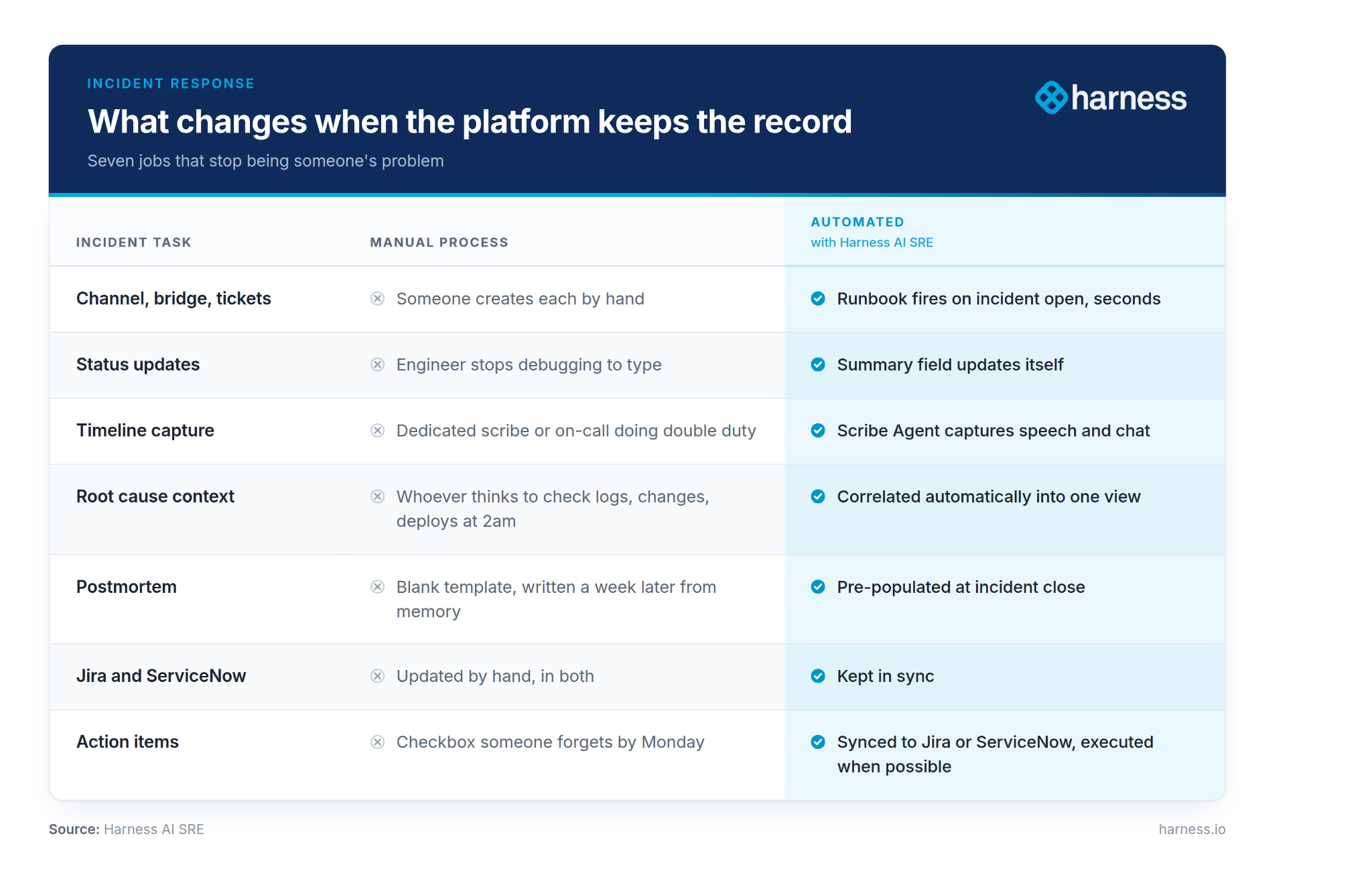
Automated incident response means the platform captures the timeline, key events, and decisions as an incident unfolds, instead of a human reconstructing them afterward. Runbooks fire the instant an incident opens: channel created, bridge spun up, Jira and ServiceNow tickets filed, all within seconds. The AI Scribe Agent joins the video bridge on its own and listens to chat, pulling key events out of both the talking and the typing. Close the incident and the postmortem already exists, populated with the real timeline rather than a blank template. Action items sync into Jira or ServiceNow, and the ones the platform can execute, it executes.
I've sat in enough incident bridges as the product person in the room to know exactly what it feels like to be the interruption. You're heads down, you've got three tabs of logs open, you think you're close, and then a message drops in the channel: "hey, any update for leadership?" That's me. I'm sorry. I've also been the guy who had to type up that response himself, at Intuit, at Hulu, pulling together what happened from a Slack scroll and a fuzzy memory two hours after the fact.
Both of those jobs are bad, not because the people doing them are bad at it, but because a human shouldn't have to be the status-tracking layer for a system that already knows what happened.
The response starts before anyone touches anything
Before you ever see a summary, there's a runbook doing the unglamorous part. The moment an incident opens, a set of runbooks fires automatically: a Slack or Teams channel gets created, a notification thread goes out, a video bridge spins up, and the Jira and ServiceNow tickets get created, all within seconds. I've shown that flow enough times that I can tell when it's landed just by watching someone's face when they check the ticket timestamp against the clock on the wall.
Those runbooks aren't a fixed menu either. Underneath, they're Harness pipelines, so if you want a runbook that runs a shell script or a Python job against your own infrastructure instead of just posting a message, you can build that. You can also route on severity, so a Sev4 doesn't spin up the same ceremony as a Sev0, and a runbook can escalate to create that Jira ticket only once someone bumps the severity up.
Nobody should be the scribe
I was working with a customer not long ago and said something I've said probably two hundred times at this point: in most incident response processes, there's a dedicated scribe, or the on-call engineer is doing double duty as one, typing while they're also trying to fix the thing. Every company I've ever worked at or sold into runs some version of this. Somebody's got a doc open, or a template in Confluence, and they're the one responsible for capturing the timeline while everyone else works the problem.
I was in a workshop with an enterprise team a while back and someone on their side put it plainly: they used to have a major incident manager on every single P1 and P2, highly scripted, and every five minutes there had to be a status update. That was the job. Then their team got smart about it and moved off that model, but the underlying problem didn't go away, it just got redistributed onto whoever was closest to the keyboard.
Here's the part people don't expect the first time they see it: the moment there's a video bridge tied to that incident, whether it's Zoom, Teams, or Google Meet, our bot joins it on its own. No one invites it. It also sits in the Slack or Teams channel listening to chat. From there it's pulling key events out of both the talking and the typing, and every line gets reprocessed for clarity so the transcript reads like something a person would write, not a raw caption feed. Say "I think this is related to the deploy we did yesterday" out loud on the bridge and it lands in the record the same as if you'd typed it.
That's what an incident summary that updates itself is for. It removes a job nobody signed up for, and it was never a dashboard feature to me.
Automated incident response is the practice of having your incident platform capture the response record itself: creating the channel and bridge, filing tickets, transcribing the bridge and chat into a running timeline, and generating the postmortem, so responders never stop debugging in order to document what they are doing.
The compliance story that sticks with me
I had a call with a customer's compliance lead who described their postmortem process, and I still think about it. They meant well, but the execution was painful. They had a standard template, but by the time they sat down to write the postmortem, the details were scattered across Slack, Confluence, and Jira, and they'd inevitably miss something. She told me flat out that an auditor once picked an incident at random to check their RCA documentation, and they didn't have it.
That's the real cost here, a team getting caught without the record they were supposed to have, because assembling that record by hand after the fact is hard to do well every single time. Capture the timeline, the key events, and the decisions as they happen instead of reconstructing them from memory a week later, and that gap closes.
Naming things honestly
Small thing, but it says something about how I think about this. Every account I've worked with names their post-incident process differently, and when we built the auto-generated version, I had a real opinion about what to call it. I've never used the word "postmortem" in my career. I try to stay as close as possible to what we're actually trying to do, which is review the incident and find the opportunity to improve, not conduct an autopsy. The tab in the product still says postmortem more often than not because that's the term people search for and expect, but I'll take that fight with product marketing over calling it something someone died from.
I bring this up because it matters to me that the thing writing your incident history doesn't just capture what happened, it captures it the way your team talks about it. A summary that gets the facts right but the tone wrong doesn't get used.
Root cause doesn't come from one place
The summary and the postmortem are the visible part. Underneath, we pull in the same things a good on-call engineer would go check by hand, and stitch them into one picture instead of leaving that correlation to whoever's fast enough to think of it at 2am:
- Whatever your runbooks turned up. If a runbook pulled logs or ran a script as part of the response, that output becomes part of the incident's context instead of a result sitting in a separate tab someone has to remember to go read.
- ServiceNow change records. One customer put this well during a working session: their CAB-approved changes were well recorded, because that process forces the paper trail, but deployments were a black hole, because nobody was reliably logging what actually shipped and when. We pull ServiceNow change records directly and also generate our own from Harness deployments and the pull requests behind them, so both sides of that gap get covered.
- The deployments themselves. When something in a deployment lands close in time to the incident, we surface it as a likely cause, with the pull requests behind it and a plain read of what the change was trying to fix. If nothing in that window explains it, we widen the look-back instead of stopping when the obvious window comes up empty.
None of this replaces the engineer's judgment. It means they start from "here's what changed and when" instead of starting from nothing.
What changes when you turn this on
I've watched this work in real accounts, so this isn't hypothetical:
- The incident record has a summary field that updates itself as the incident progresses, built from the chat, the bridge, and the tickets, so nobody has to remember to log it.
- When someone says something like "I think this is related to the deploy we did yesterday" on the call, that gets pulled out and attached to the record as a key event instead of evaporating in a Zoom transcript nobody rewatches.
- When you close the incident, you already have a postmortem, decorated with the actual timeline, not a blank template staring back at you.
- Your ticketing tools stay in sync. I've never worked anywhere, and never sold into an account that ran just ServiceNow or just Jira. Everybody runs both, and somebody has always been the poor soul manually updating each one as the incident moves.
- You can run most of this straight from Slack if that's where your team already lives. Add a key event, kick off a runbook, hand the incident to someone else, close it out, all without opening a browser tab.
One customer runs their whole comms process off a custom tab they built themselves, updating it by hand and pushing status emails out to a distribution list on a "pretty routine basis." I asked to see what that email looked like, because I wanted to know how much of that work was busywork versus judgment. Almost all of it was busywork. The judgment was "is this still ongoing," and everything after that was transcription.
The action items don't just sit there
This part matters as much to me as the summary does. Action items get captured the same way, straight out of the incident chat and the postmortem discussion, not just the "let's fix the runbook" kind but the "we should add a metric for this next time" kind that everybody says out loud and then forgets by Monday.
I had a customer tell me their teams stopped using action item tracking inside the product entirely. It worked fine, but it became a second place to check, and their team lead didn't want people tracking incident actions in one tool and everything else in Jira. So we sync those action items straight into Jira or ServiceNow, wherever the team already lives, and we don't stop at capturing them. We complete them. If the action is something the platform can execute, it runs it, closes it out, and logs that it happened, instead of leaving a checkbox for someone to remember three sprints from now.
Why I care about this specifically
I've planted my flag on AI-powered incident response, automation, and communications, and I mean that. I've worked through this with more customers than I can count and I still get a little charge out of it every time, because I know exactly whose Saturday this gets back: the engineer who had to stop debugging to type an update, and the on-call lead who had to write a postmortem nobody read carefully enough to catch the missing detail until an auditor did.
Ops work has always attracted people who are good under pressure and bad at asking for help writing it down afterward. The future of this job is automation, and it should be built by people who've carried the pager, not around them. That's the whole reason I'm still doing this after all these years and all these customer conversations: the person who used to own the status update gets to go back to being an engineer.
See how Harness AI SRE keeps everyone in the loop during your next incident.
Frequently Asked Questions
What does an automated incident summary actually contain?
A running record of the incident built from chat, the video bridge, and the linked tickets: the timeline, key events called out by responders, the deployments and change records in the window, and the decisions made.
Do you still need a scribe on incident calls?
No. Harness AI SRE's Scribe Agent joins the bridge without an invitation and monitors the Slack or Teams channel, capturing key events from speech and text. Responders stay on the problem instead of splitting attention.
How are automated postmortems different from a template?
A template is empty when you open it. An automated postmortem already contains the timeline, key events, and root-cause candidates gathered during the incident, so writing it means reviewing and adding judgment.
Can automated incident response satisfy an audit?
It addresses the common failure, which is missing RCA documentation for an incident an auditor picks at random. Capturing the record as the incident happens produces a consistent trail rather than one reassembled from memory.
Do action items sync to Jira and ServiceNow?
Yes, both. Action items captured from incident chat and the postmortem sync to whichever system the team already uses, and items the platform can execute are run and closed automatically.