Discover the critical role of DevOps audit trails in enhancing security, ensuring compliance, and boosting operational efficiency.

TL;DR
Harness's audit trails enhance security, compliance, and operational efficiency by providing detailed records of system and user activities, enabling quick detection of unauthorized access, fraud prevention, and streamlined troubleshooting.
DevOps Audit Trails
Audit trails are important for maintaining regulatory compliance, ensuring security, and improving operational efficiency. This blog post will discuss why audit trails are crucial, how they are implemented within Harness, and the various benefits they offer.
An audit trail is a chronological set of records documenting activity changes made to a system or data. In Harness, the audit trail displays a record of each event that changes the setup of your Harness account, modules, or entities. Users can view the audit trail data, where each event record displays the date, time, user, and action (created/changed/deleted). It also provides information on the resource, Harness entity affected, project, module, and event summary with the YAML difference. Users can filter the audit records by criteria such as user, organization, project, resource, and action, and can exclude events like 2FA and unsuccessful login attempts or system events.
Benefits of Audit Trail
Audit trails provide a comprehensive record of system and user activities, which are essential for several key areas:
Security
Audit trails play a crucial role in detecting security violations. By maintaining detailed records, they ensure compliance with defined regulations and restrictions. These records help identify security breaches, ensure data integrity, and monitor unauthorized access. Additionally, audit trails assist in detecting internal fraud by tracking user actions and changes to sensitive data. In the event of a security breach, audit logs provide vital information for investigating the issue, understanding its impact, and preventing future occurrences. Within Harness, audit trails capture all actions taken within the account, such as user logins, configuration changes, and deployments. This helps identify unusual activities and potential security threats, offering a robust mechanism for tracking and responding to security incidents.
Fraud Prevention
Audit trails can detect and prevent both internal and external fraud by closely monitoring user actions and changes to sensitive data. They uncover discrepancies and enforce controls to reduce the potential for cybersecurity breaches. By logging every action and change, audit trails make it easier to identify unusual patterns that may indicate fraudulent activity. This comprehensive tracking ensures that any signs of fraud are promptly detected and addressed, helping to maintain the integrity and security of the system.
Accountability
Audit trails hold users accountable for their actions by recording who made changes and when. This promotes responsible behavior and helps managers understand the flow of activities, which is crucial for maintaining operational integrity. In the Harness platform, every change is logged with detailed information about the user, action, resource, and context, ensuring that team members are accountable for their actions and reducing the risk of unauthorized activities.
Monitoring user activity is also key to individual accountability. By tracking user access, audit trails ensure that only authorized users can perform sensitive operations. Analyzing user actions and patterns is valuable not only for detecting suspicious behavior but also for ensuring that Role-Based Access Control (RBAC) is properly implemented. This allows administrators to monitor who accessed what information and when, ensuring that authorized users have access to the resources they need to perform their jobs effectively.
User Activity Monitoring
Monitoring user access ensures that only authorized individuals can perform sensitive operations. By analyzing user actions and patterns, audit trails help detect suspicious behavior and verify that Role-Based Access Control (RBAC) is properly implemented. This allows administrators to monitor who accessed specific information and ensures that users have the appropriate level of access to perform their jobs effectively.
Troubleshooting
Audit trails are also invaluable for resolving issues by providing a chronological record of actions. When troubleshooting a system failure, audit trails can help identify the root cause of the problem and distinguish between user errors and system failures. At Harness, the audit trail feature offers users detailed logs of all actions taken, making it easier to trace back steps. This reduces the time required for diagnosing and fixing issues, ultimately enhancing the system’s reliability and performance.
Change Management
Audit trails can track changes to configurations, ensuring that any unauthorized actions are identified immediately. By monitoring changes to code and deployments throughout the development cycle, audit trails promote accountability. Every modification to the deployment pipeline, configurations, resource allocations, and more is recorded, maintaining a clear and detailed history of what was changed, by whom, and when. This leads to improved change management and helps prevent issues before they escalate.
Legal Discovery and Regulatory Investigations
Audit trails create a chain of evidence, revealing the root source of security breaches and documenting the chain of custody for how files were altered. These logs provide a verifiable and transparent record of all actions within a system, ensuring accountability and helping trace issues back to their origin. The detailed record of actions, including who performed them and when, is invaluable in resolving legal disputes and regulatory investigations. By maintaining a clear trail of evidence, audit trails help ensure accountability and support thorough investigations into any security incidents.
Disaster Recovery
Audit trails ensure that records are securely backed up and can be recovered in the event of a crisis. In disaster recovery efforts, having an audit trail is crucial for maintaining business continuity and data integrity. Harness’s audit logs provide a detailed record of actions and changes, which can be used for recovery and analysis if a system failure occurs. This enables a faster and more efficient restoration of operations to their pre-disaster state.
Operational Efficiency
Audit trails provide visibility into the progress and changes of documents and tasks, enhancing workflow efficiency. They track the status of projects, offering users transparency and enabling teams to stay informed about any changes or progress. This visibility allows for easy monitoring of ongoing tasks, ensuring that project deadlines are met and any delays are promptly addressed, ultimately optimizing workflow efficiency.
Error Prevention
Audit trails track actions to identify errors promptly, reducing the chances of repeated mistakes. Knowing that their actions are consistently logged incentivizes users to be more careful, reducing errors altogether.
Legal Compliance
For many organizations, maintaining audit trails is a legal requirement. For example, in the United States, HIPAA mandates that healthcare organizations maintain and regularly review secure audit-trail logs for access to electronic protected health information (ePHI) for at least six years to ensure data integrity and traceability. Similarly, the Sarbanes-Oxley Act (SOX) requires public companies to retain accurate and complete audit-trail logs related to financial reporting for a minimum of seven years to ensure compliance and prevent corporate fraud. These regulations ensure that companies provide verifiable records of all activities, in accordance with legal and regulatory standards.
Using Harness Audit Trails
Now let’s dive into how to access Audit Trails.
- Click on the Account Settings option. Go under Account Settings located under Account Overview.

- Click on ‘Audit Trail’ under Security and Governance.

- This should display an Audit Trail.

Harness Audit Trail Features
- Time Range Selection

You can filter audit logs based on different time ranges as shown in the dropdown menu. You can include today, yesterday, past 7 days, or select a customized date range in the calendar view. This helps pinpoint specific periods to review logs.
- Basic Event Filtering

Users can choose to exclude specific types of events like ‘Login Events’ or ‘System Events’ to eliminate clutter/pin their focus on particular events. The purpose of this is to concentrate on specific actions.
Exclude Login Events: This removes all login-related activities from the log. For example, any user who is logging in/simply accessing.
Exclude System Events: This removes any system-generated actions like automated updates/notifications.
Then, you can review the logs to focus on the remaining events.
- Filter Choices Based on Criteria

This feature offers multiple fields for creating specific filters based on criteria such as User, Organization, Project, Resource Type, and Action. These filtering options enable users to focus on particular activities within the system to monitor important events. By using these detailed filters, users can more quickly identify and investigate the root causes of issues. It also simplifies the process of reviewing events according to specific criteria.
User: Select specific user/users whose events you’d like to filter.
Organization: Choose the organization related to events you’re interested in.
Project: Choose the projects to filter actions within the project context.
Resource Type: Select the type of resource by the actions.
Action: Select specific actions (updated/created/deleted) to filter events.
Then, Click on Apply to display the events based on your new filtration choices.
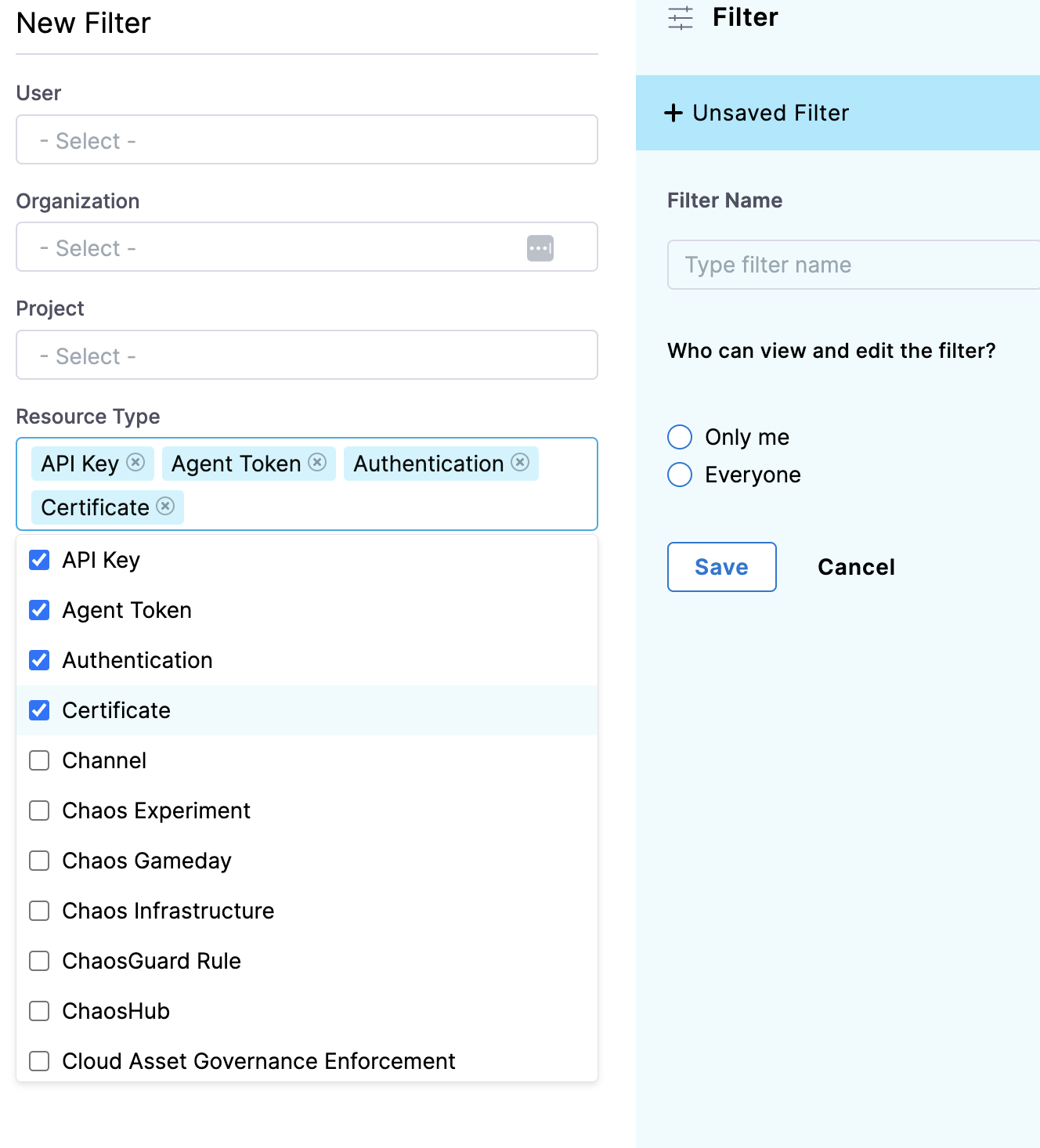
This also allows for multiple selections of the resource type for the new filter. You can also allow yourself/others to view and edit the filters you create.
- Audit Logs:

Audit logs provide a comprehensive record of all activities and events within the Harness.io account. They enhance transparency, support accountability, and bolster security by recording the time of occurrence, the type of action, the affected resources, and the identity of the user involved. These logs are valuable for identifying any unauthorized access and serve as a historical record for tracking changes to configurations, pipelines, and other resources. They also assist in troubleshooting by helping users quickly identify the root cause of issues. Additionally, users can easily view role assignments, resource updates, and new user invitations.
Time: Displays the exact timestamp of when the event occurred.
User: The user who acted (taarini.dang@harness.io).
Action: Description of the action (created/updated/deleted).
Resource: Resource affected by the action (Shared Folder, Module).
Organization: Project/Organization affected by the action.
Module: Specific module where the action took place (Dashboard Folder, Service).
- Audit Log Streaming
Audit Log Streaming allows users to continuously stream audit logs from Harness.io to an external destination (Amazon S3, SIEM systems, etc). This enables the audit log data to be available for real-time analysis and long-term storage. This helps with the immediate detection of suspicious events. Streaming logs to a centralized SIEM allows for advanced security analytics. It ensures audit logs are stored securely for extended periods.
Harness will retain your audit data for two years, but you can configure a streaming destination in Harness to send audit log data to another location for processing. You can integrate this data with SIEM tools for more security and compliance.
Create a New Streaming Destination:

Name it:

Choose Connector Options: