Generate API authentication configs instantly with AI. Eliminate setup friction, improve scan success, and accelerate dynamic application security testing.

TL;DR
- Harness API Security Testing uses AI to create complete, ready-to-use authentication configs from natural language descriptions in seconds, replacing hours of manual scripting and documentation review.
- The system supports API keys, JWTs, bearer tokens, and custom authentication flows, ensuring compatibility with virtually any protected application or API endpoint.
- You can iteratively refine authentication configurations by prompting the AI with plain English requests, eliminating time-consuming trial-and-error debugging cycles.
- Inline comments and audit logs maintain full transparency over AI-generated authentication logic, giving your complete visibility and control over every configuration step.
Application security testing tools promise coverage and accuracy, but teams often struggle just to get started. One of the biggest friction points in dynamic application security testing is configuring authentication correctly so a scanner can even access a target application, let alone API endpoints that power the functionality.
Whether it’s API keys, bearer tokens, or custom auth flows, setting up authentication for scans frequently requires trial-and-error and engineering support. This reality of scanning configuration slows down security validations, delays insights, and makes it difficult to integrate with AI-driven tooling that depends on fast, accurate access to API endpoints.
Today, we’re excited to introduce AI-Powered Custom Authentication Generation—a new capability designed to eliminate this friction and help teams move from setup to security insights faster than ever.
What’s New: AI-Powered Authentication Generation
With this release, teams can now generate and refine authentication configurations using natural language and LLMs. Instead of manually configuring authentication logic or relying on additional support, users can simply describe their requirements and let AI handle the rest.
The average time to configure authentication for API security testing is measured in seconds, whereas older manual approaches can take hours and require extensive trial-and-error.
Here are a few highlights:
- Use Natural Language to Create Auth Scripts: Generate fully functional authentication configurations by describing your needs in plain English.
- Support for Common Auth Types: Easily create configurations for API keys, JWTs, Bearer tokens, and more.
- Iterative Refinement with AI: Update and fine-tune authentication logic by prompting the system instead of time-consuming scripting or manual adjustments.
- Inline Visibility and Change Tracking: Steps taken by AI to generate auth flows are audited, and testing runs are logged fully to maintain transparency and control.
Why is Authentication Setup Difficult Historically?
Authentication setup has long been one of the most frustrating parts of security scanning. Access control mechanisms are already complex due to security hardening used to protect applications and APIs. Successfully automating authentication flows so a machine can access an app or endpoint raises the bar substantially.
Some of the common pain paints include:
- Manual configuration slows down work: Teams often need to consult different documentation, dashboards, and code to define authentication flows correctly. Even small mistakes can cause scans to fail silently or produce incomplete results.
- Lack of standardization creates confusion: Each application or API may use slightly varied access control mechanisms and authentication material, including headers, tokens, cookies, and custom flows. Practitioners must rebuild the logic from scratch each time due to inconsistent implementation.
- Iteration is painful and time-consuming: If something doesn’t work, fixing it usually requires manually editing scripts, rerunning scans, and debugging errors. Oftentimes, additional help from support or engineering teams is needed.
- Limited visibility makes troubleshooting harder: When authentication fails, it’s not always clear why. Without clear feedback or context, teams spend valuable time diagnosing issues rather than improving their security posture.
What should be a simple prerequisite, gaining authenticated context into an application, becomes a major bottleneck to dynamic application security testing.
How AI-Powered Authentication Changes the Game
The new AI-powered authentication feature in Harness API Testing removes these barriers entirely by reworking how authentication config is created and managed.
Generate Authentication in Seconds
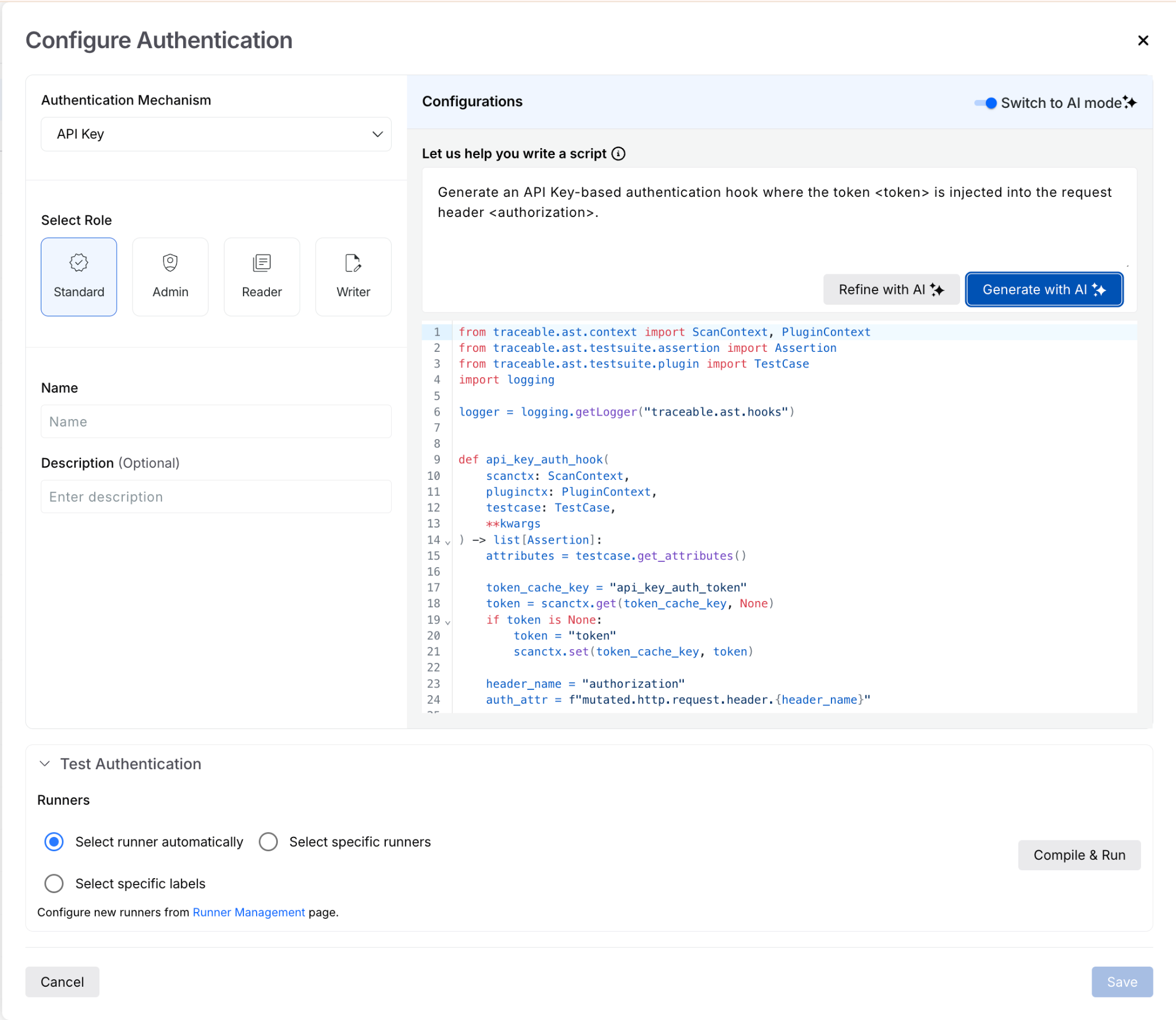
Users can navigate to the authentication configuration page, select the custom option, and simply describe what they need. For example:
“Generate an API key-based authentication hook where the token <token> is injected into the request header <authorization>.”
With a single click on “Generate with AI,” the system produces a complete, ready-to-use authentication script. This functionality eliminates the need to write or stitch together configurations manually.
Support for Multiple Authentication Types
The feature supports a range of common authentication mechanisms, including:
- API key-based authentication
- JWT-based authentication
- Bearer token authentication
This flexibility ensures teams can quickly configure access regardless of how their application or API is secured. Learn more details about the supported authentication types.
Refine Without Rewriting
Authentication requirements often evolve. Instead of starting over, users can iteratively refine their configurations using natural language prompts.
For example, if you want to change how credentials are injected into the auth flow, you can simply say:
“Change the injection type to header name.”
By selecting “Refine with AI,” the system updates the existing configuration accordingly—no manual edits required.
Built-In Transparency
Every AI-generated or modified configuration includes inline comments that explain what changed. These comments make it easier for teams to:
- Understand how authentication is implemented
- Review updates confidently
- Maintain control over their configurations
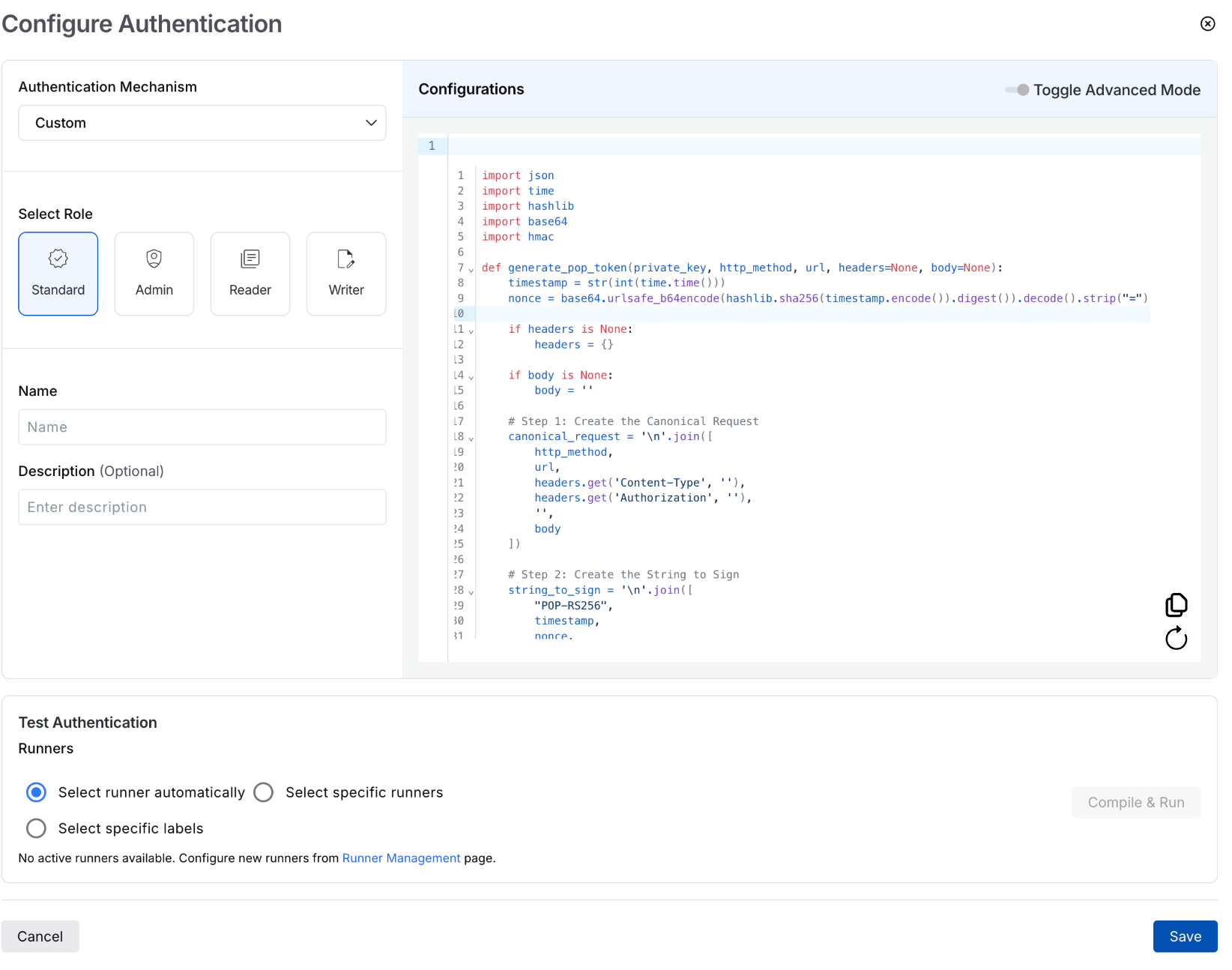
Additionally, no credentials are stored in logs or persisted in prompts. Any sensitive authentication material is masked and encrypted at rest.
Faster, More Reliable Scans
By reducing setup errors and simplifying authentication configuration, this Harness API Testing feature directly improves scan success rates. Teams can spend less time troubleshooting authentication issues and more time analyzing real security findings.
Unlocking Faster, Smarter Security Workflows
This release is more than just a usability improvement. It’s a foundational step towards enabling AI-driven security workflows.
By removing the friction of authentication setup, teams can:
- Onboard new applications for testing faster
- Integrate seamlessly with AI-powered testing and analysis tools
- Reduce dependency on manual scripting and support interventions
- Achieve more consistent and reliable scan coverage
Ultimately, this translates to a faster time-to-value and a more scalable approach to dynamic application security testing.
Get Started Today
AI-Powered Custom Authentication Generation is available immediately with your existing Harness subscription. You can find related technical documentation here.
Current Customers: Log in to your dashboard today to start exploring your threat data in a whole new dimension.
New to the Platform? If you aren't yet protected, contact us to schedule a personalized demo.