Harness API Testing enhancements simplify setup with improved validations and workflows. Validate API reachability upfront to ensure smarter execution and reduce wasted resources.

TL;DR
- Harness API Testing now consolidates scan configuration into three clear sections (General, Source & Attacks, Advanced Settings), reducing cognitive load and setup errors.
- The new Reachability Test feature validates API endpoints before generating tests, preventing wasted resources on unreachable or unauthenticated APIs.
- Inline creation workflows allow you to configure policies, authentication methods, and runners directly within the scan flow without navigating away.
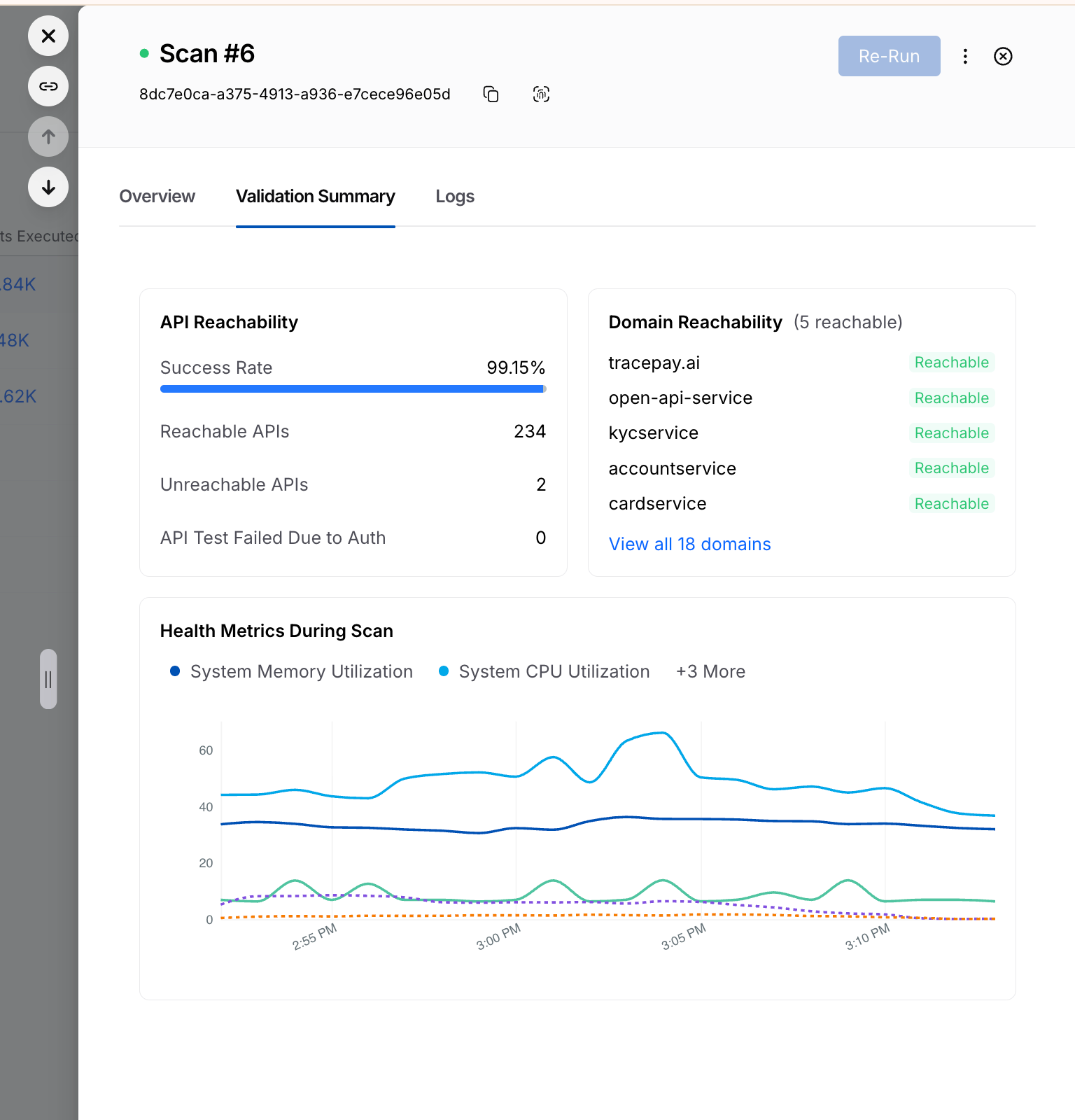
- Validation Summary tabs provide visibility into reachable vs. unreachable APIs, authentication failures, domain reachability, and resource utilization for every scan.
- These enhancements are available immediately to all Harness customers at no additional cost.
Application security & engineering teams are under pressure to move faster, cover more, and reduce the operational drag that often comes with security testing. But in practice, two problems keep slowing teams down and adding friction.
- Scan setup is often more complicated than it needs to be. Teams lose time navigating fragmented configuration flows, interpreting unclear fields, and correcting setup mistakes that only surface later. Even when teams know precisely what they want to test, configuring a scan correctly becomes a project of its own.
- Test generation is only valuable when the targets behind it are actually reachable and executable. When APIs are unreachable, improperly mapped, or blocked due to missing authentication, teams end up generating tests that consume runner resources and waste time without producing meaningful results. That creates noise, extends scan times, and makes it harder to focus on other actionable results.
Harness API Testing Enhancements at a Glance
Today, we're introducing several important enhancements to Harness API Testing that are designed to solve these exact issues and make API scans easier to configure, more reliable, and more efficient.
Improved Configuration Experience
The new scan configuration experience is built to reduce friction from the moment a user clicks "Create Scan." It simplifies the setup flow, improves validation, and provides users with more guidance directly in context, rather than forcing them to guess or leave the page for help.
The highlights include:
- A simpler, more structured configuration flow - to reduce the cognitive load of stepping through an extensive setup process, the scan creation experience has been consolidated into three clearer sections to help you focus on what matters.
- Field-level guidance everywhere it matters - every configuration field now includes tooltips and helper text, with step-level documentation available alongside the workflow. You get immediate explanations of what each field does and how to configure it correctly.
- Stronger validation early - the new experience focuses on automatic validation to avoid invalid names, incorrect selections, and incomplete inputs before finalizing creation of a scan, which translates to fewer failed setups and less trial-and-error.
- Inline creation for dependent entities - you can now create items such as policies, authentication methods, and runners directly within the scan flow via inline panels, without navigating away in the interface and breaking momentum.
Added API Endpoint Validation
The new reachability validations in XAST Replay and DAST help you confirm whether APIs are actually reachable and properly authenticated, so scan execution stays focused on targets that can produce real results.
The highlights include:
- Dedicated Reachability Test view in scan configuration - each scan now includes a Reachability Test tab that provides a rundown of API endpoint-level readiness before test generation proceeds.
- Detailed endpoint visibility - you can see the full list of API endpoints, service mappings, reachability status, response codes, and response descriptions in one place.
- Downloadable CSV for analysis and troubleshooting - results can be exported for offline review, making it easier for you to share findings, investigate failures, and track patterns across environments.
- Smarter test generation control - helps reduce irrelevant noise by preventing test cases from being generated for APIs that are unreachable or fail authentication.
Why Teams Struggle with API Security Testing
These launches address two persistent sources of friction in API security testing: configuration complexity and execution inefficiency. Both slow teams down, create avoidable rework, and make it harder to get to meaningful security outcomes.
1. Scan setup has been too easy to get wrong
The problem is not just that the setup takes time. It is that the experience in tooling has often lacked enough structure, validation, and in-context explanation.
When configuration is too complex, users are far more likely to:
- Enter incomplete or incorrect settings
- Hesitate because they are unsure what a field requires
- Depend on internal experts or professional services to get a scan configured properly
- Spend more time troubleshooting than actually testing APIs
Security teams have long been dealing with incorrect or incomplete configurations, unclear field usage, and longer times to initially create a successful scan.
2. Weak validation delays necessary feedback
Without strong validation at the point of initial setup, users can move forward thinking a scan is correctly configured, only to discover later that something was malformed, missing, or misunderstood.
That creates a chain reaction:
- Errors are caught after setup instead of during setup
- Users have to backtrack and redo work
- Confidence in the scan creation process drops
- Time-to-value gets stretched unnecessarily
Without validations, helper text, tooltips, and field-specific guidance, it's easy to make mistakes when entering wrong inputs and making selections.
3. Fragmented workflows break momentum
Context switching creates another major issue. If users need to leave the scan flow to create a policy, configure authentication, or add a runner, the API test setup experience becomes fragmented.
That fragmentation leads to:
- Slower scan creation
- More abandoned or half-finished workflows
- Higher odds of misconfiguration
- Less intuitive user experience
Teams often waste time bouncing between multiple pages and increase the likelihood of mistakes without inline workflows.
4. Test generation doesn't equate to execution readiness
On the execution end of the equation, teams may encounter cases where tests are generated even when the target APIs are unreachable or not properly authenticated.
That leads to several downstream problems:
- Unnecessary test generation
- Wasted runner resources
- More noise in scan output
- Longer scan times
When API endpoint targets aren't validated upfront, the result is unnecessary test generation and low-quality output.
5. High activity does not always mean high value
Large numbers of generated tests can look impressive on release dashboards, but if those tests are tied to unreachable APIs, they fail to create real security value.
Teams are left with:
- Inflated scan activity metrics
- Less trust in reported results
- Wasted time separating signal from noise
- Reduced confidence around coverage
Improper scan configurations that produce high volumes of poor results yield inaccurate metrics that are critical to application security programs. This reality can create a false sense of confidence in security posture.
A Closer Look at What's New in Harness API Testing
These enhancements improve two critical parts of the API testing experience: how scans are configured and how test execution readiness is validated.
Scan Configuration Revamp & Validation Enhancement
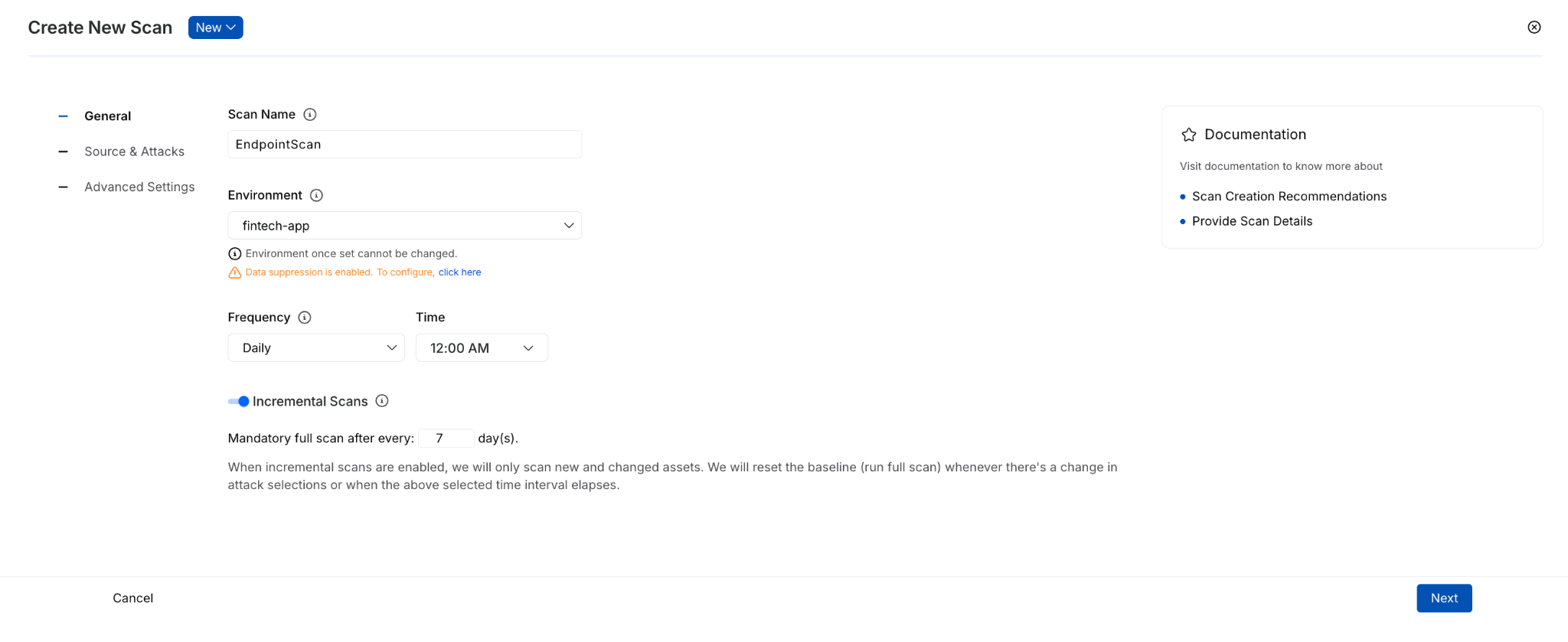
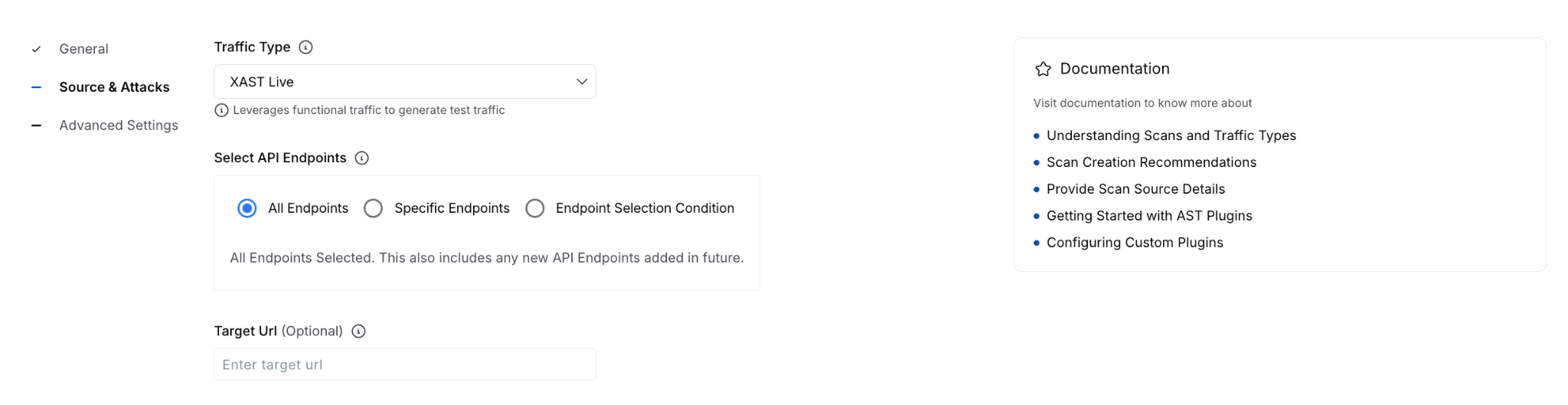
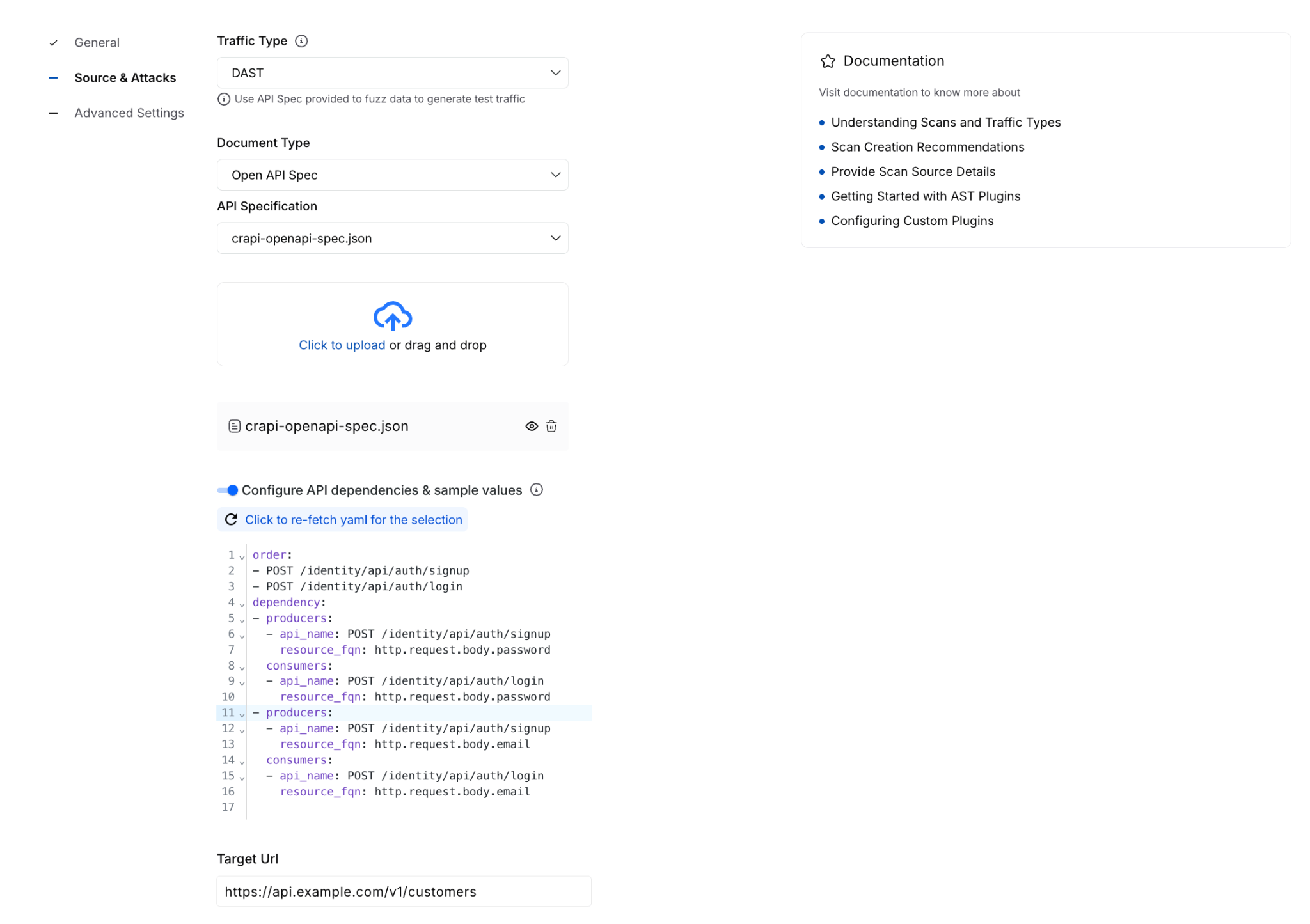
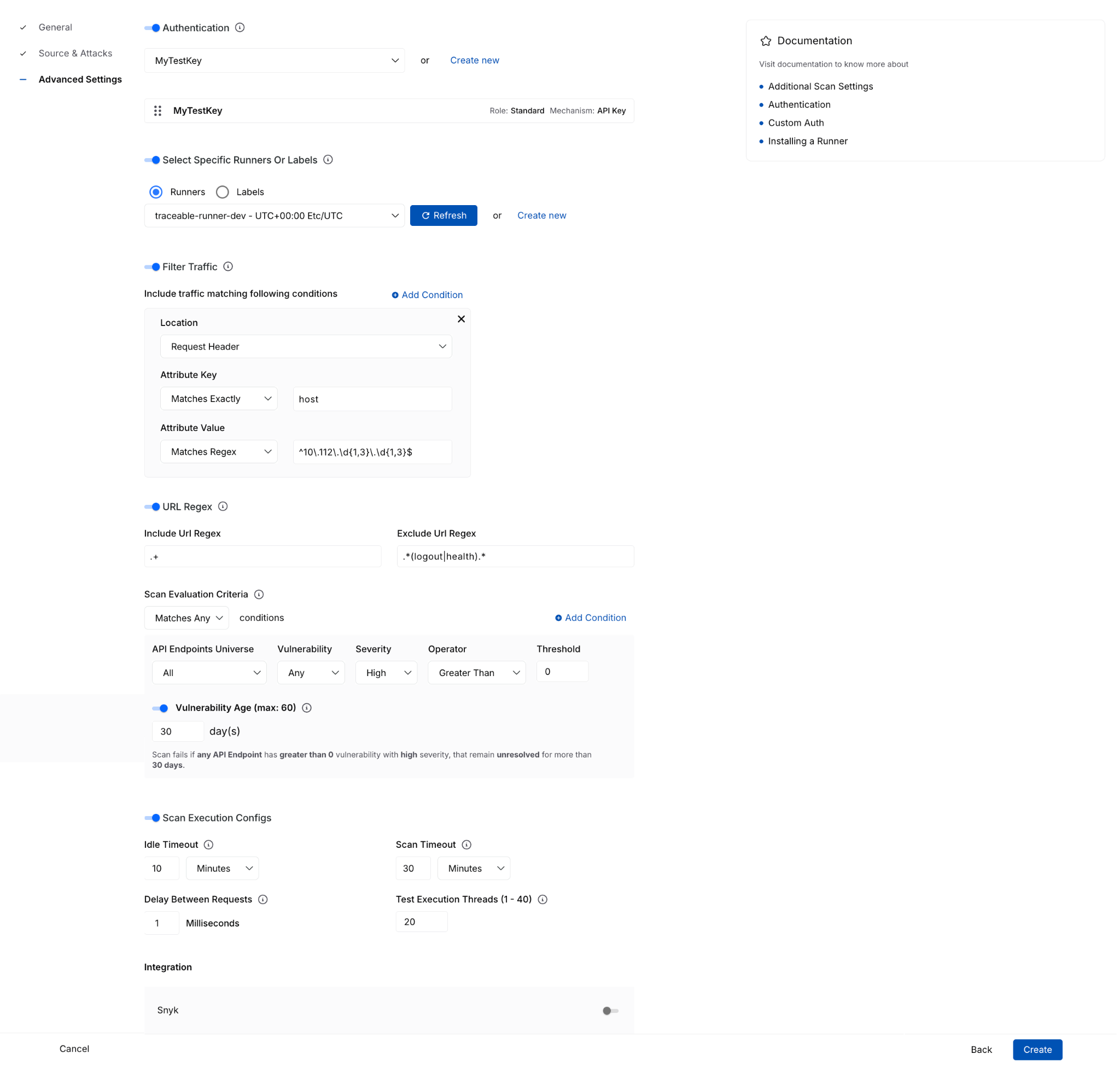
Rather than spreading configuration across a larger set of steps, the new flow reduces the experience to three main sections that are:
- General - define the basics, such as scan name, environment, frequency, and incremental scan behavior.
- Source & Attacks - select traffic and policy.
- Advanced Settings - configure optional items such as authentication, runners, traffic filters, URL regex, evaluation criteria, timeout behavior, and integrations.
That reorganization does more than simplify the UI. It separates required setup from optional tuning, helping you complete scan creation with more confidence and less guesswork.
With these enhancements, you can now more easily:
- Understand fields in context through tooltips, helper text, and side-panel documentation available during setup.
- Create policies inline without leaving the scan configuration flow.
- Configure authentication inline, including form-based and AI-based authentication options, then immediately select them for use.
- Create or select runners from the same page instead of navigating out to separate workflows.
This enhancement is especially important for teams that want to move quickly without sacrificing correctness. Keeping these dependent tasks in a single flow reduces interruptions and lowers the risk of setup errors.
The advanced settings experience also adds more clarity around complex configuration options, where you can now work with:
- Traffic filter conditions
- URL regex settings
- Scan evaluation criteria with dynamic explanatory text
- Idle timeout and scan timeout execution controls
- Integrations
These details matter because they turn a complex setup from opaque to guided and actionable. You can find more technical documentation: here.
For every running or completed scan, you will now see a Validation Summary tab that highlights critical details and the overall health of the configured API testing. Information here includes:
- Total number of reachable and unreachable APIs
- Number of tests failed due to auth issues
- Domain reachability
- Resource utilization during the scan window
Reachability Test for XAST Replay and DAST
The Reachability Test enhancement brings that same philosophy to execution: validate earlier, execute smarter. Before generating tests, the Harness platform now provides clearer visibility into whether APIs are actually ready to be tested.
The new Reachability Test tab gives you a dedicated place to inspect endpoint readiness before test generation begins. It surfaces:
- the full list of API endpoints
- service mapping details
- reachability status
- response codes
- response descriptions
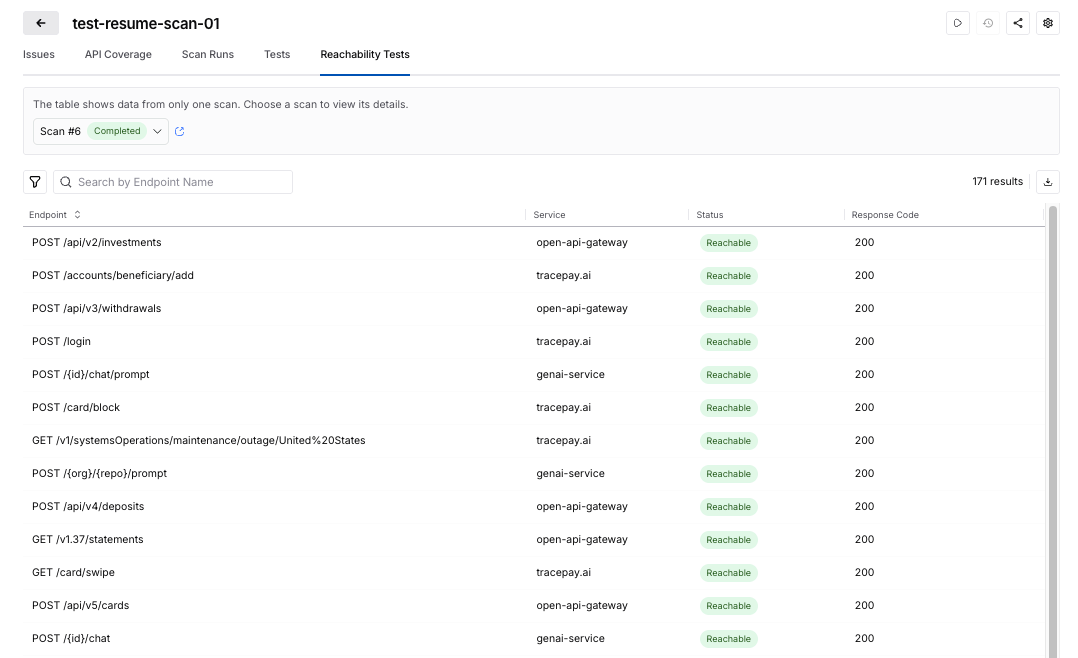
This enhancement turns what was previously harder to diagnose into something visible and actionable.
The Harness platform now uses reachability and authentication readiness as part of test generation control.
That means that no test cases are generated when:
- API endpoints are unreachable
- authentication is missing
- authentication fails
The reachability tests help ensure execution resources are spent on APIs that can actually produce meaningful results. For security teams, this creates a more efficient and trustworthy scan lifecycle with:
- less wasted runner consumption
- fewer irrelevant or misleading test artifacts
- cleaner signal in scan results
- better alignment between reported coverage and executable coverage
You can read more technical details here: docs.
Taken together, these enhancements make API security testing more usable at the front end and more efficient at the back end. Teams can configure scans faster, with fewer errors and less dependency on expert intervention, while also improving the quality of what gets executed once a scan runs.
Get Started Today
These Harness API Testing features are available immediately with your existing Harness subscription. There is no additional cost or setup required.
- Current Customers: Log in to your dashboard today to test the security of your APIs seamlessly and more effectively.
- New to the Platform? If you aren't yet validating your API security, contact us to schedule a personalized demo of Harness API Testing in action.