
As organizations ship software faster than ever, runtime behavior changes are becoming just as frequent as code releases. Teams need a way to update application behavior without waiting for code deployments while maintaining visibility, governance, and control.
Now available in beta, Config Management provides a governed runtime control plane that separates runtime configuration from application deployments, enabling organizations to deliver configuration changes instantly across environments.
With Config Management, teams can:
- Change runtime values without redeploying applications
- Manage configurations across development, staging, and production
- Deliver configuration changes instantly through Harness SDKs
- Govern every configuration change with enterprise controls
Why Runtime Configuration Matters Today
Runtime configuration separates application logic from the values that control application behavior. Instead of embedding operational values directly into source code:
const maxRetries = 3;
const timeout = 5000;
Applications retrieve those values dynamically at runtime:
const maxRetries = client.getConfig("maxRetries");
const timeout = client.getConfig("timeout");
Changing a retry limit, timeout threshold, or feature parameter no longer requires a pull request, application rebuild, or production deployment. Teams can update the configuration on the Configs page, and the application receives the latest value through the Harness FME Configs SDK.
This enables organizations to iterate on application behavior at the speed their business requires, rather than at the speed their deployment pipeline allows.
Manage runtime configurations from a single project
Available today in beta, Config Management provides a centralized place to create, organize, and govern runtime configurations across your applications. The Configs page in Harness FME allows teams to search existing configurations, filter them by traffic type or tags, and quickly identify ownership across engineering and product teams.
Rather than scattering runtime values across source code, configuration files, or environment variables, Config Management centralizes application behavior into a single governed inventory that teams can manage collaboratively.
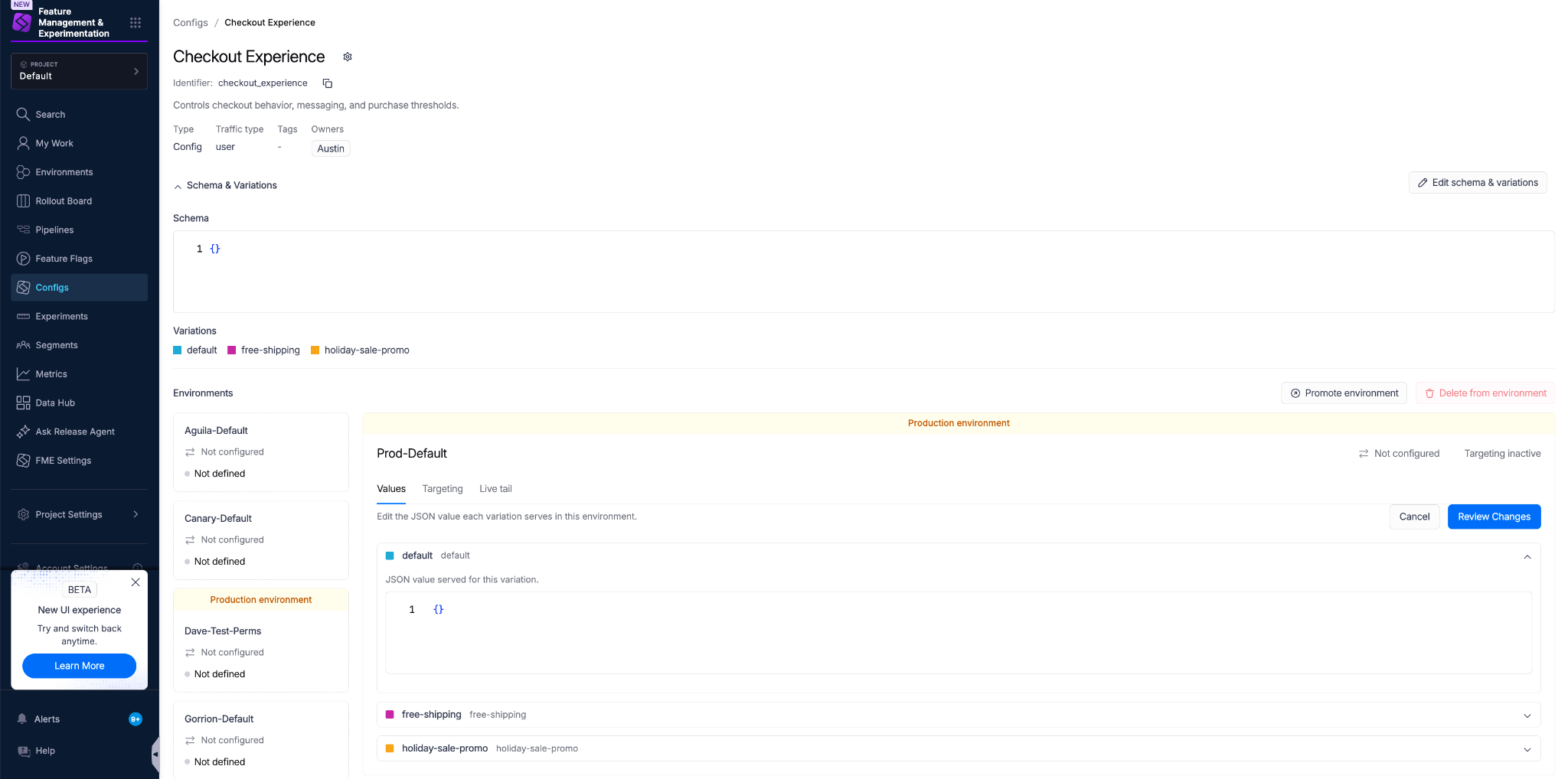
Creating a new configuration is equally straightforward. Clicking Create config opens a guided workflow where you define the configuration's name, immutable identifier, traffic type, owners, and one or more initial variations.

Each configuration begins with a shared structure that can later be delivered differently across environments. By defining variations up front, teams can prepare multiple runtime behaviors for targeted rollout and experimentation without changing application code.
Runtime control across the software delivery lifecycle
Harness provides dedicated capabilities for managing runtime behavior throughout the software delivery lifecycle.
One platform, complementary capabilities
Each capability answers a different question:
Altogether, these capabilities provide a unified platform for progressively releasing features, managing runtime behavior, monitoring production health, and validating outcomes through experimentation and warehouse native analytics.
Enterprise-grade configuration management
Configuration changes can have just as much impact on customers as application releases. Adjusting a retry count, modifying a pricing threshold, or changing a production timeout can immediately affect reliability, performance, and customer experience.
Config Management applies enterprise governance directly to runtime configuration.
Teams can:
- Require approvals before production changes
- Track every configuration change through version history
- Audit who changed what and when
- Validate configuration schemas before deployment
- Monitor configuration impressions through runtime evaluation
- Deliver configuration updates instantly through the Harness Configs SDK
Organizations have the flexibility to configure at runtime without sacrificing governance or operational control.
Common use cases for Config Management
Optimize application behavior
Adjust feature limits, business rules, onboarding flows, or customer messaging without requiring new deployments.
Improve operational performance
Tune retry counts, timeout values, concurrency limits, cache durations, and resource thresholds based on production telemetry.
Iterate through experimentation
Target different configuration values to specific users or environments to compare onboarding experiences, pricing thresholds, UI copy, or application workflows.
Prepare for AI-powered applications
Manage prompts, model selection, inference parameters, retrieval settings, and other AI behavior as runtime configurations rather than hardcoded application logic.
The foundation of AI Config Management
As Config Management continues to evolve beyond its beta release, it also provides the foundation for AI Config Management. As AI-powered applications become increasingly dynamic, teams need the same runtime control over AI behavior that they already require for traditional software.
Config Management provides the foundation for managing AI-specific configurations, including prompts, model selection, inference parameters, and agent behavior.
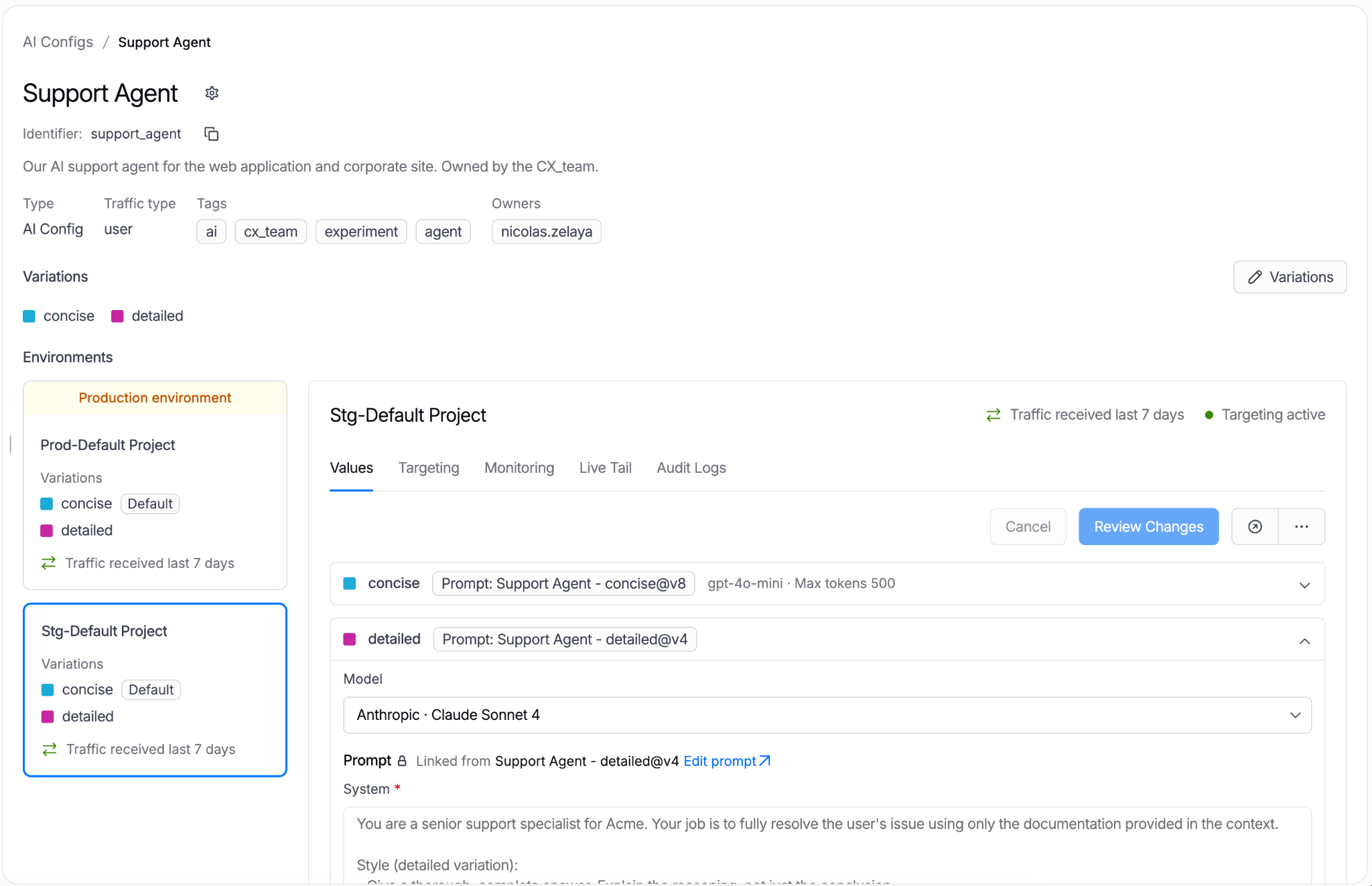
Rather than embedding these decisions directly into application code, teams can govern, target, and evolve AI behavior through the same runtime configuration platform.
Get started with Config Management today
Available now in beta, Config Management extends the Harness platform with a governed runtime control plane for modern applications.
Whether you’re tuning application behavior, optimizing operational performance, or preparing for AI-powered workloads, Config Management enables teams to safely evolve production behavior without waiting for code deployments.
To get started with the Config Management beta, explore the Config Management documentation. If you’re new to Harness, sign up for a free trial today.

All this author’s posts
Austin Lai is a Developer Relations Engineer focused on developer experience, observability, and feature management.
