Harness solves the firewall dilemma for OPA. Shift-left governance-as-code while keeping API tokens and internal systems secure within your local perimeter.

Let's face it: "move fast and break things" is a great way to end up sitting in a war room at 3:00 AM. Engineer burnout is at record highs, we don’t need sloppiness to hurt us further.
Look. Here’s the reality: thanks to AI code generation tools, we are writing more code than ever before. Delivering that with pipelines built for human-speed development? That’s become the chokepoint. Everything in delivery needs to get faster and better. That includes governance.
We’ve long used Open Policy Agent (OPA) to embed automated governance directly into delivery pipelines to stop teams from cutting corners. OPA is Policy as Code and by default evaluates on our secure cloud infrastructure. But for large, highly regulated enterprises, corporate firewalls and strict data residency rules present a classic dilemma:
What happens when a policy needs to access data that resides within a corporate firewall? How do we run these policies so that they connect to internal systems securely and access that data within the corporate trust boundary?
We’re tackling that challenge now. New to Harness is the ability to evaluate OPA Policies on Local Infrastructure.
The Architectural Hurdle: Firewalls & Local Secrets
Platform and security engineering teams love OPA because it allows them to gate pipelines based on real-time business logic. For example, you may want to implement a waiver or exceptions workflow that grants a one-time exception to a specific Policy from being broken. And you may want to track that a waiver was issued in a ticketing system like ServiceNow.
However, executing this evaluation in a standard SaaS model breaks down when:
- The Target System you are querying is Inbound-Protected: Your internal ticketing system, database schema verifier, or proprietary security scanner lives deep behind your corporate firewall.
- Secrets Must Stay Local: To query that internal system, OPA needs an API token, certificate, or password. Sending that credential to an external cloud environment—even one as secure as Harness—is often an immediate veto from Chief Information Security Officers (CISOs).
Historically, teams had to choose between drilling holes in their firewall, duplicating infrastructure, or reverting to manual spreadsheets and agonizing verification meetings.
Enter Local OPA Evaluation on Kubernetes
With this new capability, Harness lets you direct the OPA evaluation engine to run in your own environment (specifically on your local Kubernetes clusters).
How It Works
Instead of pulling your secure internal metrics out to the cloud for policy validation, Harness sends the evaluation intent down to your local cluster. The evaluation triggers locally, pulls secrets natively from your secure environment, queries your private behind-the-firewall tools, and passes a simple, immutable Pass/Fail status back to the Harness pipeline
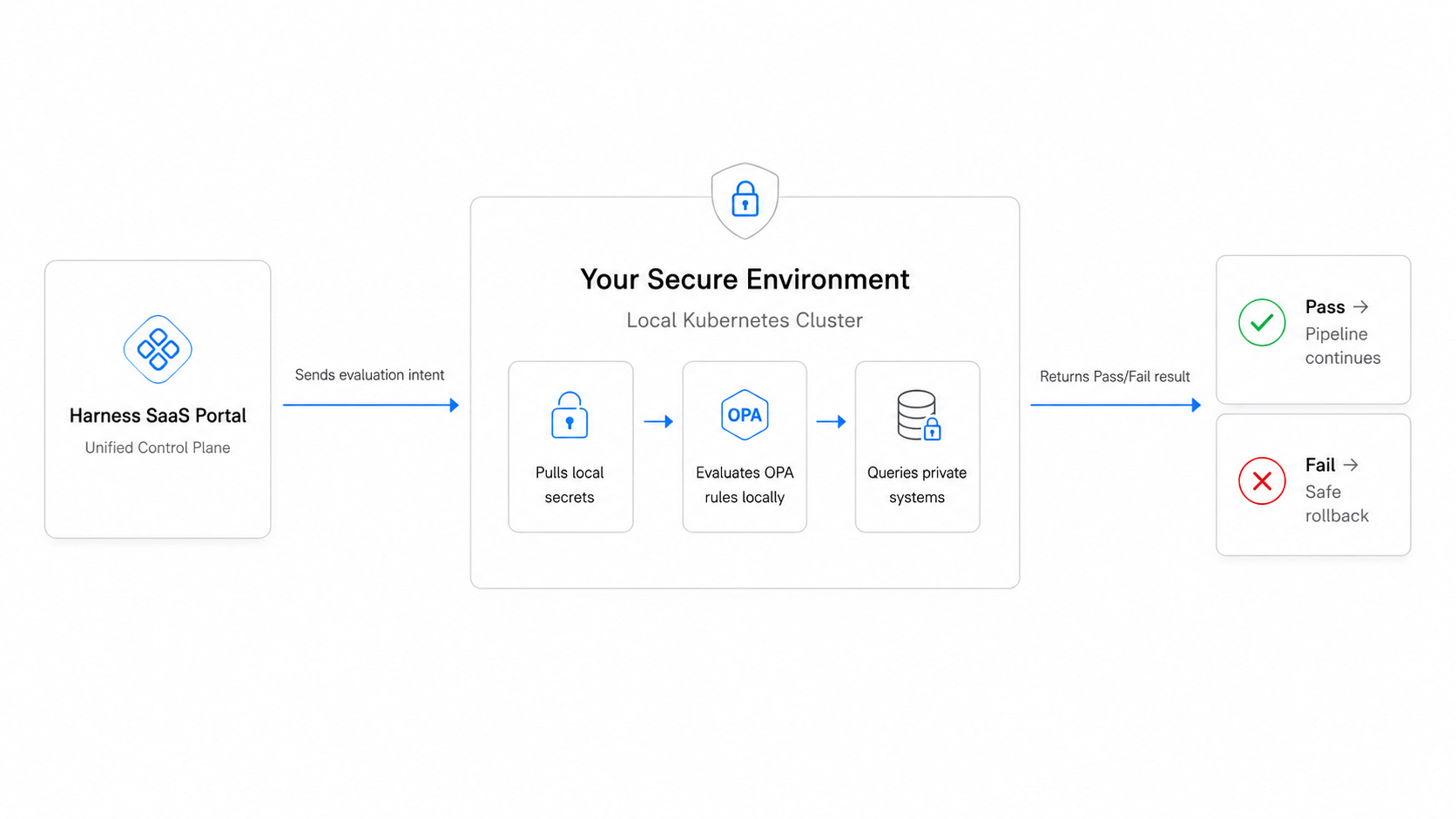
This approach delivers the best of both worlds: the ease and scalability of a unified platform control plane, backed by the absolute security of local execution
See It: Gating Pipelines on Secure Ticket States
Consider a classic enterprise scenario: gating a production deployment based on an internal ticketing system.
If the ticket is approved, the sync proceeds automatically. If the ticket is canceled, pending, or in an unexpected state, the pipeline halts or triggers an automated rollback strategy before any risk is introduced to production. Because the execution stays within your perimeter, your ticketing credentials remain entirely untouched by external systems.
Check out this quick demo video to see exactly how to configure your Kubernetes cluster to handle OPA evaluations locally:
Use Cases
Use Case 1- Allowing for OPA waivers/exceptions
A common pattern we saw amongst our customers was they wanted an “exceptions” or “waiver” workflow where customers, for certain use cases, could waive a failed OPA policy for a particular scenario. Let’s take the following example:
- You have a pipeline that has an OPA policy mandating that there’s >95% test coverage before a deployment is done
- A hotfix comes in at the last minute that fails the 95% test coverage
- Given the urgency of the situation, you want to bypass the OPA policy
In these kinds of situations, teams often want some kind of mechanism to allow a waiver where they allow the pipeline to run this one specific time due to special circumstances. Additionally, customers want to keep track that a waiver was issued in a third-party ticketing system (like JIRA or ServiceNow). With the Local OPA evaluations capability, you can now write policies that query the internal ticketing system as shown above.
Use Case 2 - Using OPA to check for Pipeline Tampering
Another common authorization workflow we saw was customers trying to ensure that their pipeline YAMLs hadn’t been tampered with. For example, customers often want to ensure that the pipeline they have authored and stored in Harness SaaS is exactly the one that runs at the time of deployment. They want to ensure that no third party tampers with the pipeline YAML before it is actually being run. The approach we saw customers take was the following:
- They would author a pipeline in Harness SaaS
- They would take the pipeline YAML and take a hash of the pipeline
- They would store the hash of the pipeline within their internal database/system
- At the time of the pipeline actually running, they compare the hash of the “correct pipeline” with the hash of the pipeline being run to check for equivalence
The steps outlined above allow for ensuring that nobody has tampered with the pipeline’s yaml before it is run. However, to write a rego policy that can actually do a hash code equivalence check (step 4) you need to make a call to the internal database system where the hash code of the correct pipeline lives. This again necessitated having the rego policy read credentials and connect to a 3rd party system. Again, one way to solve this problem was to allow customers to run these OPA policies on their own K8s clusters.
Use Case 3 - Very Large or Sensitive Payloads
Finally, some customers use our custom policy step action to perform an authorization check midway through a pipeline. For several of these situations, customers want to send data for the OPA policy to check that is sensitive in nature. For such use cases, they don’t want the sensitive payload to be sent to the OPA service running in Harness SaaS. Instead they want the payload to be sent to the OPA rego policy running in their own infrastructure.
Zero Friction, Maximum Compliance
So, what does this mean for your daily operations?
The beauty of local OPA evaluation is that your developers won't notice a single change in their daily workflow. They continue to leverage the fastest builds and automated continuous delivery pipelines they love.
Meanwhile, Platform Leaders gain a comprehensive, immutable audit trail of every single evaluation, ensuring painless compliance reviews without hampering developer velocity.
Ready to eliminate toolchain chaos and secure your deployment guardrails? Get started with Harness Continuous Delivery & GitOps today.