An in-depth look at the Miasma supply chain attack that compromised Red Hat npm packages. Learn how the malware spread, stole credentials, abused trusted publishing, and the steps teams can take to mitigate risk.

The Shai-Hulud lineage has a new face. On June 1, 2026, security teams independently flagged a fresh supply chain compromise inside the @redhat-cloud-services npm namespace. 32 packages and 96 versions were all republished with a credential-stealing worm.
These aren't typosquats. They are the official packages in a trusted scope, pulling somewhere 80,000-117,000 average weekly downloads. This article walks through how one compromised maintainer account turned Red Hat's own CI/CD pipeline into a malware channel, what is actually new under the hood versus earlier Shai-Hulud waves, and how to clean it up without tripping the worm's self-destruct.
Preface
Open-source ecosystems run on trust and most of that trust is now automated. A modern build pulls hundreds of transitive dependencies, publishes through CI/CD with nobody watching and checks provenance to prove an artifact came from where it claims. Provenance can tell you where a package was built but can't tell you if the build environment was clean.
“Miasma is what happens when an attacker stops trying to fake that trust signal and just earns it from inside a pipeline that already has it.”
Introduction
Miasma is a multi-stage dropper. It runs during npm installation, scans the machine and any reachable cloud for credentials, then republishes itself through every package the stolen tokens can reach. It's a direct descendant of the Mini Shai-Hulud worm. What changed is the packaging: the wrapping, the staging, and the disguise. Where Shai-Hulud used Dune references, Miasma switches to Greek mythology hence naming things "spartan" and labeling its exfiltration repos Miasma: The Spreading Blight.
Here's what actually separates this wave from earlier Shai-Hulud activity:
- Every infection gets its own encryption.
- Instead of copying itself byte for byte, the malware generates a uniquely encrypted payload per infection. So a hash-based IOC is only good for one package version, which quietly breaks both version tracking and signature detection.
- It goes after cloud identities, not just secrets.
- New collectors enumerate every GCP and Azure identity the infected machine can reach. Earlier variants mostly grabbed the static keys.
- It abuses trusted publishing from a hijacked account.
- Rather than steal a long-lived npm token, the attacker pushed commits that requested short-lived OIDC tokens inside GitHub Actions and published with valid SLSA provenance. It's the same trick we saw in the TanStack and Bitwarden compromises.
Timeline
| Date | Target | What happened |
|---|---|---|
| Apr 22, 2026 | @bitwarden/cli | Compromised via a poisoned GitHub Actions workflow. Payload self-identifies as "Shai-Hulud: The Third Coming." |
| Apr 29, 2026 | 4 SAP npm packages | Compromised using an npm token leaked through a malicious CircleCI pull-request build. |
| May 12, 2026 | 160+ packages (incl. Mistral, TanStack) | Mini Shai-Hulud hits in one wave; malicious releases carry valid provenance. |
| May 12, 2026 | Shai-Hulud source code | TeamPCP publishes the full source to GitHub and posts on BreachForums urging others to run their own campaigns. |
| May 29, 2026 | First Miasma marker | First repo carrying the Miasma: The Spreading Blight description appears, likely the actor testing the variant. |
| Jun 1, 2026 | 30+ @redhat-cloud-services packages | Red Hat Cloud Services npm packages compromised ("Miasma"). |
Deep Dive Into the Miasma Compromise
This wasn't a stolen token push. It happened inside Red Hat's own release infrastructure. A Red Hat employee's GitHub account was taken over and used to commit straight into internal repositories hence skipping the code review step entirely. Here's how it played out:
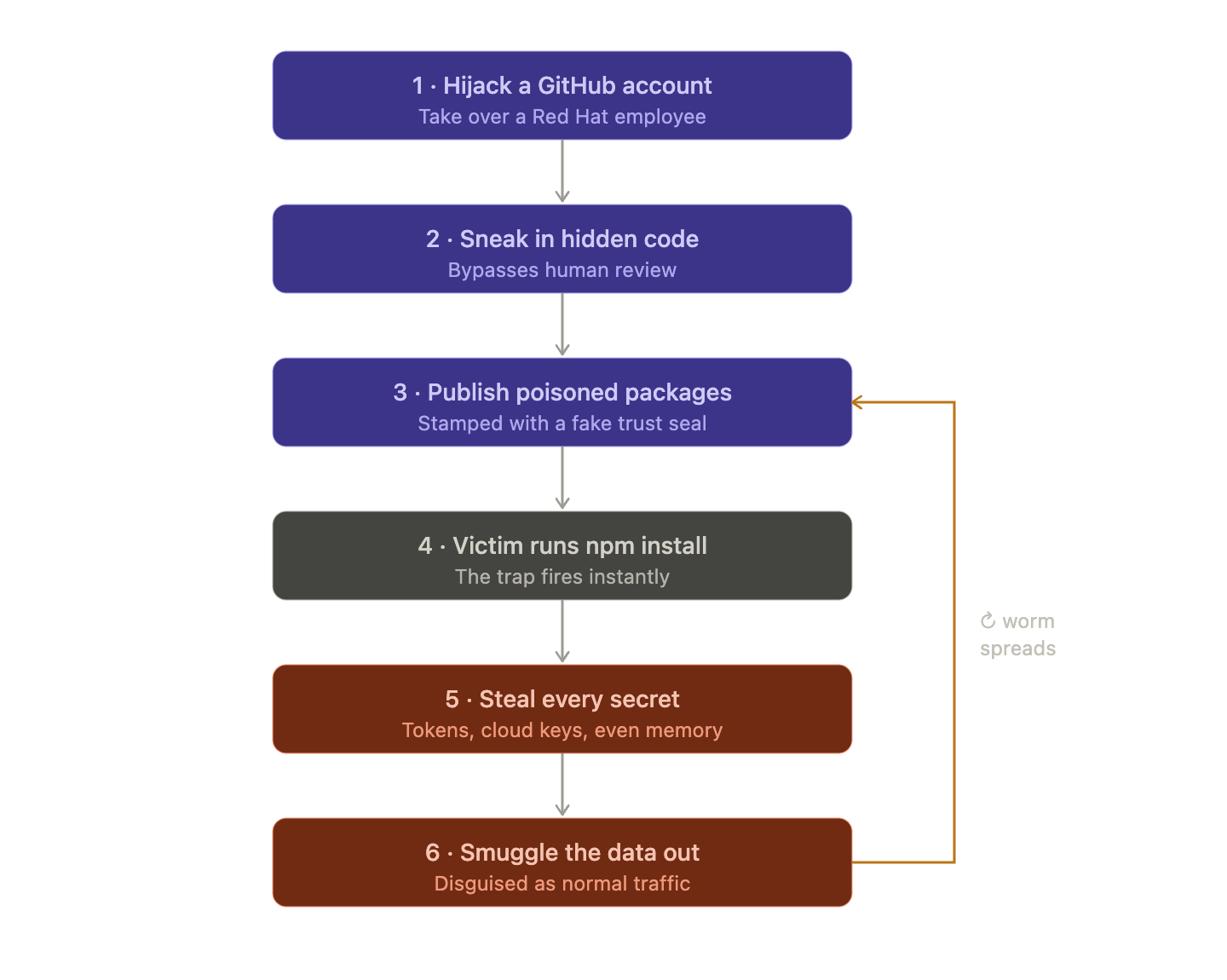
Step 1: The Big Picture
Red Hat publishes free software building blocks (called "packages") that thousands of other developers download and use in their own apps. An attacker found a way to poison those building blocks so that anyone who downloaded them would get secretly hacked. This kind of attack is called a "supply chain attack." Instead of breaking into your house, they forge the lock before it ever reaches the store.
Step 2: How they got in
The attacker didn't steal a password or a key. They hijacked a Red Hat employee's GitHub account and quietly slipped their own code into Red Hat's project. Normally, any code change gets reviewed by another human first. But they used a sneaky trick of Orphan commits that let the changes bypass that review making sure that nobody saw them go in.
Step 3: The clever part about "trust"
The industry recently moved to a system where instead of using permanent passwords to publish software, the publishing system hands out temporary and single-use permission slips (short lived tokens).
The idea was "no permanent password to steal means safer."
But the attacker had taken over the machine that creates those permission slips. So every poisoned package came stamped with a legitimate "this was built by a trusted system" seal of approval which was technically true and completely useless because the trusted system itself was compromised.
Step 4: The trap springs instantly
They rigged the poisoned packages so the malicious code runs the instant you install them, before you can read the code or before anything looks wrong. One giant red flag they point out: one of the infected packages was supposed to contain only text definitions (no programs at all), yet it was set up to run a program on install. That's like a sealed envelope that somehow starts ticking.
Step 5: Hiding the malware
The actual malicious code was buried under layers of disguise. It was scrambled, encrypted and rebuilt from lists of numbers, specifically to fool automated security scanners. It also quietly downloads its own tools if your machine doesn't already have them to make sure that it works on almost any computer.
Step 6: Stealing credentials
Once running, it grabs everything it can. It reads environment variables, host details, and local credential files, pulls GitHub CLI tokens with gh auth token and scans the filesystem for secrets that match known patterns. It doesn't stop at files on disk. If it has a valid identity, it queries cloud metadata services, reads from AWS Secrets Manager and SSM Parameter Store, pulls Azure Key Vault and GCP Secret Manager values and lists Kubernetes and Vault secrets. On CI runners it can even read secrets out of the runner's memory, which gets around log masking because the secret is never written to a log.
Representative token patterns searched by the payload include:

Step 7: Hiding the exfiltration as Anthropic traffic
To smuggle the stolen secrets out without setting off alarms, the malware sent data to a web address that looks normal. The full address is hxxps[:]//api[.]anthropic[.]com/v1/api, which is a real Anthropic host. A plain GET to it returns Anthropic's normal 404 not_found_error, so /v1/api isn't a real route and Anthropic's systems were not compromised. The point is to cover. The domain looks harmless in network logs and the path looks like an API call. It's also awkward to block, since lots of companies legitimately call Anthropic.

The malware reuses the same "GitHub dead-drop" trick from earlier Shai-Hulud versions. If it finds a working GitHub token, it uses it to create a public repo on the victim's account and saves stolen data there as JSON files (under a results/ folder, named with a timestamp and counter). The repo gets a random name in the form adjective-noun-number and its description is set to a fixed string.
“Miasma: The Spreading Blight”
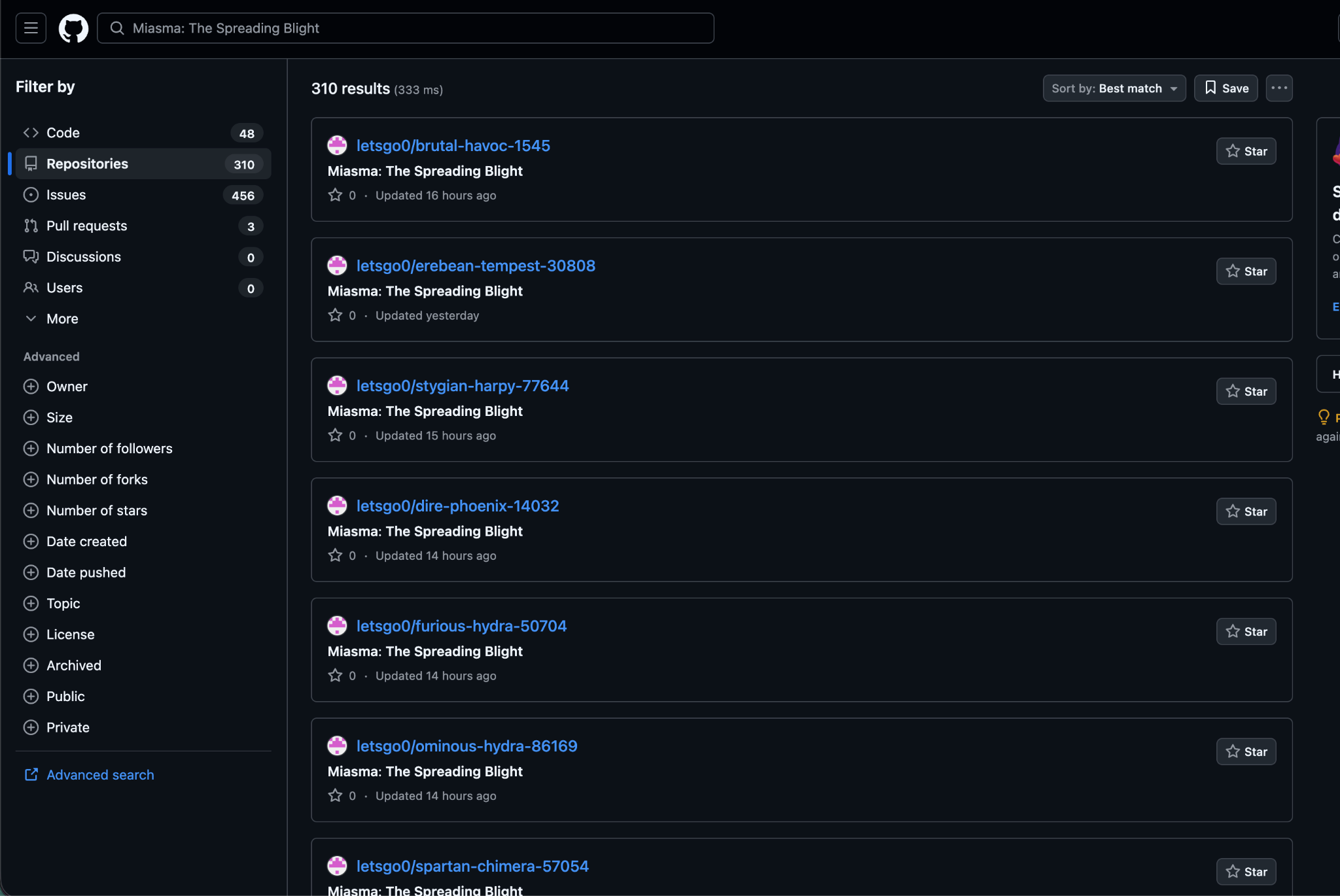
When the payload includes a stolen token in a commit message, it uses the threat marker:
IfYouInvalidateThisTokenItWillNukeTheComputerOfTheOwner
Step 8: Spreading itself
Why it spreads like a worm: This is the nastiest part. When the malware finds credentials that can publish software, it infects those packages too and republishes them so the infection jumps from victim to victim automatically similar to the way a real worm or virus spreads. Researchers found it in over 200 infected projects. It also has multiple hidden backup copies of itself buried around GitHub so even if you clean one up it is designed to crawl back.
Affected Packages
The names of some of the affected packages are:
- @redhat-cloud-services/vulnerabilities-client
- @redhat-cloud-services/tsc-transform-imports
- @redhat-cloud-services/topological-inventory-client
- @redhat-cloud-services/sources-client
- @redhat-cloud-services/rule-components
- @redhat-cloud-services/remediations-client
- @redhat-cloud-services/rbac-client
Mitigation
The single biggest takeaway for a normal developer: be suspicious when installing a package triggers programs to run, especially a package that has no business running anything. That `preinstall` behavior was the whole foundation of the attack.
Because of the dead-man switch, sequence is the whole game. Work through these in order:
- Isolate first by taking infected machines and CI runners offline. Save logs and then remove the malware's persistence.
- Then rotate the keys.
- Remove bad packages by uninstalling any affected @redhat-cloud-services version. Reinstall a clean one and regenerate the lockfiles.
- Block install scripts by running npm ci --ignore-scripts in CI so the preinstall hook can't run.
- Fix the pipeline and don't allow workflows that run on any branch with id-token: write and also review every commit.
- Search for traces by looking for new repos named Miasma: The Spreading Blight and odd patch-version published.
How Harness Supply Chain Security Helps
Harness SCS helps you quickly detect and contain compromised dependencies like the redhat-cloud-services package before they impact your pipelines. With real-time visibility into your SBOMs and dependency graph, you can identify affected versions, trace their usage across builds and environments and block them using OPA policies. This ensures malicious packages never propagate through your CI/CD or AI workflows.
Detect Compromised Packages
Harness SCS enables instant search across all repositories and artifacts to quickly identify if compromised package versions exist in your environment. The moment such a malicious package is disclosed, you can pinpoint its presence and assess impact across your entire supply chain in seconds.
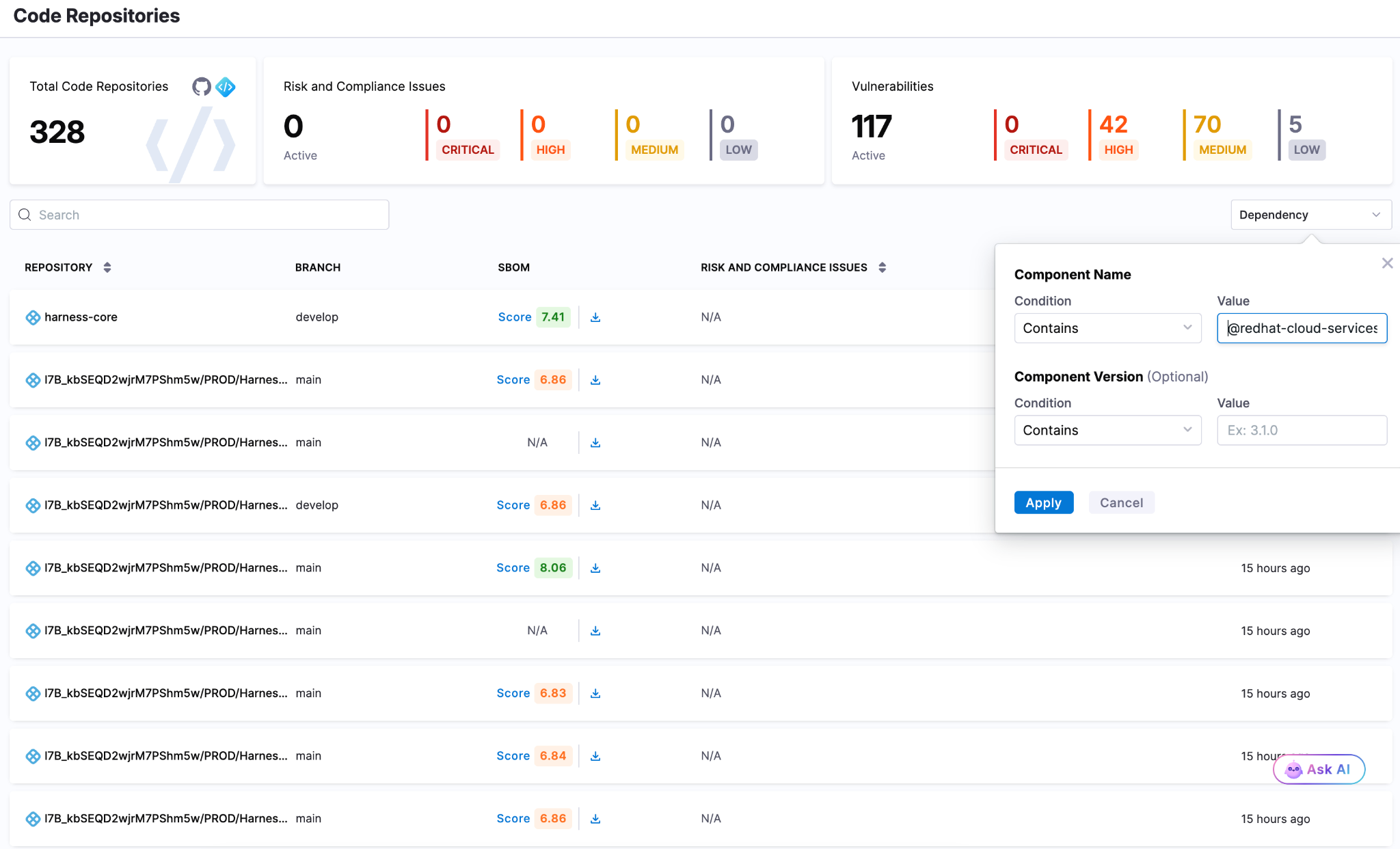
Block Compromised Packages
Harness AI streamlines response to incidents like the redhat-cloud-services package compromise through simple natural-language prompts. With a single prompt, you can generate OPA policies to block affected versions of redhat-cloud-services packages, for example, across all pipelines, preventing malicious packages from entering builds or deployments. As new compromised versions emerge, these policies can be quickly updated to maintain strong preventive controls across your SDLC.
Harness SCS automatically detects compromised versions across both production and non-production environments. Teams can track remediation, assign fixes and monitor progress through to deployment, ensuring exposed credentials and vulnerable dependencies are addressed quickly. This end-to-end visibility helps contain the impact and prevents compromised packages from persisting in your supply chain.
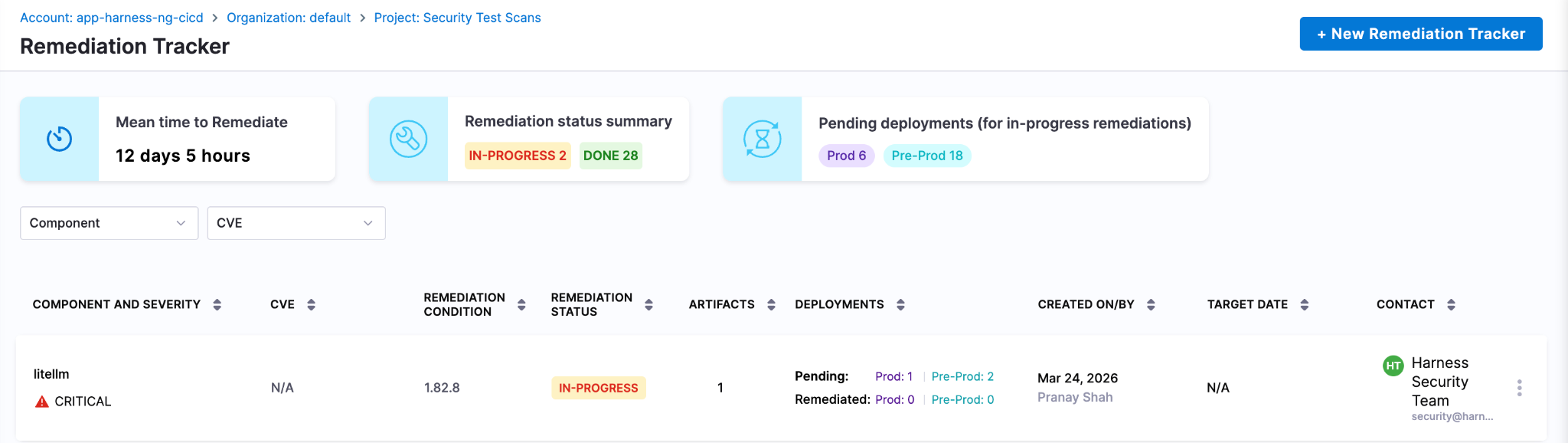
Next Steps In The Face Of Supply Chain Attacks
The Mini Shai-Hulud worm highlights how quickly a malicious package can expose high-value secrets when embedded deep within registries and CI runners. Given its role in managing dependencies and packages across projects, the impact extends beyond code to API keys, prompt data and downstream systems, often bypassing traditional security checks.
Defending against such attacks requires more than reactive fixes. Teams need real-time visibility into dependencies, the ability to enforce policies to block compromised versions and continuous tracking to ensure remediation is complete across all environments. Harness SCS enables teams to quickly identify where affected package versions are used, prevent them from entering new builds and ensure fixes are consistently rolled out.
With these controls in place, organizations can limit credential exposure, contain threats early and secure their supply chain against attacks like the redhat-cloud-services compromise.