Most CI tools use global build counters, causing confusion. Learn how Harness solves this with branch-scoped build numbers.

You're tagging Docker images with build numbers.
-Build #47 is your latest production release on main. A developer pushes a hotfix to release-v2.1, that run becomes build #48.
-Another merges to develop, build #49. A week later someone asks: "What build number are we on for production?" You check the registry.
-You see #47, #52, #58, #61 on main. The numbers in between? Scattered across feature branches that may never ship. Your build numbers have stopped telling a useful story.
That's the reality when your CI platform uses a single global counter. Every run, on every branch, increments the same number. For teams using GitFlow, trunk-based development, or any branching strategy, that means gaps, confusion, and versioning that doesn't match how you actually ship.
Branch-scoped versioning has been a long-standing gap in CI tooling.
Build numbers should reflect release reality—not CI activity.
Harness CI makes that possible as a first-class capability: no scripts, no plugins, no workarounds.
TL;DR: Harness CI now supports branch-scoped build sequence IDs via <+pipeline.branchSeqId>.
Each branch gets its own counter. No gaps. No confusion.
Why Global Build Counters Break Down
Most CI platforms give you one incrementing counter per pipeline. Push to main, push to develop, push to a feature branch, same counter. So you get:
- Gaps in the sequence for any given branch (e.g. main might have #1, #4, #7).
- No clear answer to "what's the latest build on main?"
- Semantic versioning and artifact naming that don't line up with branch reality.
- Registries and artifact stores full of numbers that don't map to how you release.
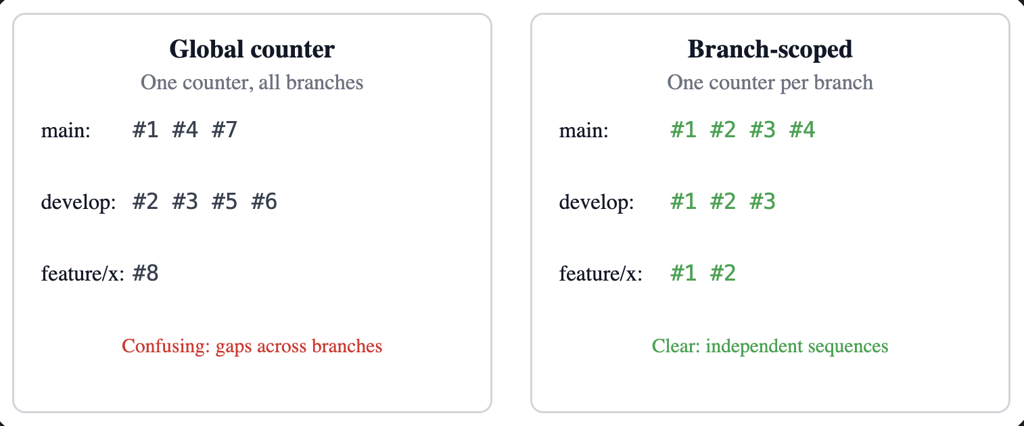
This is now built directly into Harness CI as a first-class capability.
What It Feels Like in Practice
Add <+pipeline.branchSeqId> where you need the number—for example, in a Docker build-and-push step:
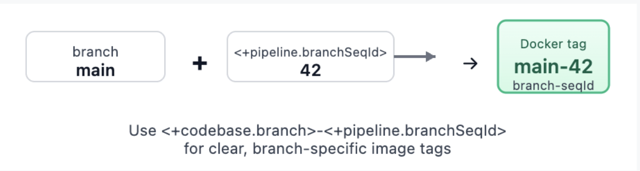
Trigger runs on main, then on develop, then on a feature branch. Each branch gets its own sequence: main might be 1, 2, 3… develop 1, 2, 3… feature/x 1, 2. Your tags become meaningful: main-42, develop-15, feature-auth-3. No more guessing which number belongs to which branch.
What You Get
- Per-branch counters – One sequence per pipeline + repo + branch, stored and incremented atomically.
- Pipeline expression –
<+pipeline.branchSeqId>. Check out Harness variables documentation. - REST API – List sequences for a pipeline, get the current value for a branch/repo, reset a branch counter, or set it to a specific value (for example, after a major release or when migrating from another CI).
- Consistent identification – Repo URLs and branch names are normalized (for example, refs/heads/main → main, different URL forms to one canonical host/owner/repo). Same logical branch and repo always share the same counter.
- Cleanup – When a pipeline is deleted, its branch-sequence data is removed so you don't leave orphaned counters.
Webhook triggers (push, PR, branch, release) and manual runs (with branch from codebase config) are supported. For tag-only or other runs without branch context, the expression returns null so you can handle that in your pipeline if needed.
How It Works Under the Hood

Branch and repo are taken from the trigger payload when possible (webhooks) or from the pipeline's codebase configuration (for example, manual runs). We normalize them so that the same repo and branch always map to the same logical key: branch names get refs/heads/ (or similar) stripped, and repo URLs are reduced to a canonical form (for example, github.com/org/repo). That way, whether you use https://..., git@..., or different casing, you get one counter per branch.
The counter is stored and updated with an atomic increment. Parallel runs on the same branch still get distinct, sequential numbers. The value is attached to the run's metadata and exposed through the pipeline execution context so <+pipeline.branchSeqId> resolves correctly at runtime.
Putting It to Work
- Docker image tagging: use
<+pipeline.branchSeqId>and optionally <+codebase.branch>-<+pipeline.branchSeqId> for clear, branch-specific tags. - Helm chart versioning: e.g. --version 1.0.
<+pipeline.branchSeqId> --app-version <+codebase.commitSha>so the chart version tracks the build number and the app version tracks the commit. - Release notes or deployment labels: for example, "Release Build #
<+pipeline.branchSeqId>" so production and staging each have a clear, branch-local build number.
For teams that need control or migration support, branch sequences are also manageable via API:
All of this is gated by the same feature flag so only accounts that have adopted the feature use the APIs.
Try It (With Smart Guardrails)
- Enable the feature – Turn on
CI_ENABLE_BRANCH_SEQUENCE_ID(Account Settings → Feature Flags, or Reach out to the Harness team). - Use the expression – Add
<+pipeline.branchSeqId>in steps, tags, or env vars. - Verify – Run the pipeline on two or three branches and confirm each branch has its own 1, 2, 3…
If branch context isn't available, the expression returns null. Design your pipeline to handle that (for example, skip tagging or use a fallback) for tag builds or edge cases.
✅ Recommendation: Try it with a non-production pipeline first. Confirm that each branch gets its own sequence and that your tags or version strings look right. Then roll it out to production pipelines with confidence.
Feature availability may vary by plan. Check with your Harness account or Harness Developer Hub for your setup.
How Other CI Platforms Handle This (Spoiler: Most Don't)
This isn't just a Harness problem we solved—it's an industry gap. Here's how major CI platforms compare:
Platform | Native Per-Branch Sequence | What you Actually Get |
|---|---|---|
Harness | ✅ | <+pipeline.branchSeqId> — zero config, atomic counters, full API |
Jenkins | ~ | Multibranch jobs have per-branch numbers, but isolated, each starts at 1, no coordination |
GitHub Actions | ✗ | github.run_number is global. Workaround: third-party actions with Git tag storage (race conditions possible) |
GitLab CI | ✗ | CI_PIPELINE_IID is project-wide, not branch-scoped. Feature requested since 2017, still not implemented |
CircleCI | ✗ | CIRCLE_BUILD_NUM increments per job, not per pipeline (5 jobs = 5 increments per build) |
Bitbucket Pipelines | ✗ | Repository-wide counter by design. No per-branch option |
Azure DevOps | ✅ | counter(prefix, seed) works, but requires YAML setup per use case |
Most platforms treat build numbers as an afterthought. Harness CI treats them as a first-class versioning primitive. For teams migrating from Jenkins or Azure DevOps, the model will feel familiar. For teams on GitHub Actions, GitLab, or CircleCI, this fills a gap that previously required external services or custom scripts
What's Coming
This is the first release of branch-scoped sequence IDs. The foundations are in place: per-branch counters, expression support, and APIs. We're not done.
We're listening. If you use this feature and hit rough edges—or have ideas for tag-scoped sequences, dashboard visibility, or trigger conditions—we want to hear about it. Share feedback .