Well-designed agent infrastructure isn't about building smarter tools. It's about building fewer, more composable ones that keep the context window free for reasoning.

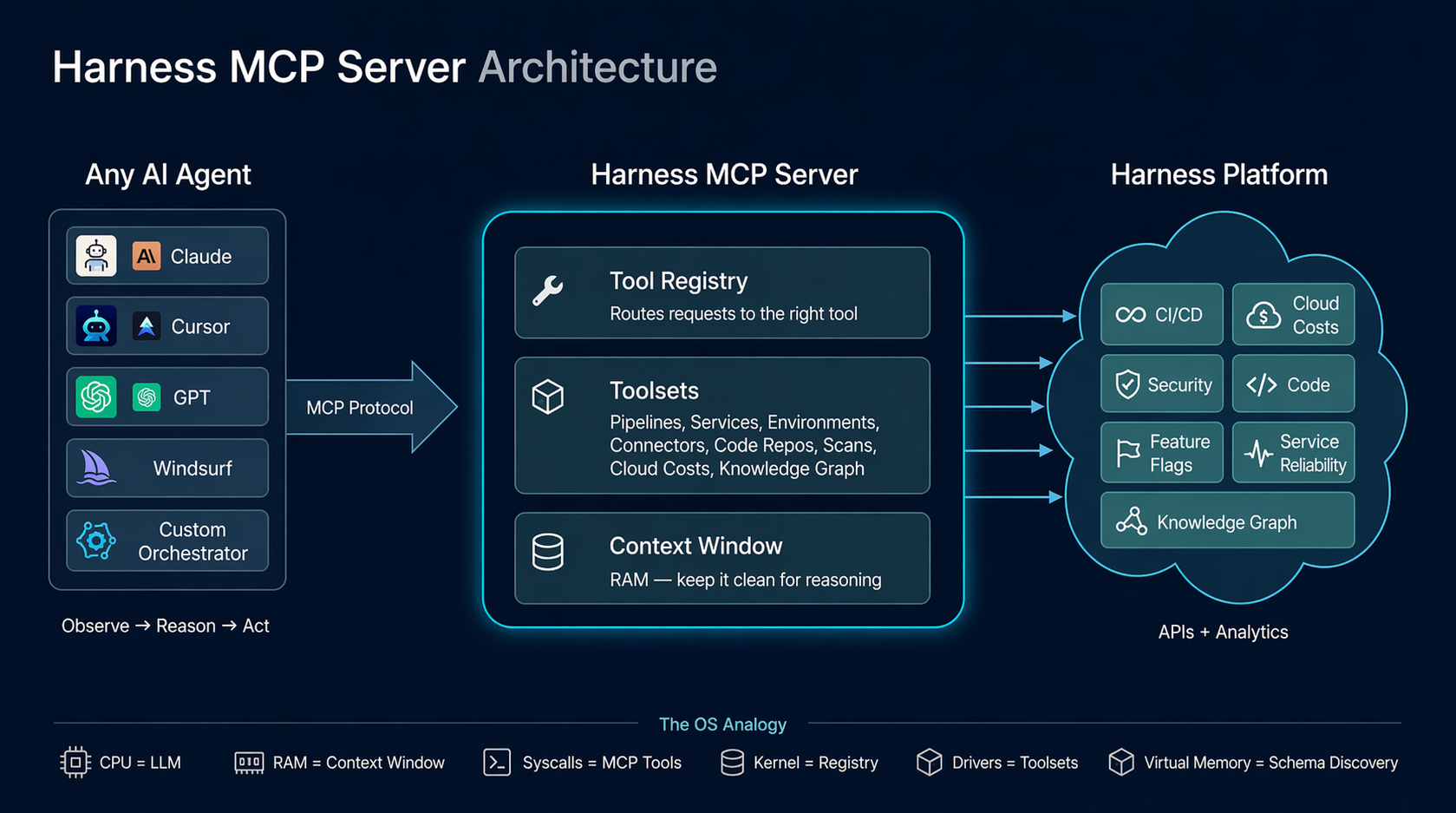
The design of the Harness MCP (Model Context Protocol) server is driven by a pattern that keeps reappearing across systems that scale well: small, stable interfaces with most of the complexity pushed behind a dispatch layer. The central idea is this: the agent loop behaves like an operating system boundary. The LLM is the reasoning engine, the context window is working memory, tool calls act like syscalls, and the MCP server serves as a kernel that mediates access to underlying systems. This isn’t a literal equivalence, but it’s a useful design lens. It forces you to think in terms of memory pressure, interface stability, and clean I/O contracts.
We built the Harness MCP server to make Harness agent-native. In practice, that means exposing the platform through a runtime-discoverable, schema-driven interface that agents can inspect, select from, and compose without hardcoded knowledge of the domain. Today, that interface consists of 10 generic tools that dispatch to 30 toolsets covering 140+ resource types across the platform, along with 57 Knowledge Graph views for cross-module analytics.
Those numbers matter less than the constraint behind them: tool count stays constant while capability scales through data and dispatch. The goal is to keep the agent’s context focused on reasoning, not on parsing a large menu of endpoints.
Before getting into the architecture, though, it’s worth asking a simpler question: why does Claude feel so capable when you give it nothing more than a bash shell?
Why Claude Feels Powerful with Just Bash
The Contrast
Give Claude access to a terminal. Just bash. No APIs, no SDKs, no custom tools. It can navigate an unfamiliar codebase, find a bug across 50 files, refactor code, run tests, and commit end-to-end.
Now give an LLM access to a hundred perfectly-documented REST endpoints. It gets confused by the tool count, picks the wrong endpoint, and loses track of multi-step operations.
The difference isn't the tools themselves. It's the shape of the interface. The point isn’t that shell text streams are superior to structured APIs, but that agents perform better with interfaces that have a small, consistent grammar and are easy to compose.
What Makes Bash Work
Bash provides three properties that matter enormously for agent reasoning:
Composability. Every Unix tool does one thing and communicates through a uniform interface: text streams. grep | sort | uniq -c | head is four tools composed into an analytical pipeline. The agent doesn't need to know about a special "count-unique-matches" API. It composes primitives.
Uniform interface. Every tool takes text in and produces text out. There's no per-tool protocol, no per-tool authentication, no per-tool response schema. The contract is always the same: stdin, stdout, and exit code.
Introspection. ls, find, file, cat, head — the agent can discover what exists at runtime. It doesn't need to memorize the file system layout. It explores, then acts.
These three properties mean the agent doesn't need to hold 200 tool schemas in its context window. It learns a small set of verbs and composes them. The intelligence isn't in any single tool. It's in the loop that decides what to call next.
The Deeper Insight
Watch what actually happens when Claude debugs with bash:
1. Observe: ls src/ → see the project structure
2. Hypothesize: "error likely in auth module"
3. Act: grep -r "token" src/auth/
4. Observe: see the grep output
5. Refine: "ah, token expiry not handled"
6. Act: cat src/auth/session.ts
7. Observe: read the file
8. Fix: edit the file
9. Verify: npm test
This is not "call the right API." This is a reasoning loop — observe, hypothesize, act, verify. The bash commands are just I/O. The reasoning happens between them.
This loop is the program. The tools are the I/O. And the design of the tools determines how efficiently the loop can run.
The Agent Loop — What's Actually Happening
The Event Loop
Every agent, whether it's Claude in a terminal, Cursor with MCP tools, or a custom orchestrator, runs some version of this loop:
while (!task_done) {
context = observe(environment) // tool outputs, previous results
plan = reason(context, goal) // LLM inference
action = select_tool(plan) // tool selection
result = execute(action) // tool call
environment.update(result) // state change
}
This is an event loop. The LLM is the scheduler (the scheduling behavior is an emergent property of the loop, not an intrinsic property of the LLM). The tools are I/O operations. The context window is working memory. Each iteration, the agent observes the current state, reasons about what to do next, selects a tool, executes it, and incorporates the result into its context.
Where the Intelligence Lives
The critical insight: the intelligence is in the loop, not in the tools. The tools just move information in and out. The loop is what plans, backtracks, retries, composes, and converges.
This means the quality of the agent's output depends on two things:
- The loop's ability to reason, which is a function of the LLM's capability and the available context
- The quality of I/O, which is a function of tool design (clear, structured, context-efficient)
If the tools are well-designed (few, composable, self-describing, context-efficient), the loop can reason clearly. If the tools are poorly designed (many, verbose, opaque), the loop spends its context budget parsing menus and payloads instead of thinking.
The MCP Server's Role
Our MCP server does not implement the agent loop. The loop lives in the MCP host: Cursor, Claude Desktop, or whatever IDE/agent framework the user is running. Our server is stateless at the request level: each tool call arrives as a JSON-RPC message, runs an async handler, and returns a structured response. Task-level state lives in the MCP host and in the underlying Harness systems.
We implement the kernel that the loop dispatches into. Our job is to make each dispatch fast, clean, and context-efficient.
Systems That Just Click: We've Seen This Pattern Before
Before drawing the OS analogy, it's worth stepping back. The properties that make bash work for agents, composability, uniform interface, and runtime discovery, aren't unique to Unix. They show up in every long-lived system that engineers describe as "just working."
Linux: The syscall ABI has been stable for decades. The VFS (Virtual File System) is a dispatch table: open(), read(), write(), close() work against ext4, NFS, procfs, sysfs, and any backend. New filesystem? Write a driver, load it at runtime. The interface never changes. /proc and /sys let the kernel describe itself through runtime introspection.
Git: Content-addressable blobs plus a handful of verbs. Branches are just pointers. The plumbing/porcelain split gives you a tiny, stable core with everything else built through composition. The transport protocol is uniform: push/fetch work the same over HTTP, SSH, or a local filesystem.
Kubernetes: Declare desired state. Controllers reconcile. kubectl get, apply, describe work on any resource kind: Pods, Services, your custom CRDs. New capability = new CRD, not a new CLI.
SQL: Small grammar: SELECT, JOIN, WHERE, GROUP BY. Works against any schema. The engine optimizes. You declare intent. The grammar has been stable for 40 years.
The Shared DNA
These systems share five properties:
- Small, stable interface: few verbs, many nouns
- Uniform contract: same interaction pattern regardless of backend
- Runtime discovery: the system describes itself
- Dispatch layer: a central mechanism that routes requests to domain-specific handlers
- Extend without changing the core interaction model: new capabilities don’t require changing the existing interface.
This is the design target for agent infrastructure.
The Gap in REST: What MCP Had to Fill
REST APIs answered two questions well:
- WHAT: what resources exist (/pipelines, /services, /executions)
- HOW: how to operate on them (GET, POST, PUT, DELETE)
For programs, code written by humans who already understood the domain, this was enough.
The developer read the docs, wrote the integration, and deployed it. The logic was pre-written.
An agent encounters your API at runtime, with no prior knowledge. It needs a third answer:
WHY:
- Why would I use this tool?
- What does it return?
- When should I prefer it over another tool?
- What are the side effects?
This "why" lived in documentation, READMEs, and developers' heads. It was never machine-readable. MCP fills this gap by making tools carry their own intent — descriptions, hints (readOnlyHint, destructiveHint), schemas, and metadata that the agent reads at runtime to decide what to call.
The difference between REST and MCP isn't the transport. It's the audience. REST APIs are typically optimized for pre-written integrations. MCP tool surfaces are optimized for runtime selection and composition by an agent.
The OS Analogy: A Systems Engineer's Guide to Agent Platforms
The mapping between operating systems and agent platforms is more than metaphorical — parts of it are structural, and the rest provide a useful design vocabulary. The same engineering constraints apply, and the same design principles solve them.
The Full Mapping
| OS Concept | Agent Equivalent | Why It Matters |
|---|---|---|
| CPU | LLM (reasoning engine) | The compute unit that processes instructions |
| RAM | Context window (128K-200K tokens) | Finite working memory; everything the agent can "see" |
| Syscalls | Tool calls (MCP tools) | Structured interface between user-space and kernel |
| Kernel | MCP server / agent harness | Manages resources, enforces policy, abstracts hardware |
| File system | Knowledge graph / data layer | Persistent structured storage the agent can query |
| Device drivers | Resource definitions (toolsets) | Per-device adapters that the kernel loads |
| Process scheduler | Agent loop (plan → act → observe) | Decides what runs next |
| Virtual memory | Schema discovery (demand paging) | Load metadata on demand, not all upfront |
| IPC | Tool chaining (output of one → input of next) | Communication between logical operations |
| Access control | AuthZ, read-only mode, scope enforcement | Who can do what |
Context Is RAM
This is the most important mapping, and it has direct engineering consequences.
The context window is finite. Every token you put in is a token that can't be used for something else. Verbose API responses, unnecessary fields, large tool schemas: these are all memory allocations. If you fill the context with data, the agent can't reason.
The OS parallels are precise:
| OS Problem | Agent Problem |
|---|---|
| Memory thrashing | Context full of raw JSON payloads — agent re-reads the same data repeatedly |
| Page faults | The agent needs information that it has already evicted from context |
| Memory leaks | Tool outputs that grow unbounded (e.g., unpaginated list results) |
| OOM kill | Context overflow → model starts hallucinating or losing coherence |
| Cache misses | The agent can't find previously retrieved data in its context |
The #1 job of an agent platform is to keep the context window clean for reasoning. Every architectural decision should be evaluated through this lens: does this consume more or less of the context budget?
Syscalls, Not Raw I/O
Programs don't write directly to disk. They call write(), and the kernel handles buffering, permissions, journaling, and device-specific quirks. This abstraction is what makes programs portable and reliable.
The same applies to agents. An agent shouldn't construct HTTP requests with auth headers, manage pagination cursors, handle retry backoff, or parse nested response wrappers. It should call a tool — a syscall — and the MCP server (the kernel) handles all of that.
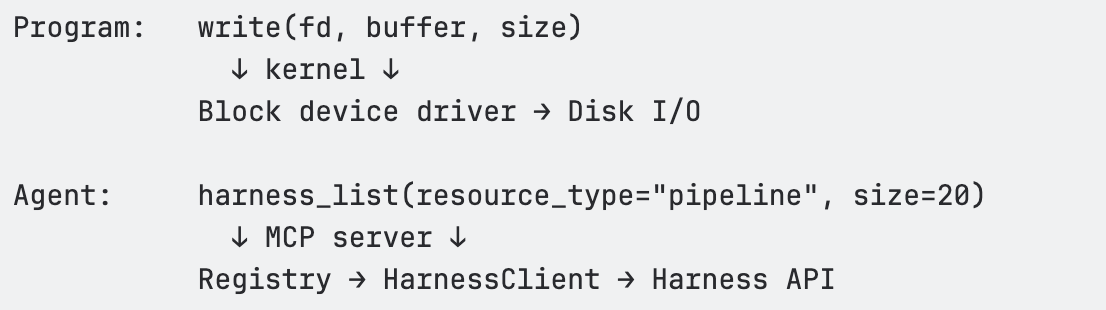
The tool is the syscall. The MCP server is the kernel. Same contract every time. The agent never has to think about x-api-key headers, accountIdentifier query parameters, or exponential backoff on HTTP 429.
Virtual Memory = Schema Discovery
An OS doesn't load every file into RAM upfront. It uses virtual memory — a large address space backed by on-demand paging. Hot pages stay in RAM; cold pages live on disk until needed.
Our MCP server applies the same pattern to domain knowledge. The agent's "address space" covers 140+ resource types. But at any given moment, only the relevant metadata occupies context:
- Need pipeline fields? → harness_describe(resource_type='pipeline') loads ~500 tokens
- Need execution details? → harness_describe(resource_type='pipeline_execution') loads ~3K tokens of type catalog
- Need pipeline schema? → harness_schema(resource_type=’pipeline’), loaded only when constructing pipeline, and enables progressive discovery
This is demand paging for domain knowledge. The agent discovers what it needs, when it needs it, and the rest stays "on disk" (available but not occupying context).
Our Architecture Through This Lens
The Three-Layer Stack
The MCP server has three layers, each corresponding to a layer in the OS model:
┌────────────────────────────────────────────────────┐
│ MCP Tool Surface │
│ harness_list · harness_get · harness_execute │
│ harness_create · harness_update · harness_delete │
│ harness_describe · harness_schema · harness_diagnose │
│ harness_search │
│ (~10 tools — the "syscall table") │
├────────────────────────────────────────────────────┤
│ Registry │
│ Dispatch by (resource_type, operation) → executeSpec() │
│ Path building · Scope injection · Auth · Pagination │
│ Body building · Response extraction · Deep links │
│ Read-only enforcement · Feature gating │
├────────────────────────────────────────────────────┤
│ HarnessClient │
│ HTTP fetch with retry (429/5xx) · Rate limiting │
│ Auth header injection · Timeout handling │
│ The "block device driver" — raw HTTP I/O │
└────────────────────────────────────────────────────┘
Layer 1 — MCP Tool Surface (syscall table). Ten generic tools that accept a resource_type parameter and dispatch through the registry. These are registered with the MCP SDK using Zod schemas for input validation. Each tool handler is a thin wrapper: normalize inputs → call registry → format response.
Layer 2 — Registry (kernel). The Registry class in src/registry/index.ts is the core dispatch engine. It holds a Map<string, ResourceDefinition> populated from 30 toolset files. When a tool handler calls registry.dispatch(client, resourceType, operation, input), the registry resolves the ResourceDefinition, looks up the EndpointSpec, and calls executeSpec() — the single execution pipeline that handles path templating, scope injection, query parameter building, body construction, auth header interpolation, HTTP dispatch, response extraction, and deep link generation.
Layer 3 — HarnessClient (block device driver). The raw HTTP client in src/client/harness-client.ts. Handles fetch() with the x-api-key auth header, accountIdentifier injection, retry with exponential backoff on 429/5xx, client-side rate limiting, timeouts, and response parsing.
The Syscall Table
| Tool | Purpose |
|---|---|
| harness_list | List resources by type with filtering and pagination |
| harness_get | Get a single resource by identifier |
| harness_create | Create a new resource |
| harness_update | Update an existing resource |
| harness_delete | Delete a resource (with confirmation) |
| harness_execute | Execute an action: run pipelines, test connectors, run HQL queries |
| harness_describe | Inspect resource type metadata — operations, fields, filters |
| harness_schema | Get the exact JSON body schema for create/update operations |
| harness_diagnose | Debug a failed pipeline execution |
| harness_search | Fuzzy search across all resource types |
The agent learns 10 verbs. They work against every domain in Harness.
Why Tool Count Matters
Every tool the agent "sees" costs tokens:
<table>
<thead>
<tr>
<th>Tool count</th>
<th>Approximate token cost</th>
<th>% of 128K context</th>
</tr>
</thead>
<tbody>
<tr>
<td>10 tools</td>
<td>~1,500 tokens</td>
<td>1.2%</td>
</tr>
<tr>
<td>50 tools</td>
<td>~8,000 tokens</td>
<td>6.3%</td>
</tr>
<tr>
<td>100 tools</td>
<td>~16,000 tokens</td>
<td>12.5%</td>
</tr>
</tbody>
</table>
Our approach keeps this at ~1.2%. Tool count stays O(1). Capabilities grow O(n). This is the core design invariant.
The Dispatch Table (vtable)
The registry is a vtable — a dispatch table that maps (resource_type, operation) to an EndpointSpec and executes it through a unified pipeline. One execution path. Every resource type. Every operation.
Design Patterns
Pattern 1: Generic Verbs + Type Dispatch
Principle: Don't create a tool per API endpoint. Create generic verbs that dispatch by resource type through a registry.
This is the same insight behind REST (uniform interface + varying resources) and Unix (uniform file interface + varying devices). The agent learns the grammar once — list, get, create, execute. New nouns (resource types) are just data in the registry.
Pattern 2: Declarative Over Imperative
Principle: Resource definitions are data structures, not handler functions.
Each API mapping is expressed as an EndpointSpec — a declarative object that describes the HTTP method, path, path parameters, query parameter mappings, body builder, response extractor, and metadata. The registry's executeSpec() reads this spec and handles execution.
This means:
- Auth, retry, pagination, rate limiting, deep links — all handled once in the registry
- New resource types get these behaviors automatically
- Changes to the execution pipeline propagate to every resource type
Pattern 3: Fix Once in the Kernel, Every Driver Benefits
Principle: Centralized dispatch creates compounding returns on infrastructure investment.
Features that propagate everywhere through the registry:
| Feature | Where it lives | What it does |
|---|---|---|
| Header interpolation | executeSpec() | Replaces ${ACCOUNT_ID} in header values with config |
| Read-only enforcement | dispatch() / dispatchExecute() | Blocks writes when HARNESS_READ_ONLY=true |
| Scope injection | executeSpec() | Adds org/project/account query params from config |
| Deep link generation | executeSpec() | Attaches openInHarness URLs to responses |
| Compact mode | harness_list handler | Strips verbose metadata from list items |
| Pagination normalization | executeSpec() | Adjusts 0-indexed page to 1-indexed when needed |
| Retry with backoff | HarnessClient | Retries 429/5xx with exponential backoff |
| Rate limiting | HarnessClient | Client-side rate limit |
| Toolset gating | Registry constructor | HARNESS_TOOLSETS=pipelines,logs enables only selected toolsets |
Pattern 4: Validate Before Execute
Move error detection left. Validate agent-generated inputs before spending API budget on execution.
When an agent tries to create or execute something, validate the inputs before committing. If the agent provides a malformed pipeline YAML or references a nonexistent service, catch it at the schema level — before the API call burns tokens on a 400 error and the agent has to parse the response to figure out what went wrong.
Validation is cheap — milliseconds. Wrong answers are expensive — broken trust, bad decisions. This is compile-time checking for agent-generated operations.
Pattern 5: Runtime Reflection Over Static Documentation
Principle: Let agents discover your domain model at runtime. Self-describing systems don't need documentation updates.
<table>
<thead>
<tr>
<th>What the agent asks</th>
<th>How it discovers</th>
</tr>
</thead>
<tbody>
<tr>
<td>"What resource types exist?"</td>