Learn what Maven is, how it manages Java dependencies and builds, and how private Maven repositories work with Harness Artifact Registry.

TL;DR
Learn More
Today, Maven is more than a build tool, it's a foundation of modern Java development. It integrates naturally with CI/CD pipelines, enabling automated builds, testing, and artifact publishing. By combining Maven with a managed artifact repository like Harness Artifact Registry, teams can maintain better control over their software supply chain while preserving familiar development practices.
Whether you’re building a small Java library or a large enterprise application, Maven provides a structured, repeatable approach to dependency management and builds.
What Is Maven? Java Dependency Management Explained | Harness
What Is Maven?
Maven is a build automation and dependency management tool widely used in the Java ecosystem. It helps developers standardize how projects are built, how dependencies are managed, and how software artifacts are shared across teams. Maven relies on a declarative approach, where project configuration and dependencies are defined in a single file called pom.xml (Project Object Model).
At a basic level, Maven solves a common problem in software development: managing external libraries. Instead of manually downloading JAR files and tracking their versions, Maven automatically resolves, downloads, and organizes dependencies for your project.
If you’ve worked with tools like npm for JavaScript, pip for Python, or NuGet for .NET, Maven serves the same purpose for Java-based applications.
What Is a Maven Artifact?
A Maven artifact is a packaged output of a Java project that can be shared and reused. Common Maven artifacts include:
- JAR files for libraries and applications
- WAR files for web applications
- Maven plugins used during the build process
Each artifact is uniquely identified by:
- Group ID – the organization or project namespace
- Artifact ID – the name of the package
- Version – the specific release of the artifact
Together, these identifiers allow Maven to locate and retrieve the correct dependency from a repository.
Understanding Maven Repositories
Maven repositories are storage locations where artifacts are published and retrieved. There are three main types of repositories in the Maven ecosystem:
Local Repository
This is a directory on your local machine where Maven stores downloaded dependencies and built artifacts. It avoids repeatedly downloading the same libraries.
Remote Repositories
Remote repositories host artifacts that can be shared across teams or publicly. Maven Central is the most well-known public repository.
Private Repositories
Organizations often use private repositories to store internal libraries and control access to proprietary code. Solutions like Harness Artifact Registry can act as private Maven repositories while supporting standard Maven tooling.
How Maven Works
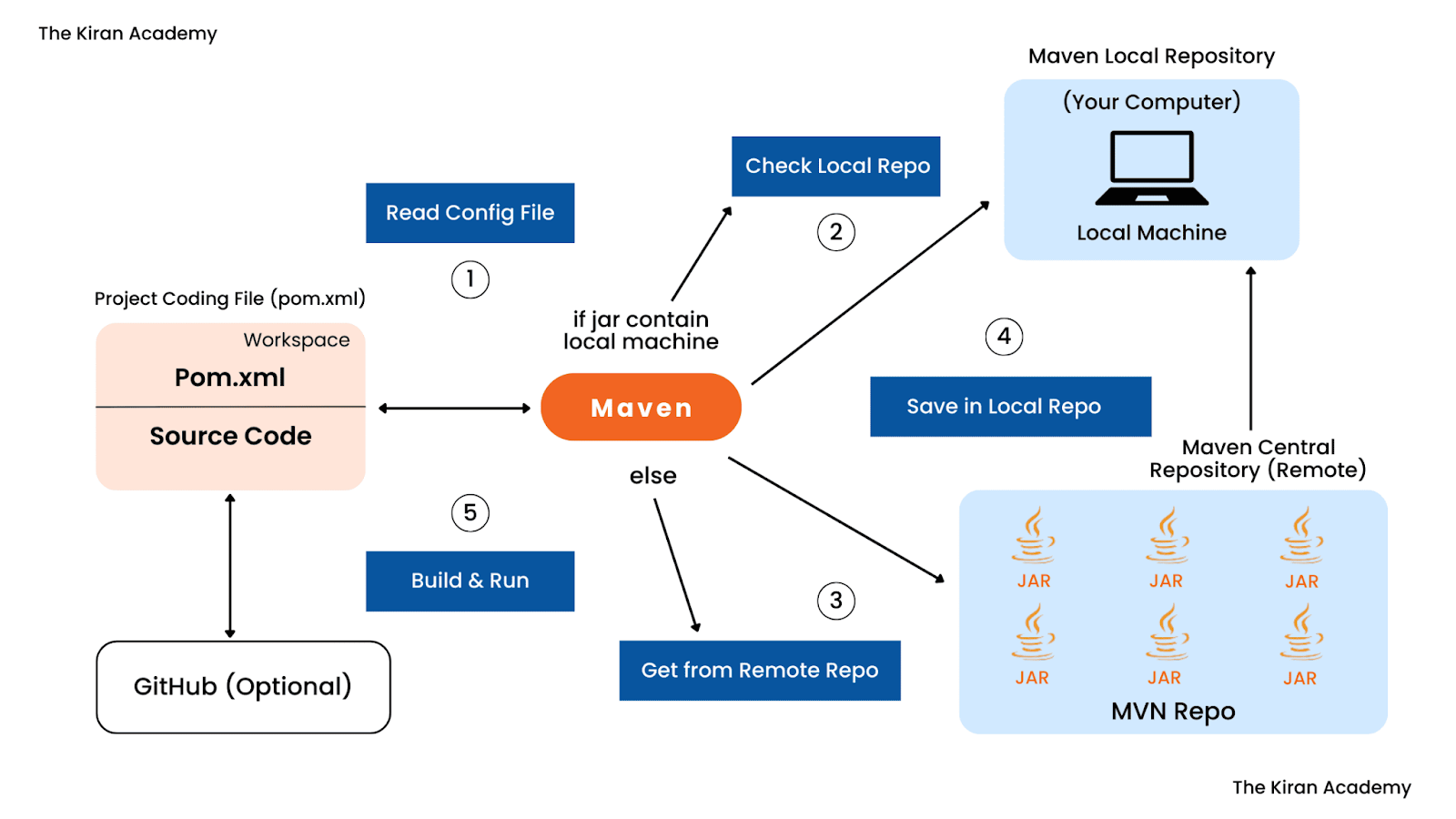
Maven follows a predictable workflow for building and managing Java projects.
1. Defining the Project
The pom.xml file defines:
- Project metadata
- Dependencies and their versions
- Build plugins and lifecycle phases
This declarative configuration ensures consistency across environments.
2. Resolving Dependencies
When a Maven command runs, Maven:
- Checks the local repository for required dependencies
- If missing, queries configured remote or private repositories
- Downloads dependencies and their transitive dependencies automatically
This process removes the need for manual dependency management.
3. Building the Project
Maven uses a standard build lifecycle, which includes phases such as:
- compile – compiles source code
- test – runs automated tests
- package – creates the artifact
- install – installs the artifact into the local repository
- deploy – publishes the artifact to a remote repository
These standardized phases make builds predictable and repeatable.
Using Maven with Harness Artifact Registry
Harness Artifact Registry provides a centralized place to store and manage Maven artifacts. From an educational standpoint, it serves as an example of how private Maven repositories work in practice.
With Harness Artifact Registry, teams can:
- Publish internal Maven artifacts using standard mvn deploy commands
- Pull dependencies using existing pom.xml configurations
- Proxy public repositories like Maven Central to cache external dependencies
Because it supports Maven’s native repository format, developers don’t need to learn new tools or workflows.
Why Private Maven Repositories Matter
Using a private Maven repository offers several advantages:
- Consistency: Teams rely on approved versions of dependencies
- Security: Access to internal artifacts is restricted
- Reliability: Builds do not depend entirely on external services
- Performance: Cached dependencies reduce build times
These benefits become increasingly important as applications and teams scale.