Learn how Harness MCP OAuth proxy mode enables enterprise developers to use their own identity provider without static tokens or shared credentials.

TL;DR
OAuth proxy mode lets enterprises run Harness MCP behind their own identity provider, with no static tokens anywhere in the chain.
Coding agents write the change. Harness agents take it through production, running the builds, tests, scans, and deployments that follow, with policy enforced on every action.
The Harness MCP server provides coding agents with the software delivery context. You can run it in the Harness cloud or host it yourself. For large enterprises, hosting it yourself was the hardest part.
This post covers the problem we kept running into and the mode we built to solve it.
The token problem
Here is how most self-hosted MCP setups used to work. Someone creates a Harness personal access token (PAT) or a service account token, stores it in a config file or a secret, and points the MCP server at it. Every agent request includes that token.
That is quick to set up, and it is fine for a demo. In a real engineering org, it causes trouble:
- The tokens last a long time: PATs do not expire unless you set an expiry, so a leaked one keeps working until someone notices. Somewhere out there is a token named temp-do-not-use that just turned three.
- They end up everywhere: Dotfiles, IDE settings, CI secrets, a .env someone committed by accident. It is the spare key under the doormat, and everyone knows which doormat.
- They get shared: One token gets copied to five laptops and a pipeline, and there is no clean way to revoke just one session.
- The audit trail breaks: When a team shares a service account, every action in Harness looks like it came from that one account. RBAC cannot tell the intern from the release manager, and neither can the audit log.
Now put an AI agent on the other end of that token. The agent reads untrusted text all day and decides what to call next. Handing it a long-lived, shared credential is like giving a very eager new hire the master key on day one and asking them to please only open the supply closet.
Why our first OAuth mode was not enough
We had already shipped an OAuth mode for the MCP server. Users signed in with HarnessID, got a short-lived token, and sent it with every request. No PATs. For many organizations, that solved it.
Then we worked with a large financial services company that runs an internal MCP registry. Every MCP server listed there has to authenticate through the company's own identity provider. That is the only way in. The registry does not trust any outside identity provider, and that includes HarnessID. Highly regulated organizations are not known for making exceptions.
So the only token their agents and IDEs could bring was one from their own identity provider. And Harness cannot do anything with that token. Harness APIs understand HarnessID tokens. Showing them anything else is like paying for coffee in a currency the cafe has never heard of.
That left them two options, and neither one worked:
1. Fall back to a PAT or service account token on the server, with all the problems mentioned above.
2. Leave Harness out of their AI developer platform. (We did not love this one either.)
We needed a third option.
Bring your own identity provider
The idea behind OAuth proxy mode is simple. Let the customer's identity provider guard the MCP server, and let HarnessID guard Harness. The MCP server sits in the middle and connects the two, one user at a time.
Think of a hotel with its own front desk. Guests check in at the desk with their own ID. Then the hotel hands them a room key that only opens their room. Guests never carry a master key, and the hotel always knows whose key opened which door. Nobody's minibar shows up on someone else's bill.
In this setup, the customer's identity provider is the ID check. HarnessID issues the room key. The MCP server is the front desk, and it holds the key for the guest.
How it works
The first sign-in
1. A developer connects their IDE or agent to the MCP server. The server replies that it needs a sign-in and points the client to its built-in OAuth broker.
2. The broker sends the developer to the company's identity provider. They sign in the way they always do.
3. Next, the broker sends them to HarnessID through the normal Harness login page. HarnessID federates that login to the same company identity provider, so it is usually one click. This step links the company identity to the developer's Harness user.
4. The MCP server receives the developer's HarnessID tokens and stores them encrypted on the server side.
5. The IDE gets back a token from the company's identity provider, plus a refresh token issued by the broker. It never sees a Harness token.
Here is the whole dance on one page:
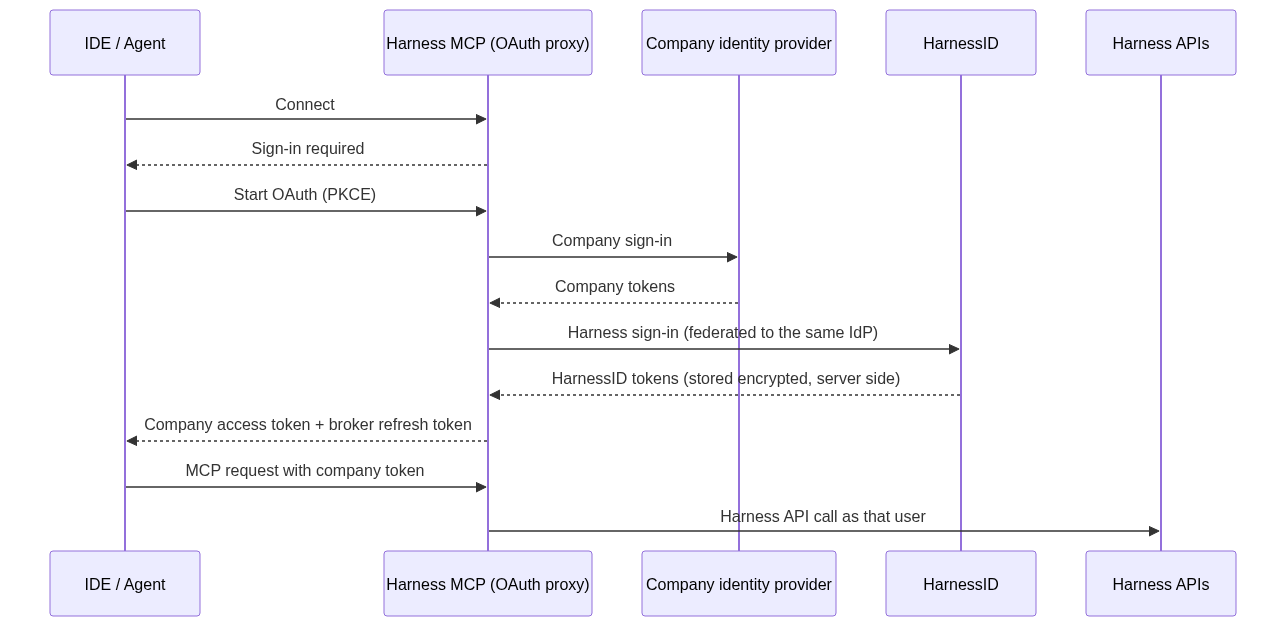
OAuth proxy mode sign-in and request flow
Every request after that
- The IDE sends the company token with each MCP request.
- The server checks that token's signature, issuer, audience, and expiry before anything else happens.
- It looks up that user's HarnessID token. If the cached one is still valid, it uses it. If the token is within a minute of expiring, it renews it with the stored refresh token first. Nobody gets kicked out mid-deploy because a token picked a bad moment to retire.
- It calls Harness with that user's own HarnessID token.
If anything along the way does not match up, such as a missing link or a refresh token HarnessID has revoked, the server returns 401 and the developer signs in again. It never falls back to a shared credential, no matter how politely the agent asks.
What this changes for security
| Before | With OAuth proxy mode |
|---|---|
| A PAT or service account token sits on the server or the laptop | No Harness credential on the developer's machine |
| Tokens last until someone revokes them | HarnessID access tokens are short-lived and renewed on the server |
| One shared identity in the audit log | Every Harness call runs as the real user |
| Revoking access means hunting down copies of a token | Disable the user in the company identity provider or in Harness, and access ends at the next refresh |
| Any client with the token can call Harness | Clients must present a valid token from the company's own identity provider |
A few more details for the security reviewers. (We know you scrolled straight here. That is fine. We would have too.)
- PKCE on every leg: The IDE's sign-in, the identity provider sign-in, and the HarnessID sign-in each use their own state and S256 PKCE values.
- Secrets stay on the server: The confidential client secrets for the identity provider and HarnessID never leave the MCP server.
- The client never holds the upstream refresh token: The IDE gets an opaque refresh token from the broker. The broker only accepts refresh tokens it issued itself.
- Encrypted storage: Refresh tokens are encrypted with AES-256-GCM, and each record is cryptographically bound to the user it belongs to. Swapping one stored record for another makes decryption fail.
- Tight redirects: The broker only sends authorization codes to callback URLs that are explicitly allowed.
- Linking is strict: The Harness user has to match the company identity's subject. An email only counts when the identity provider marks it verified and its domain is on an allowlist.
- Built for more than one pod: The encrypted vault can live in Redis over TLS, so several server pods share the same sign-ins.
Key takeaways
- Static tokens were the price of self-hosting: Until now, a self-hosted Harness MCP server needed a personal access token or a service account token to talk to Harness. Regulated organizations do not want long-lived secrets sitting behind AI agents, and many of them will not allow it.
- Our first OAuth mode helped, but it did not go far enough for everyone: It removed the static tokens. It also required clients to bring a HarnessID token, and some enterprises only allowed their own identity provider in front of internal resources.
- OAuth proxy mode lets you bring your own identity provider: The MCP server accepts your identity provider's token, signs the user into HarnessID behind the scenes, and calls Harness as that user.
- Every call has a real person behind it: Harness RBAC applies to the actual user, and audit logs show who did what. Developer machines never hold a Harness credential.
Your coding agents can now reach Harness as the developer who signed in, through your own identity provider. To see what they can do once connected, read how we redesigned the Harness MCP server. To enable OAuth proxy mode, contact the Harness support team.
