See 60+ Harness updates from May 2026 across measuring AI ROI, AI-native development, software delivery, and security.

AI coding tools promise faster development. What they don't show you is the queue forming at the pipeline, the security scanner you bypassed to stay fast, or the cost dashboard with a line now labeled "unknown" that is steadily growing. In May, we shipped 60+ features in 31 days across the entire delivery system: not just the editor, but everything downstream of it.
May Highlights
- Measuring AI investment with two extremely relevant capabilities: AI spend finally has a home in your cost dashboard, and AI adoption finally has a metric. Cloud and AI Cost Management now tracks AI infrastructure as a first-class spend category alongside traditional cloud costs. AI DLC Insights now correlates AI assistant adoption against the productivity outcomes it is supposed to drive. Read the announcement.
- Harness landed in the Claude Connectors Directory, giving Claude users direct access to pipelines, builds, deployments, security scans, and approvals from inside the Claude interface. Read the announcement.
AI-Native Development: MCP at Pace
Software Delivery Intelligence, Now Inside Claude (Code and Desktop)
The Harness MCP Server is now in the official Claude Connectors Directory. Developers using Claude can now discover and connect to Harness, gaining structured, real-time access to their pipelines, deployments, approvals, and delivery workflows. What makes this different from a typical API integration is what's underneath: the Harness Software Delivery Knowledge Graph, which gives Claude the context it needs to make decisions that are accurate, fast, and safe.
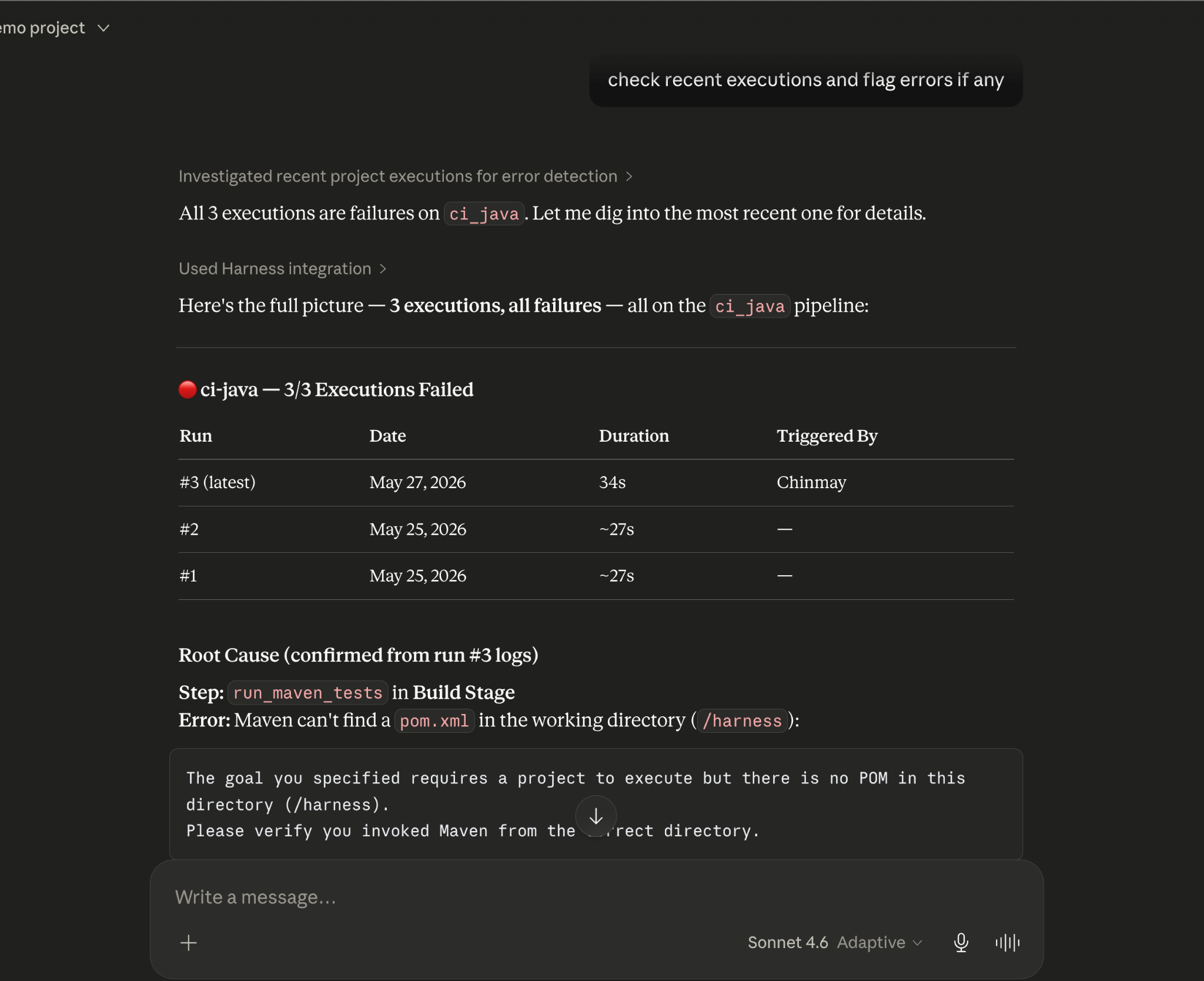
The MCP Server in May: From Early Access to Production-Ready
Our MCP Server is evolving fast! Seven releases across 31 days. The month started with control and safety work: configurable autonomy levels, per-session trust boundaries, human-in-the-loop execution waits, six CVEs patched, and guardrails around destructive operations. It ended with expanded reach: IaCM workspaces, full DBSchema CRUD for database operations, Ansible support, and GPT app readiness with structured output and tool annotations. If you are building agentic pipelines on top of Harness, or want your AI coding assistant to drive deployments, infrastructure changes, and database schemas without leaving the IDE, this is the server to connect to. Read the docs.
Skills Library
A curated library of skills distills common prompt patterns from internal usage into structured instruction files. The library includes security-specific skills and is packaged for use with the MCP Server, Claude Code, Cursor, and GitHub Copilot. The model follows the skill; the engineer describes what they want. Read the docs.
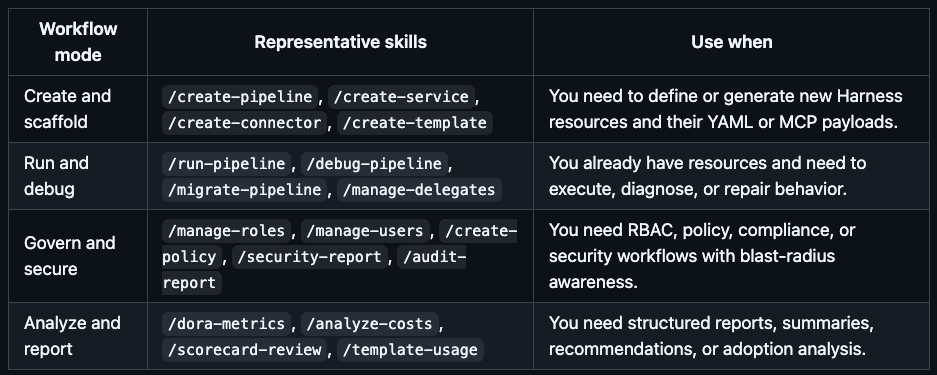
Google Code Wiki and Deepwiki Integration
The Harness MCP server is now indexed by Google Code Wiki and Deepwiki (Cognition/Windsurf). Devin and Windsurf users can analyze the MCP server architecture and ask questions about it directly. The Code Wiki updates automatically from commits.
Know What Your AI Is Doing and Keep AI Secure
AI APIs, MCP tools, and models are now first-class assets in the platform, not afterthoughts in a traditional API inventory.
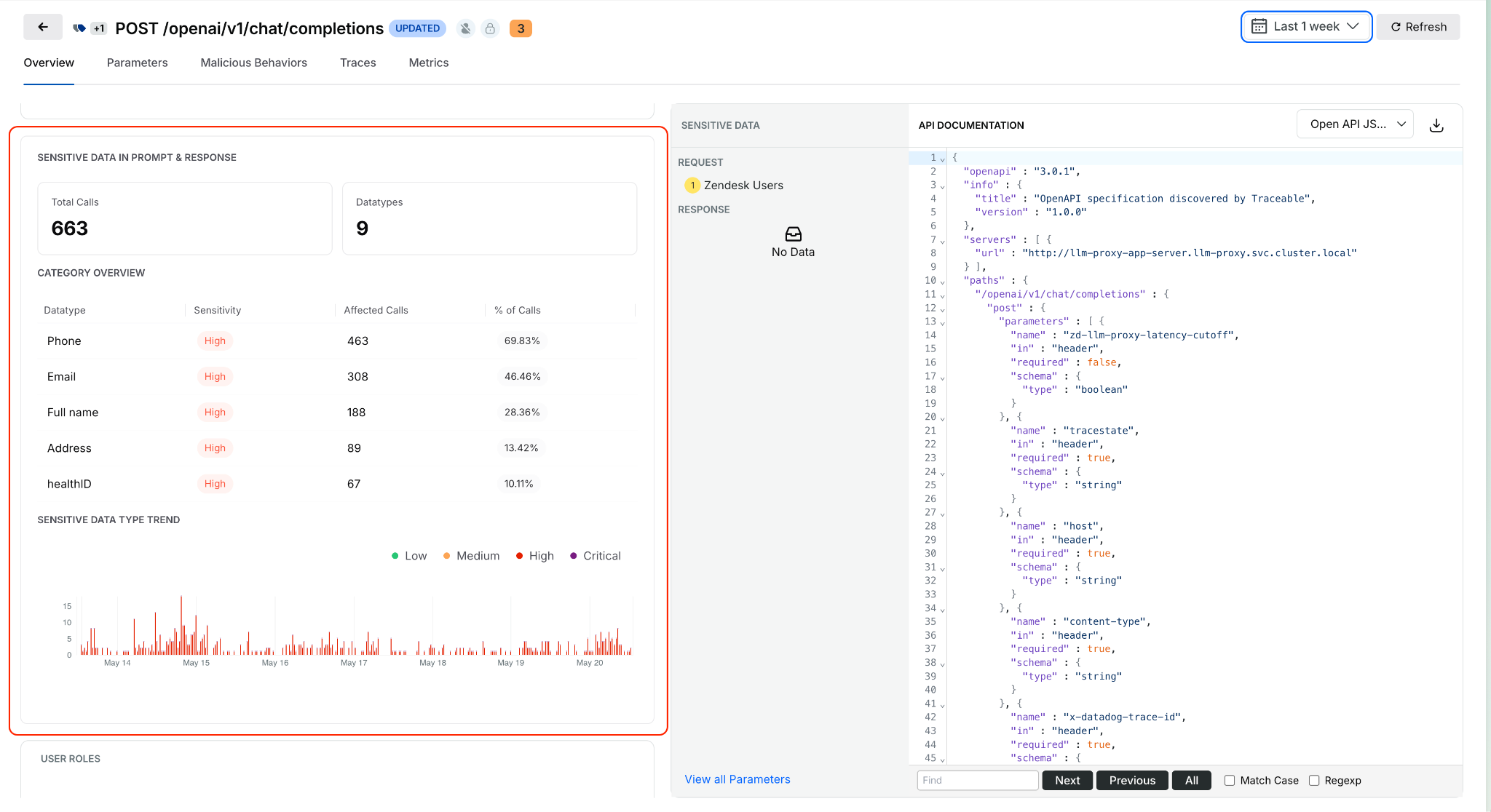
Sensitive Data Detection in AI Prompts and Responses
Open any discovered AI API from the AI Assets inventory and see what sensitive data is being processed in prompts and model responses. Exposure trends, data locations, and classifications are surfaced inline. This identifies high-risk AI APIs based on actual runtime behavior, not how they are configured. Learn more about AI Asset Details .
Service, MCP Server, and Environment on Issue Details
Issue Details now surfaces exactly where an issue is occurring: which service, which MCP server, and which environment, without leaving the side sheet. Previously, pinpointing issue context required navigating across views.
Span Attributes for Live Traffic Policy Scoping
Live traffic policies now evaluate only spans that match specific attributes, such as HTTP status codes. Detections are contextual rather than applied universally to all traffic. The evidence in each detection shows which spans actually triggered it. Docs
UI for Span-Attribute-Based API Exclusion Rules
Define API exclusion rules based on span attributes directly in the UI. Select status codes or specific headers to exclude APIs from discovery, giving precise control over what appears in the API inventory.
Entity Derivation for Bot and Abuse Protection
Extract, transform, and standardize application-specific attributes from API traffic and use them in Bot and Abuse Protection policies. Previously, detection rules were limited to predefined attributes. Custom entities derived from traffic patterns can now feed directly into policy evaluation. Docs
Rule Evaluation Point Support in Exclusion Policies
Configurable rule evaluation behavior for exclusion rules enables exclusions to be applied based on your deployment model, whether through a tracing agent or Traceable Edge. Docs
Granular RBAC and Environment-Level Scoping
Environment-level scoping now covers APIs, policies, configurations, and security insights consistently across the platform. Access is restricted to authorized environments, and policy management is environment-aware. Docs
Security in the Pipeline
Keyless Artifact Signing
Sign and verify artifacts without managing long-lived cryptographic keys. Identity-based authentication replaces key management, eliminating the rotation burden that makes key-based signing operationally painful at scale. Docs
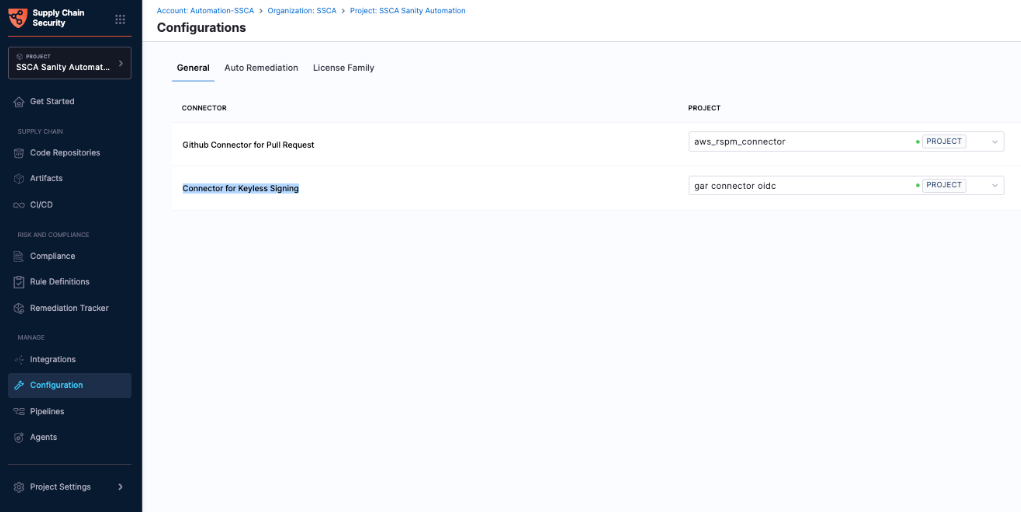
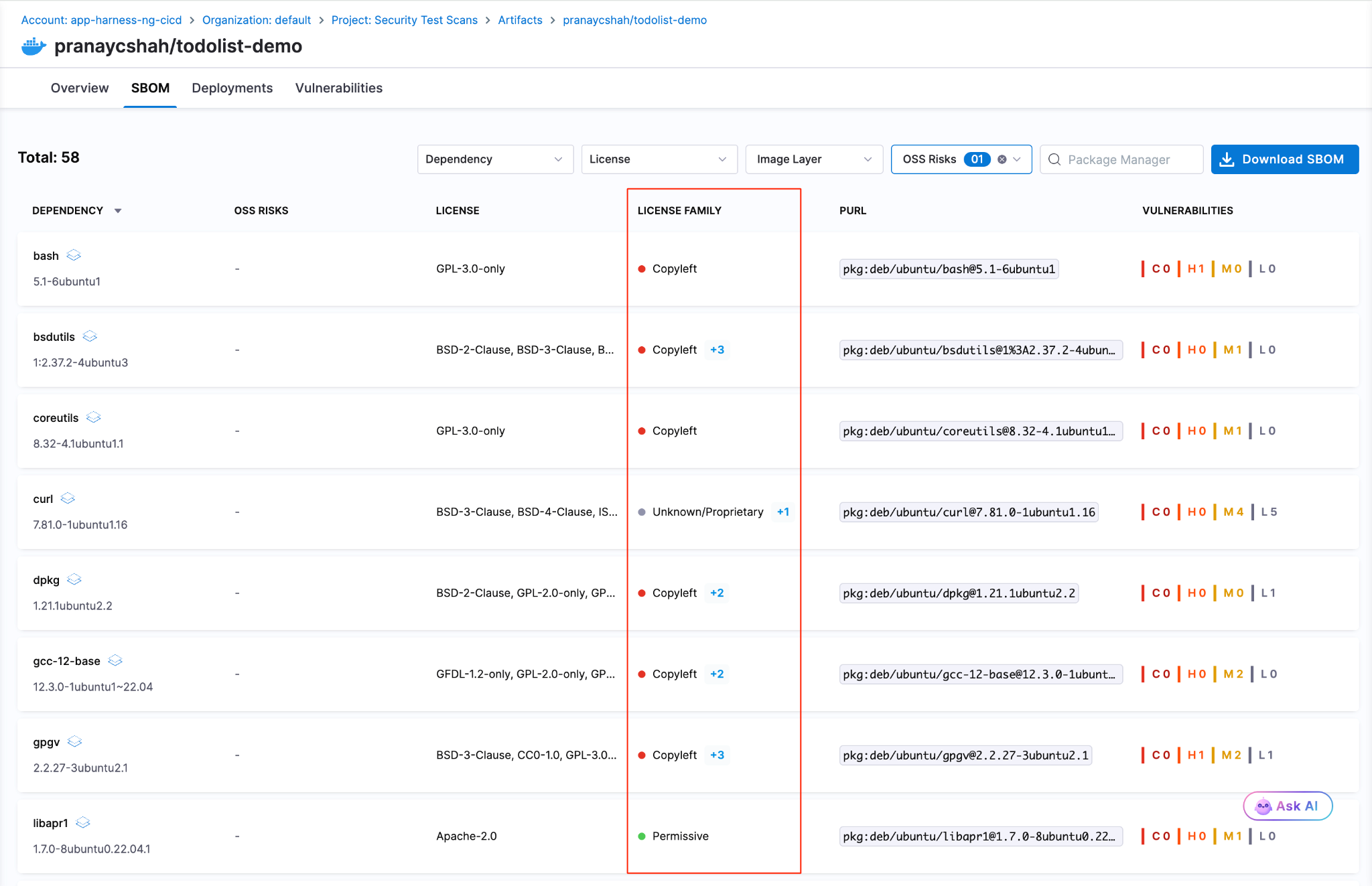
License Family Classification for SBOM
SBOM components are now automatically grouped by license family. Teams get a portfolio-level view of open-source license risk without reviewing individual component licenses one by one. Docs.
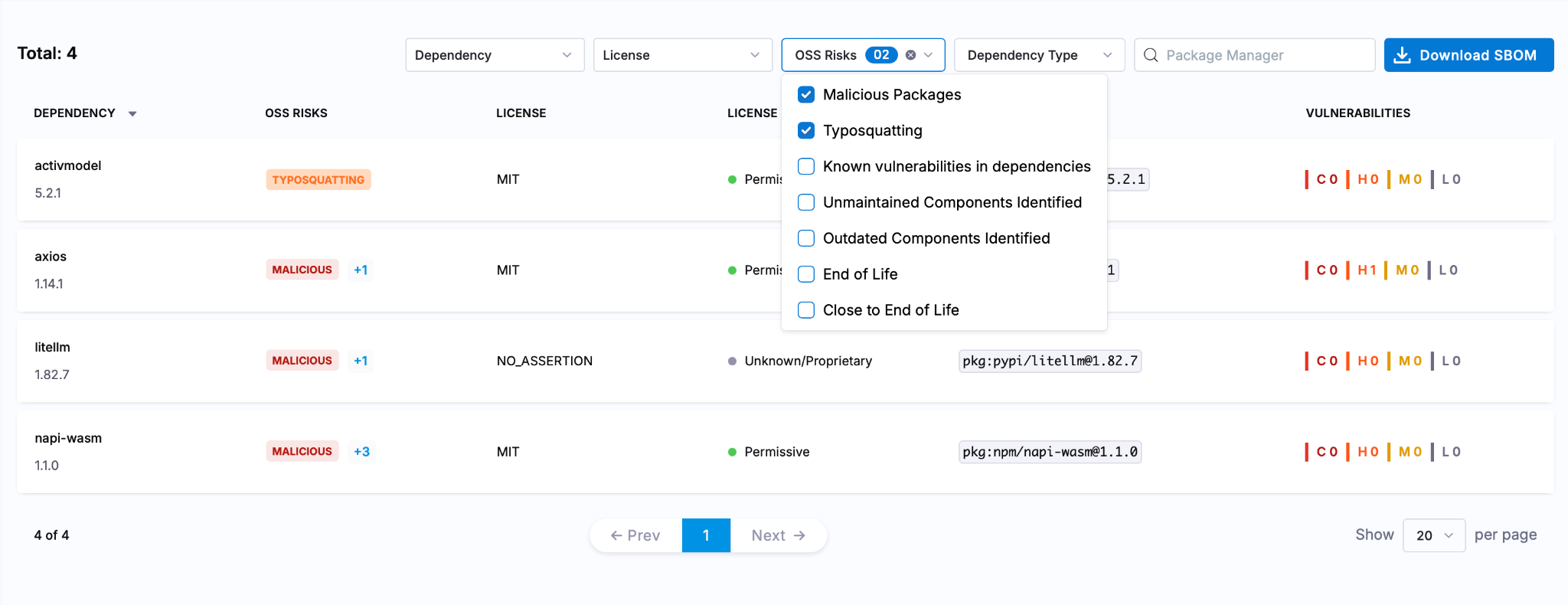
Typosquatting and Malicious Package Detection
Two new risk signals are now checked during OSS dependency scanning: packages named to look like popular libraries (typosquatting) and known malicious packages. Added to the existing supply chain risk checks. Docs
Faster, More Reliable Builds
Flaky Test Detection (Beta)
Test Intelligence now identifies tests that pass and fail intermittently without consistent code changes as the cause. Flaky tests can be quarantined, removing them from pipeline gate decisions while tracking their instability over time. Previously, flaky tests failed pipelines with no actionable root cause. Read the docs.
Docker Connector Support for Custom Build Images
Bring Your Own Image (BYOI) workflows in Harness Cloud now support Docker connectors pointing to private registries. Teams with custom build container images hosted in private registries can use them for Harness Cloud builds without pushing to a public registry first. Release notes
Network Egress Restrictions in UI
Configure egress allow lists for Harness Cloud Linux and Windows build VMs directly from the Harness UI. Previously required manual configuration outside the product.
Test Splitting Accuracy
Test Intelligence now uses historical average durations for more balanced test parallelism. The split_tests binary previously required timing data in a specific format; it now also supports average-based timing, making accurate splitting available to more test suites.
Connector validation tasks and SCM tasks for proxy-enabled connectors are now routed through Harness Cloud delegates, ensuring both validation and source code operations work correctly for PrivateLink setups. These are behind feature flags.
Deploy More Safely
OIDC Delegate Selectors for AWS
Pass delegate selector information as AWS session tags in OIDC tokens. IAM policies can now restrict which Harness delegates execute which tasks, providing environment-level secret isolation without relying on environment naming conventions. Works across connector validation, deployment stages, and custom stages. Release notes
Dry Run Validation API
A new API endpoint validates pipeline YAML changes before they are committed to Git. Runs schema validation, template expansion, and OPA policy evaluation without executing the pipeline. Useful for pre-commit checks in IDEs or CI gates on pipeline repositories.
Artifact Registry
Soft Delete for Packages
Deleting a package or version now moves it to a recoverable state rather than removing it immediately. Teams that accidentally delete an artifact a running deployment still depends on can recover it before anything breaks. Permanent deletion is available from the same dialog when that is the intent.
Swift and Raw Package Support
Two new formats are now supported. Swift packages work with full SwiftPM compatibility: authenticate, publish, and resolve dependencies using the registry URL with no changes to existing workflows. Raw artifact storage handles arbitrary files by path: binaries, archives, reports, configuration files, anything that does not belong to a package manager ecosystem.
Dependency Firewall: Exemptions and Notifications
The Dependency Firewall now supports exemptions and policy action notifications. Whitelist trusted dependencies that should bypass firewall rules, and configure alerts that fire when the firewall blocks or flags a package. Teams get granular control over what gets blocked without having to audit the firewall log manually to know when it acted.
Audit Dashboard for Package Uploads and Downloads
A new dashboard records every package upload and download across all registries with full attribution: who performed the action, when, and on which package and version. Provisioned automatically for accounts with Artifact Registry enabled. Useful for compliance reviews, security investigations, and understanding artifact consumption patterns across teams. Release notes
Database DevOps Updates
Harness Code Repositories as a schema source
Harness Code Repositories can now be used as a source during DB Schema configuration and execution workflows.
Tagging Behavior
Enhanced tagging for database changesets improves consistency and traceability during migration workflows. Release notes here.
Purchase Credits API reliability
Database operations in the Purchase Credits API are now atomic, with enhanced logging for overage details during credit resets.
Know What Your AI Costs
Software Engineering Insights is now AI DLC Insights (Development Lifecycle Insights). Cloud Cost Management is now Cloud and AI Cost Management. Both capabilities reflect an expanded scope for the existing products: AI is now a first-class dimension in both products, not a filter you apply after the fact. Read the announcement
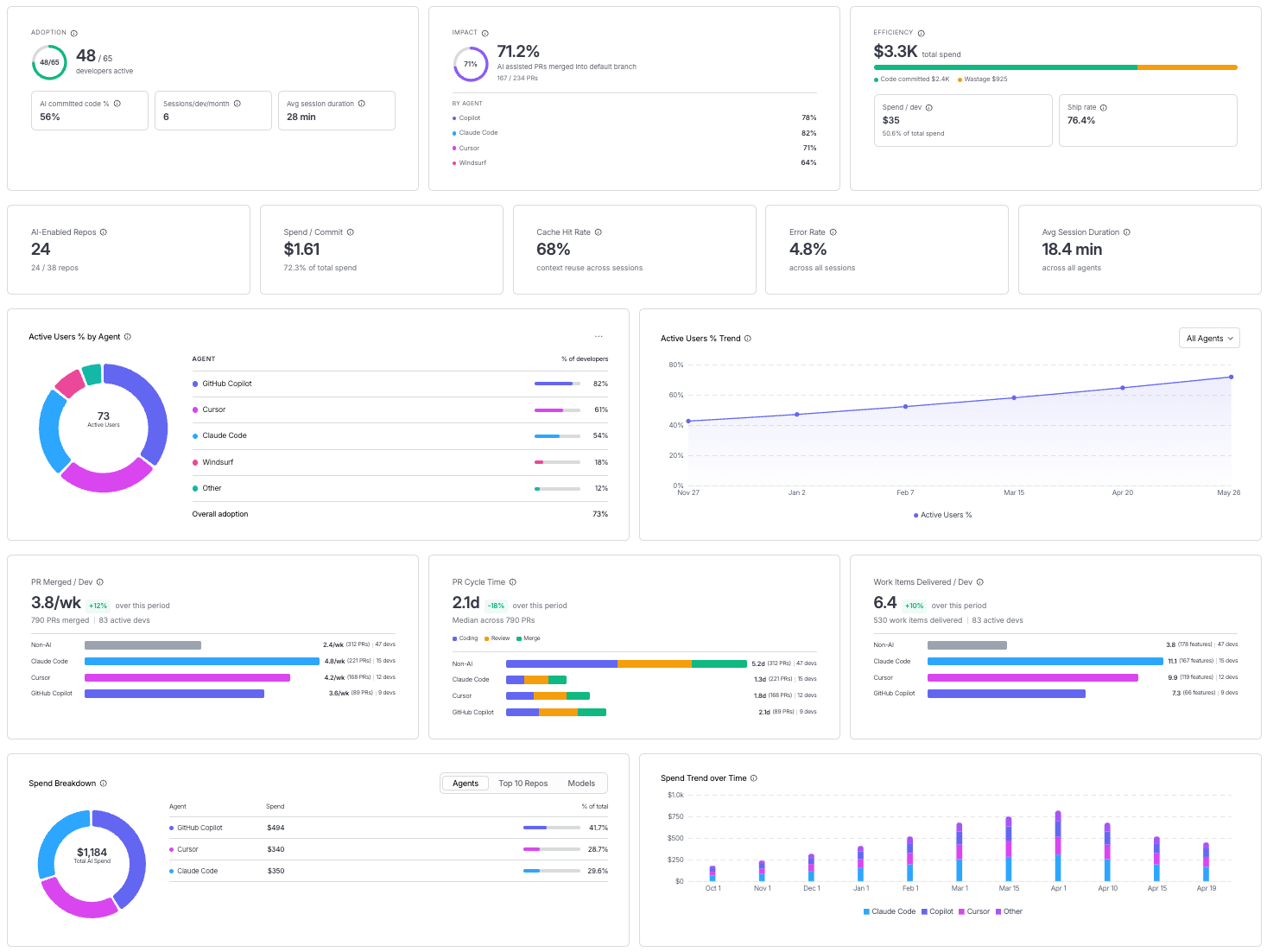
Cost Explorer with AI/ML Workload Visibility
Cloud and AI Cost Management's Cost Explorer now surfaces AI/ML spending alongside traditional cloud costs in a unified view. As teams add GPU instances, inference endpoints, and model API spend, that usage now appears in the same dashboards as the rest of the cloud bill. Docs
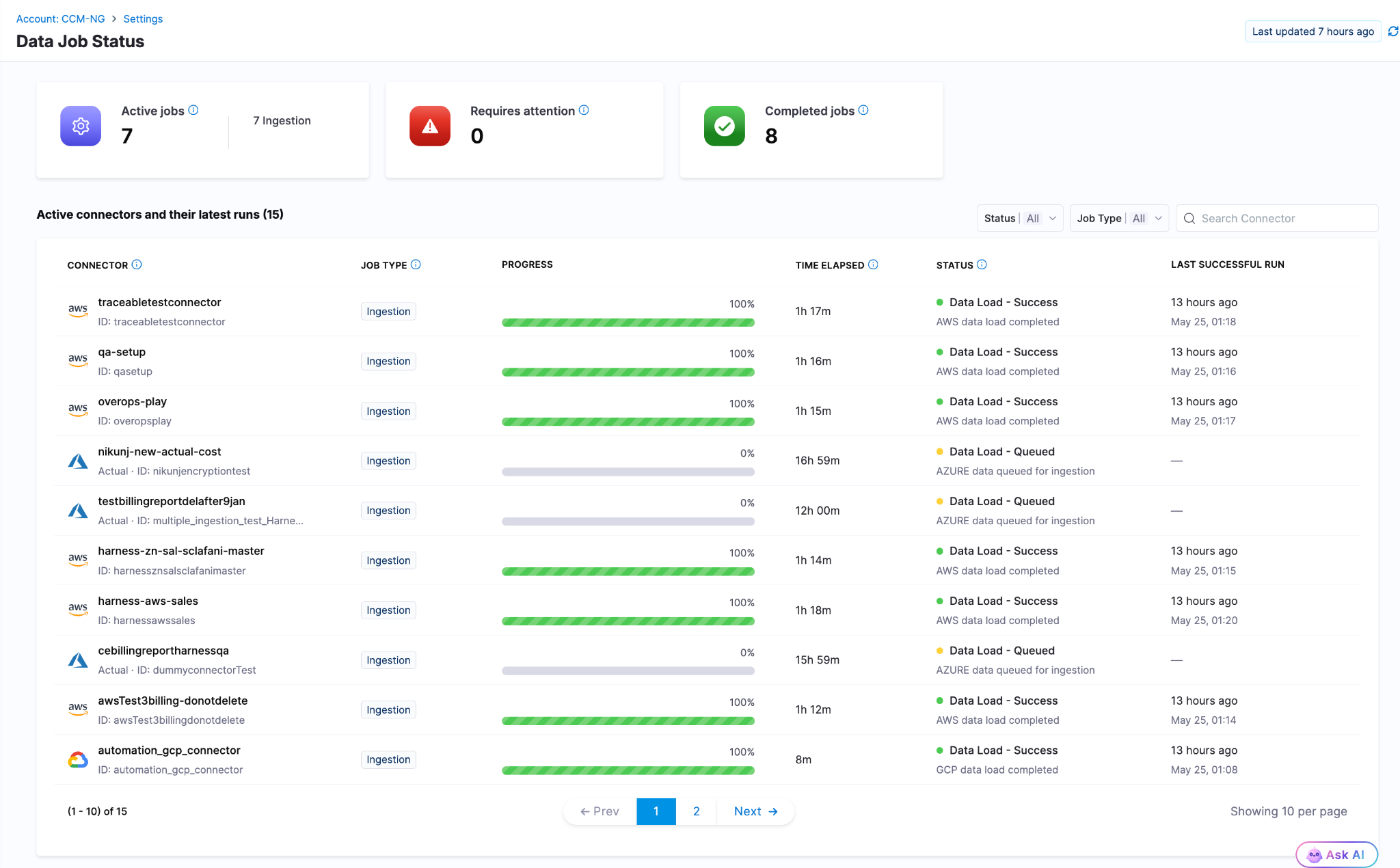
Data Job Status
Real-time visibility into the cloud cost data pipeline. When billing data from AWS, Azure, or GCP is delayed, failed, or stale, the Data Job Status page now shows the actual state. Previously, stale billing data produced incorrect recommendations and anomaly alerts with no indication that the underlying data had a problem. Docs
Cost Settings for Recommendations
A rebuilt, tabbed configuration experience for AWS and Azure recommendation cost preferences. AWS supports Passthrough Cost for both uniform and mixed account configurations, with per-account cost-type visibility. Azure adds selectable options for Amortized and List Price views of recommendation costs. Release notes
Engineering Metrics That Reflect Actual Human Work
AI Summaries and Insights Dashboard Enhancements
AI DLC Insights dashboards now surface AI-generated summaries alongside DORA metrics, productivity data, and workflow visualizations. The goal is to reduce the gap between "here is the chart" and "here is what to do about it." Docs
PR Cycle Time Excludes Bot-Generated Review Comments
The Productivity Insights dashboard now strips bot-generated review comments from PR Cycle Time calculations. Cycle time now reflects human reviewer activity only, which is the number that matters for understanding team throughput. Release notes
Custom Date Range on Dashboards
All dashboards on the Insights page now support a custom date range beyond the default presets. Analyze metrics over any time window, useful for quarterly reviews, incident post-periods, and year-over-year comparisons. Docs
Enable or Disable Developer Filtering for Lead Time for Changes
Control whether Lead Time for Changes honors developer filters at the team level from Team Settings. Gives engineering teams more precision in how DORA metrics are calculated and attributed across distributed or shared-team structures. Docs
ServiceNow Integration
ServiceNow is now a data source for engineering insights. Ingest, normalize, and analyze ITSM data directly within dashboards. DORA metrics can be calculated from ServiceNow incident and change management records for teams where ServiceNow is the system of record. Docs
qTest Integration
Test management data from qTest Cloud now flows into AI DLC Insights via API key authentication. Docs
Feature Flag Governance
FME Policy as Code: Environments and Segments
The OPA-based policy framework for Feature Management now covers environments, segments, and segment definitions. Teams can enforce consistent governance standards across the full FME configuration surface, not just flag-level rules. Release notes
Your Software Catalog, Smarter
Catalog Roundup: Modeling, Connections, and Surface Area
A set of enhancements expands what the developer portal catalog can model, connect, and display. The changes are incremental, but together they close gaps that platform teams have been routing around.
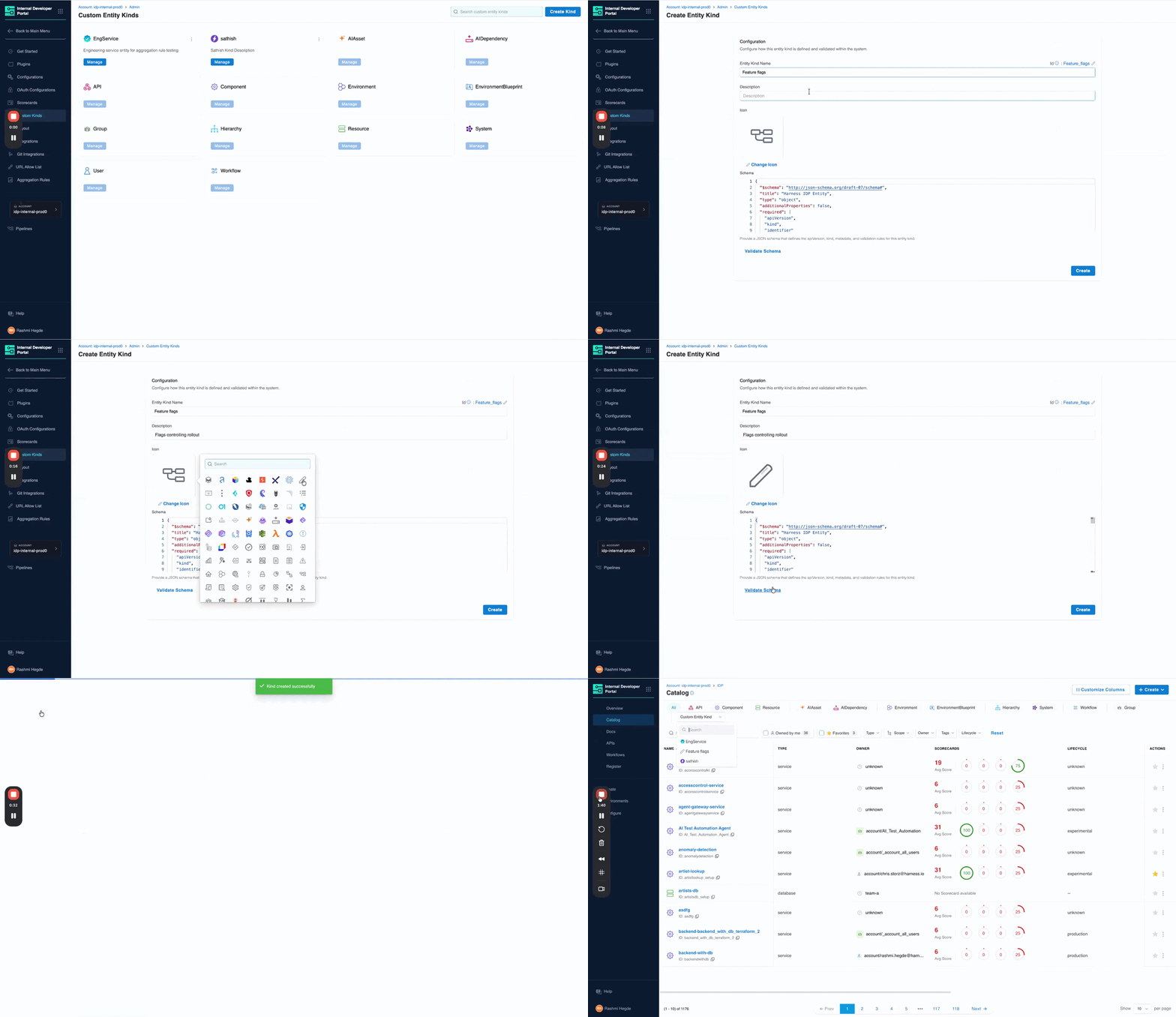
Integrations Overview on Entity Pages
The entity details page now includes a dedicated card showing key integration data directly on the overview. Platform engineers and developers can see the health and status of an entity's connected integrations at a glance rather than navigating to a separate integrations view. Docs
GitHub Integration: Secondary Entity Kinds
When configuring GitHub integration, you can now select secondary entity kinds to map discovered repository entities to. The data from those kinds surfaces directly on the entity details page, giving platform teams more flexibility in how GitHub content is represented in the catalog. Docs
AI Asset Instructions Tab
Entity pages for AI Assets now include a dedicated Instructions tab that renders the associated documentation file from GitHub directly within the portal. Teams discover and read AI asset documentation without leaving the catalog. Docs
Blueprints at Organization and Project Levels
Environment Blueprints can now be created and managed at the Organization and Project scope levels, in addition to the Account level. The blueprint listing page shows the scope for each blueprint, and managed roles have been updated with the appropriate permissions at each scope.
Resilience Testing
Kubernetes Load Testing
Load tests can now run against Kubernetes infrastructure. Previously load tests required Linux infra, meaning chaos testing and load testing needed different tooling and separate infrastructure even when targeting the same cluster. Resilience testing is now fully Kubernetes-aware end to end. Docs
Chaos Enhancements
A set of improvements landed across the chaos platform this month: filtering support for chaos experiment lists in the REST API, step name editing in Chaos Studio, NOT_EQUAL_TO operator for ChaosGuard namespace label selectors, tag-based filters on the DR Tests screen, probe chain logic, DR Test ACL permissions and audit events, user-based filters in the Experiments API, support for output variables in chaos resources, and the Chaos NG experience reaching general availability. Release notes
AI Test Automation
Playwright Execution Service (Beta)
Harness AI Test Automation now runs native Playwright test suites directly on the platform. Your playwright.config, spec files, and package.json scripts work as-is: connect your repo, point to your project root, and run. No grids to configure, no browser images to maintain, no infrastructure to scale. Tests run in cloud with parallel workers out of the box.
When tests fail, Harness automatically classifies the failure as regression, flaky, performance, or environment issue, so engineers spend time fixing problems instead of determining whether a problem is real. Playwright runs are first-class pipeline steps: results live in the Tests tab alongside build and deploy stages, and tests block deployments by default. Existing Playwright investments stay intact; scripts can evolve into AI-generated intent-based tests gradually when teams are ready.
Available now in beta. Release notes | Docs | Blog
AI SRE
CEL Expression Engine
Common Expression Language is now the full expression engine for AI SRE runbook conditions. Write dynamic conditions using regex matching, datetime formatting, list comprehensions, and math anywhere logic is evaluated or data is transformed. Docs
Google Chat Integration
Teams using Google Workspace can now run incident response from Google Chat: dedicated incident spaces, bidirectional message mirroring between the AI SRE UI and Google Chat, automatic responder adds, and real-time incident timeline sync. Built on Pub/Sub for reliable message delivery. One-time admin setup per organization. Docs
Platform-Level Updates
Service Account Token Notifications
Configure alerts for service account token events: creation, rotation, updates, expiration, deletion, and upcoming expiration. Delivered across notification channels already configured in your account. Expiring service account tokens are a common cause of silent pipeline failures; this makes them visible before they cause an outage. Docs
Platform Alerts
An in-app notification framework now surfaces important account-level events automatically within the Harness UI: approaching resource limits, system release announcements, and other account-wide signals. No external configuration required. Docs
In Closing...
The teams compounding fastest on AI are the ones where the whole system accelerated, not just the part that writes code. May brought 60+ feature releases, a Skills Library that makes any AI coding assistant fluent in Harness, artifact registries that know what they are serving and to whom, and the first dashboards that connect AI spend to AI output. The bottleneck keeps moving. We help you unblock the bottleneck in your software delivery.
See you in June.
