
TL;DR
- One grammar, the entire platform: harness <verb> <noun> works identically for code, pipelines, secrets, GitOps, and more. 335 commands, one muscle memory.
- Discover, don't memorize: get module, get noun, and list noun --matrix replace doc hunts for humans and agents alike.
- Zero context switching: Create, review, read AI insights, stream CI logs, approve, and merge without leaving the terminal.
- Native AI Code Reviews: Risk scores, review groupings, and success criteria are first-class CLI citizens.
- True Code + CI/CD traceability: PR checks carry pipeline, execution, and stage IDs; one command streams the failing logs.
- Interactive when you want it: `--ui` click-through from inbox → PR → checks → logs, with browser-like back navigation.
- Built for the Agentic era: JSON output, self-describing schemas, agent detection, and zero-config HARNESS_API_KEY auth for autonomous workflows.
Every developer knows the fatigue of the "12-tab code review dance":
- You finish a commit in your IDE terminal.
- You switch to a browser to open a Pull Request.
- You wait for CI checks, switching to a second tab to see why a test failed.
- You open a third tab to read an AI summary or scan comments.
- You switch back to your editor, tweak the code, push, and repeat.
Agents have become first class citizens in SDLC and AI coding agents author code alongside human engineers, thus the above context switching destroys flow state. GitHub's gh CLI proved developers love the terminal, but modern delivery is tied to AI reviews, pipeline executions, risk scoring, and autonomous agents, not just git hosting.
Harness CLI 3.0 unites Harness Code with native CI/CD pipelines, AI Code Reviews, and interactive terminal UIs. One CLI built for humans and the agents driving their shells.
Start Here: Install and Run Your First Commands
# macOS / Linux — one-line installer (core + har plugin bundle)
curl -fsSL https://raw.githubusercontent.com/harness/cli/main/install.sh | sh
# macOS — Homebrew
brew install --cask harness/tap/harness-cli
# Windows (PowerShell)
irm https://raw.githubusercontent.com/harness/cli/main/install.ps1 | iex

# Authenticate (PAT, SAT, or browser SSO)
harness auth login
# or:
harness auth login --sso

# Your cross-repo review inbox — every PR waiting on you, every repo
harness list pr:review_pending

# Interactive UI commands
harness list pr:review_pending --ui
1. The Core Philosophy: One Grammar Across the Entire SDLC
Most enterprise platforms fragment the developer experience: one CLI for git, another for CI/CD, REST APIs for secrets, ad-hoc scripts for everything else.
Harness CLI changes the paradigm with a strictly predictable, spec-driven grammar:
Six core verbs (list, get, create, update, delete, execute) cover over 320+ commands and 95+ nouns across the platform. You don't have to guess whether a command is harness pr create or harness create-pr. If you want to create a PR, it is simply:
harness create pr blog-demo --set title="feat: harness code integration" source_branch=feat/code-integration
2. Discover, Don't Memorize
The CLI is self-describing at runtime. You rarely need to leave the terminal or open docs:
# What modules exist?
harness list module

# Domain model + all nouns for Harness Code
harness get module code

# Every field and supported verb for pull requests
harness get noun pr

# Full noun × verb matrix — 335 commands at a glance
harness list noun --matrix

# Flags for one command
harness create pr --help
For scripts and agents, add --format json:
harness get noun pr --format json | jq '.commands[].command'
harness list noun --matrix --format json
This is the foundation of the Agentic CLI: an agent doesn't need a stale SDK or hallucinated endpoints. It asks the CLI what's available, then executes deterministically.
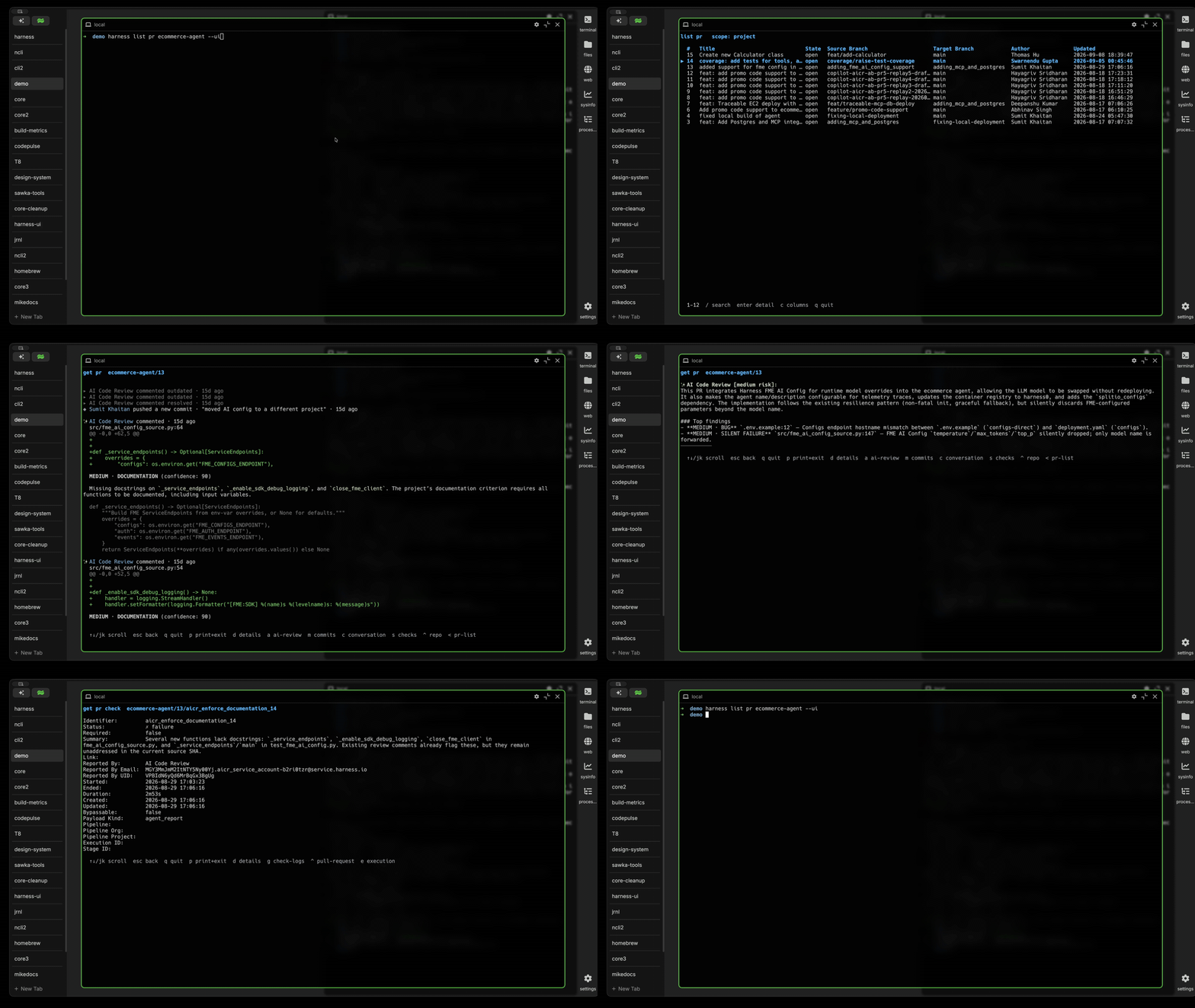
3. Harness Code in the Terminal: Zero-Context-Switch PR Lifecycle
With the new Harness Code module, the complete pull request and code review loop lives directly in your shell.
A. Cross-Repo PR Inboxes
In standard git CLIs like gh, viewing PRs you authored or PRs waiting for your review across dozens of repositories requires complex search queries or custom bash loops.
Harness CLI introduces first-class, account-wide PR inboxes:
# View every open PR you authored across the entire organization
harness list pr:mine --state open

# View every PR awaiting your review across all repos
harness list pr:review_pending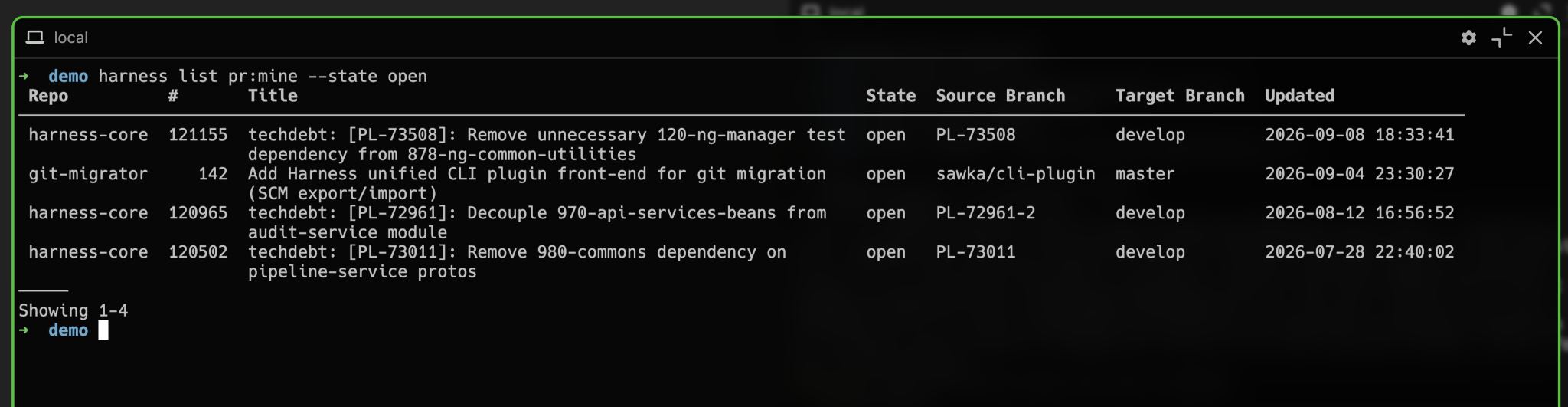
Filter by author with automatic identity resolution: email, Harness UID, or numeric ID.
harness list pr blog-demo --author mohit.suman@harness.io --created-after 2wB. Pull and Checkout with a Single Command
Need to test a teammate’s PR locally? No need to copy branch names or configure remote tracking manually:
# Clone a repo without touching git directly
harness pull repository blog-demo

# Inside an existing clone — fetch and check out a PR branch
harness pull pr blog-demo/29
# or, when already in the repo: harness pull pr 29
C. Reading PR Conversations as Clean Prose
Rather than rendering clunky HTML or forcing you to visit the web UI, Harness CLI formats pull request discussions, threaded replies, system events, and code diffs as readable, clean terminal prose.
Options like --show-resolved, --show-outdated, and --no-diffs let you tune verbosity for humans or agents.
harness get pr:conversation blog-demo/29

─────────────────────────────
[review-submit] Mohit Suman submitted a review: APPROVED
  "Looks solid. Checked the edge cases on empty payload."

[comment #104] Mike Sawka:
  "Please also add checks for concurrent requests."
  ↳ [reply #105] Mohit Suman:
    "Added in commit 8f9b1c2!"
─────────────────────────────
D. Review, Comment, Merge: All Scriptable
# Formal review decision
harness execute pr:review blog-demo/29 --decision approve

# Threaded bot reply from CI
harness create pr_comment blog-demo/29 -f review.md --reply-to 104

# Mark a draft PR ready for review
harness execute pr:ready blog-demo/67

# Merge with strategy and branch cleanup
harness execute pr:merge blog-demo/29 --method squash --delete-branch
4. Native AI Code Review: Risk Analysis in Your Terminal
One of the most powerful capabilities of Harness Code is its built-in AI Code Review and Insights Engine. Instead of treating AI review as a third-party bot comment dumped into a PR, Harness Code treats review insights as first-class objects, now fully accessible via the CLI.

A. Instant Risk Summary & Recommendations
Before spending 30 minutes reading lines of code, run get pr:insight to get a structured analysis of architecture impact, potential security flaws, and performance risks:
harness get pr:insight blog-demo/29

AI Code Review [Risk: MEDIUM]

This PR introduces an idempotency key cache using Redis to prevent duplicate charges.

Key Observations:
  • Security: Idempotency keys are validated against caller tenant scope (Safe).
  • Performance: Redis TTL set to 24 hours prevents memory exhaustion.
  • Recommendation: Ensure distributed lock handles Redis timeouts gracefully.
===========================================================================
B. Risk-Bucketed Review Groups
Instead of scrolling through 40 changed files alphabetically, get pr:review_group breaks changes down into risk tiers:
harness get pr:review_group blog-demo/29


● Core Event Execution [HIGH RISK]
Critical financial transaction logic altered.
Files:
  - pkg/events/processor.go
  - pkg/events/idempotency.go

● Test Suites & Mocks [LOW RISK]
Unit and integration test additions.
Files:
  - pkg/events/processor_test.go
Agents can consume the same data as JSON and prioritize high-risk files first:
harness get pr:review_group blog-demo/29 --format jsonC. Automated Review Routing & Criteria Checks
Verify automated policy checks and discover who from the team should review:
# View AI-suggested reviewers based on code ownership and commit history
harness list pr_suggested_reviewer blog-demo/29

# Check automated AI criteria results (e.g. Test Coverage, Zero Secrets, Linting)
harness list pr_success_criterion blog-demo/29
5. The Code and CI/CD Bridge: Live Pipeline Logs from PR Checks
In traditional git hosts (like GitHub or GitLab), PR checks are just colored dots or external webhook status links. If a test fails, you click a URL that opens a separate web page, authenticate, and search for the failure in a sprawling log viewer.
Because Harness Code and Harness CI/CD exist on the same platform, PR checks are natively bound to their underlying pipeline execution:
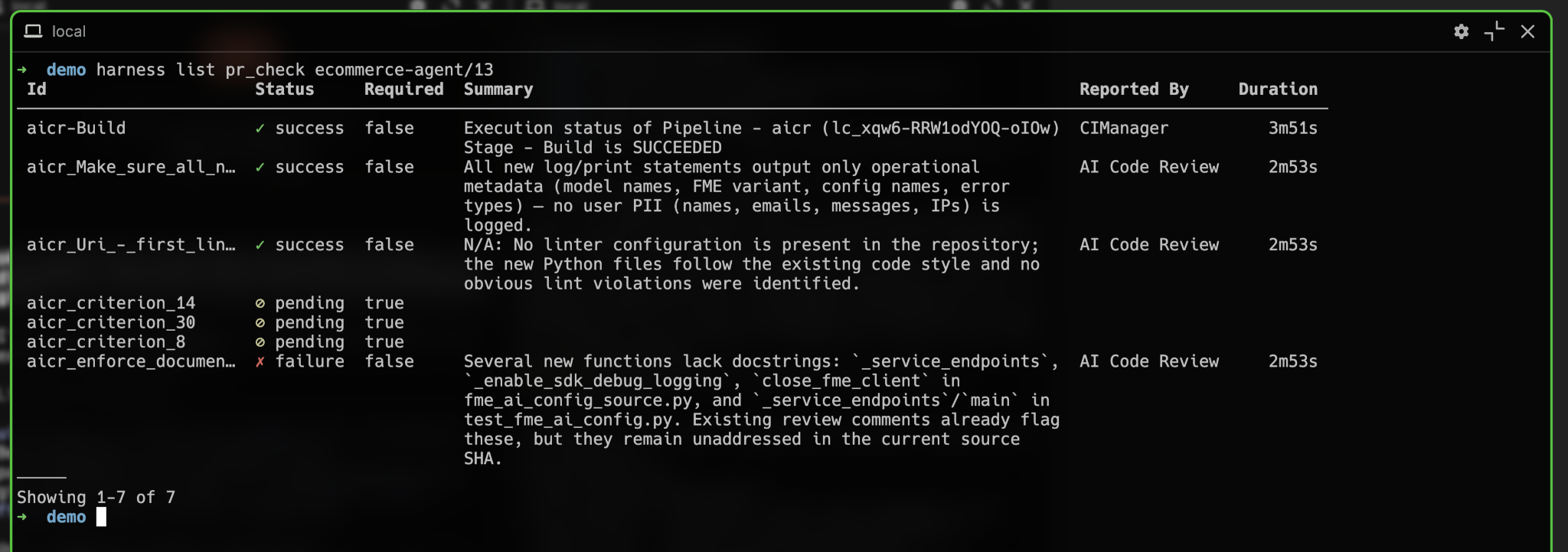
# 1. List PR checks — each check carries the execution ID and stage ID natively
harness list pr_check blog-demo/29
Stream Pipeline Logs Without Leaving Your Shell
When a check fails, you don't open a browser. You stream the exact failing stage’s logs straight to your console with get pr_check:log.
harness get pr_check:log blog-demo/29/integration-test

harness get execution blog-demo-ci/exec_92a10f

harness get execution_log blog-demo-ci/exec_92a10f --ui   # live log viewer
Once fixed, merge your pull request with your chosen strategy and branch cleanup in one shot:
harness execute pr:review blog-demo/29 --decision approve
harness execute pr:merge blog-demo/29 --method squash --delete-branch
6. Interactive Terminal UI (--ui): Frictionless Visual Drilldown
When you want visual interactivity without leaving the shell, append --ui to any command. Harness CLI renders rich, full-screen interactive views.
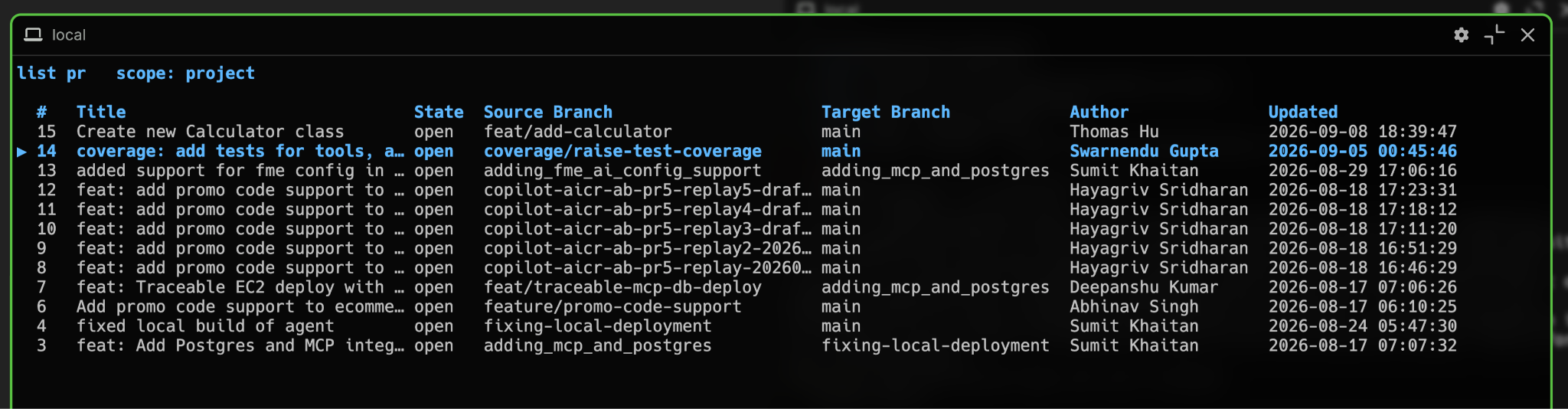
# Launch interactive PR inbox
harness list pr:review_pending --ui

# Launch interactive drill-down on a specific PR
harness get pr blog-demo/42 --ui
End-to-end click-through takes you from repo → PR → checks → pipeline logs without memorizing IDs:
Inside the interactive view, single hotkeys provide instant navigation:
7. Dual-Mode DevEx: Humans + AI Agents (Agentic DevEx)
The modern software landscape is no longer built solely for human fingertips. Autonomous coding agents (like Cursor, Claude Code, GitHub Copilot, Codex) are writing code, opening PRs, diagnosing CI failures, and reviewing code.
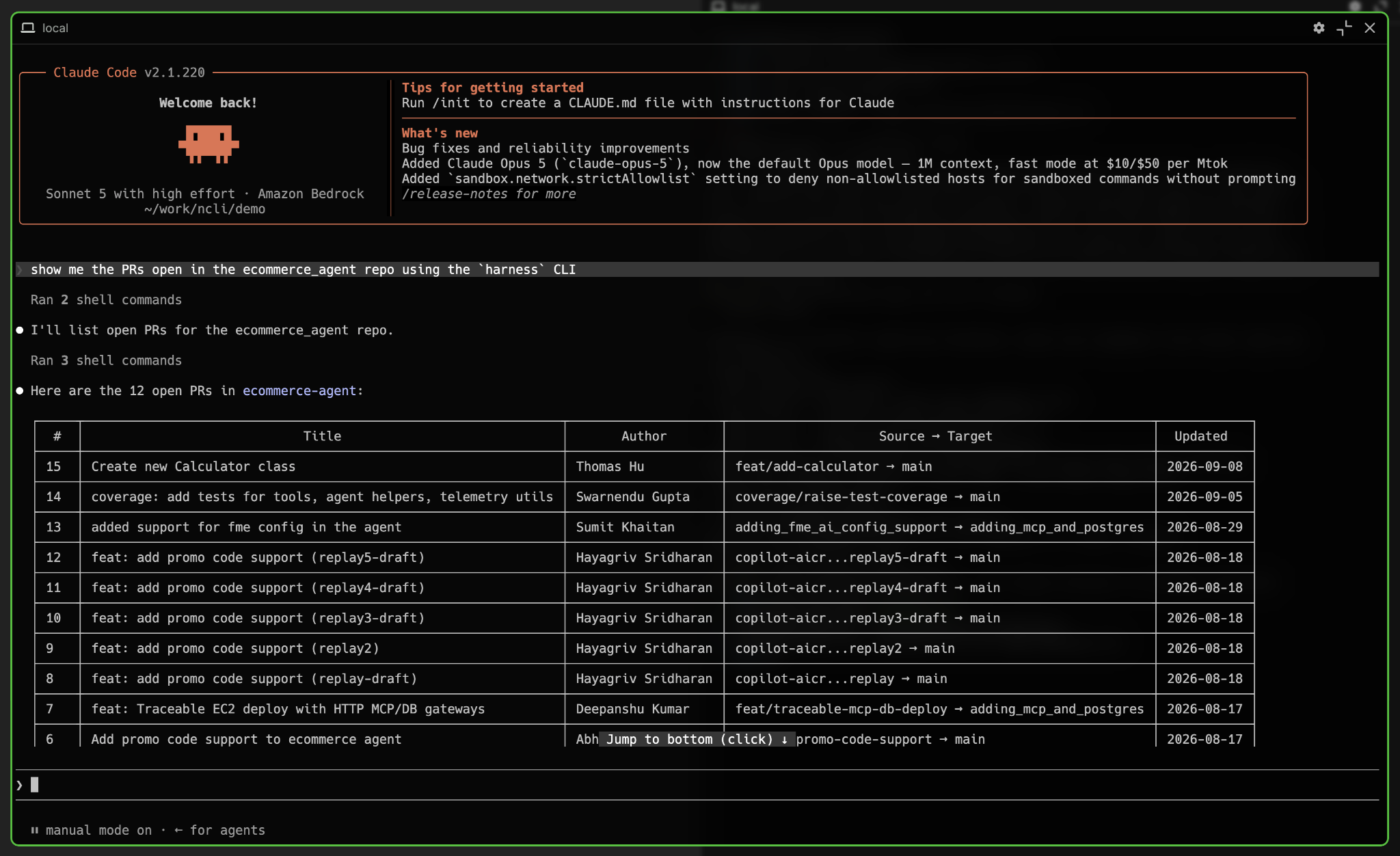
Why Agents Thrive on Harness CLI
1. Self-Describing Discovery: An agent can inspect the CLI's entire capability matrix at runtime via harness list noun --matrix --format json or harness get noun pr --format json. No hallucinated endpoints or out-of-date API SDKs.
harness list noun --matrix --format json
harness get noun pr --format json
harness get module code --format json
2. Deterministic Output: Switching between human-friendly tables and machine-readable JSON is a single flag away:
harness list pr demo-blog --format json | jq '.[0].title'3. Autonomous Agent Review Loops: An agent running in CI or Cursor can:
- Read AI review risk groups (harness get pr:review_group <repo>/<pr> --format json).
- Stream failing build logs (harness get pr_check:log <repo>/<pr>/<check>).
- Fix the code, push a commit, and post a threaded comment (harness create pr_comment <repo>/<pr> -f fix.md --reply-to <id>).
An Autonomous Review Loop (Copy-Paste for Agents)
Here's a complete agent workflow: discover, triage, diagnose, fix, respond.
# 1. Discover what's available
harness get module code --format json

# 2. Find PRs needing attention
harness list pr:review_pending --format json

# 3. Triage by AI risk
harness get pr:insight blog-demo/29 --format json
harness get pr:review_group blog-demo/29 --format json

# 4. Check CI status — each check knows its pipeline + execution
harness list pr_check blog-demo/29 --format json

# 5. Stream failing logs
harness get pr_check:log blog-demo/29/integration-test

# 6. After fixing code locally and pushing:
harness create pr_comment blog-demo/29 -f fix-summary.md --reply-to 104

# 7. Approve and merge
harness execute pr:review blog-demo/29 --decision approve
harness execute pr:merge blog-demo/29 --method squash --delete-branch
8. How Harness Code CLI Compares to GitHub CLI (gh)
Comparing source control, code review, and CI/CD capabilities:
Frequently Asked Questions (FAQs)
1. How do I install and configure the new Harness CLI?
Installation takes seconds via our automated installer:
# macOS — Homebrew (recommended)
brew install --cask harness/tap/harness-cli

# macOS / Linux — one-line installer (core + har plugin bundle)
curl -fsSL https://raw.githubusercontent.com/harness/cli/main/install.sh | sh

# Windows (PowerShell)
irm https://raw.githubusercontent.com/harness/cli/main/install.ps1 | iex
Once installed, authenticate and You can log in interactively, provide an API key/token, or use Browser SSO.
harness auth login

harness auth login --sso
Manage profiles for multiple accounts:
harness auth login --profile staging
harness auth setscope --org my-org --project my-project
harness auth status
2. Can I use Harness CLI with my existing Git remotes?
Yes. When working inside a cloned repository, you can run harness pull pr <pr_number> directly. Harness CLI automatically detects your git remotes and checks out the PR source branch.
3. How does the CLI handle authentication and permissions for AI coding agents?
The CLI uses the exact same RBAC, audit trails, and authentication tokens as the Harness Platform. When you hand the CLI to Claude Code, Cursor, or a CI runner, simply assign it a scoped Personal Access Token (PAT) or Service Account Token (SAT). The agent can only execute actions permitted by that token’s role.
4. How does the --ui mode work in headless environments or CI pipelines?
The --ui flag requires an interactive terminal (TTY). If executed in CI, under a shell pipe (|), or redirected to a file, the CLI automatically detects the absence of a TTY and safely instructs you to use --format jsonl or --follow instead.
5. Is Harness CLI open source?
Yes. The Harness CLI is licensed under Apache 2.0 and developed publicly at github.com/harness/cli.
Get Started Today
Step into the future of terminal-native development and agentic software delivery:
# 1. Install (pick one)
brew install --cask harness/tap/harness-cli   # macOS

curl -fsSL https://raw.githubusercontent.com/harness/cli/main/install.sh | sh

# 2. Log in
harness auth login

# 3. Let the CLI explain itself
harness get module code

# 4. Open your review inbox
harness list pr:review_pending --ui
- Star the project on GitHub: github.com/harness/cli
- Read the documentation: Harness Developer Hub
- Join our community discussions to shape the future of Developer Experience.