Harness enables seamless artifact registry migrations with a compatibility layer that translates legacy package requests, minimizing client changes and simplifying secure cutovers.

The part everyone underestimates
Every artifact registry migration blog post you'll read starts with "step 1: export your artifacts." That's the easy part.
The hard part is everything downstream:
- A few thousand developer laptops with ~/.m2/settings.xml, ~/.docker/config.json, ~/.npmrc, ~/.pypirc files pointing at your current registry
- A Jenkins fleet with credentials and repository URLs baked into hundreds of jobs
- Kubernetes clusters with imagePullSecrets referencing registry hostnames
- A vanity domain like artifacts.yourcompany.com referenced in wikis, runbooks, and Slack canvases going back five years
You can migrate the artifacts in a weekend. Rewiring every one of those touchpoints? That's the six-month project nobody scoped for.
The idea: intercept at the edge, translate to the new shape
An artifact registry compatibility layer is a proxy that accepts requests in the old registry's URL format and translates them to the new registry's native format. Instead of asking every client to learn your new registry's URL layout, put a small compatibility layer in front of the new registry. The layer:
- Accepts requests in the old registry's URL shape.
- Translates the URL and account context to the new registry's native shape.
- Forwards to the new registry, which handles the actual artifact serving.
Flip DNS on your vanity domain and every developer, pipeline, and cluster starts hitting the new registry without touching a single client-side config. It's the strangler fig pattern, applied to package URLs instead of API endpoints.
Why not just rewrite paths in your ingress?
Fair question. The reason you can't get away with a pure nginx rewrite is that every package manager has its own URL grammar, and modern container registries don't map 1:1 to older ones.
- Docker/OCI clients speak the Distribution Registry v2 protocol. Paths look like /v2/<repo>/manifests/<tag>.
- Typed package managers (npm, NuGet, PyPI, RubyGems) usually hit paths like /api/npm/<repo>/<package>.
- Bare-repo package managers (Maven, generic HTTP) hit filesystem-shaped paths.
Naive regex rewrites break the moment a client follows a redirect or fetches a subresource. You need something that understands each package type's protocol, not just its URL prefix.
The architecture, in three layers
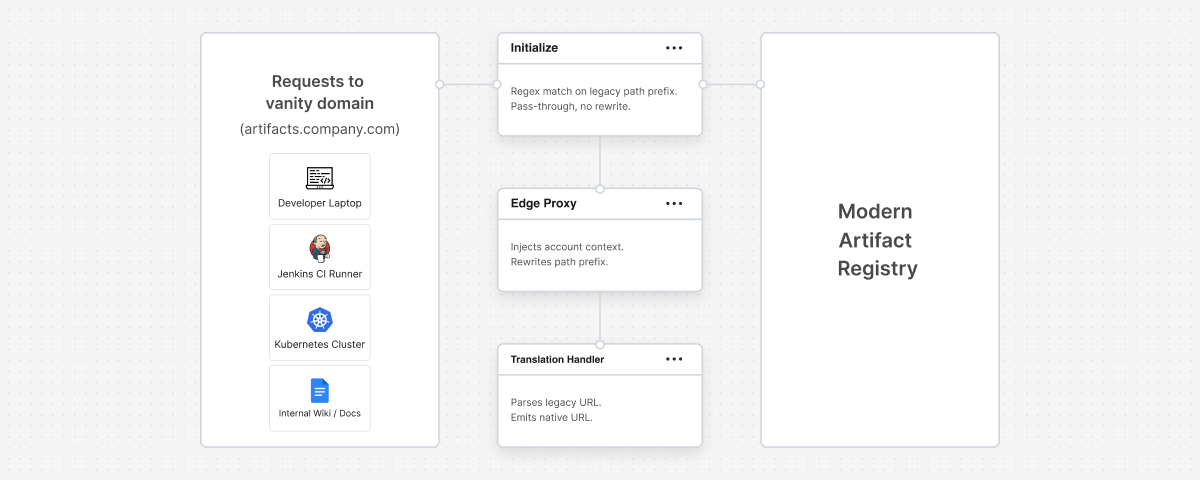
   Developer laptop  ──┐
   Jenkins runner      │
   Kubernetes node     ▼
   Wiki links       ┌─────────────────┐
                    │  Vanity DNS     │
                    │  (CNAME to      │
                    │   gateway)      │
                    └────────┬────────┘
                             ▼
                    ┌─────────────────┐
                    │  L1: Ingress    │
                    │  match, forward │
                    └────────┬────────┘
                             ▼
                    ┌─────────────────┐
                    │  L2: Edge proxy │
                    │  inject account │
                    │  rewrite prefix │
                    └────────┬────────┘
                             ▼
                    ┌─────────────────┐
                    │  L3: Translator │
                    │  parse legacy   │
                    │  emit native    │
                    └────────┬────────┘
                             ▼
                    ┌─────────────────┐
                    │  New registry   │
                    └─────────────────┘
Layer 1: Ingress, match and forward
The ingress's only job is to say "these paths belong to the compat layer." Don't do path translation here. You'll regret it the first time a Docker client follows a redirect and the ingress rewrites the Location: header out from under it.
- name: registry-compat
  annotations:
    nginx.ingress.kubernetes.io/use-regex: "true"
  paths:
    - path: '/compat/v1/.*'
The prefix /compat/v1/ is illustrative; pick anything that can't collide with your new registry's native paths.
Layer 2: Edge proxy, inject context, and rewrite
This is where the account context gets bound to the request. Modern multi-tenant registries scope artifacts by account or namespace, and clients on the legacy side don't know about that scoping. The account was implicit in the hostname.
Here's an Envoy virtual host config, generalized:
- name: compat_gateway
  domains: ["compat.registry.example.com"]
  request_headers_to_add:
    - header:
        key: x-tenant
        value: <YOUR_TENANT_ID>
      append_action: ADD_IF_ABSENT
  routes:
    - match:
        prefix: "/"
      route:
        cluster: registry-backend
        prefix_rewrite: "/compat/v1/<YOUR_TENANT_ID>/"
        timeout: 900s
Three things worth calling out:
- prefix_rewrite stamps /compat/v1/<tenant>/ onto every request path before it hits the backend. That prefix is the marker: both the ingress regex and the downstream translation handler use it to identify compat-layer traffic and to parse out the tenant.
- ADD_IF_ABSENT on the x-tenant header. The handler itself reads the tenant from the rewritten path, not from this header. The header is stamped for logging, tracing, and any middleware sitting between the proxy and the handler. Belt-and-suspenders; don't rely on it as your source of truth.
- Generous request timeout. Large image pushes take minutes. Default 15-second proxy timeouts will silently break Docker pushes. Bump this early — 10 to 15 minutes is a safer starting point than the default.
Design tradeoff: binding the account in the vhost means one vhost per tenant. Fine for a single-tenant enterprise migration; SaaS platforms should derive the account from Host header or client cert.
Layer 3: Translation handler, the interesting bit
Legacy registries expose paths in three family shapes, and the new registry expects paths in one canonical shape. Your translator collapses the three into one. URL shapes below are illustrative of the family; your legacy registry may vary in prefix and layout.
Family 1: Docker / OCI. Slot insertion.
Legacy:  /v2/<repo>/manifests/<tag>
Native:  /v2/<tenant>/<registry>/<repo>/manifests/<tag>
Preserve Docker Registry v2 semantics end-to-end: Docker-Content-Digest response header, Location: headers on chunked upload responses, error JSON shape.
Family 2: Typed package managers (npm, PyPI, NuGet, RubyGems). Move <type> segment.
Legacy:  /<legacy-prefix>/api/npm/<repo>/lodash/-/lodash-4.17.21.tgz
Native:  /pkg/<tenant>/<repo>/npm/lodash/-/lodash-4.17.21.tgz
Beyond the URL rewrite, each package manager has its own grammar you'll want to test explicitly, not from the migration itself, just from knowing these clients:
- npm: dist-tag endpoints need their own route beyond the base package fetch.
- NuGet: OData feed endpoints (/api/v2/Packages(...)) are their own grammar.
- PyPI: the simple/ index format is HTML. Don't let your proxy strip the response body.
Family 3: Bare-repo (Maven, Helm-HTTP, generic). Infer type from repo metadata.
Legacy:  /<legacy-prefix>/<maven-repo>/com/example/my-lib/1.0.0/my-lib-1.0.0.jar
Native:  /pkg/<tenant>/<maven-repo>/maven/com/example/my-lib/1.0.0/my-lib-1.0.0.jar
The legacy shape has no <type> segment. The client doesn't tell you it's Maven, it just hits a filesystem-shaped path. Your translator has to look up the package type from the repository's config, cache that lookup (an in-memory map keyed by repo name works fine, invalidated when the repo config changes), then emit the correct type into the new path. For Maven this also means maven-metadata.xml, .md5 and .sha1 checksums, and directory listings all need to route correctly.
What to think about before you build one
If you're evaluating this pattern for your own migration, three questions worth answering upfront:
- How many package types do you actually use? If your enterprise is 90% Docker and 10% Maven, you can build a minimal translator that only handles those two families and defer the rest. Scope discipline here saves months.
- How is auth handled today, and what will your team need to bridge? Legacy registries typically use API keys or basic auth. Modern registries often use short-lived OIDC tokens. The compat layer described here handles URL translation, not credential translation, so you'll need a plan for the coupling nobody documented: a CI runner pinned to a service account whose secret is stored in a vault that only knows the old registry's hostname; a laptop credential helper that caches the old registry's login for 30 days; a base image reference in a Terraform state file that pulls with anonymous auth because that's how it worked in 2019. Every migration finds at least one of these. Hunt for them before cutover, not after.
- What's your rollback plan? If the compat layer fails, can you flip DNS back to the old registry in under 5 minutes? If not, don't cut over yet.
Choosing the destination
The compat layer is registry-agnostic on paper. In practice, the registry you migrate to still has to earn its keep once the traffic is flowing. Three things I'd look for in any destination:
- Native breadth for the package types you actually use. Docker, OCI, Maven, npm, PyPI, NuGet, Helm, Generic covers most enterprise stacks. If your destination supports fewer formats than you use, you'll end up running external registries alongside it, and you've just added a compat layer for nothing.
- Cleanup that isn't a cron job somebody wrote in 2021. Legacy registries accumulate artifact sprawl the same way attics do. Ask what policy-based retention looks like: can you retain by version count, age, or download activity, without writing your own reaper? What's GA and what's still rolling out? You don't want to migrate into a fresh registry and inherit five years of debris on day one.
- Supply-chain checks at the boundary. A dependency firewall that blocks malicious or non-compliant packages before they enter your registry means the migration is also a security posture upgrade, not just a cost move.
The compat-layer technique works with any modern registry that gives you enough control at the API layer. But picking a destination that already ticks these boxes is what keeps the migration from becoming three migrations in a trench coat. For a closer look at how a modern, AI-native registry approaches these problems, that's where I'd start.
Roadmap items referenced in this post represent current plans and are not commitments to deliver any feature by any particular date.
Scoping a migration and want to talk through the sharp edges? The compat-layer pattern above is a reference architecture informed by real migration engagements, not a shipping product feature. If you're evaluating the shape of a migration and want to bring your specific package types, auth setup, or CI topology to an engineering-led conversation, I'm happy to work through it with you.
Book a migration architecture session Explore Artifact Registry