Artifact repository sprawl across multiple registries creates CI/CD bottlenecks, security blind spots, and compliance gaps. Learn how registry consolidation with unified governance fixes it.

Three weeks into a platform modernization project, this question landed in my inbox: "Why does our deployment pipeline take 40 minutes instead of four?"
This is artifact repository sprawl in practice, and it does more than slow pipelines. It fragments your security posture, your compliance evidence, and your ability to answer basic questions like "what's actually running in production right now?"
How Artifact Repository Sprawl Creates CI/CD Bottlenecks
Modern software delivery pipelines consume and produce artifacts at every stage. A typical microservices application might pull base container images, install language-specific packages, bundle compiled binaries, and push versioned containers, all before a single integration test runs. When each artifact type lives in a separate registry, every pipeline stage authenticates separately, fetches metadata independently, and logs access in disconnected audit systems.
The operational cost compounds quickly. Build jobs that should complete in minutes stall while waiting for credential rotation across four registry providers. Terraform modules reference hardcoded repository URLs that break when teams migrate between vendors. Developers waste hours debugging "works on my machine" issues that trace back to different registries serving different cached versions in CI versus local environments.
Container registry management alone doesn't solve this. You can centralise Docker images perfectly and still have sprawl across Maven Central proxies, PyPI mirrors, and npm registries that each handle authentication, scanning, and access policies differently. The sprawl persists even when every tool works correctly in isolation.
What this actually looks like in a pipeline:
# A typical fragmented pipeline - four different auth mechanisms, four different APIs
stages:
  - name: Pull Base Image
    spec:
      connectorRef: docker_hub_connector    # Registry 1: Docker Hub
      image: node:20-alpine

  - name: Install Dependencies
    spec:
      command: npm install                   # Registry 2: npm registry (or private Verdaccio)

  - name: Build Java Service
    spec:
      command: mvn package                   # Registry 3: Maven Central / Artifactory

  - name: Push Container
    spec:
      connectorRef: ecr_connector            # Registry 4: Amazon ECR
      repo: my-app
      tags: <+pipeline.sequenceId>
Four registries, four sets of credentials to rotate, four places to check when something breaks. Now multiply that by every microservice in your org.
How Registry Consolidation Reduces Security Blind Spots
Software supply chain governance requires knowing what entered your build process, who approved it, and whether it matches what shipped to production. Artifact repository sprawl makes that visibility nearly impossible without building custom integration layers that inevitably lag behind the registries they monitor.
Consider a realistic scenario: your security team needs to answer whether a new CVE affects any production workload. With fragmented registries, you're querying Docker Hub for container manifests, Artifactory for Java dependencies, a separate S3 bucket for ML models, and hoping the correlation logic catches every transitive dependency. Miss one registry in the sweep and you've got an incomplete answer. Get the timing wrong and you're correlating artifacts from different build windows.
Unified artifact management changes the equation. When containers, packages, and models flow through a single governance boundary, you can enforce consistent policies at ingestion time rather than auditing violations after deployment. Access control becomes auditable in one place instead of five.
This matters for supply chain attacks targeting package managers, which increasingly exploit the trust developers place in upstream dependencies. When every language ecosystem has its own registry with different security scanning capabilities and policy enforcement mechanisms, attackers optimize for the weakest link. A malicious npm package that wouldn't pass container scanning slips through because the npm registry didn't apply the same controls.
How a unified registry changes incident response:
# Fragmented approach: check each registry separately
1. Query Docker Hub for affected container manifests     (minutes)
2. Query Artifactory for affected Java dependencies      (minutes)
3. Query npm registry for affected Node packages         (minutes)
4. Cross-reference results manually                      (hours)
5. Hope you didn't miss a registry                       (uncertainty)

# Consolidated approach: one query, full picture
1. Search artifact registry for component with CVE ID    (seconds)
2. View which artifacts contain the dependency (SBOM)    (seconds)
3. Check Deployments tab for production exposure         (seconds)
4. Full answer with audit trail                          (confidence)
The Hidden Cost of Sprawl on Platform Teams
Platform engineering teams building internal developer portals face a choice: abstract away registry complexity or force application teams to manage it themselves. Neither option works well with artifact sprawl. Abstraction requires maintaining integration code for every registry type, each with different APIs for search, versioning, and access control. Forcing teams to manage it themselves guarantees inconsistent practices and duplicate effort across squads.
The operational burden shows up in unexpected places. Onboarding a new service means provisioning credentials across multiple registries. Rotating secrets means updating pipelines in every repository that publishes or consumes artifacts. And when you need to answer "who pulled what and when" for a compliance audit, you're stitching together logs from disconnected systems with different formats and retention windows.
DevOps toolchain efficiency suffers because fragmented registries create artificial boundaries in automation workflows. Teams end up building brittle orchestration logic that breaks whenever registry APIs change or network partitions separate previously co-located systems.
Why Sprawl Compounds in Hybrid and Multicloud Environments
Running workloads across on-premises data centres and multiple cloud providers amplifies every artifact sprawl problem. Each environment tends to accumulate its own preferred registries: Amazon ECR for AWS workloads, Google Artifact Registry for GCP services, a self-hosted Harbor instance in the data centre. What started as practical deployment choices hardens into infrastructure that's expensive to consolidate and risky to migrate.
Software delivery pipeline consistency becomes nearly impossible. A feature branch tested against artifacts from the on-prem registry might behave differently in production pulling from ECR because different proxy cache timing introduced a version skew. Compliance auditors asking for artifact lineage get stitched-together spreadsheets instead of queryable attestations because no single system has the full picture.
Registry consolidation doesn't mean forcing everything into one physical location. It means establishing a logical control plane that can proxy, cache, and govern artifacts regardless of where they're ultimately stored. The governance layer stays consistent even when artifacts need to live close to compute for latency or compliance reasons.
How Harness Artifact Registry Addresses Sprawl
Harness Artifact Registry was designed to centralise artifact storage and enforce governance across engineering teams dealing with exactly these sprawl problems. It supports 16+ package types natively, including Docker, Helm, Maven, npm, PyPI, NuGet, Go, Cargo, Dart, Swift, RPM, Conda, Hugging Face (for ML models), and generic files, so teams don't need a separate registry for each language ecosystem.
Upstream proxy and caching is where consolidation starts in practice. Instead of every developer and CI job pulling directly from Docker Hub, Maven Central, PyPI, or npm, they pull through Harness AR's proxy layer. The proxy caches artifacts locally, so external registry downtime doesn't break your builds, and every fetch is subject to the same governance policies.
# Before: Direct pulls from multiple external registries
developer laptop  -->  Docker Hub
CI runner         -->  Maven Central
CI runner         -->  npm registry
CI runner         -->  PyPI

# After: Everything routes through Harness AR upstream proxies
developer laptop  -->  Harness AR (Docker proxy)   -->  Docker Hub
CI runner         -->  Harness AR (Maven proxy)    -->  Maven Central
CI runner         -->  Harness AR (npm proxy)      -->  npm registry
CI runner         -->  Harness AR (Python proxy)   -->  PyPI
Upstream proxies are available for all 16+ supported package types, so the governance boundary is genuinely universal rather than limited to containers.
The Dependency Firewall gates what enters your registry from upstream sources. Currently, OPA policies apply only to artifacts fetched through upstream proxies. Direct pushes to hosted registries are not yet subject to Dependency Firewall policies; that capability is coming soon.
For now, governance for direct pushes relies on Security Tests policy sets (Docker/Helm only) or post-ingestion scanning via STO/SCS. There are some built-in policy templates that cover the most common scenarios:
- CVSS Threshold - Block packages with vulnerability scores above a threshold
- License Policy - Block packages with non-compliant licenses (e.g., GPL in a proprietary codebase)
- Package Age - Block packages published too recently (a common indicator of typosquatting attacks)
Each evaluation results in one of three statuses: Passed, Warning, or Blocked. Blocked artifacts are never cached in your registry. You can write custom Rego policies beyond the built-in templates.
# Example: Block any npm package published less than 7 days ago
package artifact

deny[msg] {
    input.metadata.published_days_ago < 7
    msg := sprintf("Package %s was published %d days ago (minimum: 7)",
        [input.metadata.name, input.metadata.published_days_ago])
}
Currently, the Dependency Firewall's OPA policies apply to upstream proxy fetches. Support for applying these policies across all registry types, including direct pushes to hosted registries, is coming soon.
Role-based access control provides three pre-built roles (Viewer, Contributor, Admin) that can be assigned to users, user groups, or service accounts at the registry level.
| Role | Pull | Push | Delete | Manage Settings |
|---|---|---|---|---|
| Viewer | Yes | No | No | No |
| Contributor | Yes | Yes | No | No |
| Admin | Yes | Yes | Yes | Yes |
Security scanning and quarantine work through two layers. First, the Dependency Firewall evaluates upstream artifacts against OPA policies at fetch time, blocking anything that fails before it ever enters your registry. Second, for artifacts already in the registry, Harness integrates with Security Testing Orchestration (STO) and Supply Chain Security (SCS) to scan for vulnerabilities and generate SBOMs. Registries can be configured with Security Tests policy sets that evaluate artifacts during ingestion via a scan pipeline (currently supported for Docker and Helm registries). Artifacts that violate policies are automatically quarantined, preventing them from being pulled or used in any downstream pipeline. This requires enabling the relevant policy configuration on your registry.
Quarantine can also be applied manually through the UI on any artifact (three-dot menu > Quarantine), with a required reason for audit purposes. Quarantined artifacts can be released via "Remove from Quarantine" once the issue is resolved.
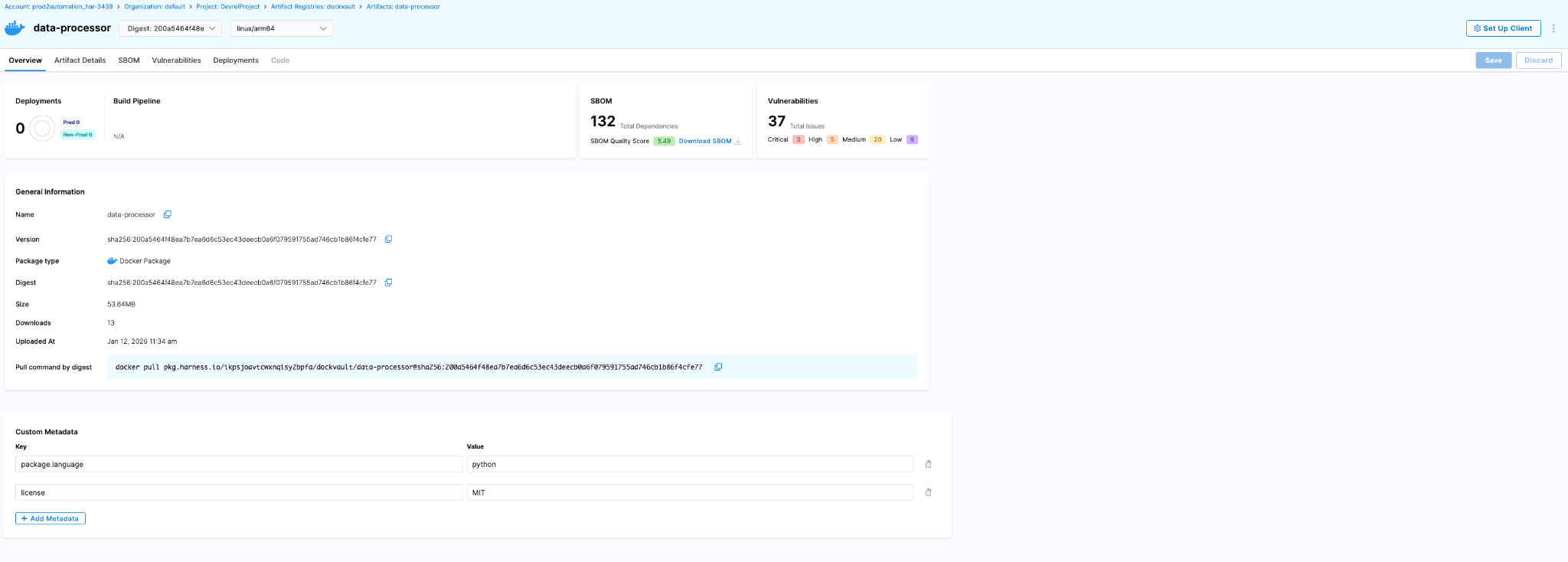
The artifact details page surfaces security and deployment data directly:
- SBOM tab - Dependency lists, suppliers, package managers (requires SCS module)
- Vulnerabilities tab - Scan results from STO (requires STO module)
- Deployments tab - Which environments this artifact is deployed to and instance counts (requires CD module)
Audit trails are built into the Harness platform. Every artifact action is tracked with the actor, timestamp, and context. You can query these via the UI (Account Settings > Audit Trail, filter by Artifact Registry) or the API.
Teams serious about software supply chain governance end up implementing these controls eventually. Harness AR packages upstream proxy caching, Dependency Firewall, RBAC, security scanning via STO/SCS, and platform-wide audit trails into a single registry that covers the breadth of package types modern engineering teams actually use. The alternative is maintaining a constellation of registry-specific integrations that break whenever vendors deprecate APIs or security requirements tighten.
You can explore the platform or review implementation patterns in the Artifact Registry documentation.
Reducing Artifact Sprawl Starts with Visibility
Fixing artifact repository sprawl doesn't require ripping out every existing registry overnight. It requires establishing a control plane that can answer basic questions reliably: what artifacts exist, where they came from, who has access, and what depends on them. Once you have that visibility, you can start enforcing policies consistently and eliminating redundant tooling incrementally.
The teams that move fastest at scale treat artifact management as infrastructure that enables speed rather than a storage problem that needs solving registry by registry. They consolidate governance boundaries, route external dependencies through proxy layers with policy enforcement, and build confidence that what passed security checks is actually what reached production.
If your deployment pipelines feel slower than they should, or your security team struggles to answer supply chain questions confidently, artifact sprawl is worth examining. The operational debt compounds quietly until it doesn't, usually during an incident when you need answers fast and discover your artifact lineage spans five disconnected systems with inconsistent audit logs.
FAQ
Do I have to migrate all my artifacts to Harness AR at once?
No. Start with upstream proxies (no migration needed), then migrate hosted artifacts incrementally per team/package type.
What if I'm already using JFrog Artifactory?
Harness AR can proxy Artifactory as an upstream source while you migrate, or coexist indefinitely if you need Artifactory-specific features.
Does this lock me into Harness for CI/CD?
No. Harness AR works with any CI/CD tool that can authenticate to a registry. The integrations with Harness CD/STO/SCS are optional add-ons.