AI writes code faster, but CI still repeats costly work. See how Harness CI cuts unnecessary tests, recompilation and dependency downloads.

TL;DR
- Green builds aren't enough. As AI-assisted development increases code volume, redundant compilation, dependency downloads, and test execution become significant CI bottlenecks.
- Optimize the work, not just the runners. Harness Cache Intelligence, Build Intelligence and Test Intelligence target different sources of unnecessary work.
- Test selection makes a measurable difference. In our Java Maven example, Test Intelligence ran 12 of 42 tests after a single-file change, skipping 30 tests without sacrificing relevant test coverage.
Six months ago, your team adopted an AI coding assistant. Pull requests doubled. Generated code started landing in branches faster than reviewers could read it. The CI pipeline kept up for about three weeks.
Now the queue backs up by mid-morning. Builds take 38 minutes. 4,000 tests run on every commit when 60 are relevant. The pipeline was designed for developers writing code. It is now processing code that machines write, at machine speed, with human-era validation.
This is for platform engineers and engineering leads dealing with what happens when AI-generated code meets a CI pipeline that was never built for that volume.
Green is the baseline. It is not the finish line.
AI writes the code faster. CI still validates it the slow way.
The bottleneck shifted. AI coding assistants removed the slowest part of the development cycle: writing code. What they did not touch is everything after the commit: dependency resolution, compilation, test execution, and image builds. Those still run the same way they did when a developer pushed two PRs a day instead of ten.
Look at what happens on a single-file change: full dependency downloads, full compilation, full test suite, full Docker layer rebuilds. Multiply that by the PR volume an AI assistant generates. GitHub's 2023 developer experience survey found that developers spend as much time waiting for builds and tests as they do writing new code. Incredibuild's survey found 98% of developers wasted time waiting for builds, with build times increasing nearly 16% year over year.
Then there is the trust problem. Slack's mobile team watched flaky tests drive their main branch build pass rate to 20%. Each failure took 28 minutes to triage. A green pipeline is not valuable if developers do not trust the red ones. At AI-assisted commit velocity, flaky tests do not just slow you down. They stop the entire merge queue.
CircleCI's 2026 report, analyzing 28 million workflows, confirms the pattern: increased code volume is exposing validation as a delivery bottleneck. The pipeline is doing more work than the change requires.
Two approaches to CI pipeline optimization in the AI era: faster execution or less work
Most teams start with the first: bigger runners, parallelized tests, cached dependencies, and conditional pipeline logic. These help. But they optimize the wrong layer. Doubling the CPU on 5,000 tests still runs 4,700 unnecessary tests, whether a human or an AI wrote the change.
The more interesting approach: stop doing work that doesn't need to be done. Detect which dependencies changed, which modules need recompilation, which tests are affected by the code change, and skip everything else. At an AI-generated volume, the savings multiply with every PR that skips redundant work.
That is the path this walkthrough follows with Harness CI.
Attacking different kinds of waste at different layers
This is where the conversation shifts from generic CI advice to something more specific. Harness CI is oriented toward the second philosophy: stop doing work that does not need to happen.
But it is not a single optimization. It is a layered approach, where each layer attacks a different kind of waste.
Here is where each type of waste maps to a Harness CI feature:
| Waste | What happens | Harness feature |
|---|---|---|
| Dependency re-downloads | Every run fetches the same packages | Cache Intelligence |
| Unnecessary recompilation | Unchanged modules rebuilt from scratch | Build Intelligence |
| Full test suite on small changes | 4,000 tests when 60 are relevant | Test Intelligence |
| Docker layer rebuilds | Base layers rebuilt despite no Dockerfile change | Docker Layer Caching |
| Serial test execution | Tests run single-threaded on one runner | Test splitting and parallelism |
| Flaky test noise | Intermittent failures block unrelated PRs | Flaky test detection and quarantine |
Enabling Cache Intelligence, Test Intelligence, and Build Intelligence
The Harness CI intelligence features work at the stage level. You do not install plugins or write custom caching scripts. You enable them in your pipeline configuration.
Here is a Java Maven pipeline with Cache Intelligence and Test Intelligence active, running on Harness Cloud:
pipeline:
  name: ci green not enough - SD
  inputs:
    branch:
      type: string
      required: true
      default: main
  clone:
    enabled: true
    connector: shibam_github
    repo: shibam17/ci-intelligence-lab
    ref: ${{ inputs.branch }}
  stages:
    - id: build
      name: Build
      runtime: cloud
      platform:
        os: linux
        arch: amd64
      cache:
        enabled: true
      steps:
        - id: run_tests
          name: Run Tests
          run-test:
            container:
              image: maven:3.9-eclipse-temurin-17
            script: mvn clean test
            intelligence:
              disabled: false
            report:
              paths:
                - "**/*.xml"
Two things are happening in this pipeline that do not happen in a standard CI setup:
Cache Intelligence (stage level)
cache:
  enabled: true
That is it. Harness detects the build tooling (Maven in this case; it also supports Gradle, Yarn, Go, .NET, Bazel) and automatically preserves and restores the dependency cache between runs. The cache key is derived from files like pom.xml or build.gradle. No manual cache key configuration, no hashFiles() expressions, no cache invalidation scripts.
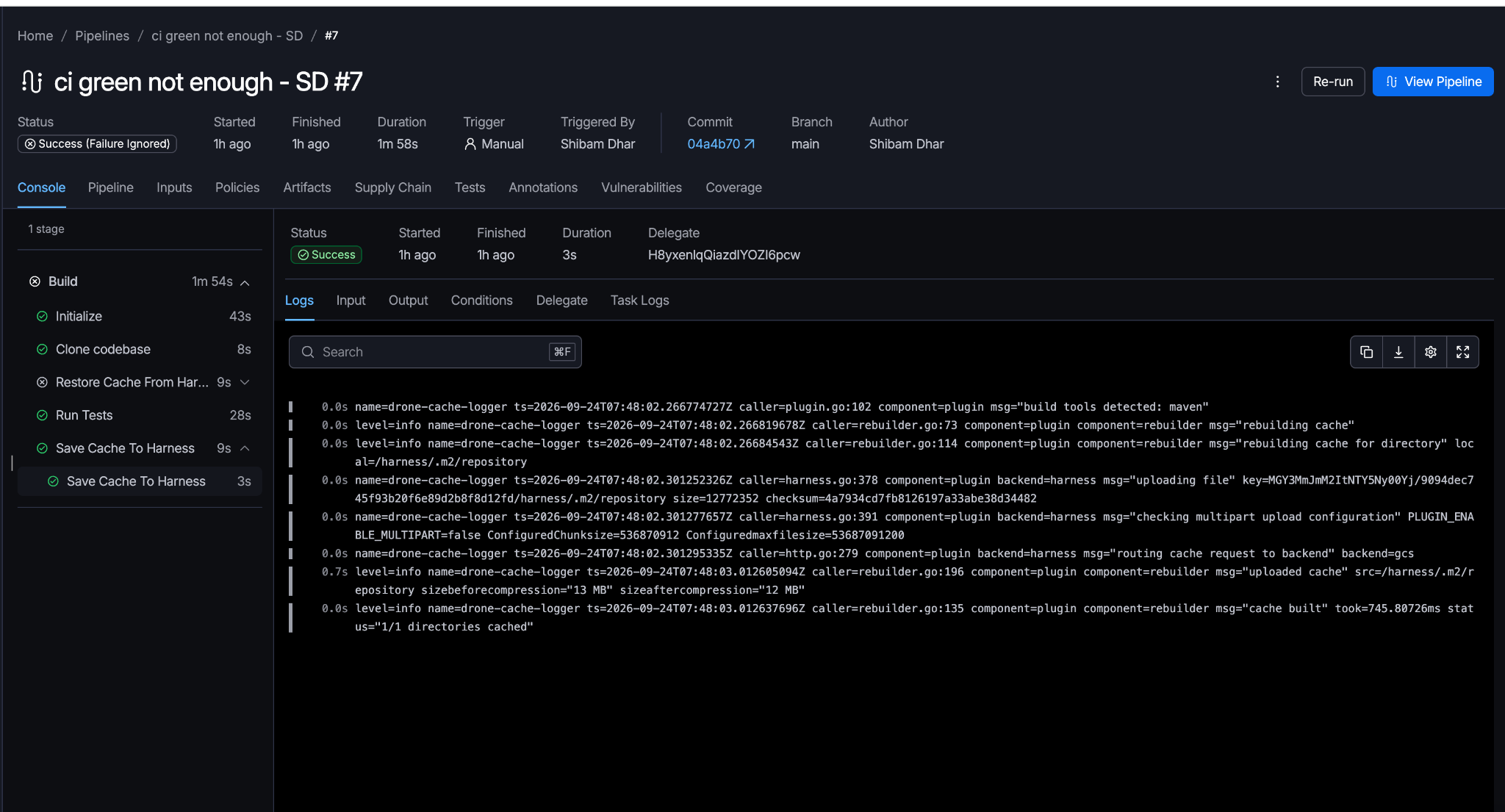
On the first run, the cache step shows "file not found" because nothing has been saved yet. On every subsequent run, it restores the full .m2/repository in seconds. In our test pipeline, the cache save uploaded 13 MB of Maven dependencies, and the second run restored them in 9 seconds instead of re-downloading.
Cache Intelligence saving 13 MB of Maven dependencies (compressed to 12 MB), cached in 745ms
Test Intelligence (run-test step)
run-test:
  script: mvn clean test
  intelligence:
    disabled: false
Setting intelligence.disabled: false activates Test Intelligence. Harness uses code-change information and a call graph to identify which unit tests are affected by the changed code. It selects those tests, plus any new or modified tests. Everything else is skipped.
Test Intelligence supports Java, Python, Ruby, C#, Kotlin, and Scala. The call graph is built per language.
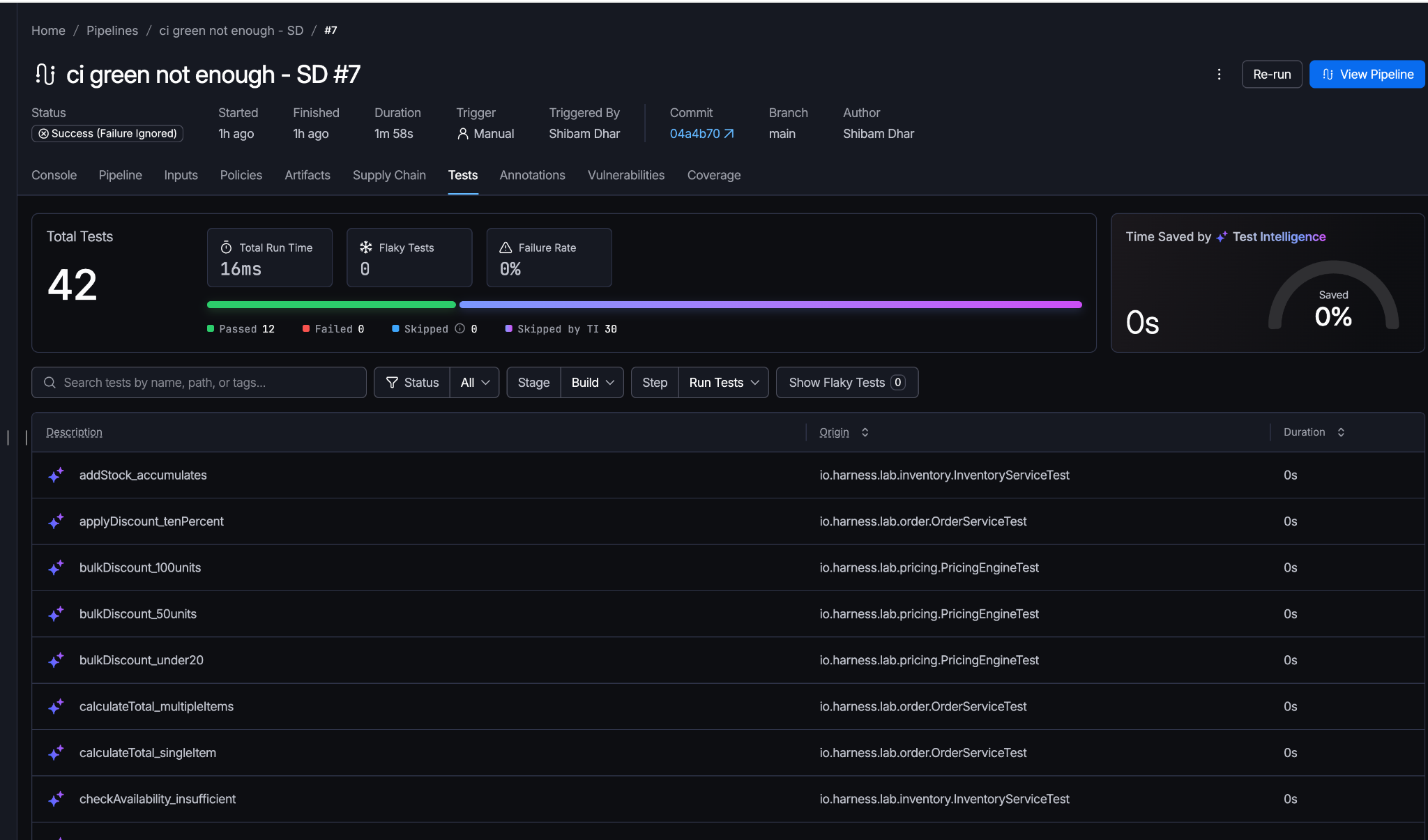
On our first run, TI built a call graph with 82 nodes and 39 test relations across all 42 tests. On the second run, after changing a single file (InputValidator.java), TI selected only 12 tests and skipped the remaining 30. The test run time dropped from 58ms to 16ms.
On broad-impact changes (like modifying pom.xml), the system runs the full suite automatically. It does not blindly skip.
Test Intelligence selected 12 tests and skipped 30 after a single-file change to InputValidator.java
Build Intelligence (stage level)
For pipelines that compile code, Build Intelligence adds another layer:
build-intelligence:
  enabled: true
Build Intelligence operates on compiled outputs. If the inputs for a module have not changed, Harness retrieves the previously generated build output instead of recompiling. Gradle, Bazel, and Maven 3.9+ are supported.
This layer stacks on top of Cache Intelligence: caching avoids re-downloading dependencies, Build Intelligence avoids re-compiling code that has not changed.
Two more layers worth knowing about: Docker Layer Caching stores previously built image layers so that only changed layers rebuild, which matters most for pipelines that build container images on every commit. Test splitting and parallelism distributes your test suite across multiple runners based on timing data, so a 20-minute serial test run can drop to 5 minutes across four parallel stages. Both stack with the intelligence features above.
Flaky test detection (automatic)
Harness tracks test results over a 14-day observation window. A test that has both passed and failed against the same commit within that window gets a FLAKY indicator. Quarantine mode keeps the test running and visible but prevents its failure from blocking the pipeline. The test exits quarantine after five consecutive successful runs.
Before and after
We ran this pipeline against a Java Maven project with 42 unit tests across 5 service modules (order, inventory, pricing, notification, validation). Here is what changed between the first run (no cache, no call graph) and the second run (single file changed):
| Metric | Run #6 (baseline) | Run #7 (with intelligence) |
|---|---|---|
| Cache restore | Miss (no prior cache) | Hit (13 MB restored in 9s) |
| Tests executed | 42 (full suite) | 12 (selected by TI) |
| Tests skipped by TI | 0 | 30 |
| Test run time | 58ms | 16ms |
| Call graph | Built (82 nodes, 39 relations) | Reused for selection |
| Failure rate | 2.38% (1 test bug) | 0% |
42 tests, all executed, 1 failed, 0 skipped by TI
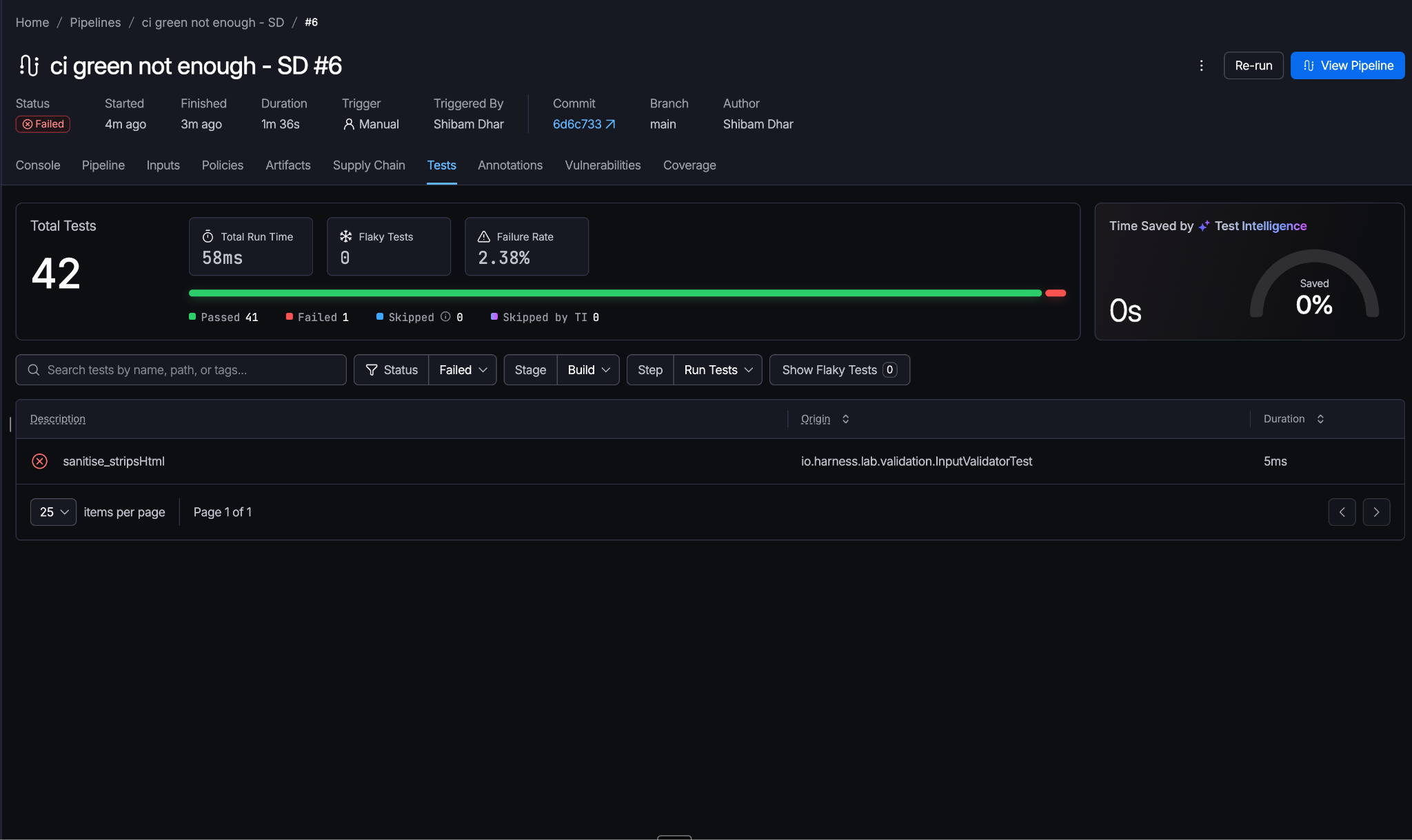
42 tests, 12 executed, 30 skipped by TI, 0 failures
The pipeline is still green. It is just doing 71% less test work to get there. On a larger codebase with thousands of tests, that ratio translates to minutes saved per commit.
Try it against your pipeline
The fastest way to see the difference: take an existing pipeline, add cache: enabled: true at the stage level, and swap your run test step for a run-test step with intelligence: disabled: false. Run it twice. Compare the second run's test count against your baseline.
# The minimum change to enable intelligence on an existing pipeline:
stages:
  - id: build
    name: Build
    runtime: cloud
    cache:
      enabled: true
    steps:
      - id: tests
        name: Tests
        run-test:
          container:
            image: maven:3.9-eclipse-temurin-17
          script: mvn clean test
          intelligence:
            disabled: false
          report:
            paths:
              - "**/*.xml"
Start with Harness CI documentation for the full configuration reference per language and build tool.
What connects beyond CI
Faster CI is one layer. The bottlenecks on either side are different problems.
Code that passes CI and sits in staging for three weeks is a deployment problem. Continuous Delivery with progressive rollout and built-in verification closes that gap: code moves to production when it is ready, not when someone remembers to deploy it.
Security alerts from four different scanners creating duplicate noise are a triage problem. Security Testing Orchestration deduplicates findings and gives developers one prioritized list instead of four noisy dashboards.
CI costs spiraling across dozens of feature branches is a visibility problem. Cloud Cost Management shows what each pipeline actually costs, per branch, per team.