Learn to version reference data with Liquibase OSS, automate deployments in Harness Database DevOps, and enable safe rollbacks.

TL;DR
Versioning reference data in Git with Liquibase OSS changelogs enables consistent, auditable, and automated deployments across environments. Using loadUpdateData with versioned CSV files provides fast, reliable rollbacks and reduces production risk.
Modern applications do not just depend on schema changes. They also depend on data that powers the application itself.
Things like dropdown values, feature flags, country codes, user roles, pricing tiers, workflow statuses, or internal configurations are often stored inside database tables. This is called reference data. Even though this data may look small, it is critical to the application. A wrong value can break workflows, show incorrect information to users, or create production issues.
In this blog, we will look at a clean and safe way to manage reference data updates using Harness Database DevOps with Liquibase OSS compatible changelogs. We will also see how to safely roll back data changes when something goes wrong.
Why Reference Data Needs Version Control
Many teams still update reference data manually.
Someone runs an SQL update in production. Another person edits rows directly from a database UI. Sometimes CSV imports happen without tracking.
This creates several problems:
- Nobody knows who changed the data.
- There is no rollback process.
- Different environments become inconsistent.
- Testing becomes difficult.
- Deployments become risky.
Over time, this also creates environment drift between development, staging, and production databases.
Database DevOps solves this by treating reference data like application code. Where the data lives in Git and the changes are reviewed through pull requests. Database deployments take place through pipelines and rollback workflows become predictable.
This gives teams consistency, governance, and traceability across every environment.
A Better Pattern for Managing Reference Data
One of the safest patterns for updating reference data is:
- Store reference data inside versioned CSV files
- Commit those files to Git
- Use the loadUpdateData change type
- During deployment, apply the new CSV version
- During rollback, deploy the previous CSV version
This approach works especially well for database CI/CD and database deployment automation workflows. It also aligns nicely with GitOps-style database management where every change is versioned and auditable.
For example, the Harness community maintains a Terraform onboarding template that helps teams provision and onboard Harness Database DevOps resources directly from CSV files.
Real-World Examples of Reference Data
Teams commonly use this pattern for:
- Product pricing tiers
- Feature flags
- Internal application settings
- Country and currency mappings
- Approval workflow statuses
- Lookup tables used by frontend applications
These datasets are often tightly connected to application behavior, which makes safe deployments and rollback strategies extremely important.
Example Scenario
Imagine your application has a table called subscription_tiers. The application reads values from this table to display pricing plans inside the UI.
Your current data looks like this:
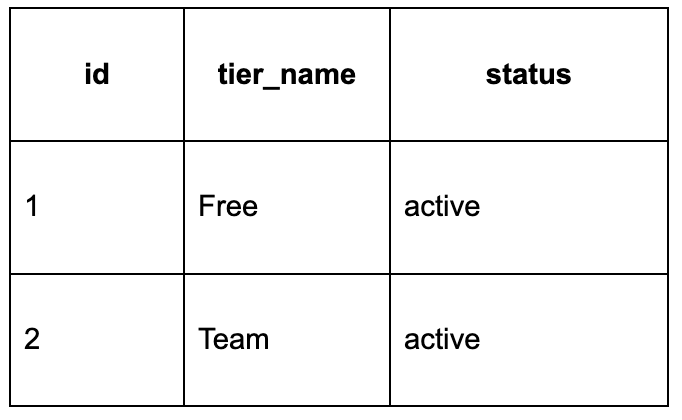
Now your product team wants to add a new Enterprise tier with help of subscription_tiers-v2.csv. Instead of manually inserting rows into production, we can version this data properly.
Step 1: Store Data in Versioned CSV Files
Inside your repository, create a folder for reference data.
The version suffix is important, this makes deployments predictable and makes rollback much easier and teams can quickly identify which dataset version was deployed to each environment.
Step 2: Use loadUpdateData
Now create a Liquibase OSS compatible changelog YAML file.
This is the important part:
- During deployment, Harness Database DevOps executes the changelog and loads subscription_tiers-v2.csv.
- During rollback, the pipeline reloads subscription_tiers-v1.csv.
This creates a rollback-ready deployment workflow without requiring manual SQL fixes during incidents.
How This Fits into Database DevOps?
In a modern Database DevOps workflow, every database change should move through the same CI/CD process.
That includes:
- Schema changes
- Stored procedures
- Reference data
- Permissions
- Seed data
Reference data should not bypass governance. When reference data lives in Git, teams gain much better operational control:
- Developers can review changes before deployment.
- QA teams can validate updates in staging environments.
- DBAs keep database deployment automation in environments consistent.
- Rollback steps are already prepared before production deployment begins.
And this significantly reduces operational risk for the team.
Using Harness Database DevOps for Reference Data Deployments
While many teams have adopted CI/CD for application deployments, database updates often remain tied to manual workflows, increasing risk particularly with reference data.
Harness Database DevOps bridges this gap by enabling automated reference data management. By utilizing Liquibase OSS compatible changelogs and storing CSV files in Git as deployment artifacts, teams can bring database changes into their standard delivery pipelines.
This approach provides several key benefits:
- Full traceability through Git commits, pull requests, and pipeline history.
- Environmental consistency by moving the same reference data from development through production without manual intervention.
- Coordinated delivery by integrating database updates directly into existing application release pipelines.
- Enhanced governance via automated policy checks, audit logs, and approval gates.
Git-driven workflows are particularly advantageous for large-scale operations. To support this, the Harness community offers Terraform onboarding templates that facilitate CSV-driven resource provisioning, helping organizations standardize database operations.
This workflow ensures that rollbacks are integrated from the start. If an update causes an issue, teams can rapidly redeploy the previous CSV version using pre-defined rollback steps in the changelog. This result is a more predictable and secure delivery process for both operations and development teams.
But The Rollbacks Are the Real Advantage
Most teams focus mainly on deployments. But mature Database DevOps practices depend heavily on reliable rollback strategies. Reference data changes can fail for many reasons. The application may still expect an older value. Unexpected data changes can break the UI.
A feature flag might get enabled too early. Without rollback automation, production recovery becomes stressful and slow. Using versioned CSV files with loadUpdateData keeps the rollback process simple. Since the previous working version already exists, recovery becomes much faster. That simplicity becomes extremely valuable during production incidents.
Conclusion
This streamlined lifecycle leverages automated pipelines to manage updates and rapid recoveries. Standardizing reference data management aligns database deployments with modern CI/CD best practices. Explore how Harness Database DevOps can transform your delivery process today.