Provision a fresh Docker Registry with Terraform, build your container image into it, and deploy to Kubernetes in one

TL;DR
One pipeline. One click. It provisions a fresh Docker Registry with Terraform, builds your container image into it, and deploys that image to Kubernetes. Every run creates a uniquely named registry, so you never hit naming conflicts.
Creating Docker registries by hand every time you spin up a new service or environment gets tedious fast. What if your CI/CD pipeline could provision its own registry, push an image to it, and deploy, all without you clicking through a single UI form?
That's exactly what you'll build in this guide. Using Harness Pipelines and the Harness Terraform Provider, you'll create a fully automated workflow that handles the entire lifecycle: infrastructure provisioning, image building, and Kubernetes deployment.
Whether you're exploring how Harness Artifact Registry works or looking for a practical example of Infrastructure as Code inside a CI/CD pipeline, this tutorial walks you through every step.
.png)
What you'll learn
By the end of this tutorial, you'll know how to:
- Run Terraform inside a Harness CI step to provision infrastructure on the fly, with no separate Terraform workflow needed.
- Pass data between pipeline stages using output variables and Harness expressions, so each stage builds on the last.
- Use the Build and Push to Docker Registry step to push images directly to Harness Artifact Registry (HAR).
- Wire a dynamically provisioned registry into a Kubernetes CD deployment with rolling updates and automatic rollback.
What you'll build
A Harness pipeline with three stages that work together:
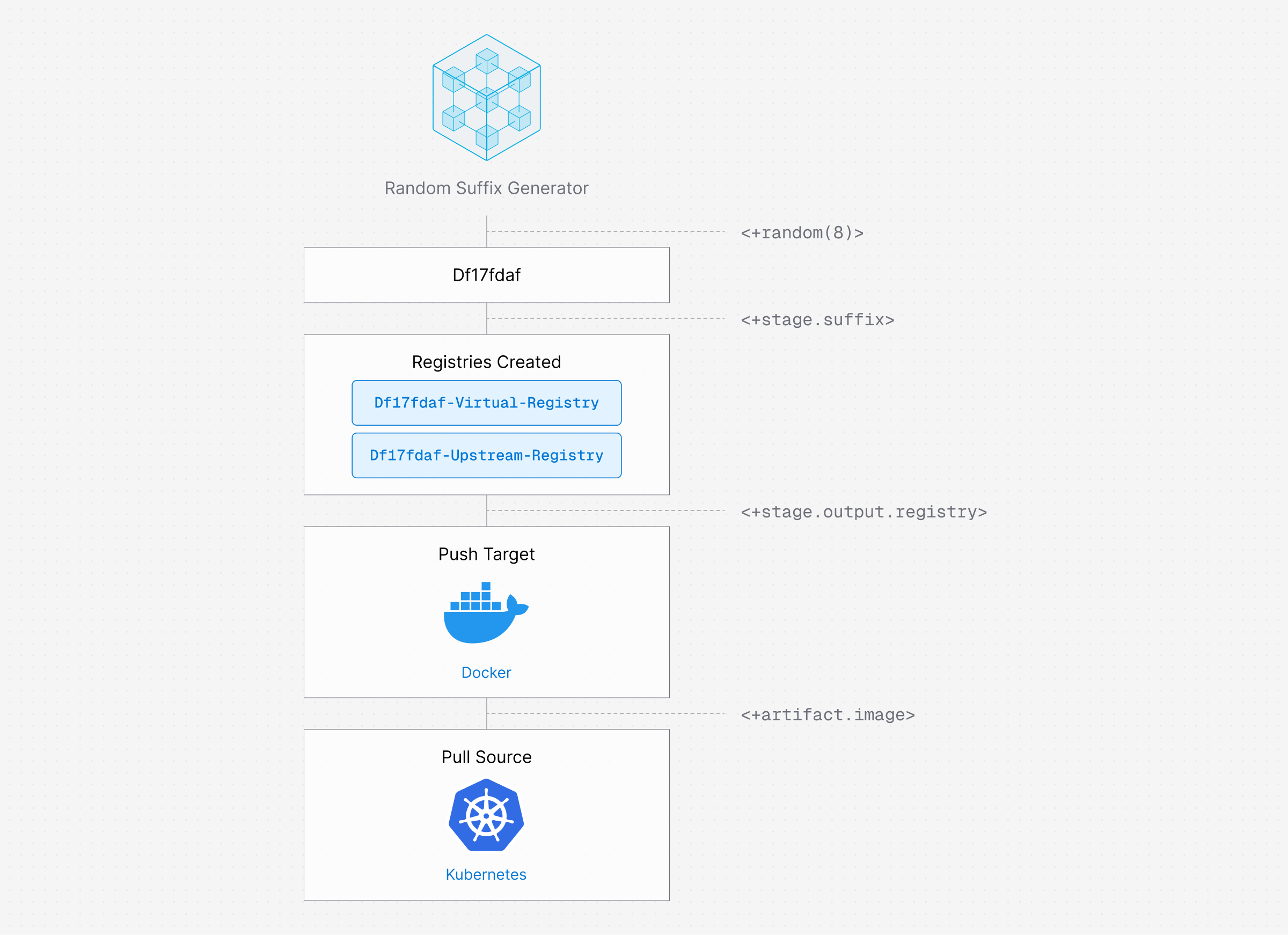
How data flows between stages
The pipeline generates a unique suffix (e.g., df17fdaf) per run. This suffix creates unique registry names so multiple runs never collide:
Stage 1 creates:    terra-docker-df17fdaf   (virtual registry)
                    terra-upstream-df17fdaf  (upstream proxy)
                             │
Stage 2 pushes to:  terra-docker-df17fdaf   (as the image target)
                             │
Stage 3 pulls from: terra-docker-df17fdaf   (as the deployment source)
Harness output variables and expressions handle the data passing automatically. You don't hardcode anything.
Key concepts (quick refresher)
If any of these terms are new, here's a brief summary. Skip ahead if you're already familiar.
Prerequisites
Before you begin, make sure you have:
- A Harness account with the Artifact Registry, CI, and CD modules enabled. Sign up here if you don't have one yet.
- A code repository containing a Dockerfile (the image you want to build and deploy). The pipeline clones this repo in Stage 2.
- A Harness API key (PAT or Service Account Token), which you'll store as a Harness secret in the first step below.
- A Kubernetes cluster connected to Harness via a Kubernetes connector. Stage 3 deploys to this cluster.
- A Harness service, environment, and infrastructure definition configured for Kubernetes deployment.
:::info New to Harness CD? If you haven't set up a Kubernetes deployment in Harness before, work through the Kubernetes CD quickstart first. It walks you through creating the service, environment, and infrastructure definition you'll need for Stage 3. Come back here once those are ready. :::
Required permissions
Your Harness API key needs the following permissions in the target project:
If you're using a project-level PAT, it inherits your user role. For a service account, make sure it has Project Admin or a custom role with the permissions above.
Step 1: Store your API key as a Harness Secret
The Terraform steps need a Harness API key to create registries. Storing it as a secret ensures it's never exposed in logs.
- Go to your project → Project Settings → Secrets.
- Select + New Secret → Text.
- Fill in the fields:
- Select Save.
Note the identifier (not the name); you'll reference it in the pipeline as <+secrets.getValue("harness_api_key")>.
:::warning Protect your API key Never commit API keys to Git, paste them in pipeline commands, or share them in Slack. Always use Harness secrets to manage credentials. The pipeline references secrets by identifier, so the actual value is never visible in logs. :::
Step 2: Create the Pipeline
- Go to your project → Pipelines → + Create a Pipeline.
- Fill in:
- Select Start to open the Pipeline Studio.
Configure the Codebase
Stage 2 needs your source code to build the Docker image. Configure the codebase now so it's available to all stages:
- In the Pipeline Studio, select the Codebase section on the right panel.
- Configure:
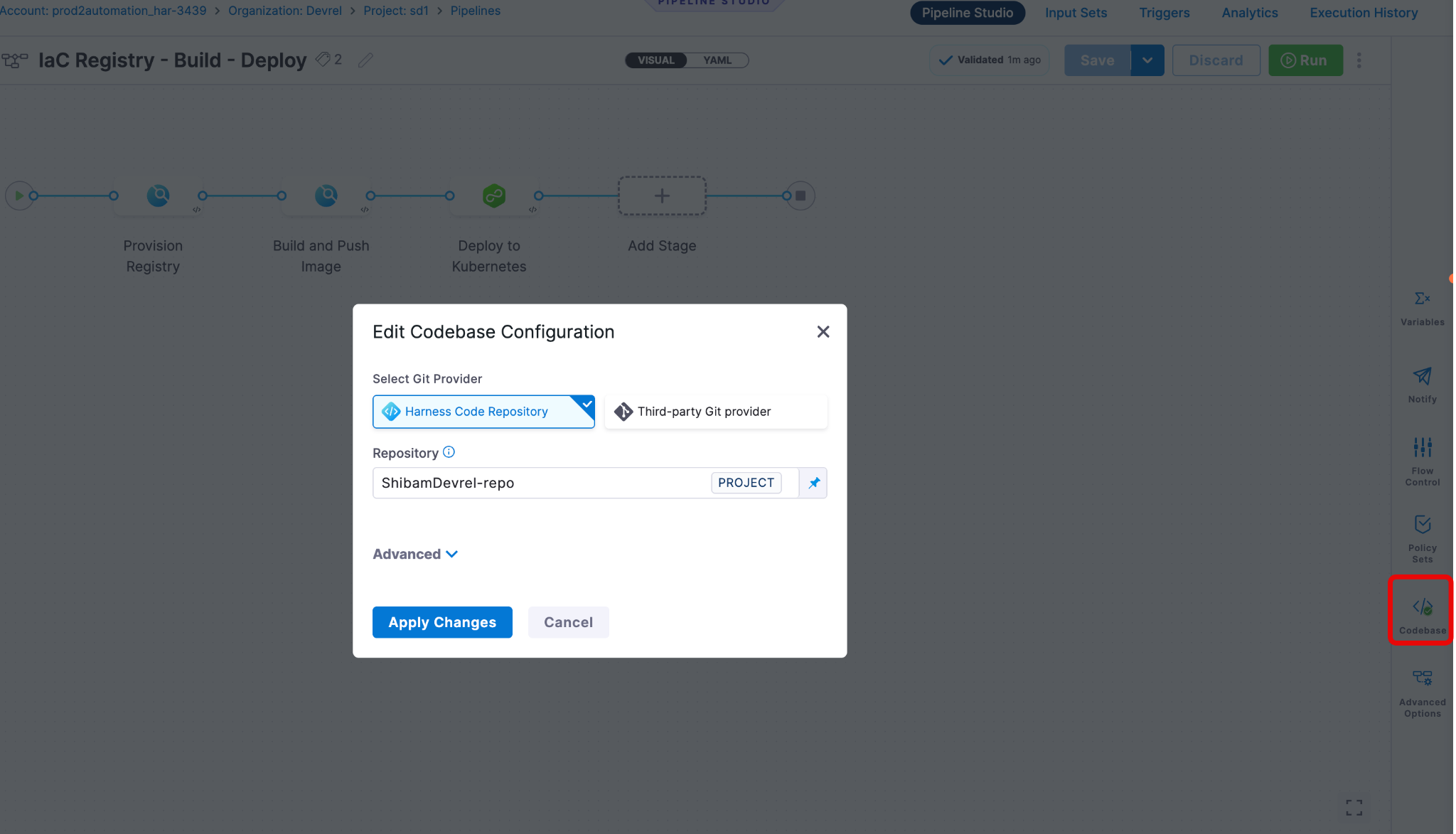
:::info Why Runtime Input for Build? Setting Build to <+input> means you choose the Git branch (or tag, or PR) each time you run the pipeline. This is useful when you want to test different branches without editing the pipeline every time. :::
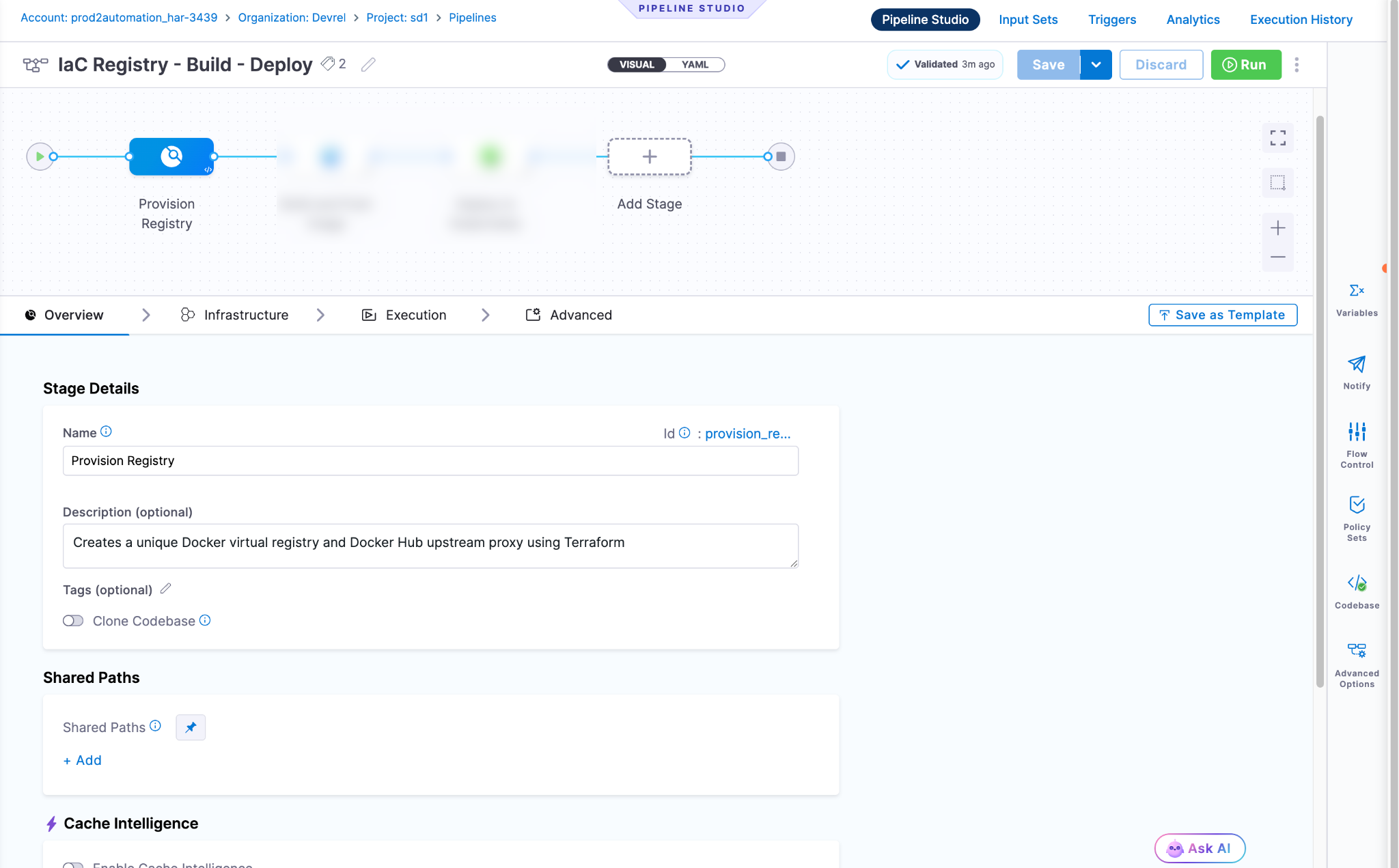
Step 3: Add Stage 1 (Provision Registry)
This is the core of the pipeline. A single CI stage with three sequential Run steps that use Terraform to create the registry infrastructure.
Why inline Terraform? Each step generates .tf files using shell heredocs instead of cloning them from a repo. This keeps the pipeline self-contained, with no external Terraform repository dependency. For production use, you may prefer to store Terraform in a Git repo instead.
- Select + Add Stage → Build (CI).
- Configure:
- Under Infrastructure, select:
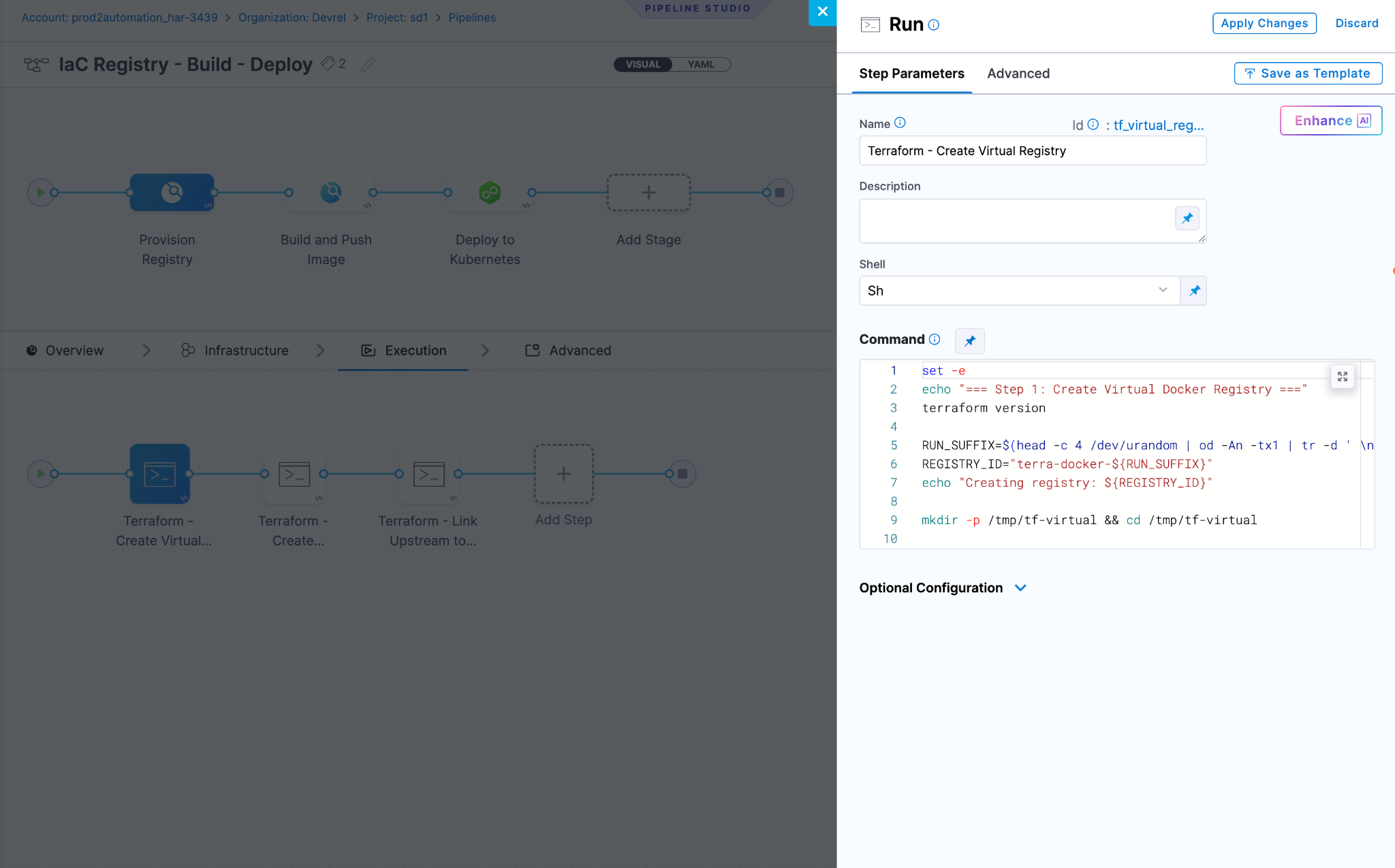
Step 1: Terraform - create virtual registry
This step generates Terraform configuration files inline, creates a virtual Docker registry with a unique name, and exports the registry ID for later steps.
- Select + Add Step → Run.
- Configure the basic fields:
- Expand Optional Configuration → Environment Variables and add:
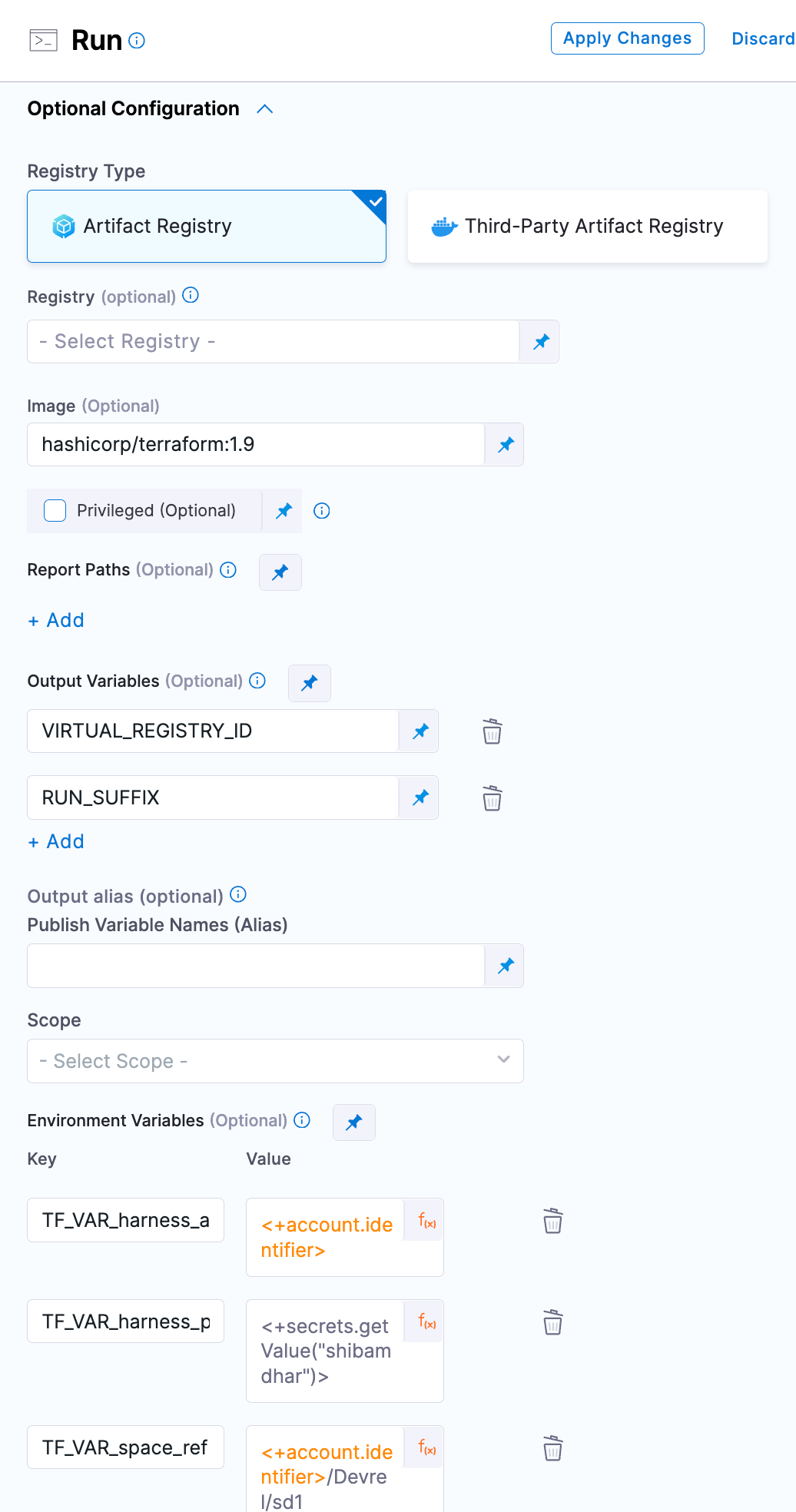
:::tip Built-in expressions <+account.identifier> automatically resolves to your Harness account ID at runtime, so no hardcoding is needed. <+secrets.getValue(...)> fetches the secret value and masks it in all logs. See the expressions reference for more built-in expressions. :::
Replace YOUR_ORG and YOUR_PROJECT with your actual Harness organisation and project identifiers. You can find these in the Harness URL:
https://app.harness.io/ng/account/ACCOUNT_ID/home/orgs/YOUR_ORG/projects/YOUR_PROJECT/...- Enter the Command:
set -e
echo "=== Step 1: Create Virtual Docker Registry ==="
terraform version

# Generate a unique 8-character hex suffix for this pipeline run
# This ensures every run creates a uniquely named registry
RUN_SUFFIX=$(head -c 4 /dev/urandom | od -An -tx1 | tr -d ' \n')
REGISTRY_ID="terra-docker-${RUN_SUFFIX}"
echo "Creating registry: ${REGISTRY_ID}"

# Create a temporary working directory
mkdir -p /tmp/tf-virtual && cd /tmp/tf-virtual

# --- Generate Terraform configuration files inline ---

cat > versions.tf <<'EOF'
terraform {
  required_version = ">= 1.5.0"
  required_providers {
    harness = {
      source  = "harness/harness"
      version = ">= 0.30.0"
    }
  }
}
EOF

cat > providers.tf <<'EOF'
provider "harness" {
  endpoint         = "https://app.harness.io/gateway"
  account_id       = var.harness_account_id
  platform_api_key = var.harness_platform_api_key
}
EOF

cat > variables.tf <<'EOF'
variable "harness_account_id" {
  type = string
}
variable "harness_platform_api_key" {
  type      = string
  sensitive = true
}
variable "space_ref" {
  type = string
}
variable "registry_id" {
  type = string
}
EOF

cat > main.tf <<'EOF'
resource "harness_platform_har_registry" "virtual" {
  identifier   = var.registry_id
  description  = "Docker virtual registry provisioned by pipeline"
  space_ref    = var.space_ref
  package_type = "DOCKER"
  config {
    type             = "VIRTUAL"
    upstream_proxies = []
  }
  parent_ref = var.space_ref
}
EOF

cat > outputs.tf <<'EOF'
output "registry_url" { value = harness_platform_har_registry.virtual.url }
output "registry_id"  { value = harness_platform_har_registry.virtual.identifier }
EOF

# --- Run Terraform ---

export TF_VAR_registry_id="${REGISTRY_ID}"

terraform init -upgrade -input=false
terraform validate
terraform apply -auto-approve -input=false

# Export output variables for subsequent steps
export VIRTUAL_REGISTRY_ID=$(terraform output -raw registry_id)
export RUN_SUFFIX="${RUN_SUFFIX}"
echo "Done: VIRTUAL_REGISTRY_ID=${VIRTUAL_REGISTRY_ID}, RUN_SUFFIX=${RUN_SUFFIX}"- Still under Optional Configuration, scroll to Output Variables and add:
:::Caution: don't skip output variables If you forget to add VIRTUAL_REGISTRY_ID and RUN_SUFFIX here, the subsequent steps and stages will fail with unresolved expressions. Harness only captures export-ed shell variables that are explicitly listed in this section. :::
What this step does:
- Generates an 8-character random hex suffix (e.g.,
df17fdaf) so every pipeline run creates a uniquely named registry. - Writes five Terraform files (
versions.tf, providers.tf, variables.tf, main.tf, outputs.tf) inline using shell heredocs. - Creates a VIRTUAL Docker registry with an empty
upstream_proxieslist (the upstream gets linked in Step 3). - Exports
VIRTUAL_REGISTRY_IDandRUN_SUFFIXso the next steps can use them.
:::info Why is the Terraform state ephemeral? Terraform state lives in /tmp inside the container. When the step finishes, that state is gone. This is intentional because the pipeline is designed for create-once workflows. Each run provisions new registries. If you need to update or destroy registries from a previous run, you'd need to re-import them or use a remote backend like S3 or Terraform Cloud. :::
Step 2: Terraform - Create Upstream Proxy
This step creates a Docker Hub upstream proxy that caches public images. It uses the same random suffix from Step 1 so both registries are clearly paired.
- Select + Add Step → Run.
- Configure:
- Add the same three Environment Variables as Step 1 (TF_VAR_harness_account_id, TF_VAR_harness_platform_api_key, TF_VAR_space_ref).
- Enter the Command:
set -e
echo "=== Step 2: Create Docker Hub Upstream Proxy ==="

# Retrieve the suffix from Step 1 using a Harness expression
RUN_SUFFIX="<+execution.steps.tf_virtual_registry.output.outputVariables.RUN_SUFFIX>"
PROXY_ID="terra-upstream-${RUN_SUFFIX}"
echo "Creating upstream proxy: ${PROXY_ID}"

mkdir -p /tmp/tf-upstream && cd /tmp/tf-upstream

cat > versions.tf <<'EOF'
terraform {
  required_version = ">= 1.5.0"
  required_providers {
    harness = {
      source  = "harness/harness"
      version = ">= 0.30.0"
    }
  }
}
EOF

cat > providers.tf <<'EOF'
provider "harness" {
  endpoint         = "https://app.harness.io/gateway"
  account_id       = var.harness_account_id
  platform_api_key = var.harness_platform_api_key
}
EOF

cat > variables.tf <<'EOF'
variable "harness_account_id" {
  type = string
}
variable "harness_platform_api_key" {
  type      = string
  sensitive = true
}
variable "space_ref" {
  type = string
}
variable "proxy_id" {
  type = string
}
EOF

cat > main.tf <<'EOF'
resource "harness_platform_har_registry" "upstream" {
  identifier   = var.proxy_id
  description  = "Docker Hub upstream proxy provisioned by pipeline"
  space_ref    = var.space_ref
  parent_ref   = var.space_ref
  package_type = "DOCKER"
  config {
    type      = "UPSTREAM"
    source    = "Dockerhub"
    auth_type = "Anonymous"
  }
}
EOF

cat > outputs.tf <<'EOF'
output "proxy_id" { value = harness_platform_har_registry.upstream.identifier }
EOF

export TF_VAR_proxy_id="${PROXY_ID}"

terraform init -upgrade -input=false
terraform validate
terraform apply -auto-approve -input=false

export UPSTREAM_PROXY_ID=$(terraform output -raw proxy_id)
echo "Done: UPSTREAM_PROXY_ID=${UPSTREAM_PROXY_ID}"- Add Output Variable:
How the expression works:
<+execution.steps.tf_virtual_registry.output.outputVariables.RUN_SUFFIX>This tells Harness: "Go to the step with identifier tf_virtual_registry in this stage, find its output variable RUN_SUFFIX, and insert the value here." At runtime, it resolves to something like df17fdaf.
:::Note about Docker Hub rate limits This upstream proxy uses anonymous Docker Hub access. Anonymous pulls are limited to 100 pulls per 6 hours per IP address. For teams, this can become a bottleneck. To increase the limit, set auth_type to "UserPassword" and provide Docker Hub credentials. See the companion Terraform tutorial for the authenticated configuration. :::
Step 3: Terraform - Link Upstream to Virtual
This step imports the virtual registry into a new Terraform workspace and updates it to route through the upstream proxy. After this step, your virtual registry is fully functional, and pulls will resolve through Docker Hub.
- Select + Add Step → Run.
- Configure:
- Same three Environment Variables as the previous steps.
- Enter the Command:
set -e
echo "=== Step 3: Link Upstream Proxy to Virtual Registry ==="

# Retrieve identifiers from previous steps
REGISTRY_ID="<+execution.steps.tf_virtual_registry.output.outputVariables.VIRTUAL_REGISTRY_ID>"
UPSTREAM_ID="<+execution.steps.tf_upstream_proxy.output.outputVariables.UPSTREAM_PROXY_ID>"
echo "Linking ${REGISTRY_ID} -> ${UPSTREAM_ID}"

mkdir -p /tmp/tf-link && cd /tmp/tf-link

cat > versions.tf <<'EOF'
terraform {
  required_version = ">= 1.5.0"
  required_providers {
    harness = {
      source  = "harness/harness"
      version = ">= 0.30.0"
    }
  }
}
EOF

cat > providers.tf <<'EOF'
provider "harness" {
  endpoint         = "https://app.harness.io/gateway"
  account_id       = var.harness_account_id
  platform_api_key = var.harness_platform_api_key
}
EOF

cat > variables.tf <<'EOF'
variable "harness_account_id" {
  type = string
}
variable "harness_platform_api_key" {
  type      = string
  sensitive = true
}
variable "space_ref" {
  type = string
}
variable "registry_id" {
  type = string
}
variable "upstream_id" {
  type = string
}
EOF

cat > main.tf <<'EOF'
resource "harness_platform_har_registry" "virtual" {
  identifier   = var.registry_id
  description  = "Docker virtual registry with Docker Hub upstream"
  space_ref    = var.space_ref
  parent_ref   = var.space_ref
  package_type = "DOCKER"
  config {
    type             = "VIRTUAL"
    upstream_proxies = [var.upstream_id]
  }
}
EOF

export TF_VAR_registry_id="${REGISTRY_ID}"
export TF_VAR_upstream_id="${UPSTREAM_ID}"

terraform init -upgrade -input=false
terraform validate

# Import the existing virtual registry so Terraform can update it
terraform import harness_platform_har_registry.virtual "${TF_VAR_space_ref}/${REGISTRY_ID}"
terraform apply -auto-approve -input=false

echo "Registry linked: ${REGISTRY_ID} -> ${UPSTREAM_ID}"
Why does this step use terraform import?
The virtual registry already exists because Step 1 created it. This step needs to update it (add the upstream proxy to upstream_proxies). But Terraform doesn't know about the existing registry because the state from Step 1 lives in a different /tmp directory.
terraform import tells Terraform: "This resource already exists in Harness, so start managing it from here." Then terraform apply updates it to include the upstream proxy. Without the import, Terraform would try to create a duplicate and fail with a "resource already exists" error.
Step 4: Add Stage 2 (Build and push image)
Now that the registry exists, this stage builds a Docker image from your source code and pushes it to the provisioned registry.
- Select + Add Stage → Build (CI) after Stage 1.
- Configure:
- Under Infrastructure:
- Optionally enable Caching under Advanced for faster subsequent builds.
Step: Build and push to HAR
This step uses a native Harness step type designed specifically for building Docker images and pushing them to Harness Artifact Registry.
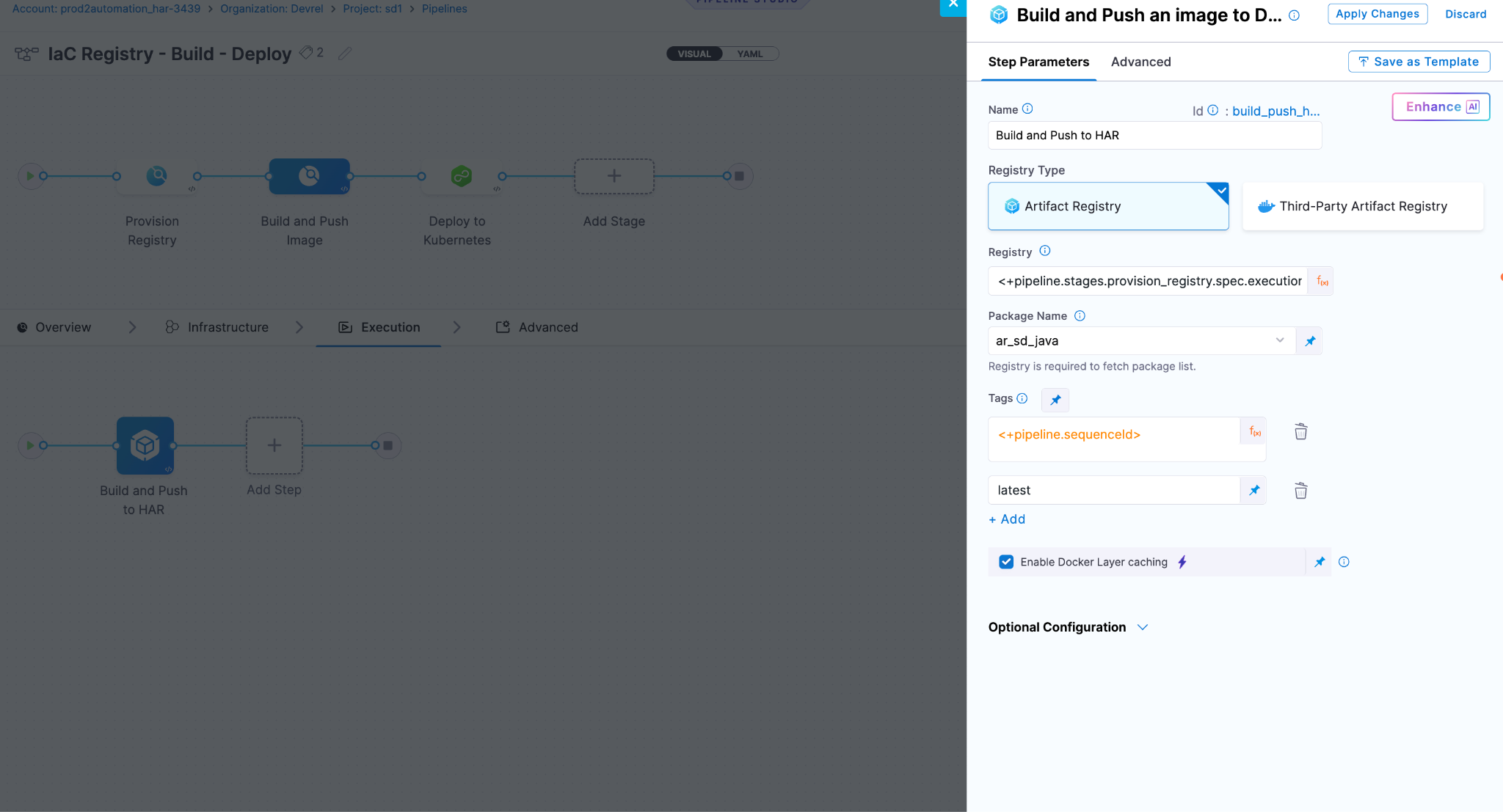
- Select + Add Step → Build and Push to Docker Registry.
:::info Set the step's Registry Ref field (not Connector Ref) to target HAR — it's the same step Harness uses for Docker Hub pushes, just pointed at your HAR registry instead. :::
- Configure:
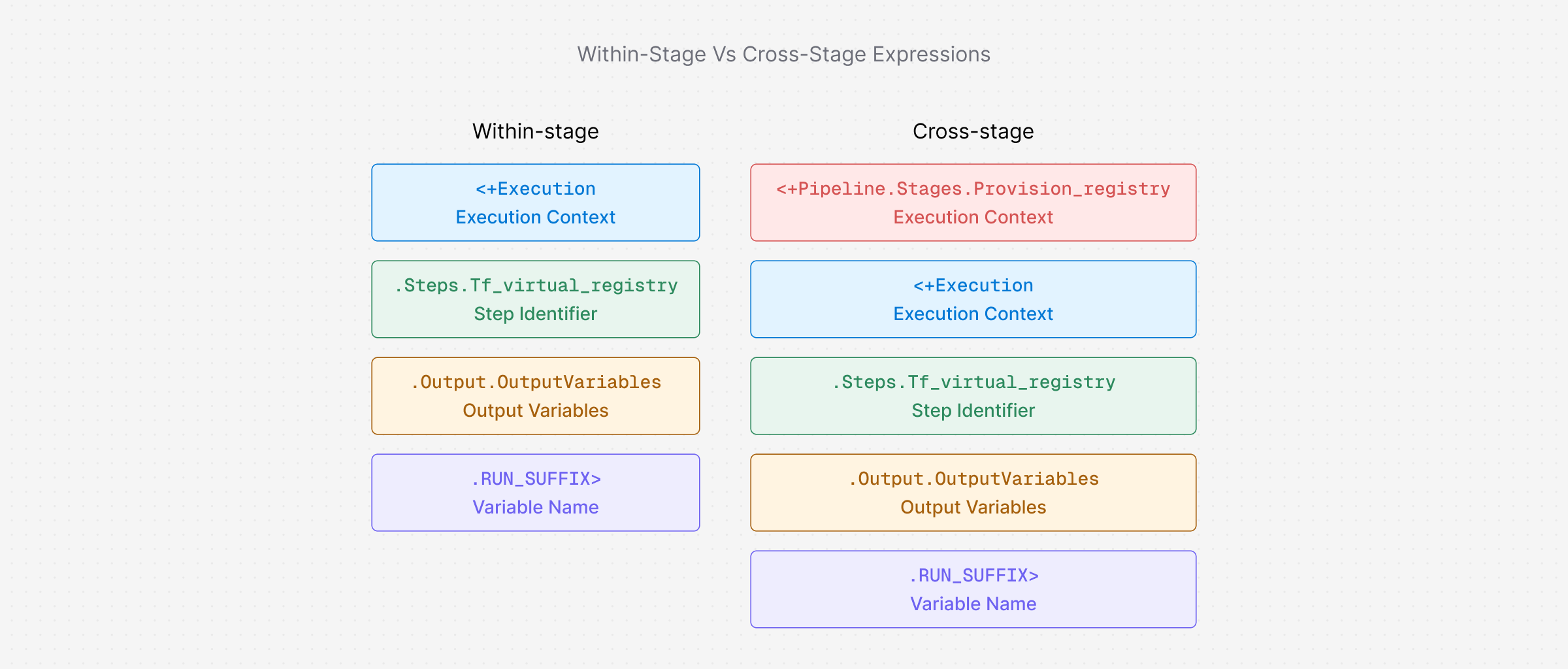
Understanding the cross-stage expression:
<+pipeline.stages.provision_registry.spec.execution.steps.tf_virtual_registry.output.outputVariables.VIRTUAL_REGISTRY_ID>This is longer than the within-stage expressions from earlier because it crosses stage boundaries. Here's what each part means:
At runtime, this resolves to something like terra-docker-df17fdaf.
Tags explained:
<+pipeline.sequenceId>is an auto-incrementing run number (1, 2, 3…), giving you a unique, traceable tag per run.latestis a convenience tag for the most recent build.
Step 5: Add Stage 3 (deploy to Kubernetes)
The final stage pulls the image from the provisioned registry and deploys it to your Kubernetes cluster using a rolling update.
- Select + Add Stage → Deploy after Stage 2.
- Configure:
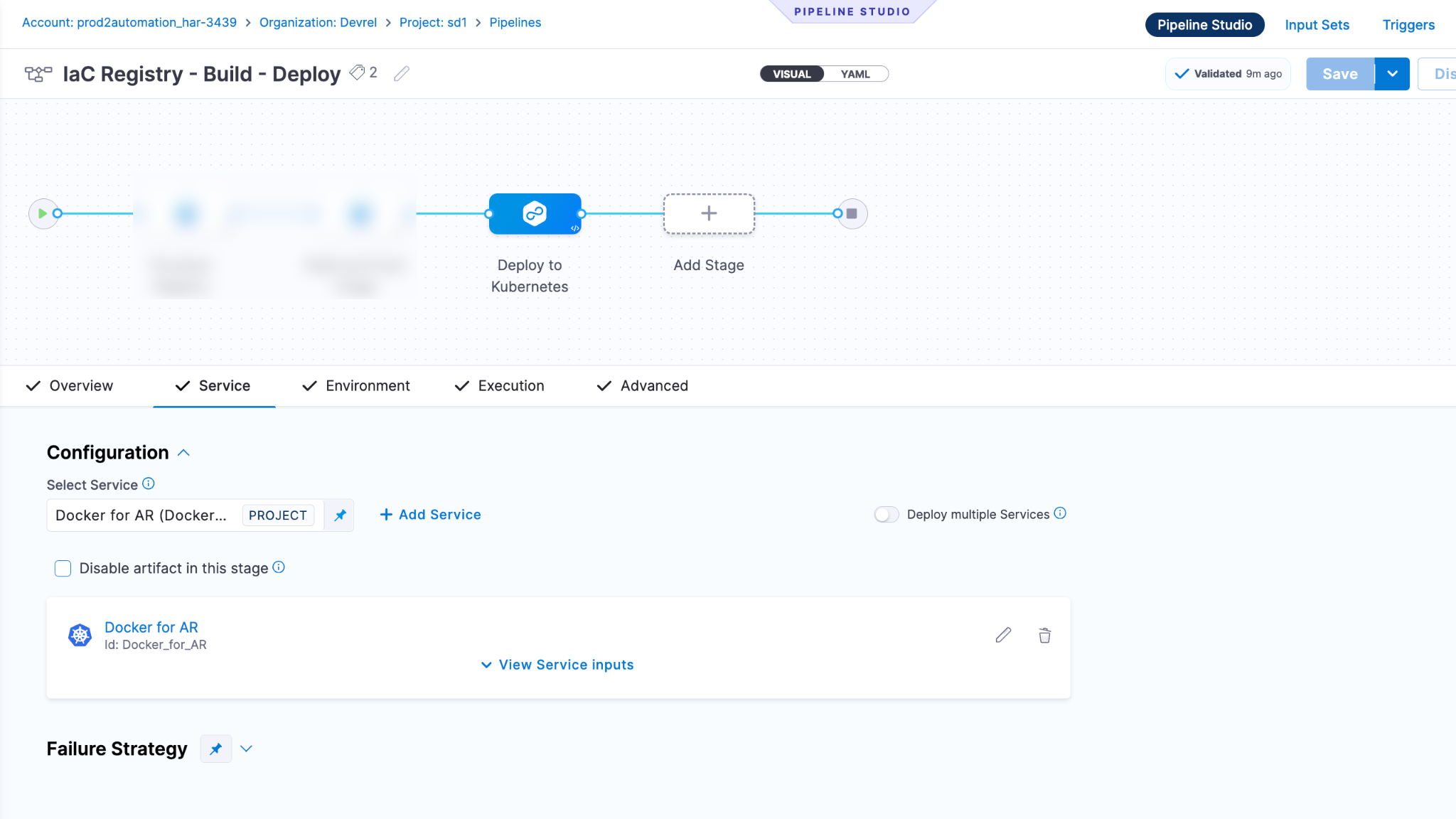
Configure the service
- Select your Harness service (or create one).
- Under Service Definition → Artifacts → Primary Artifact:
This tells Kubernetes to pull the exact image that Stage 2 just built and pushed.
Configure the Environment
- Select your Harness environment.
- Select your infrastructure definition (the Kubernetes cluster + namespace).
Configure the Execution
- The Execution tab should already have a default step. If not, select + Add Step → K8s Rolling Deploy.
- Configure:
- Under Rollback Steps, add:
Configure Failure Strategy
Under the stage's Advanced tab → Failure Strategy:
This ensures a failed deployment automatically rolls back to the previous working version instead of leaving your cluster in a broken state.
Step 6: Save and Run
- Select Save in the top-right corner of the Pipeline Studio.
- Select Run.
- If prompted, choose the branch for your codebase (used by Stage 2's Git clone).
- Select Run Pipeline.
What happens during Execution
Here's what you'll see as the pipeline runs through all three stages:
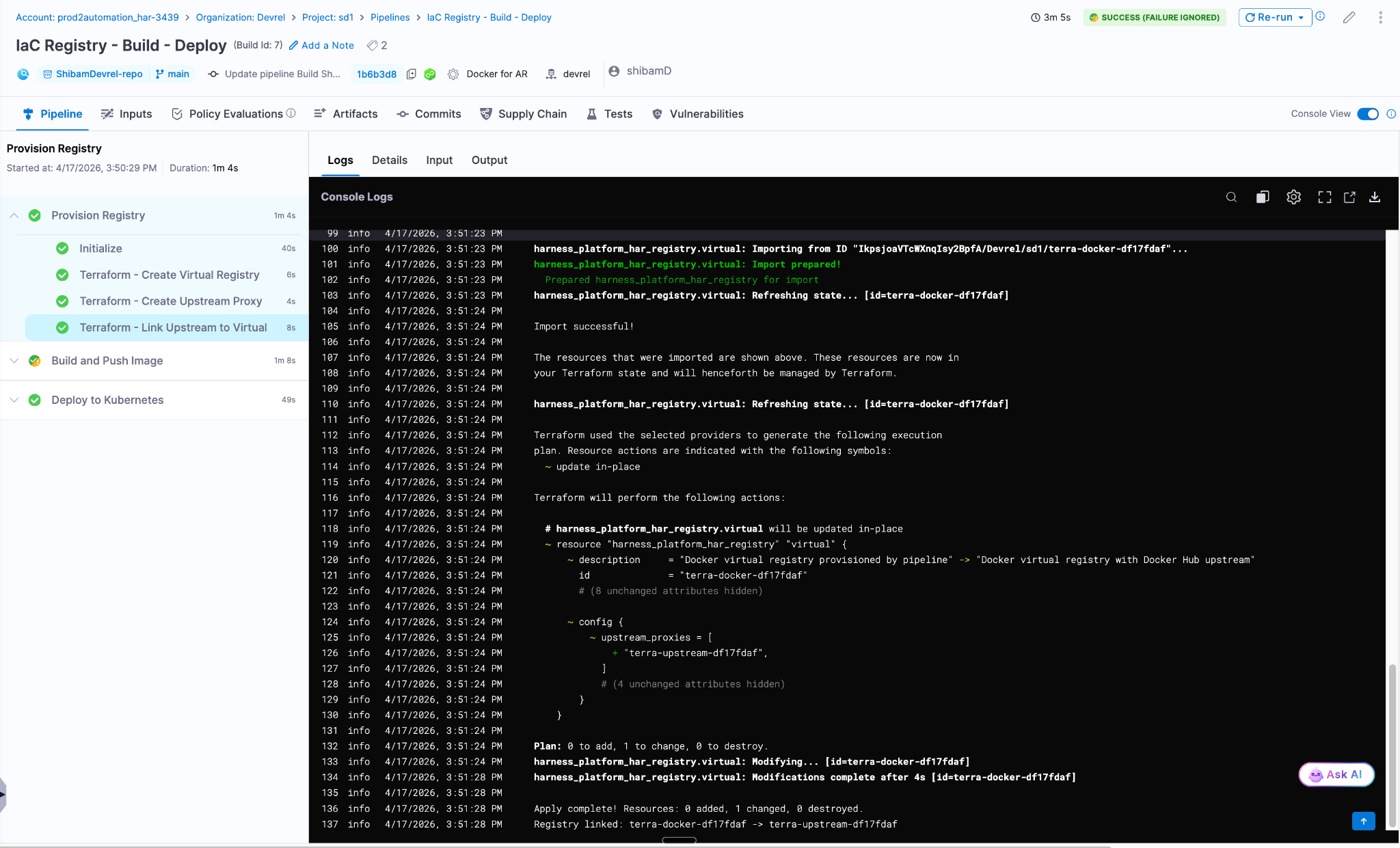
Stage 1 - Provision Registry:
=== Step 1: Create Virtual Docker Registry ===
Creating registry: terra-docker-df17fdaf
Apply complete! Resources: 1 added

=== Step 2: Create Docker Hub Upstream Proxy ===
Creating upstream proxy: terra-upstream-df17fdaf
Apply complete! Resources: 1 added

=== Step 3: Link Upstream Proxy to Virtual Registry ===
Linking terra-docker-df17fdaf -> terra-upstream-df17fdaf
Import successful!
Apply complete! Resources: 0 added, 1 changed
Registry linked: terra-docker-df17fdaf -> terra-upstream-df17fdafStage 2 - Build and Push:
- Clones your repo
- Builds the Docker image from the Dockerfile
- Pushes to
pkg.harness.io/.../terra-docker-df17fdaf/my-app:7
Stage 3 - Deploy:
- Pulls the image from the provisioned registry
- Performs a rolling deployment to Kubernetes
- Kubernetes pods start running the new image
Verify in the Harness UI
After the pipeline completes:
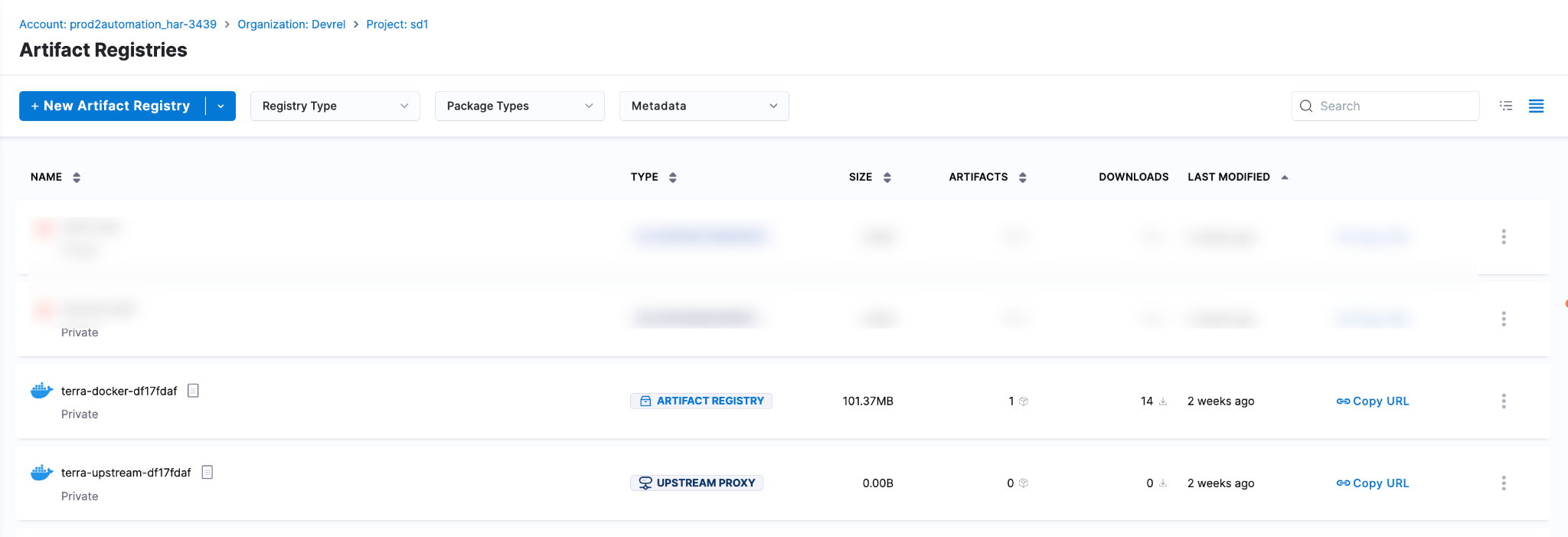
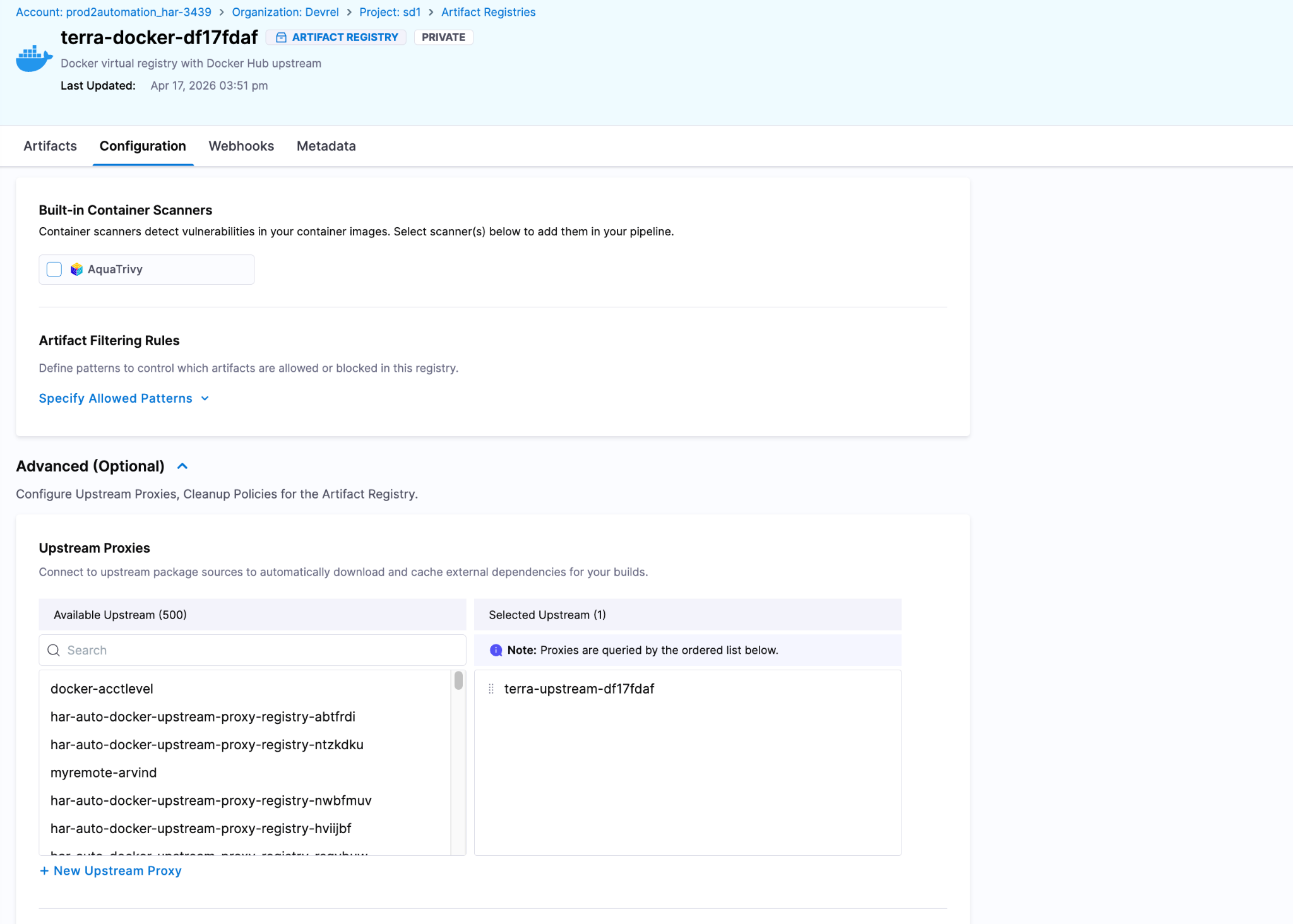
- Artifact Registry: Navigate to your project's Artifact Registry. You'll see
terra-docker-df17fdaf(Virtual) andterra-upstream-df17fdaf(Upstream) listed. - Deployments: Check the Deployments page to confirm the successful Kubernetes rollout.
- Kubernetes: Run
kubectl get podsto confirm the new pods are running with the correct image.
Cleaning up old registries
Every pipeline run creates two new registries. After ten runs, you'll have twenty registries. Here's how to tidy up:
Manual cleanup (Harness UI):
- Go to Artifact Registry in your project.
- Select the registries you want to delete.
- Select Delete.
Automated cleanup (add a pipeline stage): Add a fourth stage with conditional execution that runs terraform destroy.
:::caution Deleting a registry permanently removes all cached artifacts in it. Make sure the images are no longer needed before deleting. :::
Expression quick reference
The pipeline uses Harness expressions to pass dynamic data between stages. Here's a complete reference of every expression used:
:::info Within-stage vs cross-stage references
- Within the same stage: Use
<+execution.steps.STEP_ID.output.outputVariables.VAR>, which is shorter since Harness knows the context. - Across stages: Use
<+pipeline.stages.STAGE_ID.spec.execution.steps.STEP_ID.output.outputVariables.VAR>, which is fully qualified since Harness needs the stage context. :::
Full pipeline YAML reference
For reference, here is the complete pipeline YAML. You can import it directly into Harness by selecting Edit YAML in the Pipeline Studio and pasting this in.
Click to expand the full pipeline YAML
pipeline:
name: IaC Registry - Build - Deploy
identifier: iac_registry_build_deploy
tags:
terraform: ""
artifact-registry: ""
properties:
ci:
codebase:
repoName: YOUR_REPO
build: <+input>
stages:
- stage:
name: Provision Registry
identifier: provision_registry
description: >-
Creates a unique Docker virtual registry and Docker Hub
upstream proxy using Terraform
type: CI
spec:
cloneCodebase: false
platform:
os: Linux
arch: Amd64
runtime:
type: Cloud
spec: {}
execution:
steps:
- step:
type: Run
name: Terraform - Create Virtual Registry
identifier: tf_virtual_registry
spec:
image: hashicorp/terraform:1.9
shell: Sh
envVariables:
TF_VAR_harness_account_id: <+account.identifier>
TF_VAR_harness_platform_api_key: <+secrets.getValue("harness_api_key")>
TF_VAR_space_ref: <+account.identifier>/YOUR_ORG/YOUR_PROJECT
command: |-
set -e
echo "=== Step 1: Create Virtual Docker Registry ==="
terraform version
RUN_SUFFIX=$(head -c 4 /dev/urandom | od -An -tx1 | tr -d ' \n')
REGISTRY_ID="terra-docker-${RUN_SUFFIX}"
echo "Creating registry: ${REGISTRY_ID}"
mkdir -p /tmp/tf-virtual && cd /tmp/tf-virtual
cat > versions.tf <<'EOF'
terraform {
required_version = ">= 1.5.0"
required_providers {
harness = {
source = "harness/harness"
version = ">= 0.30.0"
}
}
}
EOF
cat > providers.tf <<'EOF'
provider "harness" {
endpoint = "https://app.harness.io/gateway"
account_id = var.harness_account_id
platform_api_key = var.harness_platform_api_key
}
EOF
cat > variables.tf <<'EOF'
variable "harness_account_id" {
type = string
}
variable "harness_platform_api_key" {
type = string
sensitive = true
}
variable "space_ref" {
type = string
}
variable "registry_id" {
type = string
}
EOF
cat > main.tf <<'EOF'
resource "harness_platform_har_registry" "virtual" {
identifier = var.registry_id
description = "Docker virtual registry provisioned by pipeline"
space_ref = var.space_ref
package_type = "DOCKER"
config {
type = "VIRTUAL"
upstream_proxies = []
}
parent_ref = var.space_ref
}
EOF
cat > outputs.tf <<'EOF'
output "registry_url" { value = harness_platform_har_registry.virtual.url }
output "registry_id" { value = harness_platform_har_registry.virtual.identifier }
EOF
export TF_VAR_registry_id="${REGISTRY_ID}"
terraform init -upgrade -input=false
terraform validate
terraform apply -auto-approve -input=false
export VIRTUAL_REGISTRY_ID=$(terraform output -raw registry_id)
export RUN_SUFFIX="${RUN_SUFFIX}"
echo "Done: VIRTUAL_REGISTRY_ID=${VIRTUAL_REGISTRY_ID}, RUN_SUFFIX=${RUN_SUFFIX}"
outputVariables:
- name: VIRTUAL_REGISTRY_ID
- name: RUN_SUFFIX
- step:
type: Run
name: Terraform - Create Upstream Proxy
identifier: tf_upstream_proxy
spec:
image: hashicorp/terraform:1.9
shell: Sh
envVariables:
TF_VAR_harness_account_id: <+account.identifier>
TF_VAR_harness_platform_api_key: <+secrets.getValue("harness_api_key")>
TF_VAR_space_ref: <+account.identifier>/YOUR_ORG/YOUR_PROJECT
command: |-
set -e
echo "=== Step 2: Create Docker Hub Upstream Proxy ==="
RUN_SUFFIX="<+execution.steps.tf_virtual_registry.output.outputVariables.RUN_SUFFIX>"
PROXY_ID="terra-upstream-${RUN_SUFFIX}"
echo "Creating upstream proxy: ${PROXY_ID}"
mkdir -p /tmp/tf-upstream && cd /tmp/tf-upstream
cat > versions.tf <<'EOF'
terraform {
required_version = ">= 1.5.0"
required_providers {
harness = {
source = "harness/harness"
version = ">= 0.30.0"
}
}
}
EOF
cat > providers.tf <<'EOF'
provider "harness" {
endpoint = "https://app.harness.io/gateway"
account_id = var.harness_account_id
platform_api_key = var.harness_platform_api_key
}
EOF
cat > variables.tf <<'EOF'
variable "harness_account_id" {
type = string
}
variable "harness_platform_api_key" {
type = string
sensitive = true
}
variable "space_ref" {
type = string
}
variable "proxy_id" {
type = string
}
EOF
cat > main.tf <<'EOF'
resource "harness_platform_har_registry" "upstream" {
identifier = var.proxy_id
description = "Docker Hub upstream proxy provisioned by pipeline"
space_ref = var.space_ref
parent_ref = var.space_ref
package_type = "DOCKER"
config {
type = "UPSTREAM"
source = "Dockerhub"
auth_type = "Anonymous"
}
}
EOF
cat > outputs.tf <<'EOF'
output "proxy_id" { value = harness_platform_har_registry.upstream.identifier }
EOF
export TF_VAR_proxy_id="${PROXY_ID}"
terraform init -upgrade -input=false
terraform validate
terraform apply -auto-approve -input=false
export UPSTREAM_PROXY_ID=$(terraform output -raw proxy_id)
echo "Done: UPSTREAM_PROXY_ID=${UPSTREAM_PROXY_ID}"
outputVariables:
- name: UPSTREAM_PROXY_ID
- step:
type: Run
name: Terraform - Link Upstream to Virtual
identifier: tf_link_registries
spec:
image: hashicorp/terraform:1.9
shell: Sh
envVariables:
TF_VAR_harness_account_id: <+account.identifier>
TF_VAR_harness_platform_api_key: <+secrets.getValue("harness_api_key")>
TF_VAR_space_ref: <+account.identifier>/YOUR_ORG/YOUR_PROJECT
command: |-
set -e
echo "=== Step 3: Link Upstream Proxy to Virtual Registry ==="
REGISTRY_ID="<+execution.steps.tf_virtual_registry.output.outputVariables.VIRTUAL_REGISTRY_ID>"
UPSTREAM_ID="<+execution.steps.tf_upstream_proxy.output.outputVariables.UPSTREAM_PROXY_ID>"
echo "Linking ${REGISTRY_ID} -> ${UPSTREAM_ID}"
mkdir -p /tmp/tf-link && cd /tmp/tf-link
cat > versions.tf <<'EOF'
terraform {
required_version = ">= 1.5.0"
required_providers {
harness = {
source = "harness/harness"
version = ">= 0.30.0"
}
}
}
EOF
cat > providers.tf <<'EOF'
provider "harness" {
endpoint = "https://app.harness.io/gateway"
account_id = var.harness_account_id
platform_api_key = var.harness_platform_api_key
}
EOF
cat > variables.tf <<'EOF'
variable "harness_account_id" {
type = string
}
variable "harness_platform_api_key" {
type = string
sensitive = true
}
variable "space_ref" {
type = string
}
variable "registry_id" {
type = string
}
variable "upstream_id" {
type = string
}
EOF
cat > main.tf <<'EOF'
resource "harness_platform_har_registry" "virtual" {
identifier = var.registry_id
description = "Docker virtual registry with Docker Hub upstream"
space_ref = var.space_ref
parent_ref = var.space_ref
package_type = "DOCKER"
config {
type = "VIRTUAL"
upstream_proxies = [var.upstream_id]
}
}
EOF
export TF_VAR_registry_id="${REGISTRY_ID}"
export TF_VAR_upstream_id="${UPSTREAM_ID}"
terraform init -upgrade -input=false
terraform validate
terraform import harness_platform_har_registry.virtual "${TF_VAR_space_ref}/${REGISTRY_ID}"
terraform apply -auto-approve -input=false
echo "Registry linked: ${REGISTRY_ID} -> ${UPSTREAM_ID}"
- stage:
name: Build and Push Image
identifier: build_and_push
description: >-
Build Docker image from source and push to the
Terraform-provisioned HAR registry
type: CI
spec:
cloneCodebase: true
caching:
enabled: true
platform:
os: Linux
arch: Amd64
runtime:
type: Cloud
spec: {}
execution:
steps:
- step:
type: BuildAndPushDockerRegistry
name: Build and Push to HAR
identifier: build_push_har
spec:
registryRef: >-
<+pipeline.stages.provision_registry.spec.execution.steps.tf_virtual_registry.output.outputVariables.VIRTUAL_REGISTRY_ID>
repo: my-app
caching: true
tags:
- <+pipeline.sequenceId>
- latest
- stage:
name: Deploy to Kubernetes
identifier: deploy_to_k8s
description: Deploy the built image from HAR to Kubernetes
type: Deployment
spec:
deploymentType: Kubernetes
service:
serviceRef: YOUR_SERVICE
serviceInputs:
serviceDefinition:
type: Kubernetes
spec:
artifacts:
primary:
primaryArtifactRef: YOUR_ARTIFACT_SOURCE
sources:
- identifier: YOUR_ARTIFACT_SOURCE
type: DockerRegistry
spec:
imagePath: >-
<+account.identifier>/<+pipeline.stages.provision_registry.spec.execution.steps.tf_virtual_registry.output.outputVariables.VIRTUAL_REGISTRY_ID>/my-app
tag: <+pipeline.sequenceId>
environment:
environmentRef: YOUR_ENVIRONMENT
deployToAll: false
infrastructureDefinitions:
- identifier: YOUR_INFRA_DEFINITION
execution:
steps:
- step:
name: Rollout Deployment
identifier: rolloutDeployment
type: K8sRollingDeploy
timeout: 10m
spec:
skipDryRun: false
pruningEnabled: false
rollbackSteps:
- step:
name: Rollback
identifier: rollbackDeployment
type: K8sRollingRollback
timeout: 10m
spec:
pruningEnabled: false
tags: {}
failureStrategies:
- onFailure:
errors:
- AllErrors
action:
type: StageRollback:::caution Before importing this YAML Replace these placeholders with your actual values:
YOUR_REPO: Your Git repository nameYOUR_ORG/YOUR_PROJECT: Your Harness organisation and project identifiersYOUR_SERVICE: Your Harness service referenceYOUR_ENVIRONMENT: Your Harness environment referenceYOUR_INFRA_DEFINITION: Your Kubernetes infrastructure definitionYOUR_ARTIFACT_SOURCE: Your primary artefact source identifierharness_api_key: The identifier of your Harness secret containing the API key :::
Troubleshooting
Terraform step fails with undefined response type
The Harness Terraform provider sometimes returns this error even when the resource was created successfully. This is a known quirk.
What to do:
1. Check the Harness UI; if the registry exists, the step actually succeeded.
2. For a more resilient pipeline, add a guard after the apply command:
terraform apply -auto-approve -input=false || true3. Add a verification step that confirms the registry exists before proceeding.
Stage 3 terraform import fails
"Resource already managed by Terraform". This can happen if the pipeline is re-run with the same suffix (unlikely with random generation) or if you're debugging manually.
Add a guard to make the import idempotent:
terraform state show harness_platform_har_registry.virtual 2>/dev/null || \
  terraform import harness_platform_har_registry.virtual "${TF_VAR_space_ref}/${REGISTRY_ID}"
Build and Push step can't find the registry
The registryRef expression must resolve to a valid registry identifier. If Stage 1 failed (even partially), the output variable may be empty or malformed.
What to do: Check Stage 1 logs first. Look for the VIRTUAL_REGISTRY_ID= line in the step output. If it's missing, the output variable wasn't exported correctly.
Deploy stage fails to pull the image
Verify the imagePath expression resolves correctly. The expected format is:
ACCOUNT_ID/REGISTRY_ID/IMAGE_NAMECheck the expression output in the pipeline execution logs under Resolved Inputs to see the actual resolved value.
Permission errors (403 Forbidden)
Your API key doesn't have sufficient permissions. Make sure it has Registry: Create/Edit and Secret: Read permissions in the target project. See Required Permissions above.
What's next
Now that you have a working pipeline, here are some ways to extend it:
- Add a cleanup stage: Add a fourth stage with conditional execution: <+pipeline.variables.action> == "destroy". Run terraform destroy in reverse order to tear down registries.
- Parameterise the package type: Add a pipeline variable for package_type to support Helm, Maven, NPM, PyPI, and other registries.
- Add approval gates: Insert a Harness Approval step before Stage 3 for production deployments.
- Use Terraform remote state: Replace ephemeral /tmp state with an S3 backend or Terraform Cloud so state persists across runs.
- Add pipeline triggers: Run the pipeline automatically on Git push using Triggers.
- Add notifications: Get Slack or email alerts on pipeline completion or failure using Notification Rules.