Learn how the Microsoft 365 outage highlights infrastructure resilience challenges and how Harness Resilience Testing helps identify risks, simulate failures, and validate recovery before outages impact customers.

TL;DR
Key Takeaways:
- Identify infrastructure risks before they cause outages.
- Simulate failures and test application resilience under load.
- Understand service dependencies and cascading failures.
- Validate disaster recovery and failover mechanisms.
- Integrate continuous resilience testing into CI/CD workflows.
Microsoft 365 outage highlighted how infrastructure failures can cascade across interconnected services. Server availability issues, failed health checks, overloaded processes, and complicated recovery attempts disrupted Exchange Online connectivity and affected Microsoft 365 features that depended on it.
The incident highlights an important challenge for modern engineering teams: even highly distributed systems can experience cascading failures when infrastructure components become unavailable or cannot handle changing workloads.
What Happened During the Microsoft 365 Outage?
On November 12, 2026, Microsoft began investigating connectivity issues affecting Exchange Online and specific Microsoft 365 features that depended on it.
According to Microsoft's incident updates:
- Server availability: Affected servers began failing automated health checks and becoming unavailable.
- Infrastructure overload: The unexpected loss of servers shifted additional workload onto the remaining infrastructure. Microsoft indicated that this increased load was not initially caused by an overall increase in user traffic.
- Process saturation: A process responsible for establishing secure connections became overwhelmed, causing affected servers to stop processing requests.
- Recovery complications: Some servers became unresponsive again after traffic was reintroduced, complicating recovery efforts.
- Configuration investigation: Microsoft investigated recent configuration changes and began reverting a network configuration change that correlated with the incident.
Importantly, Microsoft identified the network configuration change as correlated with the incident, not as a confirmed root cause in the updates reviewed,
The disruption demonstrates how failures in individual infrastructure components can affect the availability of dependent services, even when the broader application infrastructure remains operational. For organizations operating distributed applications, these are risks worth identifying and validating before a similar failure occurs.
How Harness Resilience Testing Helps Identify and Mitigate Similar Failures
Harness Resilience Testing combines AI-powered Resilience Risk Insights, Chaos Testing, Load Testing, and Disaster Recovery Testing to help teams proactively identify weaknesses and validate recovery mechanisms.
These capabilities address different parts of resilience engineering. Resilience Risk Insights analyzes infrastructure and deployment information to identify potential weaknesses without disrupting running workloads. Chaos Testing, on the other hand, uses controlled fault injection to validate how applications behave when failures actually occur. Load Testing helps to simulate real-world user traffic on a system to ensure it performs smoothly under expected peak loads before it crashes.
Here are a few scenarios inspired by the Microsoft incident, along with how Harness can help teams address similar risks in their own environments.
1. Identify Infrastructure Resilience Risks Before They Cause Outages
Imagine you are running a distributed application across multiple Kubernetes nodes. A configuration change introduces insufficient resource allocation or leaves critical workloads without appropriate resource limits.
When infrastructure resources become constrained, application instances may become unstable, fail health checks, or get terminated. This can reduce available capacity and affect dependent services. This is exactly what happened in the Microsoft outage.
How Harness helps:
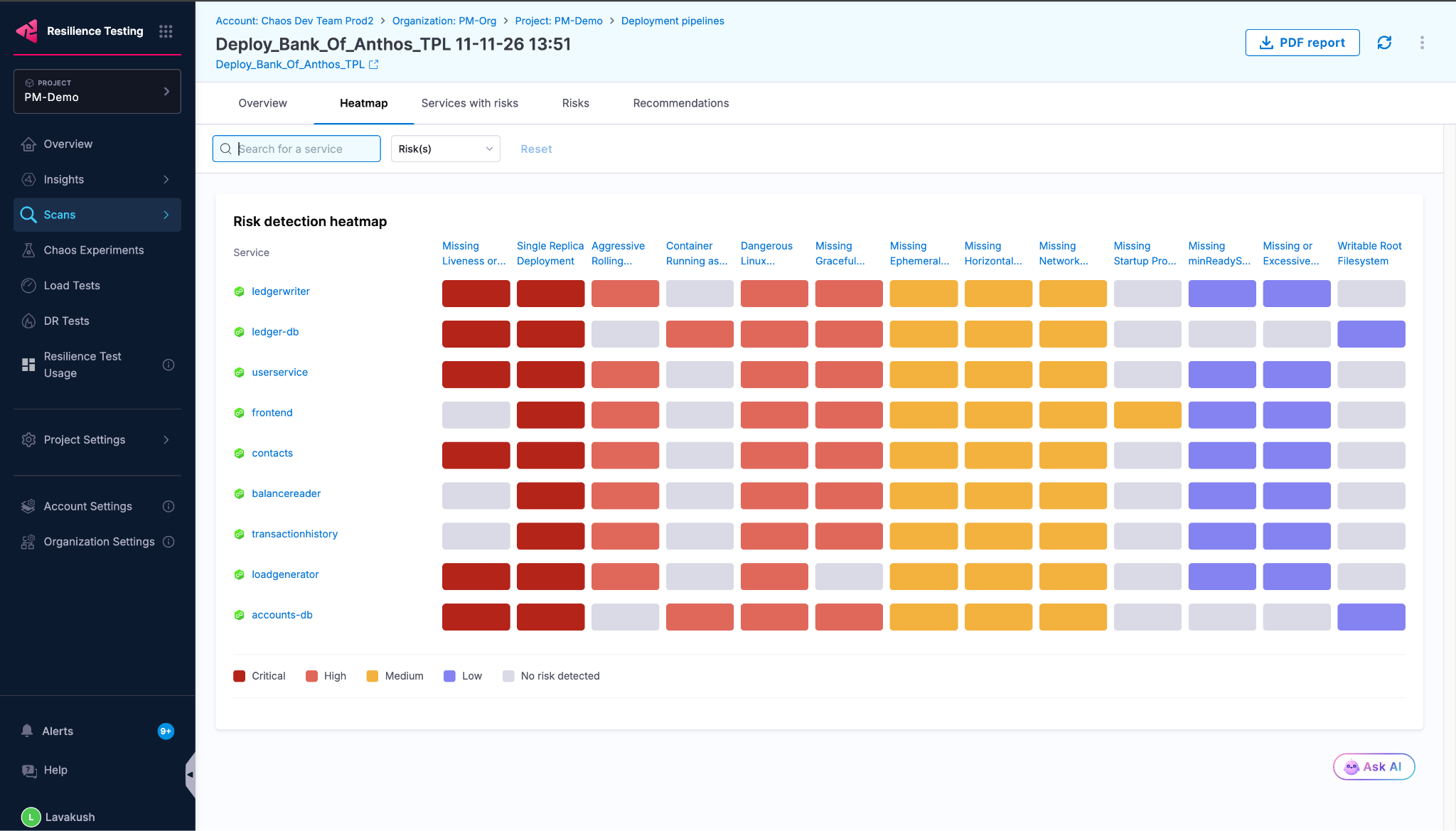
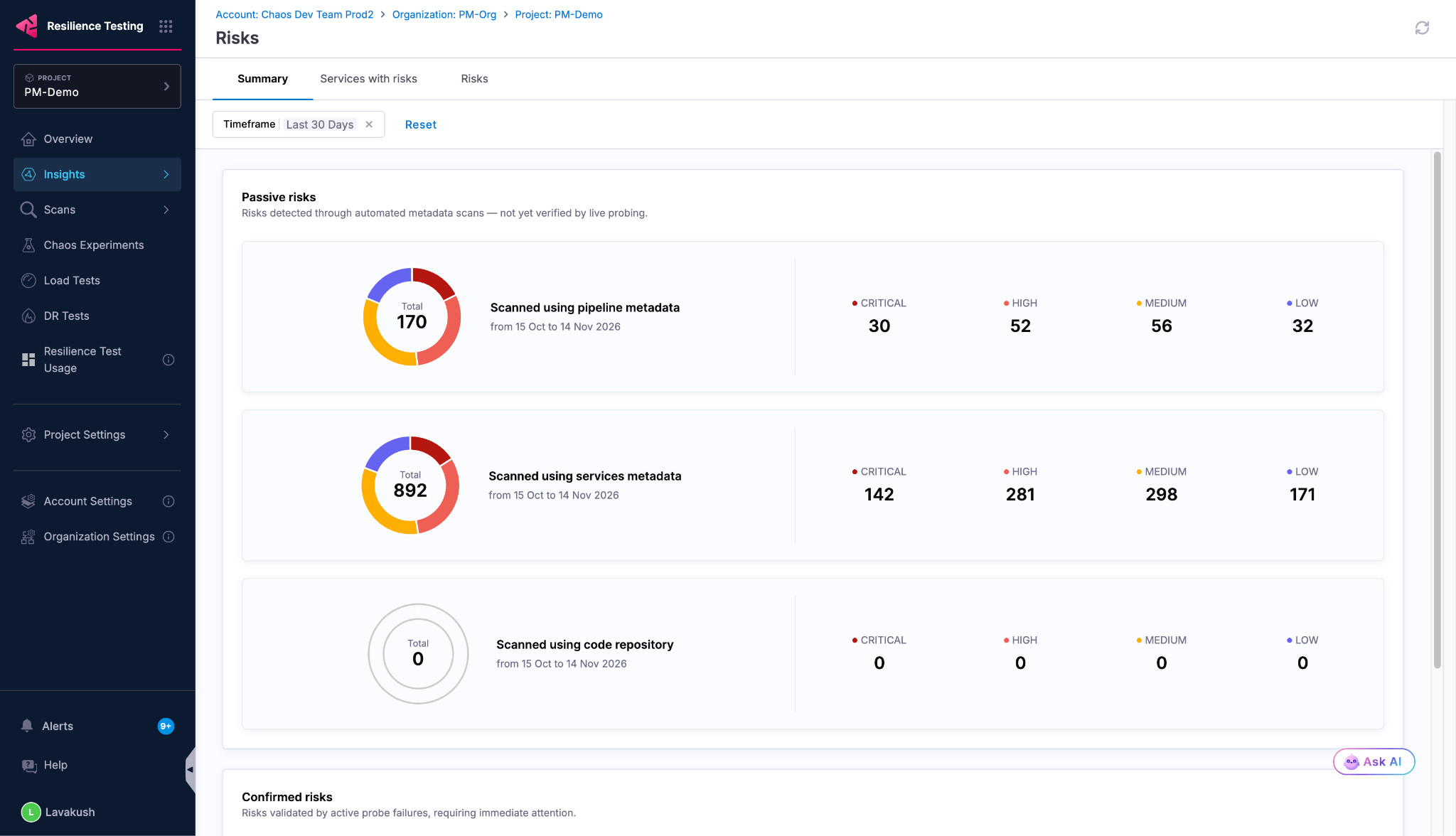
Harness Resilience Risk Insights analyzes existing infrastructure and deployment information, including Kubernetes manifests, deployment configurations, pipeline history, and infrastructure metadata. Its AI agents identify potential resilience weaknesses and generate evidence backed recommendations.
For example, they can identify:
- Missing CPU and memory resource limits.
- Services with insufficient resilience testing coverage.
- New or untested service dependencies.
- Configuration changes that introduce potential resilience risks.
- Teams receive a ranked Resilience Risk Score, helping them prioritize issues based on severity and business criticality.
Because this is a read-only analysis, teams can investigate potential weaknesses and prioritize remediation without injecting faults or disrupting running infrastructure.
2. Simulate Infrastructure Failures and Test Application Capacity Under Load
Imagine you are running an application across ten instances. If several instances suddenly become unavailable, the remaining instances must handle a larger share of incoming requests. Even if the application performs well under normal traffic conditions, the reduced capacity could lead to increased latency, resource exhaustion, or failed requests.
This is similar to what happened during the Microsoft incident, where unexpectedly unavailable servers shifted additional workload onto the remaining infrastructure.
How Harness helps:
Harness Resilience Testing allows teams to inject controlled infrastructure failures and observe how applications respond.
Teams can simulate scenarios such as:
- Pod termination to test application instance failures.
- Node drain or node-level disruptions to validate workload rescheduling.
- CPU and memory stress to evaluate resource exhaustion.
- Network disruption to test communication between dependent services.
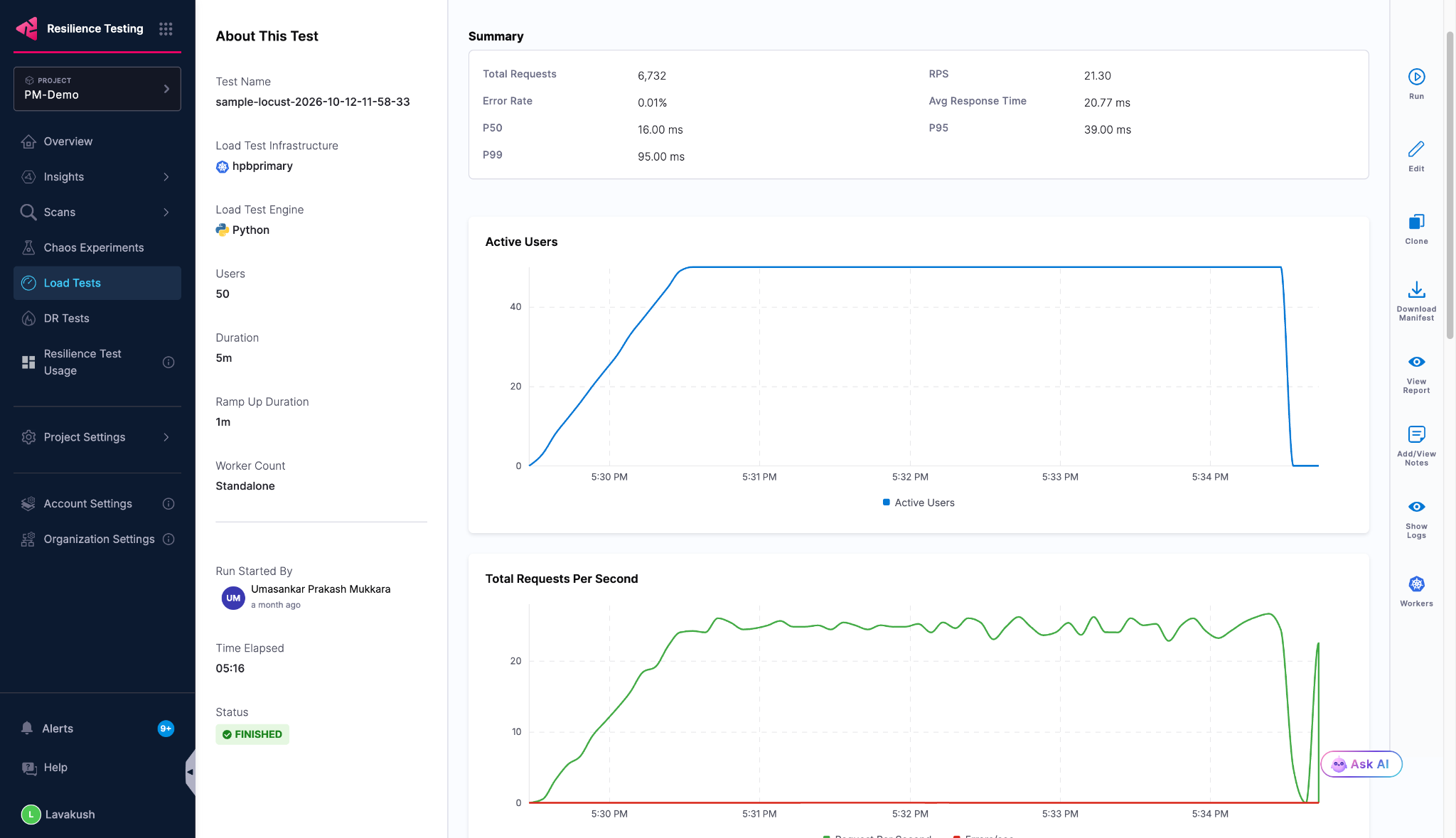
- Harness Load Testing can be combined with chaos experiments to evaluate application performance during infrastructure failures.
For example, teams can generate application traffic, terminate selected instances, and monitor CPU, memory, latency, error rates, and application health.
This helps identify whether the remaining infrastructure can handle the workload and whether the application can continue serving requests during disruptions.
3. Identify Cascading Failures Across Service Dependencies
Imagine your application depends on multiple interconnected services, including authentication, databases, and APIs. If one critical service becomes unavailable or experiences increased latency, dependent services may also begin to degrade.
For example, if an authentication service becomes unavailable, dependent applications may experience request failures. Repeated retries can introduce additional load and affect other services.
How Harness helps:
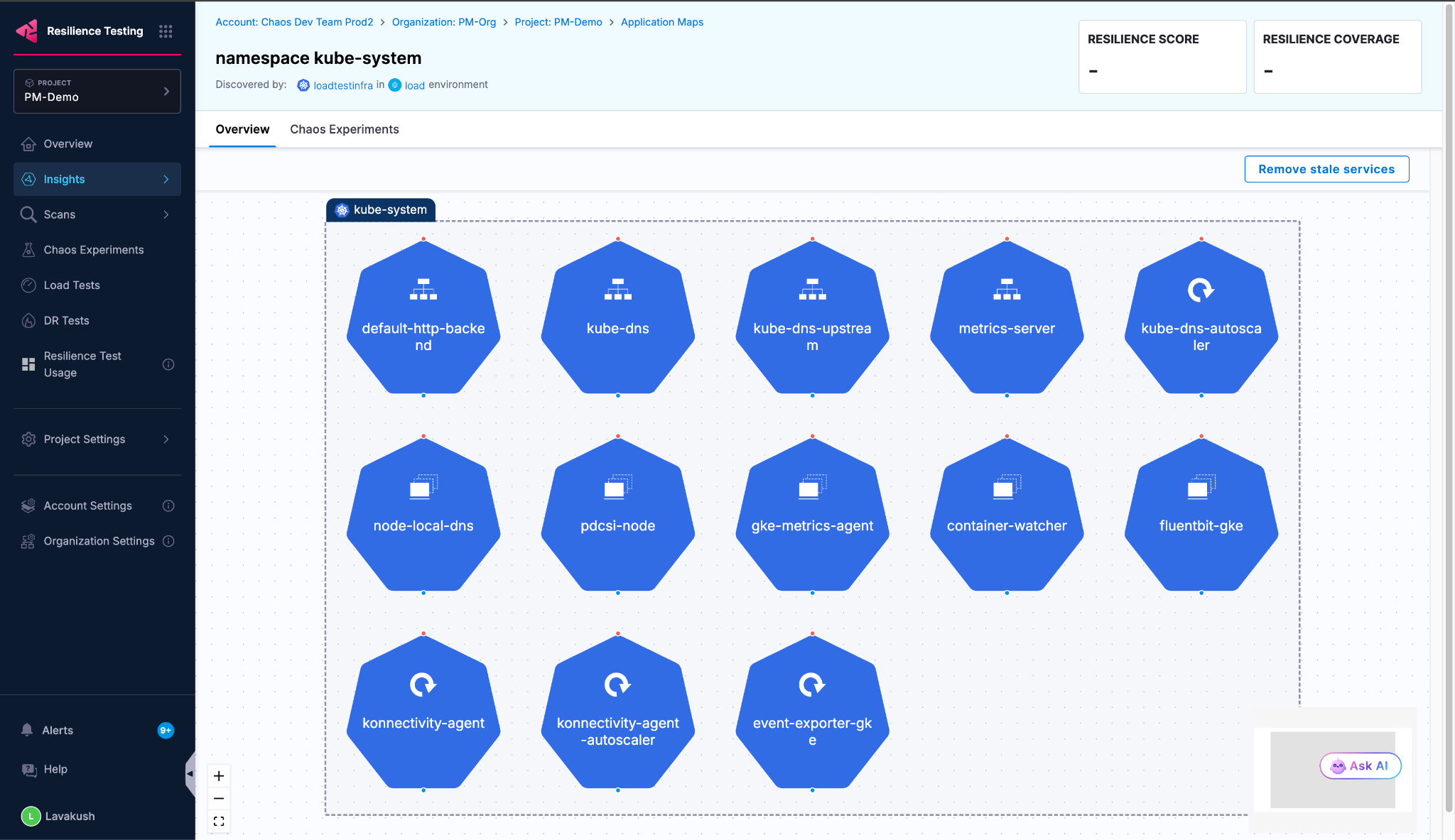
Harness application topology mapping and blast-radius analysis help teams understand service dependencies and assess how failures can propagate.
Engineering teams can:
- Discover and visualize application dependencies.
- Identify critical services and infrastructure components.
- Inject controlled faults into selected services.
- Observe the impact on dependent services.
This helps teams identify critical dependencies, understand the potential impact of individual failures, and prioritize resilience improvements.
4. Validate Recovery and Disaster Recovery Mechanisms
Imagine you operate an application across multiple availability zones or regions. A failover mechanism is configured, but has it been tested under realistic failure conditions?
During the Microsoft incident, some servers initially appeared healthy after restarting but became unresponsive again when traffic was reintroduced. This highlights why recovery needs to be tested beyond simply restarting failed components.
How Harness helps:
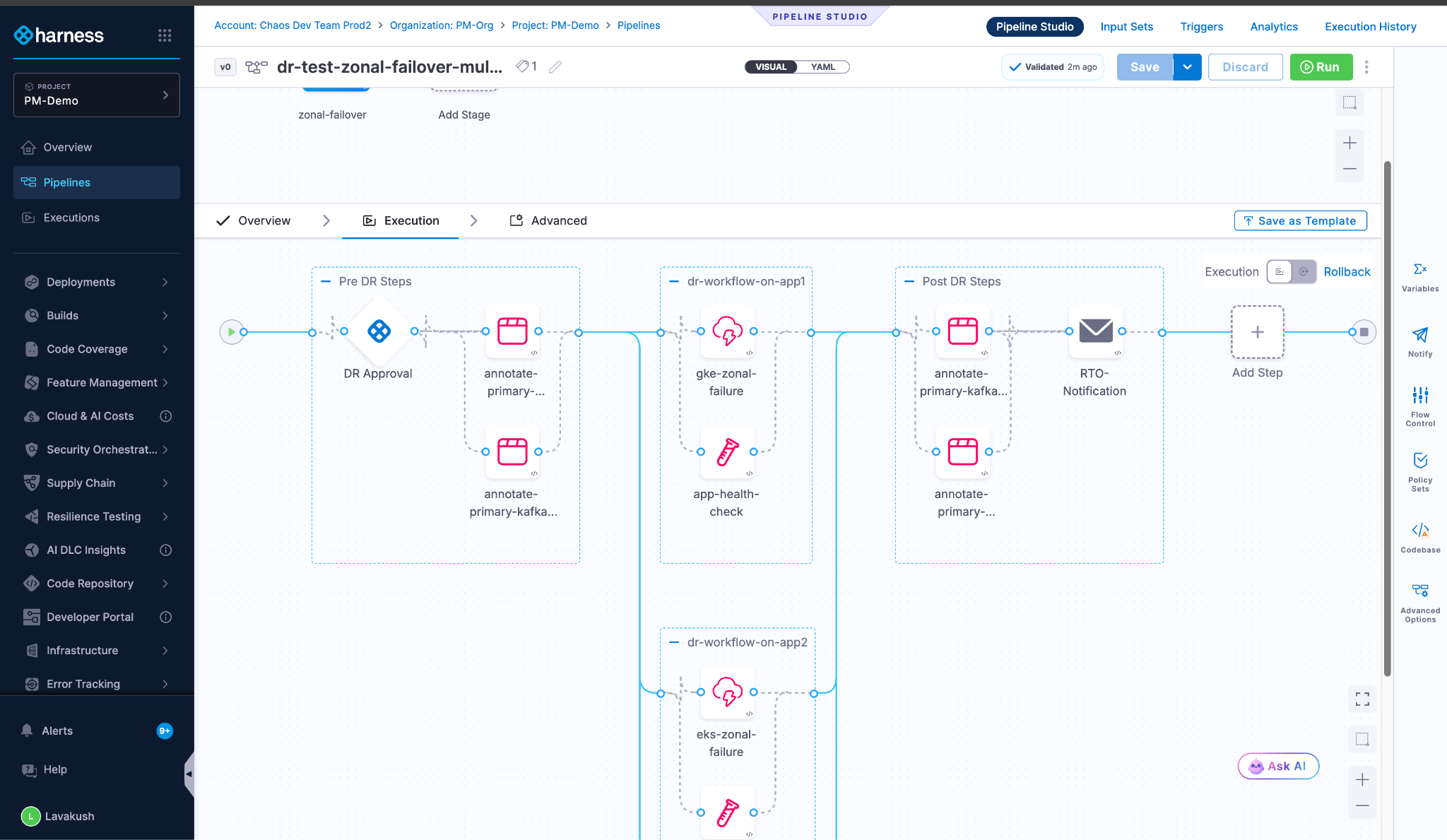
Harness Disaster Recovery Mechanism enables teams to automate regional failover experiments and validate recovery procedures against defined Recovery Time Objectives (RTO) and Recovery Point Objectives (RPO).
Teams can:
- Automate regional failover scenarios.
- Validate recovery procedures and runbooks.
- Measure actual recovery performance.
- Compare recovery results against defined RTO and RPO targets.
- Generate audit evidence of recovery experiments.
This helps teams verify that their recovery mechanisms work as expected and identify gaps before an actual outage.
Make Resilience Testing Part of Your Software Delivery Lifecycle
Identifying potential resilience weaknesses is only the first step. Engineering teams also need a way to continuously validate that application changes do not introduce new reliability risks.
Harness Resilience Testing integrates into existing CI/CD workflows, enabling teams to:
- Identify resilience risks across deployed services.
- Detect potential resilience regressions in pull requests.
- Generate and execute controlled chaos, load, and disaster recovery experiments.
- Evaluate experiment results using live health probes and resilience scores.
- Apply policy-based gates to prevent releases that fail defined resilience thresholds.
With AI-powered risk detection and automated experiment generation, teams can move beyond manually designed chaos experiments and make resilience validation a continuous part of software delivery.
By incorporating resilience checks into development and deployment workflows, engineering teams can identify potential issues earlier and continuously validate application behavior as infrastructure and application configurations evolve.
Prepare for Failures Before They Become Production Incidents
The Microsoft 365 outage is another reminder that infrastructure failures are inevitable, but widespread service disruption does not have to be. Organizations need more than monitoring and reactive incident management. They need to understand where their infrastructure is vulnerable, validate how applications behave under failure conditions, and continuously test whether recovery mechanisms work as expected.
Harness Resilience Testing helps engineering teams identify potential risks, simulate real-world failure scenarios, and validate application resilience before customers experience an outage.
The goal is not to predict the exact cause of every outage. It is to understand how systems respond when infrastructure components fail, workloads shift, dependencies become unavailable, or recovery does not go as planned.
Don't wait for your next production outage to discover where your infrastructure breaks. Identify resilience risks, test failure scenarios, and continuously validate recovery with Harness Resilience Testing.