Harness AI Config Management helps teams change prompts, models, and AI behavior at runtime with targeting, experimentation, approvals, policy, and audit trails.

- AI agents never stop changing. Prompts go stale, models improve, and guardrails need tuning. Managing those changes through code deployments is too slow for the pace AI demands.
- AI configs give you a governed runtime layer. Change a prompt, swap a model, or adjust parameters in production without redeploying. Every change is targeted, approved, versioned, and auditable.
- AI tuning becomes a release and learning loop. Expose a new behavior to a controlled audience, measure the impact, then expand, iterate, or roll back with confidence.
- The same discipline you apply to software, now applied to AI. Harness AI Config Management brings targeting, experimentation, approvals, and audit trails to the layer where AI behavior actually lives.
Overview
AI agents don't stop evolving when they ship to production. Teams continuously optimize for better accuracy, lower cost, faster response times, stronger safety, and higher customer satisfaction. That means updating prompts, changing models, and introducing new guardrails far more frequently than traditional code releases. Yet most teams are still managing those changes through deployments, environment variables, or manual processes.
That is the gap Harness AI Config Management is designed to close. It is a governed runtime configuration system that lets teams change prompts, models, routing, and behavior without redeploying code.
Harness Feature Management & Experimentation already helps teams control features in production, gating who sees a capability, governing the release strategy, and measuring impact. Harness AI Config Management extends that same discipline to agent behavior. Teams can manage prompts, model selection, and the inference parameters that control how the model behaves, all as runtime configurations that are targeted, measurable, and governed.
Feature flags answer: who should see this AI capability?
AI Configs answer: how should that capability behave?
Experiments answer: which behavior delivered the best outcome?
The Rise of AI Runtime Behavior
The industry is transitioning from deterministic software to probabilistic/AI-driven software. This evolution is transforming a number of dimensions and dramatically changing what runtime management must address.
Together, these differences mean that the operational surface area for AI agents is significantly wider and less forgiving than traditional software. Costs can spike without warning, failures are harder to detect, and the number of stakeholders making changes continues to grow.
The Ungoverned AI Problem
In most organizations today, AI changes happen without governance:
- Prompts are edited in notebooks, spreadsheets, or config files with no versioning
- Model switches happen without cost impact analysis or governance
- No pre-prod verification as changes go straight to production
- No rollback path when things go wrong
- No audit trail for compliance
The result is a standoff. Platform teams can't give product teams the freedom to iterate because the risks of ungoverned changes are too high. Product teams can't move at the pace AI requires because every change bottlenecks through engineering and deployment. Harness AI Config Management is designed to break that standoff.
A working example: the AI Support Agent
Imagine a team shipping a new AI Support Agent.
The team deploys the agent behind a feature flag, limiting access to internal users and a small beta cohort. To control agent behavior at runtime, the team uses AI configs to manage the prompt, temperature, token limits, retrieval threshold, and fallback message without touching code.
Before promoting anything to production, the team tunes parameters in pre-production environments using environment-level definitions and targeting. Changes are reviewed and governed through Harness before they go live.
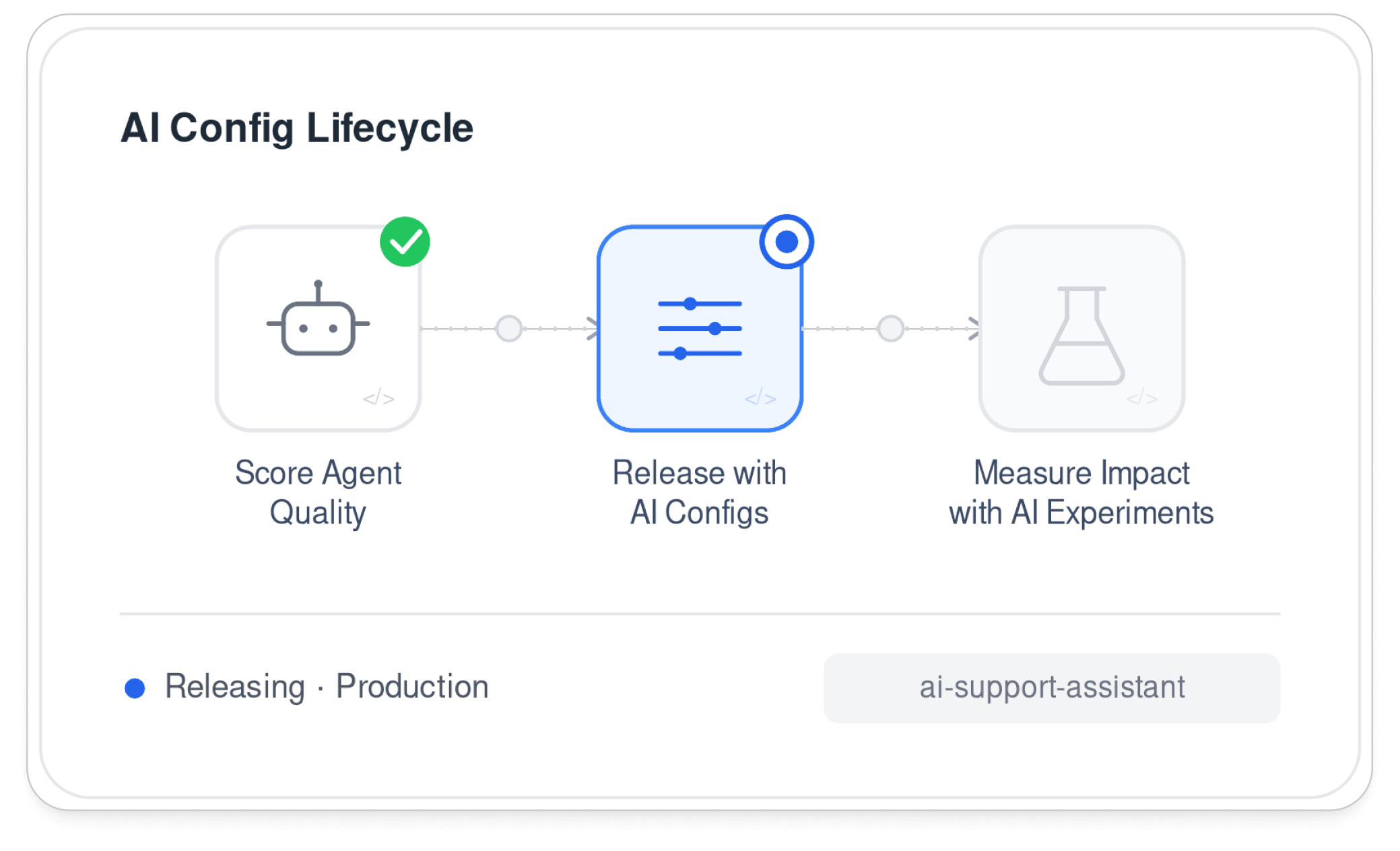
With the agent running in production, the team creates two AI config variations: one optimized for concise answers and one for detailed troubleshooting. Those variations are targeted to different user cohorts, and impression data feeds directly into an experiment. The team now has real evidence of which behavior drives better outcomes before deciding whether to roll out further, iterate, or roll back.
What Harness AI Config Management adds
Harness AI Config Management is built on Harness Configs, a first-class runtime configuration layer in Harness FME. It uses the same config model, the same delivery path, and the same governance patterns teams already rely on for production software.
Environment-specific values with shared structure
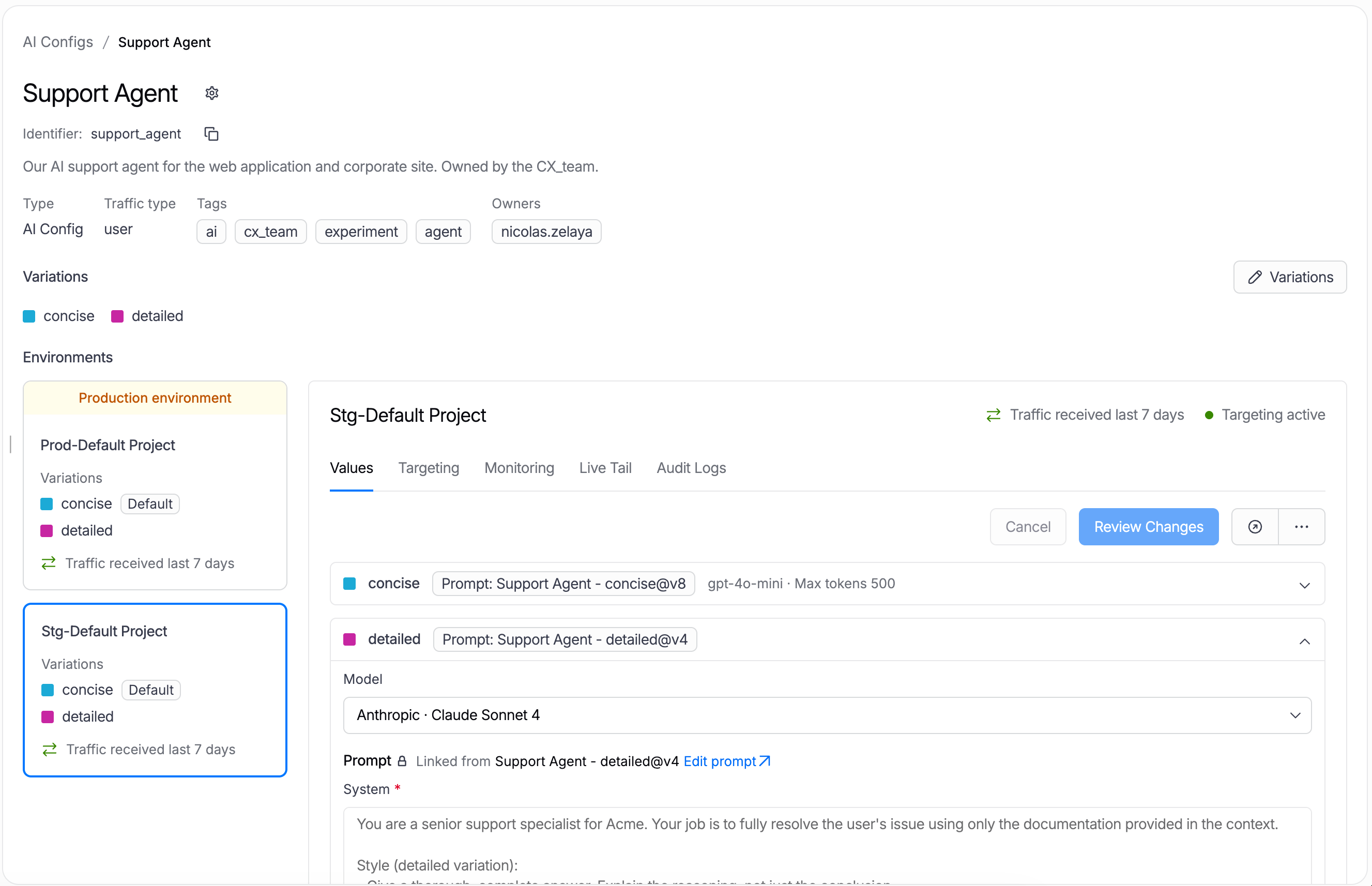
Harness AI Configs use a two-level model. Teams define schema, default values, and variations once, then manage targeting rules and live values per environment. Developers and AI teams can iterate freely in development and staging while keeping production stable. When a configuration is ready, it can be promoted across environments without a redeployment.
Variations, targeting, and experimentation readiness
Harness AI Config Management supports multiple variations per config. A team might compare two prompts, route different customer cohorts to different model choices, or test parameter changes against a controlled audience. Targeting rules determine which users, accounts, or environments receive each variation, using the same rule builder as Harness feature flags.
This is what turns AI tuning from a guessing exercise into a structured release and learning loop. Teams can shift AI behavior for a limited group, watch quality and business metrics, then decide whether to expand, iterate, or roll back.
SDK delivery without a separate AI path
Developers call getConfig() to resolve the right configuration for a given target and get back type-safe accessors for string, number, and boolean values. For AI use cases, that means resolving a prompt, model, temperature, or parameter at runtime without redeploying. There is no separate AI SDK. AI configs build on the same delivery layer as every other config, giving teams one consistent way to manage runtime behavior.
Governance where AI changes happen
The most important part of Harness AI Config Management is not that teams can change AI behavior faster. It is that they can do it with governance.
Harness FME applies RBAC, granular permissions, approvals, OPA policy evaluation, version history, and audit logs to every config change. Sensitive production changes can require policy checks before they propagate. That matters because AI behavior changes carry real customer impact. A model swap can affect cost and latency. A prompt update can shift output quality in ways that are hard to detect without the right tooling.
Changes to AI configs require the same release discipline as code.
Ready to see Harness AI Config Management in action?
Harness AI Config Management helps teams manage the behavior behind AI features with the same discipline they apply to modern software releases: targeted rollout, experimentation, approvals, policy, auditability, and rollback.
Ready to see how Harness helps teams govern AI behavior without slowing iteration? Sign up today and get started with a free account!