Harness launches Autonomous Worker Agents: AI that runs as pipeline steps, with the governance enterprises need to trust agents in production

AI is writing more of the code. Software delivery, the work between writing code and running it in production, is where most of the day still goes. Building, testing, scanning, deploying, remediating, and operating still require the same, if not more, effort as before AI.
Today, we're introducing Autonomous Worker Agents for software delivery: the platform for enterprises to build and safely run AI agents that handle the work between writing code and shipping it to production.
Autonomous Worker Agents execute as pipeline steps and produce auditable outputs. Their memory is the organization: services, pipelines, deployments, incidents, policies, all connected through the Harness Knowledge Graph, and their capability is powered by the Harness MCP. They operate in production and support the deployment, security, remediation, and validation of your code.
They join Harness Expert Agents, which have been available to customers for some time, to form a complete AI layer across the platform.
Each agent runs as a step inside a Harness pipeline, on customer-controlled infrastructure, with full governance: scoped credentials, OPA policy enforcement, approval gates, and complete audit trails.
Safe to Run in Production
Autonomous Worker Agents are invoked as pipeline steps or independently. They inherit the governance Harness pipelines already provide. Instead of trying to teach an AI agent a massive list of corporate rules, the agent operates entirely within the constraints of your existing software delivery pipelines.
- OPA Policies that gate production deployments gate the agents.
- RBAC that controls who can push to production controls who can trigger an agent.
- Approval Gates apply before an agent's fix ships, just as they do before any release.
Safety is architected in as well. Workloads execute on Harness Delegates, lightweight runtimes installed inside the customer's own Kubernetes cluster or VPC. An agent that "shouldn't be able to merge to main" cannot merge to main, even if its prompt asks it to. The architecture enforces it.
We built RiskSentinel, a Harness Autonomous Worker Agent, to demonstrate that governed AI can move beyond identifying security issues to safely remediate them while maintaining enterprise controls, auditability, and compliance. When building with Harness, what stood out most was how intuitive the experience was — it enabled our team to move from an initial idea to a production-ready agent in just four days, allowing us to focus on solving a real enterprise challenge rather than the underlying platform. That combination of developer experience and enterprise-ready capabilities is what will enable organizations to confidently scale AI across software delivery.
- Ratna Devarapalli, Director IT, United Airlines
Six additional controls make Autonomous Worker Agents production-safe.
1. Sandboxing
Agents are run containerized, with non-root execution (UID 65534, "nobody"). Their filesystem is read-only except for the workspace. Network access is configurable per agent: unrestricted, restricted to allowed MCP servers, or fully disabled.
An agent that produces a malicious bash command has nowhere to send the data.
2. Scoped Credentials
When a pipeline triggers, Harness mints an ephemeral scoped token. Its scope is the intersection of the agent's permissions and the triggering user's RBAC.
Token deletes on completion. TTL as a failsafe. MongoDB TTL index as final backstop.
3. Policy Enforcement
OPA policies, the same framework Harness customers use to govern deployments, apply to agents. Policies govern the agent at runtime and during configuration.
4. Audit Trails
Every execution is captured in the Harness Audit Trail. This includes a full provenance chain: who or what triggered the agent, template version, every action taken, and final outcome.
Prompts and reasoning chains are sanitized before persistence: secrets stripped, and PII is stripped.
5. Cost Tracking
Token consumption and costs are surfaced per execution, per agent, and per pipeline. Running totals are shown live in the step header.
6. Chaining
Agents are architected to run within pipelines and can be naturally composed into multi-step workflows.
- Sequential: Agent B consumes Agent A's output.
- Parallel: agents run simultaneously.
- Conditional: an agent runs only if a previous step meets a condition.
- Matrix: same agent across repos, environments, or services.
Output handoff happens via pipeline expressions and shared workspace files.
Three ways to create an agent
Using YAML
A Worker Agent is defined in a single file.
Agent:
  uses: harnessAI@1.0.0
  with:
    prompt: |-
       ## INPUTS
        - Project Name: <+inputs.projectName>
        - Organization: <+inputs.orgId>

        ## OUTPUT REQUIREMENT
        **CRITICAL: You MUST write ALL output to a markdown file.**
        - At the end of your analysis, use the Write tool to create a file named `pipeline_analysis_report.md` in the current working directory
        - The file must contain the complete analysis report in markdown format
        - Do NOT just print the report to the console - you MUST write it to the .md file
        - After writing the file, confirm the file was created and provide the file path

        ## WORKFLOW

        ### Step 1: Discover Pipelines
        Use the Harness MCP tools to list all pipelines in the project:
        - Call harness_list with resource_type="pipeline", org_id and project_id
        - Record the total count and each pipeline identifier/name

        ### Step 2: Analyze Each Pipeline
        For each pipeline discovered, retrieve its full YAML using harness_get with resource_type="pipeline" and analyze:

        **A. Structure Analysis**
        - Count stages, steps, and step groups
        - Identify stage types (CI, CD, Custom, Approval, etc.)
        - Check for parallel execution usage
        - Identify infrastructure definitions

        **B. Best Practices Assessment (Score 0-100)**
        Evaluate each pipeline against these criteria:

        | Category | Weight | Criteria |
        |----------|--------|----------|
        | Modularity | 15% | Uses templates, step groups, reusable components |
        | Parameterization | 15% | Uses variables, runtime inputs, input sets |
        | Error Handling | 15% | Has failure strategies, rollback steps, timeout configs |
        | Security | 15% | Uses secrets properly, no hardcoded credentials |
        | Conditional Logic | 10% | Uses when conditions, skip conditions appropriately |
        | Notifications | 10% | Has notification steps for success/failure |
        | Documentation | 10% | Has meaningful names, descriptions, tags |
        | Efficiency | 10% | Uses caching, parallel execution, matrix strategies |

        **C. Pattern Detection**
        Identify recurring patterns across pipelines:
        - Similar stage structures
        - Repeated step sequences
        - Common shell scripts or commands
        - Shared infrastructure definitions
        - Similar approval workflows

        ### Step 3: Generate Recommendations

        For each pipeline, provide:

        **Quick Wins (Easy to Implement):**
        - Add missing failure strategies
        - Add timeout configurations
        - Replace hardcoded values with variables
        - Add meaningful descriptions and tags

        **Medium Effort:**
        - Extract common steps into step groups
        - Implement conditional execution
        - Add notification steps
        - Create input sets for different environments

        **Template Opportunities:**
        Based on patterns found, suggest templates to create:
        - Stage templates for repeated stage structures
        - Step group templates for common step sequences
        - Pipeline templates for similar pipeline architectures

        ### Step 4: Generate Report and Write to File

        Produce a structured report with the following sections, then **write the entire report to `pipeline_analysis_report.md`**:

        1. **Executive Summary**
           - Total pipelines analyzed
           - Average best practices score
           - Top 3 improvement areas

        2. **Pipeline Scorecards**
           For each pipeline:
           - Overall Score (0-100)
           - Category breakdown
           - Top 3 recommendations
           - Effort estimate (Low/Medium/High)

        3. **Common Patterns Found**
           - Pattern description
           - Pipelines using this pattern
           - Template recommendation

        4. **Prioritized Action Plan**
           - Quick wins (implement in < 1 hour)
           - Medium effort (implement in 1-4 hours)
           - Strategic improvements (template creation)

        5. **Template Suggestions**
           For each suggested template:
           - Template type (Stage/StepGroup/Pipeline)
           - Template name
           - Description
           - Pipelines that would benefit
           - Sample YAML skeleton

        ### Step 5: Write Output File
        **MANDATORY:** After generating the report content:
        1. Use the Write tool to save the complete report to `pipeline_analysis_report.md`
        2. The file should be created in the current working directory
        3. Confirm successful file creation with the full path

        ## RULES
        - Always fetch the complete pipeline YAML before analysis
        - Score objectively based on the defined criteria
        - Provide specific, actionable recommendations with YAML examples where helpful
        - Prioritize recommendations by impact and effort
        - If a pipeline follows all best practices, acknowledge it and suggest advanced optimizations
        - Group similar issues across pipelines to identify systemic improvements
        - When suggesting templates, provide concrete YAML examples
        - Consider the pipeline's purpose when scoring (a simple utility pipeline may not need all features)
        - Never expose secrets or sensitive values in the report
        - Format output in clear markdown with tables for easy reading
        - **ALWAYS write the final report to pipeline_analysis_report.md - this is mandatory**
    connector: account.harnessAnthropic
    allowed_domains: harness.io, app.harness.io, apidocs.harness.io
    env:
      CLAUDE_SWARM: "true"
  inputs:
    ProjectName:
      type: string
      default: Applications Team
Save the file, commit it to the repo, and the agent is live, governed, and in the catalog. Every PR triggers it. Every run is audited. Every action is scoped by RBAC. From a blank file to a live governed agent in minutes.
The Harness pipeline engine handles container runtime, scoped credentials, MCP server integration, audit logging, and cost tracking.
Using the UI
The Harness Agent Builder is a simple form for configuring your Agents. Define your prompts in plain English, referencing Harness constructs through common expressions. This experience makes it easy to see what you need to provide and set up your agent in minutes.
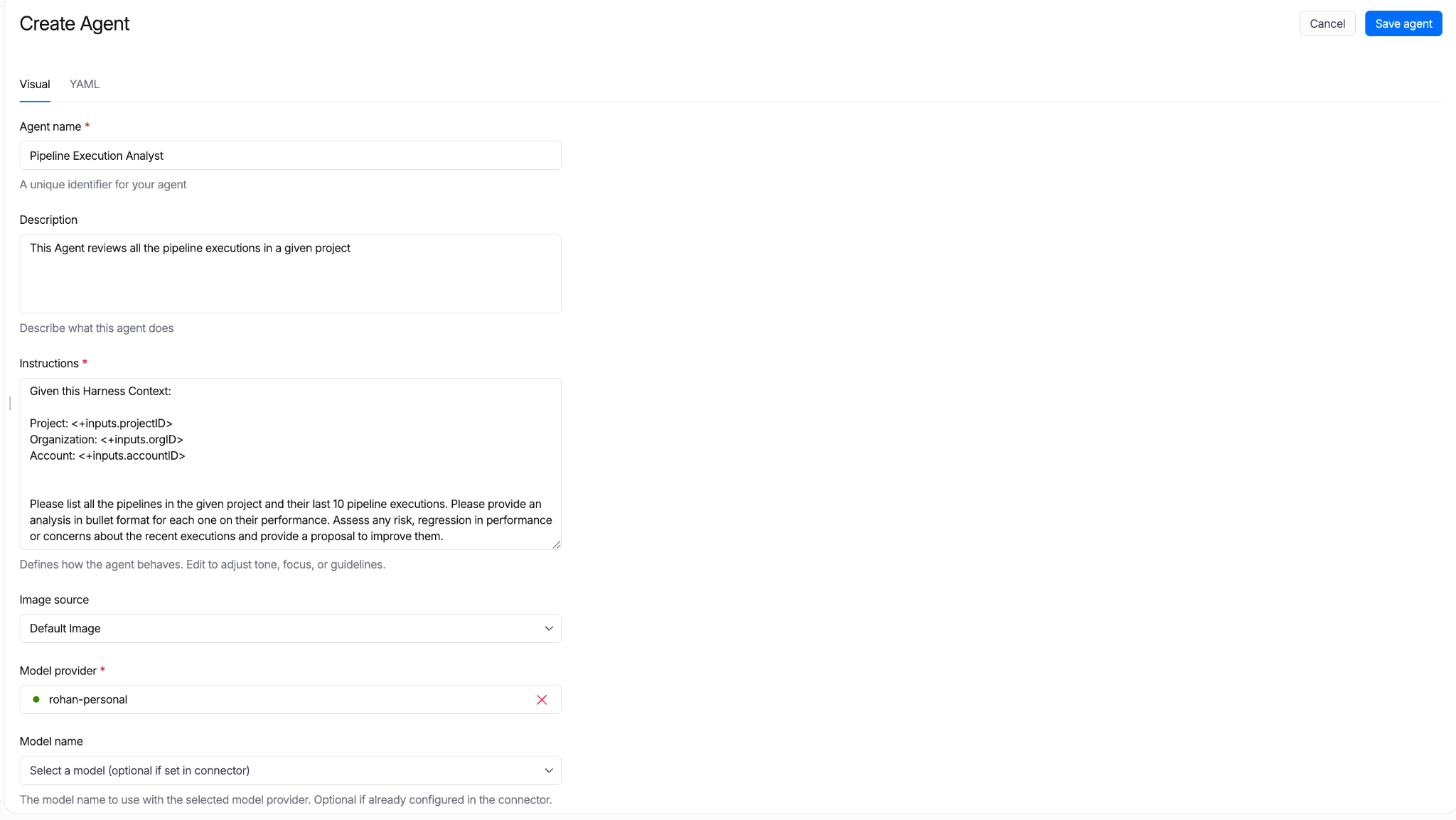
All agent definitions are stored in Harness. Their reference in pipelines can be managed in Git. Approval gates apply. Pipeline Branch-based versions let teams test new agent behavior in feature branches before merging to main.
"We built an agent that handles log analysis directly inside Harness. No tool switching, no context loss. The ability to stay on one platform and have the agent surface what's happening and review it for us was the biggest immediate win. We're planning to use it in production."
- Mandy Pearce, Senior Engineer, Cloud Automation, Verint
Create with MCP
Using your favorite coding agent, you can connect to Harness over the MCP. The MCP bridges the AI Coding agents’ inner-loop context and the outer-loop context and the constructs in Harness.
Agents as Pipeline Steps
Most software delivery workflows have more than one step. Autonomous Worker Agents compose with shell scripts, plugins, approval gates, and other agents to make full pipelines.
Referencing an Agent in a Pipeline
uses: references a Worker Agent template by name and version. The agent runs as one step alongside everything else a Harness pipeline can run.
Sequential: Output Handoff
Agent B consumes Agent A's output. The pipeline expression ${{ steps.<agent_id>.output }} carries the result forward.
Parallel
Multiple agents run simultaneously:
Step Groups
A Step Group bundles agents and deterministic steps into a single reusable unit:
Save the group as a template. Reference it from any pipeline. The PR Autofix workflow ships as a Step Group template.
Conditional and Matrix
An agent runs only when a condition is met:
The same agent runs across multiple targets:
Approval gates, failure strategies, retry policies, and rollback work the same way they do for any other pipeline step.
Introducing the Harness Agent Marketplace
The Harness Agent Marketplace is where teams discover, install, fork, customize, and publish Autonomous Worker Agents.
Three publisher tiers anchor it:
- Harness Managed: Built and maintained by Harness. SLA-backed. Versioned. Pinnable (e.g., harness.autofix@1.2).
- Harness Certified: Partner-built. Reviewed and certified by Harness engineering and security. Examples: dependency vendors with their own scanning agents, cloud providers with cloud-specific deployment agents.
- Community: Published by the broader Harness community. Validated for schema, no secrets in prompt. Enterprise accounts can restrict via OPA policy. Allow only Managed and Certified in production, for instance.
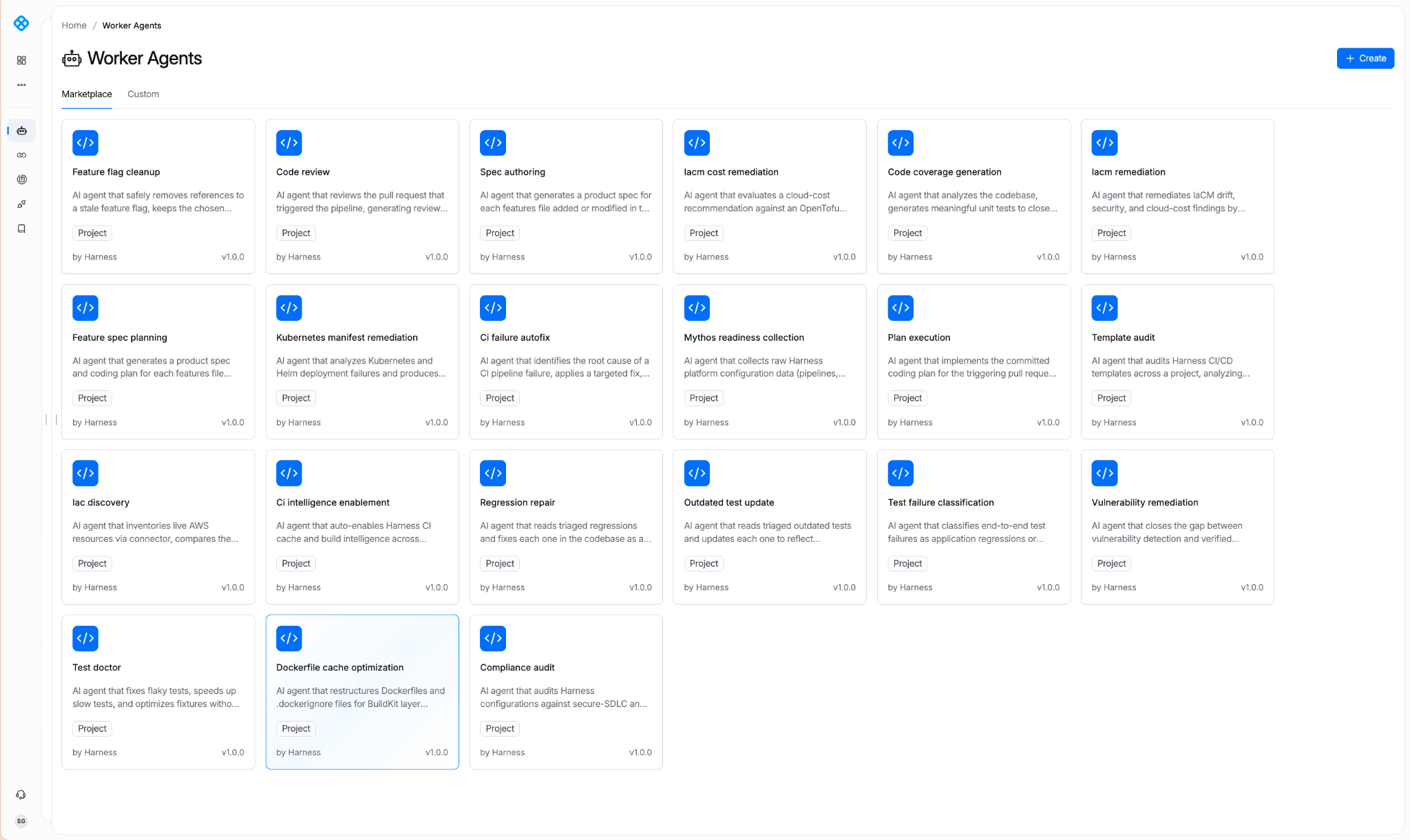
Harness Managed Agents
With today’s launch, Harness has pre-built agents for the most requested use cases. Here are some examples of what’s currently available:
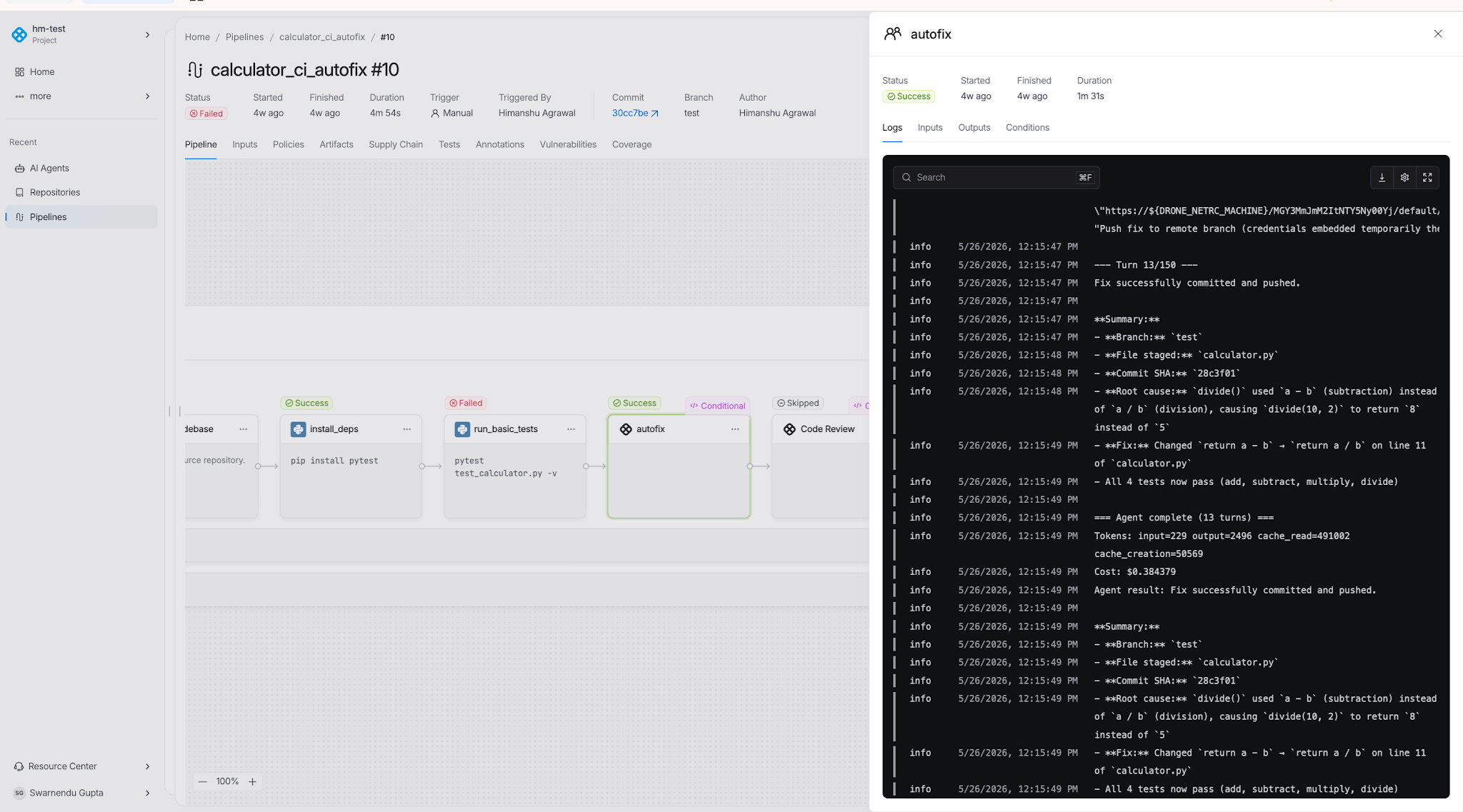
CI Autofix
Reads build logs from a failed PR build, identifies the root cause, commits a fix to the PR branch, re-triggers the build, and repeats until the build passes or the configured max-turns limit is reached.
Manifest Remediator
Analyzes failed Kubernetes deployments. Identifies whether the issue is the manifest, the cluster, or the workload. Fixes manifest issues. Used by teams managing dozens of services across multiple clusters.
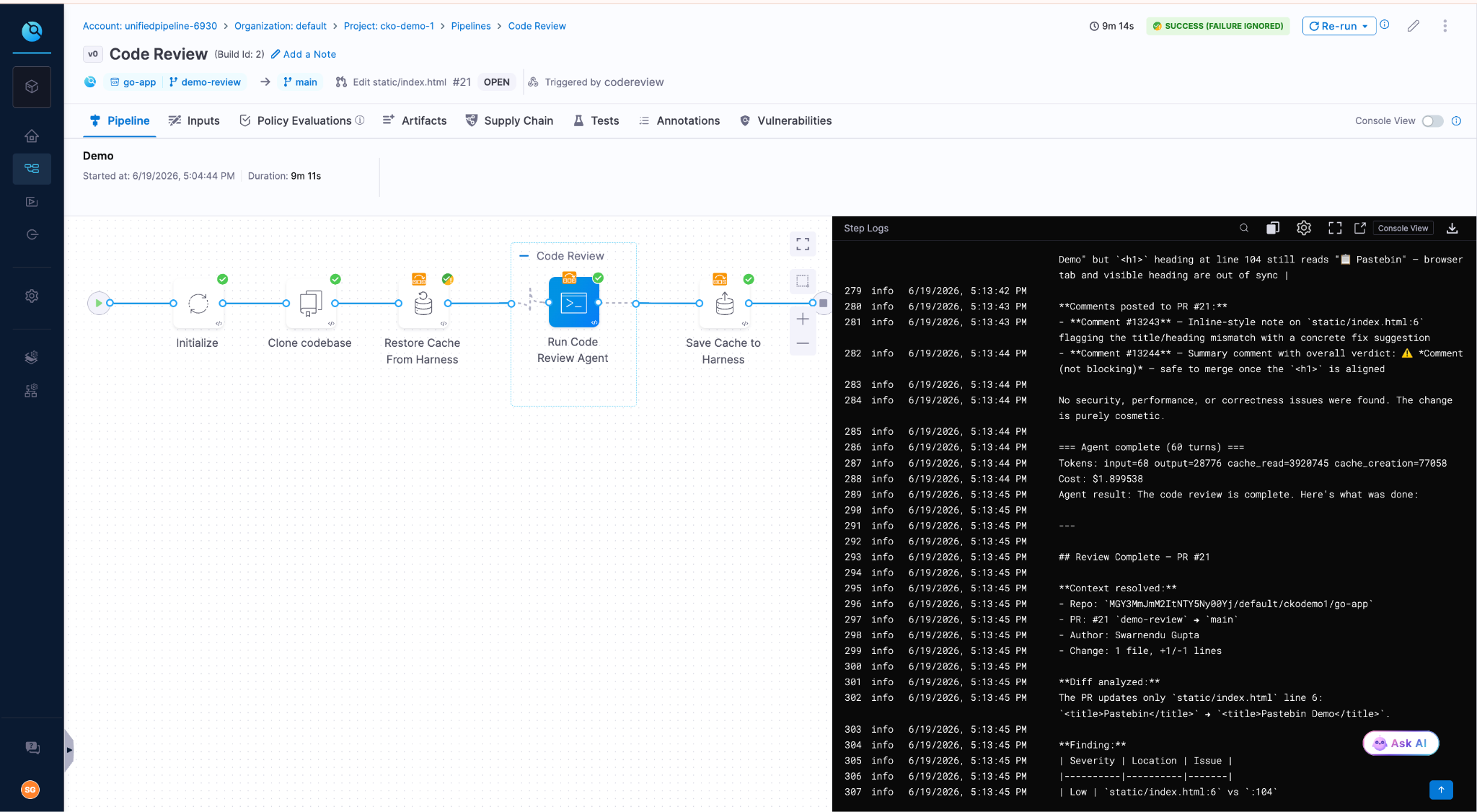
Code Review
Reviews PR diffs across security, quality, and test coverage. Outputs structured findings with severity ratings and concrete remediation. Grounded in the Harness Knowledge Graph, the agent knows which services are production-critical, which have had recent incidents, and which historical anti-patterns have caused outages.
Feature Flag Cleanup
Reads code, config, and flag-system state to identify feature flags that are fully rolled out or fully off. Once it validates removal is safe, the agent generates a cleanup PR. With this agent, the status of your experiments automatically informs you when flags are cleaned up, reducing flag debt and the drudgery of cleaning up old flags.
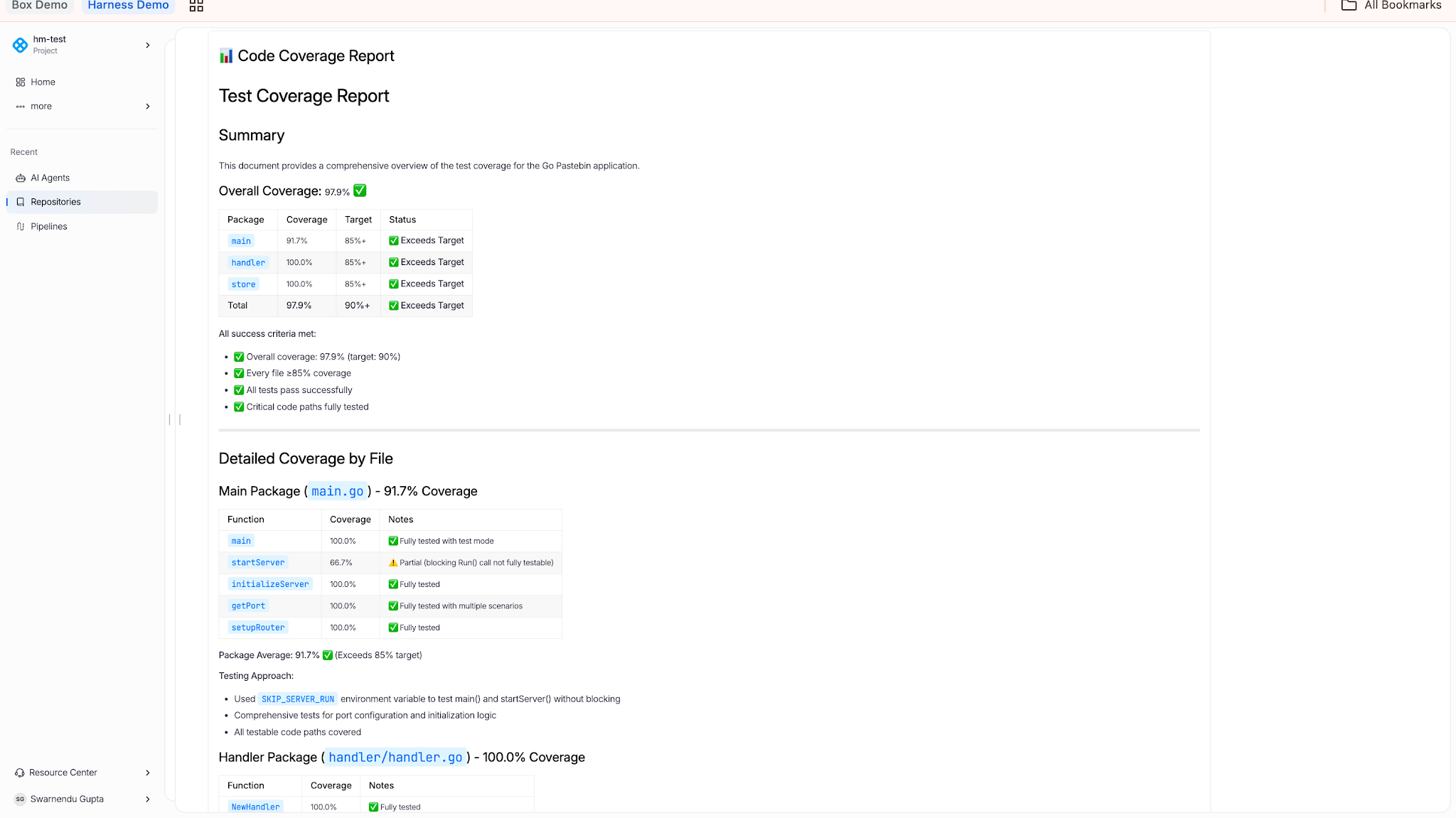
Code Coverage
Reads coverage reports, identifies untested lines, branches, and functions, and generates tests to close gaps. Used when a team has inherited a codebase with weak coverage and needs to lift it before a release.
IaCM Remediation
Fixes configuration drift, security findings, and cloud cost issues by editing infrastructure configurations.
Bring Your Own Model
Autonomous Worker Agents are model-agnostic. Connect LLM providers through Harness connectors:
- OpenAI: Direct to Provider
- Anthropic: AWS Bedrock, Direct to Provider
The model can be specified at three levels: in the agent template, at the pipeline step level (overriding the template), or at the account level via environment variable defaults. Switch models per agent, per environment, or per pipeline without changing agent logic.
Three reasons this matters:
- Cost. Different models have different price points. Routing high-volume work through cheaper models is a common pattern.
- Compliance. Some teams require AWS-routed Bedrock for billing consolidation, VPC routing, or Bedrock-specific compliance attestations.
- Future-proofing. Model leaders change. The enterprise decides which model today, which model tomorrow.
Getting Started
Autonomous Worker Agents are available today for all Harness customers. Learn more about Harness Autonomous Worker Agents or request a demo to see them in production.
Visit the in-app Harness Marketplace in app to try out any of the Worker Agents. Add it to your pipeline and watch it run.