Learn how to streamline deployment approvals with Harness CD native approval steps and configurable policies to reduce manual effort, improve consistency, and accelerate releases.

TL;DR
Approvals shouldn’t cost you a shift. With Harness, the approval step lives inside your pipeline, so you get sign-off without the waiting and the glue code.
Key takeaways include:
Waiting on people is the real cost: Approval gates rarely fail because the check is wrong. They fail because someone isn’t free when the deploy needs them, and those hours add up fast.
Keep approvals in the pipeline: One approval step runs alongside your build and deploy. No separate tool, no webhook to wire up.
Measure ready-to-release time: Track the gap between staging validation and the next deployment, find where approvals stall, and fix that.
The Approval Gate That Costs You a Shift
Manual approval gates in front of the pre-prod stage don't fail because the check is wrong. They fail because they wait on a person, and a person isn't always available the moment a deployment needs one. A build that passes staging tests at 10 AM can sit blocked for hours waiting on a checklist that requires three separate sign-offs before anyone can click “Approve”. By the time all three land, it's 6 PM, the engineer who owns the next step has already left for the day, and the deployment slips to the next morning.
That's not a one-off. Across 12 releases last quarter, the same 4-hour-plus wait recurred, adding up to roughly two full working days of cycle time spent waiting on sign-offs, not shipping anything.
How a Single Execution ID helps
A Harness pipeline is a single execution graph, not two tools glued together by a webhook. Your staging and pre-prod stages sit inside the same pipeline object, sharing a single execution ID and timeline. There's no artifact handed off from a CI system to a separate CD system via a trigger or webhook payload. The same pipeline orchestration layer that started the run owns it end-to-end, from the first step to the last. That matters for what comes next, because it means a later stage can reference an earlier stage's output directly through an expression.
Bring the Approval Process Into the Pipeline
With Harness, teams can build approval gates directly into their deployment pipelines instead of stitching together a separate workflow for every release. This step slots into the same Staging-to-Pre-production pipeline covered in Deploy Your First App with Harness CD, right after the Deploy stage and before the pre-prod promotion. Once the staging checks are complete, the pipeline reaches the approval step. Harness notifies the configured reviewers, waits for the required approvals, and continues when the approval conditions are met.
This is the whole step, no separate approval-tracking tool, no webhook to wire up. Drop it into any CD stage and point userGroups at your release managers:
- step:
    type: HarnessApproval
    name: Release Manager Sign-Off
    identifier: ReleaseManagerSignOff
    spec:
      approvalMessage: |-
        Review this release before it proceeds to pre-production.
      includePipelineExecutionHistory: true
      approvers:
        minimumCount: 1
        disallowPipelineExecutor: false
        userGroups:
          - account.release_managers
      approverInputs: []
    timeout: 1d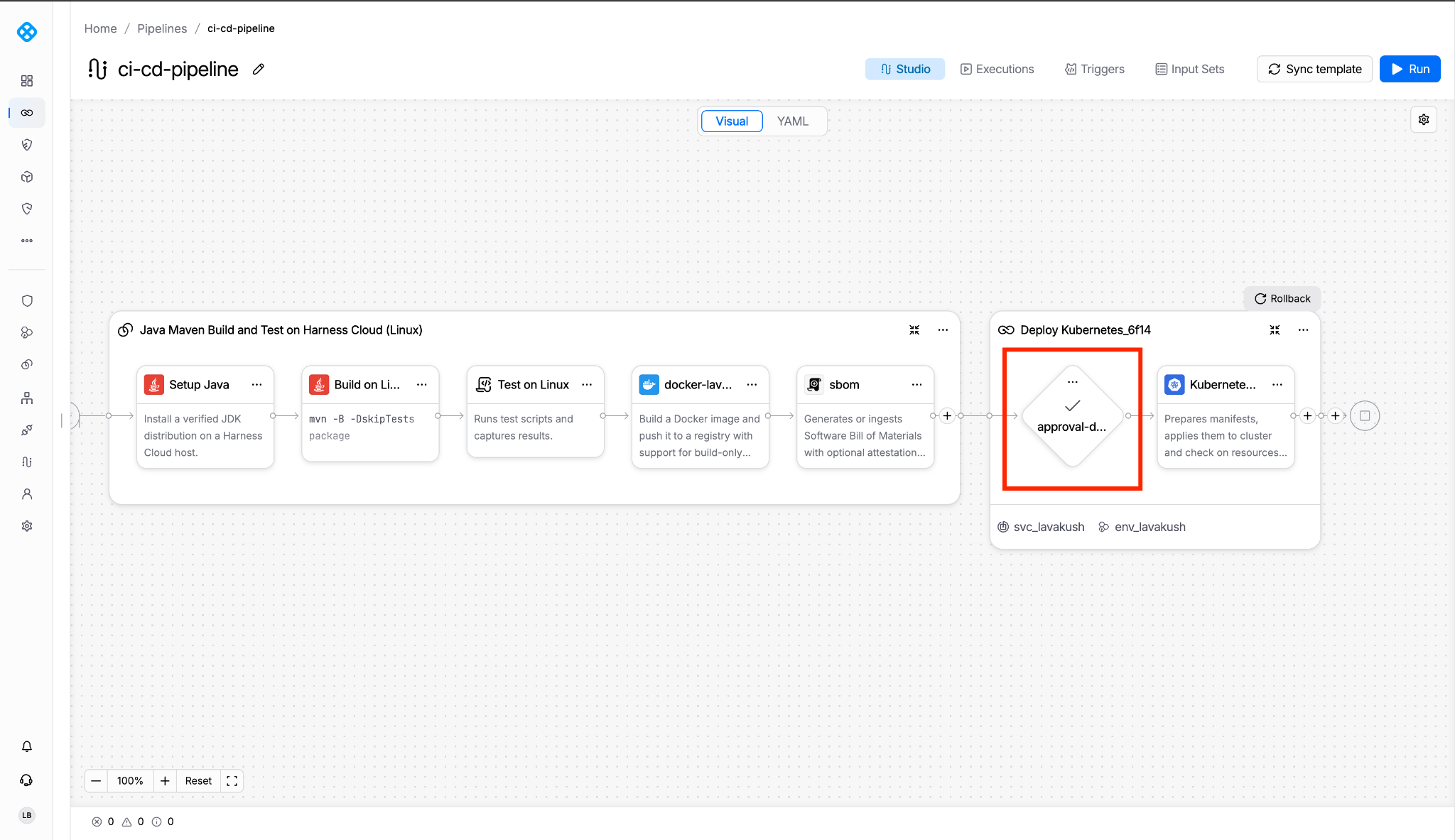
The approval step sits within the same execution graph as the build and deploy stages, not bolted on alongside them.
Harness supports different approval approaches depending on how your organization works. A team can request direct sign-off through a Harness Approval step, use Jira Approval when the decision depends on a Jira issue, or use ServiceNow Approval when production changes are governed by a ServiceNow workflow. The Jira variant looks like this:
- step:
    type: JiraApproval
    name: Change Request Approval
    identifier: ChangeRequestApproval
    spec:
      connectorRef: jira_connector
      projectKey: REL
      issueKey: <+pipeline.variables.jira_ticket>
      approvalCriteria:
        type: KeyValues
        spec:
          conditions:
            - key: Status
              operator: equals
              value: Approved
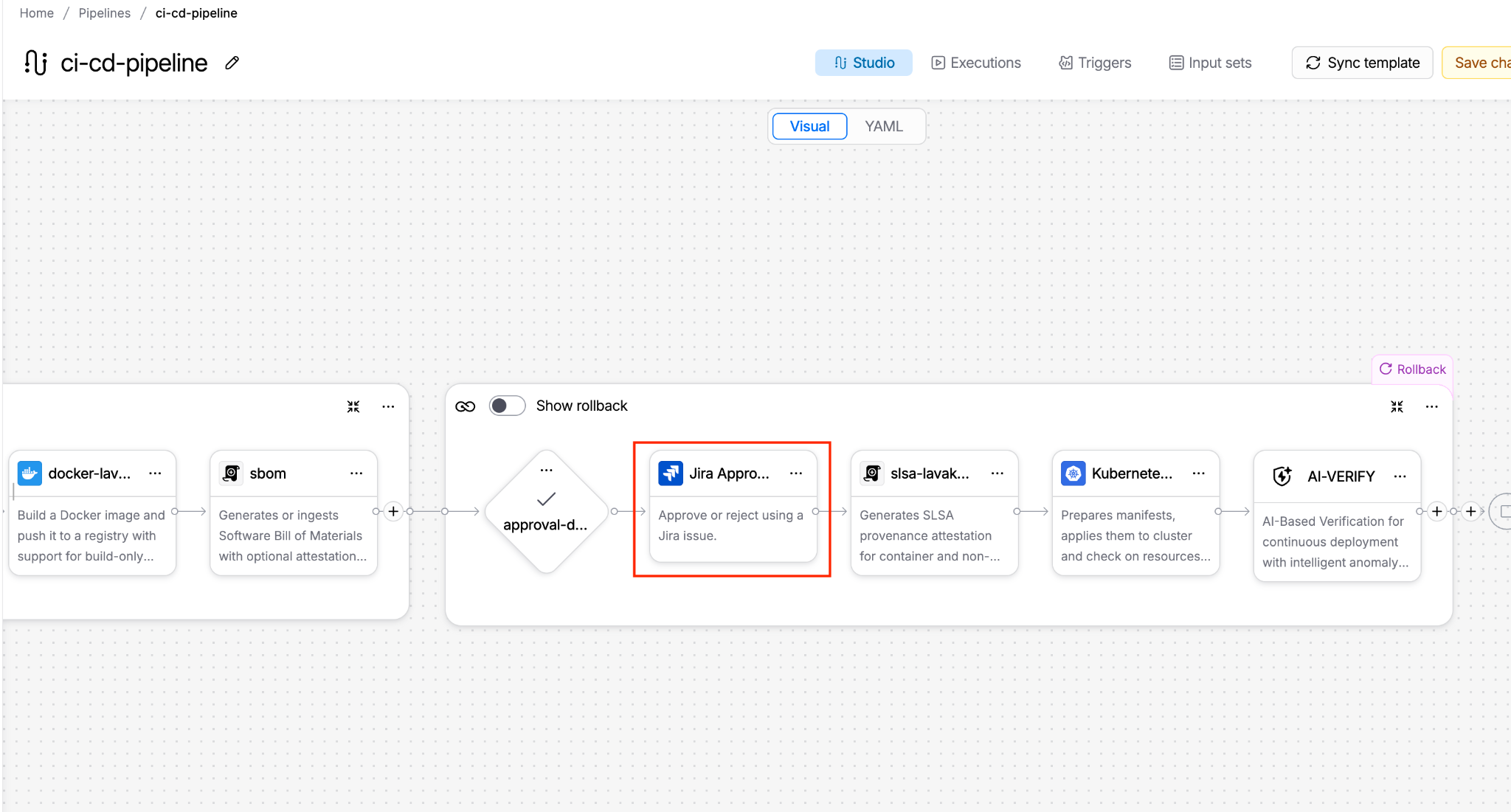
The approval criteria are tied directly to the Jira issue’s status field; no separate polling or webhook needed.
The point is to fit the approval into the release process your organization already follows.
Spend Less Time Chasing Approvals
An approval request shouldn't leave reviewers wondering what they're being asked to approve.
When the relevant release context is readily available, reviewers can spend less time tracking down deployment details and more time making the decision. Teams can configure approvers, approval requirements, notifications, and timeouts to make the process more predictable.
Timeouts also help define what happens when an approval doesn't arrive. Rather than leaving a release blocked indefinitely, teams can configure the pipeline's failure behavior to align with their release policies, and for organizations that require formal change management, Jira and ServiceNow approval integrations can connect the deployment workflow to the relevant change request.
The result is a more consistent approval process, without requiring teams to build and maintain a custom approval mechanism for every pipeline.
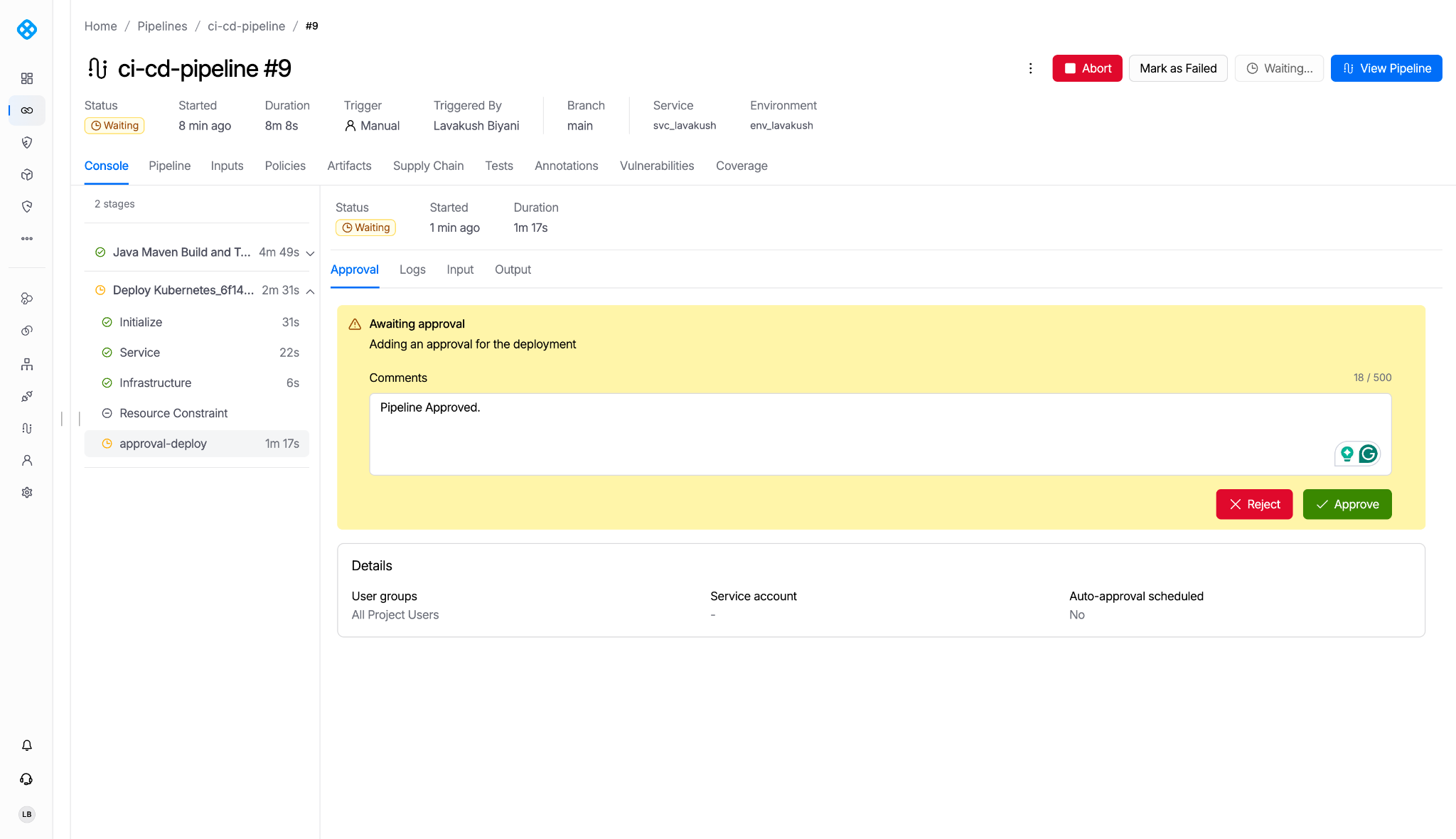
Approval status sits right inside the pipeline execution.
Keep Human Judgment Where It Matters
Not every release decision needs a person. Test results, artifact requirements, and other machine-verifiable conditions can often be checked automatically before an approval request is raised. Human approval can then focus on decisions that require accountability, business context, or explicit authorization.
Harness Policy as Code can be added when teams need custom, enforceable rules for release readiness. But when the requirement is simply to obtain a human sign-off, a native Harness Approval step is often all that's needed.
The distinction matters: automating the checks reduces manual verification, while streamlining the approval workflow makes it easier for the right people to act.
Measure the Time Between Ready and Released
The real measure of an approval workflow isn't how quickly a button can be clicked. It's how long a release waits after it's technically ready to move forward. Track the time between the completion of staging validation and the start of the next deployment. Look for recurring delays, identify where approvals get stuck, and use those findings to improve the workflow.
If your current process regularly adds hours of waiting, set a measurable improvement target and validate it against actual execution data. A release pipeline should make necessary controls easier to follow, not turn coordination into the longest stage of the delivery process.
Next up: Encoding release-readiness as Policy as Code. Once the sign-off step itself is fast, the next bottleneck is usually the checklist behind it: test status, artifact tag, ticket linkage, still being checked by eye. We’ll cover how to turn that checklist into an enforced OPA policy in the next piece.
Ready to streamline deployment approvals? Explore Harness Approval steps and see how they fit into your existing delivery workflow. If you’re starting from scratch, sign up for a free Harness account first, no credit card required.