Secure feature flags with Harness FME using local or remote evaluation, automated cleanup, governance, and AI-powered lifecycle management.

TL;DR
Incorporating robust security measures into feature flag management is critical to protecting sensitive data and maintaining compliance. Harness FME security features, like remote evaluations in Thin SDKs and governed AI flag cleanup, let you practice security by design and standardize solid security practices across your teams.
Ensuring Security in Feature Flagging and Experimentation
With the success of feature flags and experimentation widely touted by influential companies (like AirBnb and Netflix), it would seem that the benefits of nurturing an experimentation culture are a no-brainer. Surely any downsides would be far outweighed by the great insights gained into user behavior, the measurable metrics observed, and the precise monitoring together with exquisite fine tuning and orchestration of feature releases. The whole concept brims with safety.
Why wouldn’t it?
Because, among other principles, software security centers on knowing your technology (what it does and the relevant security requirements) and reducing your attack surface. The Harness platform was built with security by design from the get-go, and there are many interesting articles you can look up like this one about security in the Harness CI/CD pipeline.
For this post, we will hone in on Harness Feature Management and Experimentation (FME), specifically on two vital keys for managing your flags securely:
- FME Thin and standard client-side SDKs: the choice between local and remote feature flag target evaluation
- The Harness FME flag management pipeline steps, including the Feature Flag Cleanup AI agent
These are newly released security features that the Harness FME team is proud to celebrate. This blog explains what these mean for you. Let’s dive in.
Local and Remote Flag Evaluation
Protecting the privacy of your users means knowing where private data resides, and reducing its movement between software components.
Most security models are satisfied when private data stays and stops at the mobile or web client. Any sensitive user attributes (like PII, business context, or session data) never leave the user device. This scenario describes the concept of local feature flag target evaluation, the security premise all client-side standard FME SDKs are built on.
It may be your case, however, that feature flag targeting rules themselves are sensitive. You may rightly not trust the client with them (here’s an elaborative story that illustrates this point and another compelling story about the impossibility of securing the client). If that is your scenario, you can choose remote feature flag target evaluation. User attributes travel over the network to the Remote Evaluator in FME cloud and feature flag treatments are returned. Remote evaluation is invoked by all client-side thin FME SDKs. The flag definitions and targeting rules never leave the FME servers.
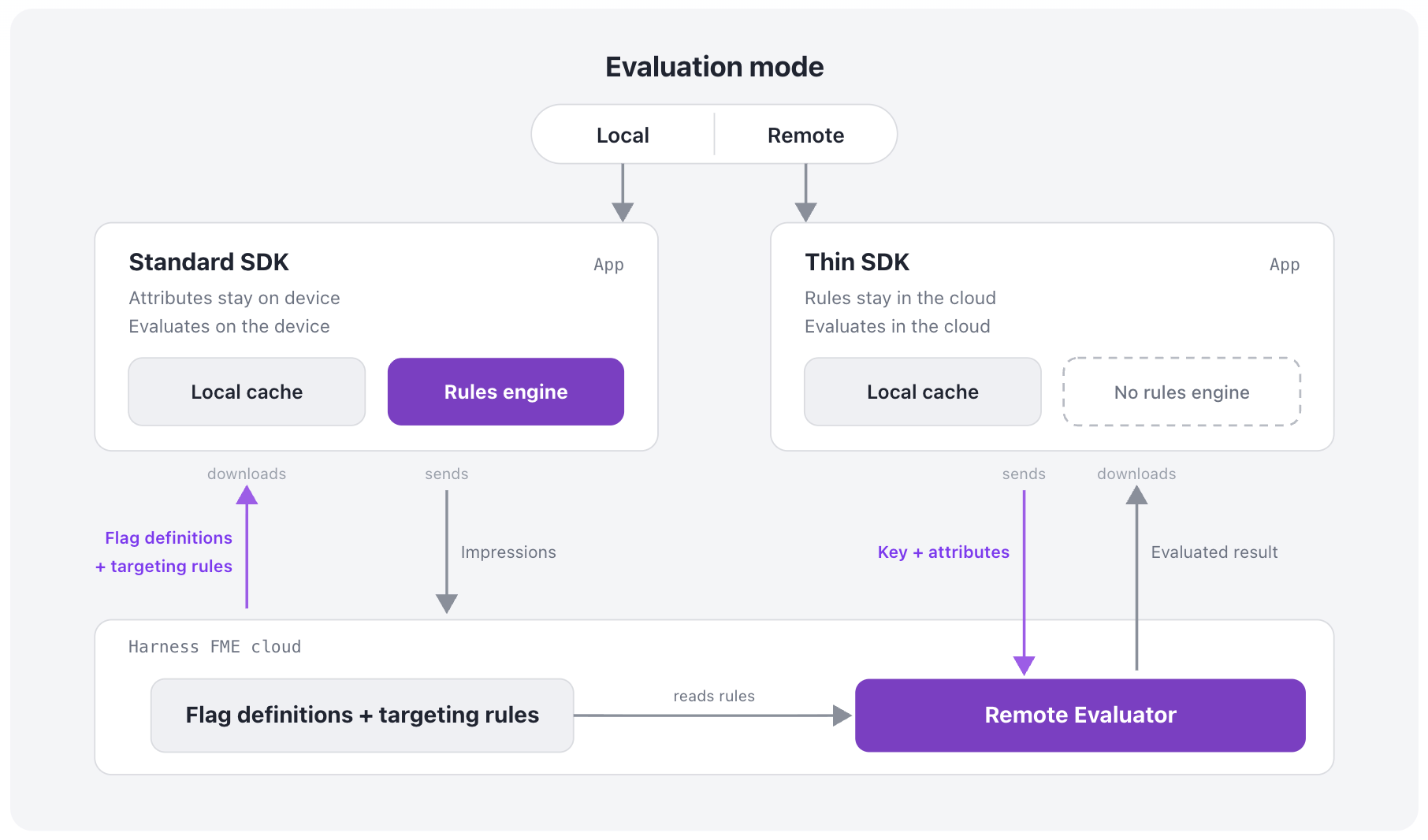
Takeaway: While most client-side surfaces are well served by local evaluation, which protects user attributes, remote evaluation is the right tool when those targeting rules themselves carry information that has to stay private. A common pattern is to keep most of the application on the standard SDK and reserve the thin SDK for the surfaces where rule visibility is sensitive. This detailed technical analysis can help you decide on your own strategy.
Local or remote evaluation—now you have the choice. It’s our pleasure to be giving you the key.
Feature Flag Lifecycle and the Cleanup AI Agent
Flags let you catch disasters before they happen. In the early stages of a canary release, triage for a faulty feature variant is as trivial as opening an alert and flicking a kill switch.
With this perception of safety and visibility, it might seem like a convenience to reuse old flags, but that would be a major malpractice (read: very very Bad, with a capital B).
There are many reasons why informed people strongly discourage flag reuse. Besides confusing flag purpose, undermining intra- and inter-team communication (getting colleagues and management mad), and deliberately ignoring the very common reality of long-delayed application updates/old code still active (especially on mobile devices, but also on a server as in this $460 million mistake); flags not removed in a timely manner, once the golden feature variant has been measured and identified, leave over unnecessary code complexity. When everyone has forgotten the unneeded variant paths (instead of removing them), we are left with encumbering tech debt.
Better to keep code simple, and follow good flag lifecycle practices that Harness FME fully supports by providing:
- OPA policies for feature flags
- Feature flag pipeline steps
- Feature Flag Cleanup AI agent
OPA Policies for Feature Flags
OPA policies allow you to enforce standardized naming practices for your feature flags project-, organization-, or account-wide in Harness. Keep the intent of each flag crystal clear to all engineers and stakeholders.
Feature Flag Pipeline Steps
Pipelines, built from standardized pipeline templates, can manage the entire flag lifecycle by using automated Harness pipeline steps for feature flag management. These take a feature flag through smoke and beta testing, canary release, monitored ramping, full GA, removal from code, archival, and deletion. More on removal from code, the feature flag cleanup step, in the next subsection.
Feature Flag Cleanup AI Agent
Harness worker agents are now available in Harness Marketplace and ready to be configured with an AI model of your choice. The Feature Flag Cleanup AI agent runs in a pipeline step that safely removes references to a stale feature flag, keeps the chosen treatment, and commits the cleanup to a given branch in the code repo.
Add the agent step to your pipeline, and the agent will search through your code for feature flag evaluations and conditional execution paths and create a commit to remove these from your code base, leaving just your chosen variant path. You can see in FME when a flag has not received traffic in the past week or month, signaling that the flag can safely be killed, archived, and deleted in Harness FME.
How to add the Feature Flag Cleanup AI Agent step to your pipeline:
- Create or open a pipeline in Harness.
- Create or click on a supported stage type (or a containerized step group) for Agent steps.
- Add the Feature Flag Cleanup agent step to the step group.
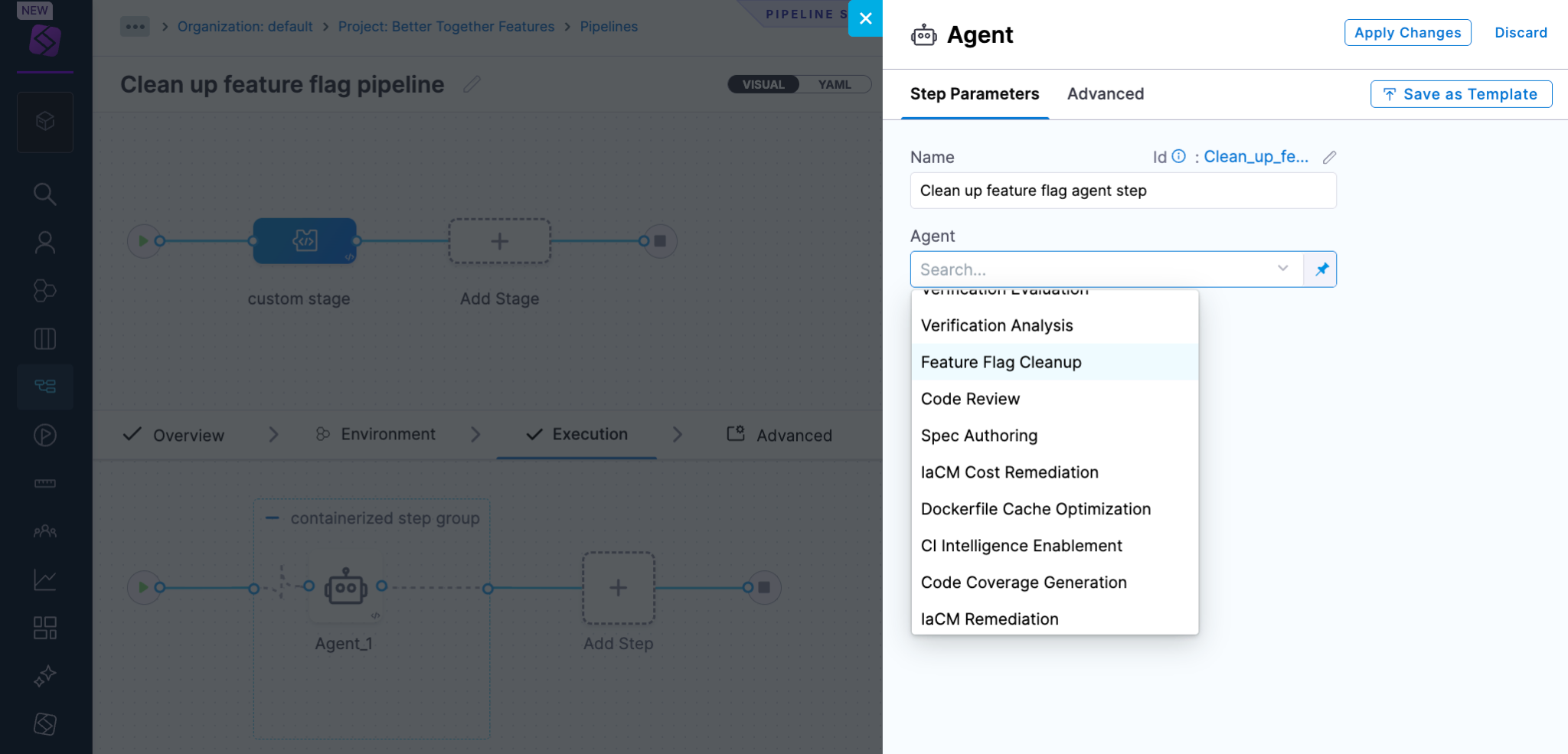
- Configure the LLM Connector, AI model, flag name and code repository parameters.
After the step runs successfully, your team can review the changes and merge the branch. Once the new code is deployed and the flag is no longer receiving traffic, you can safely kick off archival and deletion of the flag in Harness FME.
Feature flag lifecycle management is automated within your governed pipeline.
Takeaway: Harness enforcement of your naming policies and native-to-Harness feature management pipeline steps allow you to ensure your flags are not reused. Ever.
You have the key tooling in hand to successfully govern and cleanly complete your feature flag lifecycles, and you can effectively do this across your organization.
More Security Best Practices - Completing the List
The focus here was on feature flag security. There is much more on Harness pipeline security, including:
- Security testing orchestration (STO) and application security posture management (ASPM)
- Role-based access control (RBAC) for all Harness resources (including feature flags, but going way beyond)
- Web Application & API Protection
- AI Security
We help you to shift security left in your SDLC, secure your CI/CD pipeline, and shield your application in production.
Harness has always put security first by design. Security is our priority. We are proud of that legacy, and we empower you to do the same.
Frequently Asked Questions
Why does security need to be considered when using feature flags?
Feature flag targeting rules or user attributes may contain sensitive information that can be protected by a well-chosen SDK evaluation mode. Flag lifecycle management is best automated and standardized across your teams, including clear flag naming conventions and well-supported cleanup practices.
You may also be interested in learning about setting up a proxy and reverse proxy to harden your network boundaries while allowing FME traffic through.
What tools does Harness provide to strengthen the security posture of my CI/CD pipeline?
Security is a top priority at Harness, and we are rapidly innovating new security tools, integrations, and partnerships. Some of these innovations are listed below:
- Static Application Security Testing (SAST)
- Software Composition Analysis (SCA)
- Supply Chain Security (SCS)
- Security Testing Orchestration (STO)
- Web Application & API Protection
- AI Security
How does Harness support you shift left and shield right in the SDLC?
Shifting left means incorporating security best practices early in the software delivery life cycle (SDLC), most preferably in the development process. This approach helps developers identify and fix vulnerabilities as early as possible and reduce costly mistakes and security patches.
That's what the Harness platform does today. Harness brings Application Security Testing directly into the development workflow, surfacing vulnerabilities where they're faster and cheaper to fix, while Supply Chain Security ensures the integrity of artifacts from build to deploy.
As code ships to production, Web Application & API Protection monitors and defends applications and APIs in real time, detecting and blocking attacks as they happen. And critically, findings in production don't disappear into a security team's backlog—they flow back to devs and engineers to remediate issues before the next release.
The result is a closed loop: find vulnerabilities early in code, protect applications in production, resolve incidents lightning fast. All on a single, unified platform.
How is security changing in the AI era?
AI-assisted attacks are surfacing in the AI era. Apple is responding to the changing technology landscape by stepping up security in an unprecedented policy change, in recognition of the security impacts of AI. Harness recently released AI Security to address the security gap that can exist with AI assisted coding.
Where can I learn more about best practices for securing my Harness CI/CD pipeline?
You can keep your knowledge current by watching the Harness Testing & Compliance blogs; the Harness Application Security Testing, Web Application & API Protection, and AI Security product pages; and organizations like Open Worldwide Application Security Project (OWASP) that regularly publishes authoritative Top 10 lists of critical security risks.