Learn how to secure AI-generated Kubernetes YAML using a layered approach with Harness GitOps, OPA policies, admission controls, CI validation, and post-deployment verification.

TL;DR
- GitOps provides version control, auditability, and visibility into Kubernetes deployments, but doesn't guarantee security.
- Automate manifest validation in CI using policy checks and server-side dry runs.
- Use Harness OPA and Kubernetes admission controls to enforce deployment and workload security policies.
- Use Harness AI Verify to monitor application health and identify issues after deployment.
AI coding assistants like GitHub Copilot, Claude, and Cursor generate Kubernetes configurations faster than teams can review them, so the controls that validate that output have to keep pace. GitOps is a good foundation. It becomes a safe path to production when you combine it with policy checks, human approvals, Kubernetes admission controls, and post-deployment verification.
Consider an AI-generated Kubernetes Deployment that runs a container as root and exposes an internal application through a publicly accessible Service. The YAML is syntactically valid, and the application passes the build and test stages, but the configuration still introduces security risks that conventional build checks may not detect.
Why traditional push-based pipelines need additional controls
Most traditional CI/CD pipelines follow a push-based deployment model. A pipeline executes commands such as kubectl apply or helm upgrade directly against a Kubernetes cluster. This works well for many scenarios, but it places responsibility on the pipeline to validate what it deploys.
Consider a few examples:
- A container runs with root privileges because the generated manifest omits runAsNonRoot
- A Kubernetes Service exposes an internal application through an unintended public endpoint
- A workload receives excessive permissions through its service account
- A deployment targets a production namespace instead of the intended development environment
Teams can implement additional security checks in push-based pipelines, but those checks need to be explicitly designed and maintained. A successful pipeline run alone does not establish that the deployment configuration meets organizational security requirements.
What GitOps changes
Harness is a platform that helps engineering teams build, test, secure, deploy, and verify applications through an integrated set of developer and DevOps tools. One of its capabilities, Harness GitOps, helps teams manage Kubernetes deployments using the GitOps operating model, which treats Git as the source of truth for an application's desired state.
Harness GitOps builds on Argo CD, providing a centralized management layer for GitOps applications, repositories, and agents, while retaining Argo CD's application controller to monitor and reconcile the desired state with the live Kubernetes cluster.
With GitOps, the desired state lives in Git. Instead of a CI job pushing manifests directly into the cluster, the Argo CD application controller continuously compares the desired state in the repository with the live cluster and reconciles differences when a sync is initiated or an automated sync is configured.
A typical workflow looks like this:
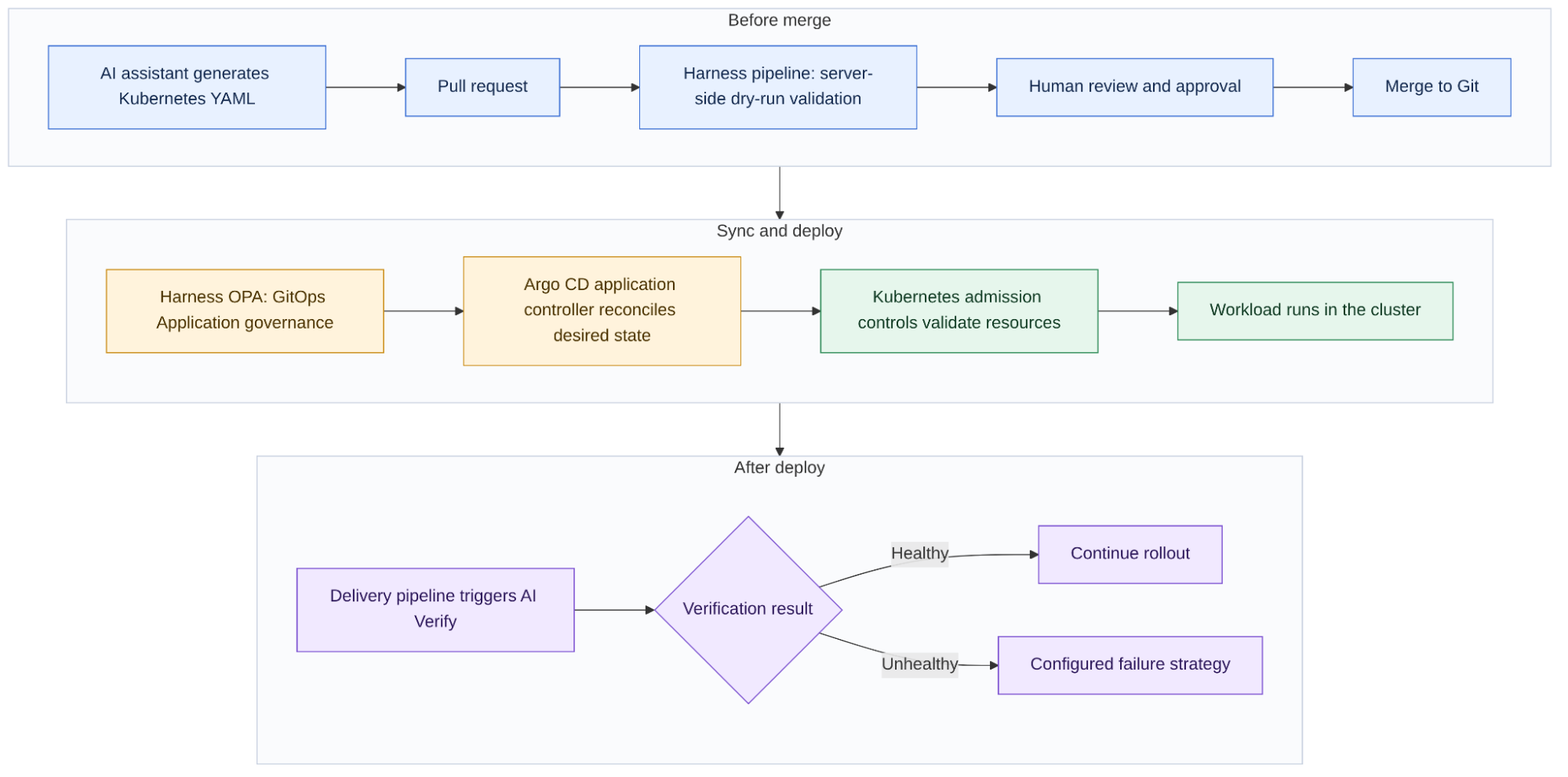
- An AI assistant generates or modifies Kubernetes manifests
- The developer submits the changes through a pull request
- CI evaluates the manifests against security and configuration policies
- A human reviews and approves the proposed changes
- The approved changes are merged into Git
- Harness OPA policies evaluate the GitOps Application when it is saved or when a sync is started through Harness
- The GitOps controller detects the updated desired state and reconciles the cluster
- Kubernetes admission policies validate resources as they are submitted to the API server
- Post-deployment verification evaluates application health
Try it yourself: the Harness GitOps samples show GitOps pipelines for syncing applications, PR-based updates, and rollouts. The Harness CD GitOps quickstart walks through a complete deployment.
Four GitOps properties that matter for AI-generated code
- A pull request is a natural checkpoint, not an extra step: An AI assistant opening a PR instead of pushing directly to main gives a policy engine and a human a point to review the change before it is live. This isn't unique to AI-generated code. The difference is volume: more PRs land per day, so the checks at that checkpoint need to be automated, not just a human skimming a diff.
- Git history acts as an audit trail: Every synced change traces back to a commit, an author, and a timestamp. It is not automatically tamper-proof: if your repo allows force pushes or history rewrites on the branch GitOps watches, the trail can be altered.
- Drift detection is built in; correction is opt-in: Argo CD reports drift between Git and the live cluster by default. It reverts that drift only when automated sync and self-heal are enabled. Without self-heal, a manual change to the cluster stays until the next sync
- Rollback is a Git operation: If a synced change breaks something, a git revert plus a sync returns you to the last known good state. Argo CD's own rollback operation is not available while automated sync is enabled, so revert in Git instead
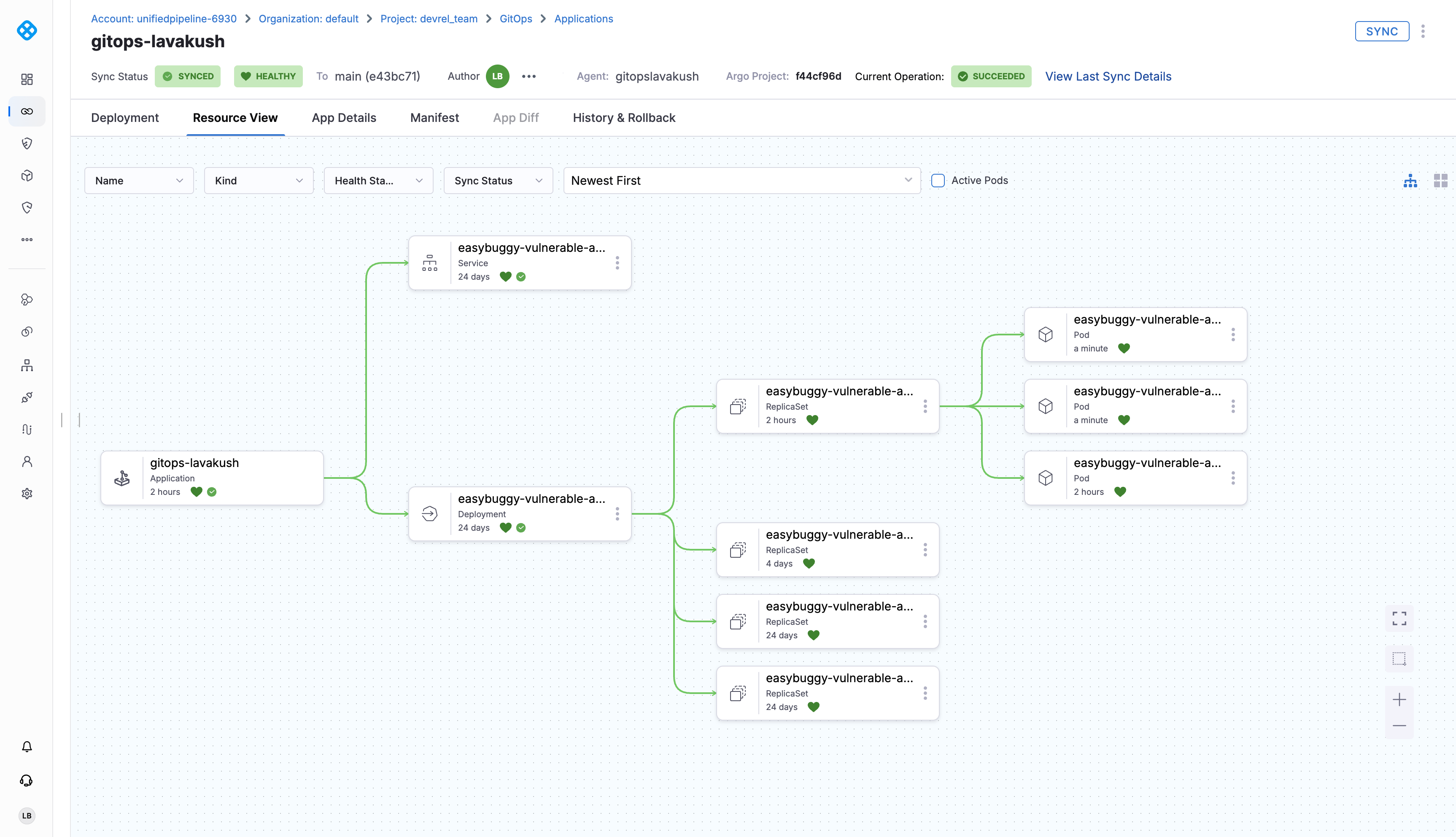
In the Harness GitOps Applications view, the Sync Status and Health badges at the top of the application show whether the live cluster matches Git and whether the workload is healthy, as highlighted below.
Governing and verifying deployments with Harness GitOps
Harness GitOps works alongside Argo CD components to manage GitOps operations and connect the deployment environment with Harness SaaS. The Harness GitOps Agent provides the management layer for applications and repositories, while the Argo CD application controller continues to monitor applications, compare desired and live state, and take corrective action.
This matters most when an organization runs many applications across many clusters. Instead of managing disconnected Argo CD installations, platform teams get one place in Harness to manage GitOps applications and agents and to view deployment status. See the Harness GitOps Agent architecture.
Validate manifests in CI with a server-side dry run
Admission policies can also run before merge. A server-side dry run sends manifests to the Kubernetes API server, which evaluates them against the cluster's admission policies without saving anything. Add this Run step to a Harness pipeline after the repository is cloned, and update manifests/ to match your repository:
The step fails only if the cluster has a policy set to deny, such as a ValidatingAdmissionPolicy binding with validationActions: [Deny] or a Gatekeeper constraint in deny mode. The connector needs real apply permissions, because Kubernetes RBAC cannot allow dry runs while denying real requests, so scope it to the target namespaces and do not run it on pull requests from forks. See the Kubernetes documentation on dry-run requests.
- step:
    type: Run
    name: Validate Kubernetes Manifests
    identifier: Validate_Kubernetes_Manifests
    spec:
      shell: Sh
      command: |-
        set -eu
        kubectl apply --dry-run=server -f manifests/
    timeout: 10m
The step fails only if the cluster has a policy set to deny, such as a ValidatingAdmissionPolicy binding with validationActions: [Deny] or a Gatekeeper constraint in deny mode. The connector needs real apply permissions, because Kubernetes RBAC cannot allow dry runs while denying real requests, so scope it to the target namespaces and do not run it on pull requests from forks. See the Kubernetes documentation on dry-run requests.
Enforce GitOps Application governance with Harness OPA
Harness OPA evaluates the GitOps Application object: its metadata, source, destination, and sync operation details. For example, this policy blocks applications from targeting reserved or system namespaces:
package gitopsApplication

reserved_namespaces := [
    "default",
    "argocd",
    "istio-system",
    "cert-manager",
    "monitoring",
    "logging"
]

reserved_prefixes:= ["kube-", "openshift-"]

# Exact match against reserved namespaces
deny[msg] {
    ns := input.gitopsApplication.app.spec.destination.namespace
    reserved_namespaces[_] == ns

    msg := sprintf(
        "Application '%s' cannot deploy to reserved namespace '%s'. Choose an application namespace.",
        [input.gitopsApplication.app.metadata.name, ns]
    )
}

# Prefix match covers kube-system, kube-public, kube-node-lease, and any openshift-* namespace
deny[msg] {
    ns := input.gitopsApplication.app.spec.destination.namespace
    startswith(ns, reserved_prefixes[_])

    msg := sprintf(
        "Application '%s' cannot deploy to system namespace '%s'. Namespaces starting with 'kube-' or 'openshift-' are reserved.",
        [input.gitopsApplication.app.metadata.name, ns]
    )
}
The policy does not inspect the rendered Deployment, so keep workload checks in CI and admission control. You attach it to a Policy Set with the GitOps Application entity type and choose one of two events:
- On Save: when a GitOps Application is saved or updated
- On Sync: when a sync is initiated through the Harness UI or API
Harness OPA policies do not run for auto-syncs triggered by Argo CD, or for syncs started from the cluster CLI (for example, argocd app sync). An On Save policy can still deny applications that enable auto-sync. If you use auto-sync, rely on CI checks and admission policies to enforce workload. The policy also checks only the destination namespace set on the Application, so use Argo CD AppProject destination restrictions to cover namespaces written inside the manifests. See Policy as Code for GitOps Applications for setup steps and sample payloads.
Verify application health with Harness AI Verify
A deployment can pass every configuration check and still introduce higher latency, new errors, or changed resource utilization. AI Verify uses an AI-assisted Configuration Agent to set up health sources, with statistical anomaly detection and narrower platform support, so check the docs before choosing. The step can fail the pipeline and run your configured failure strategy, such as a rollback. It does not attach itself to every Argo CD auto-sync, so start it from your delivery pipeline. See Harness Continuous Verification with AI Verify.
In the delivery pipeline, the AI-VERIFY step runs after the Kubernetes deployment step inside the same stage, as highlighted below.

End to End Workflow
The diagram shows where each control sits relative to the AI-generated change and the running workload.
How to get started
Start with one Kubernetes application and add the controls incrementally:
- Establish the GitOps workflow. Create an Argo CD Application that points to a Git repository containing your manifests, then configure branch protection and require pull requests for deployment changes
- Add CI validation. Add the server-side dry-run step to a Harness pipeline and make it a required pull-request check
- Add admission policies. Use Pod Security Admission, Gatekeeper, or ValidatingAdmissionPolicy to enforce critical workload requirements at the API server, even if a change bypasses CI
- Add Harness OPA policies. Restrict destination namespaces and require Harness labels, and choose On Save or On Sync based on how synchronization is configured
- Decide on auto-sync and self-healing. Enable them only when correcting live-cluster drift automatically matches your operational requirements
- Add post-deployment verification. Add AI Verify to a delivery pipeline that coordinates the sync and set a failure strategy for unhealthy deployments
Make generated code safe to ship
GitOps does not make an insecure manifest safe on its own, and no single policy engine covers every layer. Combine reviewable changes in Git, Harness OPA for GitOps Application configuration, admission control for workloads, and post-deployment verification. A successful build is not proof that a deployment is safe, and these layers are how you get that proof.
Want to strengthen your deployment? Sign up for Harness GitOps and explore how it can help you manage and secure your GitOps workflows.