Learn how Harness CD and Database DevOps automate application deployments and database schema migrations in a unified CI/CD pipeline.

TL;DR
Combining application deployments and database schema migrations in a single CD pipeline improves release consistency, visibility, and governance. Harness Continuous Delivery and Database DevOps automate deployments, verification, and rollbacks to reduce risk and accelerate software delivery.
Modern software releases rarely consist of application code alone. A new feature might require additional database tables, modified columns, new indexes, updated constraints, or reference data changes. While many organizations have successfully automated application deployments, database schema migrations often remain disconnected from the rest of the software delivery process.
This separation creates deployment bottlenecks, increases operational overhead, and introduces unnecessary risk.
Application teams may deploy code through automated Continuous Delivery (CD) pipelines, while database changes are managed through separate processes, manual approvals, or standalone tooling. The result is a fragmented release workflow where application and database changes must be done manually. In this article, we'll explore how Harness Continuous Delivery (CD) and Harness Database DevOps (DBDevOps) enable teams to deploy database and application changes through a unified pipeline, improving release velocity, visibility, governance, and deployment safety.
Why Database Schema Migrations Should Be Part of Your CD Pipeline?
Applications and databases are now a days mostly tightly coupled and an application release may depend on:
- New tables
- Additional columns
- Updated indexes
- Modified constraints
- New database objects
When application deployments and database schema migrations happen independently, teams often encounter several challenges.
Manual Coordination
Application and database teams must coordinate release schedules and deployment windows.
Deployment Risk
Applications may be deployed before required database changes are available, resulting in runtime failures or broken functionality.
Limited Visibility
Teams often struggle to answer questions such as:
- Which database schema migrations have been deployed?
- Which environments are running the latest schema version?
- What changes were included in a release?
Complex Rollbacks
- Application rollbacks are generally straightforward.
- Database rollbacks can become significantly more complicated when deployments are managed through separate workflows.
- A unified deployment process helps eliminate these challenges by treating database schema migrations as a first-class part of software delivery.
What a Unified Deployment Pipeline Looks Like
Instead of managing application and database releases separately, teams can orchestrate both through a single deployment pipeline.
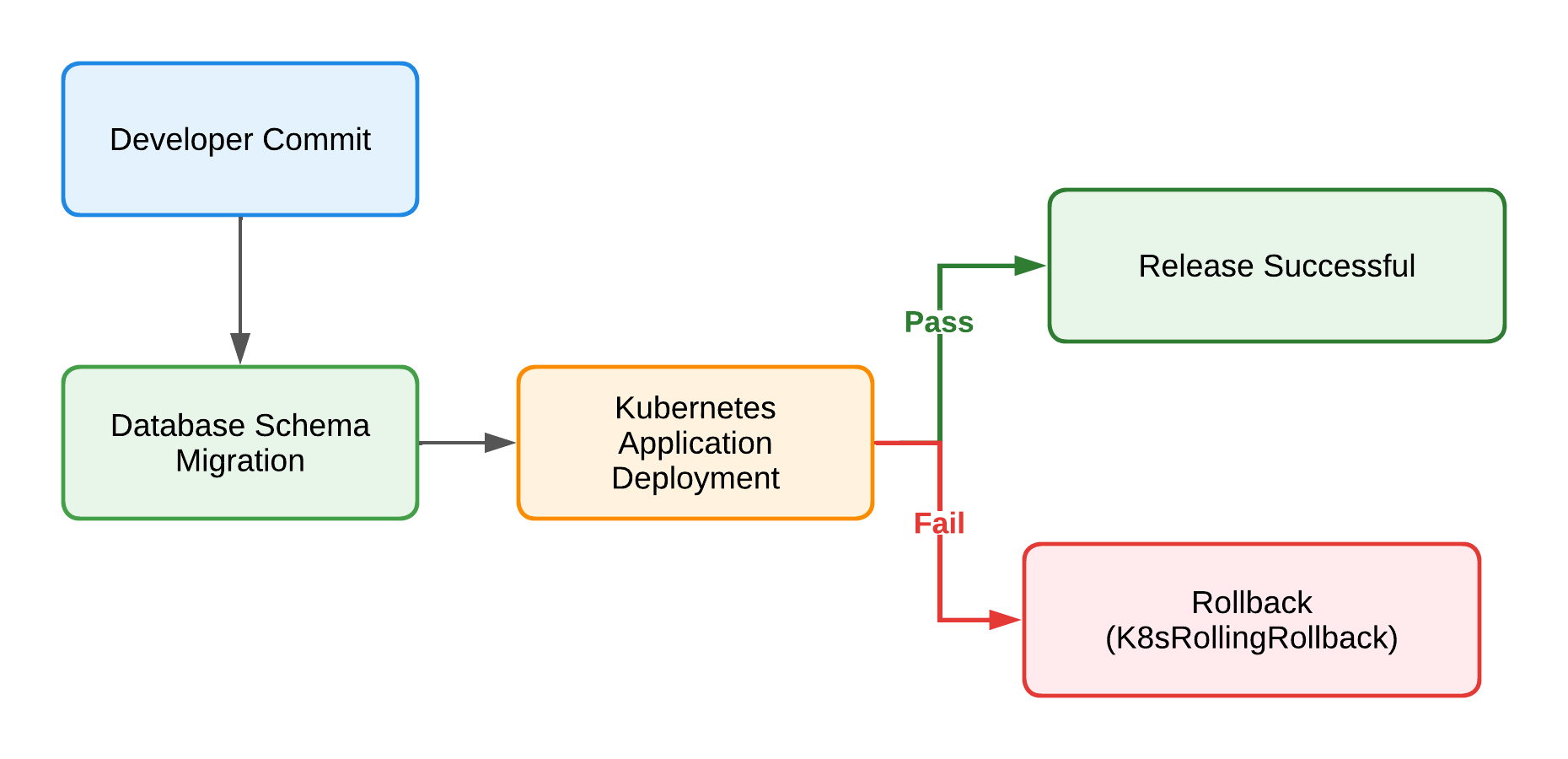
This approach ensures database and application changes remain synchronized throughout the deployment lifecycle.
Deploying Database Schema Migrations and Applications Together
Let's examine a practical example using Harness Database DevOps and Harness Continuous Delivery. The deployment stage consists of three primary phases:
- Apply database schema migrations
- Deploy the application
- Verify deployment health and initiate rollback when necessary
Phase 1: Apply Database Schema Migrations
The deployment begins by applying database changes using the Harness Database DevOps schema deployment step.
- step:
    type: DBSchemaApply
    name: Apply Database Schema
    identifier: Apply_Database_Schema
    spec:
      connectorRef: account.harnessImage
      migrationType: Liquibase
      dbSchema: bookkeeper
      dbInstance: goodinstance
      tag: v1.0.0
The DBSchemaApply step executes the database schema migration associated with the specified release version. By versioning database changes and deploying them through a pipeline, teams gain:
- Consistent database schema migration across environments
- Controlled promotion between development, staging, and production
- Deployment traceability
- Improved governance and auditability
Most importantly, database changes are deployed automatically as part of the release process rather than through a separate operational workflow.
Phase 2: Deploy the Kubernetes Application
After the database schema migration completes successfully, the pipeline proceeds with the application deployment.
- step:
    name: Deploy Application
    identifier: rolloutDeployment
    type: K8sRollingDeploy
    timeout: 10m
    spec:
      skipDryRun: true
      pruningEnabled: false
The K8sRollingDeploy step performs a rolling deployment to Kubernetes, gradually replacing existing application instances with the new version while maintaining service availability. Because the database schema migration has already been applied, the application can safely consume:
- Newly created tables
- Updated columns
- Additional indexes
- New constraints
- Modified database structures
This sequencing helps eliminate compatibility issues that commonly occur when application and database deployments are managed separately.
Automated Rollback for Safer Releases
One of the most valuable aspects of a unified deployment pipeline is coordinated rollback. If verification identifies an issue, the stage can automatically trigger rollback actions.
failureStrategies:
  - onFailure:
      errors:
        - AllErrors
      action:
        type: StageRollback
The rollback workflow executes the Kubernetes rollback step:
rollbackSteps:
  - step:
      type: K8sRollingRollback
      name: Rollback Rollout Deployment
This enables teams to quickly restore the previous application version and minimize production impact. Combined with database deployment visibility and rollback strategies, organizations can significantly reduce deployment risk and improve recovery times.
Benefits of Combining Continuous Delivery and Database DevOps
- Faster Release Velocity: Database and application changes move through a single automated workflow without waiting for separate deployment windows.
- Safer Database Schema Migrations: Version-controlled database schema migrations help ensure consistency across environments.
- Improved Visibility: Teams gain centralized insight into deployments, migration history, and release status.
- Better Governance: Approval workflows, policies, and compliance requirements can be enforced directly within deployment pipelines.
- Reduced Deployment Risk: Verification and rollback become built-in parts of every release.
- Stronger Collaboration: Developers, platform engineers, and database teams work from the same deployment process rather than maintaining separate release workflows.
Bringing Database Schema Migration into Modern Continuous Delivery
Database schema migration should not be treated as a separate operational activity. Modern software delivery requires application code and database changes to move together through a secure, automated, and governed deployment process. Harness Database DevOps enables teams to:
- Automate database schema migrations
- Integrate database deployments into CI/CD pipelines
- Manage version-controlled database changes
- Apply governance and compliance controls
- Support rollback and recovery workflows
- Deploy applications and databases together through a unified pipeline
By combining Harness Continuous Delivery and Harness Database DevOps, organizations can streamline releases while reducing deployment risk and improving operational efficiency.
Conclusion
Application releases and database schema migrations are two parts of the same deployment. Managing them separately creates unnecessary complexity, increases risk, and slows delivery.
By orchestrating database schema migrations, Kubernetes deployments, verification, and rollback within a single pipeline, teams can build a more reliable and efficient release process. Harness Database DevOps and Continuous Delivery provide the foundation for modern software delivery, enabling organizations to deploy applications and database changes together with greater confidence, visibility, and control. Explore how Harness Database DevOps can transform your delivery process today.