Speed up Gradle builds with Harness CI's Build Intelligence, leveraging zero-config remote caching to reduce build times and simplify cache management.

Every developer knows the pain of waiting for a build to finish. You change a single line of code, hit build, and watch your terminal spin. When builds take minutes, developer momentum grinds to a halt. By leveraging the Gradle Build Cache, you can reuse outputs from previous builds and significantly reduce build times. In this guide, we will look at how Gradle's caching mechanism works under the hood, how to write cacheable custom tasks in Java, and how to easily share these speedups across your entire team using the Harness CI.
Overview of Gradle
Gradle is a powerful build automation tool used primarily for Java and JVM-based projects, while also supporting other languages and platforms through its plugin ecosystem. It is designed to be flexible, performant, and scalable, making it suitable for everything from small libraries to large multi-project builds.
Key Features of Gradle
- Directed Acyclic Graph (DAG): Gradle models the build process as a DAG of tasks. Tasks represent units of work, and the edges between them represent dependencies.
- Incremental Builds: Gradle avoids re-executing tasks whose inputs and outputs have not changed since the last build.
How Gradle Works
At a high level, Gradle turns your build scripts into a task graph, determines which tasks are required for the requested command, and executes only the work that needs to run.
Build Lifecycle
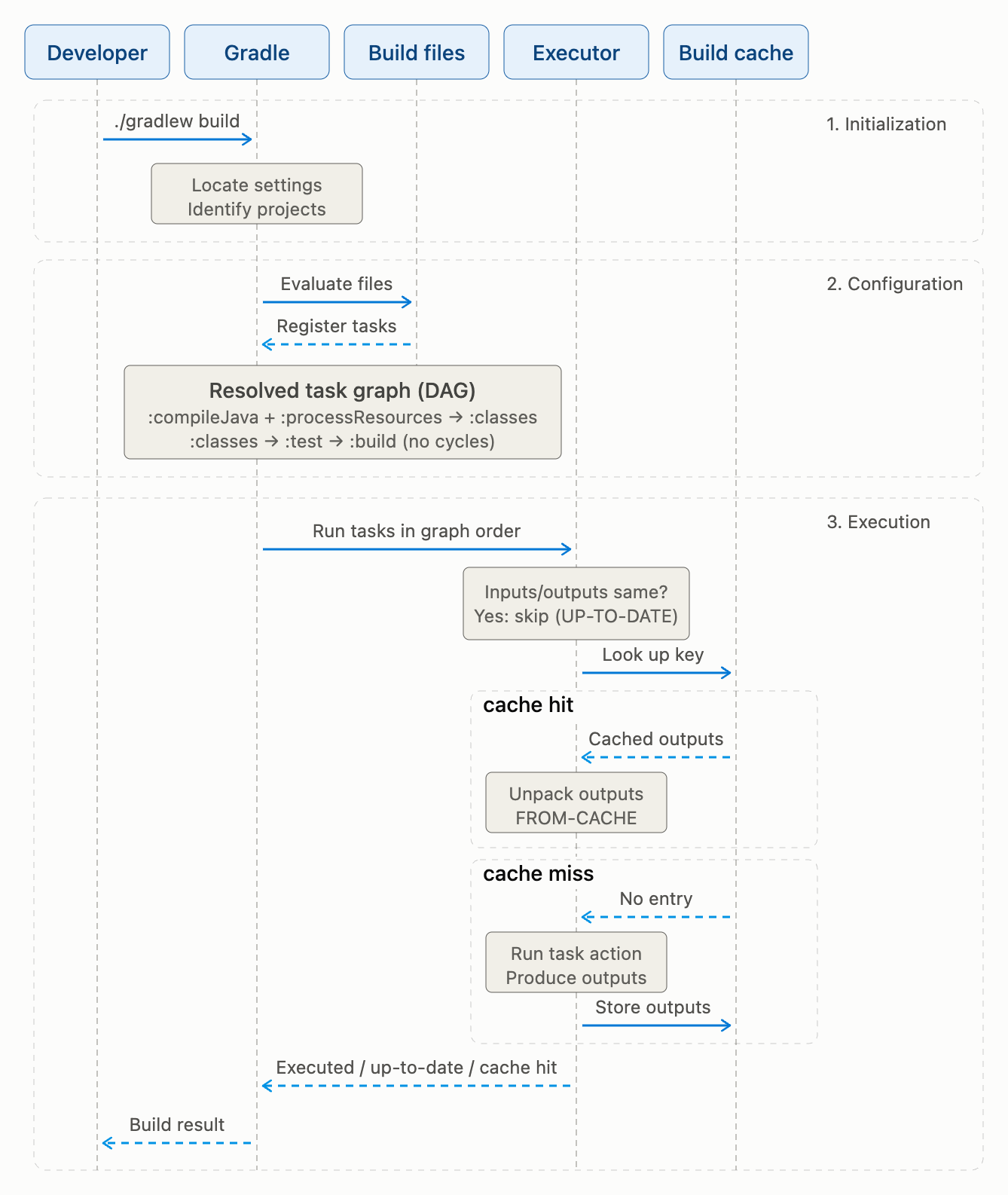
- Initialization Phase: Gradle identifies which projects are involved in the build and creates a Project object for each one.
- Configuration Phase: Gradle executes the build scripts, such as build.gradle or build.gradle.kts, and constructs the task graph by evaluating task definitions and dependencies.
- Execution Phase: Gradle determines the tasks to execute based on the requested tasks and their dependencies, then runs them in the correct order.
Tasks in Gradle
A task is a unit of work that performs a specific action, such as compiling code, running tests, generating documentation, or packaging an application.
- Inputs: Files, directories, properties, or other data the task uses.
- Outputs: Files or directories the task produces.
- Up-to-Date Checks: Before executing a task, Gradle checks whether its inputs and outputs have changed since the last execution. If nothing has changed, the task is considered up-to-date and is skipped.
How Gradle Caching Works Under the Hood
Gradle caching extends the up-to-date behavior described above by reusing task outputs beyond the current workspace. The key distinction is:
- Incremental Builds: Skip unchanged tasks in the current local workspace.
- Build Cache: Stores task outputs in a local or remote directory. If another workspace (or a CI runner) has already executed the task with the exact same inputs, Gradle downloads the outputs instead of running the task.
Cache Key Computation
Before executing any task, Gradle computes a unique cache key (a SHA-256 hash) based on:
- Task Type and Classpath: The implementation class of the task and its dependencies.
- Input Properties: Values of properties annotated with
@Input. - Input Files: Content hashes of files annotated with
@InputFile or @InputDirectory. - Output Declarations: The declared paths for
@OutputFile or @OutputDirectory.
If Gradle finds a matching key in the cache, it's a cache hit—Gradle skips execution and unpacks the cached outputs directly into your build directory.
Writing Cacheable Custom Tasks in Java
Built-in tasks such as compilation are already cacheable. For your own tasks, you opt in with @CacheableTask and declare every input and output so Gradle can compute a reliable cache key:
@CacheableTask
public abstract class GenerateReportTask extends DefaultTask {
    @InputFile
    @PathSensitive(PathSensitivity.RELATIVE)
    public abstract RegularFileProperty getInputData();

    @Input
    public abstract Property<String> getReportTitle();

    @OutputFile
    public abstract RegularFileProperty getReportFile();

    @TaskAction
    public void generate() throws IOException {
        String data = Files.readString(getInputData().get().getAsFile().toPath());
        String report = getReportTitle().get() + System.lineSeparator() + data;
        Files.writeString(getReportFile().get().getAsFile().toPath(), report);
    }
}
A few things keep a custom task's cache hits reliable:
- Declare everything the task reads or writes: Anything left out of the inputs and outputs is invisible to the cache key.
- Keep inputs deterministic: Timestamps, random values, or machine-specific data in an input or output produce a different key on every run, so you never get a hit.
- Use relative path sensitivity:
@PathSensitive(PathSensitivity.RELATIVE)stops absolute checkout paths from changing the key, which matters when different runners check out code in different locations.
The Challenge: Sharing the Cache
A local cache speeds up your personal machine, but it doesn't help your teammates or your CI/CD pipelines. Setting up a self-hosted remote HTTP cache requires provisioning servers, managing credentials, and configuring complex network rules in your settings.gradle:
// Traditional complex remote cache setup
buildCache {
    remote(HttpBuildCache) {
        url = 'https://cache.mycompany.com/cache/'
        push = true
        credentials {
            username = 'ci-user'
            password = 'secure-password'
        }
    }
}
This manual configuration is error-prone and exposes credentials in build scripts, creating security risks. It also requires managing a build cache server or buying an expensive build cache solution.
Zero-Config Remote Caching with Harness CI
The Harness Software Delivery Agent eliminates this complexity entirely. With Harness CI's Build Intelligence, you get a fully managed, zero-config distributed build cache.
Instead of writing complex Gradle configuration blocks, you simply enable caching in your Harness pipeline. The Harness agent automatically detects your build tool, updates the configuration on the fly to enable the remote build cache by modifying build-tool-specific configuration files such as init.d for Gradle, .bazelrc for Bazel, and settings.xml for Maven, manages the secure storage, and shares the cache across all local and cloud runs.
Harness CI supports out-of-the-box caching for:
- Gradle
- Maven 3.9+
- Bazel
- Go (Newly supported!)
How to Enable It
To enable Build Intelligence in your Harness pipeline, enable the cache option at the stage level in your pipeline YAML:
- stage:
    name: Build
    identifier: build
    type: CI
    spec:
      # Harness automatically detects supported tools to restore cache
      buildIntelligence:
        enabled: true
      execution:
        steps:
          - step:
              type: Run
              name: Build and Test
              identifier: build_and_test
              spec:
                command: ./gradlew build --profile
The --profile flag publishes your Build Intelligence savings to Harness so you can see them in the UI and dashboards. Caching still works if you omit it, but the savings won't be visible.
Let the Harness agent manage your build cache to avoid manual configuration, cache server setup, and credential management, and to reduce CI pipeline time. For more details, check out the Build Intelligence Overview.
For a step-by-step Spring Framework example, see our companion post Speed Up Your Gradle Builds with Harness CI.