Hundreds of millions of deployments taught us what delivery takes. The new platform experience applies it to a world where agents do the work.

A year ago, the question was whether agents could write code. That question is settled. The new question is whether they can ship it.
Building an agent is easy. Running one inside a real delivery process is not. Real work runs through pipelines, approvals, data, and quality gates. Delivery has always been designed around the people doing the work. Now agents are joining them, and the platform needs to be architected for both.
To enable a truly autonomous SDLC, we’ve rebuilt Harness. We took what we learned from hundreds of millions of deployments at enterprise scale and applied it to a new platform experience built for agents.
What's new
- One pipeline model: Build, deploy, security, infrastructure, and agentic work share one flexible model, with flatter, typed YAML and smart defaults.
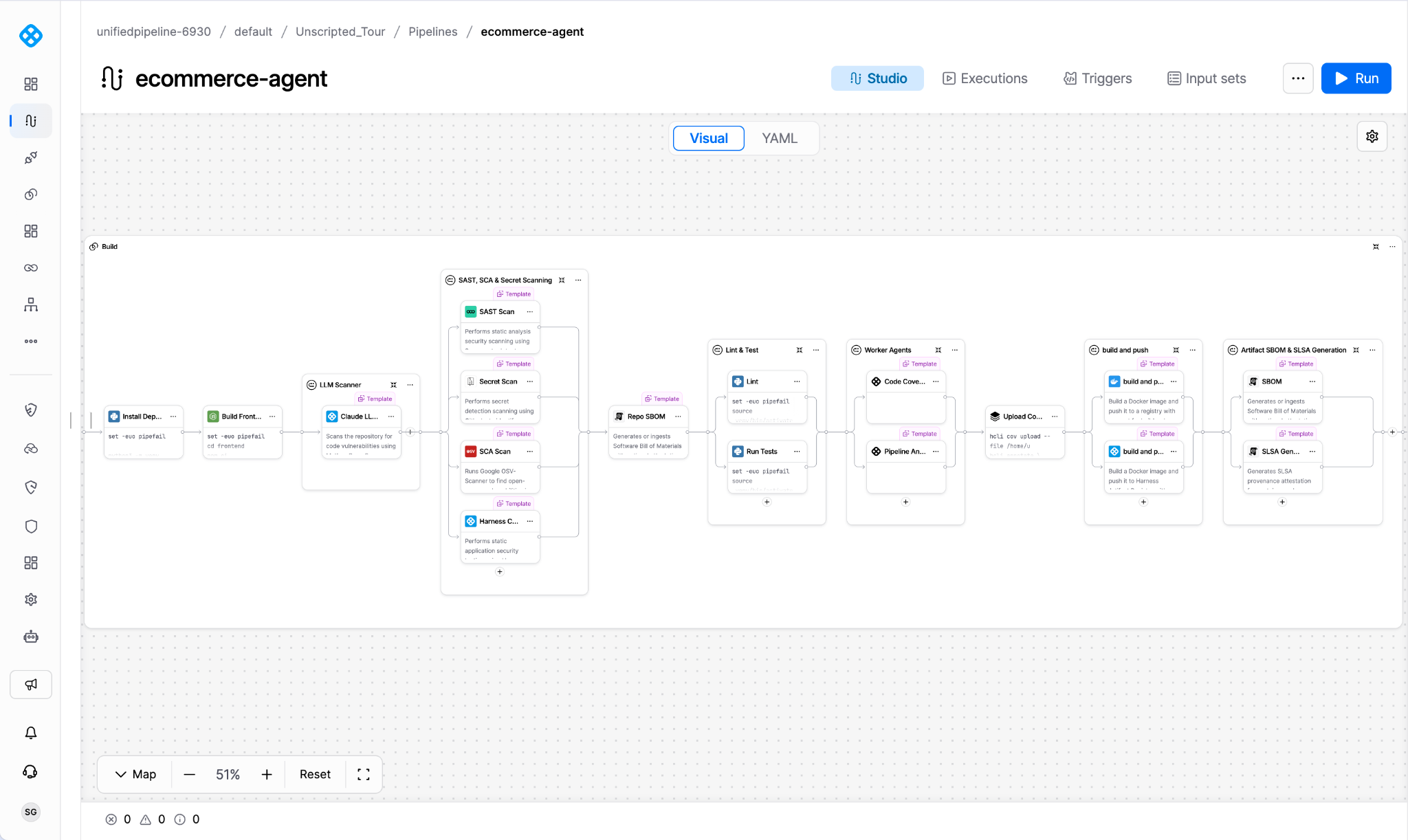
- Containerized steps: All steps are containerized and can run self contained with the required tooling, all leveraging the new Harness Delegate.
- Versioned templates: A native Template Library of versioned steps and templates you pin to an approved version.
- Agents as the primary interface: The agent knows the context of the page you are on and proposes actions for you to approve.
- Governed agents: Worker Agents are first-class pipeline steps that run under your existing approvals, policies, and audit. Rules and Memories shape how an agent behaves and what it knows. They sit alongside your governance and do not replace it.
- Dashboards: Built on the Harness Data Platform and Software Delivery Knowledge Graph, using AI Chat or the new Dashboard builder.
- A refreshed experience: A visual refresh and simplified navigation, available through early access.
One pipeline model, simpler YAML
The new platform experience re-architects the pipeline layer, letting agents and people author, review, and run the same definitions. Both audiences share a single expression language and schema, plus a simpler surface for defining policy.
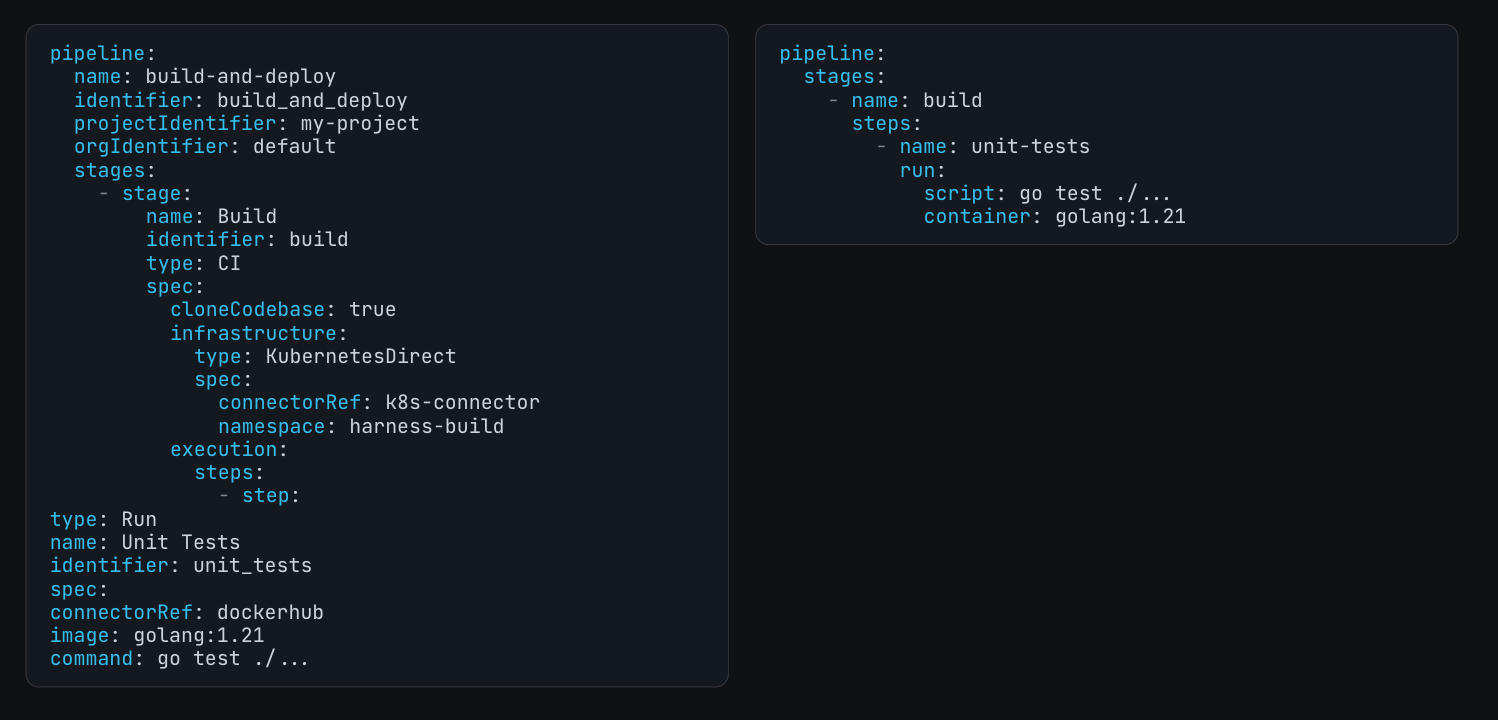
Different capabilities shipped with different stage types and ways of describing work, leading to an explosion of artifacts and fragile configuration. The new pipeline model removes capability-specific stages. Build, deploy, security, infrastructure, and agentic work all run on one flexible stage and execution model, and steps are reusable plugins inside it. Write a step once and run it anywhere in the pipeline, and an agent learns one model instead of one per capability.
The YAML is flatter and more idiomatic to developers from Drone and GitHub Actions. We reviewed every key so its name and placement are self-documenting for both people and the machine generating it. Smart Defaults set common configuration, meaning that the only configuration specific to your pipeline appears in your YAML. Flatter, shorter files are easier to understand and generate correctly.
The new platform experience retains JEXL as the syntax enterprises use to compute fields at runtime. It also provides CEL with the widely adopted ${{ ... }} syntax. Both are fully supported.
Support has been added for lists, structured objects, secrets, and connectors in addition to strings, numbers, and booleans in pipeline inputs. You can scope pipeline inputs and reuse them in multiple places in a pipeline. Secret and connector inputs are resolved with your current permissions. Therefore, they never appear in your pipeline YAML. Input Sets provide a way to group input values for easier consumption by users and agents at runtime. Current Runtime Inputs and Input Sets are retained.
The flatter schema also simplifies policies. Fewer nested paths in YAML means the written OPA definition can be simpler, shorter, more approachable, and easier for people and agents to audit. If you use OPA to define and enforce policy, update and retest your Rego against the new schema, and only then apply it to converted pipelines.
One Delegate for the entire platform
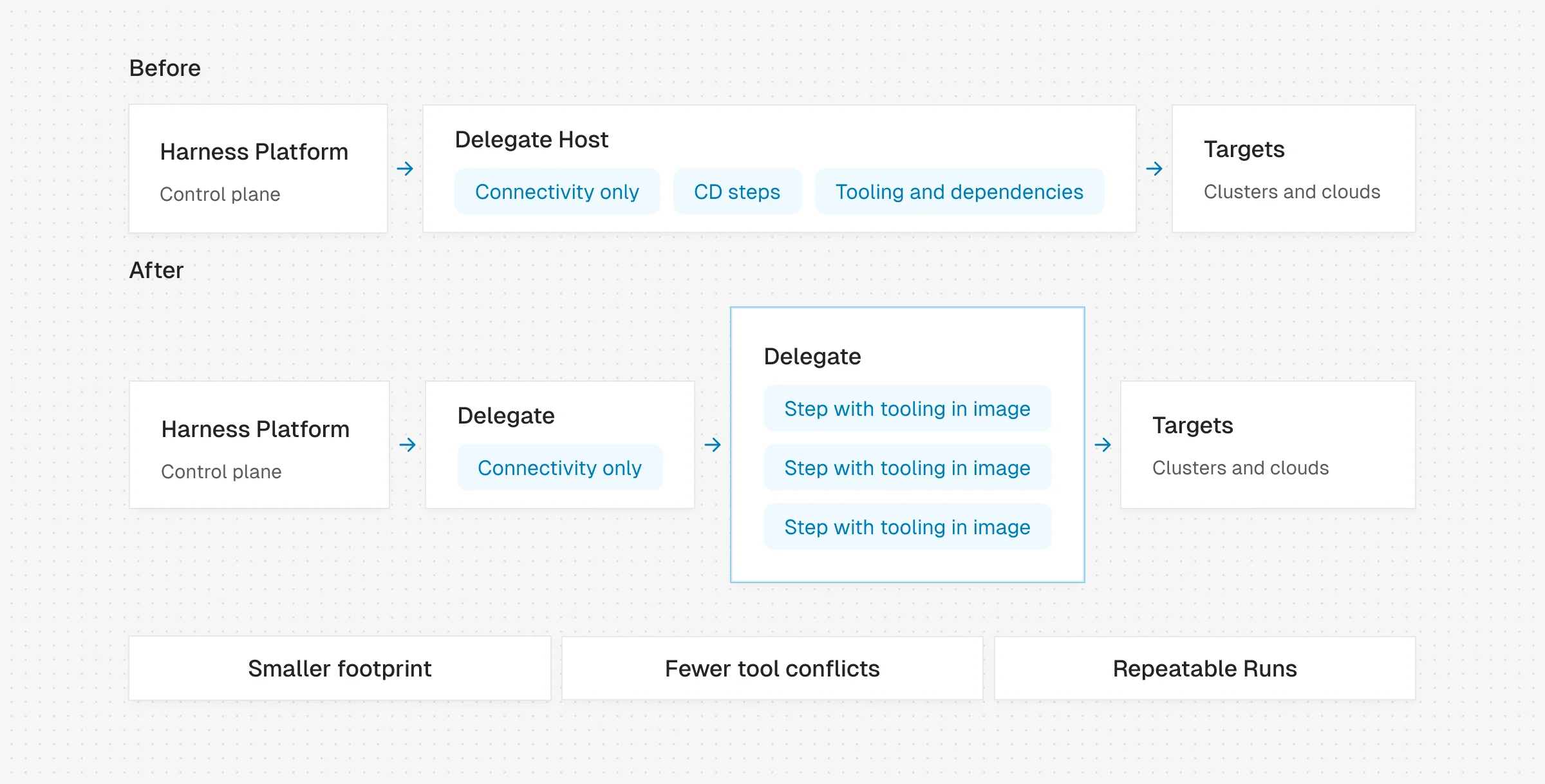
The new platform experience provides a single, unified Delegate for all Harness capabilities, whether inside or outside a pipeline. It orchestrates everything as containerized steps. Builds, deployments, and other activities, including infrastructure and database work and security scans, all happen on a single, unified execution path, and the Delegate contains no capability-specific logic.
The new Delegate is written in Go. It is very lightweight, with a small footprint and fast startup. It is available on all major operating systems, so you can now run builds and deployments for your target applications on those operating systems. The Delegate image is available on Harness' public registry. You can also pull the image from your private repository.
The Delegate now orchestrates CD steps instead of running them directly on itself as a process. Each CD step now runs in its own container, so you no longer have to manage deployment tools on the Delegate. For an agent, that means no host-level tooling to discover or work around. The step carries what it needs. The tools and their versions no longer conflict with the Delegate host. CD runs also behave the same as before, and pipelines run more reliably.
The Delegate is now a pure orchestrator of steps. As an added benefit, updates to steps ship in new step definition images, so the Delegate no longer needs to be upgraded for step-definition updates.
Versioned templates
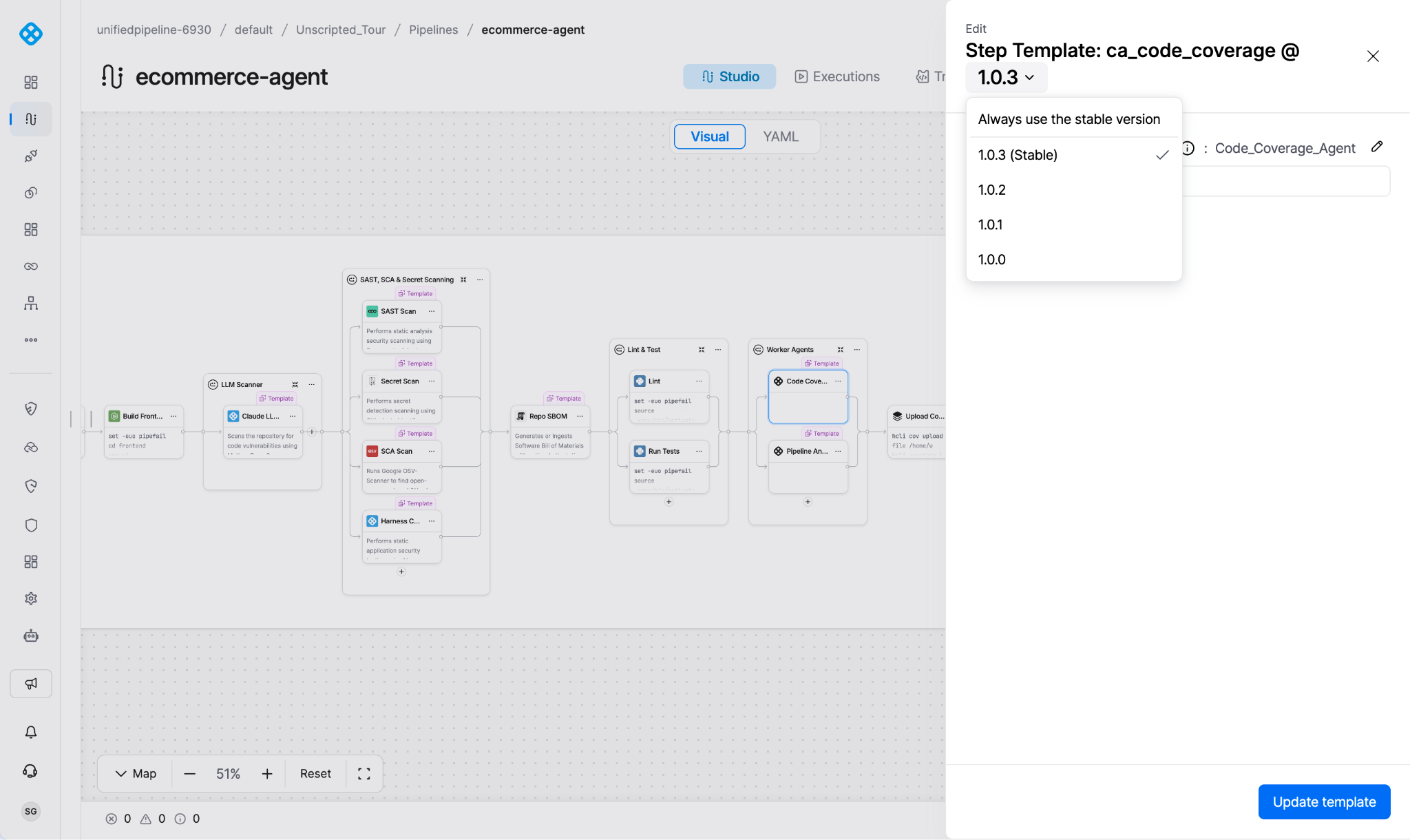
Harness-native steps and your worker agent steps are versioned templates that you manage. Harness publishes each step to a Harness global template library, where users can view it in the Pipeline Studio step palette and reference it in their pipelines. Your team can approve and pin a step version, controlling which version pipelines use. Different pipelines can pin different versions of steps.
Teams no longer have to wait for a platform release for step improvements or changes they didn’t request. Harness improves steps, and you control when changes reach production. Each team can adopt changes at their own pace.
The version of a step used in the pipeline is recorded in pipeline YAML. The version of a step can also be constrained using OPA. This combination gives the platform team the flexibility they need to maintain stability, control, and reliability without compromising application teams' development velocity. Your rules can enforce that agents update and manage pipelines with specific versions.
Pinning also helps you adopt changes safely. Before you make a change widely available, you can adopt it first and assess its impact on your system using step versioning. You can also choose to turn on an early access or experimental change using a feature flag in a step without opening a support ticket.
Agents as the primary interface
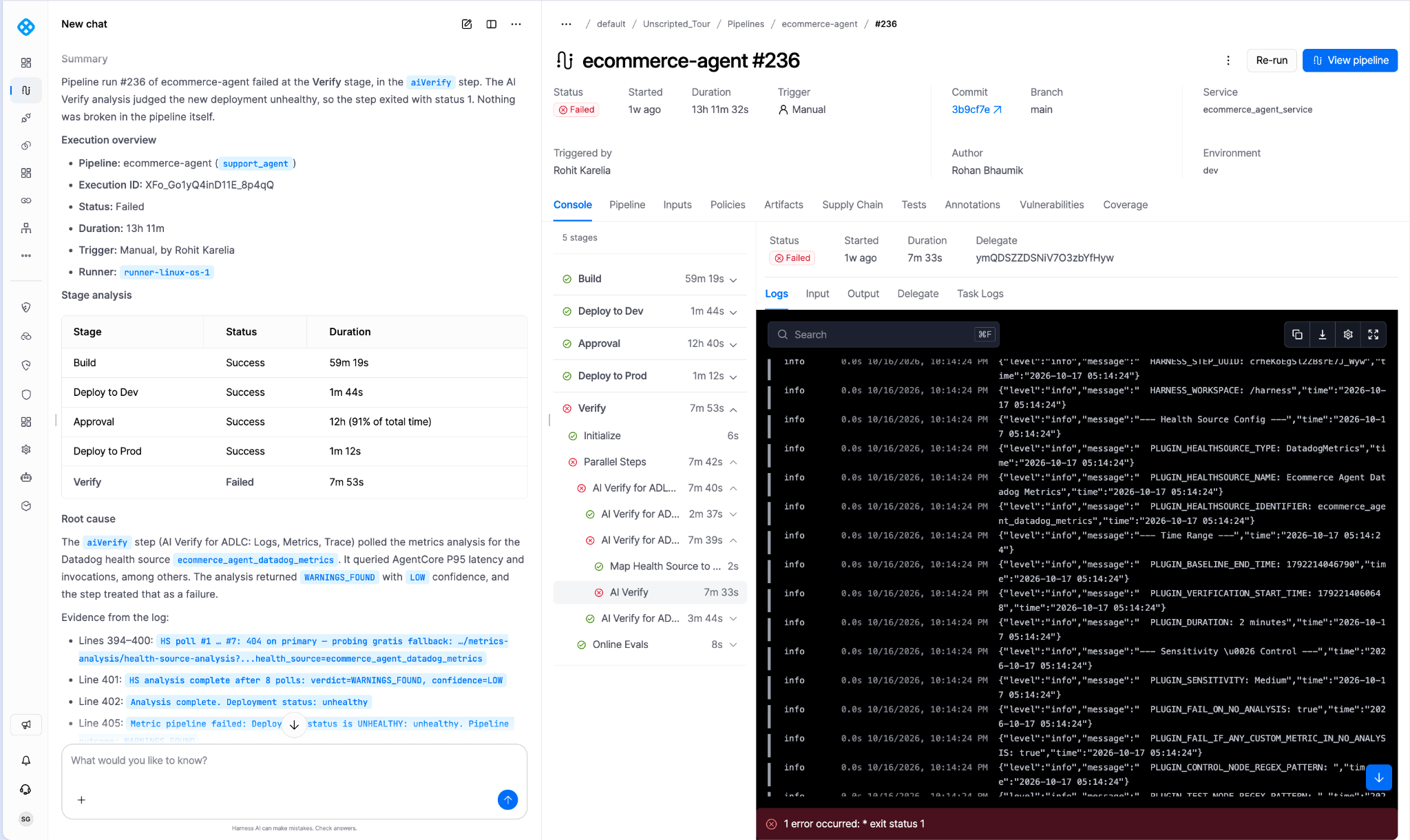
Agents help you manage and operate the platform. The agent knows which page you are on and understands the relationships in your knowledge graph. A question about a deployment can draw on the service, the environment, and the pipeline behind it, using the context in front of you instead of a pasted log.
Agents act on your behalf across the software delivery lifecycle. They author and update pipelines, diagnose failures and remediate them, and open pull requests based on pipeline feedback. The agent proposes each action, and you approve it.
AI Chat connects to your MCP servers and follows your Rules, so AI-driven work across your SDLC meets your enterprise governance and standards. The agent operates within your existing permissions, and admins can restrict it further.
Agents outside Harness work the same way. Coding agents such as Claude Code, Cursor, and Codex can reach the platform through the Harness MCP Server, which exposes Harness and the Software Delivery Knowledge Graph through a small, stable set of tools, or through the Harness CLI, one command grammar across the platform with structured output an agent can parse. Teams use the surface they already work in, and both run within their existing Harness permissions.
Governed agents
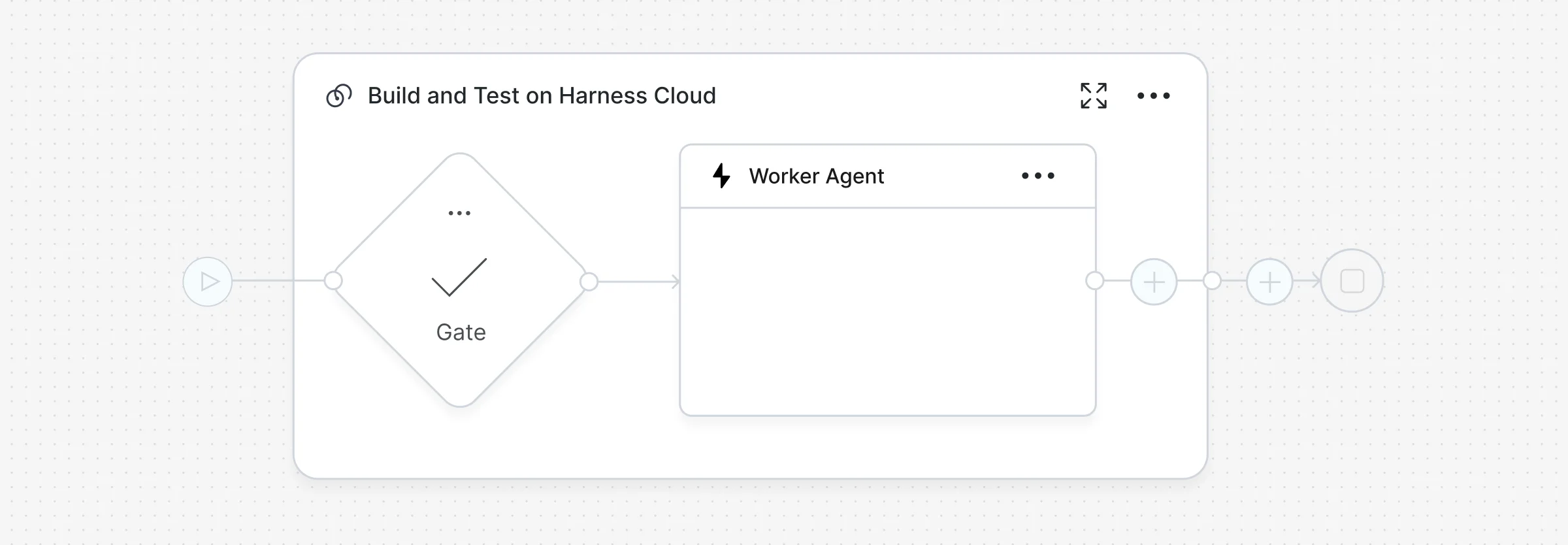
Your controls will ultimately constrain an AI to act only within your delivery process. With the new platform experience, Worker Agents are first-class resources and pipeline steps. So, they run as defined parts of your delivery process.
Agents do not get a separate rulebook. They run under the same approvals, policies, and audit trail as everyone else, and the actions they take are logged.
Because agents run inside your pipelines, the controls you use on your pipelines also control the work the AI does. Approval steps keep a human in the loop before the AI's changes move forward. Dynamic policy controls and OPA govern the AI's actions at runtime.
You adopt action-taking AI with defined boundaries instead of building another control plane to pair with your existing one.
Dashboards
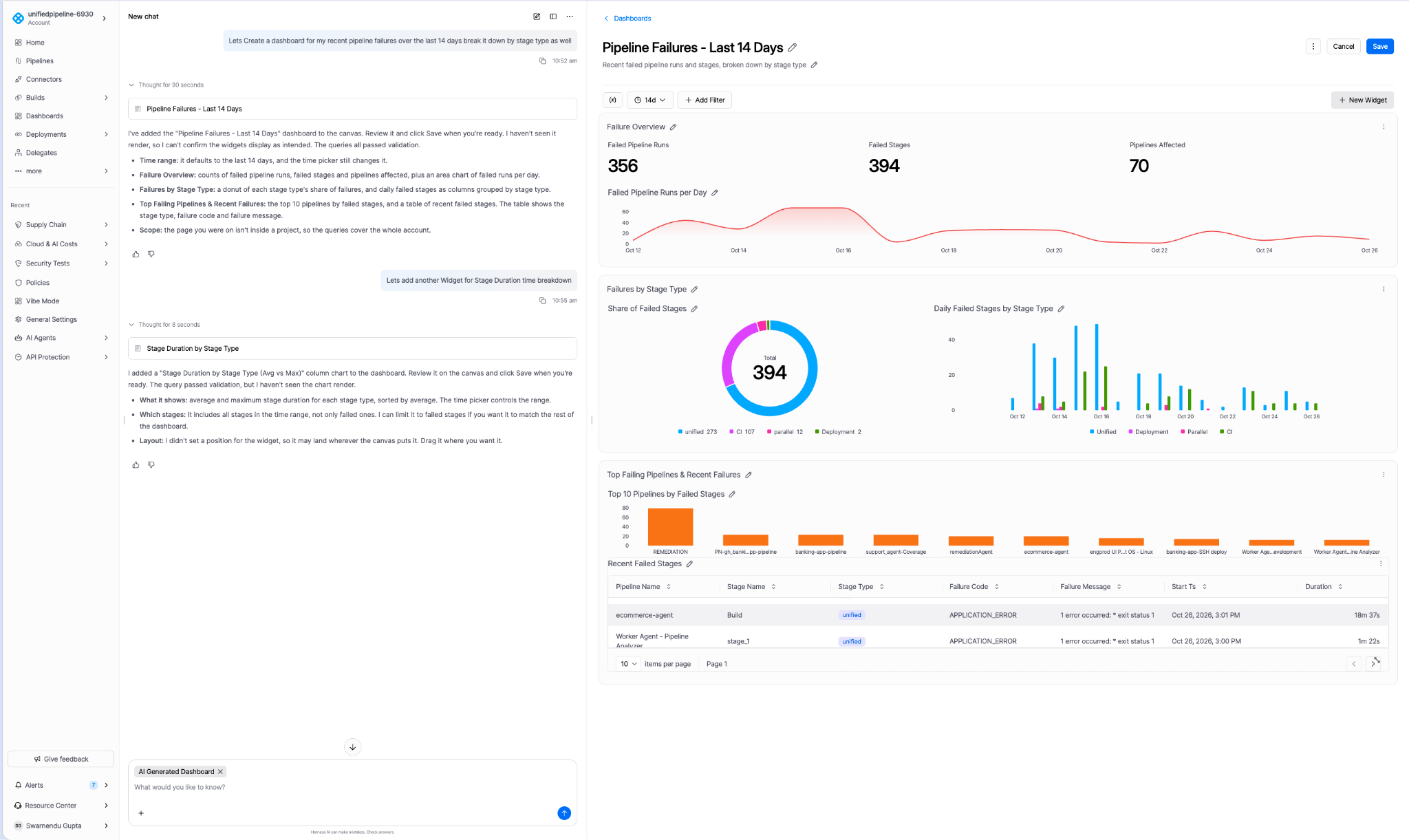
Dashboards now run on the Harness Data Platform, including the Software Delivery Knowledge Graph. Metrics are grounded in connected delivery entities and the relationships between them, so a chart can follow a change from commit to deployment to service instead of stopping at a table.
You can build visualizations on your data and knowledge graph with AI Chat or the new Dashboard builder. Dashboards are built to be built by agents, so asking for the view you need is now a normal way to get it.
Coverage and metric parity are being validated release by release. Existing Looker-based dashboards are not migrated automatically.
A refreshed interface
The new platform experience comes with a visual refresh and simplified navigation, so teams can move quickly across every capability. It is rolling out capability by capability, and you opt in through early access.
Built for agents, adopted at your own pace
Most of what changed is meant to make the platform simpler for agents to operate across the SDLC, in a cohesive experience with simpler YAML, a lighter Delegate, and agents that run under the governance your teams already trust.
Nothing requires a cutover. The existing experience and the new one run side by side, and your current pipelines, entities, and integrations stay visible and runnable from both. When you want the new pipeline model, conversion is optional and explicit. It makes a copy, so your original pipeline stays exactly as it was.
The new platform experience is available through our early access program. To get started, request access now. You can also contact your account team directly.