A hands-on walkthrough of Lifecycle Rules across Docker, npm, Maven, Python, and Helm. Includes dry-run preview, three-tier governance, and one-click recovery.

Why is Artifact Registry cleanup hard to get right
AI is changing artifact management in two ways at once. Every AI-generated pull request, dependency update, and automated build creates more container images, packages, and Helm charts than ever before. Registries are growing faster than engineering teams can manage them, driving up storage costs and leaving thousands of stale artifacts behind. At the same time, the cost of deleting the wrong artifact has never been higher. One mistaken cleanup policy can remove a production image that's still serving traffic or a package that hundreds of downstream applications still depend on.
One enterprise SaaS customer we spoke to run more than 270 microservices on a single Docker registry. A single age-based cleanup rule, set to delete artifacts older than 30 days, removed production images that were still serving traffic. The next deployment failed. An incident occurred. The rule was disabled. Cleanup never restarted. The registry kept growing at 2 to 3 TB per month.
That story is becoming increasingly common as release velocity accelerates. Across Docker registries, npm, Maven, Helm, and Python repositories, traditional cleanup strategies weren't designed for the volume and pace of AI software delivery.
- Age-based rules like "delete artifacts older than 30 days" remove production artifacts that haven't been redeployed but are still actively running.
- Count-based rules like "keep last 10 versions" silently drop deployed versions when rapid release cadence pushes them out of the keep window.
- Tag-based patterns fail when teams share tags across environments (the same
releasetag applied to both staging and production).
There's a fourth failure mode that's harder to see. Traditional lifecycle rules only look at the artifact itself: version count, age, and download activity. They have no awareness of the broader SDLC. The same artifact can be 60 days old, downloaded exactly once, and still be the exact image running live in a production pipeline. In a world where AI-generated pull requests are creating more builds than any team can manually track, that blind spot grows fast. Harness Artifact Registry's lifecycle rules are designed to
close it. Rather than evaluating artifacts in isolation, they can tie in metadata across different stages of the SDLC, including CI/CD, so that an artifact currently deployed in a pipeline is automatically protected from deletion, no extra rule required. The registry doesn't just know what it's storing. It knows what's running.
Teams are left with an impossible choice: disable cleanup and let storage costs grow unchecked, or automate cleanup and risk deleting artifacts that production still depends on. In a world where most code is generated by AI, neither approach scales. Artifact lifecycle management has to become policy-driven, predictable, and safe by default.
Lifecycle Rules is built around fixing this exact problem. Two rule types. Three scope levels. Dry-run preview before any rule fires. Soft-delete with one-click recovery. An explicit attachment model that prevents the hidden cascading behavior most registries suffer from.
This guide walks through the feature as a narrative: one DevOps engineer's first day setting up cleanup rules across five package types and learning how the hierarchy works. The engineer is fictional; the registry behavior, screenshots, and execution data are real, captured from a working Harness Artifact Registry instance.
The feature is currently behind the HAR_ARTIFACT_LIFECYCLE_POLICY feature flag. Contact Harness Support to enable it on your account. Once on, you'll be looking at exactly what's shown below.
The mental model, in 60 seconds
Before the walkthrough, the building blocks:
| Concept | What it does |
|---|---|
| Cleanup Rule | Soft-deletes artifact versions on a schedule based on age, version count, or download activity. |
| Retention Rule | Marks matching artifacts as exempt from deletion. Retention rules are always evaluated first. |
| Scope | Defines where a rule exists: Account, Organization, or Project. |
| Attachment | Determines which registries a rule applies to. Child scopes must opt in. |
| Dry Run | Previews exactly which artifacts would be deleted before any cleanup rule runs. |
| Soft Delete | Places deleted artifacts into a recovery window, allowing one-click restoration from the artifact's Deleted tab. |
Two rule types. Three scopes. Always reversible. That's the whole feature.
Day one. Maya opens the Lifecycle Rules tab.
Maya is a DevOps engineer on a fictional e-commerce platform. Her team has Docker, npm, Maven, Python, and Helm registries. Releases are tagged 1.0.0, 1.1.0, 1.2.0. Dev and PR builds use 0.9.0-dev, 1.3.0-pr-100, and similar. The registries have been growing for months. Today Maya gets the ticket: set up automated cleanup, but don't break anything.
Maya opens the Harness UI, navigates to Artifact Registry → Registries Settings → Lifecycle Rules, and clicks + New Lifecycle Rule.
She knows the rule of any cleanup operation: protect what matters before you delete anything. Her first rule won't delete a thing. It will mark her formal releases as untouchable.
Maya creates her first rule: a Retention rule
She fills in:
| Field | Value |
|---|---|
| Name |
protect prod releases
|
| Rule Type | Retention Rule |
| Registry Scope | All Registries |
| Version Patterns |
1.0.0, 1.1.0, 1.2.0
|
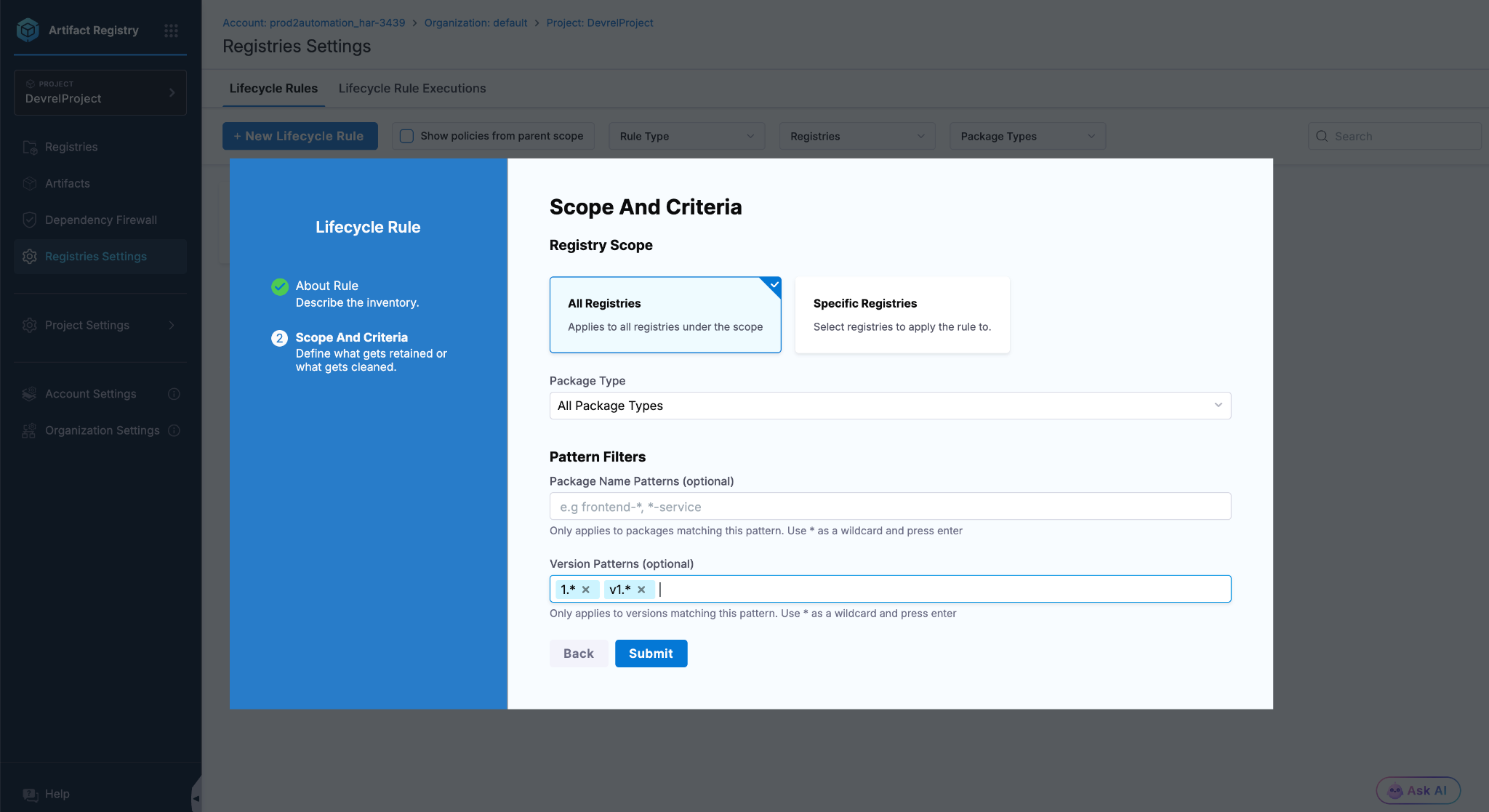
Retention rule with literal version chips. Each chip is one exact version. Predictable matching, no surprises.
She uses literal version strings, not 1.*. Maya knows that wildcards are greedy. 1.* would also match 1.3.0-dev, which would protect dev builds she actually wants cleaned up later. Exact strings are predictable.
She submits. The rule lands in the table. There's no schedule attached, because Retention rules don't run on cron. Instead they evaluate passively, every time a Cleanup rule tries to delete something. If the version matches, the deletion is blocked.
Retention always wins. If a Retention rule matches an artifact, no Cleanup rule, no manual delete, nothing within the lifecycle system can remove that artifact while the rule exists.
Now Maya goes after the dev builds
With her safety net in place, Maya is ready to actually delete something. She targets her npm registry first because the team's @shop/cart-sdk package has accumulated dev builds from months of feature branches.
She clicks + New Lifecycle Rule again, this time as a Cleanup rule:
| Field | Value |
|---|---|
| Name |
cleanup npm devs
|
| Rule Type | Cleanup Rule |
| Registry Scope |
Specific Registry: strattest07
|
| Package Type | NPM |
| Version Patterns |
0.*, *dev*
|
| Retention Criteria | Keep last 1 version |
| Schedule | Daily at 01:00 UTC |
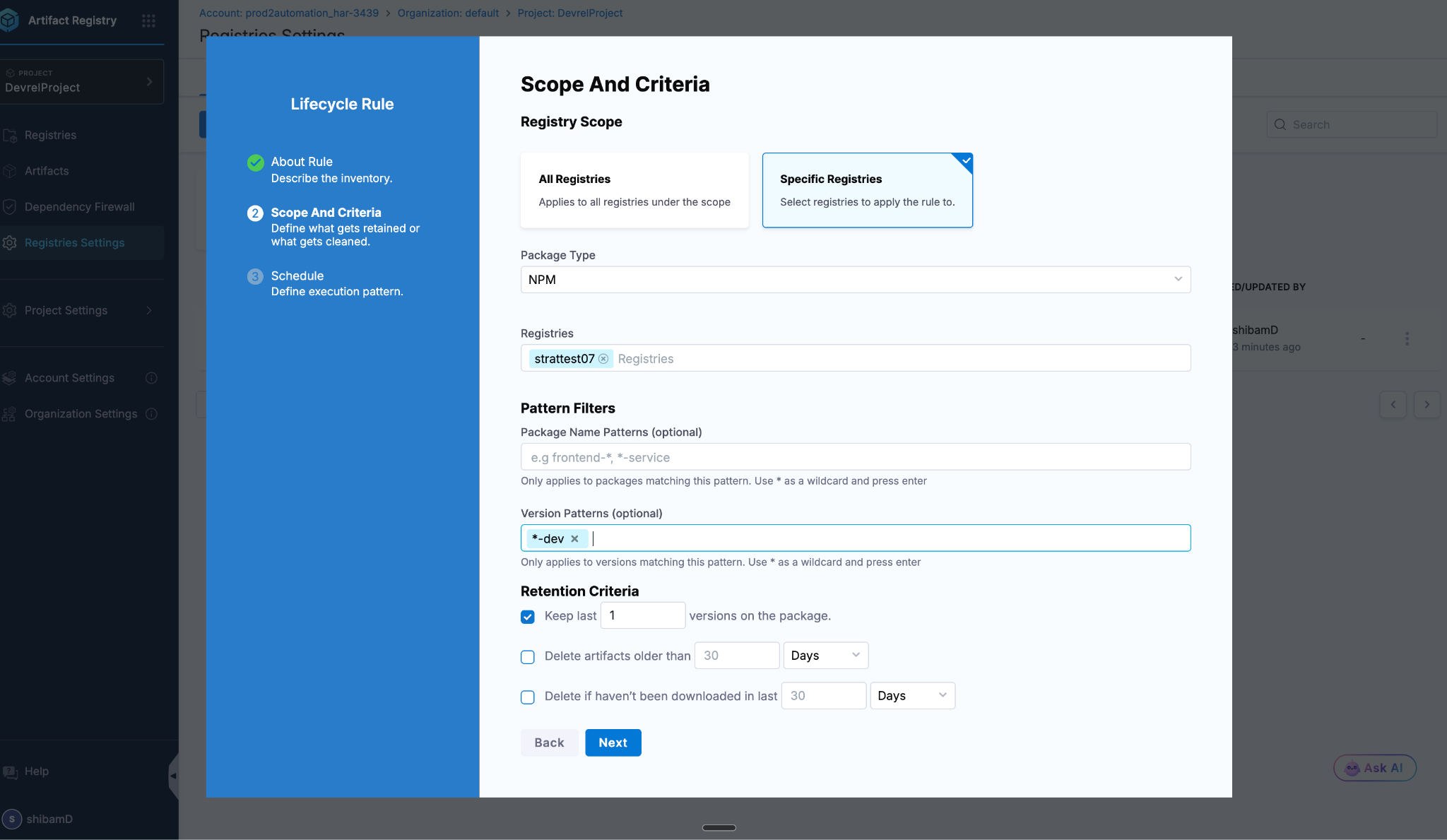
NPM cleanup rule configured with strattest07 registry, NPM type, dev-version patterns, and Keep last 1.
Maya uses two patterns instead of one. She learned from experience that stacking narrow patterns is more reliable than reaching for one clever glob. 0.* catches versions like 0.9.0-dev and 0.9.1-dev. *dev* catches anything with "dev" in the name. Both together cover the dev-build space cleanly.
She submits. The rule is saved but hasn't run yet. Cleanup rules execute on schedule, but Maya isn't going to wait for tomorrow's cron. She's going to dry-run it right now.
The dry-run is where you build trust
This is the part Maya's old registry didn't have. From the rules table, she clicks the three-dot menu next to cleanup npm devs and selects Dry Run.
Within seconds, she lands on the execution detail:
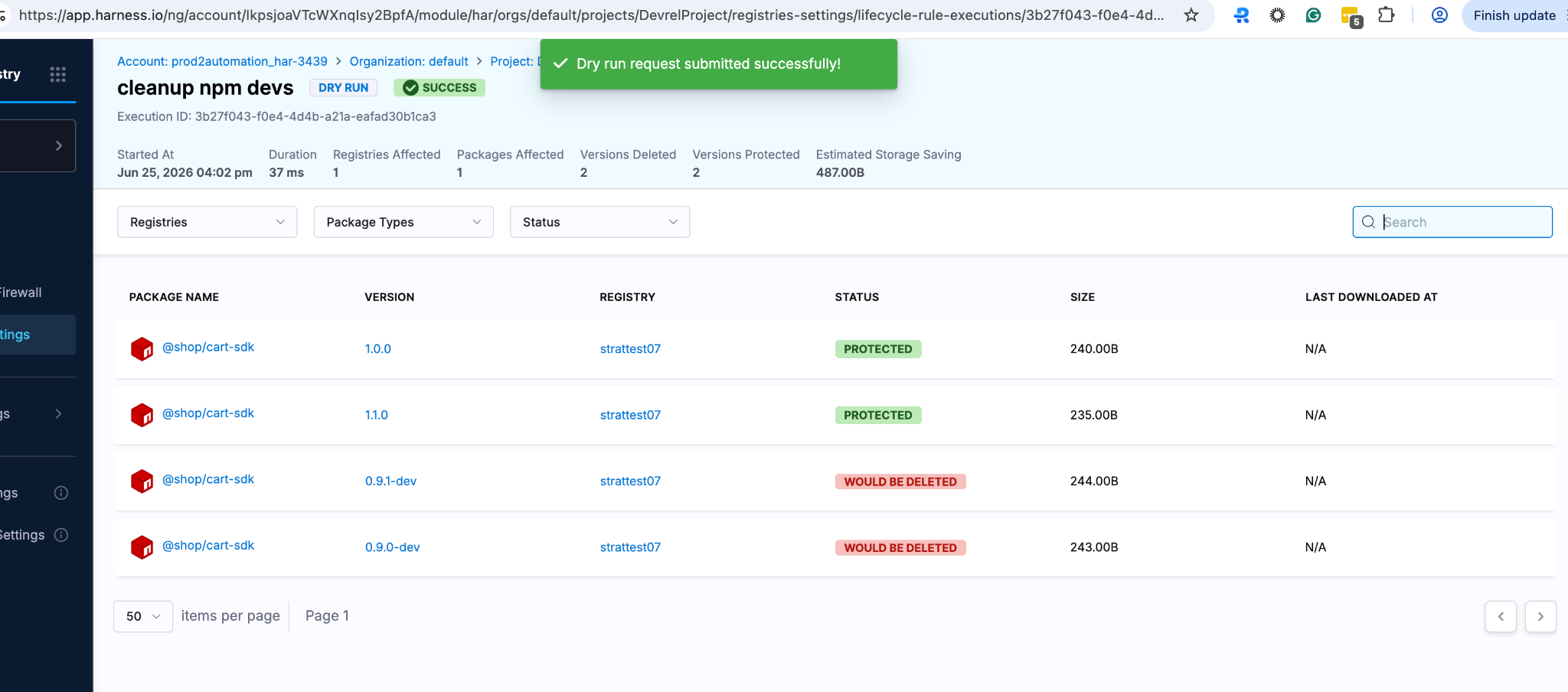
Dry-run result. Stable 1.0.0 and 1.1.0 versions are PROTECTED by the Retention rule. Older dev versions are flagged as WOULD BE DELETED. No artifacts were actually touched.
Maya scans the result:
- 1.0.0 and 1.1.0: PROTECTED, because her Retention rule matched.
- The older dev versions: WOULD BE DELETED.
- At the top: an estimated storage reclaim number she can show her manager.
Nothing was actually deleted. This is the safety net. Maya can change her patterns, change the keep count, change the registry scope, and re-run the dry-run as many times as she wants. Each dry-run uses the same evaluation logic as a real execution. The only difference is the state mutation.
Maya stacks criteria for an even stronger safety net
For her Helm registry, Maya wants to be extra careful. Helm charts deploy production infrastructure. A wrong delete here means real downtime.
She creates a Cleanup rule with two criteria stacked:
- Keep last 1 version
- Delete artifacts older than 1 day
The two criteria combine with AND logic. An artifact must satisfy both conditions to be deleted.
She dry-runs it:
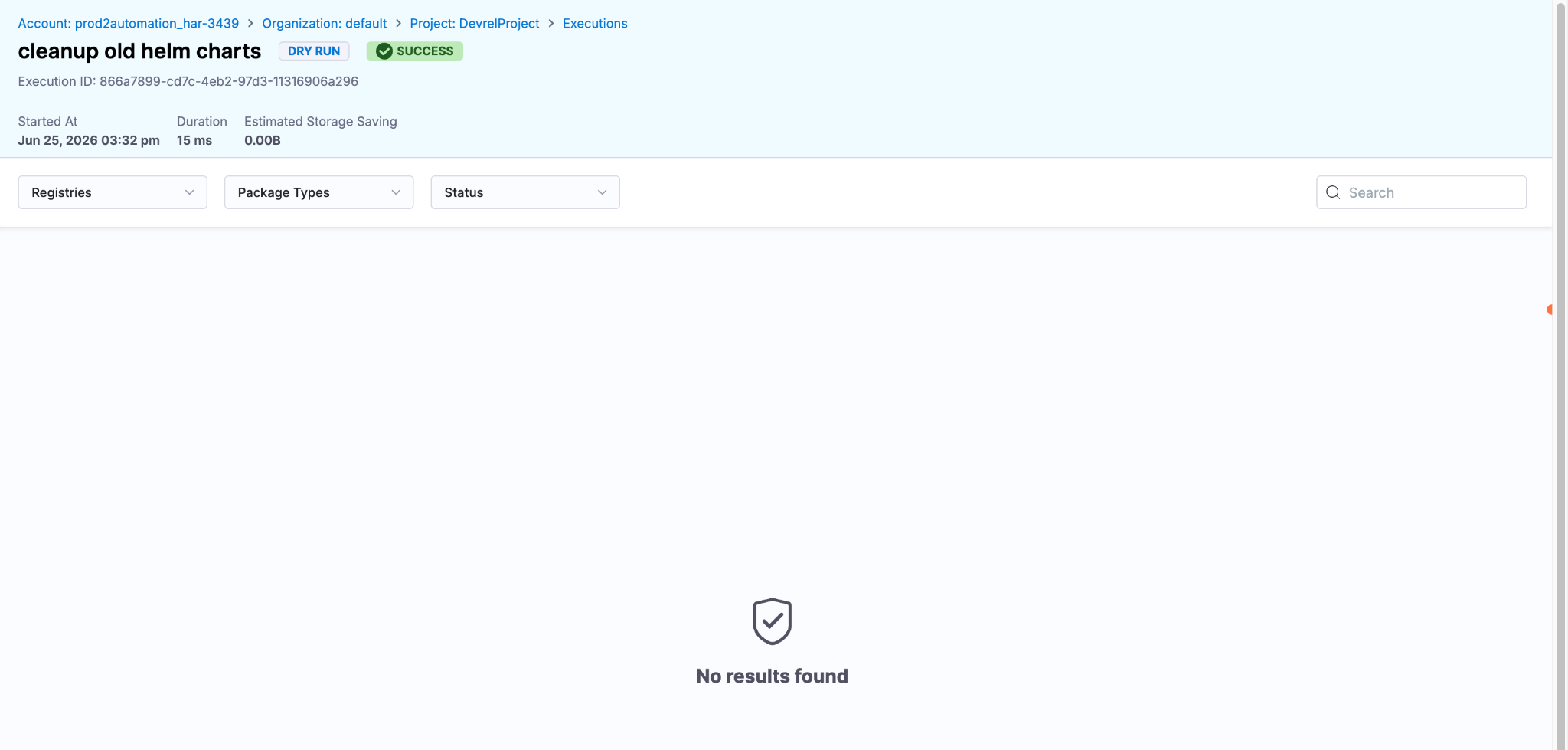
Helm dry-run with stacked AND criteria. No results found because every chart was pushed that morning. The age criterion blocked the deletion entirely.
No results found. Estimated savings: 0 bytes.
Why? Because Maya pushed all her Helm charts that same morning. Keep-last-1 alone would have flagged plenty for deletion, but the age criterion saw all the charts as less than 1 day old and blocked everything. Nothing gets deleted until every guard agrees.
This is exactly the conservative behavior she wants for Helm. She saves the rule confidently knowing it won't act until artifacts are genuinely old.
Rule of thumb. Use a single criterion when you want aggressive cleanup. Stack two or three with AND logic when you want a safety net.
Now her manager walks over
"Maya, the org admin team wants all releases tagged 1.0.0, 1.1.0, and 1.2.0 protected across every project. They don't want each team setting their own retention rules. Can we centralize that?"
Yes. This is what scoped rules are built for.
HAR has three scope levels for lifecycle rules:
- Account level: for CISO, compliance, central governance.
- Organization level: for platform teams, business unit governance.
- Project level: for service teams, day-to-day operations.
But here's the key design choice from the docs:
"Rules are reusable policies that are explicitly attached to registries. A rule does nothing until attached. This explicit attachment model eliminates hidden cascading behavior."
In plain words: rules created at the org or account level don't automatically take effect in child scopes. The child scope admin sees the rule, decides to opt in, and explicitly attaches it. This means central governance doesn't surprise project teams, and project teams can't accidentally weaken what central governance has defined.
The org admin creates the rule at org scope
Maya's org admin switches to the organization scope using the top breadcrumb, then runs the same New Lifecycle Rule flow Maya used. Same form. Same fields. Only the breadcrumb above the form is different.
| Field | Value |
|---|---|
| Name |
org-protect-prod-releases
|
| Type | Retention Rule |
| Scope | All Registries (in this organization) |
| Version Patterns |
1.0.0, 1.1.0, 1.2.0
|
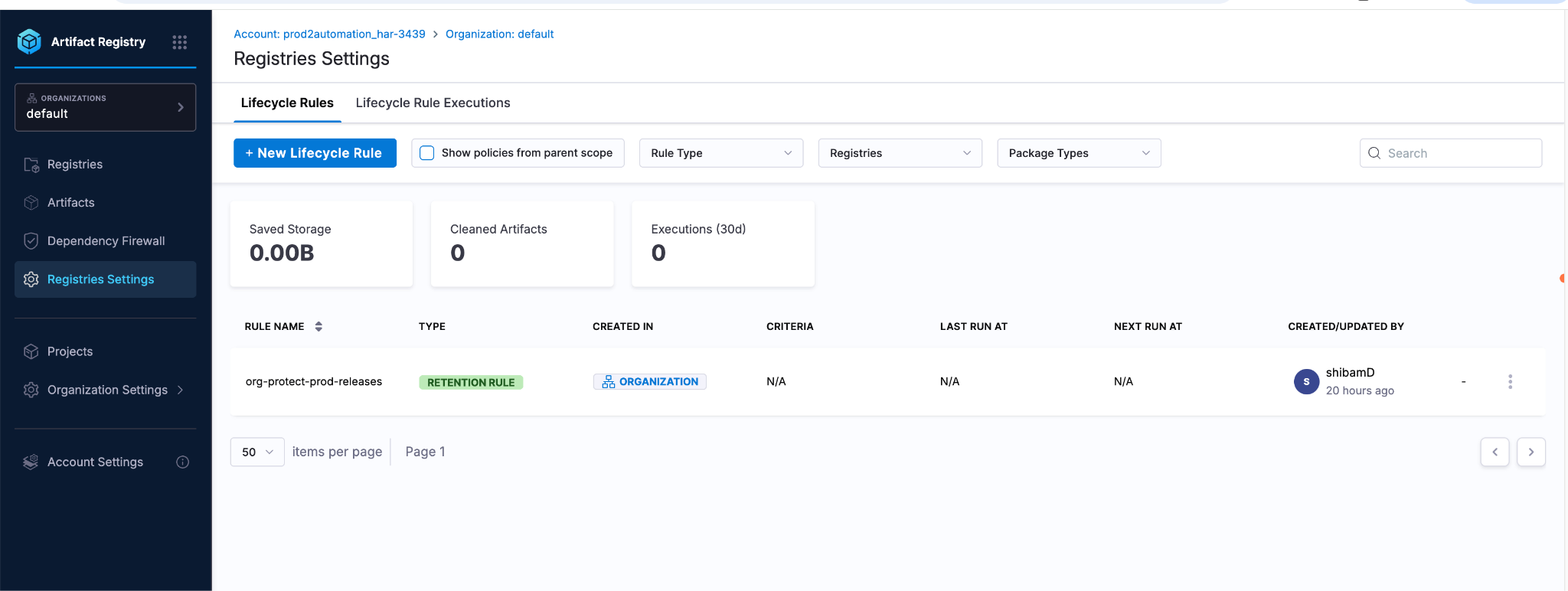
Org-scope rules tab. The breadcrumb shows Account / Organization, and the rules list contains the org-level Retention rule. From here, the rule is visible to all child projects but does not automatically protect anything.
The rule now lives at org scope. The next step is Maya's: she has to opt in.
Maya sees the org rule, but it isn't doing anything yet
Back in her project, Maya goes to the Lifecycle Rules tab and ticks the Show policies from parent scope box.
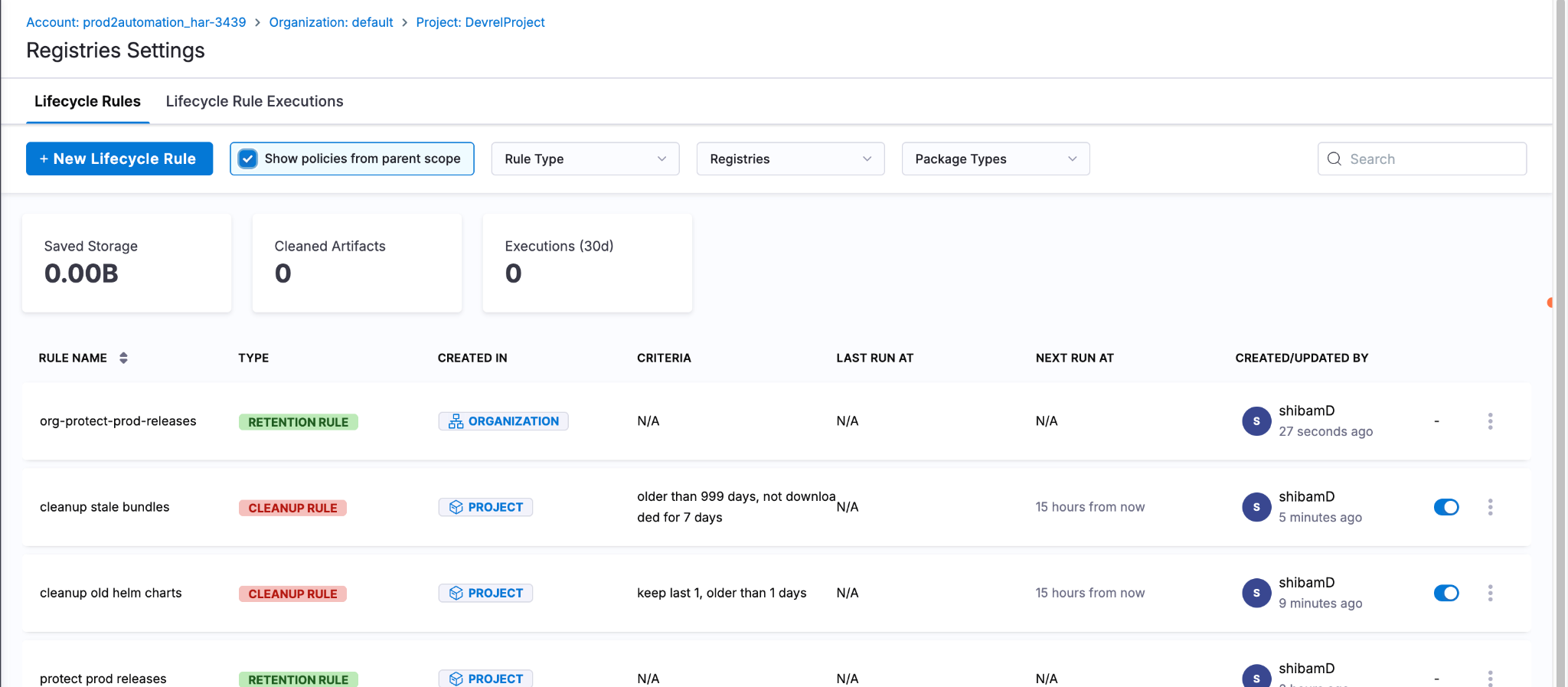
Project rules list with parent-scope visibility enabled. The org rule appears with the ORGANIZATION badge in the Created In column. There's no toggle on the right, only project-owned rules are toggleable from a child scope.
The org rule appears in her list with an ORGANIZATION badge in the Created In column. It's visible. But Maya wants to verify whether it's actually protecting anything yet.
She re-runs the dry-run on cleanup npm devs:
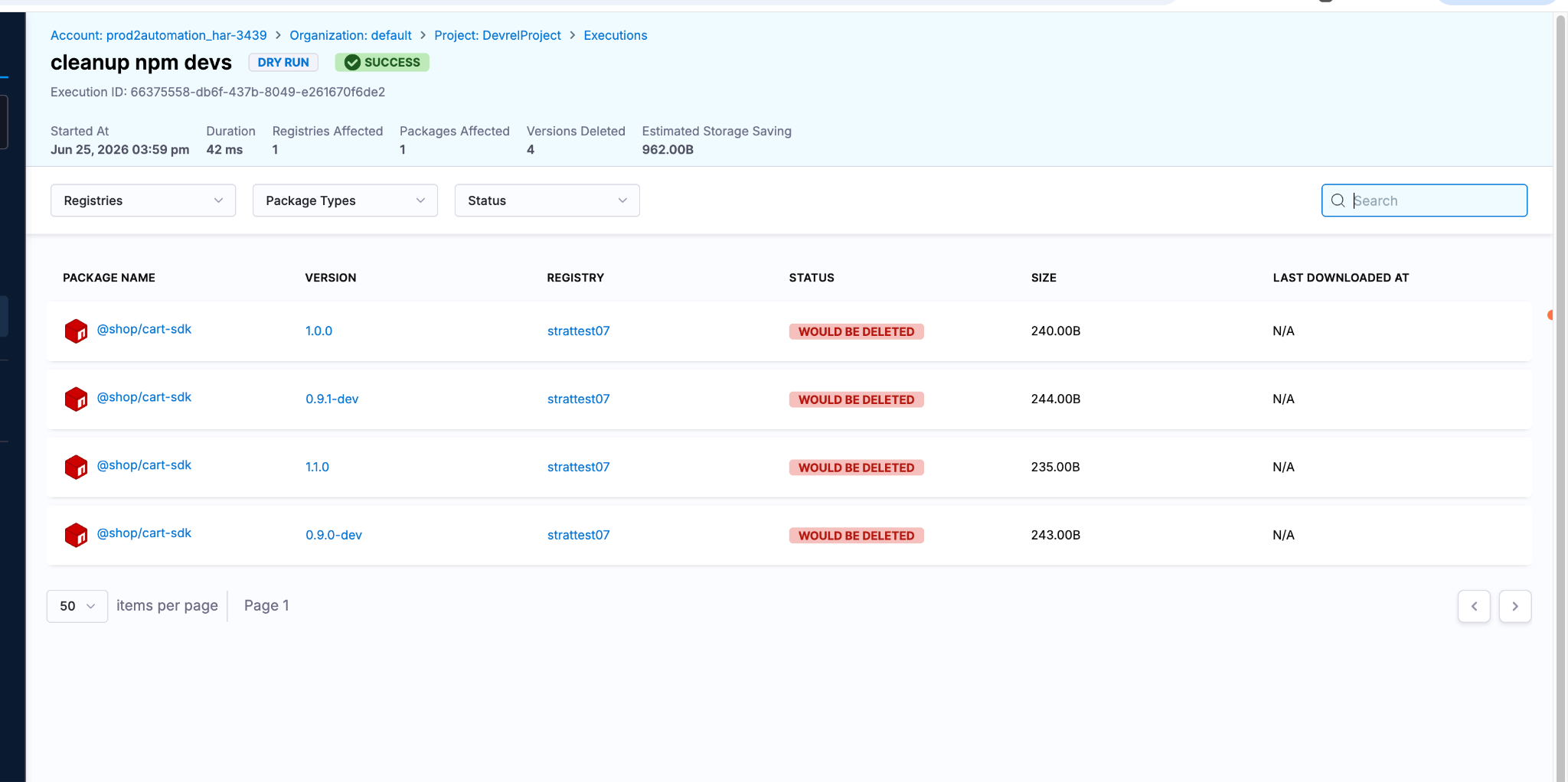
Dry run with the org rule visible but unattached. Every version, including the 1.0.0 and 1.1.0 releases, shows WOULD BE DELETED. The org rule is passive.
Every version shows WOULD BE DELETED. Including the 1.0.0 and 1.1.0 releases that should be protected by the org rule. The org rule is visible but passive. Maya hasn't attached it yet.
Maya attaches it
She clicks on the org rule row. An Edit form opens, but only one field is editable: which registries this rule attaches to in her project. Criteria, patterns, and schedule are all inherited from org scope and locked.
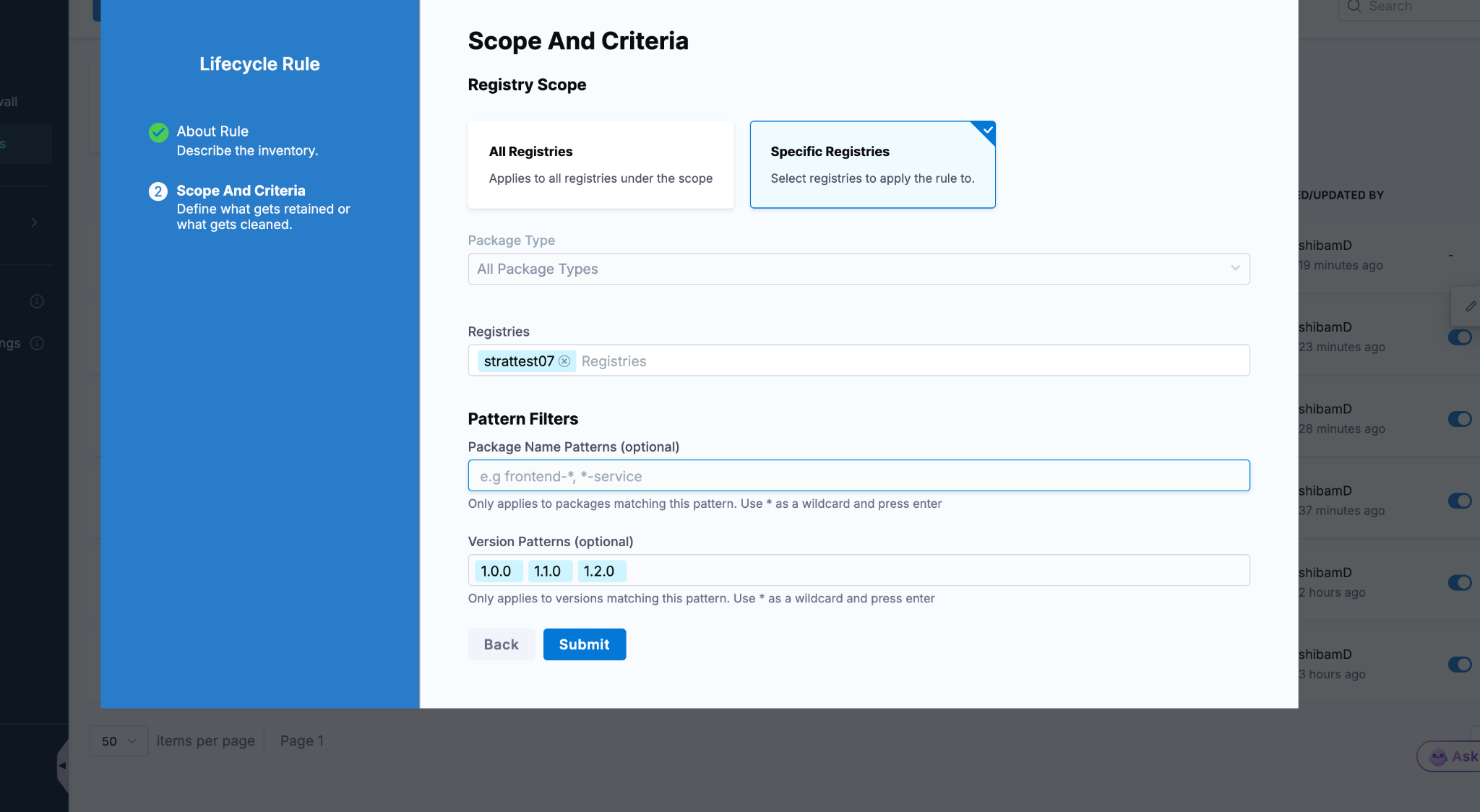
Attach form for the inherited org rule, opened from project scope. The project admin can add their registries to the attachment list. Criteria and patterns are inherited from the parent and cannot be changed here.
She adds her project's registries to the attachment list and saves.
Now she re-runs the dry-run on cleanup npm devs one more time. This time, 1.0.0 and 1.1.0 show PROTECTED. The protection is coming from the org-level rule, attached at the project scope.
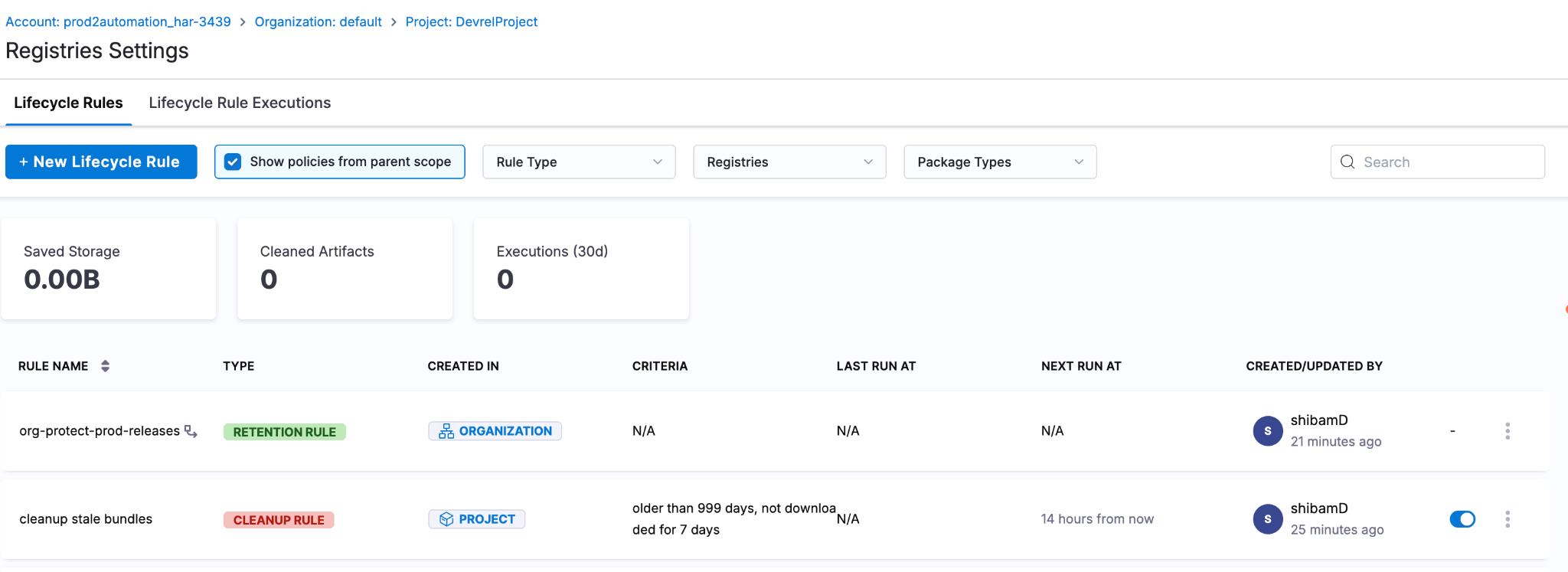
Rules list after attachment. A chain icon next to the org rule name indicates it is actively attached to one or more registries in this scope.
The model in one sentence: authorship stays at the parent scope, attachment is opt-in by the child scope. Org admins define what counts as a release. Project admins decide which of their registries the definition applies to. Nobody can weaken anybody else's rule.
Maya schedules her rules to run overnight
The dry runs are passing. The hierarchy is in place. It's time to let the system run for real.
Maya edits each Cleanup rule and walks through to the Schedule step. She picks Daily, sets the timezone, and lets the cron expression auto-generate.
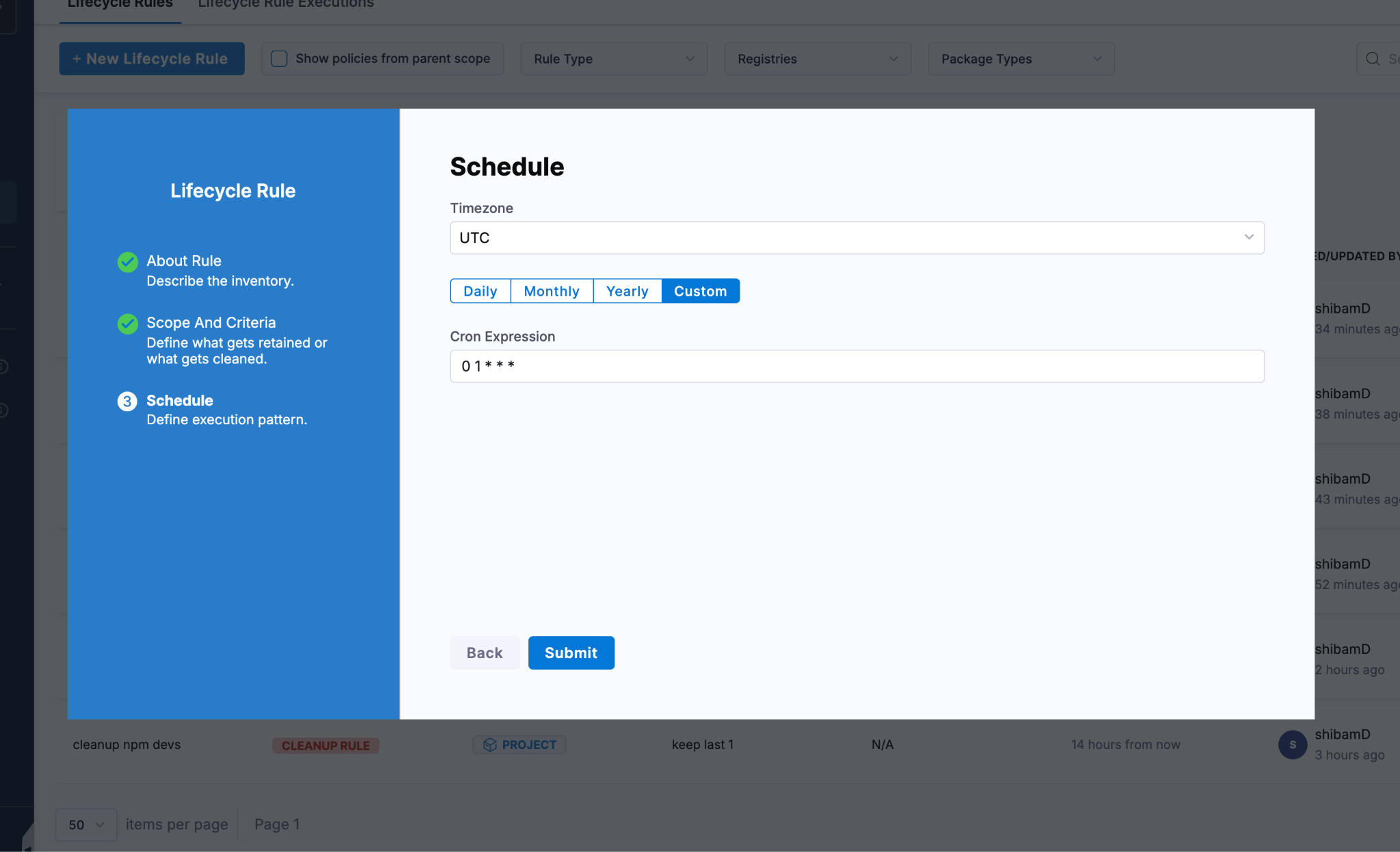
Schedule step. Timezone selector at the top, frequency tabs, and a generated cron expression. Custom mode lets you write any cron.
She schedules npm at 01:00 UTC, python at 01:15 UTC, maven at 01:30 UTC, spreading them out to keep the execution log clean. Helm and the generic bundles she leaves running with their safety-net criteria, knowing they'll keep returning "no results" until the artifacts are genuinely old enough.
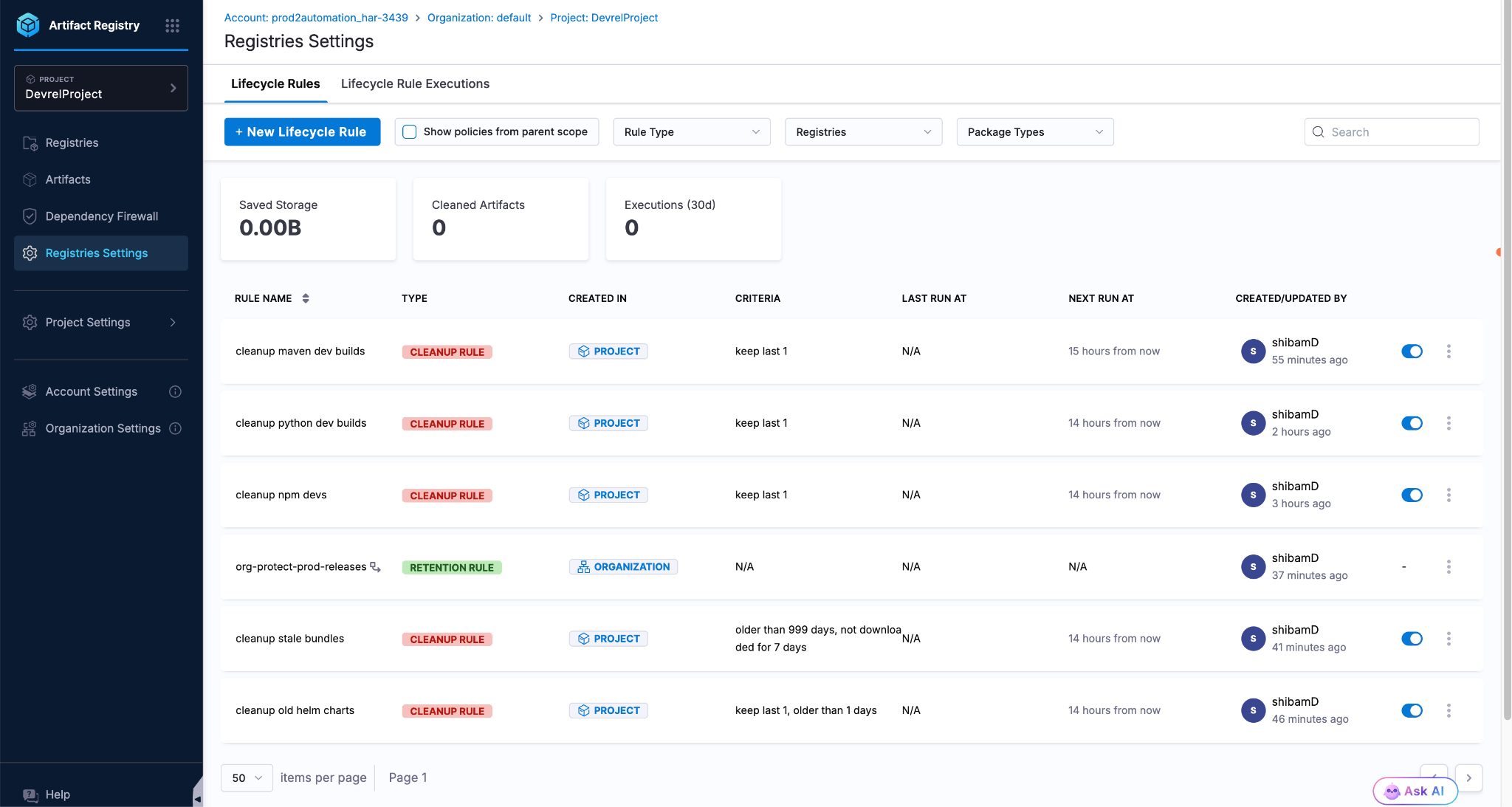
Final state before overnight scheduled execution. Five Cleanup rules covering all package types, plus one attached Org Retention rule. Saved Storage starts at zero.
She closes her laptop.
The next morning
Maya opens the Lifecycle Rules tab and looks at the Saved Storage card at the top:
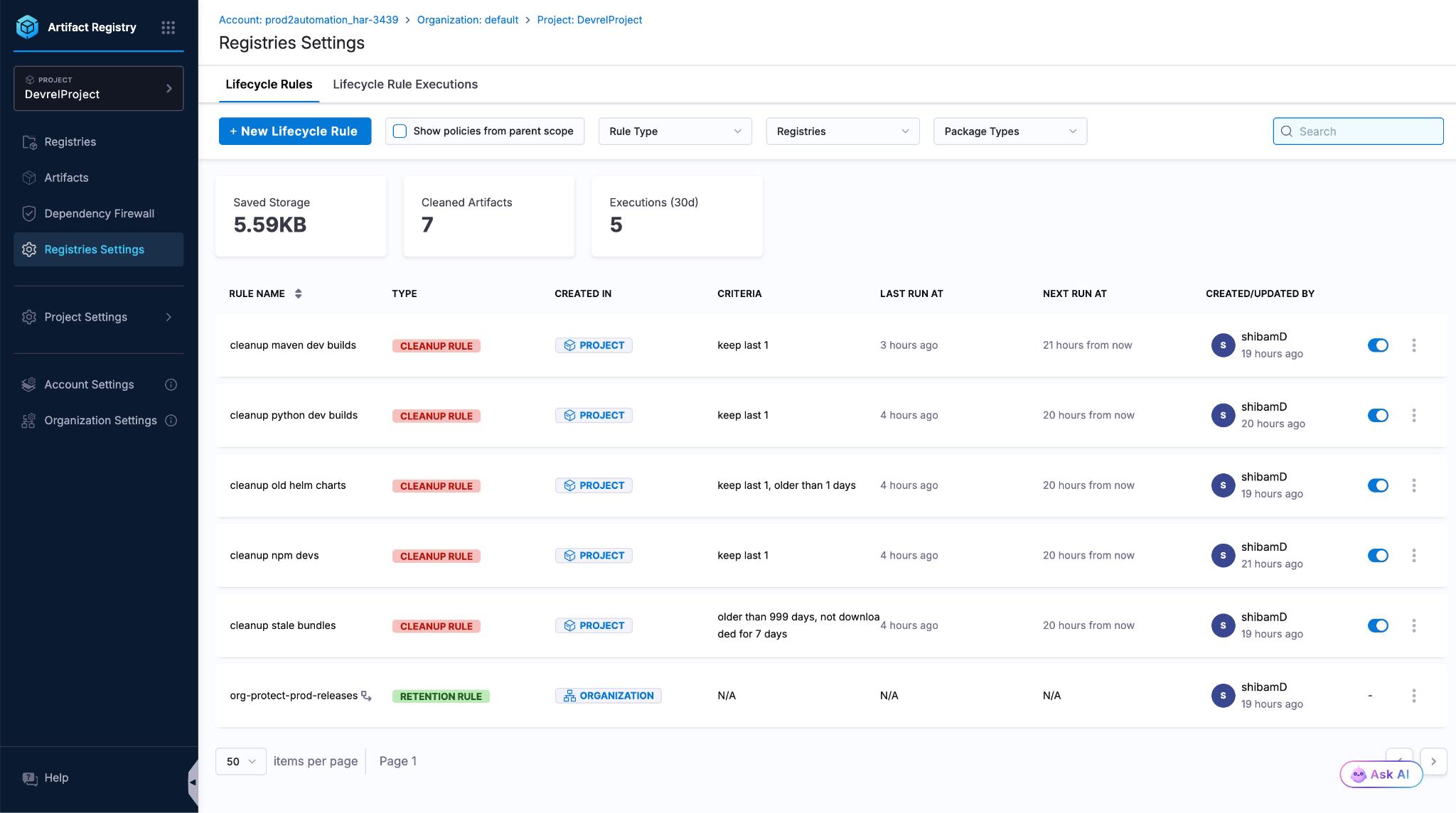
After overnight execution. 5.59 KB saved, 7 artifacts cleaned, 5 executions in the last 30 days. Real artifact cleanup, automated.
5.59 KB saved. 7 artifacts cleaned. 5 executions in the last 30 days. These are small numbers because this is a demo project. In production scale, with a registry growing at 2 to 3 TB monthly, those numbers add up fast.
She switches to the Lifecycle Rule Executions tab:
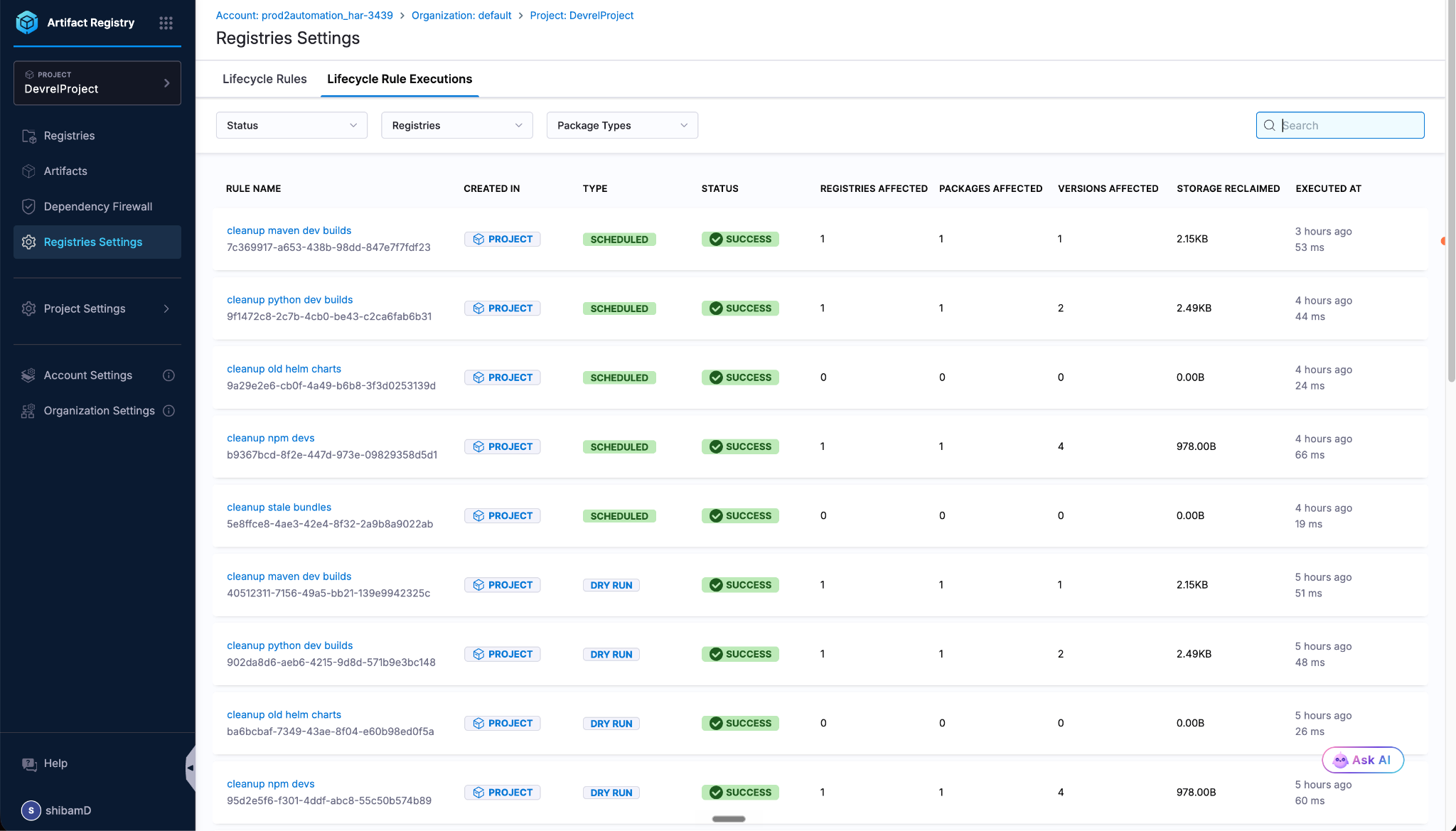
Executions tab with five SCHEDULED runs and several DRY RUN entries, all showing SUCCESS. Notice the rules that returned zero deletions (helm charts and bundles) still ran successfully. They just had nothing to delete, thanks to AND-logic safety.
Every execution is logged. Rule name, registry, type (Scheduled or Dry Run), status, registries affected, packages affected, versions deleted, storage reclaimed, timestamp. The execution log doubles as a complete compliance audit trail. Every deletion traceable to a specific rule run.
She drills into the python cleanup execution:
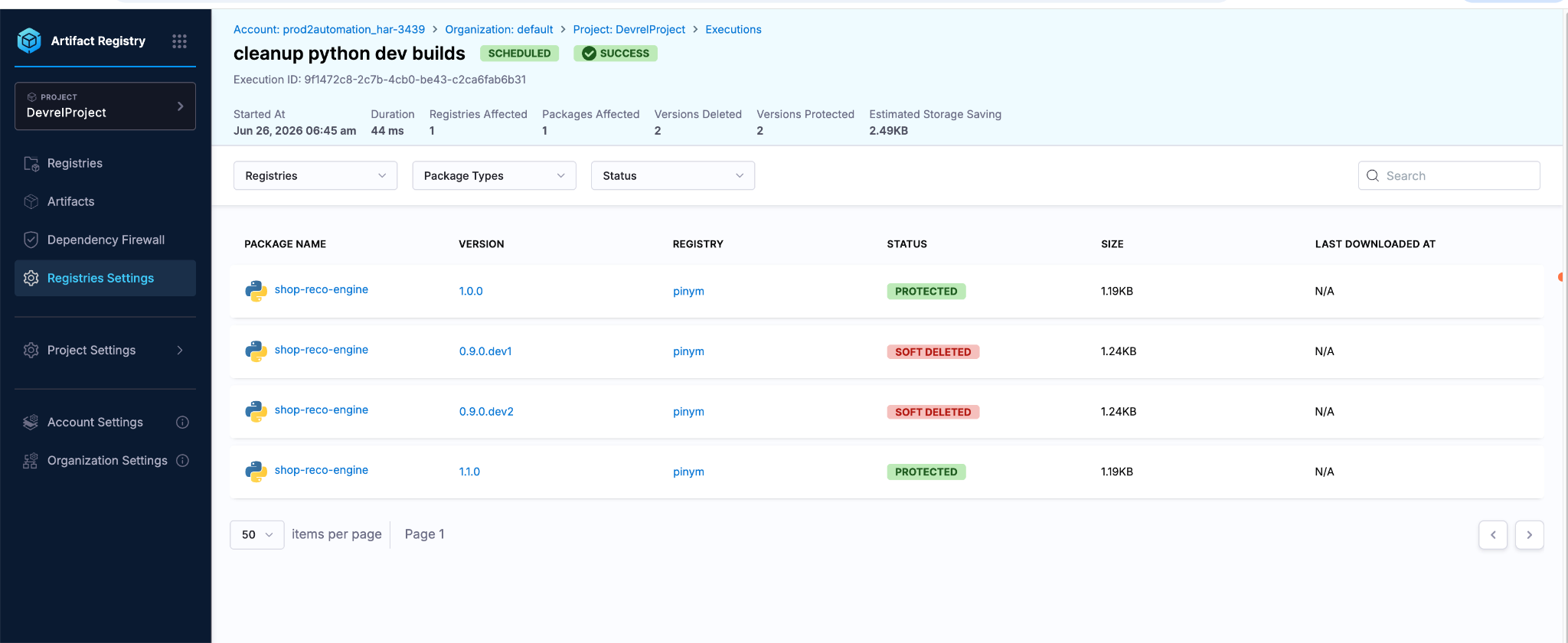
Drill-in view of the python execution. Two versions show SOFT DELETED, while 1.0.0 and 1.1.0 show PROTECTED by the Retention rule.
Two versions show SOFT DELETED. Two versions show PROTECTED. Exactly what Maya designed: dev builds cleaned, releases retained.
And then somebody asks for the deleted version back
"Maya, I was about to test a regression against 0.9.0.dev1. Can you get it back?"
Soft delete is the whole reason Maya can sleep through the night. Every deletion in lifecycle rules is reversible during the recovery window (configured at the account level).
She navigates to Registries → pinym → shop-reco-engine. The artifact view has two tabs: Available and Deleted. She clicks Deleted.
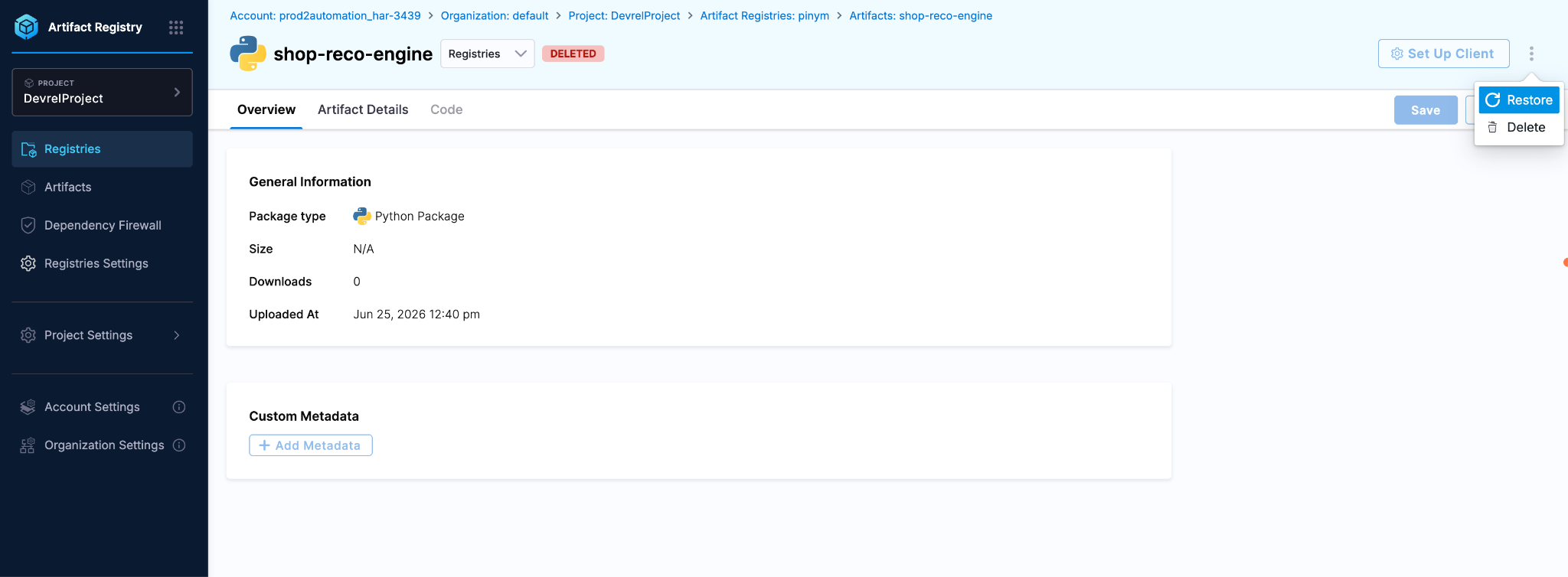
Artifact view, Deleted tab open. The three-dot menu reveals Restore and Delete options. One click brings the version back to Available.
She clicks the three-dot menu on 0.9.0.dev1. The dropdown shows Restore and Delete. She clicks Restore.
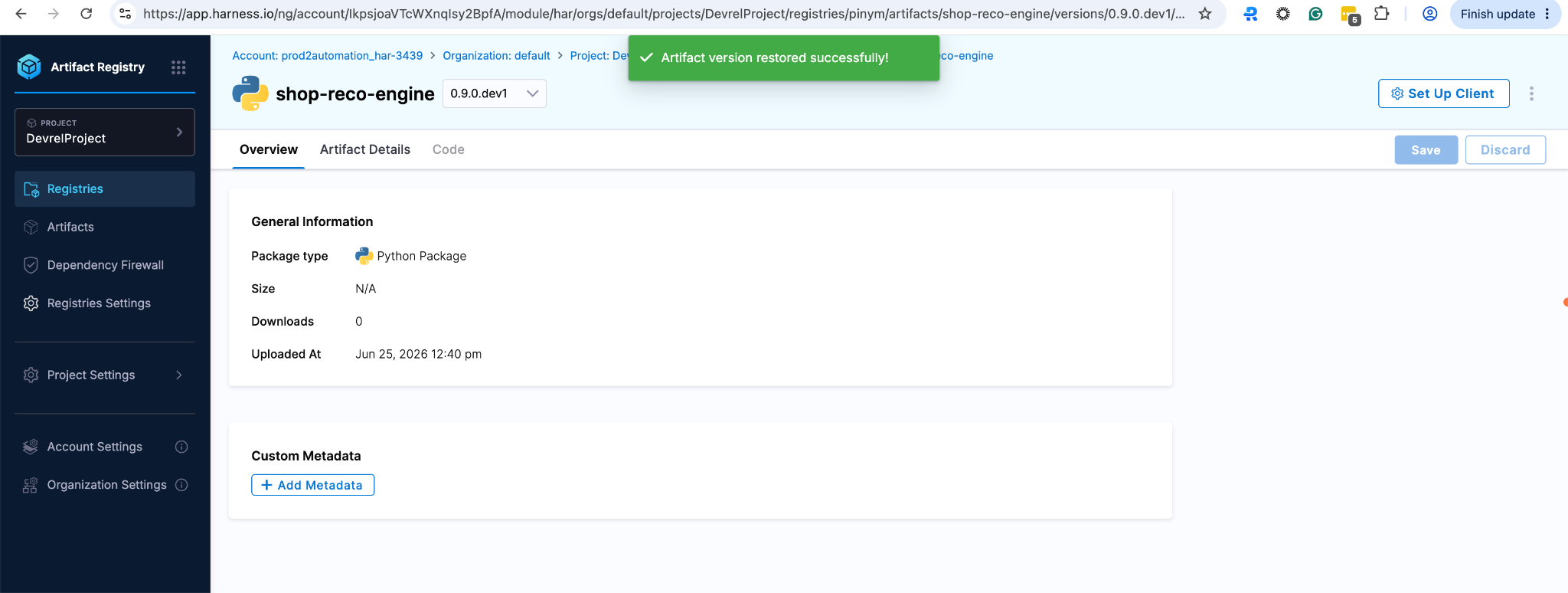
After restore. Confirmation toast reads 'Artifact version restored successfully' and the version is back in the Available state. The metadata, digest, and size are preserved.
"Artifact version restored successfully." The version is back. Same metadata, same digest, same size. As far as the downstream consumer is concerned, it never went away.
The safety promise. There is no hard-delete option in lifecycle rules. Even the most aggressive Cleanup rule can only soft-delete. Within the recovery window, every deleted version is one click away from restoration.
What Maya accomplished in one day
By the end of day one, Maya:
- Set up automated cleanup across five package types.
- Protected her formal releases with a Retention rule, so the cleanup can't touch them.
- Verified every rule with dry-runs before letting them fire.
- Adopted the org admin's centralized protect rule without losing project autonomy.
- Scheduled real overnight execution and watched it work.
- Demonstrated one-click recovery the moment somebody asked for an artifact back.
She didn't break production. She didn't delete the deployed image. She didn't have to manually triage which builds to keep. The system did what the docs promised, and her engineering org has a paper trail to show compliance if anyone asks.
The same machinery scales from a single demo project to a 270-service real customer registry. Same Retention rule pattern. Same Cleanup rule pattern. Same explicit-attachment hierarchy from project to organization to account scope.
As software delivery accelerates, artifact registries can no longer be passive storage systems. They need to actively govern what stays, what gets removed, and what is safe to promote. Lifecycle Rules are one part of a trusted software supply chain, working alongside provenance, vulnerability scanning, promotion policies, and artifact signing to ensure every artifact in your registry exists for a reason. By automatically retaining what matters, removing what doesn't, and enforcing policy before storage becomes operational risk, teams can deliver software faster without sacrificing security, reliability, or trust.
We invite you to sign up for a demo and see firsthand how Harness Artifact Registry delivers high-performance artifact distribution with built-in security and governance at scale.
Frequently asked questions
What's the difference between a Retention Rule and a Cleanup Rule?
A Cleanup Rule deletes artifact versions on a schedule based on age, version count, or download activity. A Retention Rule protects matching artifacts from any deletion. It's always evaluated first, and a match always wins over a deletion attempt. Use Retention for releases you never want touched, and Cleanup for dev, snapshot, and stale builds.
Does soft delete mean my artifact is gone forever?
No. Every artifact deleted by a Lifecycle Rule enters a recovery window. During that window, the artifact can be restored in one click from the Deleted tab of the artifact's detail view. There is no hard-delete option in Lifecycle Rules at all.
How do rules at the Organization or Account scope apply to my Project's registries?
They don't apply automatically. A rule created at any scope is visible to child scopes when you tick "Show policies from parent scope," but it only acts on registries it's explicitly attached to. The child-scope admin attaches the rule by selecting which of their registries it should apply to. Criteria and patterns inherited from the parent scope cannot be modified at the child scope.
Can I preview what a rule will delete before it actually runs?
Yes. Every Cleanup Rule has a Dry Run action in its three-dot menu. The dry run uses identical evaluation logic as the real run but mutates no data. It produces a per-version table showing PROTECTED versions and WOULD BE DELETED versions plus an estimated storage reclaim.
What happens if I stack multiple retention criteria on one Cleanup Rule?
Multiple criteria combine with AND logic. An artifact must satisfy every enabled condition to be deleted. This is conservative by design and is the main safety mechanism against accidental over-deletion. Use a single criterion when you want aggressive cleanup, and stack two or three when you want a safety net.
Which package types does this work with?
The feature works across all package types supported by Harness Artifact Registry: Docker, npm, Maven, Python, Helm, NuGet, RPM, Cargo, Go, Generic, and others. Filter fields adapt to the package type (Maven shows Group ID patterns, Docker shows tag patterns, etc.).
How do I get access to Lifecycle Rules?
Lifecycle Rules are currently behind the HAR_ARTIFACT_LIFECYCLE_POLICY feature flag. Contact Harness Support to enable it on your account.
Next steps
If your registry has been growing without a cleanup policy, the safest place to start is exactly where Maya did:
- Identify your release version patterns (the artifacts you never want touched).
- Create a Retention Rule with those literal version strings at your project scope.
- Create a Cleanup Rule targeting dev or snapshot builds in one registry.
- Run a Dry Run before saving a schedule.
- Let it run for one week, then review the Executions tab to see what was cleaned up.
For full reference documentation, see the official Harness docs. The Harness CLI used to push artifacts in this guide is open source.
If you set up Lifecycle Rules and something surprises you, the Harness team wants to hear about it. Reach out through the community Slack, the developer forum, or open an issue on GitHub.