Harness October 2026 Updates: 150+ Features, Cosmos, FedRAMP 20x

TL;DR
This Month's Biggest Ships:
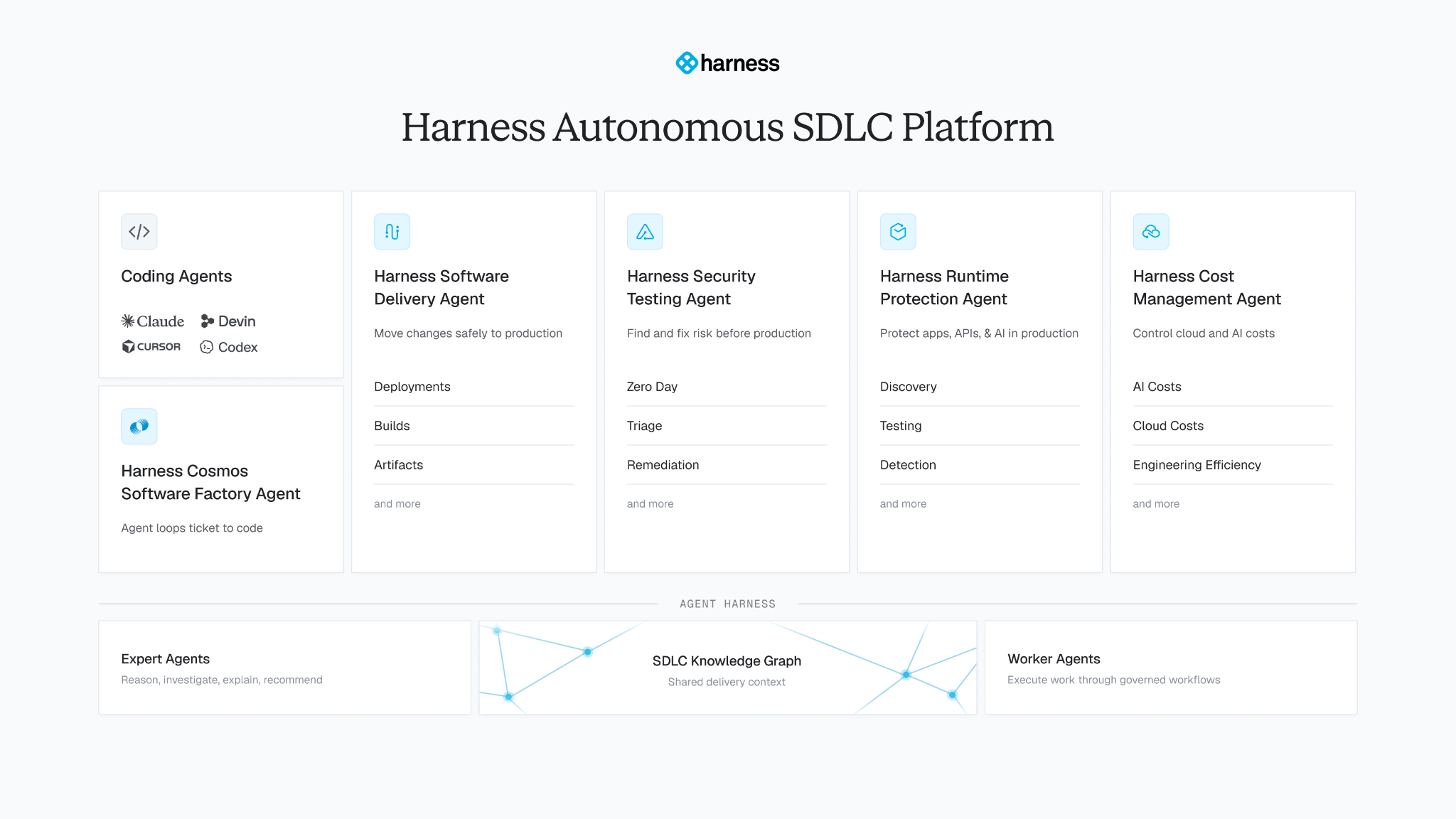
- Cosmos Software Factory Agent: Cosmos from Augment Code becomes the fifth Harness agent. It plans changes, writes code and tests, opens pull requests, and responds to review feedback, and the other four agents take the result to production. Learn more about Cosmos.
- Bring your own identity provider to Harness MCP: OAuth proxy mode lets a self-hosted Harness MCP server authenticate developers through your own identity provider. No shared tokens, no Harness credentials on laptops, and every call runs as the real user. Learn more about OAuth proxy mode.
- Four compliance milestones: The Harness platform completed its first SOC 1 audit and achieved FedRAMP 20x Class A, and the Runtime Protection Agent completed its first PCI DSS and HIPAA Security Rule assessments. Learn more about the compliance milestones.
- Harness Code Coverage is generally available: Enforce coverage standards in the pipeline without leaving the platform. It covers 8 language groups, supports test intelligence for Python and Java, adds PR status checks, and tracks repo-level metrics and thresholds. Learn more.
The shipping velocity at Harness skyrocketed. Harness shipped 150+ features in October, one about every 5 hours across 31 days!
October's list covers both ends: code creation and software delivery. The biggest ship is Cosmos, a new agent that takes engineering work from ticket to pull request. The rest carries that pull request to production and keeps it safe: AI Verify reading more of your telemetry, support for deploying AI agents to AWS, MCP sign-in through your own identity provider, and SOC 1, FedRAMP 20x Class A, PCI DSS, and HIPAA milestones. Here's everything we shipped.
Cosmos takes engineering work from ticket to pull request
A bug report lands in your tracker on Tuesday night. With Cosmos, that ticket update starts the work: agents plan the change, write the code and the tests, open a pull request, and keep going when a reviewer leaves comments, a check fails, or a merge conflict appears. The goal is a change ready for your team's merge decision, not a first draft someone has to babysit. Work can also start from pull requests, schedules, and webhooks, so nobody has to kick off each task by hand.
Teams start with prebuilt Experts: PR Author, Deep Reviewer, Risk Analyzer, and Verifier. You adapt their instructions, tools, and environments to how your organization works, and you decide what agents may do on their own and where a person approves. The factory around them is included: execution environments, model routing, the Code Context Engine that helps agents understand a codebase, tool integrations, shared organizational memory, and configuration and budget controls.
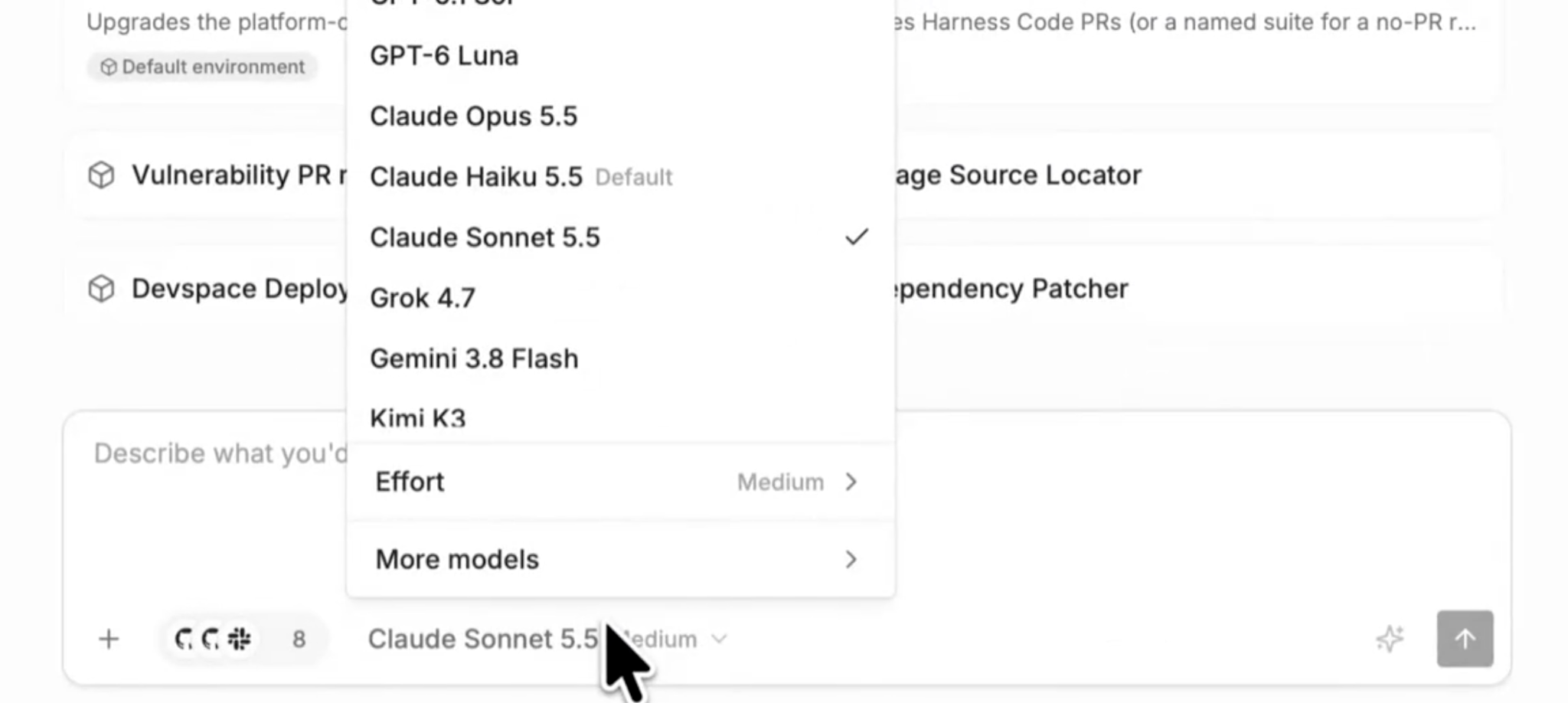
Two smaller Cosmos updates shipped alongside. You can now connect your Harness account to Cosmos with OAuth, and Cosmos supports the newest Haiku model from Anthropic as another option for the work it routes.
Cosmos is available now, and you can keep using whichever coding tools your developers prefer. Learn more about the Cosmos Software Factory Agent.
Software Delivery Agent
The Software Delivery Agent takes changes from commit to production. This month it learned to run Worker Agents on GitHub Copilot, verify rollouts against more of your monitoring data, and deploy AI agents to AWS AgentCore, on top of a long list of deployment, pipeline, and artifact upgrades. Learn more about the Software Delivery Agent.
Worker Agents run on GitHub Copilot, and the pipeline analyzer explains every step
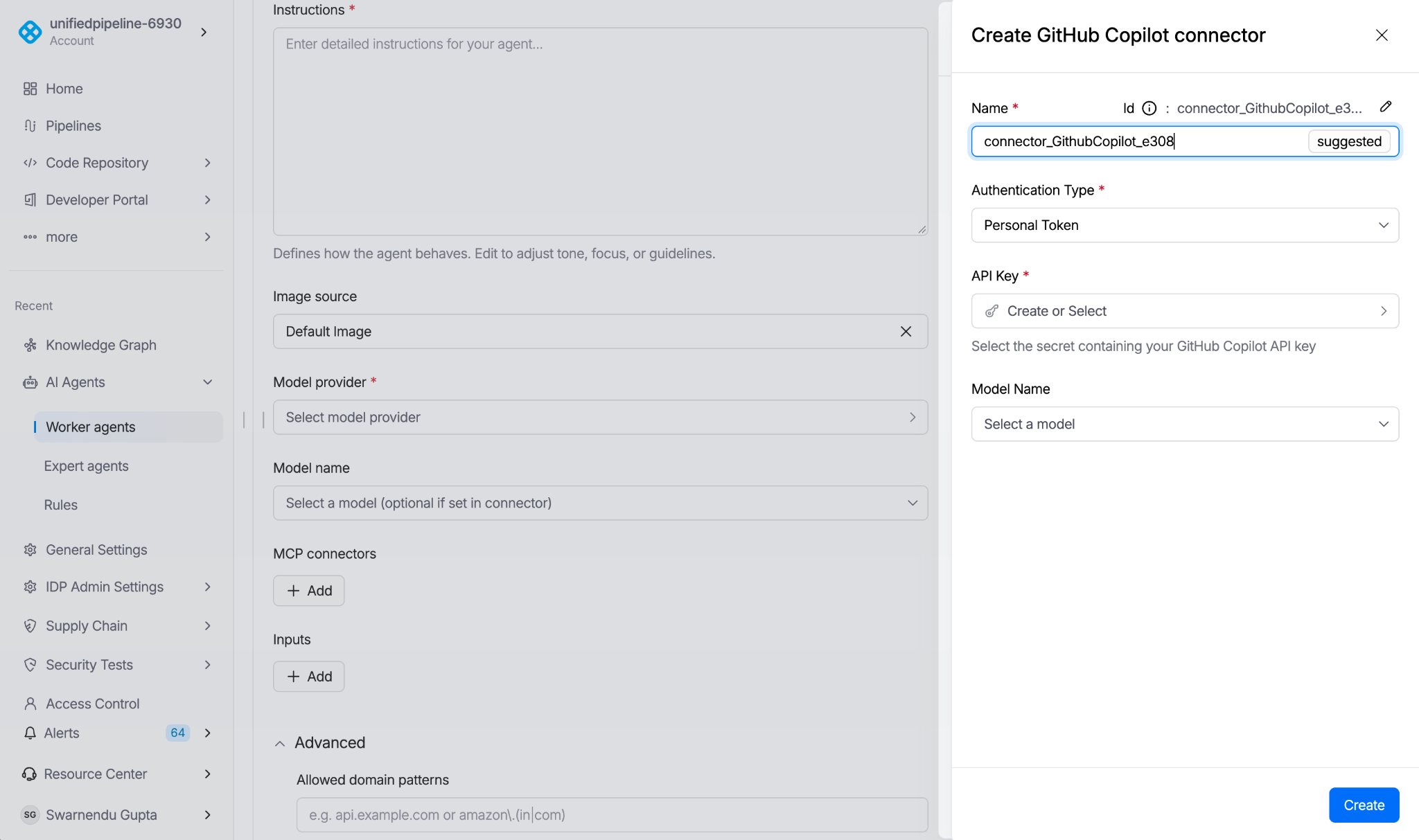
Worker Agents, the agent steps you add to a pipeline, can now run on GitHub Copilot. Create a GitHub Copilot connector, reference it in the Worker Agent, and pick from the models your Copilot subscription includes. The YAML picked up four additions: a configurable maximum number of turns in the UI, an allowed-domains list that restricts which domains the agent can reach, a working directory that tells the agent where to pull skills and files, and an advanced section that groups the rest. Worker Agents can also use the new Harness LLM Connector, which gives them Harness-managed Anthropic and OpenAI models. The individual Harness Managed Anthropic and OpenAI connectors are being deprecated for new references.
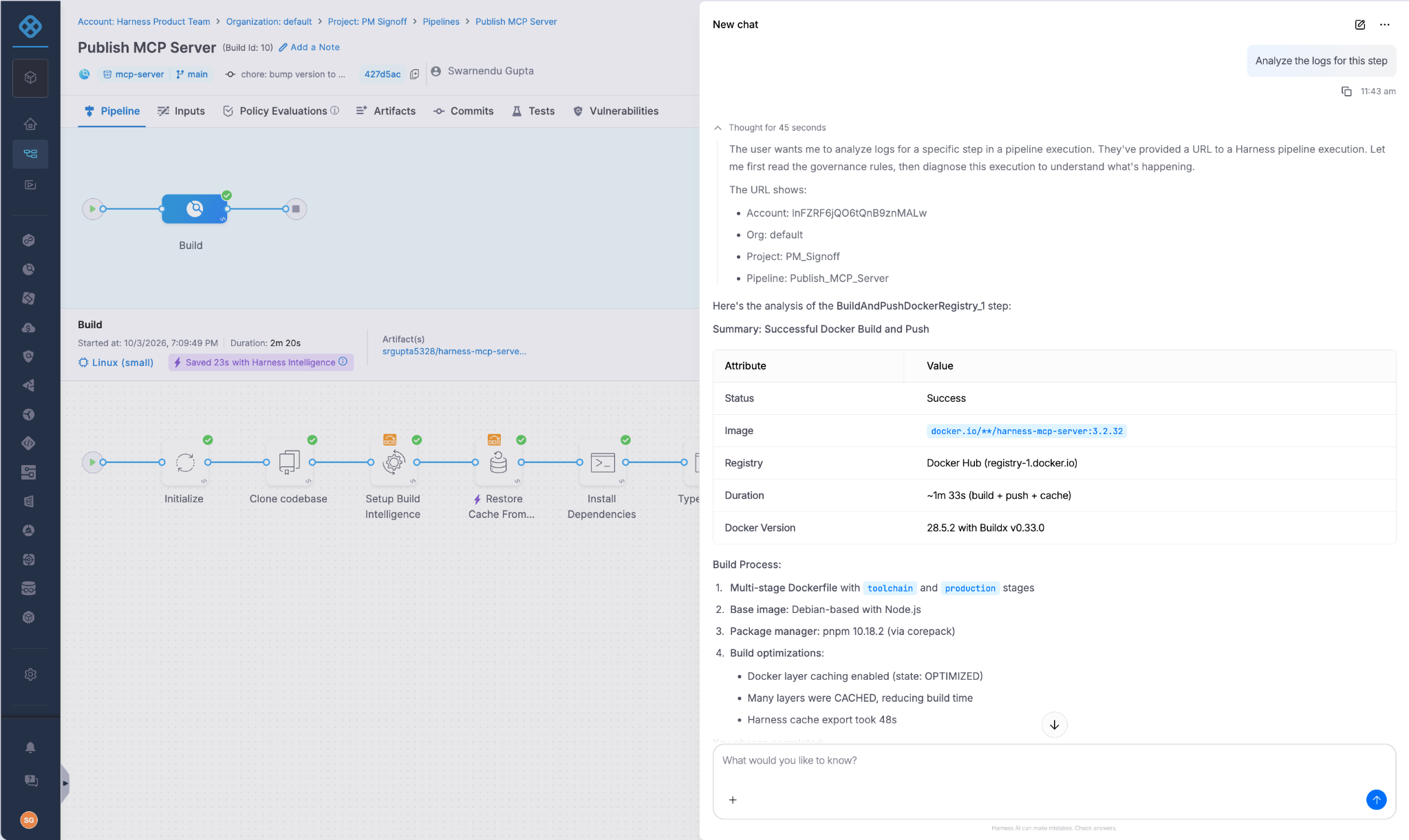
AI Pipeline Analyzer now returns structured analysis for any step execution, with step-level breakdowns and analysis of successful steps, not only failures. It complements the Pipeline Error Analyzer and is rolling out now in the current pipeline experience, with the new UI next.
AI Verify reads more of your monitoring data
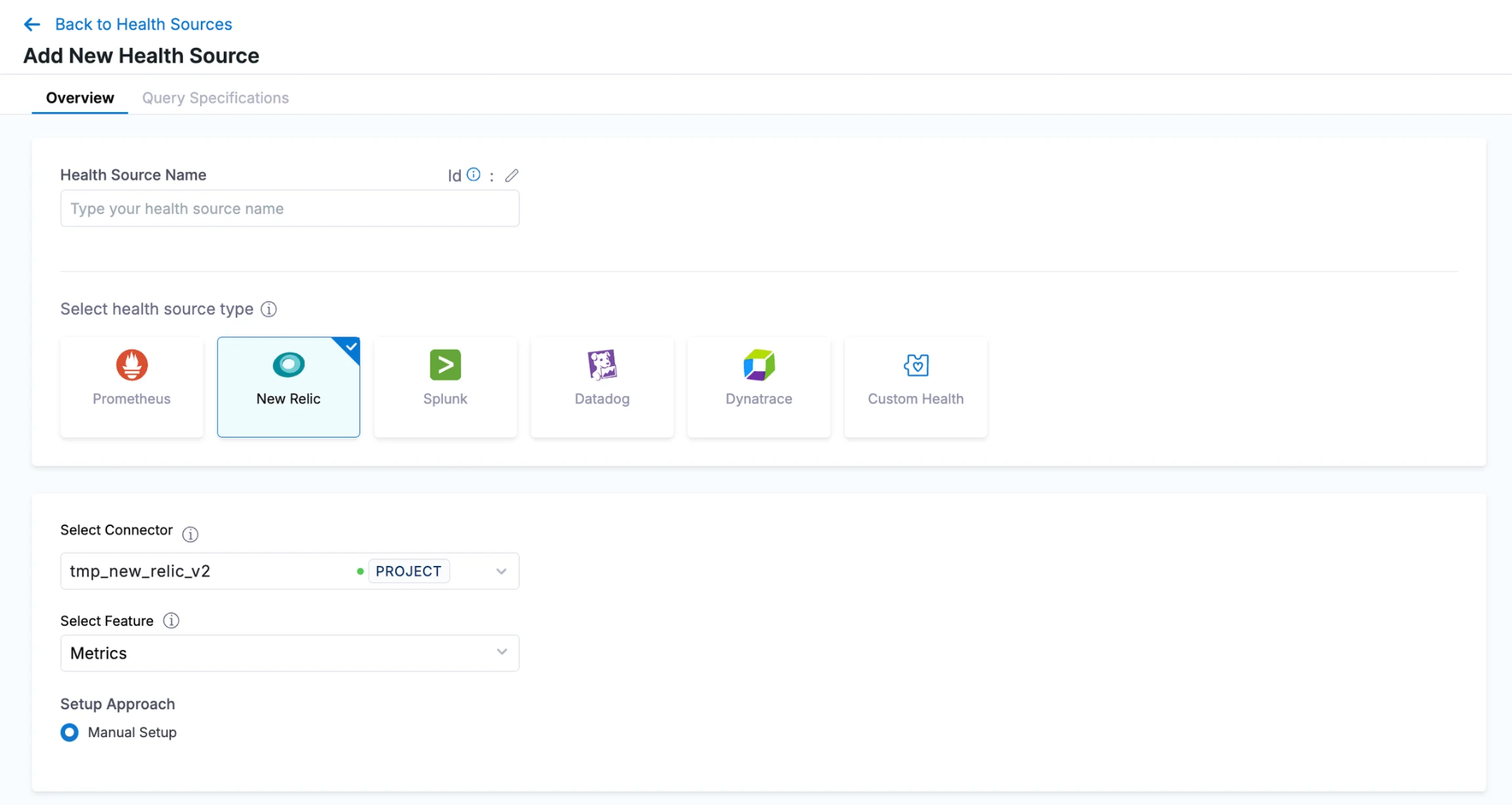
AI Verify compares each rollout against a baseline and flags anomalies. It now reads from four more sources: New Relic metrics, Splunk logs with AI-assisted query setup, custom logs from a Custom Health connector, and custom metrics from any APM tool, collected in the same verification step as logs. You can also set sensitivity to High, Medium (the default), or Low to control how strictly it flags deviations from the baseline.
Deploying AI agents to AWS AgentCore gets three additions
Harness can now create and manage the AgentCore Gateway for you. Select auto-configure, then supply a gateway role ARN and an authorizer type. Agent packages can come from an S3 bucket instead of a direct upload, and you can assign an agent authorizer to control the identity and permissions an agent assumes at runtime. Learn more about AI agent deployment.
Safer deployments on AWS, Kubernetes, and GitOps
Auto Scaling Group deployments got four upgrades. Warm pools keep pre-initialized EC2 instances ready for scale-out, and the rolling deploy step supports Standby and Scale-In Protected instance options during instance refresh. Canary deployments now roll back phase by phase, reverting only the phases already deployed. After a blue-green swap, you can delete the old group once it’s downsized, which suits teams that don’t need that rollback path.
ECS blue-green deployments can shift traffic across multiple Application Load Balancer listener rules, and ECS step-scaling policies get native CloudWatch alarm management, including through rollback and drift reconciliation.
Kubernetes clusters now have a cluster view with live resources, health, and deployment history inside Harness, and you can link reviewers straight to the diff tab of a Kubernetes diff step.
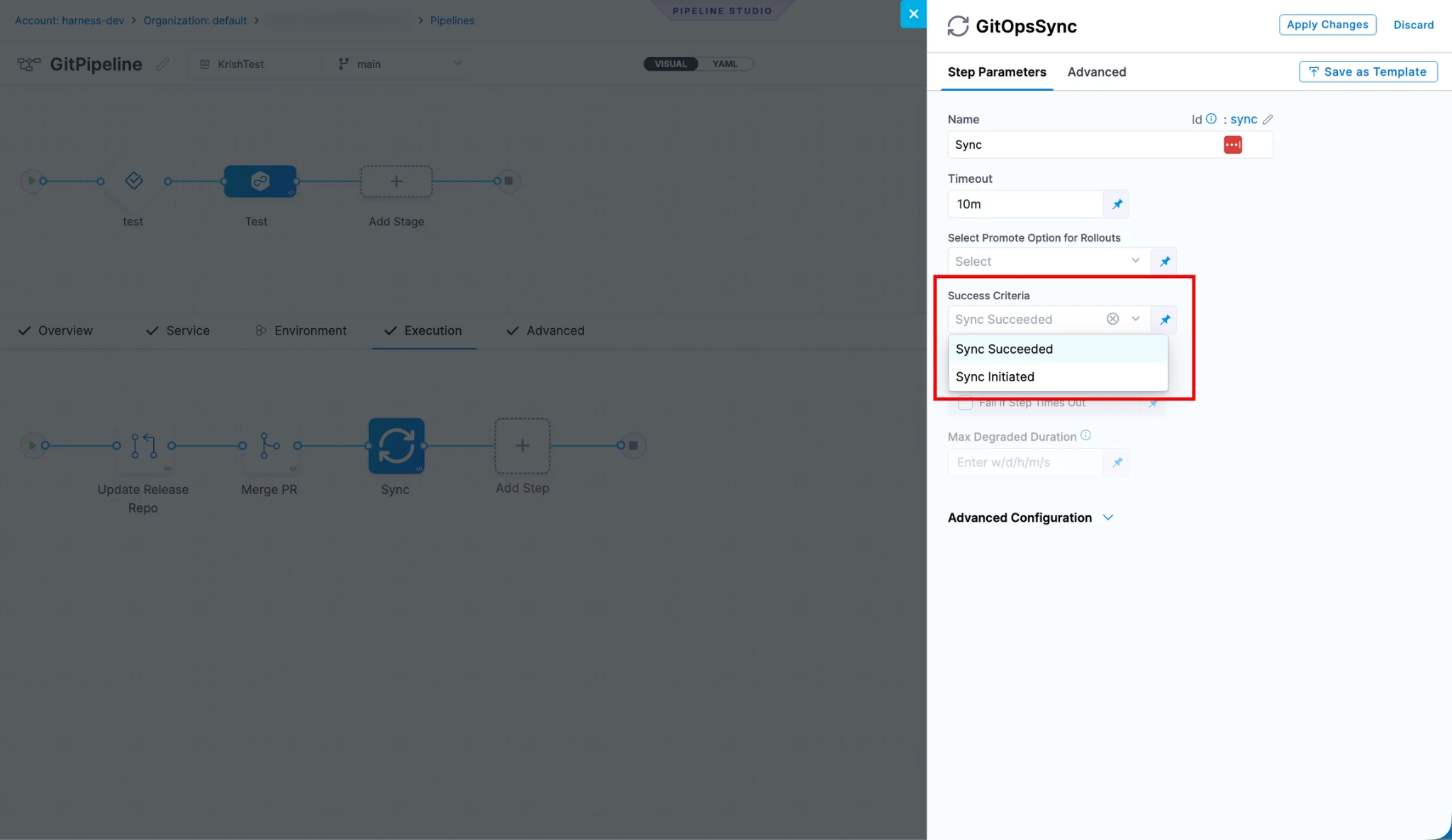
For GitOps, sync and rollback steps can succeed as soon as Argo CD accepts the request, which keeps a sync wave moving when it waits on a manual promotion or an outside process. The GitOps Agent and Service also bundle the latest Argo CD.
Builds get coverage enforcement and Go caching
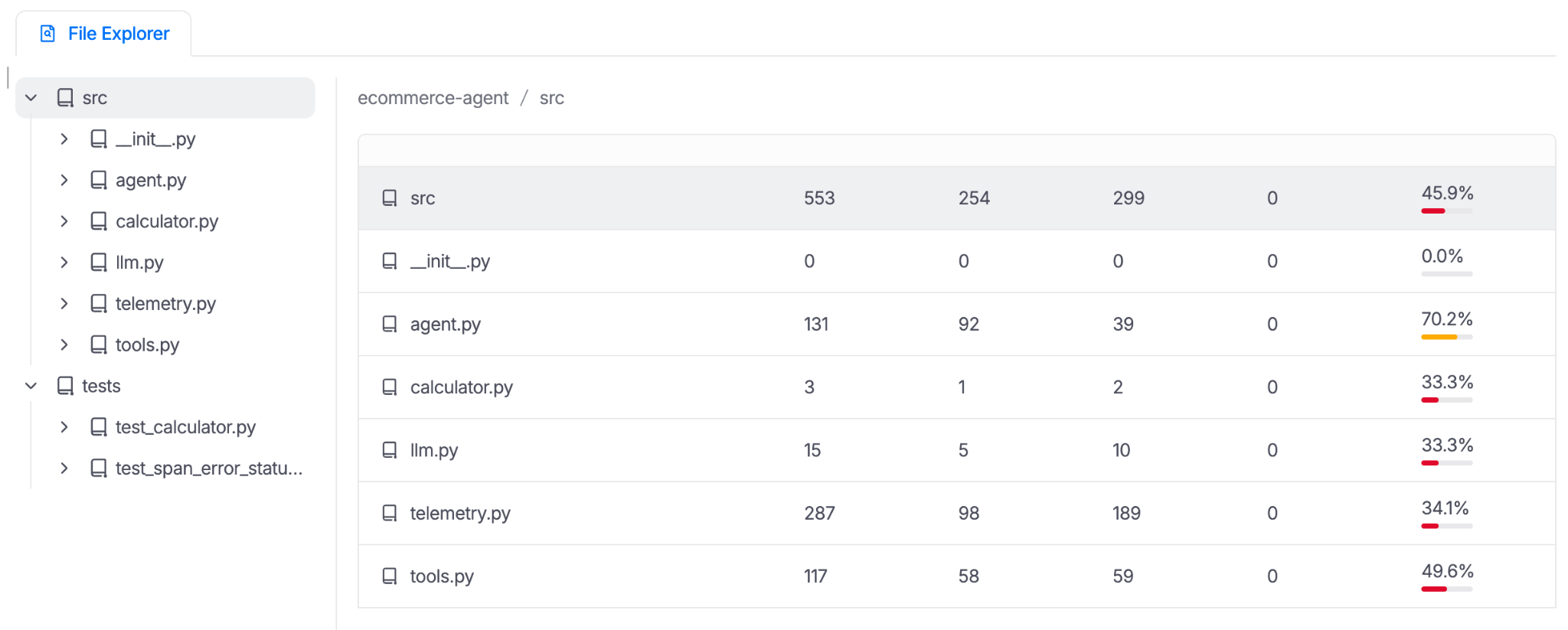
Harness Code Coverage is now generally available, so CI teams can enforce coverage standards in the pipeline without leaving the platform. It covers 8 language groups, supports test intelligence for Python and Java, adds PR status checks, and tracks repo-level metrics and thresholds.
Go builds get remote caching. With Build Intelligence enabled and a go.mod file present, Harness configures remote Go build caching for Run and Test steps automatically, with no changes to your go build or go test commands.
Two smaller builds-related updates: you can hide Run step script text from execution logs, and private connectivity setup with Tailscale now supports regional routing. Learn more about builds.
Pipelines are easier to author, govern, and connect
Pipelines can now declare identities in the identities map of pipeline, stage, step, and template YAML, so a pipeline authenticates to external systems such as AWS and GCP. Each identity takes a cloud provider, audience, subject template, custom claims, and a disabled flag; a lower level can override or disable one declared above it, and in a Shell Script step the identity name becomes the environment variable that holds the generated token. This is YAML only. The Azure connector with OIDC also supports an enhanced subject identifier: include the account, organization, project, and pipeline IDs in the token's subject claim, so a federated credential in Azure can be scoped to one pipeline instead of the whole account.
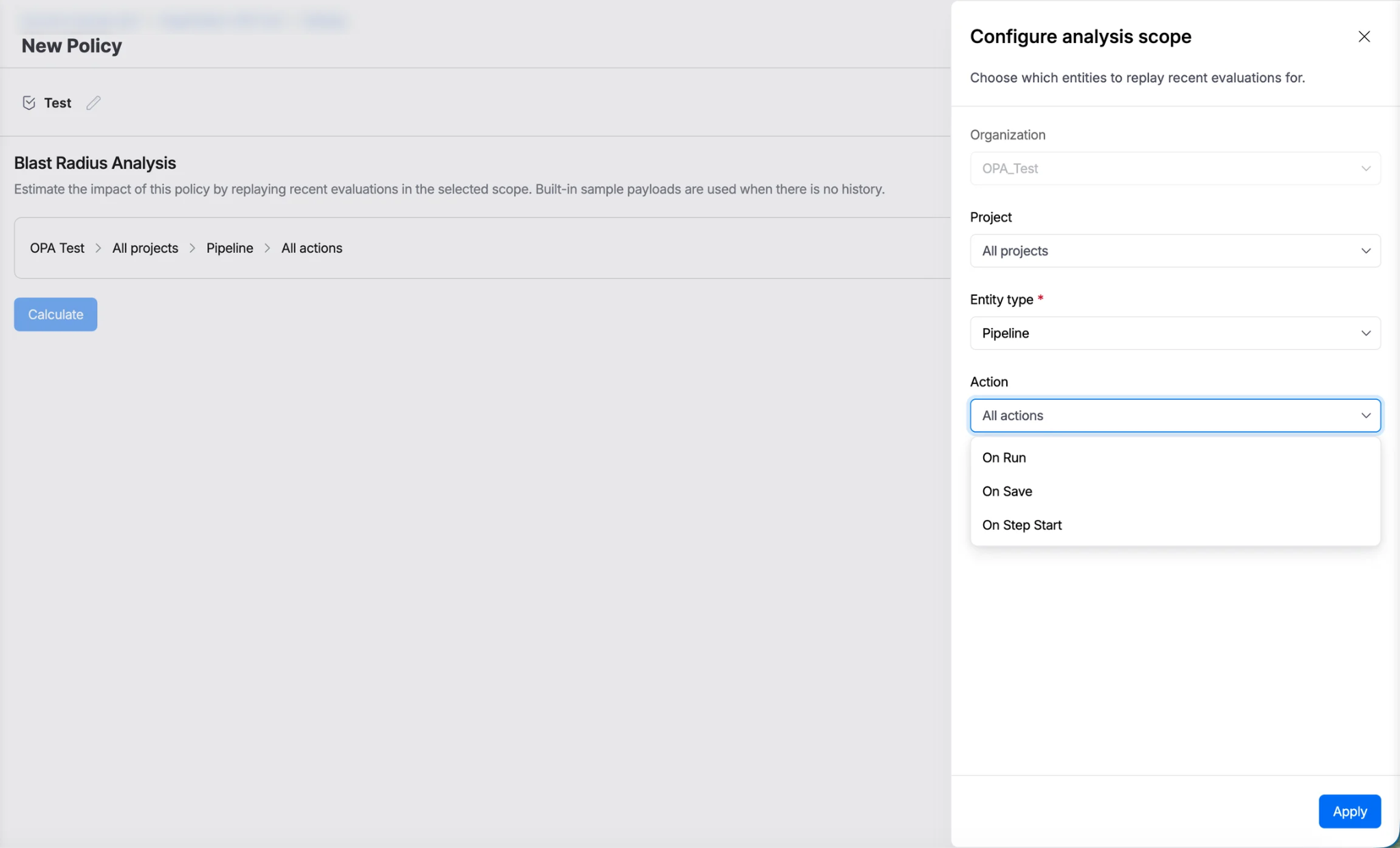
The OPA policy editor has Blast Radius Analysis. Replay a policy against recent evaluations and see which entities would pass or fail before you save the change.
Pipeline authors can customize the run form. Give runtime inputs friendly labels and descriptions, hide an input until another has a specific value, and restrict allowed values based on other inputs. Harness validates these rules when you save a pipeline, trigger, or input set. For DAG pipelines, selective stage execution no longer makes you pick every stage a selected stage depends on. Harness rebuilds the dependency chain from the stages you choose, skips the rest, and keeps the relative order.
New and improved steps and inputs:
- The HTTP step supports Basic, Bearer, and API Key authentication, so you no longer add headers by hand.
- The Download Nexus Artifact step, now available in containerized step groups, pulls raw, Maven, npm, or NuGet assets from a Nexus repository and validates checksums without a custom plugin or shell script.
- The Publish Events step reports artifacts your pipeline publishes to Release Management, so Artifact Tracker can record each one and compute changesets. Native build and push steps are detected automatically.
- Git Fetch Type can be a runtime input for manifests and config files, so you choose Latest from Branch or Specific Commit ID at deployment time.
The rest of the pipeline updates: Webhook and Datadog notification channels can notify user groups; WaitingForUserAction and PipelineResumed notifications now include step and stage details, including every waiting step with its identifier, name, type, status, and wait start time; external tools such as a CI system or release tracker can add tags to an execution after it reaches Success, Failed, or Aborted through the API; the Azure Repos connector supports self-hosted Azure DevOps Server over HTTP or SSH; and you can move a pipeline to a different project and keep its execution history.
Release Orchestration gets finer permissions and Git-backed processes
Release Orchestration now has separate Create, View, Edit, Delete, and Execute permissions for activities and processes, not only for releases. A migration adds the matching permissions to custom roles that already hold Releases permissions. A new default setting also lets a release run its pipeline activities as the Release Management service, so the person who starts a release does not need pipeline Execute permission.
Git-backed processes got easier to run. Processes, process inputs, and activities are created in Harness when their YAML is pushed to the default branch of a connected repository, and they refresh when the YAML changes. Remote activity YAML is fetched in batches, so large Git-backed processes load faster and more reliably, and a branch selector appears when you pick a remote process for an ad hoc release so you choose which branch's definition runs.
Two tracking updates round it out: the changeset Git source is inferred from the build's connector and provider, which cuts manual Git setup, and artifacts from pipelines that directly trigger a release are associated with that release automatically.
Infrastructure as code adds guardrails and a binary mirror
The Block Plan While Locked setting, under project settings, makes plan and drift detection steps fail when the target workspace is locked. It applies to Terraform, OpenTofu, and Terragrunt workspaces.
The provisioner binary mirror, in limited GA, lets the plugin download Terraform and OpenTofu binaries from Harness Artifact Registry instead of vendor endpoints. That prevents pipeline failures caused by GitHub API or get.opentofu.org rate limits in high-concurrency environments. Harness turns the mirror on per account, and the plugin falls back to the vendor site when a version is not in the registry yet.
Two more updates: the CDK provisioner gives you more control over the versions your CDK pipelines use and how CDK operations run, and Ansible execution and configuration get more control options, in beta. Learn more about infrastructure as code.
Artifact Registry accepts Artifactory clients and protects what's deployed
If you're migrating off JFrog Artifactory, a proxy shim now accepts Artifactory-style API paths, so existing clients and CI configuration can point at Harness Artifact Registry without a rewrite.
Cleanup rules for Docker now check what is deployed. Lifecycle rules query the deployments capability and mark actively deployed Docker versions as PROTECTED, so an image running in production cannot be deleted even when it falls outside the retention window. For upstream proxies, you can set a Metadata Cache TTL, which controls how long the registry reuses upstream metadata, and a Negative Cache TTL, which controls how long it remembers a failed lookup before trying again.
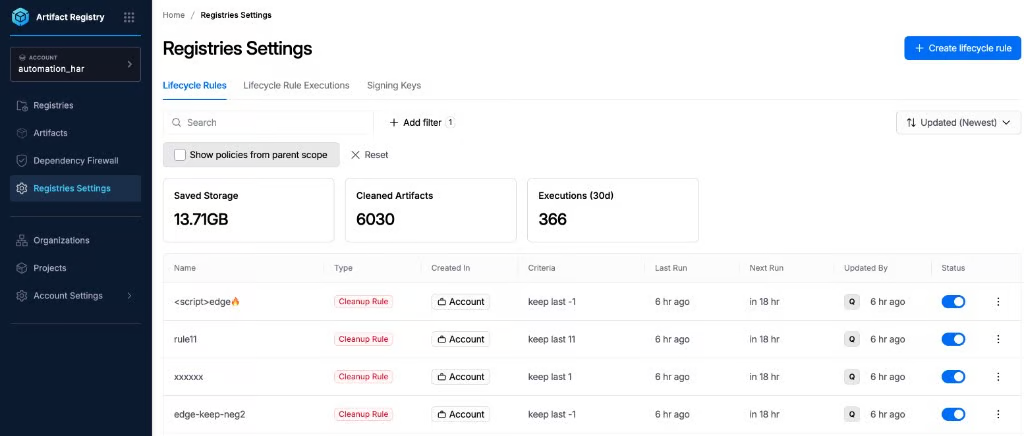
You can push to the registry from the CI you already run. The Harness Jenkins plugin and the Setup Harness CLI GitHub Action both install the Harness CLI, sign in with your Harness token, and leave it ready for the rest of the job. In GitHub Actions, add the harness/setup-harness-cli step, then run hc artifact push. Both mask the token in every log line and sign out when the job ends, even if an earlier step fails.
You can now create and manage signing keys for Alpine, Debian, and Wolfi virtual registries: RSA keys for apk clients, and RSA or Ed25519 GPG keys for apt clients.
Two behavior notes: artifacts in upstream proxy registries are permanently deleted rather than soft deleted, so pull again from the upstream source to get one back, and lifecycle rule execution history now shows Uploaded At and Last Downloaded for each affected package, which explains why a package matched the rule. Learn more about Artifact Registry.
Security Testing Agent
The Security Testing Agent finds and fixes risk before production. This month it got a repository-first view, a five-minute setup, and more control over supply chain policy. Learn more about the Security Testing Agent.
See every scanned repository in one place
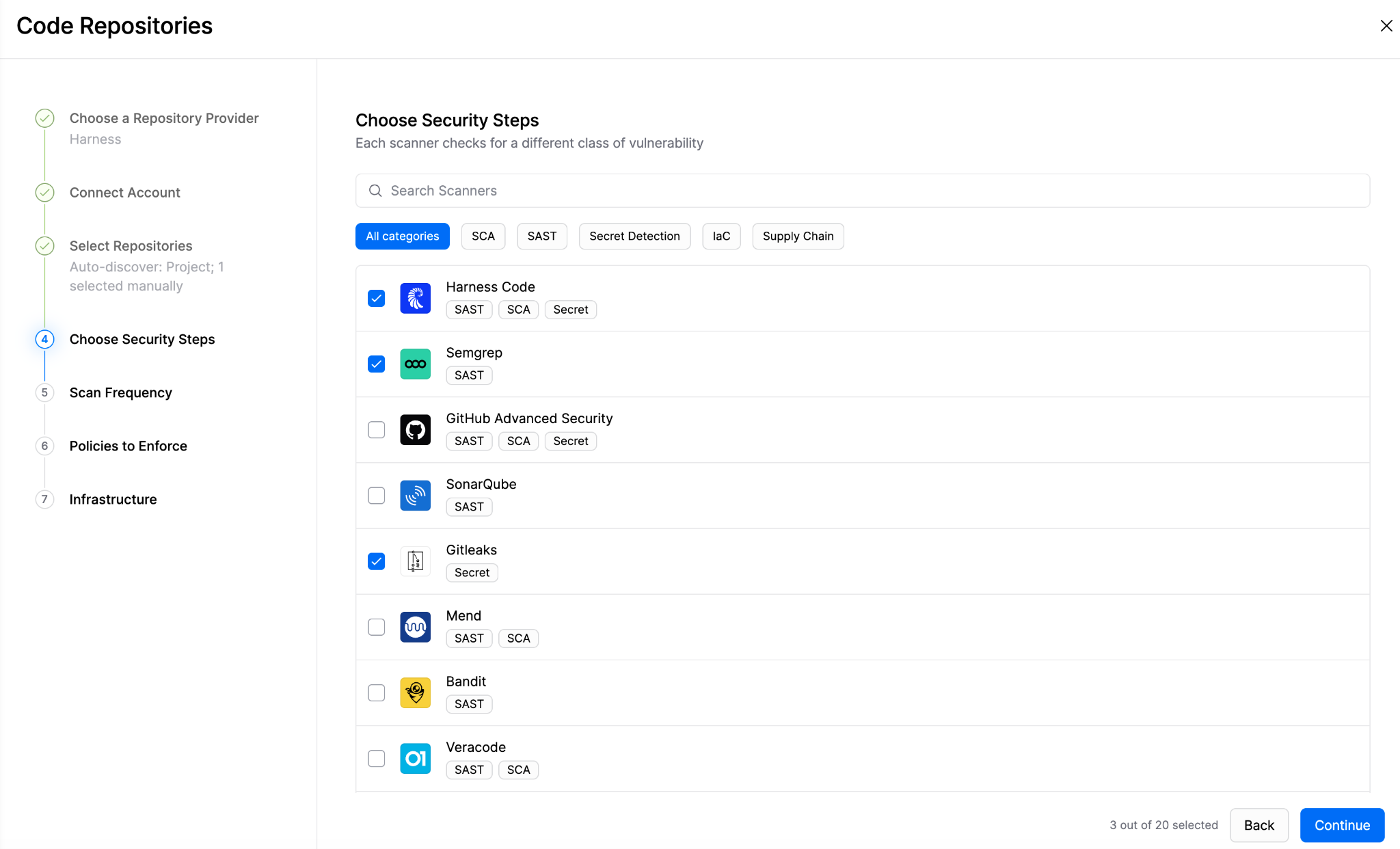
A new Code Repositories page gives you a repository-first view of everything you scan, with the security posture details attached to each repository.
Onboarding got a matching rebuild. You can go from an empty project to scheduled scans in one guided flow, with a first scan result in about five minutes. Scanner setup and supply chain security configuration appear in the same list, every step has a default, optional steps can be skipped, and everything you connect stays visible and editable on the Integrations page.
More control over supply chain policy
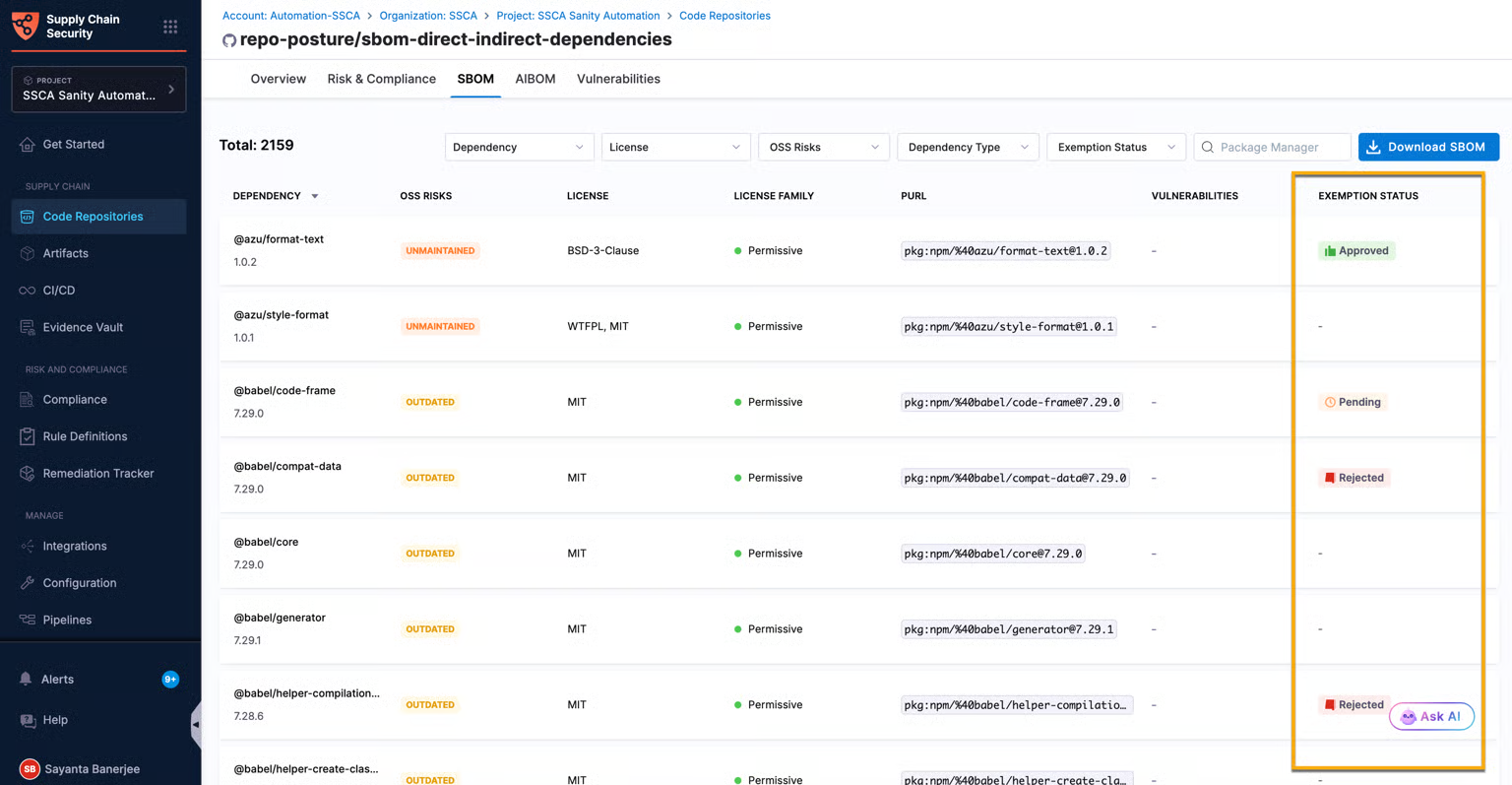
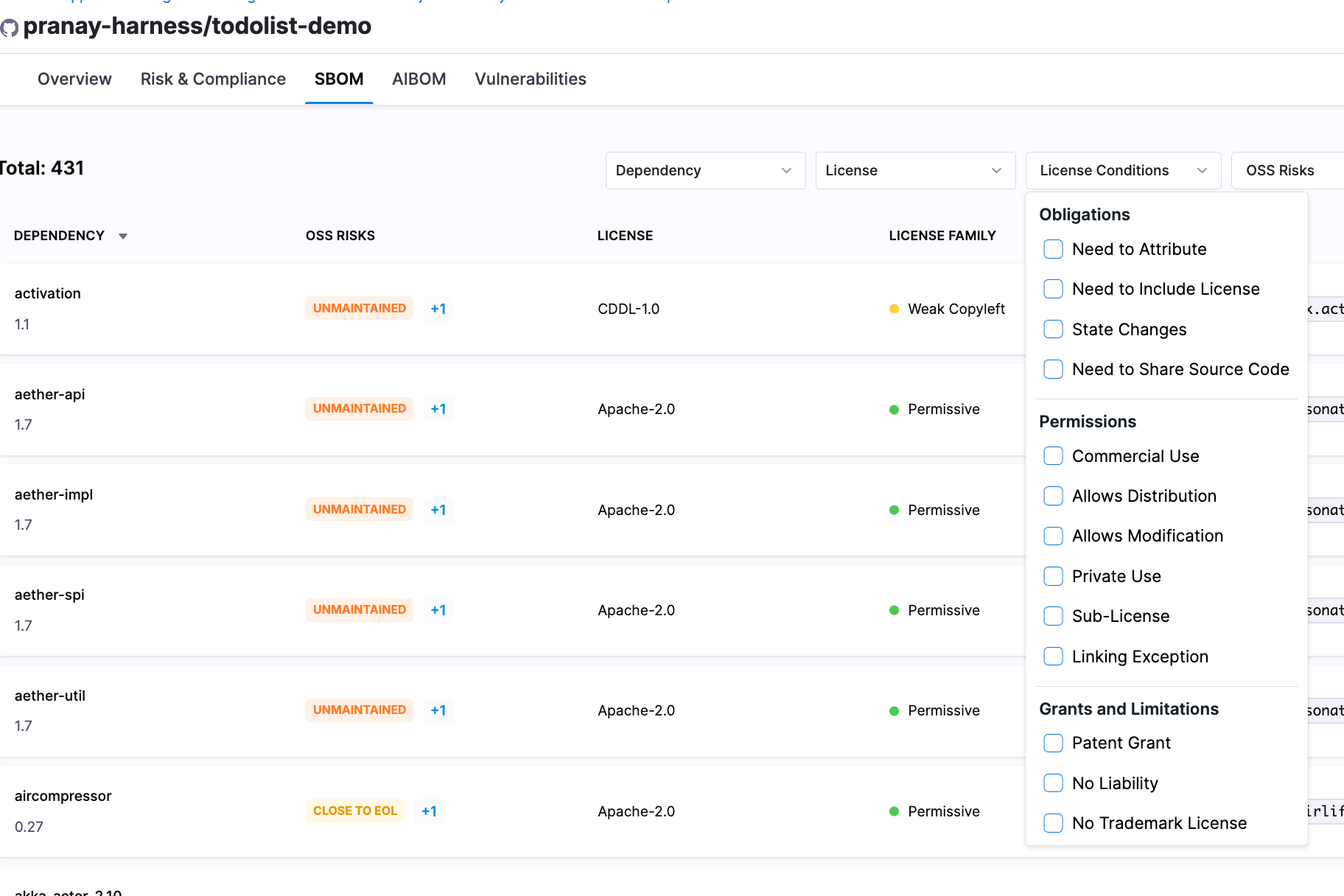
SBOM dependency exemption management lets a team temporarily exempt specific dependencies from policy enforcement without touching the underlying SBOM policy. A new License Conditions view in the SBOM shows the obligations, permissions, and limitations tied to each dependency's license, and you can filter dependencies by them.
Open source remediation now opens fix pull requests for vulnerable components on GitLab and Bitbucket, in addition to GitHub and Harness Code. And KMS-based signing now works with Google Cloud KMS as well as HashiCorp Vault, for SBOM attestation, SLSA provenance, and artifact signing. Learn more about supply chain security.
Runtime Protection Agent
The Runtime Protection Agent protects applications, APIs, and AI in production. October's focus was MCP: finding MCP servers, checking them against their specifications, and blocking requests that don't belong. API testing, detection, and SIEM integrations got a long list of upgrades too. Learn more about the Runtime Protection Agent.
MCP servers get drift detection, schema checks, and access control
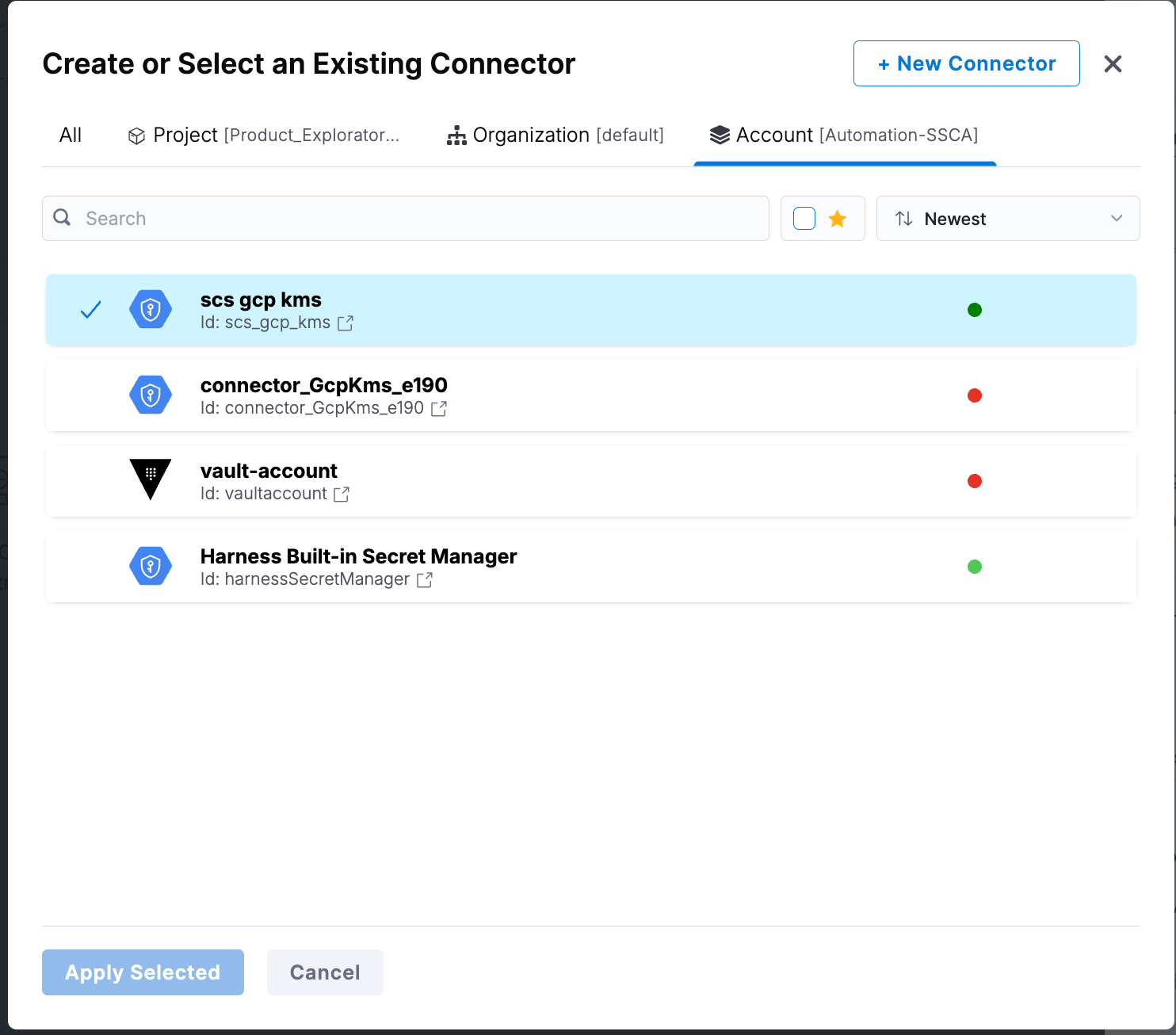
MCP conformance analysis now goes down to the parameter level. The agent compares runtime MCP behavior with the specification you uploaded and catches shadow parameters, orphan parameters, and parameter type mismatches. It opens an issue automatically when runtime behavior deviates, including resource content-type changes, so each discrepancy is tracked and remediated like any other finding.
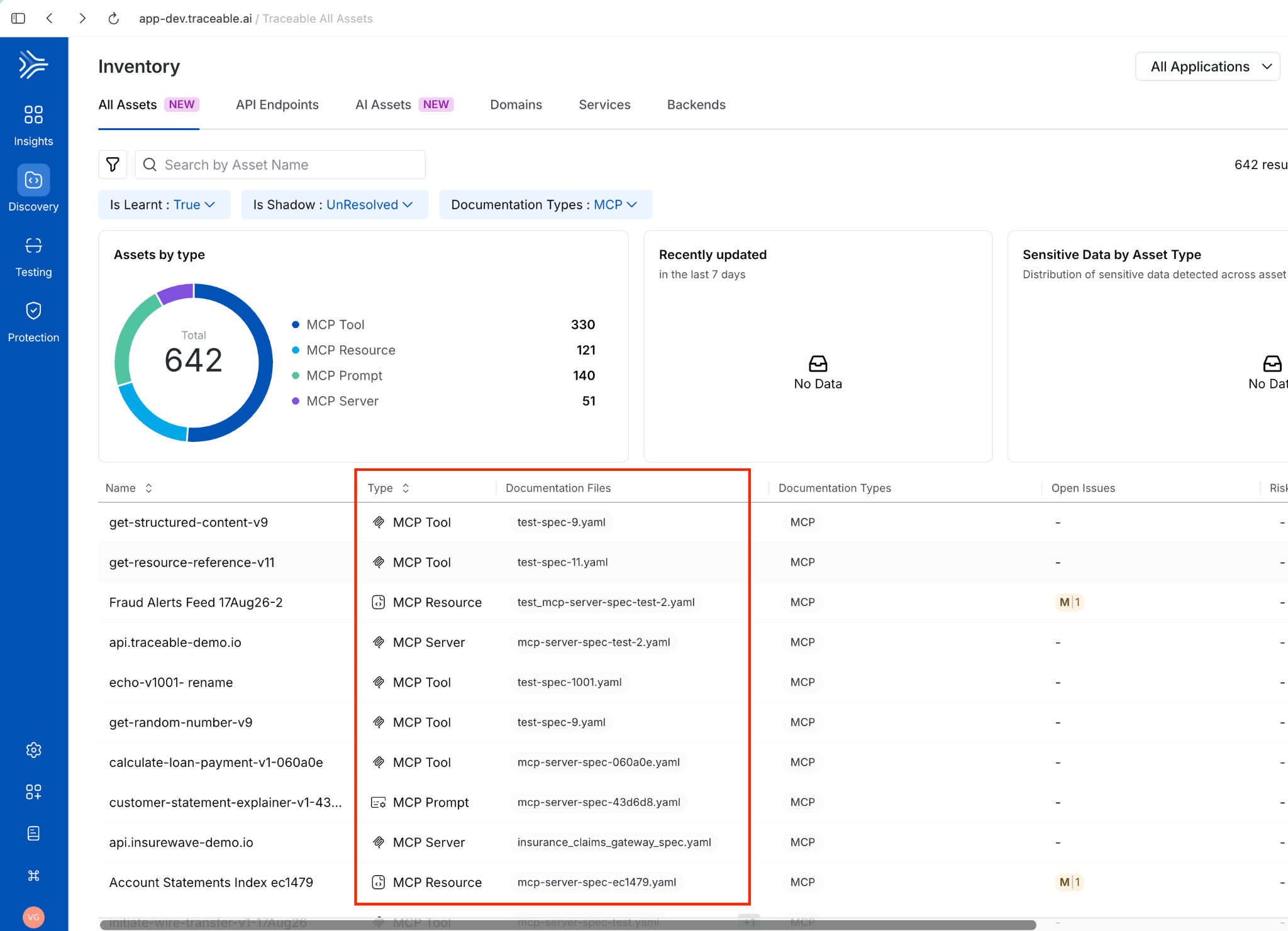
Discovery improved on the same front. MCP discovery through documentation and conformance analysis have enhancements that keep your inventory of MCP assets accurate, and AI Assets and All Assets now show Documentation File and Discovery Source columns, with clickable documentation links and discovery source indicators in MCP asset details. The MCP server name is now the primary inventory name, and shadow MCP classification is more accurate.
AI Firewall gained two MCP controls. MCP Schema Validation detects requests to MCP tools and servers that do not match their defined schemas, so you can block malformed requests. IP and geolocation-based access control detects requests to MCP tools and servers from restricted IP addresses or locations, so you can block unauthorized requests by source.
The Runtime Protection Agent's MCP server is now available on the self-managed platform. On-premises customers can connect their own AI agents and custom workflows to insights from API posture management, application security testing, and runtime protection, and build security automation on top. Learn more about AI Firewall.
API visibility and posture in one inventory
A unified API inventory shows APIs across code, specifications, and runtime in one consolidated view. Cross-module insights in that inventory combine findings from discovery, testing, and protection, so it's faster to see and prioritize API and AI risk. When live traffic triggers a security issue, the agent now highlights the specific span attributes that caused it, which shortens the trip back to root cause.
The Policies page was redesigned with dedicated API, MCP, and Custom tabs, compound filters, and quick filters for finding policies and checking framework coverage. A Framework References column on the Policies and Issues pages maps each policy to the framework controls it supports, which helps with compliance assessments. Learn more about API posture.
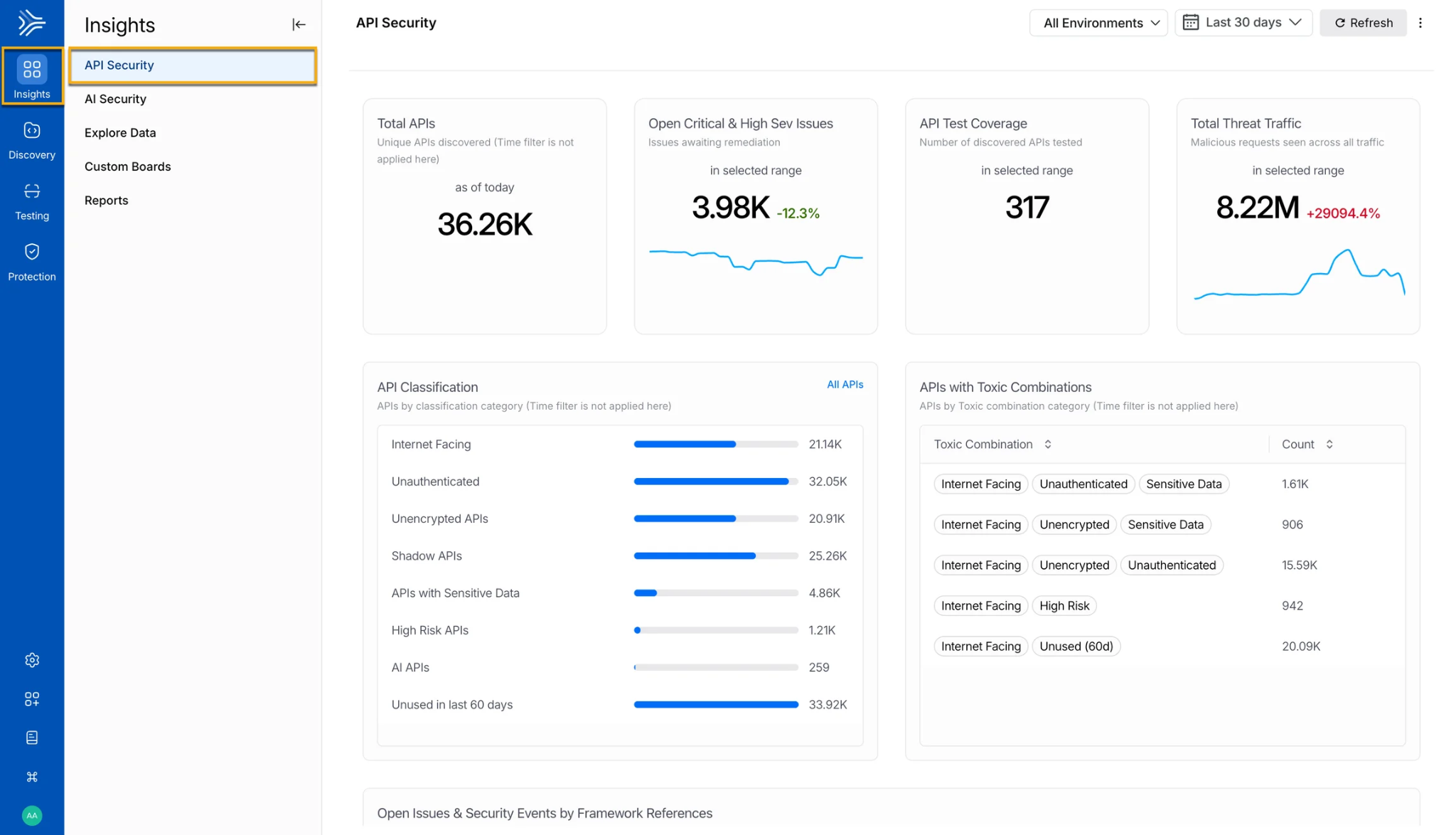
The new API Security Dashboard becomes the default landing page. It shows key metrics, API classification, toxic API combinations, issues by framework, trends, and threat traffic in one place.
API security testing reaches code, GitLab, and CI
APIs discovered by scanning code repositories can now go straight into API Security Testing, which removes the manual step between finding an API and testing it. A new GitLab integration discovers APIs from source code and runs scans directly on GitLab repositories. DAST scans now support API specification-based testing, GitHub Actions, scan overrides, and stability improvements, so API security tests fit more CI workflows.
The test results page was redesigned with a cleaner, security-focused layout, advanced test grouping, better debugging, and detail on each test attempt. For the command line, traceable code scan accepts a repeatable --attribute key=value option, so repository snapshots can carry metadata such as compliance tags and application identifiers. Attribute lookups during test execution are also faster for endpoints with many request or response attributes.
The test results redesign adds grouping by plugin and endpoint, request and response evidence, and step-by-step debugging of test chains. An out-of-the-box dashboard with 9 widgets covers scans, runners, API coverage, issues, and fix rate.
Sharper detection and quieter alerts
Threat actor scoring is now configurable by event family. Set the score contribution for WAF, API Protection, Custom Policies, and AI Firewall independently. Security events carry more context: enumeration events show the distinct parameter values an actor tried, and data loss prevention events include a count by datatype and dataset.
Bot handling got two additions. Bot Actors, Bot Accounts, and Bot Activities are now notification categories, and Bot Event notifications support threat rules so you're alerted only on matching events. Existing Bot Detection Event notifications remain available as a legacy option. A few usability updates round it out: grouping and filtering for Exclusion Policies, a Threat Category filter on the Threat Actor page, and field selections that persist when you change exclusion rule types. Learn more about API Advanced Protection.
Security events flow into Google SecOps and Palo Alto Networks Cortex
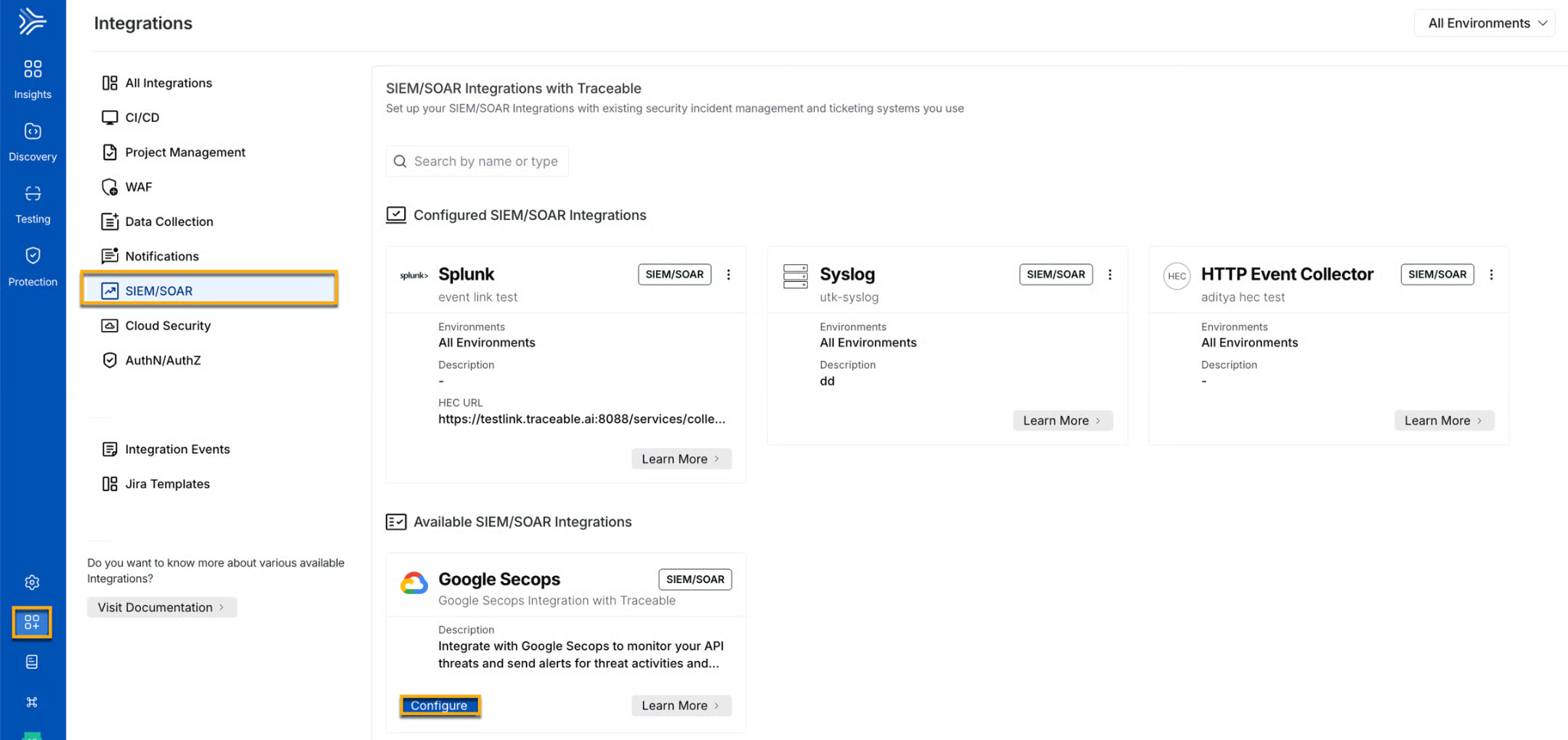
The Google Security Operations integration sends Runtime Protection Agent security events to your SIEM, so security teams can monitor and investigate API security events next to other signals. The Palo Alto Networks Cortex integration turns API security threats into incidents with threat context, actor details, and request and response payloads, and threat notifications route the relevant events to Cortex.
PCI DSS and HIPAA assessments
The Runtime Protection Agent completed its first third-party PCI DSS assessment and a HIPAA Security Rule assessment. For payment traffic, its edge deployment can inspect API traffic and process cardholder data at the edge, with sensitive payment data redacted before activity is logged in the platform. For health data, it implements the technical, administrative, and physical safeguards for inspecting traffic that carries protected health information, and Harness can sign a Business Associate Agreement with eligible customers. Learn more about the compliance milestones.
Cost Management Agent
The Cost Management Agent controls and optimizes cloud and AI costs, and its engineering efficiency insights show what AI coding tools produce. October brought three updates. Learn more about the Cost Management Agent.
Claude Code sessions get context-level analytics. With the new opt-in context snapshot capture, the agent periodically records token usage breakdowns for active Claude Code sessions, so you can see how context-window consumption patterns differ across teams.
Two smaller updates: Studio data source names now share one consistent prefix, replacing two legacy prefixes, which makes them easier to find when you build widgets. And a workload recommendation marked as manually applied now completes even when no workload spec update arrived in the last 7 days. It uses the last known workload configuration and records $0 in applied savings, instead of staying pending. Learn more about engineering efficiency.
Other Product Updates
Resilience testing, the developer portal, and runtime configuration each shipped a batch of updates this month.
Resilience Testing starts reading your code and recommending experiments
Harness launched VegaLoad, a free, open source load testing tool for developers who build with AI agents. It supports 14 protocols and CI/CD pass/fail gates.
Resilience Testing can now scan code. Add a code repository as a custom service, target it as a chaos service, and the Resilience Testing agent scans its code for risk. You can define your own risk rules in the UI or through the API, and a new API lists the risks a scan found, filtered by service and risk rule. The risk scan API also returns recommendation counts.
Experiment recommendations arrived too. Harness proposes chaos experiments for your services and creates one only when you accept the suggestion. Recommendations appear on the scan details page and on services, with filters for service, source, severity, and timeframe, plus scan-level filtering and sorting. An AI description agent writes the description for an experiment.
Load testing got better reporting and setup. The load test report view and the downloaded PDF now match, and both include AI insights and golden signals. Load Test Studio validates worker counts, shows recommendations on new load tests, adds a heading to the JMeter plan preview, and enforces a 2 MB upload limit in the UI for k6 and Locust scripts. A Run button in the execution sidebar starts a new run without leaving the execution view.
Three updates make chaos runs more predictable. A Kubernetes infrastructure toggle, Enable Persistent Helper DaemonSet, runs faults through a helper DaemonSet on each node instead of transient helper pods created on every run. The Configure Chaos Experiment pipeline step has a Timeout field, so a hung experiment is bounded at the step level. And a CD service now maps to a discovered service only when its infrastructure matches the chaos infrastructure, which stops services from other clusters from being linked to the wrong service.
The interface was refreshed throughout: the recommendations page, scan details page, and Resilience Testing dashboard have new designs, load test run details use the standard details layout, run screens show a No thresholds card while a test without thresholds executes, experiment descriptions can embed URLs, there's an updated AI icon and banner, and a product usage view is available. Learn more about Resilience Testing.
AI SRE adds paging, postmortems, and migration from PagerDuty and Opsgenie
During an incident, the live investigation view now has a Root Cause panel and Ask AI, which answers using the context on your screen. SLOs are generally available as Service Reliability Management sunsets. Rules and runbooks got smarter: nested AND/OR conditions and CEL expressions, a For Each step, /harness run {slug} to start a runbook from Slack, and YAML editing.
On-call and paging now cover the full loop. You can selectively migrate from PagerDuty, Opsgenie, and xMatters, send pages through service paging webhooks, use a Page action in rules, and deliver pages to mobile through Pushy. Postmortems draft themselves, with templates and automatic capture of follow-up items. Two new pipeline steps, Create Incident and Create Alert, let a pipeline open an incident or raise an alert directly. Learn more about AI SRE.
Developer portal ships a workflow library
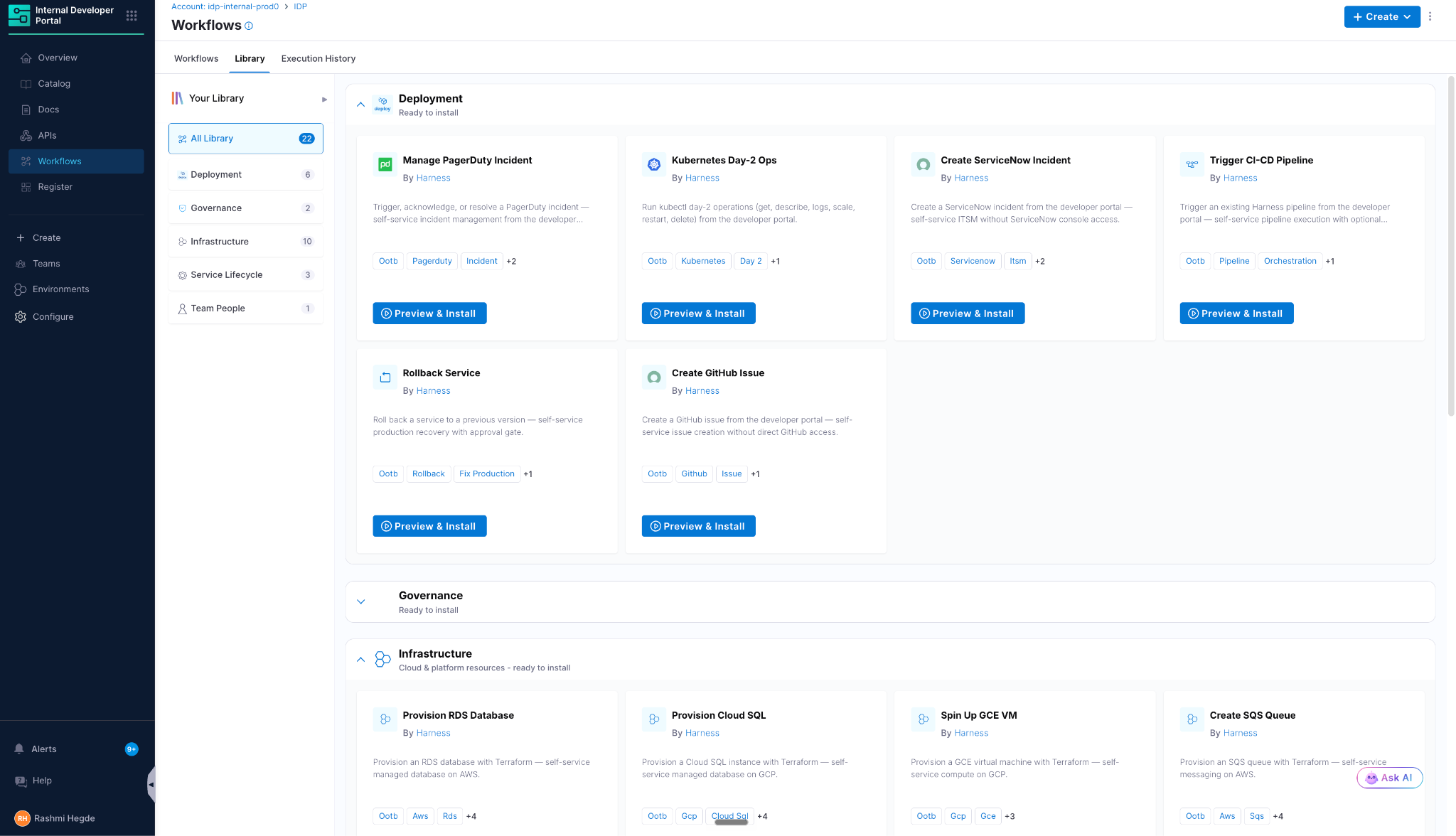
A library of pre-built workflows, authored and maintained by Harness, can now be installed into the Internal Developer Portal in a few clicks. The library has more than 25 prebuilt workflows across 5 categories, and a 3-step wizard installs each one. Pick one from the Library tab under Workflows, plug in your connectors and secrets, and developers can self-serve it right away. It shortens time to value for new portal customers considerably.
Workflow forms got four upgrades. A custom table renderer shows API-backed lists as editable tables, where developers search, sort, add, edit, duplicate, and delete rows, including nested child tables, and submit every change in a single Workflow execution. ValidateAndFetch supports gateProgression: true, which blocks the Review step or pipeline trigger until an API validation passes for the current field values, replacing the old workaround of writing true into a required field. Editing a validated input resets the gate so stale results can't be submitted. The appendUser option now works on CustomField and ValidateAndFetch fields as well, passing the logged-in user's details in headers, query parameters, or the request body. And workflowContext expressions let pipeline URLs resolve the host, account, org, and project at execution time, so one Workflow YAML works across environments.
The catalog changed too. Integrations now detect records deleted at the source, or removed by narrowing the integration's scope, and emit Entity deleted events on the Events tab. Delayed checks and a circuit breaker keep a temporary source outage from wiping large parts of the catalog. The Kubernetes integration lets you define how discovered services map to catalog entities and how they match existing records. Custom banners display announcements on specific environments and environment blueprints, in Informational, High Alert, or Medium Alert styles, with a title, an optional message, and an optional link, useful for maintenance windows, deprecation notices, and incident callouts. Learn more about the developer portal.
Runtime configuration adds pipeline-gated changes, Databricks, and dashboards
Feature flag and segment changes can now be gated by a pipeline. Set an environment's approval mode to Restrict approval to pipeline, and a saved flag or segment definition change doesn't apply immediately. It routes through a Harness pipeline you designate, and the pipeline decides whether the change goes live.
Warehouse Native Experimentation supports Databricks, in beta. Connect a Databricks SQL warehouse using OAuth machine-to-machine authentication or a personal access token, and existing Unity Catalog tables serve as the source of truth for experiment assignment and metric analysis. Results are stored in a table you configure in Databricks.
Prebuilt dashboards, also in beta, let you monitor your flag catalog and billable flag requests in one place. The Flag and Segment Catalog Overview dashboard shows active flags and segments, a breakdown of active segments by type, and a table of recently updated flags. They are available for accounts on Flex Pricing. Learn more about runtime configuration.
Platform Updates
The platform layer is where identity, policy, MCP, and compliance meet. Learn more about the Harness platform.
Sign in to Harness MCP with your own identity provider
Self-hosted MCP setups used to run on a personal access token or a service account token. Those tokens last until someone revokes them, end up in dotfiles and CI secrets, get copied across laptops, and make every action in the audit log look like it came from one account. An earlier OAuth mode removed static tokens, but it required clients to bring a HarnessID token. A large financial services company showed us the gap: their internal MCP registry only accepts tokens from their own identity provider.
OAuth proxy mode closes it. The MCP server accepts your identity provider's token, signs the user into HarnessID behind the scenes, and calls Harness as that user. No Harness credential sits on a developer machine, HarnessID access tokens are short-lived and renewed on the server, and every call runs as the real person, so RBAC and audit logs show who did what. Disable a user in your identity provider or in Harness, and access ends at the next refresh. To turn it on, contact Harness support. Learn more about OAuth proxy mode.
MCP server updates and new plugins for AI coding tools
The Harness MCP Server shipped several releases this month. Agents can now set up experiment alerting and manage experiment rules and tags for feature management. A new llm_model resource lists the provider models available to LLM connectors, agents can retrieve incident root cause theories, cost management tool calls accept custom time parsing and return clearer errors, and you can query service accounts at account and org scope. The tools list is also now compact and 57% smaller. The production container image is also clear of all known high-severity vulnerabilities, so upgrade, especially if you run the image in a regulated environment. Fixes cover AI Evals read calls, the observability eval contract, remote template updates that were missing Git details, and security tests that no longer count unlinked, stale IP-address installs. Learn more about the Harness MCP Server.
The Harness plugin launched with the Google Antigravity plugin marketplace. It bundles 71 workflow skills and connects to Harness through hosted MCP with OAuth, so you can investigate pipeline failures, review deployments, and draft pipeline YAML from your agent conversation. It's the same experience as the Cursor Marketplace plugin. Learn more about Harness in Cursor.
Feature management also gets 16 skills for AI coding assistants, shipped as the harness-fme plugin in the harness-skills repository. Each skill teaches an assistant a feature management workflow and calls the APIs through the Harness MCP Server, which gives teams a natural language path to managing flags, segments, metrics, and experiments without leaving the editor.
Governance, visibility, and settings as code
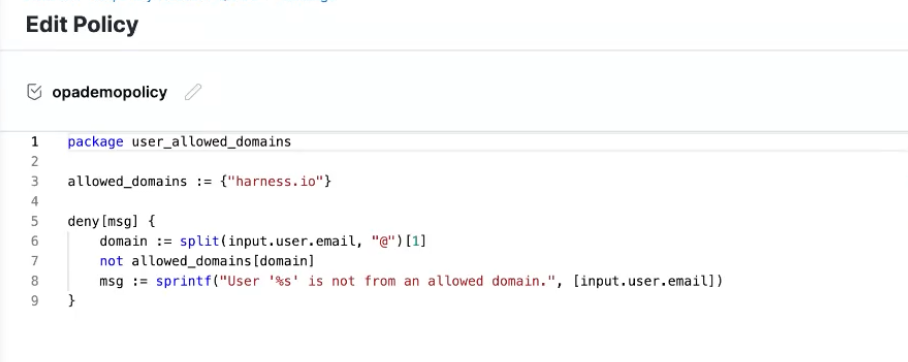
OPA governance now covers users and user groups. Admins can write policies for user invitations, role assignments, group creation, and membership changes, for example to prevent cross-organization access, restrict group membership, or require SSO linkage.
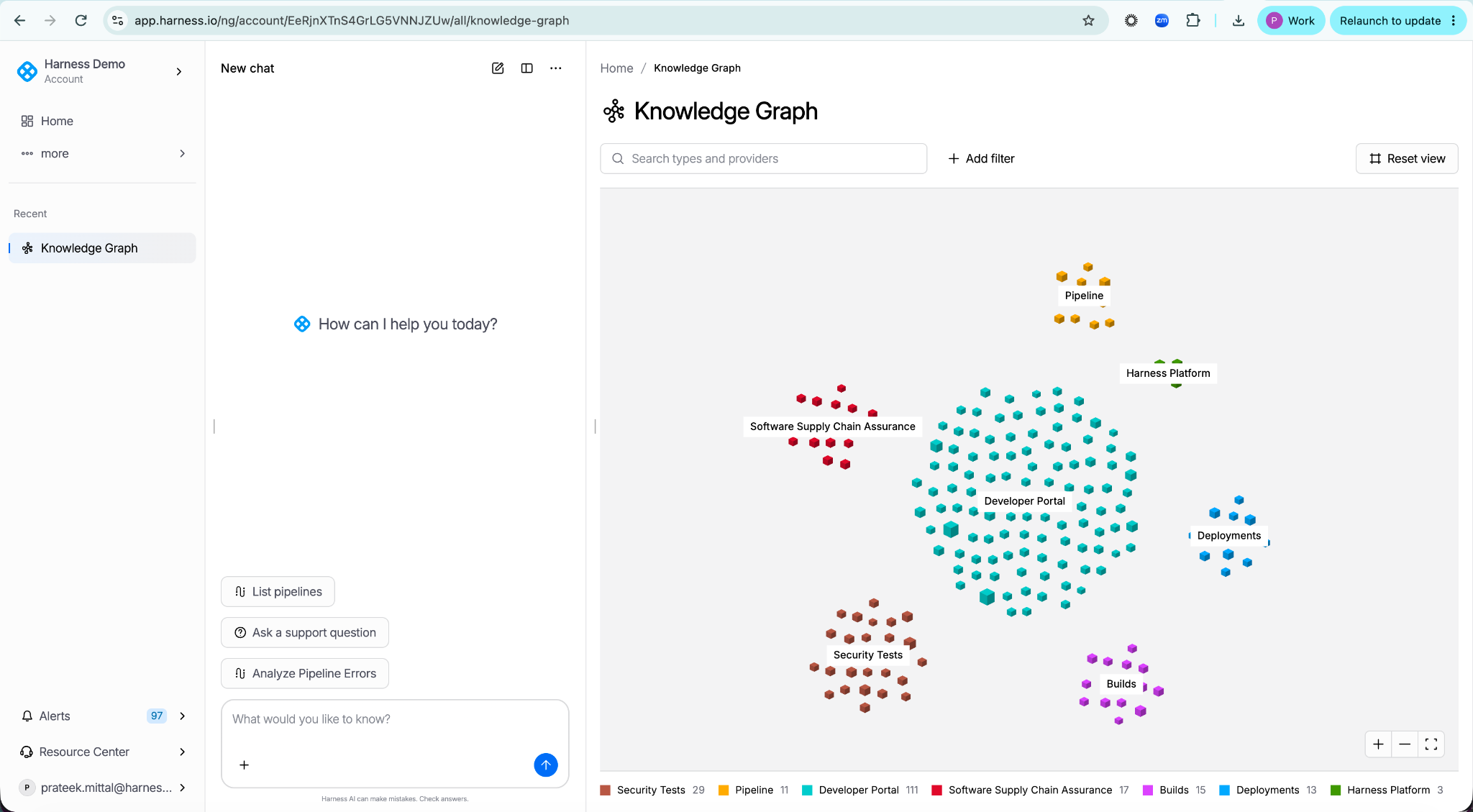
The Knowledge Graph Visual Explorer shows the relationships between your entities. Entities appear as clusters by type and provider, and you can search types and providers, add filters, zoom, and reset the view. Learn more about the Knowledge Graph.
The Harness Terraform provider supports the harness_platform_setting resource, so you can manage default settings at the account, organization, and project levels as code. Set values, lock settings for child scopes, and import existing settings. Learn more about the resource.
AI Chat never opens empty, and sign-up gets self-serve
Never Empty Chat makes AI Chat summarize the page you're on and suggest next actions. It's rolling out to all customers over two weeks. New accounts created from harness.io are now provisioned with a Free Flex license and land in the new experience, with credit card checkout still to come.
SOC 1 and FedRAMP 20x Class A
The Harness Autonomous SDLC Platform completed its first SOC 1 audit, an independent check of the controls that matter to a customer's internal control over financial reporting. That matters when a pipeline deploys to billing systems, transactional databases, and revenue infrastructure. The report reflects immutable audit trails, role-based access control, enforced separation of duties, and fully audited release workflows, and it can reduce vendor risk in a SOX audit.
The platform also achieved FedRAMP 20x Class A. The assessment covers the platform, builds, deployments, security testing orchestration, supply chain security, infrastructure as code, database DevOps, Harness Code, and Resilience Testing. Federal agencies, contractors, and integrators can start assessing Harness through the FedRAMP Marketplace. Class C and FedRAMP High are in progress, and current reports and status live in the Harness Trust Center. Learn more about the compliance milestones.
The pattern
150 features in 31 days works out to one every 5 hours. That pace comes from how engineering work looks now. Our engineers write code with AI agents and let Harness take it to delivery with the right level of human-in-the-loop approach. Our own engineers work this way, and so should yours. When code arrives that fast, everything after it has to keep up: builds, verification, deployment, security, compliance, and cost.
A quick recap of this month: Cosmos shortens the path from ticket to pull request, and nearly everything else on this list handles what happens after the pull request exists: AI Verify reading New Relic and Splunk data, rollbacks that unwind only the canary phases that shipped, AgentCore deployments with scoped identity, MCP servers checked against their specifications, and SOC 1, FedRAMP 20x Class A, PCI DSS, and HIPAA work that gives your auditors something to read.
Your team is writing code faster than ever. See what it takes to ship it just as fast, with the controls intact. Start for free.
We'll be back in November with more of it!